


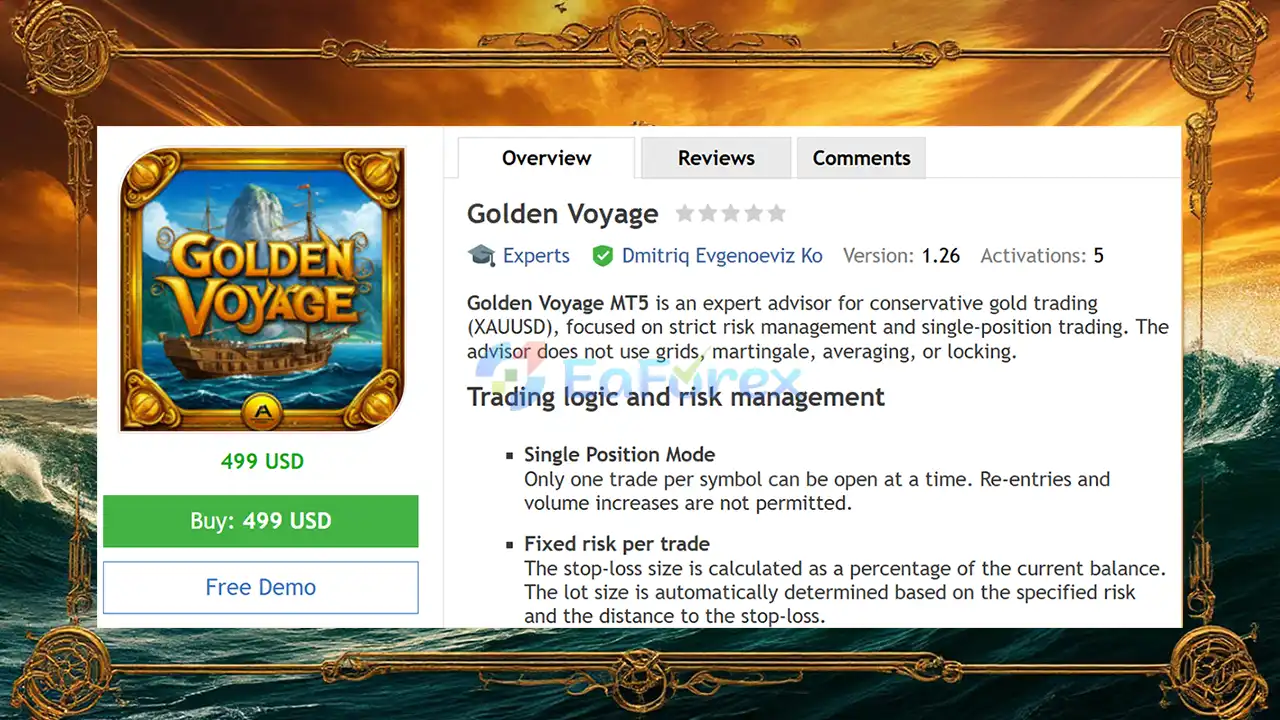
Product Overview
Golden Voyage EA MT5 is an automated XAUUSD Gold Trading Expert Advisor for MetaTrader 5, designed for traders who prioritize controlled risk, disciplined execution, and structured position management. The EA focuses on a conservative trading approach and limits exposure by allowing only one open position per symbol at a time.
Unlike recovery-based systems, Golden Voyage EA MT5 does not use Grid, Martingale, averaging, or locking strategies. Instead, each trade is opened with a predefined risk level and a mandatory Stop Loss. Position size is automatically calculated according to the selected percentage of account balance and the distance to the Stop Loss.
The trading logic combines higher-timeframe market analysis with confirmation from working timeframes. Market direction and entry conditions are evaluated using H4 and D1 market structure and volatility, with additional confirmation on M15 and H1.
Golden Voyage EA MT5 also includes spread protection, economic news filtering, trading-session controls, trailing protection, breakeven functionality, and optional virtual Stop Loss and Take Profit levels.
About the Developer
- Author: Dmitriq Evgenoeviz Ko
- Experience: Over +4 years of experience on MQL5.
- Notable Products: Golden Voyage EA, Aurum Fade EA MT5, Gold Lady V EA, Golden Talent EA, Golden Snow V, Gold Brick Pro EA, White Horse MT5, Gold Flow MT5, Pure Gold Algo EA, Aurum Path EA Gold Medalist EA, Golden Suite EA, Gold x25 MT4, Golden Harmony MT4, Infinity Gold Impulse MT4, Pharaoh Gold EA, Apex Gold MT4 and other advisors.
- Flagship Product: Golden Voyage EA MT5 is rated as the best performing product of the year.
>> Delivery time 24h-48h after payment.
>>> Refund if not delivered.
>>> You will receive the latest version without any limitations (ID+Time).>>Reviewed by Jason Stap <<
Main Features of Golden Voyage EA MT5
Single Position Trading
Golden Voyage EA MT5 uses a Single Position Mode, meaning that only one trade per symbol can remain open at any given time.
The EA does not increase trading volume after a losing position and does not continuously add positions to the market.
This approach is designed to keep market exposure more controlled and avoid the position accumulation commonly associated with Grid and Martingale systems.
Fixed Risk Per Trade
Risk management is one of the central components of Golden Voyage MT5.
Instead of relying on a fixed lot size for every trade, the EA can automatically calculate the appropriate position volume based on:
- Account balance
- Selected risk percentage
- Stop Loss distance
- Market conditions
This allows the position size to adapt to the required Stop Loss distance while maintaining the selected risk level.
Mandatory Stop Loss
Every trade opened by Golden Voyage EA MT5 must have a protective Stop Loss.
The system does not allow positions to be opened without predefined loss protection. This provides a clear risk boundary for every individual trade.
However, traders should understand that a Stop Loss does not guarantee the exact execution price during extreme market conditions, gaps, or significant slippage.
Risk/Reward Ratio Control
Golden Voyage EA MT5 includes configurable Risk/Reward management.
Take Profit can be calculated according to a minimum Risk/Reward ratio, with the default specification targeting at least 1:2.
The EA can also use virtual profit levels, allowing certain Stop Loss and Take Profit levels to be managed internally rather than necessarily being displayed as standard pending protection levels on the broker's server.
Multi-Level Market Filtering
The EA analyzes the market across several timeframes before considering a trade.
Higher-timeframe analysis uses:
- H4
- D1
These timeframes are used to assess broader market structure and volatility.
The system then uses working-timeframe confirmation from:
- M15
- H1
This multi-timeframe approach is designed to reduce reliance on a single chart timeframe and help align entries with broader market conditions.
How Does Golden Voyage EA MT5 Work?
Golden Voyage EA MT5 follows a structured process when evaluating potential trades.
Step 1: Analyze the Higher-Timeframe Market
The EA first evaluates market structure and volatility using H4 and D1 information.
This provides a broader context before a potential position is considered.
Step 2: Confirm Entry Conditions
The system then checks the working timeframes, primarily M15 and H1, for additional confirmation.
A trade is considered only when the required market conditions and filters are satisfied.
Step 3: Check Trading Conditions
Before opening a position, the EA can check several conditions, including:
- Current spread
- Trading session
- Economic news conditions
- Existing position status
- Risk parameters
If a required filter is not satisfied, the EA can block the trade.
Step 4: Calculate Position Size
Once a valid trade setup is identified, the EA calculates the appropriate lot size based on the selected risk percentage and Stop Loss distance.
This means position volume can change depending on the amount of risk required by the individual setup.
Step 5: Open One Position
If all conditions are satisfied, Golden Voyage MT5 can open a single position.
The EA does not use Grid, Martingale, averaging, or volume escalation.
Step 6: Manage the Position
After entry, the EA can manage the position using:
- Stop Loss
- Take Profit
- Breakeven
- Trailing Stop
- Virtual levels
The objective is to manage the position according to predefined rules rather than continuously adding exposure.
Golden Voyage EA MT5 Backtest Results
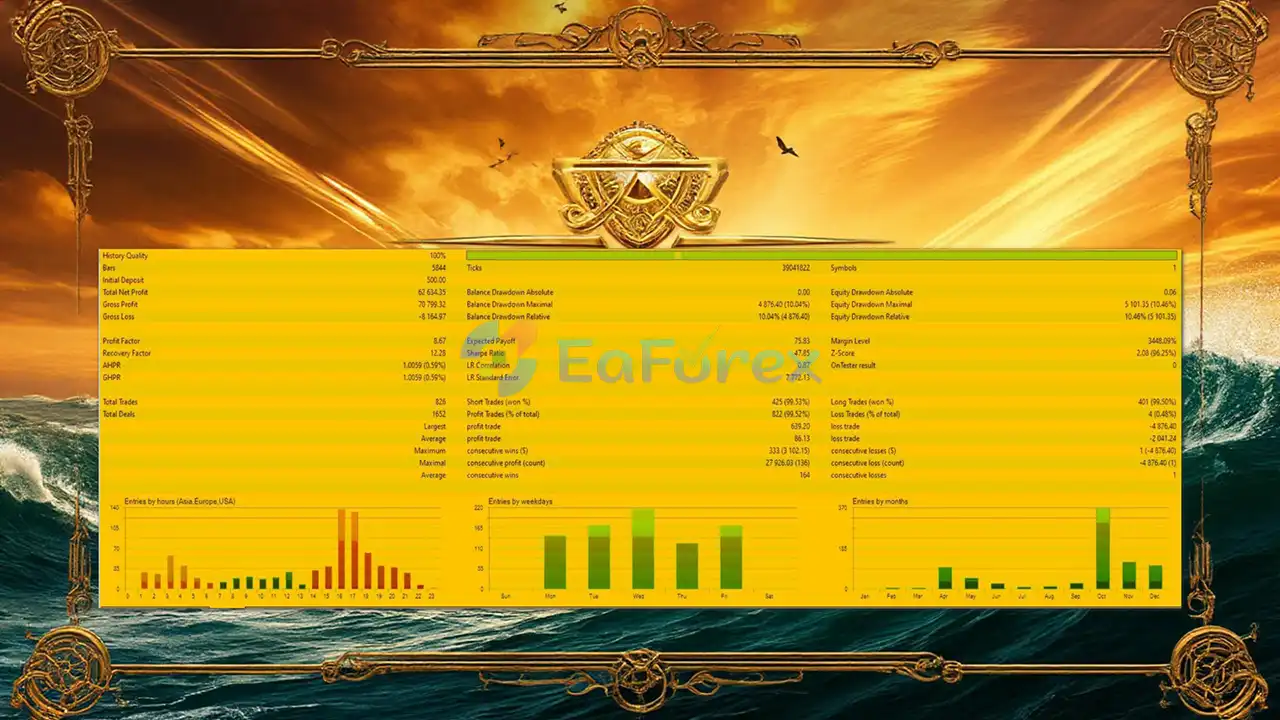
🔺XAUUSD
- Initial Deposit: $500
- Total Net Profit: $62.634,35
- Win Rate (% of total):99/52%
- Maximum Drawdown: 10.4%
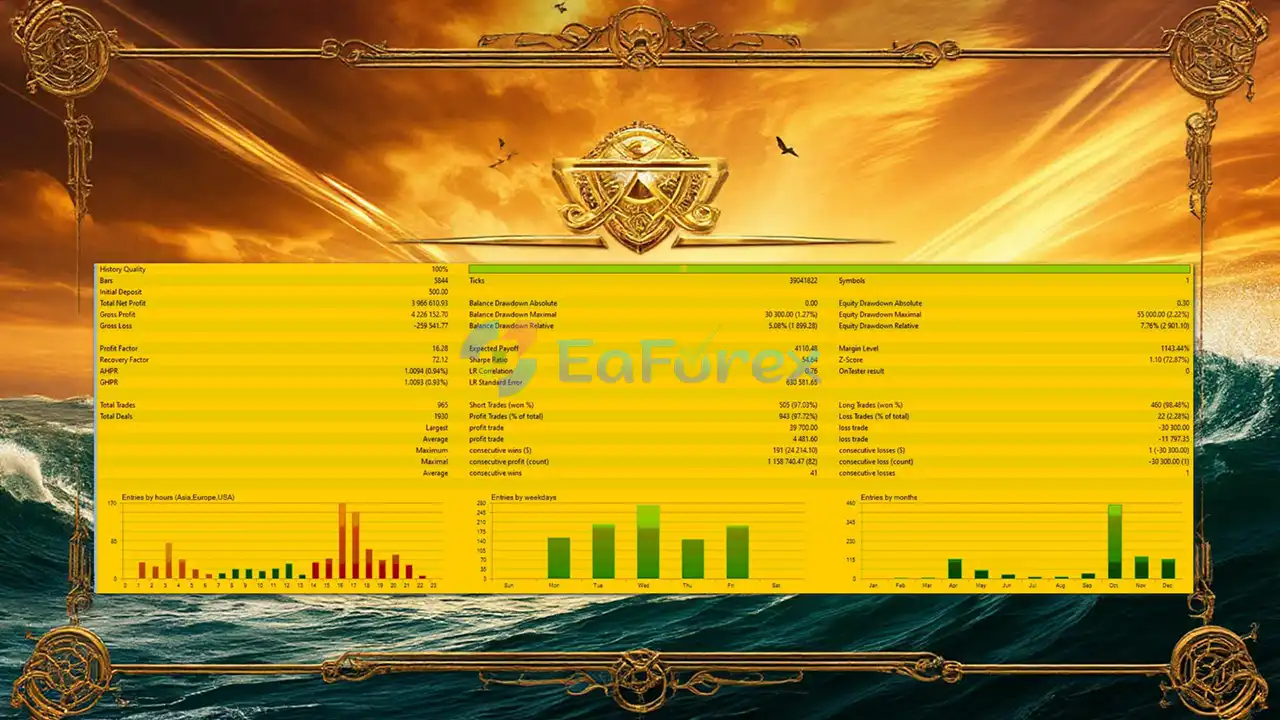
🔺XAUUSD
- Initial Deposit: $500
- Total Net Profit: $3.966 million
- Win Rate (% of total):97.72%
- Maximum Drawdown: 1.27%
Performance and Risk Management
Golden Voyage EA MT5 places considerable emphasis on risk management rather than aggressive position accumulation.
The fixed-risk position sizing system allows traders to specify the amount of account balance they are willing to risk per trade. The EA then calculates the lot size according to the Stop Loss distance.
The mandatory Stop Loss provides a predefined risk boundary, while the Risk/Reward system can help establish a structured relationship between potential loss and potential profit.
Key Risk Controls
| Risk Management Feature | Description |
|---|---|
| Single Position | Maximum one position per symbol |
| Risk-Based Lot Size | Lot size calculated from selected account risk |
| Mandatory Stop Loss | Every trade requires protective loss control |
| Risk/Reward Control | Take Profit based on configured R/R |
| Breakeven | Can move Stop Loss toward entry after sufficient profit |
| Trailing Stop | Can dynamically protect an open position |
| Spread Filter | Blocks trades when spread exceeds the permitted level |
| News Filter | Can pause trading around high-impact events |
| Trading Sessions | Allows specific trading periods to be configured |
| Virtual Levels | Internal SL/TP management option |
Because gold can experience rapid price movements, risk settings should be evaluated carefully before using the EA on a live account.
Backtests and optimization results can help evaluate the behavior of the strategy under historical conditions, but they cannot guarantee future performance.
Economic News Filter
One of the useful features of Golden Voyage EA MT5 is its integration with the MQL5 Economic Calendar.
The EA can identify high-impact economic events and adjust trading activity around scheduled news.
Depending on the selected configuration, the system can:
- Pause trading before important news
- Pause trading after news
- Cancel or restrict active trading during news volatility
- Allow an optional trading mode after the news release
This feature can be particularly relevant for XAUUSD because gold can react sharply to major economic announcements, interest-rate decisions, inflation data, employment reports, and central-bank events.
The effectiveness of a news filter depends on the availability, timing, and accuracy of the economic-calendar information as well as actual market execution conditions.
Trading Time Filter
Golden Voyage EA MT5 supports configurable trading sessions.
Traders can define the periods during which the EA is permitted to search for and execute trades.
For example, a configuration could focus on:
- London Session
- New York Session
- Specific hours within those sessions
A trading-time filter can help prevent the EA from operating continuously during periods that the trader does not want to trade.
Spread Protection
Spread conditions can have a significant effect on automated gold trading.
Golden Voyage EA MT5 includes a spread filter that prevents new trades from being opened when the current spread exceeds the configured maximum.
This can help avoid entering positions during periods of unusually wide spreads.
However, traders should still consider broker execution, liquidity, commissions, slippage, and market conditions when evaluating the EA.
Trailing Stop and Breakeven
Golden Voyage EA MT5 provides additional tools for managing open positions.
Breakeven
When a predefined profit level is reached, the EA can move the Stop Loss toward the entry price.
The purpose is to reduce the amount of open risk after a trade has moved favorably.
Trailing Stop
The trailing mechanism can adjust the Stop Loss as the trade moves into profit.
This may allow part of an existing profit to be protected while still giving the position room to continue moving.
Both features should be optimized carefully because overly aggressive protection can cause trades to close prematurely during normal market fluctuations.
Virtual Stop Loss and Take Profit
Golden Voyage EA MT5 supports an Invisible Mode, where Stop Loss and Take Profit levels can be managed internally by the EA rather than necessarily being sent directly to the broker's server.
This provides an additional way of managing trade levels.
However, virtual protection also introduces an important consideration: because the levels are managed by the EA, the terminal, VPS, internet connection, and trading environment need to remain operational for the EA to manage them correctly.
Traders should understand how this mode works before using it on a live account.
Information Panel and Notifications
Golden Voyage EA MT5 includes an on-chart information panel designed to provide an overview of the current trading environment.
Depending on the configuration, the panel can display:
- Current profit/loss
- Daily trading result
- Active risk
- Filter status
- Trading conditions
- Time remaining until the next relevant news event
The EA can also send push notifications and email alerts when positions are opened or closed.
These features can make it easier to monitor automated trading without continuously watching the chart.
Why Choose Golden Voyage MT5?
Golden Voyage EA MT5 may be suitable for traders looking for a structured XAUUSD MT5 Expert Advisor with an emphasis on controlled exposure.
Its main characteristics include:
No Grid or Martingale
The EA does not rely on Grid, Martingale, averaging, or increasing trade volume after losses.
Single-Position Approach
Only one position per symbol can be open at a time, helping limit simultaneous exposure.
Risk-Based Position Sizing
Lot size can be automatically calculated according to the selected percentage risk and Stop Loss distance.
Multi-Timeframe Analysis
The strategy combines H4/D1 market analysis with M15/H1 confirmation.
News and Spread Protection
The EA can restrict trading during unfavorable spread conditions and around selected high-impact economic events.
Structured Trade Management
Stop Loss, Take Profit, Breakeven, Trailing Stop, and Risk/Reward controls provide multiple layers of position management.
Weaknesses and Risk Warnings
Although Golden Voyage EA MT5 includes several risk-management mechanisms, it is important to understand its limitations.
Gold Can Be Highly Volatile
XAUUSD can move rapidly, particularly during major economic announcements and periods of strong market volatility.
Even a conservative trading system can experience losses.
No Strategy Guarantees Profit
Risk controls can limit predefined exposure, but they cannot eliminate trading risk.
Historical backtests, optimization results, or previous performance should not be interpreted as guarantees of future profitability.
Execution Conditions Matter
Actual results can differ depending on:
- Broker
- Spread
- Commission
- Slippage
- Liquidity
- Execution speed
- VPS quality
- Trading account type
News Events Can Cause Unexpected Movement
Even with an economic-calendar filter, unexpected announcements and rapid market reactions can occur.
Virtual Protection Requires a Stable Environment
When using virtual Stop Loss or Take Profit levels, the EA must remain operational to manage those levels.
Parameter Selection Is Important
Risk percentage, trading sessions, spread limits, Risk/Reward settings, and news-filter parameters should be selected carefully and tested before being applied to a live account.
Pros and Cons
| Pros | Cons |
|---|---|
| Single-position trading | Limited exposure means fewer simultaneous opportunities |
| No Grid strategy | XAUUSD remains inherently volatile |
| No Martingale | Results depend on broker execution conditions |
| No averaging | Virtual protection requires the EA to remain operational |
| Risk-based lot calculation | Incorrect risk settings can still lead to significant losses |
| Mandatory Stop Loss | No guarantee against slippage or gaps |
| Minimum Risk/Reward control | Requires careful optimization |
| H4/D1 + M15/H1 analysis | May miss some short-term market movements |
| News filter | Economic news reactions can be unpredictable |
| Spread protection | Wide spreads can prevent otherwise valid trades |
| Breakeven and Trailing Stop | Aggressive settings may close trades prematurely |
| MT5 Strategy Tester compatibility | Backtest results do not guarantee live performance |
How to Install Golden Voyage EA MT5
Golden Voyage EA MT5 follows the standard installation process for MetaTrader 5 Expert Advisors.
Step 1: Download the EA
Obtain the Golden Voyage MT5 EA files and any required configuration or set files.
Step 2: Open MetaTrader 5
Launch your MetaTrader 5 trading platform.
Step 3: Open the Data Folder
Go to:
File → Open Data Folder
Step 4: Locate the Experts Folder
Navigate to:
MQL5 → Experts
Step 5: Copy the EA
Place the Golden Voyage EA MT5 EA file into the Experts folder.
Step 6: Restart MetaTrader 5
Restart the platform or refresh the Expert Advisors section in the Navigator.
Step 7: Find Golden Voyage MT5
Open:
Navigator → Expert Advisors
Locate Golden Voyage EA MT5.
Step 8: Attach the EA to an XAUUSD Chart
Open the appropriate XAUUSD chart and attach the EA.
Use the recommended timeframe and broker conditions specified for the system.
Step 9: Configure the Parameters
Review and configure:
- Risk percentage
- Stop Loss
- Risk/Reward ratio
- Trading sessions
- Maximum spread
- News filter
- Breakeven
- Trailing Stop
- Virtual levels
- Notifications
Step 10: Test Before Live Trading
Use the MT5 Strategy Tester and preferably a demo account before considering live deployment.
The EA supports Strategy Tester operation, including the Every tick based on real ticks testing environment.
What’s Included in the Download Package?
- Setting (If Any).docx
- Installation Guide.docx
>>> Join VIP Membership Now <<<
Final Thoughts
In summary, Golden Voyage EA MT5 is an XAUUSD Expert Advisor designed around a conservative and structured trading philosophy. Its defining characteristics are single-position trading, risk-based lot sizing, mandatory Stop Loss protection, and the absence of Grid, Martingale, averaging, and locking strategies.
The system combines higher-timeframe market analysis from H4 and D1 with confirmation on M15 and H1, while additional controls such as spread filtering, economic-news protection, trading-session filters, breakeven, trailing stops, and Risk/Reward management provide further layers of trade control.
For traders evaluating a conservative Gold trading EA for MT5, Golden Voyage MT5 offers a clearly defined risk-management framework. Nevertheless, automated trading remains subject to market volatility, broker execution, slippage, liquidity, and parameter selection.
As with any Expert Advisor, users should conduct their own backtests, forward tests, and demo-account testing before using real capital. Testing and optimization results do not guarantee future profits, and the trader remains responsible for all live-account settings and risks.



