


Product Overview
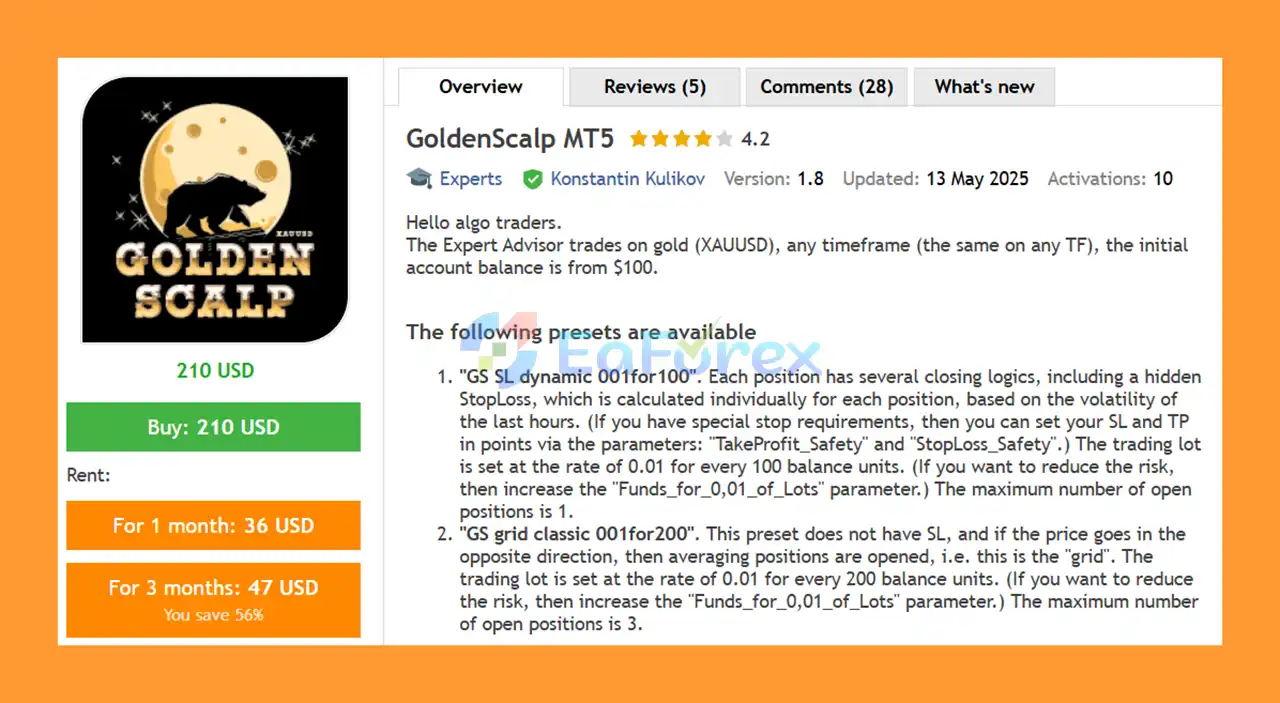
GoldenScalp MT5 is a specialized Gold scalping Expert Advisor (EA) for MetaTrader 5, designed to trade XAUUSD (Gold) across different timeframes. The EA is built to automate gold trading while offering multiple preset configurations for different risk-management preferences and trading approaches.
GoldenScalp MT5 can be used with an initial account balance starting from $100, making it accessible to traders who want to explore automated gold trading with a relatively small starting capital. The EA provides two main presets: a dynamic Stop Loss strategy and a classic grid strategy, allowing traders to select an approach that better matches their risk tolerance.
The dynamic Stop Loss preset focuses on controlling individual trade exposure, while the grid preset uses position averaging when the market moves against an open trade. Because Gold can experience significant volatility, proper lot sizing and risk management remain essential when using this EA.
About the Developer
• Author: Konstantin Kulikov
• Experience: Over +10 years of experience on MQL5.
• Notable Products: GoldenScalp MT5, Trust EA, FrankoScalp MT5, News Trade EA MT5, Breakthrough Strategy MT4 and other advisors.
• Flagship Product: GoldenScalp MT5 is rated as the best performing product of the year.
>> Delivery time 24h-48h after payment.
>>> Refund if not delivered.
>>> You will receive the latest version without any limitations (ID+Time).>>Reviewed by Jason Stap <<
Key Features of GoldenScalp MT5
- Designed for XAUUSD: Specialized for automated Gold trading.
- MetaTrader 5 Compatible: Built to operate on the MT5 trading platform.
- Multi-Timeframe Support: Can operate on different chart timeframes using the same EA logic.
- Low Starting Balance: Designed to support accounts starting from approximately $100.
- Two Trading Presets: Includes dynamic Stop Loss and classic grid configurations.
- Dynamic Hidden Stop Loss: The SL preset calculates a hidden Stop Loss individually for each position according to recent market volatility.
- Optional Safety TP/SL: Traders can define safety Take Profit and Stop Loss values through the available parameters.
- Automatic Lot Sizing: Position size can be calculated according to account balance and the selected
Funds_for_0,01_of_Lotssetting. - Recovery Money Management: The SL preset includes a Recovery MM option designed to maintain the calculated trading lot during drawdowns.
- Limited Position Exposure: The SL preset allows a maximum of one open position, while the grid preset allows up to three.
- Flexible Risk Adjustment: Traders can increase the funds required for 0.01 lots to reduce trading risk.
- Backtesting Support: Includes a GMT offset parameter for more accurate historical testing.
How Does GoldenScalp MT5 Work?
GoldenScalp MT5 offers two primary preset configurations.
1. GS SL Dynamic 001for100
The GS SL dynamic 001for100 preset uses several position-closing mechanisms, including a hidden dynamic Stop Loss. The hidden Stop Loss is calculated individually for each trade using recent market volatility.
The default position-sizing approach is approximately 0.01 lot per $100 of account balance. Traders who prefer lower risk can increase the Funds_for_0,01_of_Lots parameter, requiring more account funds for the same 0.01-lot position size.
This preset allows a maximum of one open position, helping limit simultaneous exposure.
For additional protection, traders can also configure safety Take Profit and Stop Loss values using:
TakeProfit_SafetyStopLoss_Safety
2. GS Grid Classic 001for200
The GS grid classic 001for200 preset follows a different approach. It does not use a conventional Stop Loss and can open additional positions when the market moves against an existing trade.
This creates a grid or averaging strategy, where multiple positions may be used to manage an adverse price movement.
The recommended position-sizing ratio is approximately 0.01 lot per $200 of account balance, although traders can increase the Funds_for_0,01_of_Lots value to reduce overall risk.
The preset allows a maximum of three open positions.
Because grid and averaging strategies can experience increasing exposure during prolonged adverse trends, this configuration requires particularly careful risk management.
Why Choose GoldenScalp MT5?
GoldenScalp MT5 may be suitable for traders looking for an automated XAUUSD trading system with configurable money-management options.
One of its main advantages is the availability of two substantially different trading approaches. Traders who prefer defined downside protection can consider the dynamic Stop Loss preset, while traders interested in averaging-based strategies can use the classic grid configuration.
The EA also provides flexible position sizing. Instead of relying solely on a fixed lot size, traders can adjust the funds allocated to each 0.01 lot. This makes it possible to adapt the system to different account sizes and risk preferences.
Another useful feature is the ability to work across different timeframes, giving traders greater flexibility when testing and deploying the strategy.
GoldenScalp MT5 Performance and Backtest Results
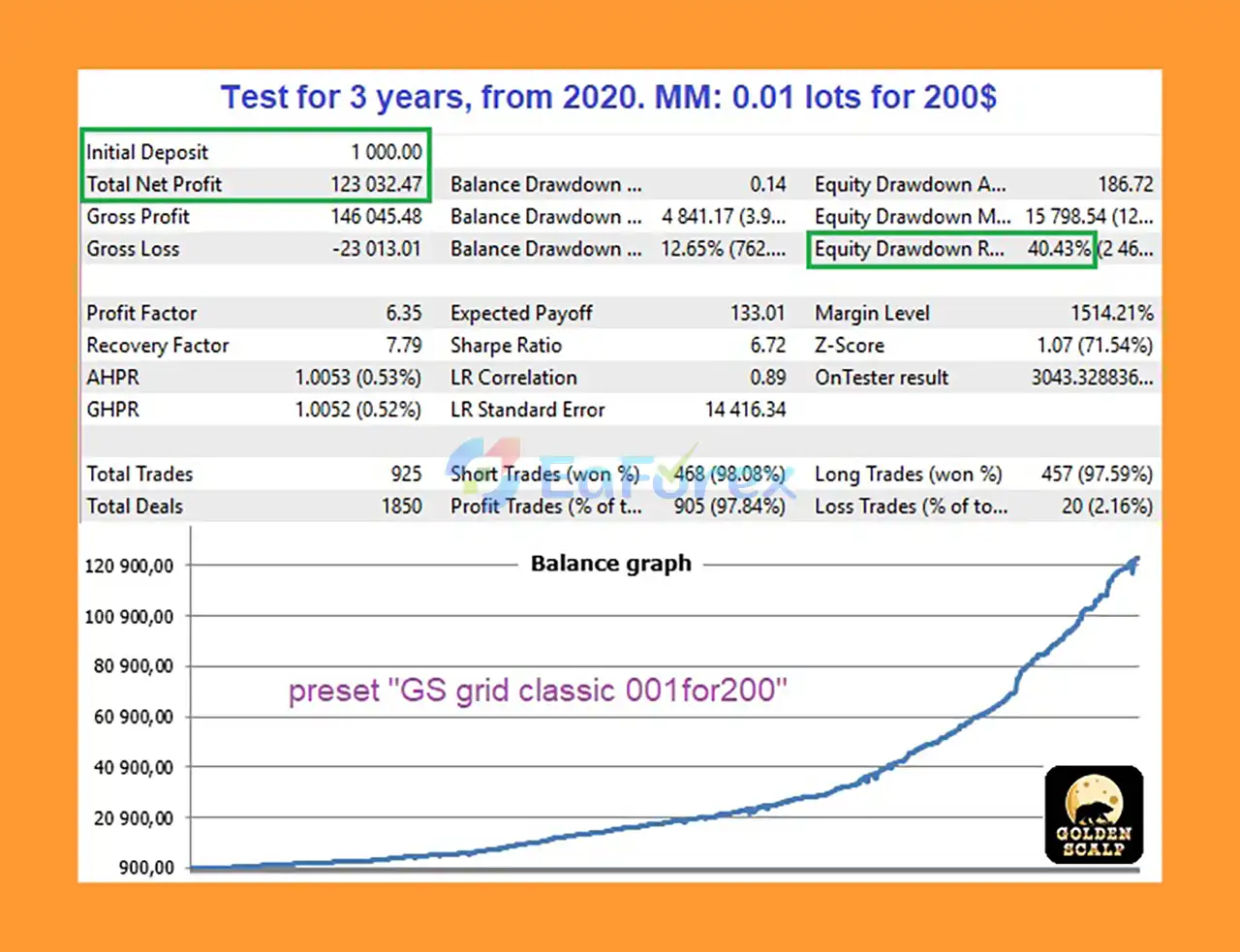
♦️GS Grid Classic Preset (2020–2023):
- Initial Deposit: $1,000
- Net Profit: $123,000
- Win Rate: 97.84%
- Max Drawdown: 3.97%
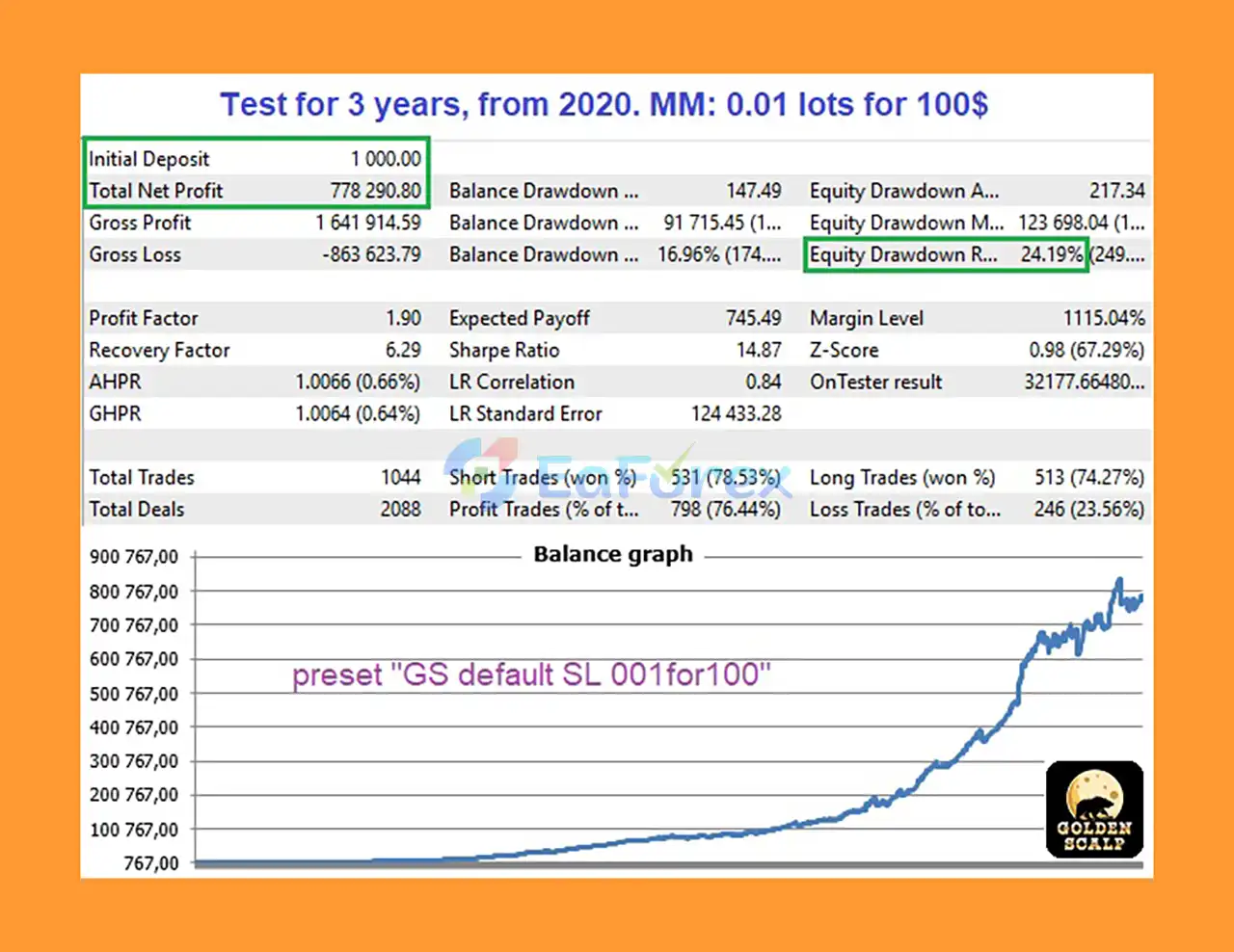
♦️GS SL Dynamic Preset (2020–2023):
- Initial Deposit: $1,000
- Net Profit: $778,290
- Win Rate: 76.44%
- Max Drawdown: 24.19%
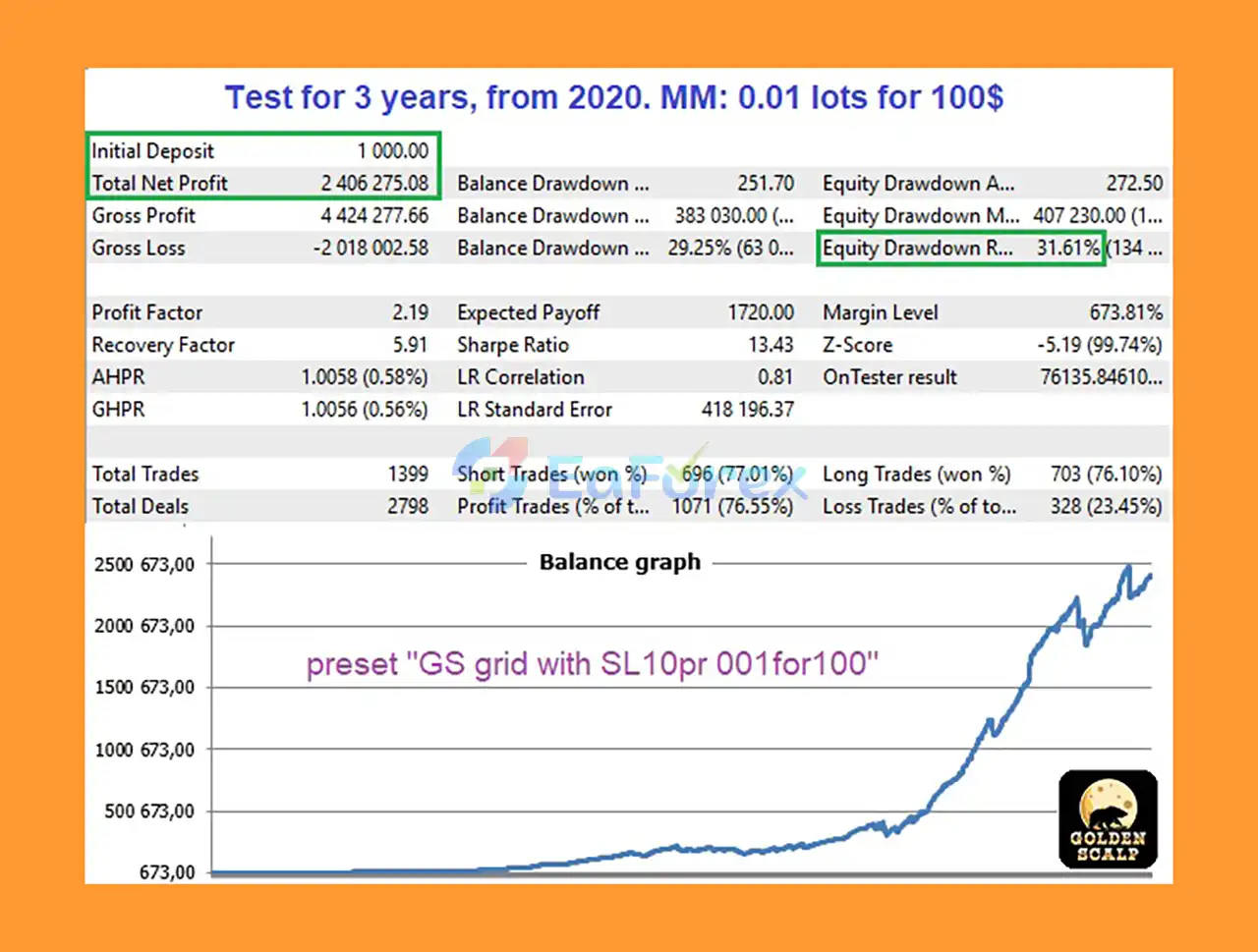
♦️General Backtest (2020–2023)
- Initial Deposit: $1,000
- Net Profit: $2,406,275
- Win Rate: 76.55%
- Max Drawdown: 10.12%
Performance and Risk Management
GoldenScalp MT5 is designed around automated position management and configurable risk parameters. However, past backtest or trading performance should never be interpreted as a guarantee of future results, particularly when trading XAUUSD.
The recommended starting position sizes are:
| Preset | Approximate Lot Sizing | Maximum Open Positions |
|---|---|---|
| GS SL Dynamic 001for100 | 0.01 lot / $100 | 1 |
| GS Grid Classic 001for200 | 0.01 lot / $200 | 3 |
For traders seeking lower exposure, increasing the Funds_for_0,01_of_Lots parameter can reduce the effective position size relative to account equity.
The Recovery MM option is enabled in the Stop Loss presets. According to the provided configuration, this means the trading lot does not automatically decrease during drawdowns. It is therefore important to understand how the money-management system behaves before deploying the EA on a live account.
If funds are withdrawn from the account and the trader wants the lot size to be recalculated, the Funds_for_0,01_of_Lots parameter should be adjusted or the EA should be reattached to the chart.
For accurate backtesting, the GMT_Offset_Manual parameter should also be configured correctly according to the broker's server time. An incorrect GMT offset can cause differences between historical testing and the EA's intended trading-time calculations.
Weaknesses and Risk Warnings
Despite its flexible configuration, GoldenScalp MT5 has several important risks that traders should understand.
Grid Strategy Risk
The GS Grid Classic 001for200 preset does not use a conventional Stop Loss and can add positions when price moves against the initial trade. A prolonged one-directional movement in Gold can therefore increase exposure and floating drawdown.
Gold Volatility
XAUUSD can experience sharp price movements, particularly around major economic announcements, central-bank decisions, inflation data, employment reports, and geopolitical events. High volatility can significantly affect automated trading results.
Recovery MM Considerations
The Recovery MM setting can maintain the trading lot during drawdowns rather than automatically reducing it. This can increase risk if the account enters a prolonged period of unfavorable performance.
Broker Conditions
Trading results may vary depending on the broker, including spreads, commissions, execution speed, slippage, contract specifications, and server time.
Backtest Limitations
Backtested performance does not guarantee live results. Traders should test the EA under realistic trading conditions and avoid relying exclusively on historical equity curves.
Small Account Risk
Although the EA can be used with a relatively small starting balance, a smaller account provides less room to absorb drawdowns. Conservative position sizing is especially important when trading Gold.
Pros and Cons
Pros
- Designed specifically for XAUUSD Gold trading
- Compatible with MetaTrader 5
- Supports multiple chart timeframes
- Offers two distinct trading presets
- Includes a dynamic hidden Stop Loss configuration
- Provides optional safety TP and SL parameters
- Flexible money-management settings
- Supports accounts starting from around $100
- Maximum position limits help control simultaneous exposure in each preset
- Provides GMT offset configuration for backtesting
Cons
- Gold trading carries substantial volatility risk
- The grid preset does not use a conventional Stop Loss
- Grid averaging can increase exposure during prolonged adverse movements
- Recovery MM may maintain lot size during drawdowns
- Live results can differ considerably from backtests
- Broker execution conditions can affect performance
- Correct GMT offset configuration is required for reliable backtesting
How to Install GoldenScalp MT5
Follow these steps to install and configure GoldenScalp MT5:
- Install MetaTrader 5 and log in to your trading account.
- Open the MT5 Data Folder and locate the appropriate
Expertsdirectory. - Copy the GoldenScalp EA files into the required MT5 Expert Advisors folder.
- Restart MetaTrader 5 or refresh the Navigator window.
- Locate GoldenScalp MT5 under Expert Advisors.
- Attach the EA to an XAUUSD chart.
- Select the desired timeframe.
- Enable Algo Trading/Auto Trading in MetaTrader 5.
- Import the appropriate GoldenScalp preset.
- Review the money-management parameters, especially
Funds_for_0,01_of_Lots. - If using safety protection, configure
TakeProfit_SafetyandStopLoss_Safetyaccording to your risk plan. - Check the
GMT_Offset_Manualsetting before running a backtest. - Test the EA on a demo account before considering live deployment.
The supplied GoldenScalp.zip archive contains the recommended presets. Traders should use the correct preset and verify all settings before starting automated trading.
What’s Included in the Download Package?
🔻Experts:
- Setting (If Any).docx
- Installation Guide.docx
🔻Presets:
- GS grid classic 001for200 MT5.set
- GS SL dynamic 001for100 MT5.set
Final Thoughts
GoldenScalp MT5 is a dedicated XAUUSD Gold scalping EA for MetaTrader 5 that combines automated trade management with flexible money-management configurations. Its two main presets give traders a choice between a dynamic Stop Loss approach and a grid-based averaging strategy.
The GS SL Dynamic 001for100 preset may be more appropriate for traders who prioritize controlled single-position exposure and dynamic Stop Loss management. The GS Grid Classic 001for200 preset provides a different approach based on averaging and multiple positions, but it also introduces substantially different drawdown and exposure risks.
As with any automated trading system, GoldenScalp MT5 should be thoroughly tested using realistic spreads, commissions, and broker conditions before live deployment. Conservative lot sizing, appropriate account capital, and a clear understanding of the EA's position-management logic are essential when trading volatile instruments such as Gold.
GoldenScalp MT5 should be viewed as an automated trading tool rather than a guaranteed-profit system. Proper testing and disciplined risk management remain critical to long-term trading success.



