Product Overview
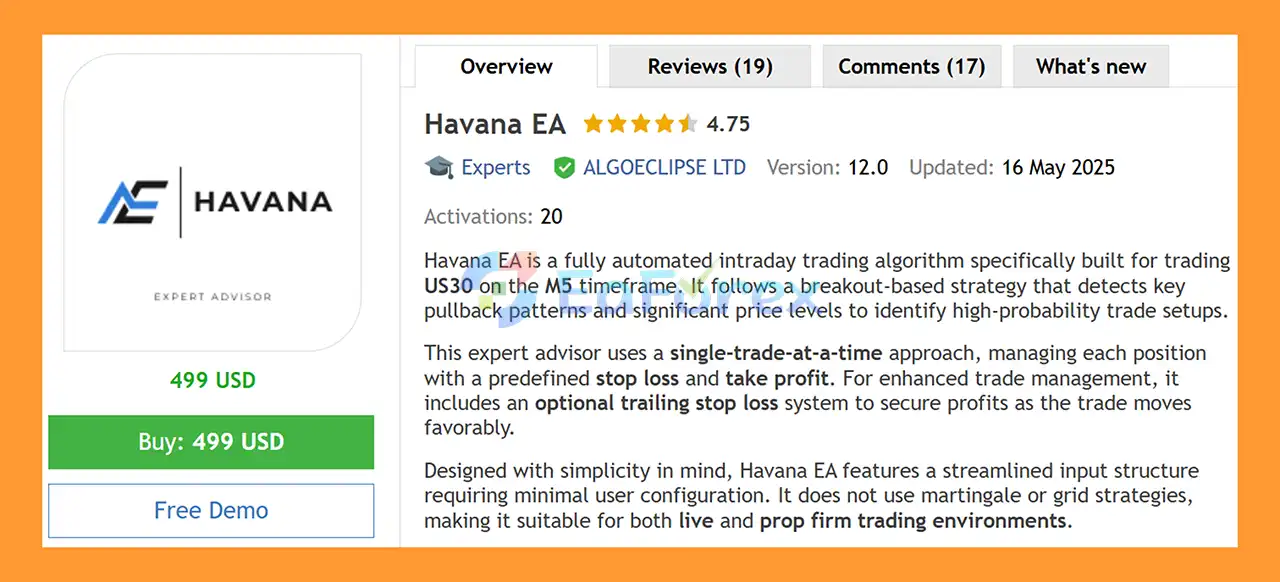
Havana EA MT5 is a fully automated US30 Expert Advisor for MetaTrader 5, specifically designed to trade the Dow Jones / US30 index on the M5 timeframe. The EA uses a breakout-based trading approach combined with pullback confirmation and significant price-level analysis to identify potential intraday trading opportunities.
Unlike newly released trading robots with limited live-market history, Havana EA has been running for approximately three years, giving traders access to a longer period of user feedback and real-market experience.
The trading system follows a straightforward single-trade-at-a-time approach. Each position is managed using a predefined Stop Loss and Take Profit, while an optional trailing stop can be activated to dynamically manage profitable trades.
Havana EA MT5 is designed with simplicity in mind. Its streamlined configuration requires relatively few parameters, making it easier to set up compared with highly complicated trading systems.
The EA does not use traditional Grid or Martingale strategies. An optional loss recovery mechanism is available in the latest version, allowing the lot size to be increased for a predefined number of trades following a loss. This feature is configurable and is presented by the developer as a separate recovery mechanism rather than a traditional Martingale system.
The EA has also been tested using high-quality tick data, with the goal of producing more realistic historical testing conditions.
About the Developer
- Author: Bailey John Wickens
- Experience: Over +3 years of experience on MQL5.
- Notable Products: Havana EA MT5, Havana EA MT4, Prop Firm Pass EA MT5, RoundHouse EA MT5, Asseto FX EA MT5 and other advisors.
- Flagship Product: Havana EA MT5 is rated as the best performing product of the year.
>> Delivery time 24h-48h after payment.
>>> Refund if not delivered.
>>> You will receive the latest version without any limitations (ID+Time).
>>Reviewed by Jason Stap <<
Key Features of Havana EA MT5
Designed Specifically for US30
Havana EA MT5 is developed specifically for:
- Symbol: US30 / Dow Jones
- Timeframe: M5
- Trading Style: Intraday
- Platform: MetaTrader 5
The strategy is therefore focused on the characteristics and price behavior of the US30 index rather than being a generic multi-symbol Expert Advisor.
Breakout-Based Trading Strategy
The core trading logic is based on identifying significant price levels and potential breakout opportunities.
The EA looks for breakout conditions and uses pullback confirmation to help identify potential entries rather than simply entering immediately whenever price crosses a level.
Single Trade at a Time
Havana EA uses a simple position structure in which only one trade is managed at a time.
This approach avoids the continuous position accumulation commonly associated with Grid-based systems and can make the EA’s exposure easier to monitor.
Predefined Stop Loss and Take Profit
Every trade can be managed using predefined:
This provides a clearly defined risk and reward structure before the trade is opened.
Optional Trailing Stop Loss
The optional trailing stop allows the EA to adjust trade protection as the market moves in a favorable direction.
When enabled, the trailing mechanism can help protect part of an open profit rather than relying exclusively on the original Take Profit level.
Optional Loss Recovery
The latest version includes an optional loss recovery feature.
After a losing trade, the EA can increase the lot size for a predefined number of subsequent trades.
The feature is configurable and can be disabled if the trader prefers the standard position-sizing approach.
Although the developer distinguishes this feature from Martingale, traders should still understand that increasing position size after losses increases potential exposure and therefore requires careful risk management.
No Traditional Grid Strategy
Havana EA does not use a traditional Grid strategy that continuously adds positions at predefined price intervals.
This keeps the trade structure relatively simple compared with multi-position grid systems.
No Traditional Martingale Strategy
The core strategy does not rely on conventional Martingale position accumulation.
However, because the optional loss recovery function can increase lot size after a losing trade, traders should evaluate the feature carefully before enabling it.
Simple Configuration
Havana EA has a streamlined input structure with relatively few parameters.
This can make the system easier to configure and maintain compared with EAs containing hundreds of adjustable settings.
Real-Time P/L Tags
The latest version includes real-time P/L tags directly on the chart, providing visual information about trade performance while the EA is running.
How Does Havana EA MT5 Work?
Havana EA follows a structured intraday trading process based on breakout and pullback behavior.
Step 1: Analyze US30 Price Levels
The EA monitors US30 on the M5 timeframe and analyzes important price areas where significant market reactions may occur.
These levels can provide the foundation for potential breakout setups.
Step 2: Identify Breakout Conditions
When price moves through a significant level, the EA evaluates the breakout according to its internal trading logic.
Rather than treating every price movement as a trading opportunity, the strategy looks for conditions that satisfy its breakout requirements.
Step 3: Wait for Pullback Confirmation
The system incorporates pullback analysis to confirm potential breakout entries.
This approach is designed to avoid relying solely on the initial breakout movement and instead look for a more structured entry condition.
Step 4: Open One Position
Once the required conditions are satisfied, Havana EA opens a trade.
The system is designed around a single-trade-at-a-time model, limiting the number of simultaneously managed positions.
Step 5: Apply Stop Loss and Take Profit
After entering the market, the EA manages the trade using its predefined Stop Loss and Take Profit parameters.
This establishes the intended risk and profit targets from the beginning of the trade.
Step 6: Manage Profit With Trailing Stop
If the optional trailing stop is enabled, the EA can adjust the protective stop as the position moves into profit.
Step 7: Optional Loss Recovery
If a trade closes at a loss and the recovery function is enabled, the EA can use the configured recovery settings for a limited number of subsequent trades.
The recovery function can be disabled when traders prefer consistent position sizing.
Why Choose Havana EA MT5?
Long-Term Market History
One of the main characteristics of Havana EA is its approximately three-year history in the market.
Compared with a newly launched EA, a longer operational history provides more time for traders to observe how the system behaves across different market conditions.
Simple Trading Architecture
The EA focuses on a relatively straightforward trading concept:
Breakout → Pullback Confirmation → Single Trade → SL/TP Management
This makes the overall trading structure easier to understand.
Designed for US30
Rather than trying to trade dozens of instruments, Havana EA is specifically designed for US30 on M5.
No Grid-Based Position Accumulation
The EA does not use a traditional Grid strategy, helping avoid the large number of simultaneous positions that can occur with aggressive grid systems.
No Conventional Martingale
The core strategy does not depend on conventional Martingale logic.
However, the optional loss recovery feature should still be treated as an additional risk component because it can increase position size after losses.
Prop Firm Friendly Design
The single-trade approach, predefined Stop Loss, and absence of traditional Grid/Martingale systems may make Havana EA relevant to traders evaluating automated systems for prop firm environments.
However, traders must independently verify compliance with the specific rules of their prop firm.
Minimal Configuration
The relatively simple input structure can reduce the complexity involved in setting up and maintaining the EA.
Havana EA MT5 Performance Review
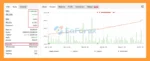
🟢Verified Profitable By MyFxBook
🔺US30 (Dow Jones)
- Initial Deposit: $23,100
- Total Gain: +1,684.43%
- Average Daily Profit: 1.64%
- Average Monthly Profit: 62.79%
- Maximum Drawdown: 5.62%
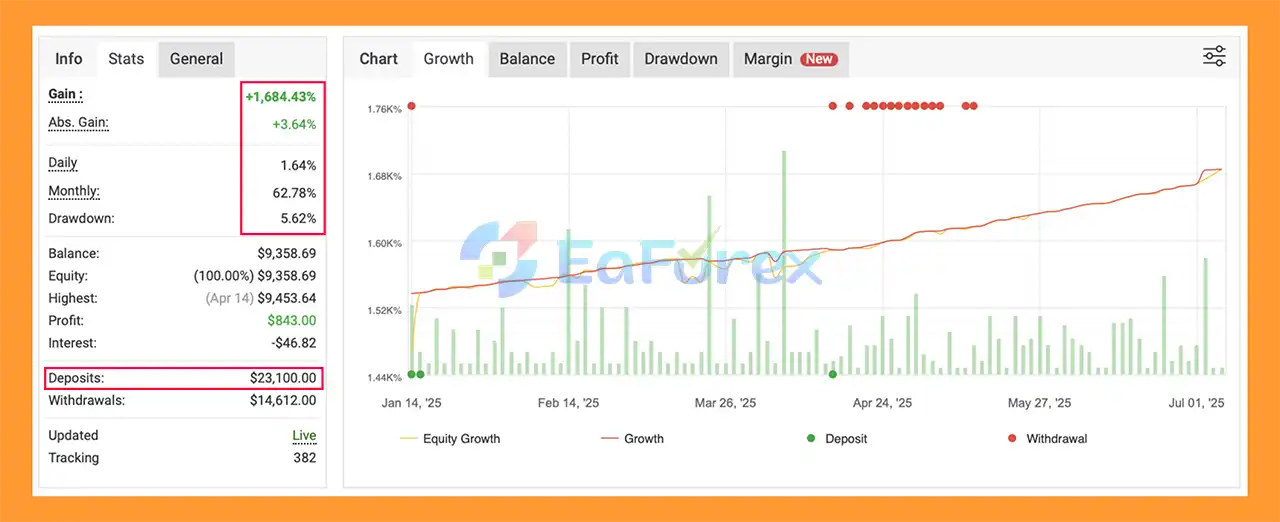
Havana EA MT5 Myfxbooks
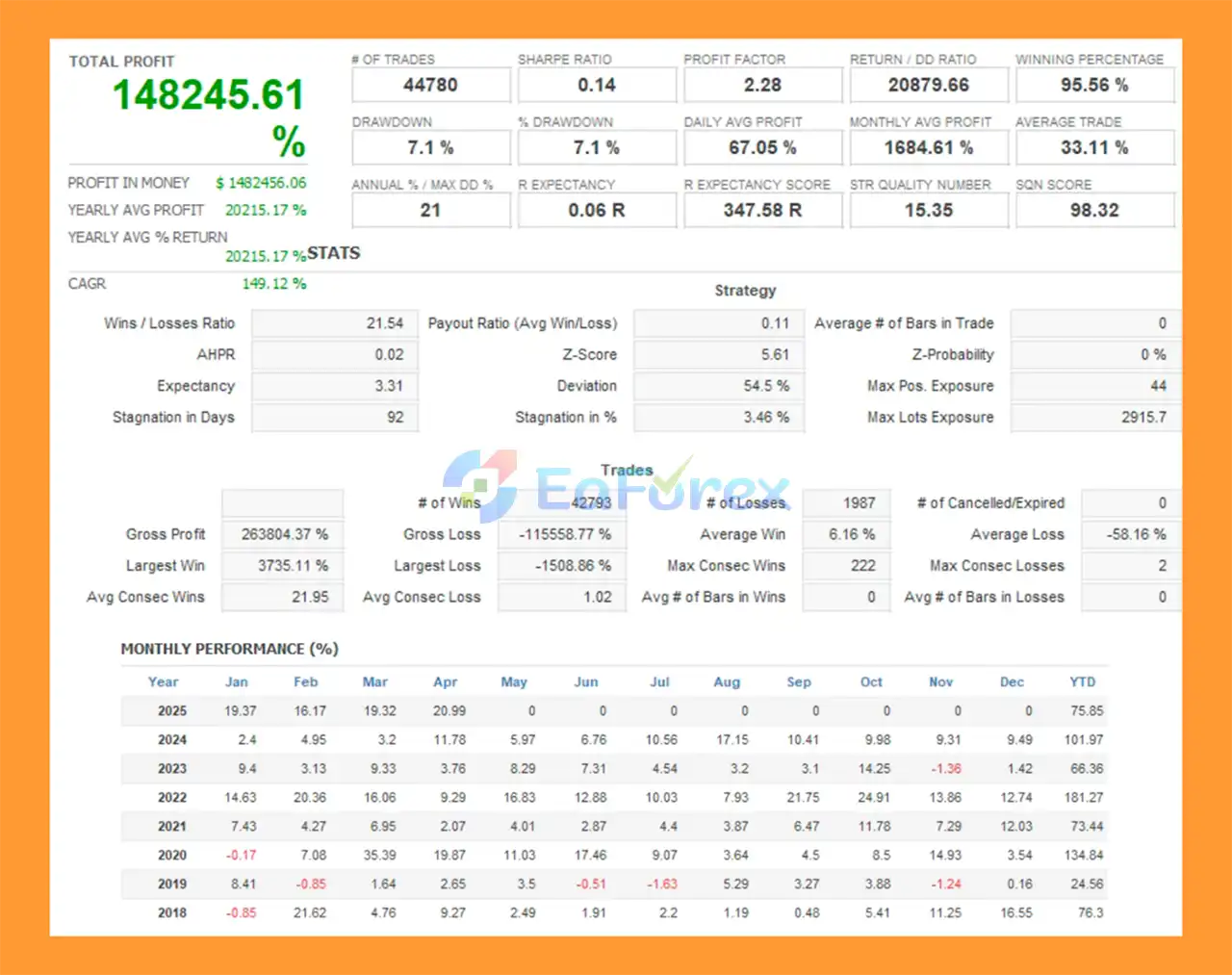
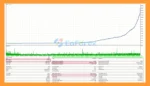
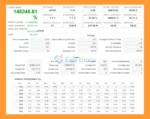
🟢Backtest Results
🔺US30 (Dow Jones)
- Initial Deposit: $1,000
- Total Net Profit: $1.48 million
- Win Rate (% of total): 95.56%
- Maximum Drawdown: 1.51%
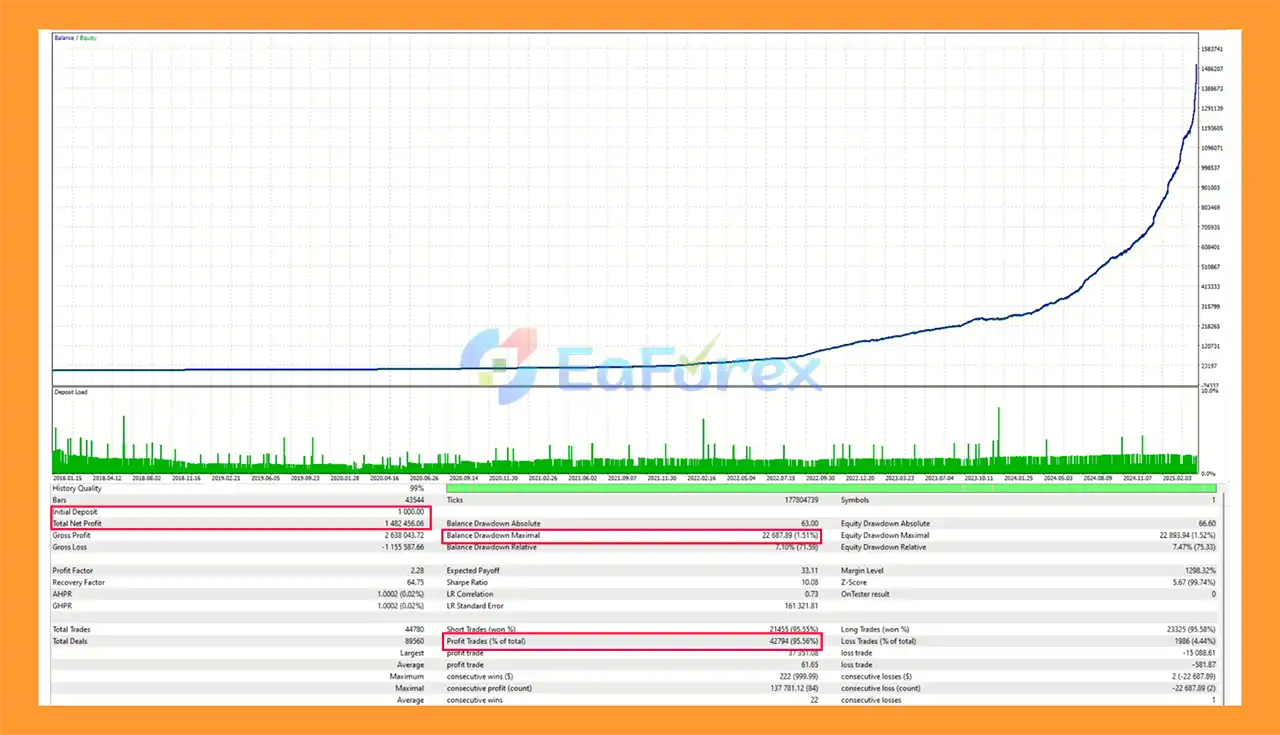
Havana EA Backtests
Performance and Risk Management
Havana EA MT5 has been tested using high-quality tick data, which is intended to provide more realistic historical simulation than lower-quality modeling methods.
The developer also states that the EA has remained active for approximately three years, providing longer-term market exposure and trader feedback.
However, historical testing and past operation cannot guarantee future performance.
Recommended Setup
| Parameter |
Recommended Setting |
| Platform |
MetaTrader 5 |
| Symbol |
US30 / Dow Jones |
| Timeframe |
M5 |
| Trading Style |
Intraday |
| Broker Type |
Raw ECN / Low Spread |
| Strategy |
Breakout + Pullback |
| Position Structure |
Single Trade |
| Stop Loss |
Enabled |
| Take Profit |
Enabled |
| Trailing Stop |
Optional |
| Loss Recovery |
Optional |
Broker Conditions
US30 can have significant differences between brokers in terms of:
- Spread
- Commission
- Contract size
- Point value
- Minimum lot
- Execution speed
- Slippage
- Trading hours
For this reason, traders should test Havana EA using the exact US30 symbol and broker conditions that will be used for live trading.
Risk Management
The predefined Stop Loss provides a defined exit level for losing positions, while Take Profit establishes the intended profit target.
The optional trailing stop can provide additional trade management once a position moves favorably.
If the loss recovery feature is enabled, traders should consider the increased exposure created by larger position sizes following losses.
Weaknesses and Risk Warnings
US30 Can Be Highly Volatile
The Dow Jones index can experience rapid price movements, especially around:
- US economic announcements
- Federal Reserve events
- Employment reports
- Inflation data
- Major corporate news
- Unexpected market events
Fast price movements can cause slippage and execution differences.
Breakout Strategies Can Produce False Breakouts
Breakout systems can experience losing trades when price temporarily breaks an important level and then reverses.
Even with pullback confirmation, false breakouts cannot be completely eliminated.
M5 Trading Requires Good Execution
Because Havana EA operates on the M5 timeframe, execution quality can have a meaningful effect on results.
Higher spreads, latency, or slippage can alter the actual outcome compared with historical testing.
Loss Recovery Increases Risk
The optional recovery mechanism can increase lot size after a losing trade.
While it is described as different from traditional Martingale, the underlying risk consideration remains important: larger positions can produce larger losses if subsequent trades also fail.
Traders should carefully test this feature and consider disabling it if they prefer consistent position sizing.
Three Years of History Does Not Guarantee Future Results
A longer track record can provide more historical information, but it does not guarantee that the EA will perform similarly in future market conditions.
Market volatility and US30 behavior can change significantly over time.
Prop Firm Rules Vary
Although the EA can be used in prop firm environments, each prop firm may have different restrictions regarding:
- Maximum daily drawdown
- Maximum overall drawdown
- News trading
- Holding positions
- Automated trading
- Lot size
- Trading hours
- Risk limits
Always check the current rules of your specific prop firm before deployment.
No Automated Trading System Is Risk-Free
Even with Stop Loss, Take Profit, and optional trailing protection, trading losses remain possible.
Users should avoid excessive leverage and should test the EA thoroughly before using real capital.
Pros and Cons
Pros
- Designed specifically for US30
- MetaTrader 5 compatible
- M5 intraday trading
- Breakout-based strategy
- Pullback confirmation
- Single-trade-at-a-time approach
- Predefined Stop Loss
- Predefined Take Profit
- Optional trailing stop
- Optional loss recovery
- No traditional Grid strategy
- No conventional Martingale strategy
- Simple configuration
- Real-time P/L chart tags
- High-quality tick-data testing
- Approximately three years of market history
- Suitable for demo and live testing
- Can be considered for prop firm environments subject to individual firm rules
Cons
- Limited specifically to US30 rather than a broad range of instruments
- M5 trading can be sensitive to spread and execution quality
- Breakout strategies can suffer from false breakouts
- US30 can experience sharp and unexpected movements
- Optional loss recovery increases position exposure
- Recovery settings require careful testing
- Historical performance does not guarantee future results
- Broker conditions can significantly affect live results
- Prop firm compatibility depends on individual firm rules
- Requires appropriate risk management and monitoring
How to Install Havana EA MT5
Step 1: Download Havana EA MT5
Obtain the Havana EA MT5 files and any .set preset or configuration file supplied with the product.
Step 2: Open MetaTrader 5
Launch MetaTrader 5 and select:
File → Open Data Folder
Step 3: Open the Experts Directory
Navigate to:
MQL5 → Experts
Copy the Havana EA files into this folder.
Step 4: Restart MetaTrader 5
Restart MT5 or refresh the Navigator panel.
The EA should appear under:
Navigator → Expert Advisors
Step 5: Open a US30 Chart
Open your broker’s US30 / Dow Jones chart.
The exact symbol name may vary between brokers, so make sure you select the correct instrument.
Step 6: Select the M5 Timeframe
Set the chart timeframe to:
M5 – 5 Minutes
This is the recommended timeframe for Havana EA.
Step 7: Attach the EA
Drag Havana EA MT5 onto the US30 M5 chart.
Make sure Algo Trading is enabled in MetaTrader 5.
Step 8: Configure the Inputs
Review the available settings, especially:
- Lot size
- Stop Loss
- Take Profit
- Trailing Stop
- Loss Recovery
- Recovery parameters
- Trading conditions
For initial testing, conservative settings are generally appropriate.
Step 9: Test on a Demo Account
Before using real money, run the EA on a demo account using your intended broker.
Check:
- Spread
- Execution
- Slippage
- Stop Loss behavior
- Take Profit behavior
- Trading frequency
- Drawdown
- Recovery behavior
Step 10: Consider VPS Hosting
For continuous automated operation, a reliable VPS can keep MetaTrader 5 connected and allow the EA to operate without interruption during the broker’s trading hours.
Real User Reviews and Feedback
🔺 Havana EA MT5 is highly appreciated by the MQL5 community for bringing stable and reliable profits. Below are 5 star reviews from users:

User Reviews
What’s Included in the Download Package?
-
- Setting (If Any).docx
- Installation Guide.docx
>>> Join VIP Membership Now <<<
Final Thoughts
In summary, Havana EA MT5 is a specialized US30 M5 Expert Advisor built around breakout and pullback confirmation rather than Grid or traditional Martingale trading. Its single-trade structure, predefined SL/TP, optional trailing stop, relatively simple configuration, and optional loss recovery provide several ways to customize trade management.
The EA’s approximately three-year market history and high-quality tick-data testing provide historical information for evaluation, but they should not be interpreted as a guarantee of future profitability. US30 remains a volatile instrument, and live results can differ because of broker conditions, spreads, slippage, execution, and changing market behavior.
For traders evaluating Havana EA, the most important considerations are the US30 broker conditions, M5 execution quality, position sizing, Stop Loss parameters, and whether the optional loss recovery feature is appropriate for their risk limits. Demo testing and realistic backtesting should be completed before live deployment.


















 Unlimited Activations
 Instant delivery
 Easy to install
















 Automatic EA
 EA Best Seller
 Expert Advisor MT4
 Expert Advisor MT5
 HFT EA


Reviews
Clear filtersThere are no reviews yet.