









-
 Unlimited Activations
-
 Instant delivery
-
 Easy to install






 Unlimited Activations
Instant delivery
Easy to install
Unlimited Activations
Instant delivery
Easy to install
 Free Update
 Free Install Support

Hippo Trader Pro MT5 is an advanced automated Forex trading robot designed for the MetaTrader 5 platform. Based on a trend-following strategy, this Expert Advisor (EA) primarily trades during the Asian and European trading sessions, focusing on identifying market direction and capturing potential trading opportunities on the EURUSD currency pair.
Optimized for the EURUSD M1 timeframe, Hippo Trader Pro combines the Relative Vigor Index (RVI) oscillator, Average True Range (ATR) volatility filters, and trend-based price patterns to analyze market conditions and identify potential entry points.
Unlike systems that rely heavily on outdated indicators or conventional chart patterns, Hippo Trader Pro uses a combination of trend analysis and volatility measurements to guide its trading decisions.
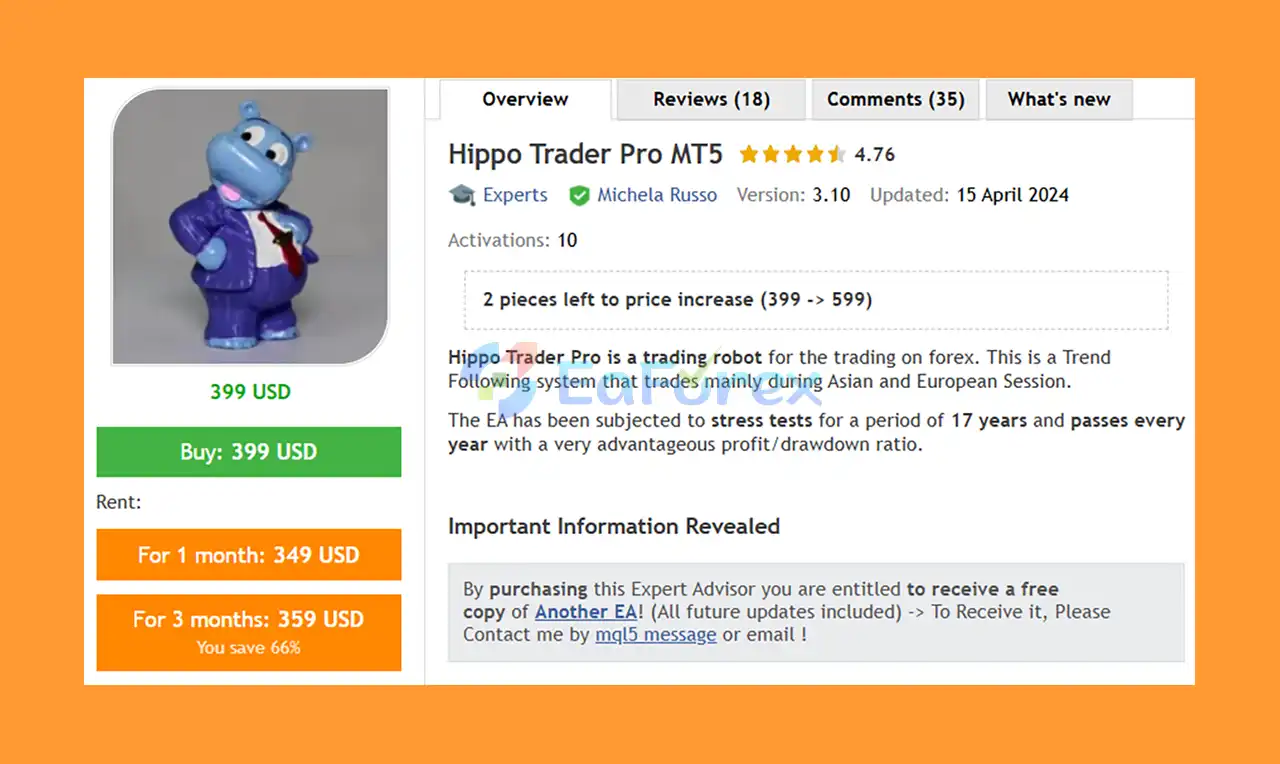
According to the developer, the EA has undergone 17 years of historical stress testing and passed the reported annual tests with a favorable profit-to-drawdown ratio. The recommended backtesting period starts in 2003 and extends to the present, providing a broad historical framework for evaluating the strategy across different market conditions.
Hippo Trader Pro MT5 also supports FIFO-compliant trading when configured with the appropriate settings, making it a potential option for traders who require First In, First Out position management.
For traders searching for a Forex EA MT5, EURUSD M1 trading robot, trend-following Expert Advisor, or automated Forex trading system, Hippo Trader Pro offers a configurable approach that combines trend identification, volatility filtering, and flexible trade management.
• Author: Michela Russo
• Experience: Over 6 years of experience on MQL5.
• Notable Products: Hippo Trader Pro MT5, Stratos Mistral MT5, Hippo Trader Pro, Dragon Scalper Pro, Lizard Scalper Pro, Snake Crazy Pro and other advisors.
• Flagship Product: Hippo Trader Pro MT5 is rated as the best performing product of the year.
>> Delivery time 24h-48h after payment.
>>> Refund if not delivered.
>>> You will receive the latest version without any limitations (ID+Time).>>Reviewed by Jason Stap <<
Hippo Trader Pro MT5 is built around a trend-following approach that aims to identify the prevailing market direction and enter trades when its conditions are satisfied.
By focusing on market trends rather than relying exclusively on short-term price fluctuations, the EA seeks to identify potential opportunities in changing Forex market conditions.
The EA is designed primarily for the EURUSD currency pair on the M1 (one-minute) timeframe.
This short timeframe allows the system to analyze frequent price movements and evaluate potential entries using its trend and volatility filters.
For the most representative results, users should follow the developer’s recommended EURUSD M1 configuration.
The Relative Vigor Index oscillator is used to help identify market direction and evaluate trend conditions.
RVI compares closing and opening prices in relation to the trading range, providing information that can help the EA assess potential bullish or bearish momentum.
Hippo Trader Pro uses fast, slow, and super-slow ATR settings to evaluate market volatility across different measurement periods.
The Average True Range (ATR) helps measure the magnitude of price movement rather than predicting direction by itself.
Combining different ATR periods allows the EA to incorporate volatility conditions into its trading decisions and filter potential entries.
The EA primarily targets trading opportunities during the Asian and European sessions.
Users can also configure fixed trading hours, including start and stop times, to align trading activity with their preferred schedule and broker server time.
Hippo Trader Pro supports FIFO-compliant operation when the appropriate settings or configuration files are used.
FIFO stands for First In, First Out, meaning that positions are managed according to the applicable closing order requirements.
Traders should verify the configuration against their broker’s specific rules before enabling live trading.
The EA provides several position-sizing options, including:
The Risk parameter controls the EA’s automatic lot calculation and should not be interpreted as a direct percentage of account capital.
Hippo Trader Pro includes multiple settings for controlling trading activity and managing positions, such as:
These settings allow users to adapt the EA’s trade-management behavior to their chosen configuration.
The EA includes an optional maximum monetary loss feature.
Users can enable a loss limit, define the maximum permitted monetary loss, and configure whether trading should stop after the threshold is reached.
The feature provides an additional risk-control option, but its effectiveness depends on correct configuration and actual trade execution.
The EA allows users to configure trading days and operating hours.
Available options include enabling or disabling trading on individual weekdays, setting custom start and stop times, and closing positions after a specified time on Friday.
These controls can help traders manage exposure around weekends and outside their preferred trading sessions.
Hippo Trader Pro MT5 offers interface options designed to make monitoring and managing the EA more convenient.
Depending on the selected settings, users can enable the trading panel, close buttons, error displays, chart color changes, and trade comments.
Hippo Trader Pro MT5 follows a structured trading process that combines trend analysis, volatility filtering, and configurable trade management.
First, the EA analyzes the EURUSD market using the Relative Vigor Index oscillator to evaluate potential trend direction.
Next, its ATR-based filters assess market volatility across different periods. These measurements help the system evaluate whether current market conditions meet its entry requirements.
When the required trend and volatility conditions are satisfied, the EA can execute a market order according to its configured Buy and Sell rules.
After entering a position, the system applies its configured Take Profit and trade-management parameters. Additional-order settings determine how secondary positions may be handled when those features are enabled.
The EA can also apply trading-hour restrictions, order limits, monetary loss thresholds, and FIFO-compliant closing behavior where configured.
The general trading process can be summarized as:
Market Analysis → RVI Trend Identification → ATR Volatility Filtering → Market Order Execution → Position Management → Trade Exit
This approach is designed to automate trading decisions while allowing users to customize important execution and risk-management parameters.
Hippo Trader Pro focuses on identifying potential trends and combining them with volatility filters. This structured approach may appeal to traders who prefer systematic market analysis over discretionary entries.
According to the developer, the EA has undergone 17 years of historical stress testing, with the reported annual tests showing a favorable profit-to-drawdown ratio.
Testing across different historical periods can help evaluate how a strategy behaves under varied market conditions. However, historical results should be assessed alongside independently verified live performance.
Rather than claiming universal optimization for every instrument, the EA’s primary configuration focuses on EURUSD M1.
This provides a clearly defined starting point for traders who want to test the system on a specific currency pair and timeframe.
The EA includes configurable lot sizing, maximum order limits, monetary loss controls, trading schedules, and position-management settings.
These options give users flexibility when configuring the system for their account and trading environment.
Traders who require FIFO-compatible position management can use the appropriate settings, subject to broker requirements and correct configuration.
Custom trading hours and weekday controls allow users to define when the EA can open new trades and how it handles the end of the trading week.
Once configured, Hippo Trader Pro can analyze market conditions and execute its trading logic automatically through MetaTrader 5, reducing the need for constant manual signal monitoring.
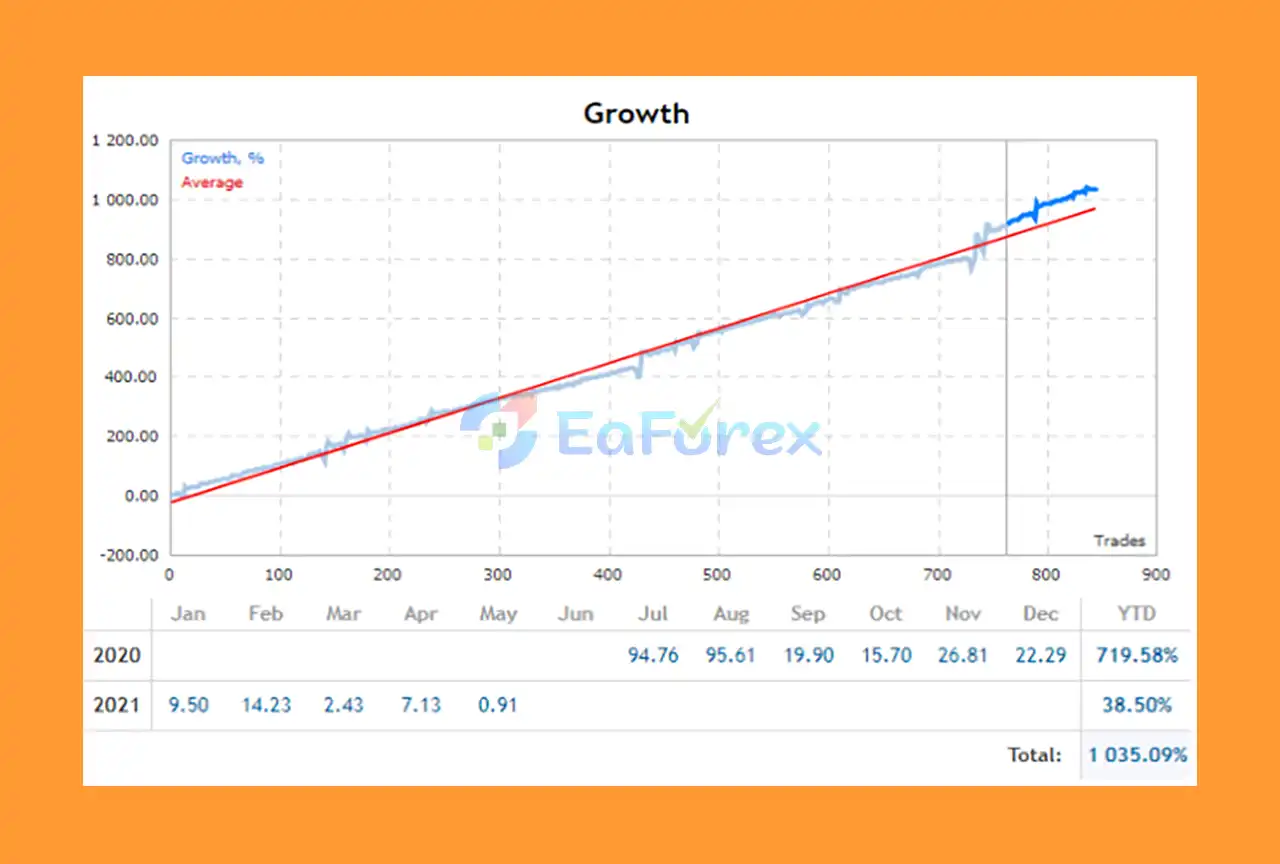
Hippo Trader Pro MT5 Live Results
🔻 EURUSD M1 – Risk 5:
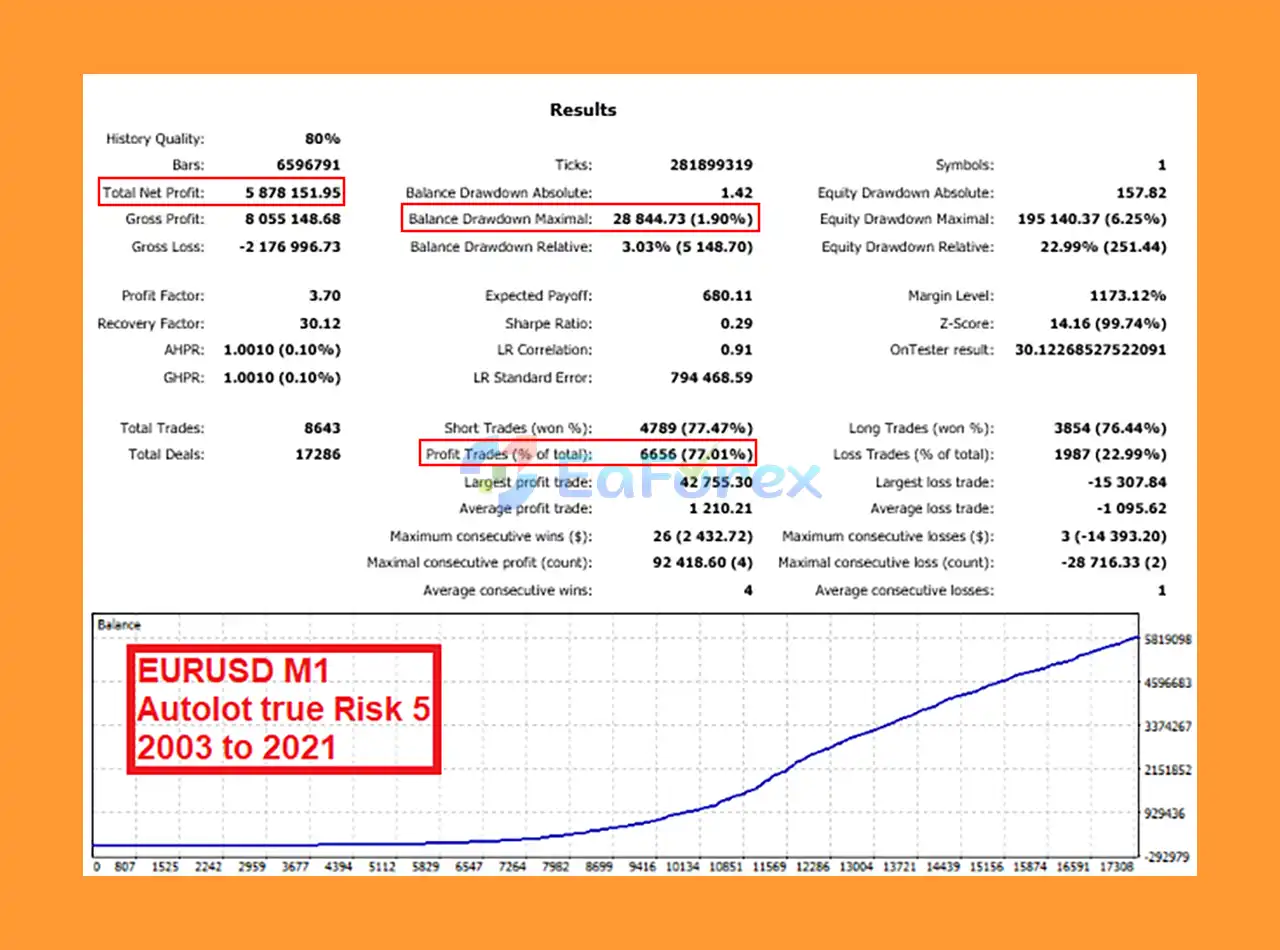
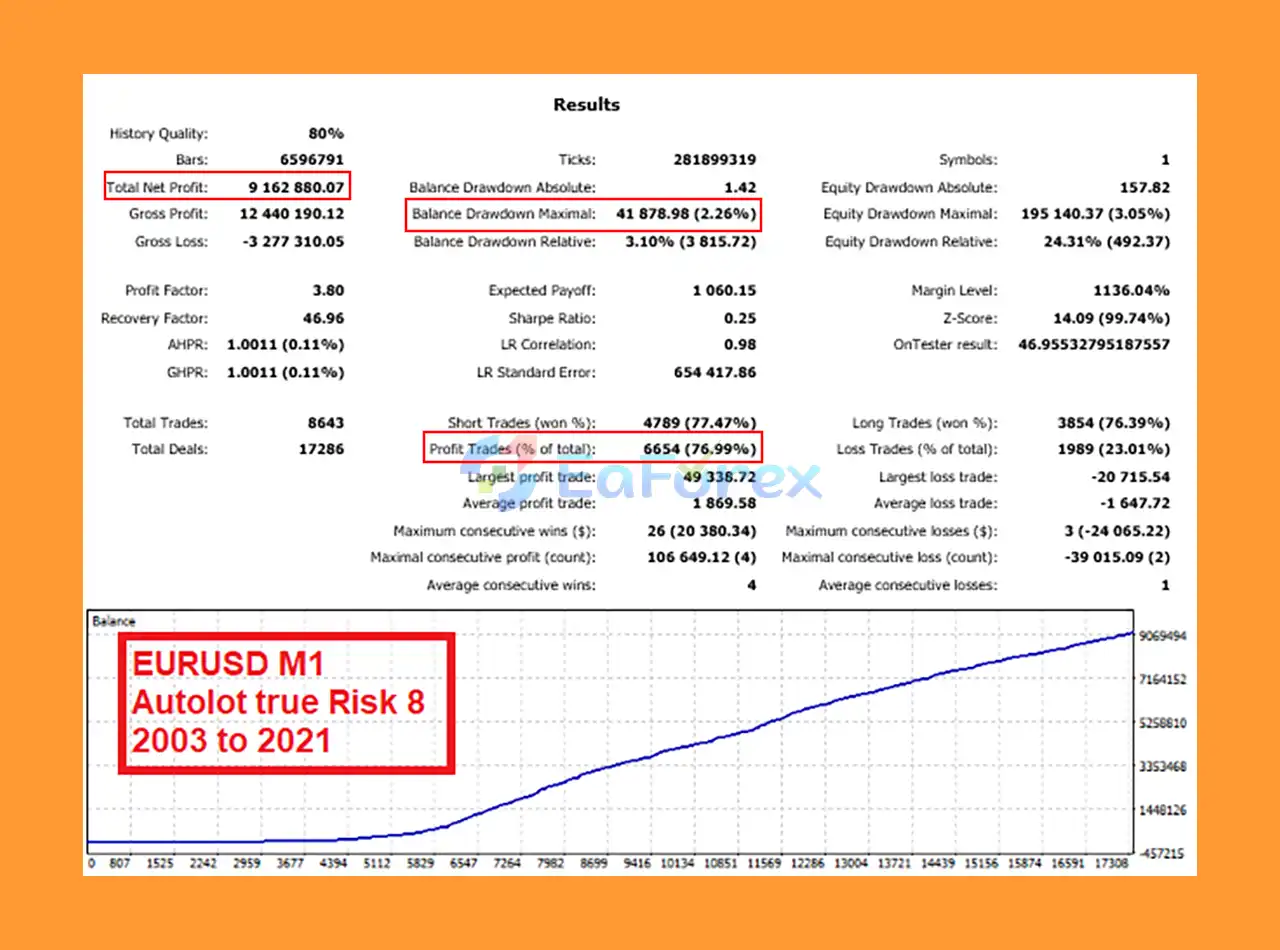
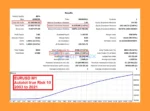
Hippo Trader Pro MT5 Backtest Results
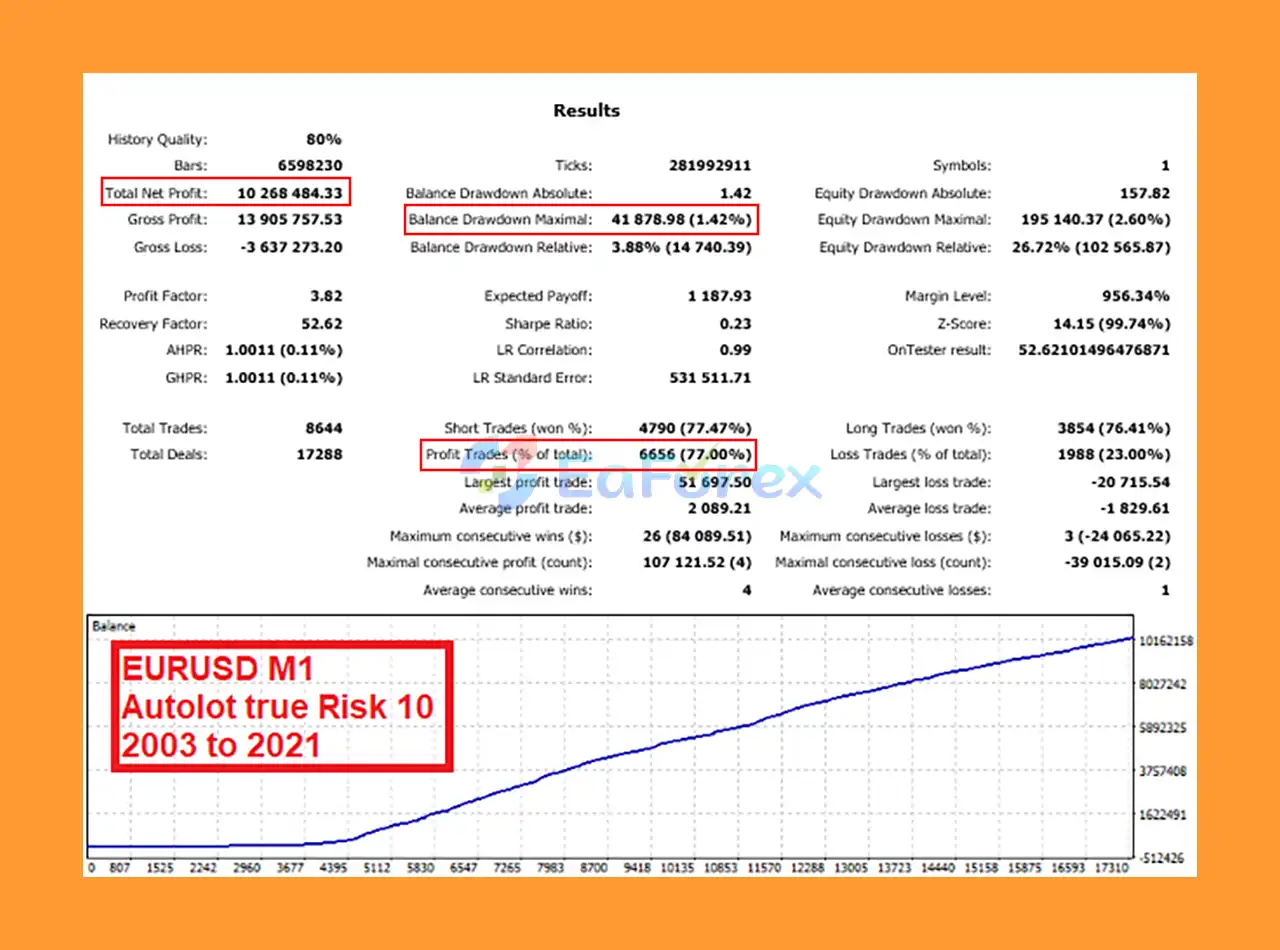
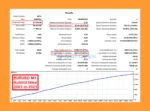
Hippo Trader Pro MT5 Backtest Trading Results
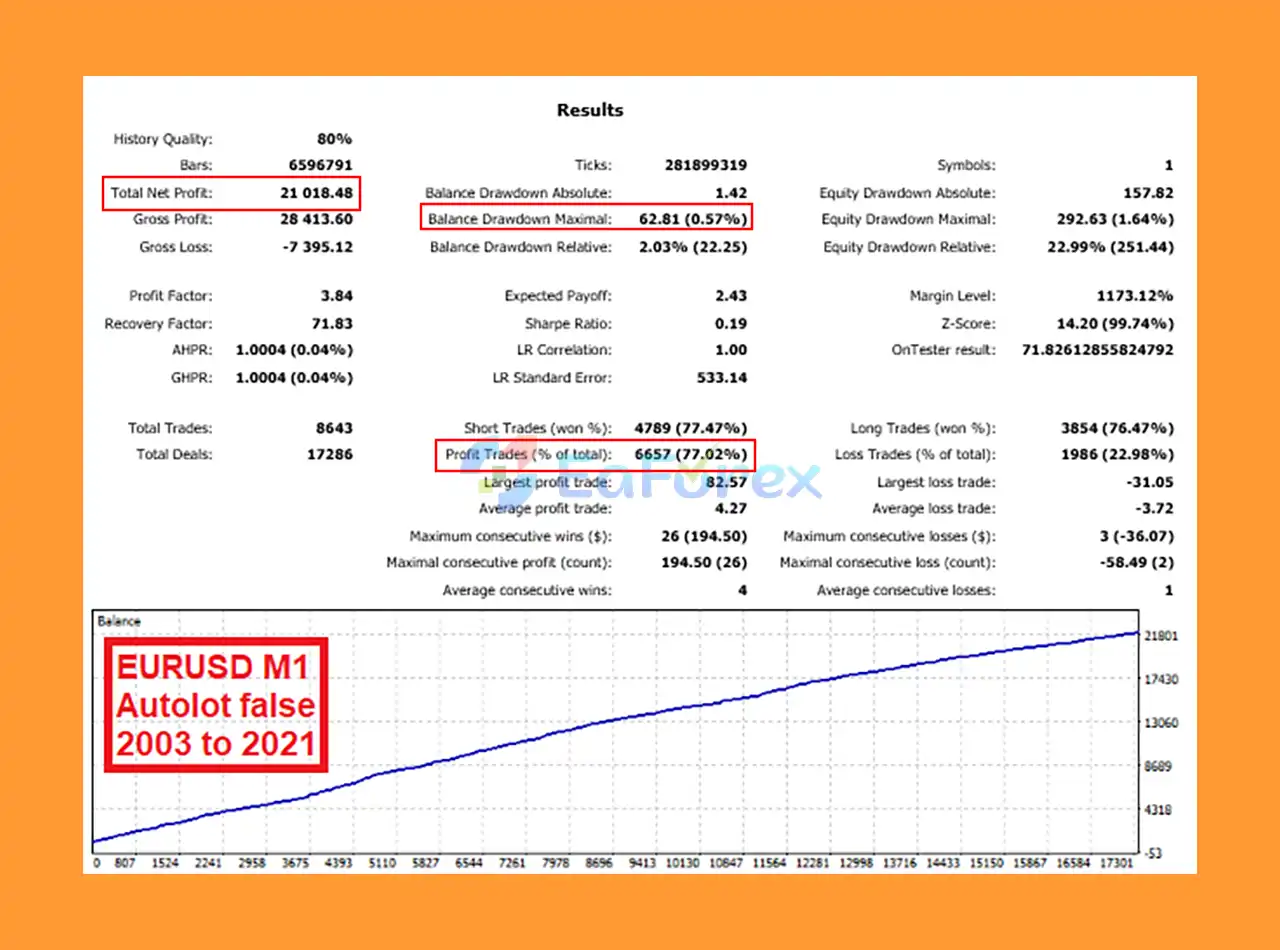
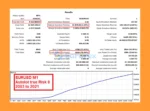
Hippo Trader Pro MT5 Backtests Trading Results
Hippo Trader Pro MT5 includes several configurable controls intended to manage trading exposure. However, these features do not eliminate the financial risks associated with automated Forex trading.
The developer recommends testing the EA from 2003 to the present using tick-by-tick modeling where suitable historical data is available.
The reported 17-year testing history provides a basis for historical evaluation, but traders should verify the test data, modeling quality, spreads, commissions, and execution assumptions.
The Auto Lot and Sqrt Lot options provide alternatives to fixed-volume trading.
Because the Risk parameter is not a direct percentage of account capital, users should review the EA’s documentation and verify the resulting position sizes before trading live.
The optional maximum monetary loss feature allows users to specify a loss threshold and, when configured, stop trading after the limit is reached.
The default global Stop Loss is stated to be 1,000 units of the account’s base currency for every 0.01 starting lot size. Traders should confirm the current default and scaling behavior in their installed version before relying on it.
A monetary loss limit should not be treated as a guarantee that losses cannot exceed the specified amount, particularly during gaps, slippage, or execution failures.
The maximum-order setting helps limit the number of orders the EA can maintain according to its configured logic.
Other grid-related settings, including the position increase coefficient and minimum distance for secondary positions, should be reviewed carefully because additional positions can increase overall exposure.
The Spread Allowed parameter sets a spread threshold above which new trades will not be opened, according to the EA’s configuration.
This can help avoid entries during unfavorable spread conditions, although spreads can change rapidly and execution costs may still affect results.
Trading-day settings, fixed operating hours, and Friday closing options allow users to manage when the EA trades.
These features can help control exposure around market closures, but they must be configured using the correct broker time.
Although Hippo Trader Pro MT5 provides several risk-management features, traders should understand its limitations before using it on a live account.
The M1 timeframe is sensitive to spreads, commissions, slippage, execution latency, and short-term market noise.
Small differences between backtest and live execution can materially affect results, especially when the system opens trades frequently.
The EA includes settings for secondary positions, maximum orders, position increase coefficients, and grid-related order management.
When these features are enabled, multiple positions may increase floating losses and margin requirements if the market moves against the trading strategy.
Users should verify the intended behavior of these settings rather than assuming the EA operates exclusively with single-position entries.
Even a strategy that passes extensive historical testing can experience losses under future market conditions.
Backtests may not fully represent real-world spreads, slippage, liquidity, execution delays, or changes in market behavior.
The Risk parameter does not represent a direct percentage of account capital. Incorrect settings can produce position sizes that are larger than intended.
Always verify calculated lot sizes and expected exposure before enabling live trading.
Different brokers may provide different spreads, commissions, execution speeds, server times, and account rules.
FIFO requirements and the availability of historical tick data may also vary.
The developer recommends a minimum deposit of $1,000, with $3,000 suggested as a preferred starting balance.
These figures are recommendations rather than guarantees of safety. The appropriate account size depends on lot sizing, the EA’s actual exposure, drawdown, leverage, and broker conditions.
Hippo Trader Pro MT5 cannot guarantee profits or prevent all losses. Traders should begin with demo testing and evaluate performance before committing significant capital.
Follow these steps to install and configure Hippo Trader Pro MT5.
Open MetaTrader 5 and copy the Hippo Trader Pro EA files into the appropriate MQL5 → Experts directory, or use the installation method supplied by the developer.
Restart MetaTrader 5 or refresh the Navigator panel if necessary.
Select EURUSD from the Market Watch window and open a new chart.
Set the chart timeframe to M1 (one minute), which is the recommended configuration for the EA.
Navigate to Navigator → Expert Advisors, locate Hippo Trader Pro MT5, and drag it onto the EURUSD M1 chart.
Choose your preferred position-sizing method:
Review the Risk parameter carefully because it is not a direct percentage of account capital.
Before enabling live trading, verify:
Use the appropriate developer-provided set file when necessary, particularly for FIFO-compliant trading.
Enable Algo Trading in MetaTrader 5 and confirm that the EA has permission to trade.
Check the Experts and Journal tabs for configuration or execution errors.
Run a tick-by-tick backtest using reliable historical data where available, then forward-test the EA on a demo account.
Monitor drawdown, trade frequency, lot sizes, spread sensitivity, and monetary loss controls before considering live trading.
| Requirement | Specification |
|---|---|
| Platform | MetaTrader 5 |
| Expert Advisor | Hippo Trader Pro MT5 |
| Recommended Symbol | EURUSD |
| Timeframe | M1 |
| Historical Test Period | 2003 to present |
| Backtest Method | Tick by tick |
| Recommended Settings | Default settings or developer-provided set files |
| Broker | Broker supporting the required EA configuration |
| Minimum Deposit | $1,000 recommended |
| Preferred Starting Balance | $3,000 suggested by the developer |
| Entry Method | Market orders |
| FIFO Compliance | Available with appropriate settings |
The recommended balance should not be interpreted as a guarantee that the account can safely withstand all market conditions. Assess the EA’s position sizing, maximum exposure, and drawdown characteristics before choosing your capital allocation.
The EA is primarily designed for EURUSD on the M1 timeframe.
Yes. It uses the Relative Vigor Index oscillator for trend identification and multiple ATR settings to assess volatility.
FIFO-compliant trading is supported when the appropriate settings or set file are used. Confirm compatibility with your broker before live deployment.
The developer recommends a minimum deposit of $1,000 and suggests $3,000 as a preferred starting balance. Actual capital requirements depend on the selected settings and trading exposure.
Yes. It provides fixed-lot, Auto Lot, and Sqrt Lot options. The Risk parameter is not a direct percentage of account capital.
No. Historical stress tests and favorable backtest results cannot guarantee future profitability. Demo testing and careful risk management are essential.
🔻 Danny Krop (2022.12.08): “Very good EA, continuous growth . Max Risk 5 is important and must be adhered to. good job.”
🔻 Mathers (2022.02.18): “So far so good, good profits with good money management.”
🔻 Yi Fan Zhong (2022.03.25): “I am a hippo trader used in September 2021 and it has already brought me 40% of the benefits. Great!”
Hippo Trader Pro MT5 is a configurable trend-following Forex Expert Advisor designed primarily for EURUSD on the M1 timeframe. By combining RVI-based trend analysis with multi-level ATR volatility filters, the EA aims to identify potential trading opportunities during the Asian and European sessions.
Its features include multiple lot-sizing methods, spread filtering, configurable trading schedules, order-management controls, monetary loss limits, and FIFO-compliant options.
The developer reports 17 years of historical stress testing with favorable profit-to-drawdown characteristics. Prospective users should independently assess the underlying backtests and any available live trading records to determine whether the EA’s performance and risk profile meet their requirements.
For traders searching for a Hippo Trader Pro MT5 EA, EURUSD M1 Forex robot, trend-following trading system, or automated MetaTrader 5 Expert Advisor, this product offers a range of customizable tools for systematic trading.
However, the EA’s short-timeframe approach and optional secondary-order management require careful attention to execution costs, position sizing, and drawdown. Start with conservative settings, test on a demo account, and verify the EA’s behavior with your broker before committing significant capital.
Trade systematically, evaluate performance objectively, and remember that no automated Forex trading system can eliminate market risk or guarantee profits.
1. What is Hippo Trader Pro MT5 and how does it work?
Hippo Trader Pro MT5 is a professional Expert Advisor (EA) designed for EURUSD M1 trading on MetaTrader 5. It follows a trend-following scalping strategy optimized for the Asian and European sessions, using advanced tools like the ATR filter and Relative Vigor Index (RVI) to forecast price movements and enter trades with high accuracy.
2. Is Hippo Trader Pro MT5 safe to use?
Yes. Unlike risky grid or martingale systems, Hippo Trader Pro MT5 uses strict capital protection features such as Money Max Loss, volatility filters, and customizable risk settings. Its long-term backtests show very low drawdowns (as little as 1.42%), making it one of the safest automated scalpers for EURUSD.
3. What are the backtest and live trading results of Hippo Trader Pro MT5?
Backtests from 2003–2021 demonstrate profits of up to $10.26 million with a win rate of 77% and minimal drawdown under 3%. Live trading has also shown over 1,000% account growth, with +719% in 2020 and steady, sustainable results in 2021 and beyond.
4. What is the minimum deposit required for Hippo Trader Pro MT5?
Hippo Trader Pro MT5 can start with a relatively small deposit, but most users recommend at least $500–$1,000 to fully leverage its money management features (Auto Lot, Fixed Lot, Sqrt Lot) and achieve stable, long-term performance.
5. Do I need trading experience to use Hippo Trader Pro MT5?
No. The EA is fully automated and comes with a simple installation guide and preset settings. Beginners can run it as a plug-and-play solution, while experienced traders can customize trading hours, lot sizing, and risk tolerance for greater control.
6. What do users say about Hippo Trader Pro MT5?
User reviews on MQL5 highlight continuous account growth, strong risk management, and reliable long-term performance. Traders report steady profits when using recommended risk settings (Max Risk 5), and many praise the developer’s expertise and product support.
In stock
In stock
In stock
In stock
In stock
Out of stock
No account yet?
Create an Account












 Automatic EA
 EA Best Seller
 Expert Advisor MT4
 Expert Advisor MT5
 HFT EA


Reviews
Clear filtersThere are no reviews yet.