


Product Overview
Insight AInvestor MT5 is an automated multi-currency Expert Advisor for MetaTrader 5, designed to analyze market conditions and execute trades according to configurable trading and risk-management parameters.
The system combines automated market analysis with flexible order management, signal configuration, position protection, and dynamic risk controls. Traders can adjust important parameters such as lot size, risk percentage, Stop Loss, Take Profit, trailing settings, signal characteristics, and order-series limits.
Insight AInvestor MT5 is designed for traders who want to automate parts of their Forex trading process while retaining control over key trading and money-management settings.
The EA can operate automatically after configuration, allowing traders to reduce the need for continuous manual market monitoring. Because it supports multiple currency pairs, users can also apply the system across different Forex markets according to their own strategy and risk-management plan.
About the Developer
- Author: Oleksii Ferbei
- Experience: Over +5 years of experience on MQL5.
- Notable Products: Insight AInvestor MT5, Currency Curator Ex, Forex FalconF, SafeSeries Managers and other advisors.
- Flagship Product: Insight AInvestor MT5 is rated as the best performing product of the year.
>> Delivery time 24h-48h after payment.
>>> Refund if not delivered.
>>> You will receive the latest version without any limitations (ID+Time).>>Reviewed by Jason Stap <<
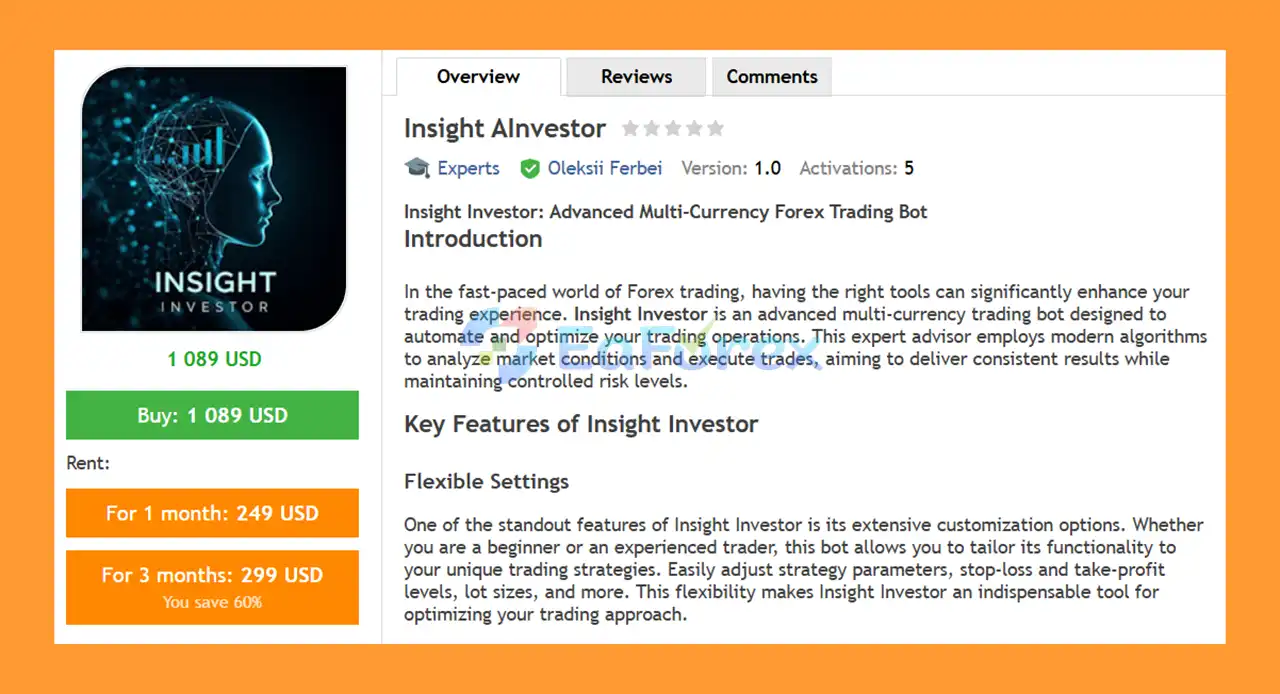
Main Features of Insight AInvestor MT5
Multi-Currency Trading
Insight AInvestor MT5 is designed to work with multiple currency pairs, giving traders the ability to distribute their trading activity across different Forex markets.
Multi-currency functionality can provide greater flexibility when constructing an automated trading portfolio, although trading multiple correlated instruments can also increase overall exposure.
Flexible Configuration
One of the main characteristics of Insight AInvestor MT5 is its extensive range of configurable parameters.
Traders can customize:
- Trading lot size
- Automatic risk management
- Risk percentage
- Order-series limits
- Signal parameters
- Stop Loss
- Take Profit
- Trailing-stop settings
- Pending-order management
- Magic Number
- Order comments
- Order filling type
This allows the EA to be adapted to different account sizes and trading preferences.
Fully Automated Trading
Once installed and configured, Insight AInvestor MT5 can analyze the market and execute trades automatically.
The automated architecture reduces the need to manually identify every potential trading opportunity and can allow the strategy to operate according to its predefined parameters.
Configurable Risk Management
The EA provides both fixed-lot and risk-based position-sizing functionality.
The RiskOn parameter can enable or disable automatic risk management, while the Risk parameter defines the percentage used to calculate trade volume.
This gives traders greater control over how position sizes are determined.
Position Protection
Insight AInvestor MT5 includes several position-protection tools, including:
- Take Profit
- Stop Loss
- Pending-order trailing
- Individual-order trailing
- Individual-order trailing stop
These features can be configured according to the trader's preferred trade-management approach.
Regular Updates and Support
The supplied product information states that the development team provides regular updates and ongoing user support.
Continuous development can help maintain compatibility and introduce improvements over time, although the effect of future updates on trading performance cannot be guaranteed.
How Does Insight AInvestor MT5 Work?
Insight AInvestor MT5 combines market signals, configurable signal parameters, order-series management, and position-protection mechanisms to automate Forex trading.
Signal Analysis
The EA provides multiple signal parameters for its trading logic.
These include:
- SignalBarsA/B
- SignalDegreeA/B
- SignalKstdA/B
- SignalCoridorA/B
- SignalStepCorrect
These parameters control different aspects of signal periods, signal strength, coefficients, trading corridors, and signal-step adjustments.
The exact trading behavior will depend on the values configured by the user.
Risk-Based Position Sizing
The EA provides two approaches to position sizing.
The Lot parameter can be used to define a fixed trading volume.
Alternatively, RiskOn can enable automatic risk management, with the Risk parameter determining the percentage used for calculating trade volume.
This provides flexibility between fixed-volume and risk-based trading approaches.
Order Series
The LimitSeries parameter controls the maximum number of orders in a series.
This allows traders to define limits on the number of positions that can be associated with an order sequence.
The Protections parameter provides additional configuration for protective trading levels.
Trade Protection
Once positions are opened, traders can configure:
- Take Profit
- Stop Loss
- Pending-order trailing
- Individual-order trailing
- Individual-order trailing stop
These tools are intended to manage open positions according to predefined conditions.
Order Identification
The EA also includes order-identification parameters.
MagicNumber provides a unique identifier for trades generated by the Expert Advisor, while CommentOrders can add comments to orders.
The TypeFilling parameter controls the order-filling method used by the EA.
Why Choose Insight AInvestor MT5?
Insight AInvestor MT5 may be suitable for traders looking for an automated Forex system with a high degree of configuration.
Multi-Currency Flexibility
The ability to work across multiple currency pairs allows traders to apply the EA to different Forex markets rather than restricting the system to a single instrument.
Extensive Parameters
The large number of configurable settings provides advanced users with significant control over signal generation, risk management, order series, and position protection.
Fixed or Risk-Based Lot Sizing
Traders can choose between fixed lot sizing and automatic risk-based volume calculation, depending on their account-management approach.
Automated Position Management
Take Profit, Stop Loss, and trailing functionality can reduce the need for manual management of every open position.
Signal Customization
The A/B signal parameters allow traders to adjust several aspects of the EA's signal-generation framework.
Order Control
Magic numbers, order comments, filling types, and order-series limits provide additional operational control when running the EA on a MetaTrader 5 account.
Insight AInvestor MT5 Backtest Results
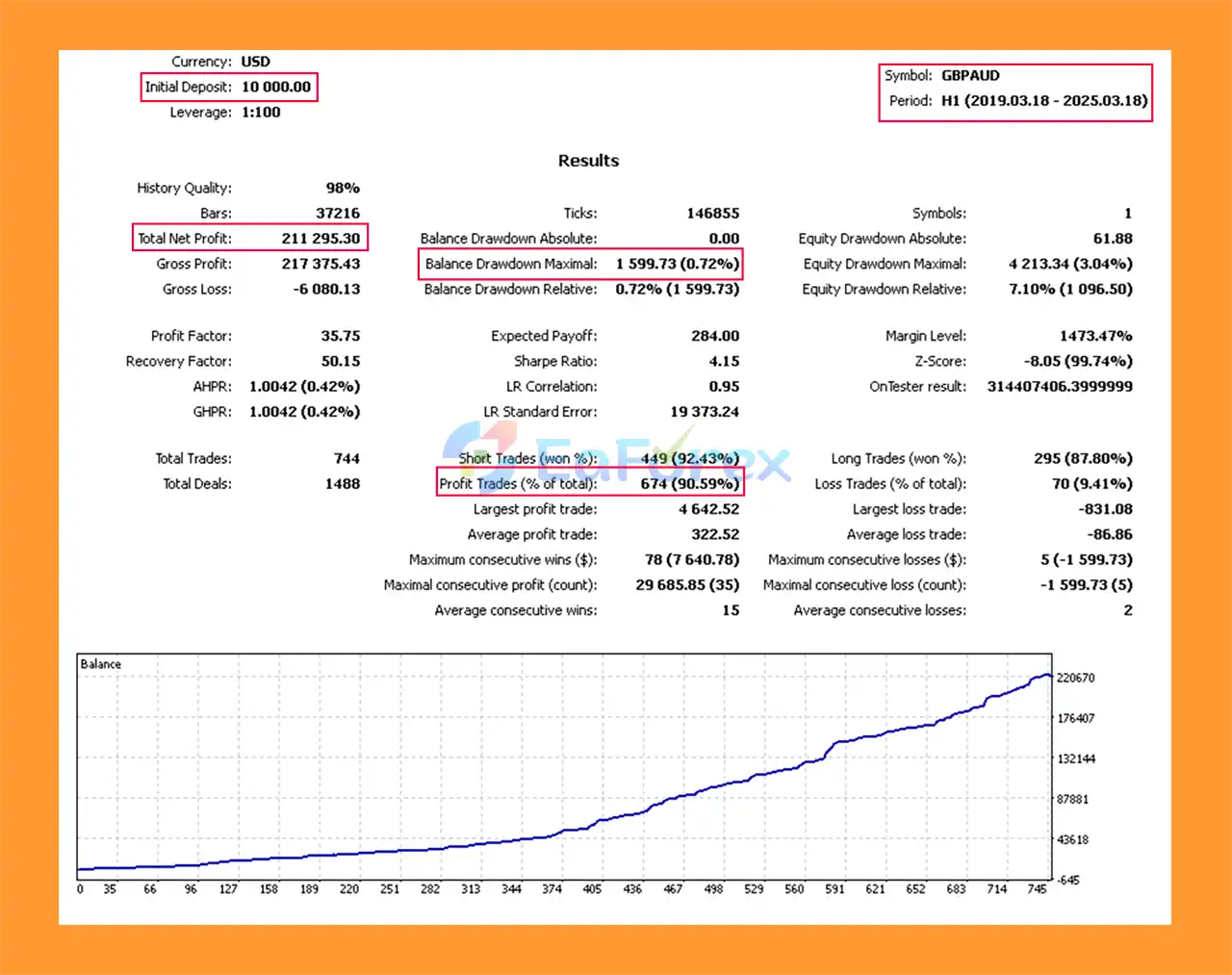
🔺GBPAUD – H1 (2019 – 2025)
- Initial Deposit: $10.000
- Total Net Profit: $211.295
- Win Rate: 90.59%
- Maximum Drawdown: 0.72%
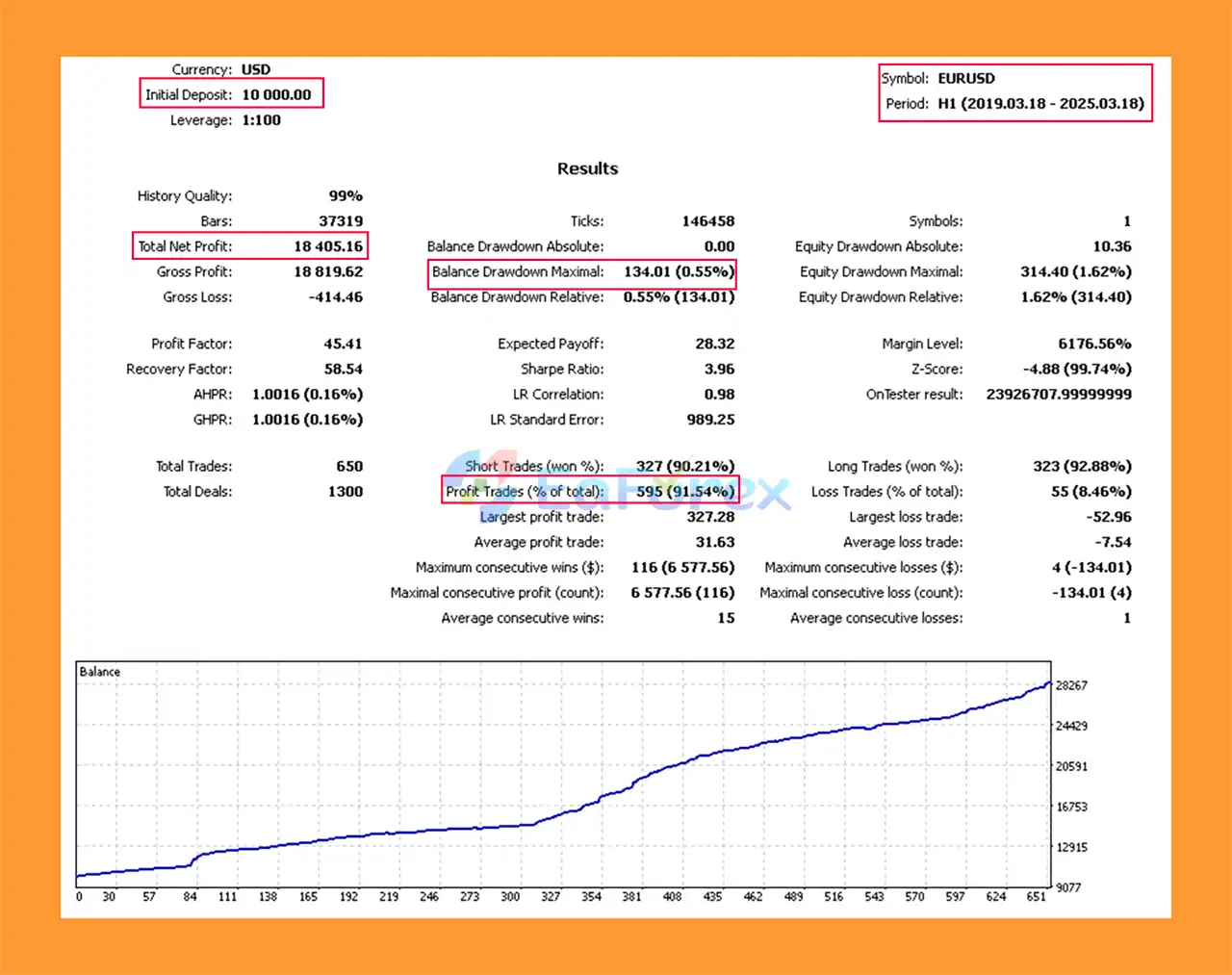
🔺EURUSD – H1 (2019 – 2025)
- Initial Deposit: $10.000
- Total Net Profit: $18.405
- Win Rate: 91.54%
- Maximum Drawdown: 0.55%
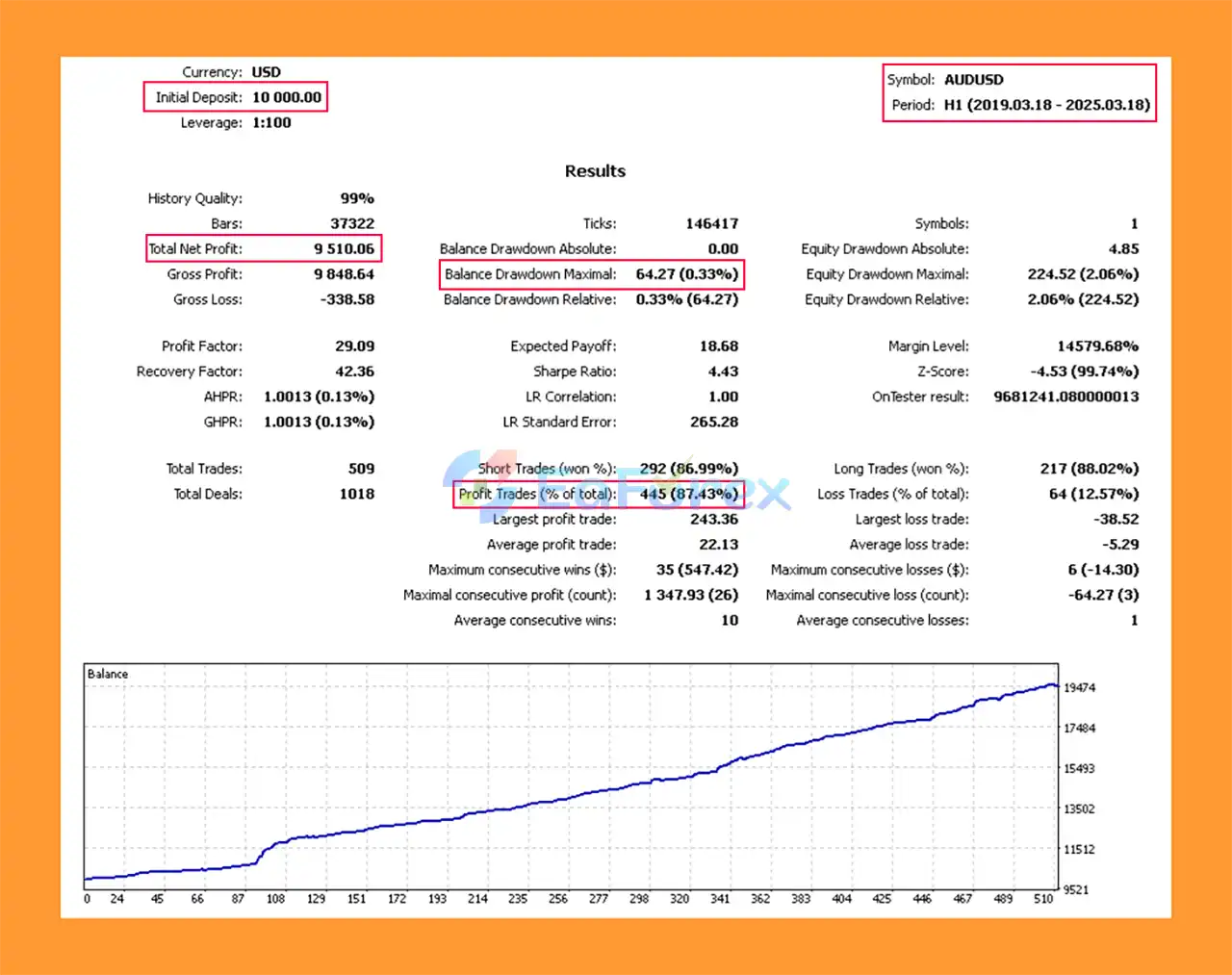
🔺AUDUSD – H1 (2019 – 2025)
- Initial Deposit: $10.000
- Total Net Profit: $9.510
- Win Rate: 87.43%
- Maximum Drawdown: 0.33%
Performance and Risk Management
The supplied product information does not provide verified numerical performance statistics such as:
- Net profit
- Profit Factor
- Win rate
- Maximum drawdown
- Recovery Factor
- Sharpe Ratio
- Total number of trades
Therefore, these metrics should not be added to the product description without supporting testing data.
Instead, Insight AInvestor MT5 provides configurable risk and trade-management parameters.
| Parameter | Function |
|---|---|
| Lot | Defines fixed trading volume |
| RiskOn | Enables/disables automatic risk management |
| Risk | Defines risk percentage for position sizing |
| LimitSeries | Sets maximum orders in a series |
| Protections | Configures protective trading levels |
| TakeProfit | Defines the take-profit level |
| StopLoss | Defines the stop-loss level |
| TrailingPendingStart | Starts trailing for pending orders |
| TrailingUnitaryStart | Starts trailing for individual orders |
| TrailingUnitaryStop | Applies trailing-stop management |
| MagicNumber | Identifies EA-generated orders |
| CommentOrders | Adds comments to orders |
| TypeFilling | Defines order-filling method |
Risk Management Considerations
The ability to configure risk parameters does not guarantee that losses will remain within a specific percentage.
Actual trading risk can be affected by market volatility, spreads, slippage, execution speed, liquidity, leverage, correlated positions, and broker conditions.
When applying the EA to multiple currency pairs simultaneously, traders should also consider total portfolio exposure, rather than evaluating the risk of each pair independently.
Weaknesses and Risk Warnings
No Guaranteed Performance
Automated trading does not guarantee profitable results. Historical testing and optimized settings may perform differently when market conditions change.
Multiple Currency Exposure
Trading several currency pairs simultaneously can diversify opportunities, but it can also increase risk when multiple pairs are exposed to the same underlying currency or market factor.
Extensive Configuration
The flexibility of Insight AInvestor MT5 can also make configuration more complex.
Incorrect settings for signal parameters, order series, lot sizes, or risk percentages may produce trading behavior that differs significantly from the intended strategy.
Order Series Risk
The LimitSeries parameter controls the maximum number of orders in a series. Traders should understand how multiple positions can affect margin usage and total exposure before increasing this value.
Market Execution Risk
Stop Loss and Take Profit settings do not eliminate execution risk. During fast markets, spreads can widen and positions may be closed at prices different from expected levels.
Broker Dependency
Trading conditions differ between brokers. Differences in spreads, commissions, execution, contract specifications, and order-filling methods can affect live performance.
Optimization Risk
If traders optimize the EA heavily against historical data, there is a possibility that the selected parameters may perform well in the tested period but less effectively in future market conditions.
Pros and Cons
Pros
- Designed for automated Forex trading on MetaTrader 5
- Multi-currency pair support
- Fully automated trade execution
- Flexible lot-size configuration
- Optional automatic risk management
- Configurable risk percentage
- Customizable signal parameters
- Order-series control
- Stop Loss functionality
- Take Profit functionality
- Pending-order trailing
- Individual-order trailing
- Magic Number support
- Custom order comments
- Configurable order-filling type
- Regular updates according to the supplied product information
- Ongoing user support
- Suitable for both basic and advanced parameter customization
Cons
- No verified performance statistics were supplied
- Extensive settings can make configuration more complex
- Multiple currency pairs can increase total exposure
- Order-series settings require careful risk management
- Results can vary according to broker and execution conditions
- Incorrect parameters can materially affect trading behavior
- Automated trading remains exposed to market volatility and slippage
- Historical optimization does not guarantee future performance
How to Install Insight AInvestor MT5
To install Insight AInvestor MT5 on MetaTrader 5:
- Open MetaTrader 5.
- Select File → Open Data Folder.
- Navigate to MQL5 → Experts.
- Copy the Insight AInvestor EA file into the Experts folder.
- Restart MetaTrader 5 or refresh the Navigator panel.
- Locate the EA under Expert Advisors.
- Open the desired currency-pair chart.
- Attach Insight AInvestor MT5 to the chart.
- Enable Algo Trading/AutoTrading.
- Configure the Lot or RiskOn/Risk settings.
- Configure the appropriate signal parameters.
- Set the desired Stop Loss and Take Profit values.
- Review the LimitSeries and protection settings.
- Configure trailing parameters if required.
- Check the Magic Number and order-comment settings.
- Test the EA using the MT5 Strategy Tester.
- Forward-test the configuration on a demo account before using real capital.
Recommended Testing Process
Before deploying the EA on a live account, traders should test the exact currency pairs, timeframe, broker conditions, and parameter configuration they intend to use.
Testing should include different market periods where possible rather than relying exclusively on a single historical period.
What’s Included in the Download Package?
🔺 Experts:
- Setting (If Any).docx
- Installation Guide.docx
Final Thoughts
In summary, Insight AInvestor MT5 is a flexible multi-currency automated trading Expert Advisor designed to combine configurable market signals with automated execution, risk management, order-series control, and position protection.
Its main strength is the level of customization available to traders. Users can control fixed or risk-based lot sizing, signal parameters, Stop Loss, Take Profit, trailing mechanisms, order limits, and other execution settings.
The EA can also be applied across multiple currency pairs, providing flexibility for traders who want to construct a broader automated Forex setup. However, multi-currency trading should be managed carefully because several positions can sometimes create substantial combined exposure.
The supplied product information does not include verified historical performance statistics, so traders should not judge the EA solely from its feature set. Instead, backtesting, forward testing, appropriate position sizing, and careful monitoring are important steps before live deployment.
Insight AInvestor MT5 can therefore be viewed as a configurable automated trading framework rather than a guaranteed-profit solution. Its real-world results will depend on the selected parameters, currency pairs, broker execution conditions, market environment, and overall risk-management approach.



