









-
 Unlimited Activations
-
 Instant delivery
-
 Easy to install






 Unlimited Activations
Instant delivery
Easy to install
Unlimited Activations
Instant delivery
Easy to install
 Free Update
 Free Install Support

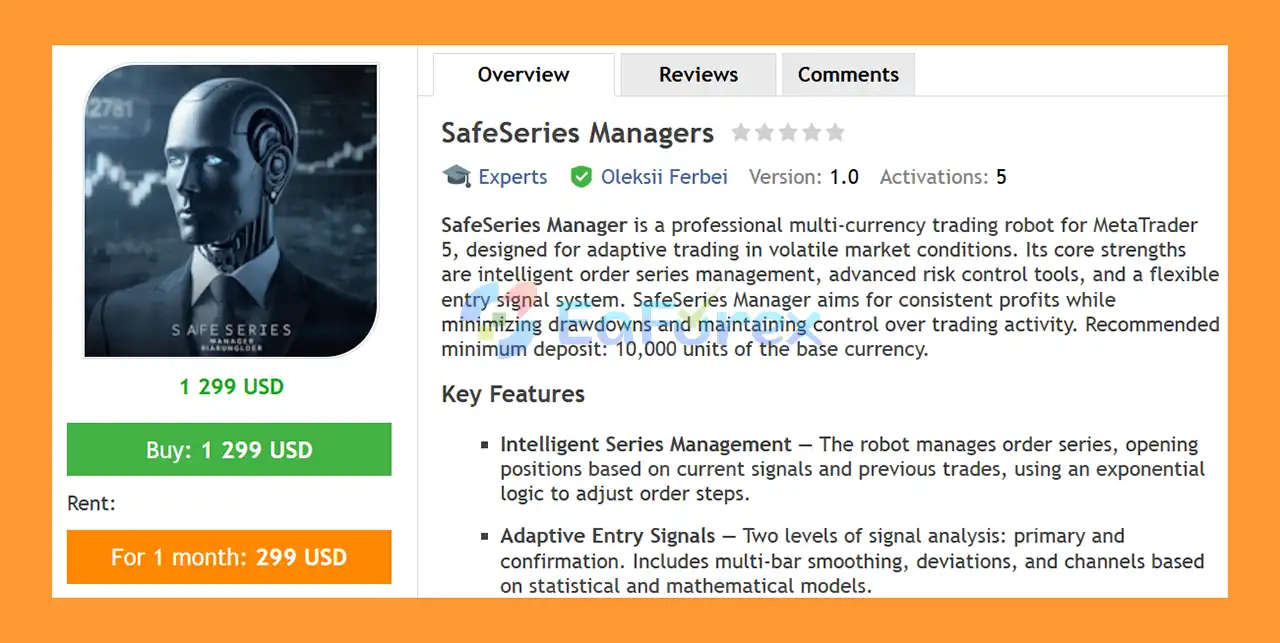
SafeSeries Managers MT5 is a professional multi-currency Expert Advisor for MetaTrader 5, designed to automate trading across major Forex pairs using adaptive entry signals, intelligent order-series management, and configurable risk controls.
The EA combines two levels of signal analysis with volatility and spread filters to identify potential trading opportunities. When market conditions meet the required criteria, SafeSeries Manager can open and manage a sequence of positions according to its predefined order-series logic.
A key component of the system is its adaptive order-series management. If the initial position moves against the strategy, additional orders may be added according to configurable series parameters, including OrderStepExponent and MaxOrdersInSeries.
Because this mechanism incorporates grid or martingale-style position expansion, appropriate risk management and sufficient account capital are particularly important.
The supplied recommendation is a minimum deposit of 10,000 units of the account’s base currency, with M15–H1 timeframes and ECN/RAW accounts with low spreads preferred.
>> Delivery time 24h-48h after payment.
>>> Refund if not delivered.
>>> You will receive the latest version without any limitations (ID+Time).>>Reviewed by Jason Stap <<
SafeSeries Managers MT5 Overview
SafeSeries Manager is designed to manage multiple positions as a coordinated trading series rather than treating every order as an isolated trade.
The system can adjust order spacing according to its configured OrderStepExponent, while MaxOrdersInSeries limits the maximum number of positions that can belong to a single series.
This allows traders to control the depth and structure of the position sequence.
The EA uses two levels of signal analysis:
The signal calculations incorporate configurable mathematical and statistical parameters, including smoothing, deviations, and channel widths.
This two-stage approach is designed to require confirmation before a new trading series is initiated.
SafeSeries Manager includes a configurable volatility filter.
Users can define:
This allows the EA to avoid trading when market volatility falls outside the selected operating range.
The system also monitors market spread conditions.
Users can configure:
These controls can help reduce exposure to unfavorable execution conditions.
SafeSeries Manager supports several position-sizing approaches, including:
Additional protection is provided through Stop Loss, Take Profit, and trailing-management settings.
SafeSeries Manager evaluates the market on each new bar and calculates its primary and confirmation signals.
The general process can be summarized as:
Signal Calculation → Confirmation → Market Filters → Initial Entry → Series Management → Profit/Drawdown Recovery → Series Closure
At the beginning of a new bar, the EA calculates its primary and confirmation signals using the configured signal parameters.
The primary signal can be adjusted through settings such as:
The confirmation layer uses corresponding parameters:
The EA checks whether the primary and confirmation signals agree.
A potential initial position is considered only when the required signals and market conditions are aligned.
Before entering a trade, SafeSeries Manager can evaluate volatility and spread conditions.
This helps prevent the EA from opening new positions when market conditions fall outside the configured parameters.
If the initial trade moves adversely, the EA can add additional positions according to its series-management rules.
This is where the system’s grid/martingale-style logic becomes relevant.
The number and spacing of additional positions are controlled by parameters such as:
These settings are important because increasing the number of positions can increase total market exposure and margin requirements.
When the series reaches its configured profit objective or recovers the relevant drawdown according to the strategy’s logic, the positions in the series can be closed together.
The EA can also use trailing management to control the series while it remains active.
SafeSeries Manager’s signal architecture is based on two separate analytical layers.
The primary signal establishes the main trading condition using configurable statistical and mathematical calculations.
Key parameters include:
SignalWindowLength
Controls the calculation window used by the primary signal.
MainSignalDegree
Defines the selected mathematical degree used by the signal calculation.
MainSignalDeviation
Controls the deviation component of the primary signal.
MainSignalChannelWidth
Defines the channel-width component used in the analysis.
The confirmation signal provides an additional layer of market validation.
Its configurable parameters include:
ConfirmSignalWindow
ConfirmSignalDegree
ConfirmSignalDeviation
ConfirmChannelWidth
The combination of primary and confirmation signals is intended to reduce entries when the required conditions are not aligned.
SafeSeries Manager provides flexible position-sizing options for different trading approaches.
Traders can use a predefined lot size through FixedLotSize.
This provides direct control over the initial order volume.
The EA can also calculate position size automatically according to its risk-management configuration.
RiskPerTradePercent allows users to define a percentage-based risk approach.
Because SafeSeries Manager can add positions to an existing series, traders should evaluate the total potential series exposure, not only the risk of the first position.
A low initial risk percentage does not necessarily mean low overall risk if multiple additional orders can be opened.
One of the most important characteristics of SafeSeries Manager is its ability to add positions when price moves against the initial trade.
This resembles a grid or martingale-style recovery mechanism.
The system uses:
to manage the position sequence.
This structure can potentially allow a series to recover after adverse price movement, but it also introduces significant risks.
If the market continues moving against the series for an extended period, additional positions can increase:
Therefore, users should carefully test the maximum possible series exposure before running the EA on a live account.
SafeSeries Manager provides several parameters for managing open positions.
DefaultStopLoss can be used to define the default protective stop level.
DefaultTakeProfit establishes the default profit objective for the trading system.
The EA also includes:
These parameters allow traders to configure trailing behavior once the series reaches the required stage.
Trailing management can help protect a profitable series while allowing the system to remain active if the market continues moving favorably.
SafeSeries Manager can be used across major Forex currency pairs, providing flexibility for traders who do not want to limit their automated trading to a single instrument.
The combination of primary and confirmation signals provides a structured entry process rather than relying on a single signal condition.
Volatility and spread filters allow users to define the market conditions in which the EA is permitted to trade.
Fixed lots, automatic risk calculation, and percentage-based risk provide multiple ways to configure trade volume.
Parameters such as MaxOrdersInSeries and OrderStepExponent provide direct control over how additional positions are introduced.
The EA is designed to support ECN trading environments, with broker execution modes and price normalization options included in the configuration.
Users can assign a custom ExpertMagicNumber and OrderComment, making it easier to distinguish SafeSeries Manager positions from other trading systems.
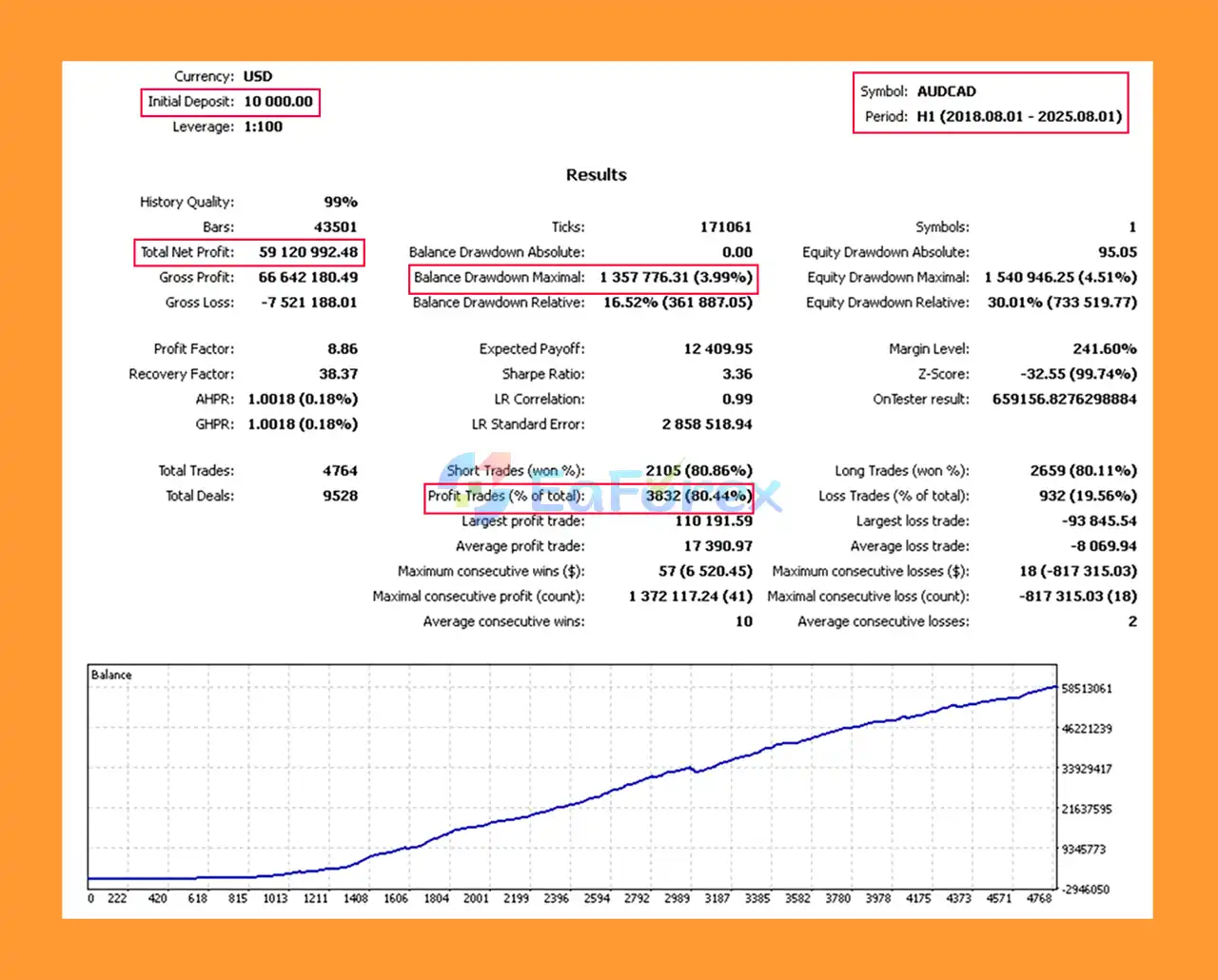
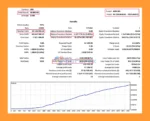
🔺AUDCAD – H1 (2018 – 2025)
SafeSeries Managers MT5 Backtess
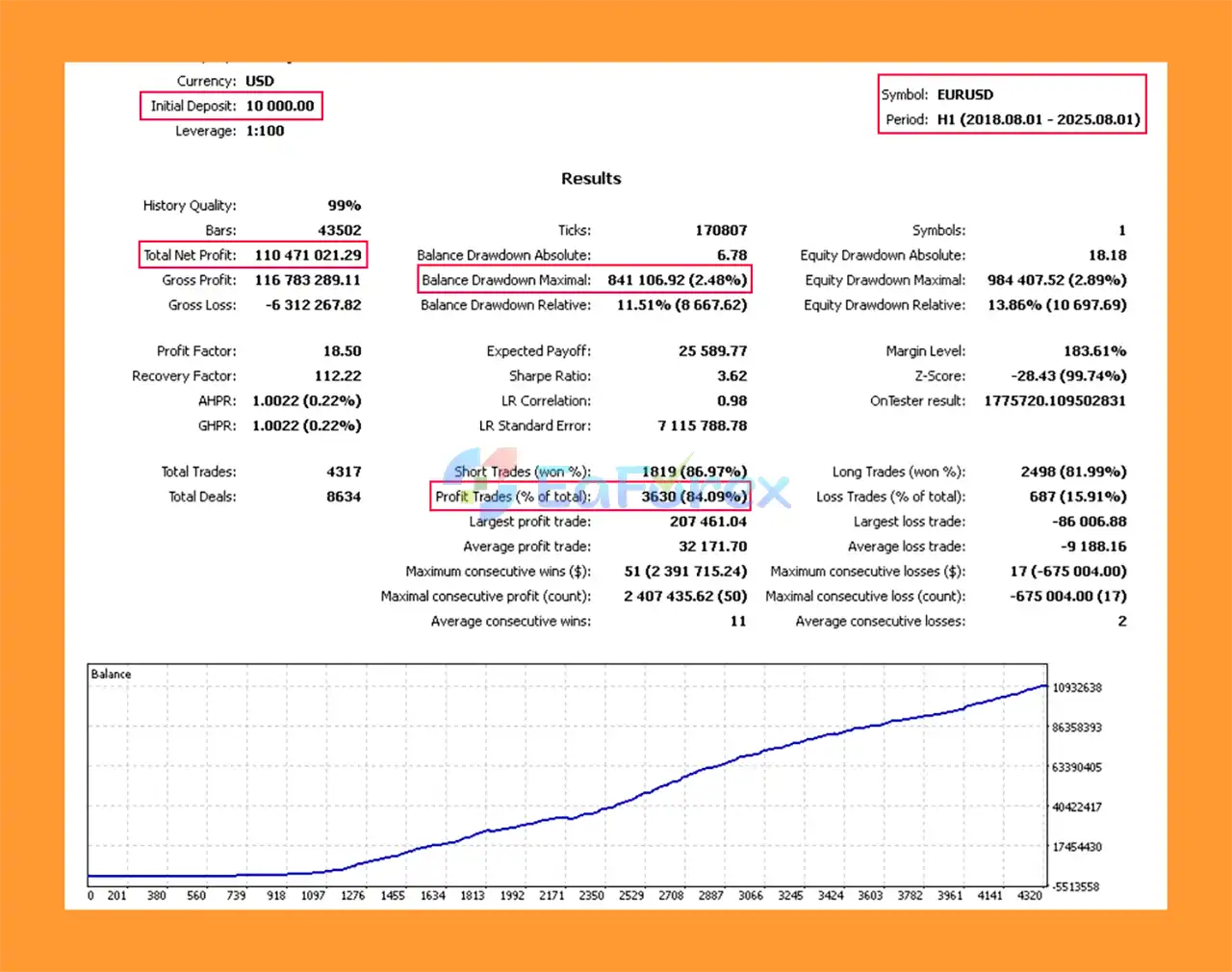
🔺EURUSD – H1 (2018 – 2025)
SafeSeries Managers MT5 Backtes
SafeSeries Manager is recommended for M15–H1 timeframes, with the supplied specifications indicating that these timeframes are intended to provide a suitable balance between signal accuracy and trading frequency.
Recommended operating conditions include:
| Parameter | Recommendation |
|---|---|
| Minimum Deposit | 10,000 base-currency units |
| Timeframes | M15–H1 |
| Instruments | Major Forex pairs |
| Broker | ECN / RAW |
| Spread | Low spread preferred |
| Lot Mode | Fixed or risk-based |
| Risk | Configurable |
| Account Type | ECN-compatible |
The recommended minimum deposit is an important consideration because the EA can manage multiple orders within a single series.
The larger account requirement provides greater room for managing position sequences and margin fluctuations, but a larger deposit does not eliminate the risk of substantial drawdown or loss.
Users should test the EA under unfavorable scenarios, including extended one-directional price movements, before determining an appropriate live risk level.
SafeSeries Manager provides extensive configuration options.
These settings give experienced traders considerable flexibility when adapting the EA to different brokers, instruments, and risk profiles.
Despite its extensive risk-management settings, SafeSeries Manager should not be considered a low-risk trading system simply because it includes protective parameters.
The primary risk comes from its series expansion mechanism.
When price moves against the initial position, additional orders may be opened. If the adverse movement continues, the series can accumulate significant exposure.
Important risks include:
Running the EA simultaneously on several currency pairs can also increase overall account exposure, particularly during broad market events affecting multiple currencies.
The recommended 10,000-unit minimum deposit should be viewed as a starting guideline, not a guarantee that the account will withstand every market condition.
Users should conduct forward testing and stress testing before deploying significant capital.
Install MetaTrader 5 through your preferred broker and log into your trading account.
Open:
File → Open Data Folder → MQL5 → Experts
Copy the SafeSeries Manager EA file into the Experts directory.
Restart MT5 or refresh the Expert Advisors section in the Navigator.
Choose one of the supported major Forex pairs and select an M15, M30, or H1 timeframe.
Drag the EA onto the selected chart and enable Algo Trading.
Review the primary and confirmation signal settings before activating the system.
Select the preferred:
Also review the maximum number of orders allowed in each series.
Set appropriate:
These settings should reflect the actual trading conditions offered by your broker.
Assign a unique Magic Number and Order Comment if the account contains other EAs or manual trades.
Run the EA on a demo account before using it with real capital.
Pay particular attention to the maximum number of positions in a series, total lot exposure, margin usage, and floating drawdown during unfavorable market conditions.
🔺 Experts:
In summary, SafeSeries Managers MT5 is a configurable multi-currency Expert Advisor that combines adaptive entry signals, volatility and spread filters, flexible money management, and automated order-series management.
Its two-level signal architecture is designed to evaluate market conditions before opening a series, while parameters such as MaxOrdersInSeries and OrderStepExponent control how additional positions are introduced.
The EA’s greatest distinguishing feature is also an important source of risk: its grid/martingale-style series recovery mechanism. This can create a structured approach to managing adverse trades, but it can also increase exposure substantially when markets continue moving against the position.
For this reason, SafeSeries Manager is better evaluated by looking beyond the initial entry signal and considering the maximum series exposure, margin requirements, drawdown behavior, and worst-case market scenarios.
With a recommended minimum deposit of 10,000 units of the base currency, M15–H1 operation, and ECN/RAW low-spread conditions, the system is positioned as a configurable solution for traders who understand automated series-based trading and its associated risks.
As always, past performance does not guarantee future results. Proper forward testing, conservative risk settings, and sufficient account capital are essential when evaluating any automated trading strategy.
1. What is SafeSeries Managers MT5?
SafeSeries Managers MT5 is a multi-currency Expert Advisor built for MetaTrader 5, designed to trade adaptively under volatile market conditions using intelligent series management and advanced risk control.
2. How does SafeSeries Managers MT5 manage risk?
The EA offers automatic lot sizing, percentage-based risk control, trailing stops, and volatility filters to ensure safe and consistent trading performance.
3. Does SafeSeries Managers MT5 use Martingale or Grid strategies?
No. It uses smart series management logic instead of risky Martingale or Grid systems, maintaining controlled exposure and low drawdowns.
4. Can SafeSeries Managers MT5 trade multiple currency pairs?
Yes. It supports multi-currency trading across major Forex pairs, optimized for M15 to H1 timeframes and ECN broker environments.
5. Is SafeSeries Managers MT5 beginner-friendly?
Absolutely. It features a user-friendly setup with simple configuration options, suitable for both new and experienced traders.
6. Why should I choose SafeSeries Managers MT5?
Because it delivers adaptive trading performance, robust risk management, and proven profitability — with backtests showing up to 84% win rate and drawdowns below 4%.
In stock
In stock
In stock
In stock
In stock
Out of stock
No account yet?
Create an Account












 Automatic EA
 EA Best Seller
 Expert Advisor MT4
 Expert Advisor MT5
 HFT EA


Reviews
Clear filtersThere are no reviews yet.