









-
 Unlimited Activations
-
 Instant delivery
-
 Easy to install






 Unlimited Activations
Instant delivery
Easy to install
Unlimited Activations
Instant delivery
Easy to install
 Free Update
 Free Install Support

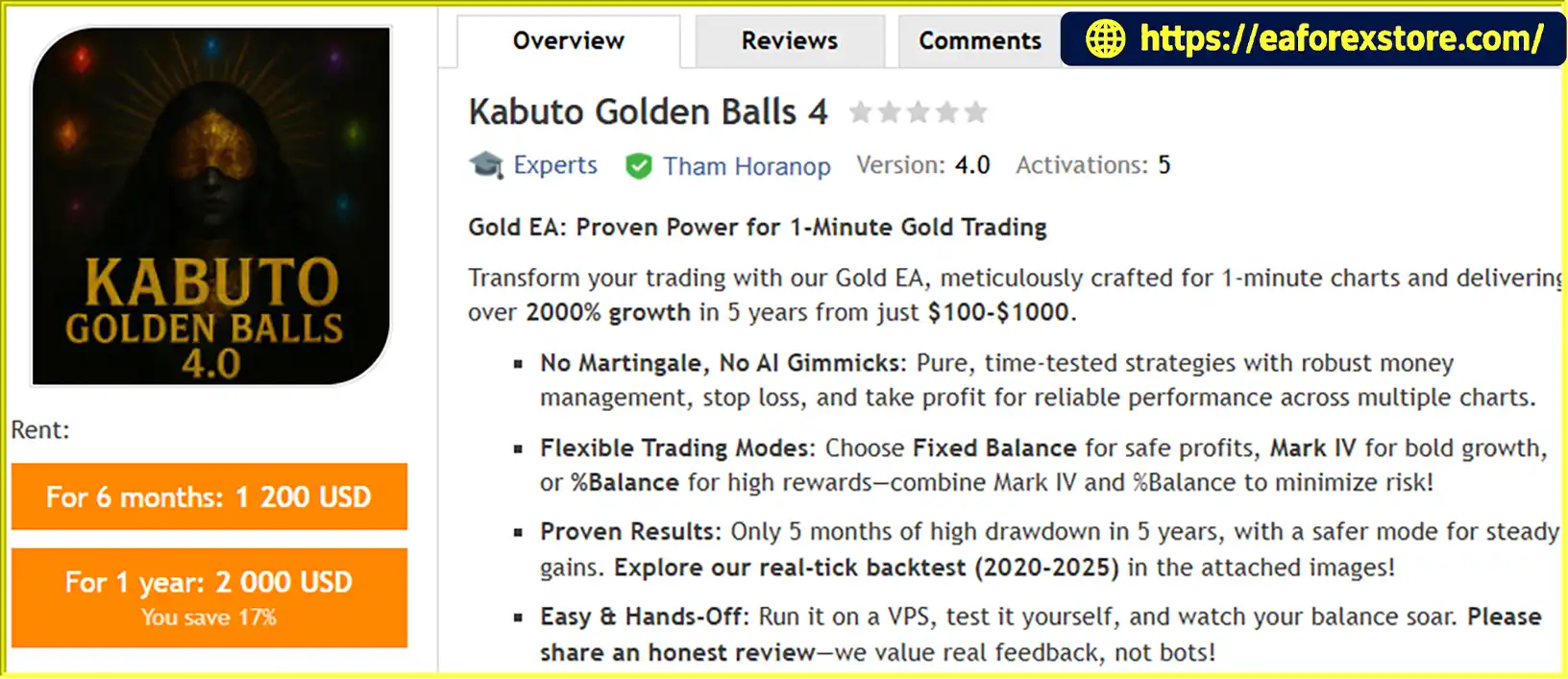
Kabuto Golden Balls 4 EA MT5 is an automated Expert Advisor designed for Gold (XAUUSD) trading on the MetaTrader 5 platform, with a primary focus on the 1-minute (M1) timeframe. It aims to combine automated trade execution with configurable money management, Stop Loss, and Take Profit settings.
According to the developer, Kabuto Golden Balls EA MT5 uses a trading approach that does not rely on Martingale or AI-based trading claims. Instead, it emphasizes predefined trading logic and several position-sizing modes intended to accommodate different trading preferences.
The EA offers three money management modes: Fixed Balance, Mark IV, and %Balance. Each mode is presented as a different approach to managing account exposure and trading growth. However, traders should verify how each mode calculates position size and understand its potential drawdown before selecting a configuration.
The developer also advertises historical real-tick backtesting covering 2020–2025, claiming growth of more than 2,000% over five years from an initial account balance in the $100–$1,000 range. These figures are developer-provided claims and should be independently reviewed against the complete backtest reports before being treated as evidence of expected performance.
With its M1 Gold trading focus, configurable money management, and VPS compatibility, Kabuto Golden Balls 4 EA MT5 is intended for traders interested in automated XAUUSD trading. As with any Forex robot, its suitability depends on verified testing results, risk settings, broker execution, and market conditions.
>>> Delivery time 24h-48h after payment.
>>> Refund if not delivered.
>>> You will receive the latest version without any limitations (ID+Time).Reviewed by Jason Stap <<<
Kabuto Golden Balls EA MT5 Overview
Kabuto Golden Balls 4 EA MT5 is designed primarily for trading Gold on the 1-minute chart.
The M1 timeframe provides frequent price updates and can present many short-term trading opportunities. However, it can also expose an EA to market noise, sudden price movements, spread changes, and increased transaction costs.
Traders should evaluate the EA using the exact XAUUSD symbol, account type, and broker conditions intended for live trading.
The developer states that Kabuto Golden Balls 4 EA MT5 does not use Martingale.
Martingale systems generally increase position size after losses in an attempt to recover previous losses through subsequent trades. Avoiding this approach can reduce exposure to one particular form of escalating position size.
Nevertheless, the absence of Martingale does not guarantee low drawdown or consistent profits. The EA’s actual risk still depends on its entry logic, position sizing, stop-loss placement, and behavior during unfavorable market conditions.
The Fixed Balance mode is presented as an option for traders who prefer a more controlled approach to account management.
Its exact calculation method is not described in the supplied information. Traders should confirm whether position sizing is based on a specified reference balance, a fixed monetary amount, or another internal rule.
Do not assume this mode guarantees safe profits or prevents account losses. Its actual risk profile should be established through testing.
Kabuto Golden Balls 4 EA MT5 also offers a Mark IV mode, which the developer describes as a more aggressive growth-oriented option.
Before using this mode, traders should establish how it changes trading volume, position sizing, or other money management parameters. The available product description does not provide enough technical detail to quantify its risk.
A more aggressive configuration may increase both potential returns and potential losses. It should be tested separately from other modes rather than assumed to provide superior performance.
The %Balance mode provides another money management option for adjusting the EA’s trading behavior according to account balance.
The developer presents this mode as suitable for pursuing higher growth. However, the exact percentage calculation and whether position size changes as the account balance fluctuates are not specified.
Traders should review the available inputs and monitor the actual lot sizes generated by the EA. The mode’s name alone does not establish a guaranteed percentage risk per trade.
Having three money management modes gives traders options when evaluating different account management approaches.
Before selecting a mode, consider:
The developer suggests combining Mark IV and %Balance to reduce risk, but this claim should not be accepted without documentation and comparative testing. Combining settings does not inherently reduce risk.
The developer states that the EA includes Stop Loss and Take Profit functionality.
Stop Loss defines the intended price level for limiting a trade’s loss, while Take Profit defines the intended level for closing a trade after a favorable movement.
These controls help establish trade exit conditions, but they cannot guarantee exact execution prices. Slippage, spread widening, gaps, and broker execution conditions can affect the final result.
The precise default Stop Loss and Take Profit values were not included in the supplied product description, so traders should verify the settings before live deployment.
The developer advertises real-tick backtesting covering the 2020–2025 period and claims more than 2,000% growth over five years. The description also states that only five months experienced high drawdown during that period.
These claims may be useful starting points for further investigation, but the complete test reports are needed to assess their reliability.
Important information to review includes:
Historical results are not guarantees of future performance, and real-tick modelling alone does not ensure that a backtest accurately represents every aspect of live trading.
The developer recommends using a VPS for automated operation.
A Virtual Private Server can keep MetaTrader running when a trader’s personal computer is switched off, provided the server, platform, connection, and trading environment remain operational.
A VPS does not make a trading strategy more profitable by itself. Traders should also monitor platform connectivity, EA status, account access, and order execution.
The developer states that post-purchase assistance is available to help users install and configure the EA.
This support may be helpful for traders who are unfamiliar with MetaTrader 5 or automated trading settings. Buyers should confirm the availability and scope of support with the seller before purchase.
Based on the supplied product description, Kabuto Golden Balls 4 EA MT5 automates Gold trading on the M1 timeframe and allows users to choose among three money management modes.
Step 1: Set up MetaTrader 5
Install the EA on a compatible MT5 platform and open the intended XAUUSD chart.
Step 2: Select a money management mode
Choose Fixed Balance, Mark IV, or %Balance according to the intended trading plan. Verify how the selected mode calculates lot size and how it affects account exposure.
Step 3: Review trade protection settings
Check the Stop Loss and Take Profit inputs and confirm how the EA handles open positions and adverse price movements.
Step 4: Run the automated strategy
The EA executes its built-in trading logic according to its configuration. The supplied description does not disclose the complete entry rules, indicators, or trade exit algorithm.
Step 5: Monitor account performance
Review open trades, trading volume, account equity, and drawdown. A VPS can support continuous platform operation, but it does not remove the need for monitoring.
Step 6: Test the configuration
Use MetaTrader 5’s Strategy Tester and a demo account to evaluate the selected money management mode, broker conditions, and performance across different market environments.
Kabuto Golden Balls 4 EA MT5 may appeal to traders looking for an automated Gold trading system with multiple money management options.
These features may be useful for traders evaluating automated Gold trading, but they do not establish the EA’s profitability or safety. The full backtest report and actual risk characteristics should be reviewed before purchase or live use.
Kabuto Golden Balls 4 EA MT5 Backtets
Risk management is especially important when trading Gold on a short timeframe. M1 strategies can be affected by rapid price movements, changing spreads, slippage, and transaction costs.
The Fixed Balance, Mark IV, and %Balance modes should be tested individually before any combination is considered.
Confirm how each mode determines position size, whether it changes lot size after losses, and whether the selected settings can cause exposure to grow as the account balance changes.
Do not assume that combining Mark IV and %Balance reduces risk without evidence from the EA’s documentation or comparative testing.
The developer’s statement that only five months experienced high drawdown over a five-year period requires clarification. It does not, by itself, reveal the size or duration of the drawdown.
Review both balance drawdown and equity drawdown, including the largest observed percentage decline and the recovery time. Floating losses may be significant even when closed-trade statistics appear favorable.
Confirm the actual Stop Loss and Take Profit values in the EA inputs. Check how these values interact with lot size and XAUUSD contract specifications.
A Stop Loss helps define intended risk but does not guarantee the final monetary loss will remain within an exact amount under all market conditions.
M1 trading can be particularly sensitive to spreads, commissions, and slippage.
Use realistic broker settings during backtesting and verify results on a demo account with the intended account type. A strategy that performs well without realistic transaction costs may behave differently in live trading.
A VPS can help maintain platform availability, but connection failures, platform restarts, broker outages, and configuration errors can still interrupt automated trading.
Check that the EA is running correctly and that the trading account remains accessible.
Before committing real money:
Follow these general steps to install Kabuto Golden Balls 4 EA MT5 in MetaTrader 5.
.ex5 file in the MQL5/Experts directory. If the developer provides an .mq5 source file, follow the appropriate compilation instructions.Exact installation and configuration requirements may vary depending on the version supplied by the developer.
>>> Join VIP Membership Now <<<
Kabuto Golden Balls 4 EA MT5 is an automated Gold trading robot designed for the M1 timeframe, offering three money management modes, Stop Loss and Take Profit functionality, and a workflow suitable for VPS operation.
Its stated lack of Martingale may appeal to traders who want to avoid one common form of progressive lot sizing. However, risk still depends on the EA’s actual entry logic, position-sizing rules, exit settings, and behavior during adverse market conditions.
The developer advertises more than 2,000% growth over five years and real-tick backtesting for 2020–2025. These are significant performance claims and should be evaluated using complete reports that disclose maximum equity drawdown, trading costs, position-sizing settings, and the testing methodology.
Before purchasing or trading Kabuto Golden Balls 4 EA MT5 with real funds, verify the backtest evidence, test each money management mode independently, and evaluate performance on a demo account with your intended broker. Historical performance is not a guarantee of future profits.
1. What is Kabuto Golden Balls 4 EA MT5?
Kabuto Golden Balls 4 EA MT5 is an automated Expert Advisor designed for Gold (XAUUSD) trading on MetaTrader 5, primarily using the M1 (1-minute) timeframe. It includes configurable money management modes, Stop Loss and Take Profit functionality, and support for VPS operation. According to the developer, the EA does not use Martingale or rely on AI-based trading claims.
2. Which trading instrument and timeframe does Kabuto Golden Balls 4 EA MT5 support?
The EA is designed primarily for XAUUSD (Gold) on the M1 timeframe. Short-term Gold trading can present frequent opportunities, but it is also sensitive to spread changes, slippage, volatility, and transaction costs. Traders should test the EA using their broker's actual XAUUSD symbol and account conditions before live deployment.
3. What money management modes are available in Kabuto Golden Balls 4 EA MT5?
Kabuto Golden Balls 4 EA MT5 provides three money management modes:
Fixed Balance: An account-management option whose exact calculation method should be confirmed.
Mark IV: Described by the developer as a more aggressive, growth-oriented option.
%Balance: An alternative mode associated with account-balance-based management.
The supplied description does not specify the exact lot-sizing formulas for these modes. Traders should verify how each mode determines position size and evaluate its drawdown before choosing a configuration.
4. Does Kabuto Golden Balls 4 EA MT5 use Martingale?
According to the developer, Kabuto Golden Balls 4 EA MT5 does not use Martingale. This means it is not presented as relying on the conventional approach of progressively increasing position sizes after losses to recover previous losses. However, the absence of Martingale does not eliminate trading risk, and the EA can still experience losing trades and significant drawdown.
5. Does Kabuto Golden Balls 4 EA MT5 include Stop Loss and Take Profit?
Yes. The supplied product description states that Kabuto Golden Balls 4 EA MT5 includes Stop Loss and Take Profit functionality. These settings establish intended exit levels for individual trades. However, the default values were not provided, so users should check the EA's inputs before trading. Slippage, spread widening, gaps, and broker execution conditions can also affect the final exit price.
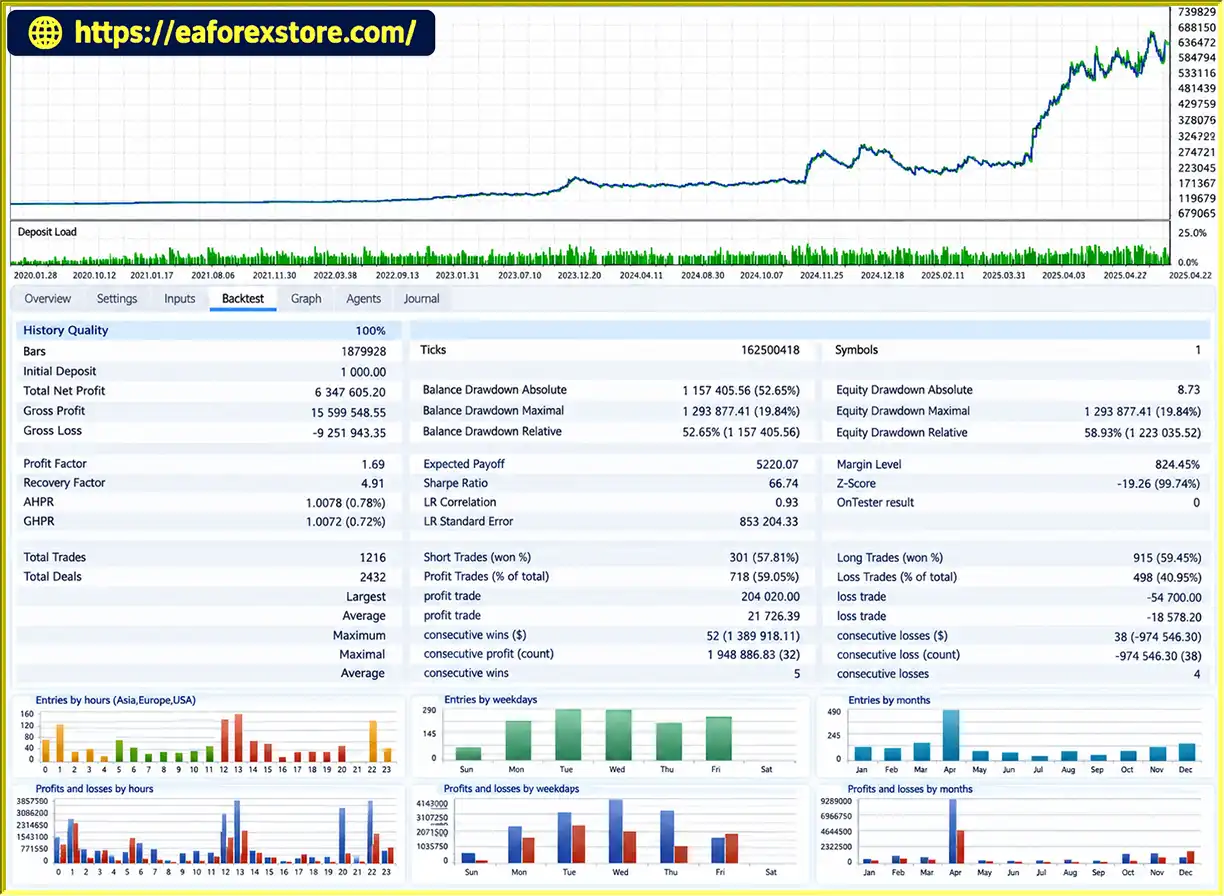
6. What are the reported backtest results for Kabuto Golden Balls 4 EA MT5?
The supplied product description reports the following results:
Initial deposit: $1,000
Total net profit: $6,347,605.20
Win rate: 59.05%
Maximum drawdown: 19.84%
The developer also advertises historical real-tick backtesting covering 2020–2025, with growth exceeding 2,000% over five years. These figures should be treated as reported claims until the complete original test reports have been reviewed. Verify the testing period, lot-sizing settings, transaction costs, and maximum equity drawdown before relying on the results.
7. Can Kabuto Golden Balls 4 EA MT5 run continuously on a VPS?
Yes. The developer describes the EA as compatible with VPS-based operation. A Virtual Private Server can help keep MetaTrader 5 running when a personal computer is switched off, provided the platform and server remain operational. A VPS does not guarantee profitability, and users should periodically check connectivity, EA status, open positions, and account risk.
8. Is Kabuto Golden Balls 4 EA MT5 suitable for beginners, and does it guarantee profits?
Beginners may find the automated execution and multiple money management options useful, but they should first understand lot sizing, leverage, Stop Loss, and drawdown. Test the EA with historical data and a demo account, and compare the three money management modes before considering live trading. Kabuto Golden Balls 4 EA MT5 does not guarantee profits, and historical backtest results cannot predict future performance with certainty.
In stock
In stock
In stock
In stock
In stock
Out of stock
No account yet?
Create an Account












 Automatic EA
 EA Best Seller
 Expert Advisor MT4
 Expert Advisor MT5
 HFT EA


Reviews
Clear filtersThere are no reviews yet.