









-
 Unlimited Activations
-
 Instant delivery
-
 Easy to install






 Unlimited Activations
Instant delivery
Easy to install
Unlimited Activations
Instant delivery
Easy to install
 Free Update
 Free Install Support

Morpheus Algo EA MT5 is an automated Expert Advisor designed for MetaTrader 5, offering trading logic for Gold (XAUUSD) and EURUSD within a single system. It combines an algorithmic trading engine with configurable position sizing, instrument-specific Stop Loss and Take Profit settings, trailing stop management, and on-chart market visualization.
The EA allows traders to select the intended trading logic for XAUUSD or EURUSD and configure risk levels from 0 to 5. Users can choose between automatic lot sizing and fixed lot operation, providing flexibility when adapting the EA to different account sizes and trading preferences.
Morpheus Algo EA MT5 also includes separate exit settings for each instrument, allowing traders to customize trade management according to the selected symbol. Additional options include spread and slippage limits, an optional news filter, and prop-firm drawdown limits.
Beyond automated execution, the EA features an on-chart visualization panel designed to display market structure information, including a range scanner, Buy-Side Liquidity (BSL) and Sell-Side Liquidity (SSL) levels, an Equilibrium (EQ) midpoint, Break of Structure (BOS) markers, and highlighted price zones.
With two supported instruments, configurable risk settings, and visual market context, Morpheus Algo EA MT5 offers an integrated approach to automated trading. However, actual performance depends on the selected configuration, broker execution, market conditions, and the underlying trading logic.
>>> Delivery time 24h-48h after payment.
>>> Refund if not delivered.
>>> You will receive the latest version without any limitations (ID+Time).Reviewed by Jason Stap <<<
Morpheus Algo EA MT5 supports selectable trading logic for two major markets: Gold (XAUUSD) and EURUSD.
Gold can experience sharp price movements and changing spreads, while EURUSD often responds to currency-market developments and major economic announcements. Supporting both instruments gives traders the option to evaluate the EA across different market environments.
The EA provides separate Take Profit, Stop Loss, and trailing stop parameters for each instrument. Traders should test each configuration independently rather than assuming that the same settings will perform equally well on both markets.
Morpheus Algo EA MT5 supports two position-sizing approaches:
Automatic sizing may help standardize position sizing according to the EA’s calculation method, while fixed lots offer more direct control over trading volume.
The available risk levels range from 0 to 5. These values represent selectable sizing profiles, not explicitly stated risk percentages per trade. Traders should confirm how each profile affects actual position volume before using the EA on a live account.
The EA includes risk-level settings from 0 to 5, allowing users to select a preferred sizing profile.
A risk-level number should not be interpreted as a percentage of account equity unless the developer explicitly confirms that relationship. The resulting position size depends on the EA’s internal risk calculations and the selected instrument.
Before deployment, traders should test the available profiles in MetaTrader 5’s Strategy Tester and verify the resulting trade volumes on a demo account.
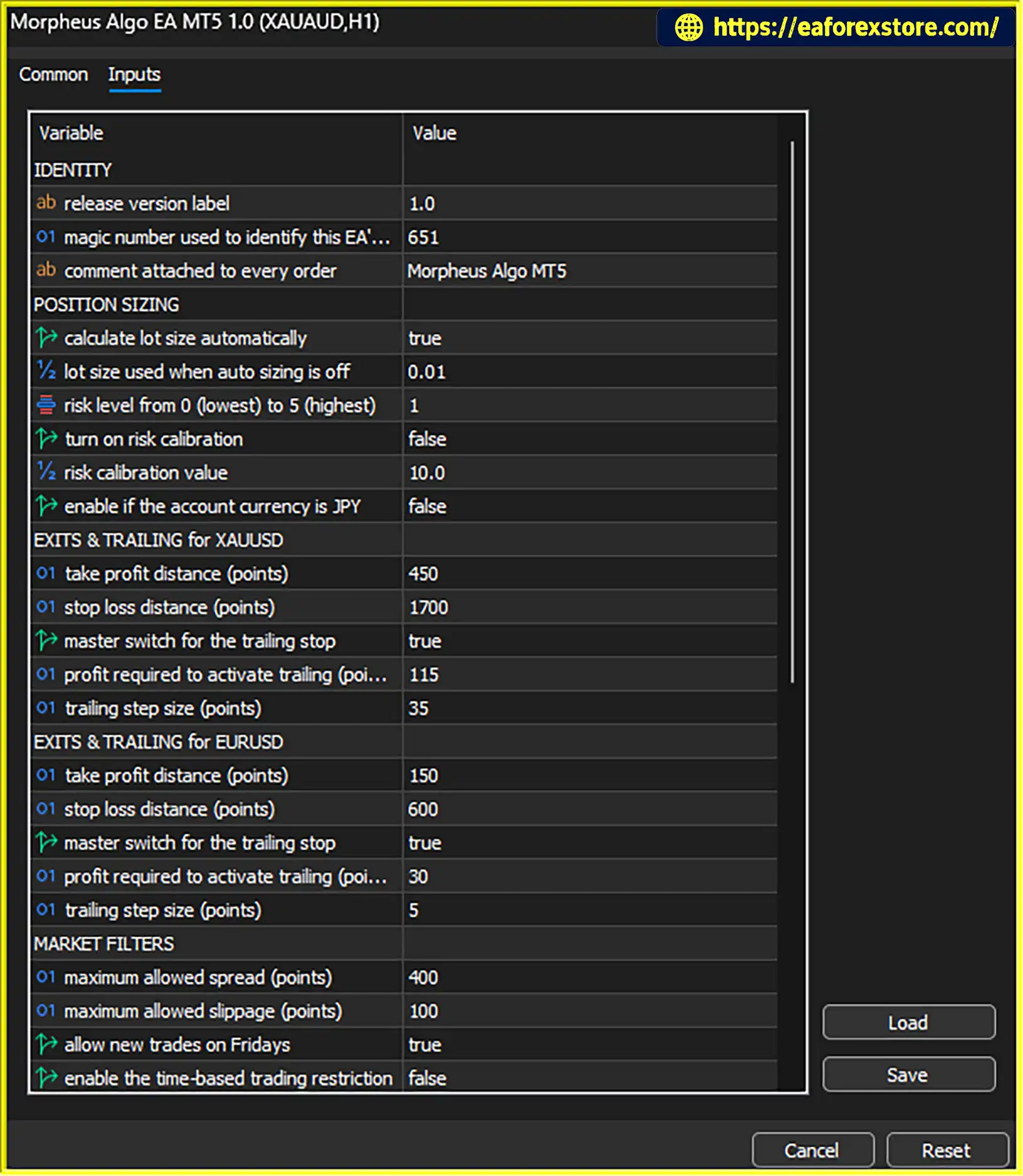
Morpheus Algo EA MT5 provides independent Stop Loss (SL) and Take Profit (TP) settings for XAUUSD and EURUSD.
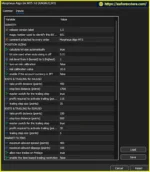
The supplied configuration includes the following values:
| Parameter | XAUUSD | EURUSD |
|---|---|---|
| Take Profit | 450 points | 150 points |
| Stop Loss | 1,700 points | 600 points |
| Trailing stop | Enabled | Enabled |
| Trailing activation | +115 points | +30 points |
| Trailing step | 35 points | 5 points |
These values are configuration examples, not guarantees of trading performance. They should be reviewed against the broker’s symbol specifications and the intended trading setup.
Because the distances are expressed in points, their price and monetary values depend on the instrument’s point size, contract specifications, and position volume.
The EA includes trailing stop management with configurable activation and step parameters.
A trailing stop begins managing the exit after the specified favorable price movement has been reached. It can then adjust the stop-loss level according to the configured step as the market develops.
This feature can help protect open-trade gains while allowing positions to remain open during favorable movements. However, trailing stops may close trades during temporary price retracements, and they do not guarantee that a trade will close at a particular profit.
Morpheus Algo EA MT5 allows trailing settings to be configured separately for XAUUSD and EURUSD.
The EA provides spread and slippage controls to help manage trade execution conditions.
These controls may help reduce exposure to unfavorable execution conditions, but they cannot eliminate all trading costs or guarantee execution at the requested price.
Traders should check typical spreads and execution behavior with their broker, especially during volatile market periods and major news releases.
Morpheus Algo EA MT5 includes an optional news filter that can be enabled to account for selected economic announcements.
Economic releases can trigger rapid movements in Gold and EURUSD, potentially increasing spreads, volatility, and slippage. A news filter may help traders configure the EA to avoid certain periods around scheduled events.
The supplied preset has the news filter disabled. Traders who want to use this feature should enable it, review its available settings, and verify how it behaves before live deployment.
The effectiveness of the filter depends on its implementation, event coverage, and configuration.
The EA also offers optional prop-firm drawdown limits.
These controls may be useful for traders who operate under proprietary trading firm rules or want to monitor defined account drawdown thresholds. However, the available description does not specify the exact calculation method, thresholds, or actions taken when a limit is reached.
The supplied preset has these limits disabled. Traders should confirm the supported rules and enable the relevant controls if they are needed.
These settings should not be treated as a guarantee of compliance with a prop firm’s requirements. Account rules, daily loss calculations, equity limits, and execution behavior must be checked independently.
Morpheus Algo EA MT5 includes a visual panel designed to display market structure information directly on the chart.
The supplied XAUUSD H1 visualization includes:
These visual elements can help traders review the market context alongside automated trading activity. However, chart markings should not be interpreted as guaranteed predictions or proof that a particular trade will be profitable.
The supplied visualization refers specifically to XAUUSD on the H1 timeframe. Its availability and appearance may depend on the selected instrument and chart configuration.
Morpheus Algo EA MT5 combines selectable instrument-specific trading logic with configurable risk management and exit controls.
Step 1: Select the trading instrument
Choose the intended XAUUSD or EURUSD trading logic and confirm that the correct broker symbol is being used.
Step 2: Configure position sizing
Select automatic lot sizing or fixed lot operation. If using automatic sizing, choose a risk level from 0 to 5 and verify how it affects actual trade volume.
Step 3: Set instrument-specific exits
Review the Stop Loss, Take Profit, trailing activation, and trailing step settings for the selected instrument. The supplied configuration uses different values for Gold and EURUSD.
Step 4: Configure execution filters
Set the spread and slippage limits according to the broker’s execution conditions. Enable the optional news filter or prop-firm drawdown limits if required.
Step 5: Monitor market context
Use the on-chart visualization to review the available range, liquidity levels, EQ midpoint, BOS markers, and highlighted price zones.
Step 6: Test and evaluate
Run the EA in the Strategy Tester and forward-test it on a demo account. Evaluate its trade frequency, drawdown, execution quality, and behavior under different market conditions before considering live trading.
The EA’s exact entry and exit logic is built into its algorithm, but the supplied description does not provide enough detail to reproduce or independently verify the full strategy.
Morpheus Algo EA MT5 may appeal to traders seeking an automated trading system with selectable Gold and EURUSD logic, customizable position sizing, and visual market context.
These features provide configuration flexibility, but they do not establish that the EA is profitable. Traders should base their decisions on verified performance data and testing under realistic trading conditions.
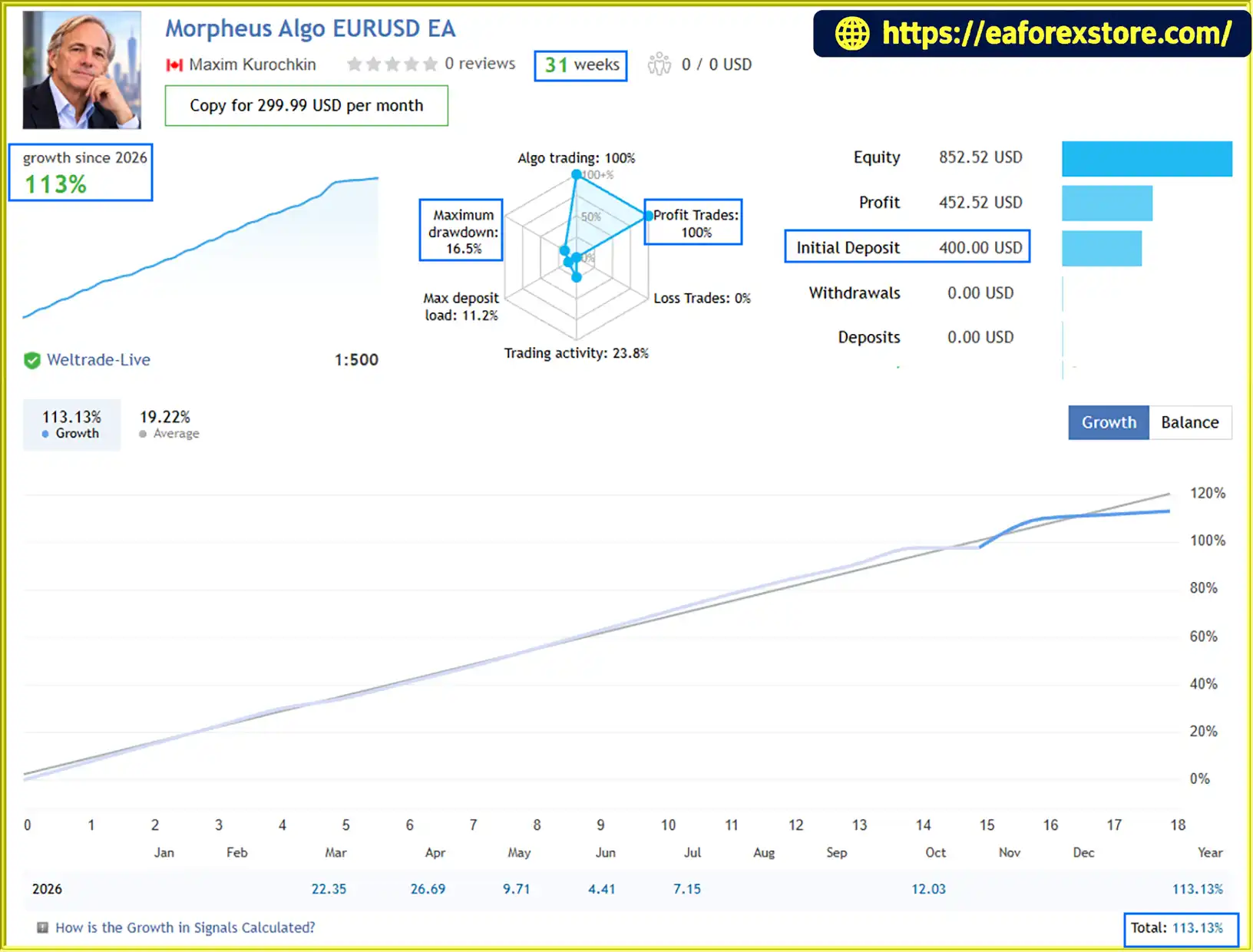
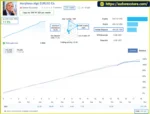
🔺Morpheus Algo EURUSD EA – 31 consecutive weeks
Morpheus Algo EA MT5 Live Signal Results
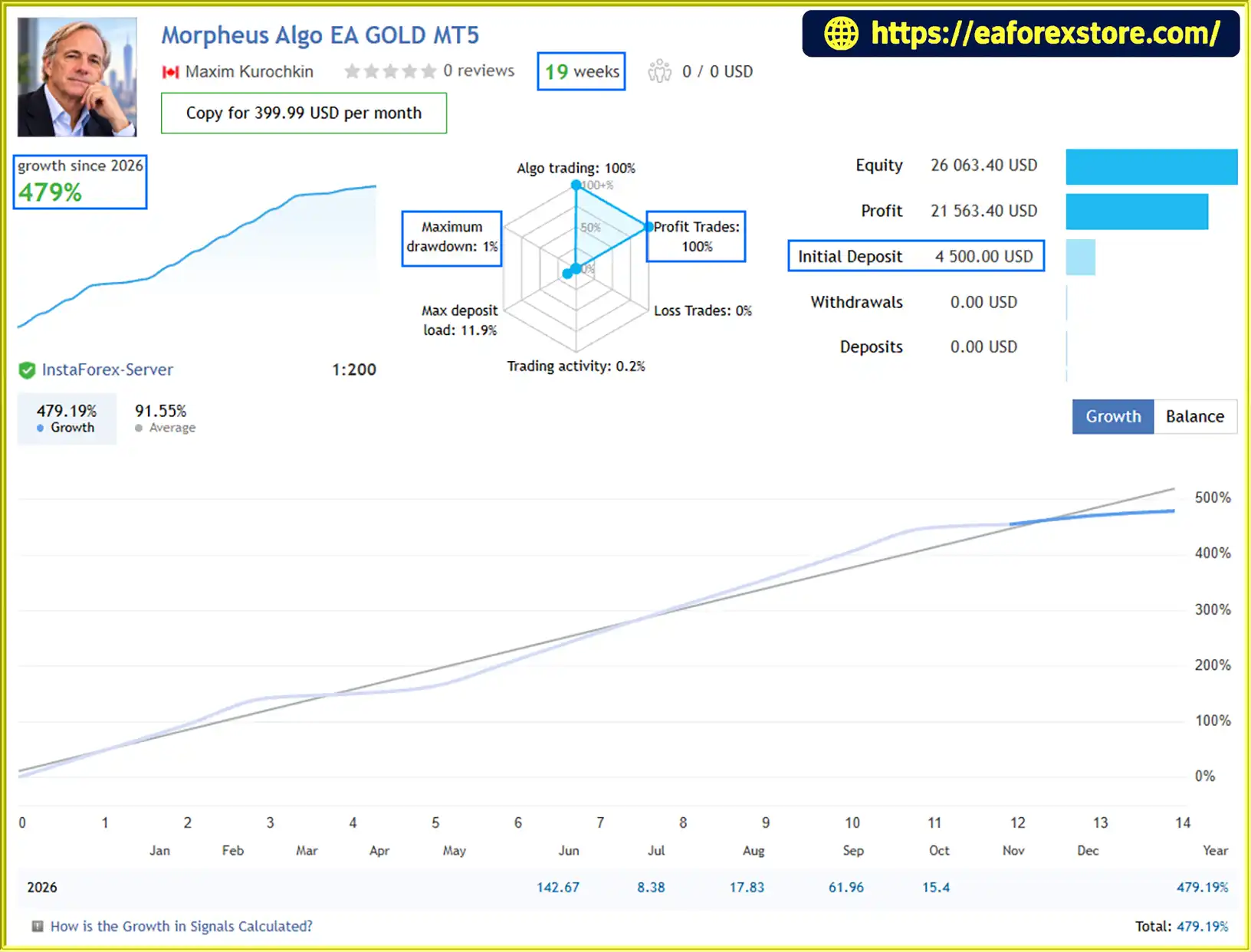
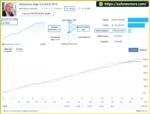
🔺Morpheus Algo EA GOLD MT5 – 19 consecutive weeks
Morpheus Algo EA MT5 Live Signal
Risk management is particularly important when trading leveraged instruments such as Gold and EURUSD. Morpheus Algo EA MT5 offers several configurable controls, but their settings and limitations should be understood before use.
The EA’s risk levels range from 0 to 5, but the supplied information does not define them as percentages of account equity.
Confirm the relationship between each level and the resulting position size. Do not assume that a higher or lower number corresponds to a particular percentage risk without documentation or testing.
The supplied XAUUSD and EURUSD settings use different point distances for Stop Loss and Take Profit.
Before applying them, verify the broker’s point size, tick value, contract specifications, and minimum stop-distance requirements. The monetary impact of a price movement depends on position volume and the instrument’s specifications.
The supplied preset leaves the news filter and prop-firm drawdown limits disabled. Traders who require these functions must enable and configure them.
Confirm how the news filter identifies events and how the drawdown controls calculate account losses before relying on them.
Spread and slippage can affect the result of automated trades, particularly during news releases, rapid price movements, and periods of reduced liquidity.
Test the EA using the intended broker and account type. A filter can restrict certain conditions, but it cannot guarantee favorable execution.
Use the MetaTrader 5 Strategy Tester to examine historical behavior and a demo account to evaluate forward execution.
Review performance across different market periods and assess net results, drawdown, trade frequency, average win and loss, and the effect of transaction costs. Historical results do not guarantee future performance.
Leveraged trading can lead to substantial losses, including the loss of all capital allocated to trading.
Follow these general steps to install Morpheus Algo EA MT5 on MetaTrader 5.
setting
.ex5 file in the MQL5/Experts directory. If the provider supplies an .mq5 source file, follow the developer’s compilation instructions.Always confirm the selected symbol, point size, account type, and broker execution settings before allowing the EA to trade.
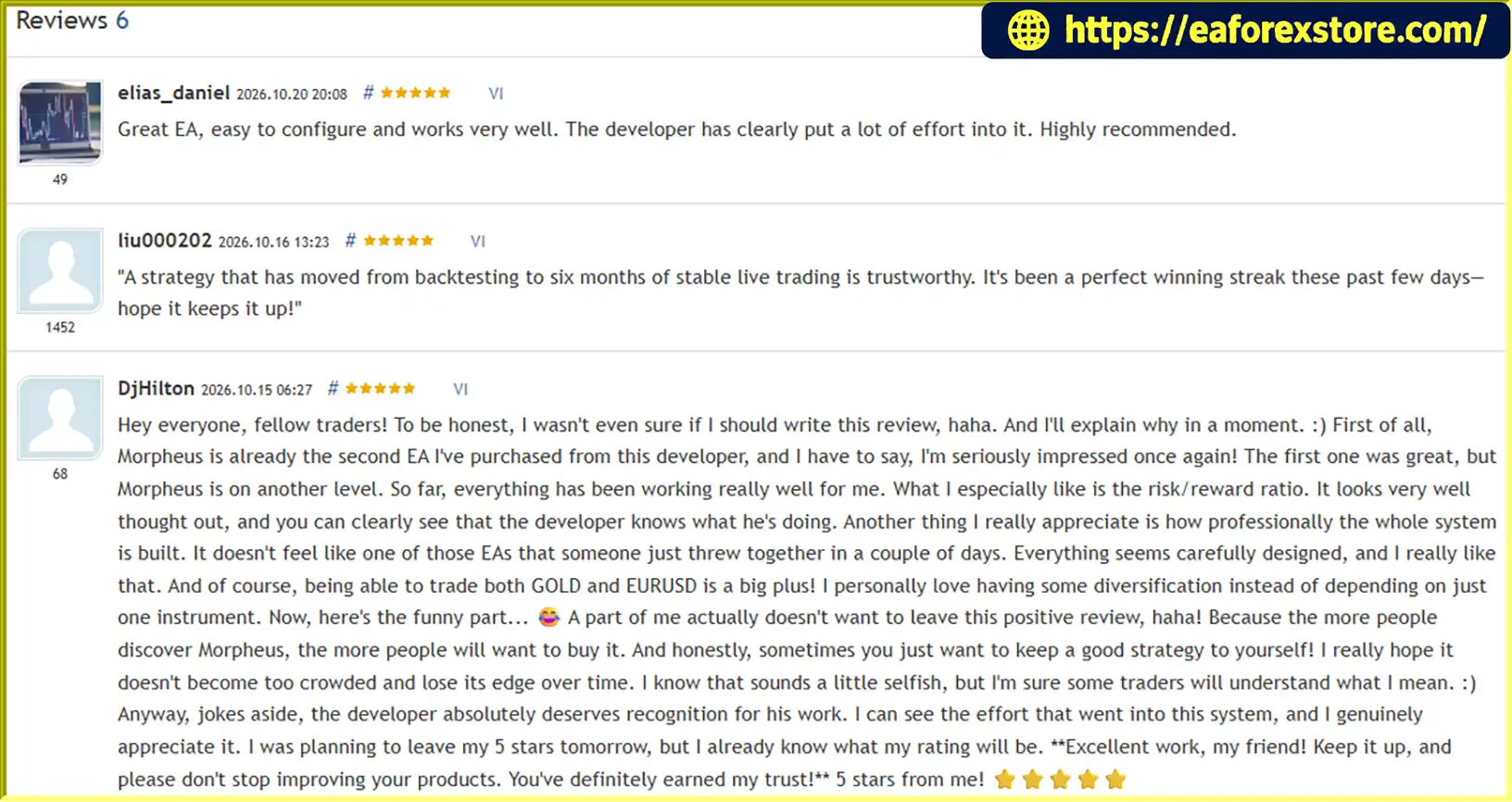
🔺Morpheus Algo EA MT5 is highly appreciated by the MQL5 community for bringing stable and reliable profits. Below are 5 star reviews from users:
Reviews
>>> Join VIP Membership Now <<<
Morpheus Algo EA MT5 combines automated trading logic for Gold and EURUSD with flexible position sizing, instrument-specific exit settings, trailing stop management, and on-chart market structure visualization.
Its spread and slippage controls, optional news filter, and optional prop-firm drawdown limits provide additional configuration choices. However, traders need to understand that the available risk levels are not stated risk percentages, and optional protections will not operate as intended unless properly configured.
The supplied XAUUSD and EURUSD settings offer a starting point for testing, not a guarantee of future results. Before using Morpheus Algo EA MT5 on a live account, verify position sizing, evaluate both instrument configurations independently, and test execution with the intended broker.
Ultimately, Morpheus Algo EA MT5 should be assessed through transparent testing and verified performance data rather than its feature list alone. Automated trading can simplify execution, but it cannot eliminate market risk or guarantee profits.
1. What is Morpheus Algo EA MT5?
Morpheus Algo EA MT5 is an automated Expert Advisor designed for MetaTrader 5, supporting Gold (XAUUSD) and EURUSD trading. It combines configurable position sizing, individual Stop Loss and Take Profit settings, trailing stop management, spread and slippage controls, and an on-chart market structure visualization panel.
2. Which trading instruments and timeframes does Morpheus Algo EA MT5 support?
Morpheus Algo EA MT5 supports selectable trading logic for XAUUSD (Gold) and EURUSD. The supplied description includes an XAUUSD H1 market visualization, but it does not establish a single mandatory trading timeframe for both instruments. Traders should confirm the recommended timeframe for their selected configuration and test each instrument independently.
3. How does Morpheus Algo EA MT5 work?
The EA uses its built-in algorithm to execute trades according to the selected instrument logic and configured risk settings. It also provides chart tools displaying the range scanner, Buy-Side Liquidity (BSL), Sell-Side Liquidity (SSL), Equilibrium (EQ), Break of Structure (BOS) markers, and highlighted price zones. However, the complete entry and signal-generation rules are not disclosed in the supplied description.
4. Does Morpheus Algo EA MT5 support automatic and fixed lot sizing?
Yes. Morpheus Algo EA MT5 offers both automatic lot sizing and fixed lot operation. It also provides selectable risk levels from 0 to 5. These levels should not be interpreted as risk percentages because the exact relationship between each level and account equity is not specified. Verify the resulting trade volume through the EA documentation and demo testing before live trading.
5. What are the recommended Stop Loss, Take Profit, and trailing stop settings?
The supplied configuration lists the following values:
XAUUSD: Take Profit 450 points, Stop Loss 1,700 points, trailing activation 115 points, and trailing step 35 points.
EURUSD: Take Profit 150 points, Stop Loss 600 points, trailing activation 30 points, and trailing step 5 points.
These are example configuration values, not guaranteed optimal settings. Their practical effect depends on the broker's symbol specifications, point size, position volume, and market conditions.
6. Does Morpheus Algo EA MT5 include a news filter and prop-firm drawdown protection?
Yes. The EA provides an optional news filter and optional prop-firm drawdown limits. However, both features are disabled in the supplied preset. Traders who need them must enable and configure the relevant settings, then verify how the filters operate. These controls do not guarantee compliance with every prop firm's rules or prevent all losses.
7. What are the reported performance results for Morpheus Algo EA MT5?
The supplied product description reports these live signal results:
EURUSD: 31 consecutive weeks, $400 initial deposit, +113% growth, 100% reported win rate, and 16.5% maximum drawdown.
Gold (XAUUSD): 19 consecutive weeks, $4,500 initial deposit, +479% growth, 100% reported win rate, and 1% maximum drawdown.
These figures are claims in the supplied description and have not been independently verified here. A reported 100% win rate over a particular period does not mean future trades cannot lose. Check the original signal records, testing methodology, account history, and drawdown calculations before relying on these results.
8. Is Morpheus Algo EA MT5 suitable for beginners, and does it guarantee profits?
Morpheus Algo EA MT5 offers configurable risk management and automated trade execution, but beginners should understand lot sizing, leverage, drawdown, spreads, and slippage before using it. Start with Strategy Tester analysis and demo forward testing, and confirm that the EA's settings match the intended instrument and broker. The EA does not guarantee profits, and leveraged trading can result in substantial losses.
In stock
In stock
In stock
In stock
In stock
Out of stock
No account yet?
Create an Account












 Automatic EA
 EA Best Seller
 Expert Advisor MT4
 Expert Advisor MT5
 HFT EA


Reviews
Clear filtersThere are no reviews yet.