









-
 Unlimited Activations
-
 Instant delivery
-
 Easy to install






 Unlimited Activations
Instant delivery
Easy to install
Unlimited Activations
Instant delivery
Easy to install
 Free Update
 Free Install Support

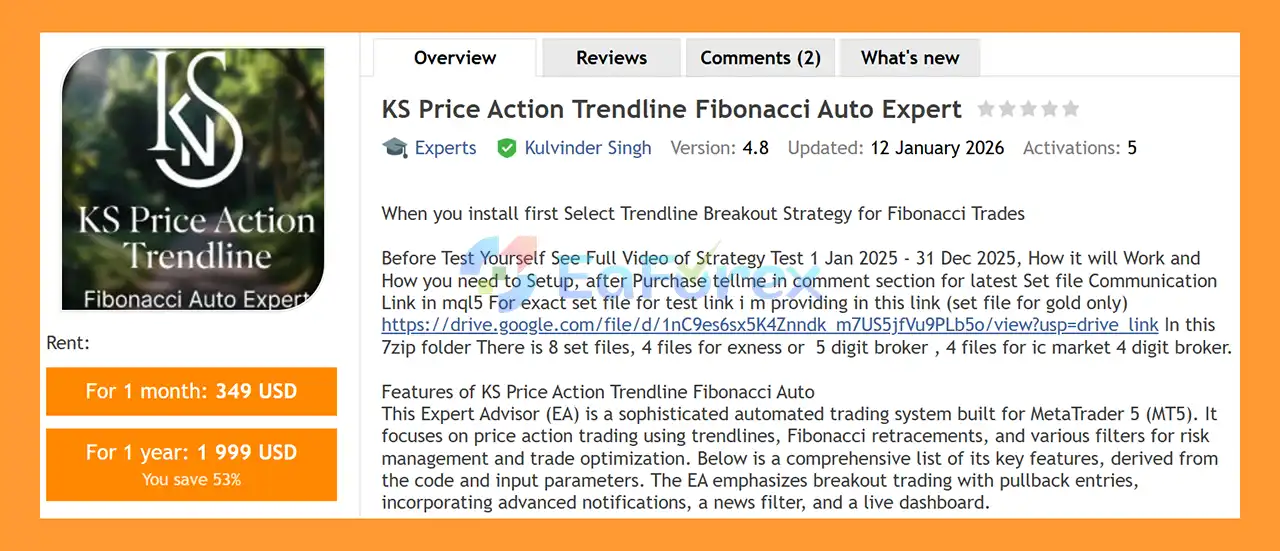
KS Price Action Trendline Fibonacci Auto Expert MT5 is an advanced automated trading system developed for MetaTrader 5 (MT5). The EA combines price action analysis, automatic trendline detection, breakout trading, Fibonacci retracement zones, candle confirmation, and comprehensive risk-management tools to identify potential trading opportunities.
Instead of relying on a single technical indicator, this MT5 Expert Advisor analyzes market structure by automatically detecting swing highs and swing lows and using them to construct dynamic support and resistance trendlines. When a valid trendline breakout occurs, the EA can wait for a pullback toward a selected Fibonacci retracement zone before considering a trade.
The system supports several Fibonacci levels, including 23.6%, 38.2%, 50%, 61.8%, and 78.6%, as well as a configurable Golden Zone between 38.2% and 61.8%. Additional confirmation filters, trading limits, news protection, trailing stops, breakeven functionality, and partial profit-taking are included to provide greater control over automated trading.
The EA also features a live on-chart dashboard that displays important account, market, trading, and performance information. Its design focuses on selective setups rather than aggressive trading methods, with no Martingale or Grid trading strategy described in the supplied specifications.
>> Delivery time 24h-48h after payment.
>>> Refund if not delivered.
>>> You will receive the latest version without any limitations (ID+Time).>>Reviewed by Jason Stap <<
The EA automatically identifies potential swing highs and swing lows using configurable parameters such as the analysis timeframe, number of bars, and minimum point distance.
It can create and monitor:
The system can also hide parallel trendlines or trendlines that have already been broken by price.
The EA monitors trendline breaks using either:
A configurable point-movement threshold can be used to determine whether a breakout is significant enough to continue with the next stage of the setup.
After a confirmed trendline breakout, the EA can require a minimum pullback before creating a Fibonacci setup.
The Fibonacci system includes:
Traders can select individual Fibonacci zones or use the 38.2%–61.8% Golden Zone.
A configurable tolerance allows the EA to determine how close price needs to come to the selected Fibonacci zone before a potential setup is activated.
The system can also monitor price interactions with trendlines. When price touches a trendline within the configured distance and subsequently shows a reversal condition, the EA can use this information as part of its trade-entry logic.
The EA supports candle confirmation on a configurable timeframe, with H4 available as the default setting described in the specifications.
Depending on the configuration, the system can wait for candle closure or allow zone re-entry conditions.
The general trading logic includes:
The system can also limit trading activity by restricting the number of trades per day and the minimum time between trades.
The EA provides two primary position-sizing approaches:
The default risk-based configuration described is approximately 1% risk per trade, although traders can adjust the setting according to their own risk-management plan.
Stop Loss can be configured using:
Take Profit can be configured using:
This provides flexibility for traders who prefer fixed targets or structure-based exits.
The EA includes an adjustable trailing-stop system that can activate after a specified profit threshold.
Available controls include:
This allows open positions to be managed dynamically as the market moves.
The EA can partially close a position after reaching a specified profit level.
For example, the supplied default configuration allows approximately 50% of the position to be closed after the defined profit target is reached, while the remaining position can continue under trailing-stop management.
The integrated news filter is designed to reduce exposure during scheduled economic events.
It can be configured to:
The MQL5 economic calendar information is updated periodically according to the EA’s configuration.
The built-in dashboard provides real-time information directly on the MT5 chart.
Depending on the configuration, it can display:
The dashboard also supports customization of its position, size, colors, fonts, and background.
The EA includes an advanced notification system designed to provide information about important trading events.
Notifications can include:
The system also includes rate limiting to reduce excessive notifications.
The trading process can generally be understood as a multi-stage technical analysis workflow.
The EA analyzes historical price data to detect significant swing highs and swing lows.
These points are then used to identify potential support and resistance structures.
Based on the detected swing points, the EA creates trendlines representing potential market structure.
The system can monitor several trendlines simultaneously.
The EA watches for price to break an active trendline.
Depending on the settings, the breakout can be confirmed using either a candle close or a price wick.
Rather than necessarily entering immediately after the breakout, the EA can require a minimum price movement and subsequent pullback.
This pullback becomes the basis for the Fibonacci setup.
The system draws Fibonacci retracement levels and identifies the configured entry zone.
Potential zones include:
The EA then checks its configured confirmation conditions, which may include the Fibonacci zone, candle confirmation, trendline conditions, and other filters.
If the required conditions are satisfied, the EA can automatically open a position.
After entry, the position can be managed using:
This structure is designed to make the trading process systematic and less dependent on manual execution.
KS Price Action Trendline Fibonacci Auto Expert MT5 may be suitable for traders who want to automate a price-action and market-structure-based trading approach on MetaTrader 5.
Several aspects distinguish the system from simpler indicator-based Expert Advisors.
The EA automatically searches for swing points and constructs trendlines, reducing the need to manually identify every potential support and resistance structure.
Instead of relying exclusively on trendline breakouts, the system can wait for a pullback toward a Fibonacci area before considering an entry.
The EA can combine breakout conditions, pullbacks, Fibonacci zones, candle confirmation, trendline interactions, and configurable filters.
Traders have access to fixed or risk-based lot sizing, Stop Loss, Take Profit, trailing stops, breakeven, partial profit-taking, and trading-frequency controls.
The integrated economic-calendar filter provides an additional mechanism for managing exposure around scheduled news events.
Based on the supplied specifications, the EA does not rely on Martingale or Grid trading. Its design instead emphasizes breakout, pullback, confirmation, and structured risk management.
Many important parameters can be adjusted, allowing traders to adapt the EA to different account sizes, brokers, instruments, and trading preferences.
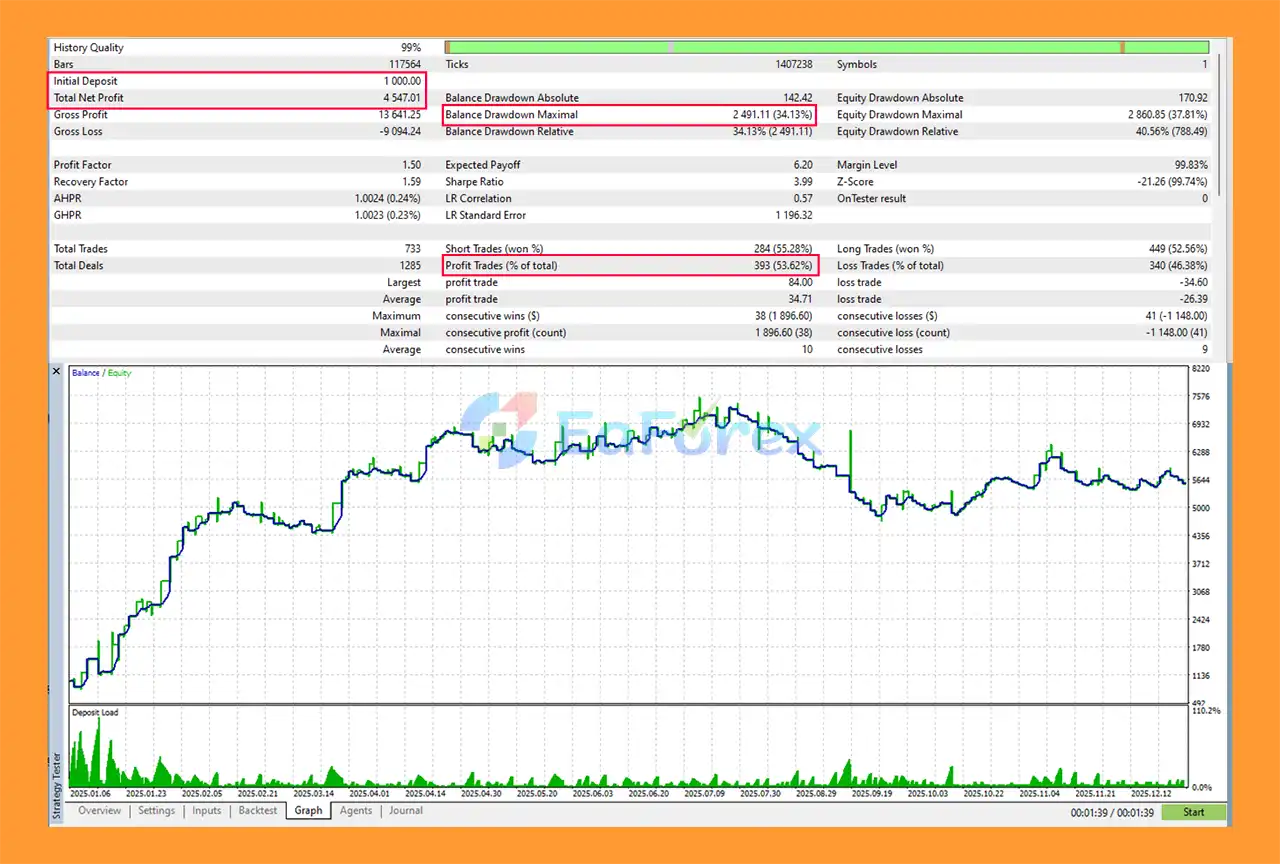
KS Price Action Trendline Fibonacci Auto Expert backtets
Risk management is an important part of the KS Price Action Trendline Fibonacci Auto Expert MT5 design.
The EA provides several mechanisms that can help control automated trading exposure.
Users can select fixed lot sizing or automatic lot calculation based on a predefined percentage of account risk.
Stop Loss can be configured at a fixed distance or around relevant swing structures.
The system supports fixed Take Profit targets as well as Risk-to-Reward-based targets.
Once a trade reaches the configured profit threshold, the EA can activate trailing-stop management to adjust the protective level as price moves.
The breakeven function can move the protective stop toward the entry price after sufficient favorable movement.
The EA can close part of a profitable position while allowing the remaining position to continue under the selected management rules.
The system can restrict:
These controls can help reduce excessive entries during rapidly changing market conditions.
A Fibonacci setup can become invalid if price moves beyond the defined invalidation level or if the setup remains active longer than the configured expiration period.
The news filter can prevent new trades or manage existing positions around scheduled economic events, depending on the selected settings.
No historical test result should be interpreted as a guarantee of future performance. Traders should evaluate the EA using appropriate historical data and perform forward testing under realistic broker conditions before considering live deployment.
Although KS Price Action Trendline Fibonacci Auto Expert MT5 provides extensive automation and risk-management options, it is not risk-free.
A strategy based on breakouts, pullbacks, and Fibonacci retracements may behave differently in trending, ranging, choppy, or highly volatile markets.
Trendline breakouts can fail. Price may temporarily move beyond a trendline and then reverse, potentially producing losing trades.
Actual execution can differ from backtest assumptions because of:
Economic announcements can cause rapid price movements. Even with a news filter, unexpected volatility or execution delays can result in losses.
Automated trading software cannot guarantee profits. Past backtest or live performance does not guarantee future results.
Using inappropriate lot sizes, Stop Loss settings, trading frequency, or risk percentages can significantly change the EA’s behavior.
The EA should not be immediately deployed with significant real-money capital after installation. Demo testing and forward testing are strongly recommended.
Recommended testing approach:
Follow these steps to install the EA on MetaTrader 5.
Launch your MetaTrader 5 trading platform.
From the MT5 menu, select:
File → Open Data Folder
Then navigate to:
MQL5 → Experts
Copy the KS Price Action Trendline Fibonacci Auto Expert MT5 EA file into the Experts folder.
If the EA is provided as an .ex5 file, place the file directly inside the appropriate Experts directory.
Restart MT5 or refresh the Expert Advisors section in the Navigator window.
Open the desired trading chart and timeframe.
Then:
Navigator → Expert Advisors → KS Price Action Trendline Fibonacci Auto Expert MT5
Drag the EA onto the chart.
Review the available settings, including:
Make sure the Algo Trading function is enabled in MetaTrader 5.
Start with a demo account and conduct sufficient backtesting and forward testing before using the EA with real funds.
>>> Join VIP Membership Now <<<
In summary, KS Price Action Trendline Fibonacci Auto Expert MT5 is a feature-rich MetaTrader 5 Expert Advisor designed around a combination of price action, trendline breakouts, pullback entries, and Fibonacci retracement analysis.
Its automated market-structure detection can identify swing points and construct trendlines, while the Fibonacci module provides configurable retracement zones for potential pullback entries. The EA also includes candle confirmation, news filtering, risk-based position sizing, Stop Loss, Take Profit, trailing stops, breakeven, partial profit-taking, and trade-frequency controls.
Another notable aspect is its integrated dashboard and notification system, which gives traders greater visibility into current positions, account information, market conditions, and EA activity.
However, traders should remember that sophisticated features do not eliminate trading risk. False breakouts, changing market conditions, spread fluctuations, slippage, news volatility, and broker execution can all affect actual results. Backtests should therefore be treated as historical analysis rather than a guarantee of future performance.
For a more responsible evaluation, users should begin with a demo account, test the EA across different market conditions, review drawdown and losing periods, and use conservative risk settings before considering live trading.
Overall, KS Price Action Trendline Fibonacci Auto Expert MT5 provides a comprehensive automated framework for traders interested in combining trendline breakout analysis with Fibonacci pullback trading and structured risk management on MetaTrader 5.
1. What is KS Price Action Trendline Fibonacci Auto Expert MT5?
KS Price Action Trendline Fibonacci Auto Expert MT5 is a professional automated trading Expert Advisor for MetaTrader 5 that trades based on pure price action. It uses automatic trendline detection, confirmed breakouts, and Fibonacci pullbacks to execute disciplined, rule-based trades.
2. Is KS Price Action Trendline Fibonacci Auto Expert MT5 fully automated?
Yes. The EA is fully automated, from detecting trendlines and Fibonacci zones to executing, managing, and closing trades. No manual intervention is required once it is properly installed and configured on MetaTrader 5.
3. Which trading strategy does this EA use?
This EA uses a price action strategy that combines trendline breakouts with Fibonacci retracements. Trades are only taken after confirmed breakouts followed by controlled pullbacks into key Fibonacci levels, ensuring high-quality setups.
4. Does KS Price Action Trendline Fibonacci Auto Expert MT5 use grid or martingale?
No. The EA strictly avoids risky strategies such as grid trading, martingale, and averaging. Each trade is independent and protected by predefined stop loss and risk controls.
5. What markets and symbols does this EA support?
KS Price Action Trendline Fibonacci Auto Expert MT5 is designed to work on MetaTrader 5 and can be used on various symbols. However, it performs best on major and popular instruments where price action and trend structures are clear.
6. How does risk management work in this EA?
The EA includes flexible risk management options such as fixed lot size or automatic lot sizing based on account balance percentage. It also supports stop loss, take profit, breakeven, trailing stop, and partial profit closing.
7. Does the EA filter trades during news events?
Yes. The EA includes a built-in news filter that can automatically block or close trades during high-, medium-, or low-impact news events, helping reduce unexpected volatility and risk.
8. Can beginners use KS Price Action Trendline Fibonacci Auto Expert MT5?
Yes. Beginners can use this EA because it is fully automated and rule-based. Advanced traders can further customize parameters to match their personal risk tolerance and trading preferences.
9. Does the EA provide visual tools and trade monitoring?
Yes. The EA draws trendlines, Fibonacci levels, and entry signals directly on the chart. It also includes a live trading dashboard displaying real-time statistics such as profit, win rate, spread, and EA status.
In stock
In stock
In stock
In stock
In stock
Out of stock
No account yet?
Create an Account












 Automatic EA
 EA Best Seller
 Expert Advisor MT4
 Expert Advisor MT5
 HFT EA


Reviews
Clear filtersThere are no reviews yet.