



Product Overview
LSTM Ensemble EA MT5 is a professional AI-powered Expert Advisor for MetaTrader 5 that uses an ensemble of 12 independent LSTM (Long Short-Term Memory) neural network models to generate trading signals.
Instead of depending on a single machine-learning model, the EA uses a collective decision-making approach. Each LSTM model is trained independently using its own historical data fold and analyzes market conditions from a different perspective.
The final trading signal is generated by aggregating the outputs of the 12 models rather than relying on the prediction of a single neural network.
This ensemble architecture is designed to reduce the influence of individual model errors and historical overfitting. By combining multiple independent models, the system attempts to create a more robust signal-generation framework for changing market conditions.
The main trading timeframe is H6 (6-hour), which is designed to provide a balance between excessive short-term market noise and signal delay.
LSTM Ensemble EA MT5 also supports multi-currency trading, allowing simultaneous trading across up to six currency pairs. Users can enable or disable individual symbols according to their preferences.
About the Developer
- Author: Evgeniy Scherbina
- Experience: Over +12 years of experience on MQL5.
- Notable Products: LSTM Ensemble, Edge Ensemble EA and other advisors.
- Flagship Product: LSTM Ensemble EA MT5 is rated as the best performing product of the year.
>> Delivery time 24h-48h after payment.
>>> Refund if not delivered.
>>> You will receive the latest version without any limitations (ID+Time).>>Reviewed by Jason Stap <<
Main Features of LSTM Ensemble EA MT5
Independent LSTM Models
The defining feature of LSTM Ensemble EA MT5 is its use of 12 independent LSTM neural networks.
Each model:
- Is trained independently
- Uses its own historical data fold
- Analyzes market behavior from a different perspective
- Produces its own trading assessment
The final signal is then formed from the combined output of the ensemble.
This differs from a traditional single-model approach, where one neural network is responsible for the entire trading decision.
Ensemble-Based Decision Making
Rather than relying on one model's prediction, the EA aggregates information from multiple neural networks.
The concept is based on the idea that individual model errors may have less influence when several independent models contribute to the final decision.
This can potentially help reduce the effect of localized overfitting and unusual historical market patterns.
However, an ensemble architecture does not guarantee better live performance, and real-market results can still differ from historical or simulated results.
H6 Main Timeframe
LSTM Ensemble EA MT5 primarily operates on the H6 timeframe.
The six-hour timeframe is intended to provide a balance between:
- Short-term market noise
- Signal responsiveness
- Broader market structure
- Signal lag
The EA periodically reassesses market conditions as new market data becomes available.
Multi-Currency Trading
The EA supports simultaneous trading across six available currency pairs.
Users can individually enable or disable each supported symbol.
This allows traders to customize the portfolio according to their preferred markets rather than being required to trade every available symbol.
Automatic Risk-Based Position Sizing
The Risk per Trade (%) parameter allows users to define risk as a percentage of account balance or deposit.
The EA can then automatically calculate the appropriate position size based on the configured risk level.
This provides an alternative to manually specifying a fixed lot size for every trade.
Maximum Positions Per Symbol
Users can define the maximum number of positions allowed for each individual symbol.
This provides an additional layer of exposure control and can help prevent unlimited position accumulation on a single market.
Position Distance Control
The Range Between Positions parameter defines the minimum distance, measured in points, between additional positions.
This allows traders to control how closely new positions can be opened relative to existing positions.
Spread Protection
The Maximum Spread setting allows traders to specify the highest acceptable spread for new market entries.
If the current spread exceeds the configured threshold, the EA can prevent new entries according to its trading logic.
This can be particularly useful when trading during periods of reduced liquidity or temporary spread expansion.
Fixed Stop Loss and Take Profit
LSTM Ensemble EA MT5 provides configurable:
- Stop Loss
- Take Profit
- Trailing Stop
The Stop Loss and Take Profit values can be specified in points.
The trailing stop can also be disabled by setting its value to 0, depending on the available configuration.
Broker Symbol Suffix Support
The EA includes a Symbol Suffix parameter for brokers that use modified instrument names.
For example, a broker may use symbols such as:
- EURUSD.m
- EURUSD_i
- EURUSD.pro
This feature allows the EA to adapt its symbol references to the broker's naming convention.
How Does LSTM Ensemble EA MT5 Work?
The core process of LSTM Ensemble EA MT5 is based on combining the outputs of multiple neural-network models.
The simplified workflow is:
Market Data → 12 LSTM Models → Individual Predictions → Ensemble Aggregation → Trading Signal → Risk Calculation → Trade Execution → Position Management
Each LSTM model independently analyzes historical market information and produces its own assessment of the current market environment.
Instead of allowing one model to determine the entire trade decision, the EA aggregates the outputs of all 12 models.
The resulting ensemble signal is then used as part of the trading decision.
Once a trade is permitted, the EA applies the configured risk-management settings, including:
- Risk per trade
- Maximum positions
- Position spacing
- Maximum spread
- Stop Loss
- Take Profit
- Trailing Stop
The system can repeat this process as new market data becomes available and reassess the market accordingly.
Why Choose LSTM Ensemble EA MT5?
LSTM Ensemble EA MT5 may be suitable for traders interested in combining machine learning and automated trading within MetaTrader 5.
Its most distinctive characteristic is the use of 12 independent LSTM models instead of a single neural network.
An ensemble approach can provide a different way of handling model uncertainty because the final signal is not determined exclusively by one model.
The EA also provides several practical trading controls, including risk-based position sizing, maximum positions per symbol, spread protection, Stop Loss, Take Profit, and trailing-stop functionality.
Another advantage is its multi-currency capability. Instead of limiting the system to a single instrument, traders can configure up to six supported currency pairs and select which markets they want the EA to trade.
The H6 timeframe also gives the system a longer market perspective than traditional low-timeframe scalping EAs.
LSTM Ensemble EA MT5 Backtest Results
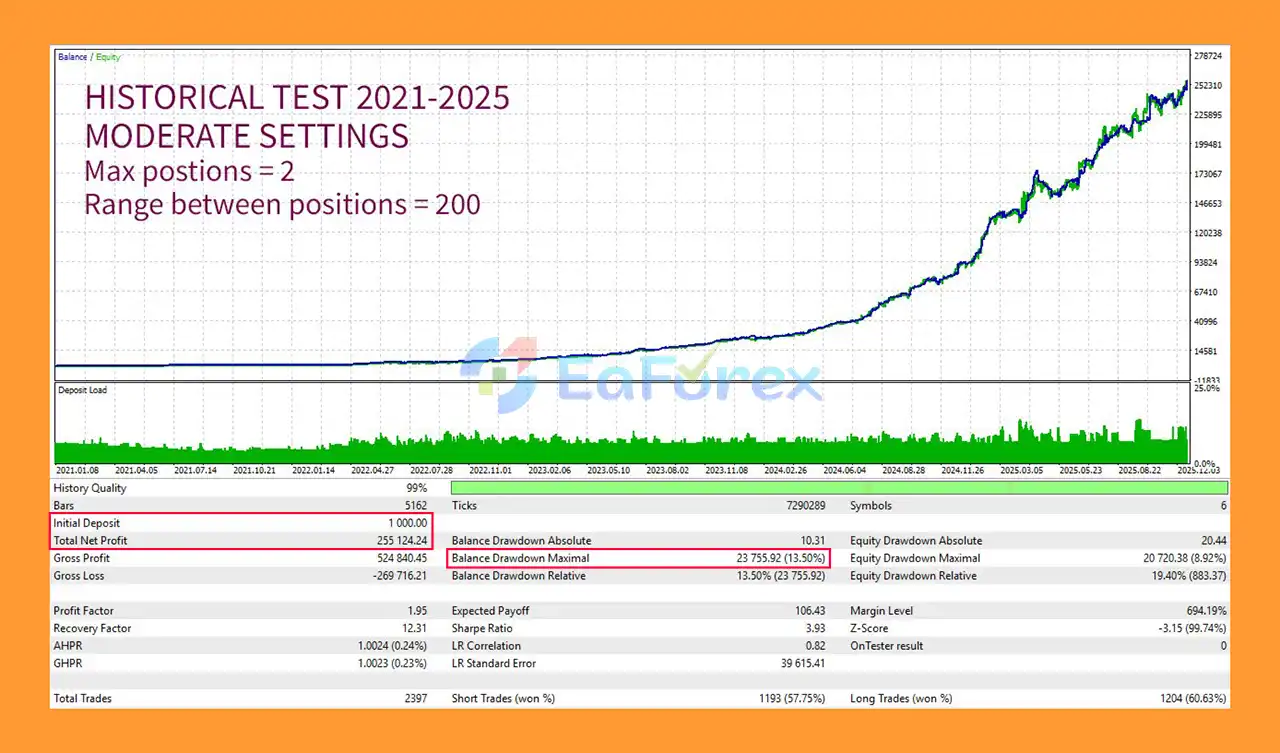
🔺XAUUSD – 4 Year
- Initial Deposit: $1.000
- Total Net Profit: $255.124,24
- Maximum Drawdown: 13,50%
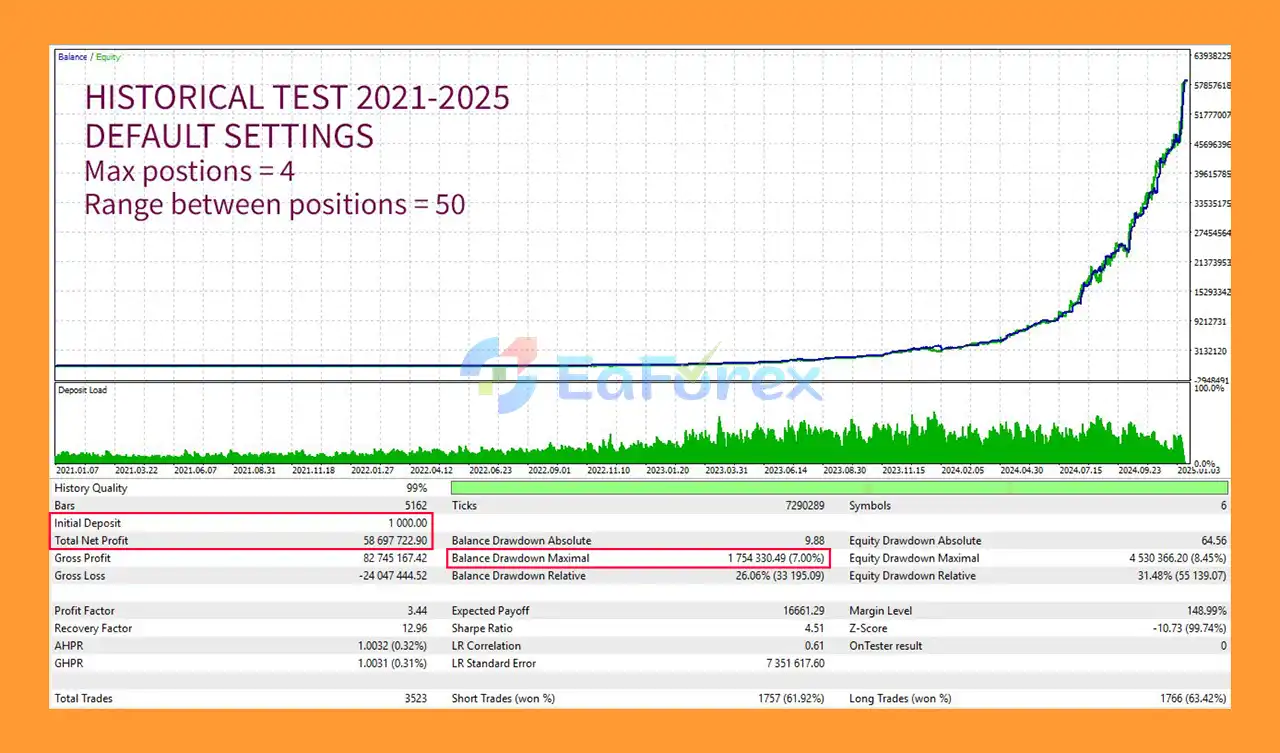
🔺XAUUSD – 4 Year
- Initial Deposit: $1.000
- Total Net Profit: $58.697 million
- Maximum Drawdown: 7.00%
Performance and Risk Management
LSTM Ensemble EA MT5 includes several features designed to manage trading exposure.
Risk Per Trade
The Risk per Trade (%) parameter allows traders to define the amount of account capital they are willing to risk on each trade.
Automatic lot calculation can then adjust position size according to the configured risk level.
Maximum Positions
The Max Positions Per Symbol setting allows traders to limit the number of simultaneous positions on an individual market.
Position Spacing
The Range Between Positions parameter controls the minimum distance between additional positions.
Spread Control
The Spread Max parameter can prevent new entries when market spreads exceed the configured threshold.
Stop Loss and Take Profit
Traders can configure fixed SL and TP values in points.
This allows every trade to have predefined exit parameters.
Trailing Stop
The EA also supports a trailing-stop mechanism.
When enabled, the trailing stop can dynamically follow favorable price movement according to the configured distance.
Multi-Currency Exposure
While trading several currency pairs can diversify market exposure, it can also increase total portfolio exposure.
Currency pairs can also be correlated, meaning that several open positions may respond similarly to the same market event.
Therefore, users should evaluate overall account risk, not only the risk assigned to each individual trade.
Weaknesses and Risk Warnings
Machine Learning Does Not Guarantee Accuracy
Although LSTM neural networks can process historical time-series information, machine-learning models cannot predict financial markets with certainty.
Unexpected market conditions can cause model predictions to become less effective.
Historical Overfitting Remains Possible
The ensemble design is intended to reduce the influence of individual model overfitting, but it does not completely eliminate the possibility of overfitting.
A strategy can still behave differently when exposed to future market conditions that were not represented in its historical training data.
H6 Produces Fewer Signals
The H6 timeframe is relatively slow compared with M1, M5, M15, or H1 strategies.
Traders looking for frequent intraday entries may find the trading frequency lower than that of traditional scalping EAs.
Multi-Currency Trading Adds Complexity
Trading up to six currency pairs can increase portfolio complexity and overall exposure.
Multiple positions may also become correlated during major USD, interest-rate, or macroeconomic events.
Broker Conditions Matter
Actual results can vary depending on:
- Spread
- Slippage
- Execution speed
- Commission
- Liquidity
- Broker symbol specifications
Therefore, the EA should be tested under the exact broker conditions intended for live trading.
No Guaranteed Profit
LSTM Ensemble EA MT5 does not guarantee profitable results.
Backtests, historical simulations, or previous performance should not be interpreted as guarantees of future returns.
Pros and Cons
| Pros | Cons |
|---|---|
| Uses 12 independent LSTM models | Machine learning cannot guarantee accurate predictions |
| Ensemble-based signal generation | Ensemble models can still experience overfitting |
| Designed for MetaTrader 5 | H6 timeframe may generate fewer trades |
| Supports up to six currency pairs | Multiple markets can increase total exposure |
| Risk-based automatic lot calculation | Requires careful risk configuration |
| Maximum positions per symbol | Position correlation can increase portfolio risk |
| Minimum distance between positions | Broker execution can affect results |
| Maximum spread protection | Trading conditions vary between brokers |
| Fixed SL and TP | Fixed exits may not suit every market condition |
| Optional trailing stop | Requires testing and optimization |
| Customizable symbol selection | More configuration may require additional testing |
How to Install LSTM Ensemble EA MT5
Installing LSTM Ensemble EA MT5 on MetaTrader 5 generally follows the standard Expert Advisor installation process.
Step 1: Open MetaTrader 5
Launch your MetaTrader 5 terminal and log in to the trading account where you want to install the EA.
Step 2: Open the Data Folder
In MetaTrader 5, select:
File → Open Data Folder
Then navigate to:
MQL5 → Experts
Step 3: Copy the EA File
Copy the LSTM Ensemble EA MT5 file into the Experts folder.
Step 4: Restart MetaTrader 5
Restart MetaTrader 5 or refresh the Expert Advisors section in the Navigator panel.
Step 5: Open a Supported Trading Chart
Open one of the supported currency-pair charts and select the recommended H6 timeframe.
Step 6: Attach the EA
Locate LSTM Ensemble EA MT5 in the Navigator window and drag it onto the chart.
Step 7: Enable Algo Trading
Make sure the Algo Trading function is enabled in MetaTrader 5.
Step 8: Configure the Risk Settings
Configure parameters such as:
- Risk per Trade (%)
- Maximum Positions Per Symbol
- Range Between Positions
- Maximum Spread
- Stop Loss
- Take Profit
- Trailing Stop
Step 9: Configure Multi-Currency Mode
If you want to use the multi-currency functionality, enable Multi Mode and select the currency pairs you want to trade under Your Symbols.
You can disable individual symbols if you prefer to limit the EA to specific markets.
Step 10: Configure the Symbol Suffix
If your broker uses a symbol suffix such as .m, _i, or another variation, enter the appropriate suffix in the EA settings.
Step 11: Test Before Live Trading
Before using the EA with real money, run comprehensive backtests and forward tests on a demo account.
Pay particular attention to:
- Drawdown
- Trade frequency
- Spread sensitivity
- Position exposure
- Correlation between currency pairs
- Execution quality
Real User Reviews and Feedback
🔺LSTM Ensemble EA is highly appreciated by the MQL5 community for bringing stable and reliable profits. Below are 5 star reviews from users:
- Xiao Bo Xu (2026.01.07): “I have always been purchasing Evgeniy’s EA because the other eAs I use all have high risks. Most of them are short-term eAs. The next generation eA will definitely be a neural network. But this has led to many fake authors.”
- BWise 2026.01.31): “EA paid back it’s price in 3 weeks if i didn’t close some trades manually it could have been 2 weeks. After i see that i’ve closed the positions earlier than it supposed to be i let the EA do it’s trick.”
What’s Included in the Download Package?
- Setting (If Any).docx
- Installation Guide.docx
>>> Join VIP Membership Now <<<
Final Thoughts
In summary, LSTM Ensemble EA MT5 is a machine-learning-based Expert Advisor for MetaTrader 5 that takes a different approach to automated trading by combining the outputs of 12 independent LSTM neural network models.
Rather than relying on one model trained over a single historical dataset, the ensemble framework is designed to aggregate multiple independent market assessments. This approach aims to reduce the influence of individual model errors and make the overall signal-generation process more robust.
The EA's main trading timeframe is H6, while its multi-currency mode supports trading across up to six currency pairs. Traders can also customize individual symbols, position limits, risk per trade, spread restrictions, Stop Loss, Take Profit, and trailing-stop settings.
From a risk-management perspective, the ability to use percentage-based position sizing, maximum positions per symbol, position spacing, and spread protection provides useful controls for managing automated exposure.
However, the use of artificial intelligence or neural networks does not guarantee profitable trading. Financial markets can change in ways that historical training data cannot fully represent, and machine-learning models can still experience unexpected performance changes.
For this reason, LSTM Ensemble EA MT5 should be thoroughly tested under realistic market conditions before live deployment. Traders should evaluate not only individual trade risk but also the combined exposure created when several currency pairs are traded simultaneously.
Overall, LSTM Ensemble EA MT5 offers a technically distinctive approach to automated trading by combining 12 LSTM models, ensemble decision-making, multi-currency trading, and configurable risk management within the MetaTrader 5 platform.



