









-
 Unlimited Activations
-
 Instant delivery
-
 Easy to install






 Unlimited Activations
Instant delivery
Easy to install
Unlimited Activations
Instant delivery
Easy to install
 Free Update
 Free Install Support

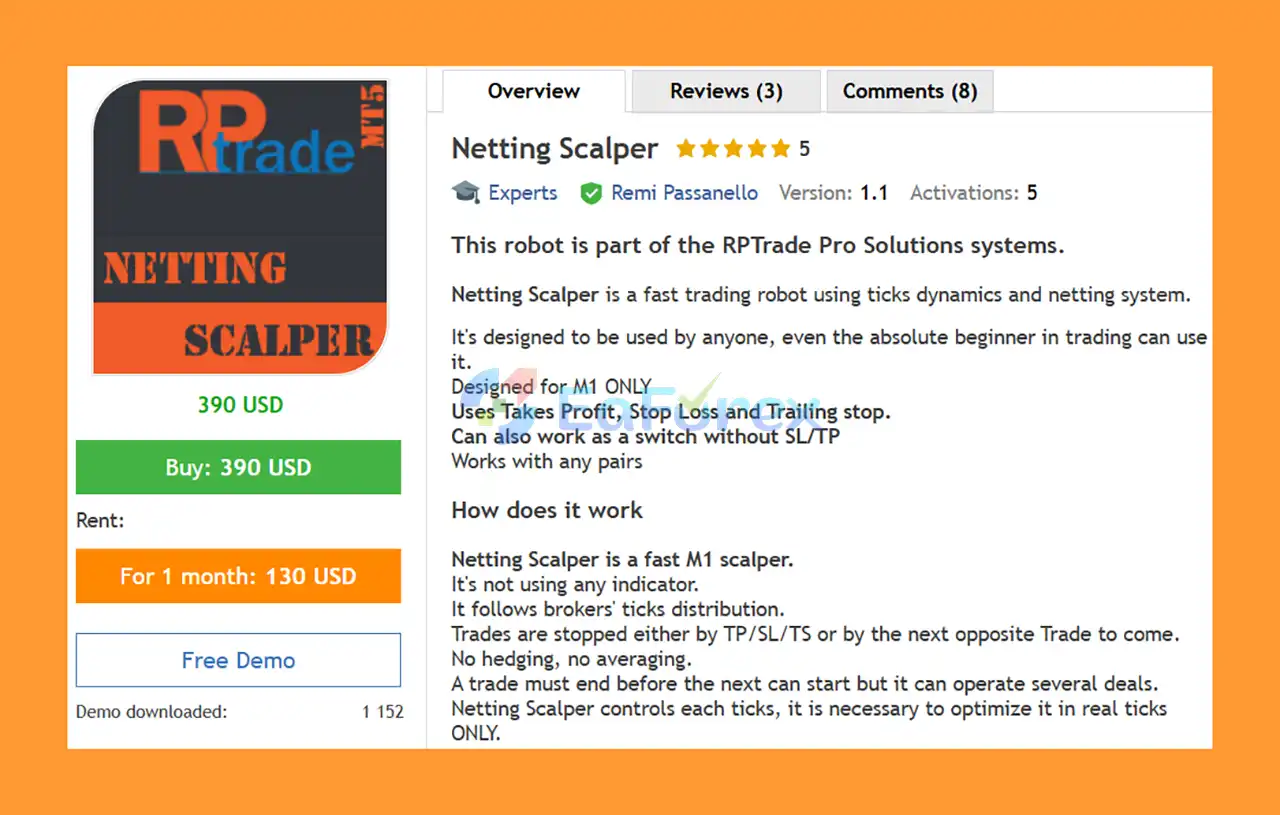
Netting Scalper EA MT5 is a fast automated scalping system designed specifically for the 1-minute (M1) timeframe. Instead of relying on conventional technical indicators, the EA analyzes real-time tick dynamics and broker tick distribution to identify short-term trading opportunities.
The system is built around a netting trading approach, meaning it does not use hedging or averaging techniques. A trade must be completed before the next trade can begin, while the EA can manage multiple deals according to the account’s netting environment.
Netting Scalper supports a wide range of financial instruments, including Forex pairs, indices, metals, futures, and other tradable markets, provided that the strategy is individually optimized for each instrument.
The EA includes Take Profit, Stop Loss, and Trailing Stop functionality. It can also be configured to operate without conventional SL/TP protection in specific use cases, functioning as a switch-based trading system.
• Author: Remi Passanello.
• Experience: Over +11 years of experience on MQL5.
• Notable Products: Netting Scalper EA MT5, UniversalTrader EA MT5 and others.
• Flagship Product: Netting Scalper is rated as the best performing product of the year.
>> Delivery time 24h-48h after payment.
>>> Refund if not delivered.
>>> You will receive the latest version without any limitations (ID+Time).>>Reviewed by Jason Stap <<
Netting Scalper EA MT5 is designed exclusively for the M1 timeframe.
Its short-term trading approach is intended to capture opportunities generated by rapid changes in market tick activity.
Unlike conventional Expert Advisors that rely heavily on indicators, Netting Scalper does not use traditional technical indicators.
Instead, the system continuously analyzes tick movements and broker tick distribution.
This allows the EA to react directly to short-term changes in market activity.
The EA does not use a traditional hedging approach.
Its trading logic is designed around the netting account system, where positions are managed within a net position rather than maintaining simultaneous opposing positions.
Netting Scalper does not rely on averaging down or continuously adding positions to losing trades.
This creates a more clearly defined trade sequence compared with strategies that build large position networks.
The EA supports several position-management mechanisms:
These parameters can be customized according to the selected instrument and optimized strategy settings.
Netting Scalper EA MT5 can be used with different types of financial instruments, including:
However, each instrument should be individually tested and optimized, because tick behavior and market conditions vary considerably between markets.
The EA includes a risk-based position-sizing mechanism.
Users can define a maximum risk percentage, and the system can automatically calculate the appropriate lot size based on account equity and the selected risk level.
Two additional parameters can be used to manage profitable trading periods:
Cash Out Ratio can close open trades and positions when a predefined profit ratio is reached, after which the EA can continue trading.
Stop Trading at X% can stop new trading after a specified profit target is reached until the EA is reinitialized.
Netting Scalper EA MT5 analyzes the distribution and direction of market ticks on the M1 timeframe.
The basic trading logic monitors upward and downward tick activity. When the configured number of directional ticks is reached, the EA can generate a new Buy or Sell deal.
For example:
Once a trade is opened, it can be closed through:
The EA does not use conventional indicators to generate its core signals. Instead, it focuses on tick-by-tick market dynamics.
Because every tick can influence the strategy, optimization should be performed using real ticks only.
For traders looking for a different approach to automated scalping, Netting Scalper EA MT5 provides an alternative to indicator-heavy strategies.
Its core logic is based on tick dynamics rather than traditional technical indicators.
The EA is specifically designed to operate on MT5 netting accounts, making it suitable for traders who prefer the net-position structure.
The system is not restricted to a particular currency pair. It can be tested on Forex, metals, indices, futures, and other instruments.
However, each market should have its own optimized configuration.
Despite its tick-based logic, several key parameters are straightforward to understand, including:
This makes the EA relatively accessible to traders who are new to automated trading.
The Revert option allows users to experimentally invert the strategy’s normal trading logic.
This is an advanced feature and should be tested carefully rather than used blindly on a live account.
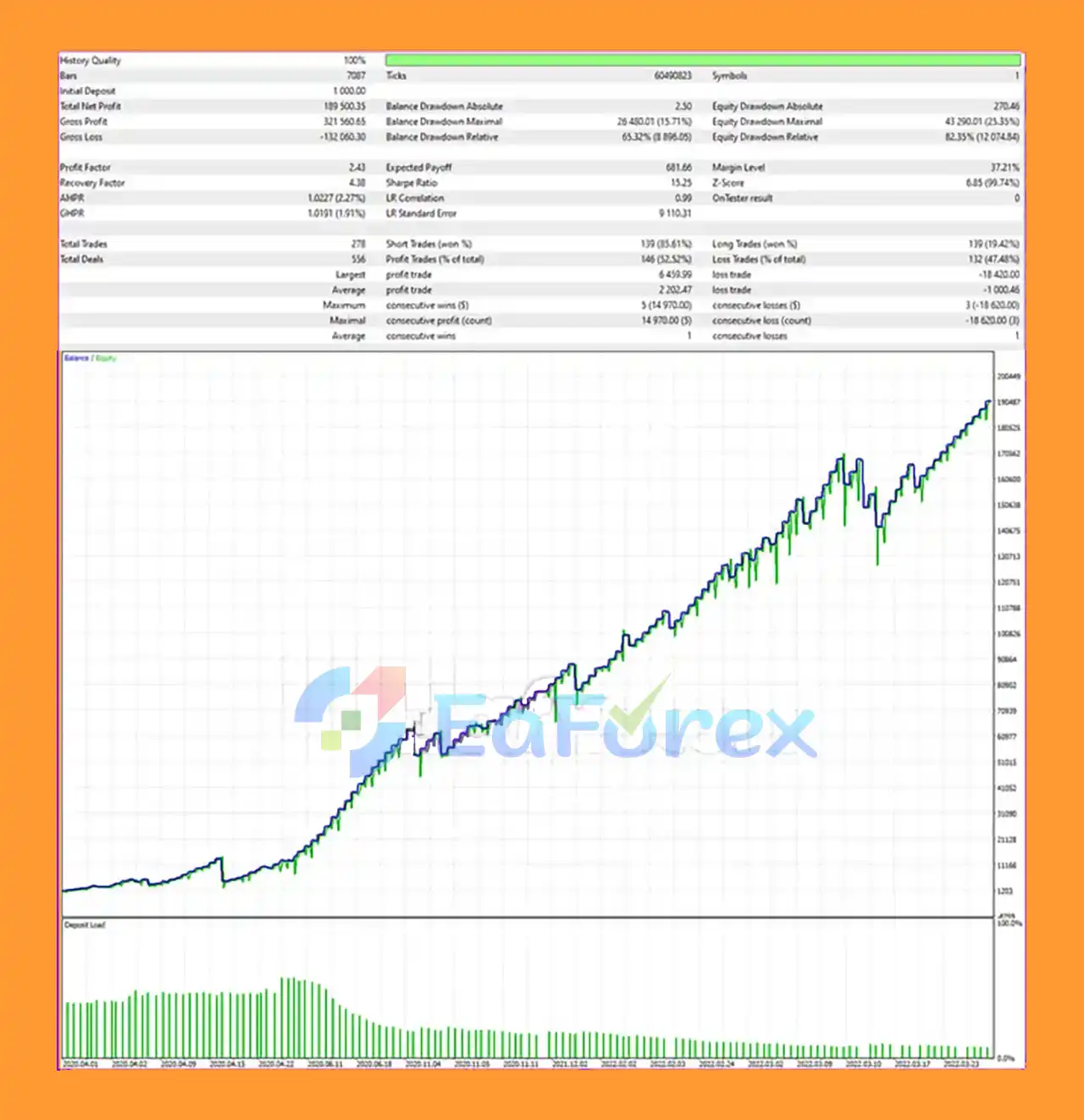
Netting Scalper EA Backtest Trading Results
Netting Scalper EA MT5 includes a flexible money-management system that can automatically calculate trade size based on the user’s selected risk percentage.
For example, the provided configuration describes a 1% risk level on a €1,000/$1,000 equity account as approximately 0.01 lot, although actual position sizing can vary depending on the instrument, contract specifications, Stop Loss distance, and broker conditions.
| Parameter | Function |
|---|---|
| Maximum Lot Size | Sets the maximum total lot size |
| Lot Per Trade | Maximum lot size for a new deal |
| Maximum Risk Percentage | Determines risk-based position sizing |
| Take Profit | TP distance in pips |
| Stop Loss | SL distance in pips |
| Trailing Stop | Dynamic stop-management distance |
| Ticks Up | Upward tick threshold for Buy signals |
| Ticks Down | Downward tick threshold for Sell signals |
| Cash Out Ratio | Closes positions at a predefined profit ratio |
| Stop Trading at X% | Stops trading after reaching a specified profit level |
| Optimize at +∞% | Controls profit-stop behavior during optimization |
| Revert | Experimentally reverses the strategy |
For optimization, the developer recommends setting Maximum Lot Size and Lot Per Trade to sufficiently high values, such as 100, so that the EA’s money-management system can calculate the actual position size based on the selected risk percentage.
The Stop Trading at X% parameter can also be adjusted depending on the objective of the test.
Because Netting Scalper EA MT5 analyzes individual market ticks, accurate testing is particularly important.
The EA should be optimized using:
Every tick based on real ticks
This is essential because simulated tick data may not accurately reproduce the tick distribution required by the strategy.
The recommended workflow is:
A configuration that performs well on one instrument should not automatically be transferred to another market.
Different instruments have different tick frequencies, volatility profiles, spreads, trading sessions, and execution characteristics.
Netting Scalper EA MT5 is a high-frequency, tick-sensitive scalping system, so traders should understand its limitations before using it with real capital.
Important risks include:
The EA should therefore be tested using the same or similar broker conditions that will be used for live trading whenever possible.
Install and open the MetaTrader 5 trading platform with a broker that supports netting accounts.
In MetaTrader 5, go to:
File → Open Data Folder → MQL5 → Experts
Copy the Netting Scalper EA MT5 file into the Experts directory.
Restart the platform or refresh the Expert Advisors section in the Navigator.
Attach Netting Scalper to an M1 chart of the instrument you want to trade.
The EA is designed for the M1 timeframe, so using other timeframes is not recommended.
Set:
Choose a risk level appropriate for your account size.
Set your desired:
If you choose to operate without SL/TP, understand that this can substantially increase account risk.
Adjust:
These parameters determine the tick conditions required for potential Buy and Sell entries.
Open the MetaTrader 5 Strategy Tester and select:
Every tick based on real ticks
Optimize the EA separately for each instrument.
Run the optimized configuration on a demo account before considering live deployment.
If you eventually move to a live account, monitor spreads, execution, slippage, drawdown, and trade frequency carefully.
🔺Netting Scalper EA MT5 is highly appreciated by the MQL5 community for bringing stable and reliable profits. Below are 5 star reviews from users:
User Reviews
In summary, Netting Scalper EA MT5 is a specialized M1 tick-based scalping Expert Advisor designed around broker tick dynamics rather than conventional technical indicators.
Its key characteristics include netting-account compatibility, real-tick analysis, risk-based position sizing, Take Profit, Stop Loss, Trailing Stop, and flexible tick-based entry parameters.
The ability to use the EA across Forex, metals, indices, futures, and other instruments provides flexibility, but each market must be treated independently. Differences in tick behavior, volatility, spreads, and execution mean that an optimization developed for one instrument may not be suitable for another.
For this type of strategy, real-tick optimization is particularly important. Traders should also avoid over-optimizing historical data and should forward-test their settings under realistic broker conditions.
Netting Scalper EA MT5 can be an interesting option for traders seeking an alternative to traditional indicator-based scalping, but its fast trading nature means that disciplined risk management and careful broker selection remain essential.
1. What trading strategy does Netting Scalper EA MT5 use?
Netting Scalper EA MT5 is based on a tick distribution strategy and a netting system. Instead of relying on lagging indicators, it reads brokers’ tick dynamics in real-time, making it extremely effective for M1 scalping.
2. Is Netting Scalper EA MT5 beginner-friendly?
Yes. The EA is designed with a plug-and-play setup and comes with ready-to-use set files. Even absolute beginners can install it easily and start trading without complex configurations.
3. What instruments can Netting Scalper EA MT5 trade?
Netting Scalper EA MT5 works on any financial instrument, including Forex pairs, indices, metals, and futures. It is compatible with all brokers that provide netting accounts.
4. Does Netting Scalper EA MT5 use risky strategies like martingale or averaging?
No. Netting Scalper EA MT5 follows a safe trading logic with built-in Stop Loss, Take Profit, and Trailing Stop functions. It does not use martingale, hedging, or averaging, ensuring controlled risk management.
5. What are the key risk management features of Netting Scalper EA MT5?
The EA includes automatic lot sizing, customizable risk percentage, cash-out ratio settings, and a stop trading option that halts activity after reaching a set profit target. These features give traders high control over risk exposure.
6. Who is the developer of Netting Scalper EA MT5?
The EA was developed by Remi Passanello, a professional MQL5 developer with over 11 years of experience. He is also the creator of other successful trading robots such as UniversalTrader EA MT5.
In stock
In stock
In stock
In stock
In stock
Out of stock
No account yet?
Create an Account












 Automatic EA
 EA Best Seller
 Expert Advisor MT4
 Expert Advisor MT5
 HFT EA


Reviews
Clear filtersThere are no reviews yet.