









-
 Unlimited Activations
-
 Instant delivery
-
 Easy to install












 Unlimited Activations
Instant delivery
Easy to install
Unlimited Activations
Instant delivery
Easy to install
 Free Update
 Free Install Support

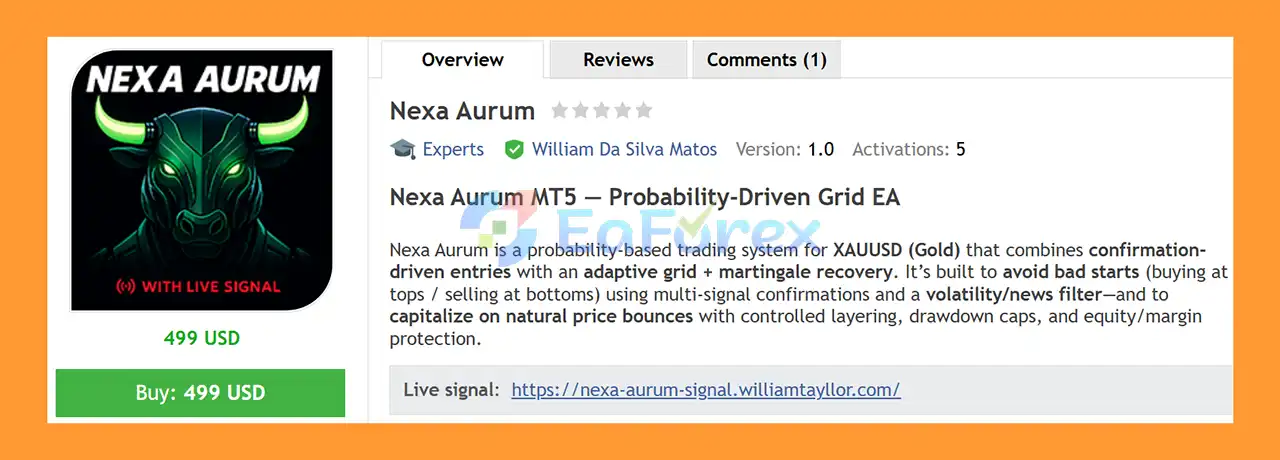
Nexa Aurum EA MT5 is a probability-based automated trading system for XAUUSD (Gold) that combines confirmation-driven entries with an adaptive grid and martingale recovery framework.
The EA is designed to avoid poorly timed initial entries by requiring multiple confirmations before opening a position. Its trading framework combines reversal confirmation, oscillator conditions, volatility controls, session rules, and a configurable news filter before allowing a new trade or grid sequence.
When a position moves against the initial entry, Nexa Aurum can use an adaptive grid to add controlled layers at calculated price intervals. The grid spacing is adjusted according to market volatility, helping the system adapt its positioning rather than relying exclusively on a fixed grid distance.
A major focus of Nexa Aurum EA MT5 is risk governance. The EA includes maximum-layer controls, equity and margin protection, daily-loss protection, drawdown tripwires, session restrictions, and a Fail-Safe mechanism that can close open trades and prevent new orders when the configured maximum drawdown is reached.
Another distinctive feature is its historical news filter for backtesting. The EA includes an embedded historical news calendar so traders can compare backtests with the news filter enabled or disabled and evaluate how major economic events may affect Gold trading.
Nexa Aurum EA MT5 is designed specifically for XAUUSD in the supplied build and can operate on different MT5 timeframes.
• Author: William Da Silva Matos
• Experience: Over +1 years of experience on MQL5.
• Notable Products: Nexa Aurum EA, SynthMind other advisors.
• Flagship Product: Nexa Aurum EA MT5 is rated as the best performing product of the year.
>> Delivery time 24h-48h after payment.
>>> Refund if not delivered.
>>> You will receive the latest version without any limitations (ID+Time).>>Reviewed by Jason Stap <<
Nexa Aurum EA MT5 does not simply open a grid whenever price moves in a particular direction.
Initial entries are gated by multiple conditions, which can include:
The objective is to avoid starting a recovery sequence from poorly timed market extremes.
The EA uses an ATR-based adaptive grid distance with configurable minimum and maximum limits.
Instead of relying exclusively on one fixed grid spacing, the system can adjust its grid step according to current market volatility.
This allows the strategy to use different spacing during relatively calm and highly volatile conditions.
Nexa Aurum EA MT5 incorporates a martingale-style recovery mechanism in its grid framework.
Additional positions can be opened according to configured layering and exposure limits when price moves against the initial position.
Because recovery trading can increase exposure significantly, the EA provides controls such as:
These controls are important components of the overall risk framework.
One of the notable features of Nexa Aurum EA MT5 is its ability to use historical news data during Strategy Tester backtests.
The embedded news calendar can allow the EA to pause new entries around historical high-impact events rather than treating the historical market as if major announcements did not exist.
Traders can configure factors such as:
The supplied system supports historical news filtering from 2020 onward.
This allows users to compare backtest results with the news filter enabled and disabled.
A central feature of Nexa Aurum EA MT5 is its dual approach to profit protection.
When only one grid row is active, the EA can operate the position using a traditional Trailing Stop Loss.
As the market moves in a favorable direction, the trailing mechanism can adjust the stop to protect accumulated gains.
This gives individual positions an additional exit mechanism instead of relying solely on a basket-level profit target.
When multiple grid rows are active, Nexa Aurum EA MT5 can monitor the floating profit of the entire basket.
Once the configured basket-profit threshold is reached, the EA can place a broker-side stop for the relevant basket and trail the protection as the floating profit increases.
If the market subsequently reverses, the basket can be closed according to the protected stop level.
The combination of TSL and BTSL allows the exit mechanism to adapt according to whether the EA is managing an individual position or a multi-position basket.
Nexa Aurum EA MT5 follows a structured process from market filtering to entry, grid expansion, profit management, and risk protection.
Before initiating a new sequence, the EA evaluates its configured trading conditions.
Depending on the settings, these may include:
If the market does not satisfy the required conditions, the EA can remain inactive.
Once the configured confirmation conditions are satisfied, the EA can open the initial XAUUSD position.
The purpose of the confirmation stage is to avoid entering every short-term price fluctuation and instead wait for a predefined combination of market conditions.
If the initial position moves against the strategy, the EA can add additional positions according to the configured grid rules.
The grid spacing is based on volatility and uses ATR-related calculations with minimum and maximum limits.
This creates an adaptive rather than purely fixed-distance grid.
Additional positions can form a recovery basket.
The martingale-style mechanism can increase exposure according to the configured recovery rules, while the maximum-layer, lot, margin, and equity controls restrict how far the sequence can expand.
The goal is to allow the basket to benefit from a favorable price retracement while keeping the recovery process within predefined limits.
When the basket reaches its configured profit conditions, the EA can manage the overall sequence toward closure.
The BTSL system can additionally protect basket-level floating gains once the required threshold has been reached.
Nexa Aurum continuously monitors account equity and configured drawdown conditions.
If the predefined maximum drawdown is reached, the Fail-Safe can:
This provides a hard risk-control mechanism intended to stop the EA from continuing to trade after a predefined account-level loss threshold has been reached.
The supplied build is designed for XAUUSD, allowing its grid, volatility, news, and risk-management framework to be configured around the characteristics of Gold trading.
The ATR-based grid mechanism can adjust spacing according to market volatility, subject to configured minimum and maximum limits.
The system attempts to improve the quality of the initial entry by applying confirmation filters before allowing a new sequence.
This is important because the starting position determines the subsequent recovery exposure if price moves against the trade.
The embedded historical news calendar allows traders to test how the strategy behaves when new entries are restricted around major economic events.
This can provide a more configurable backtesting environment than a test that completely ignores scheduled news restrictions.
The combination of TSL and BTSL provides two different approaches to protecting profitable positions:
The EA includes multiple protection mechanisms rather than relying solely on the trading strategy:
The on-chart panel is designed to display why the EA is trading or why it is currently not trading.
This provides users with additional visibility into the system’s operating state instead of leaving every decision unexplained.
🔺Medium Risk – 5 Years
Nexa Aurum EA MT5 Backtet
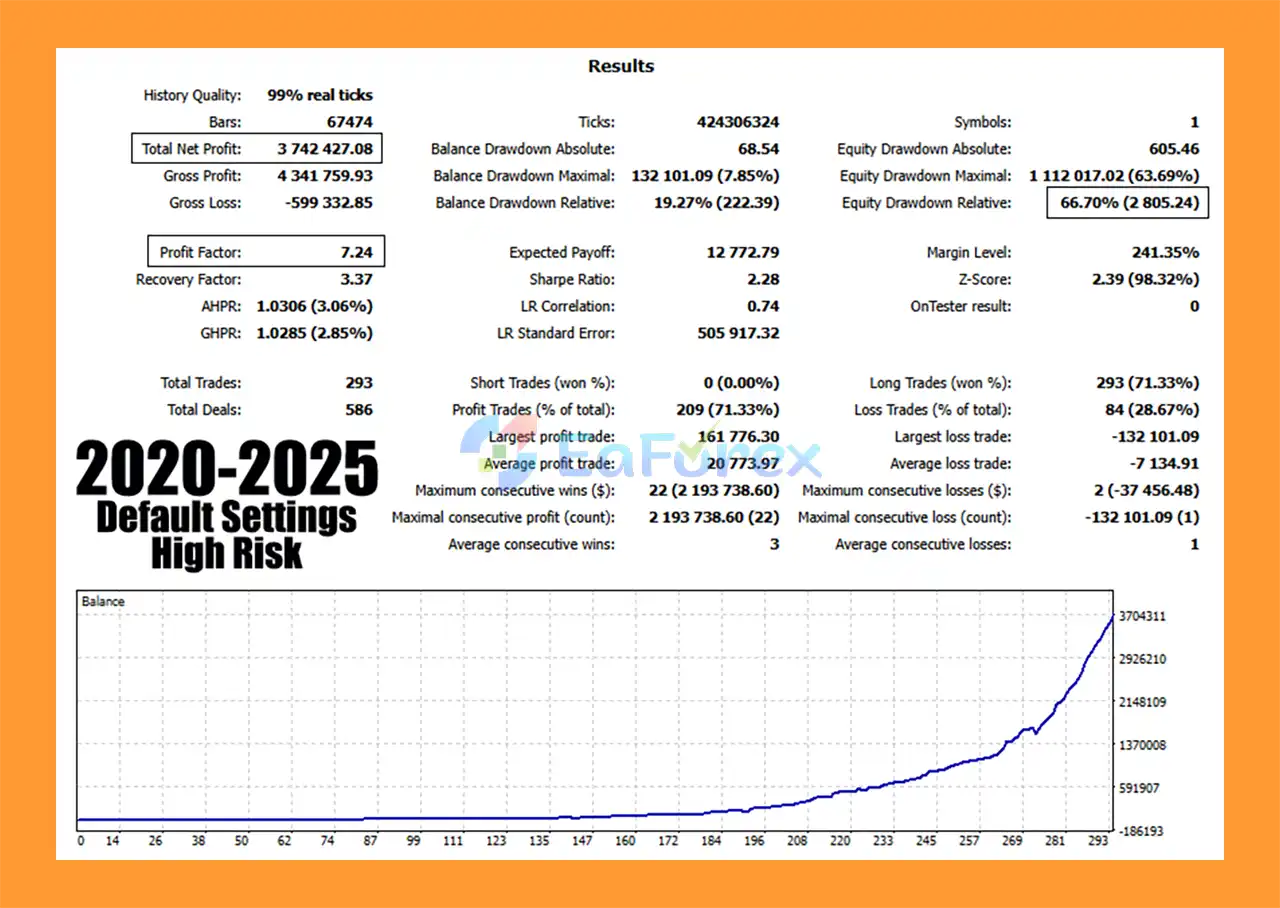
🔺High Risk – 5 Years
Nexa Aurum EA MT5 Backtets
Nexa Aurum’s performance and risk profile depend heavily on the interaction between its entry confirmation, adaptive grid, recovery logic, and account-protection settings.
Grid trading can create multiple positions when price moves against the initial trade.
An adaptive grid may adjust spacing according to volatility, but it does not eliminate the fundamental risk of prolonged one-directional movement.
The recovery component is particularly important to understand.
A martingale-style mechanism can increase position exposure during an adverse sequence. If the market continues moving against the basket without providing the required retracement, floating losses and margin usage can increase.
For this reason, the maximum-layer and exposure limits should be treated as essential risk parameters rather than optional settings.
Equity protection monitors account equity and can restrict trading when configured thresholds are reached.
This provides an additional account-level safeguard beyond individual Stop Loss or basket-profit management.
Margin protection helps prevent the EA from continuing to add positions when available margin becomes insufficient according to the configured rules.
This is particularly relevant for grid and recovery systems because cumulative exposure can increase as additional rows are added.
A daily-loss control can restrict trading after the account reaches the configured daily loss threshold.
This can help prevent the EA from continuing to accumulate losses throughout the same trading day.
The Fail-Safe provides a hard stop based on maximum drawdown.
When the configured threshold is reached, the EA is designed to close open positions and block new orders.
The actual effectiveness of any protective mechanism can still be affected by market gaps, extreme volatility, spread expansion, slippage, latency, and broker execution.
The historical news filter is one of the key features of Nexa Aurum.
In many Strategy Tester configurations, an EA can be evaluated primarily against historical price data without automatically reproducing the trading restrictions that would have been applied around scheduled economic events.
Nexa Aurum provides an embedded historical calendar designed to allow news restrictions to be applied during backtesting.
The system can be configured around:
The system supports historical news filtering from 2020 onward according to the supplied specifications.
Traders can therefore compare:
News Filter ON
versus
News Filter OFF
to investigate how avoiding selected economic events affects historical trading behavior.
Backtest results should still be interpreted carefully. A historical news filter can improve the realism of a test configuration, but it cannot reproduce every aspect of live execution, including actual spreads, slippage, liquidity changes, latency, and unexpected market reactions.
Nexa Aurum EA MT5 provides several session-governance options.
The EA can be configured to begin trading only after a specified time on Monday.
Trading can automatically stop after the configured Friday cutoff time.
The EA can be configured to avoid initiating new trading sequences around month-end periods when desired.
These controls allow traders to reduce exposure during selected calendar periods and align the EA’s activity with their own trading schedule.
According to the supplied specifications, the recommended environment is:
| Setting | Recommendation |
|---|---|
| Platform | MetaTrader 5 |
| Symbol | XAUUSD |
| Timeframes | Any MT5 timeframe |
| Account Size | From $500 |
| Recommended Balance | $1,000 |
| Broker Type | ECN / RAW |
| Execution | Fast execution |
| Leverage | 1:300–1:500 |
| VPS | Low-latency MT5 VPS |
The minimum and recommended balances should not be interpreted as guarantees of safe operation. The appropriate account size depends on configured risk, maximum layers, lot sizing, leverage, margin requirements, and market volatility.
The primary risk of any grid system is that multiple positions can accumulate when the market continues moving in one direction.
The martingale recovery component can increase position exposure during adverse sequences. A sufficiently long trend against the basket can result in substantial losses.
The strategy is designed around the possibility of favorable price retracements, but markets can continue trending without providing the expected recovery movement.
XAUUSD can experience significant volatility around CPI, FOMC, NFP, central-bank announcements, geopolitical events, and unexpected macroeconomic developments.
The historical news filter can restrict new entries around configured events, but it cannot eliminate the impact of news on positions that are already open.
Unexpected events may also occur outside the configured calendar.
Spread, slippage, latency, liquidity, execution speed, and stop execution can all affect live results.
A maximum-drawdown Fail-Safe can provide an additional layer of protection, but it cannot guarantee that an account will close positions at exactly the configured threshold during extreme market conditions.
Backtested performance does not guarantee future results. Real trading can differ substantially because of execution conditions, market regime changes, spread, commissions, slippage, and liquidity.
Open MetaTrader 5 and select:
File → Open Data Folder → MQL5 → Experts
Copy the Nexa Aurum EA file into the Experts folder.
Restart MetaTrader 5 or refresh the Expert Advisors section in the Navigator.
Open an XAUUSD chart and select your preferred timeframe.
The supplied version is designed specifically for XAUUSD and can operate across different MT5 timeframes.
An ECN or RAW spread account with fast execution is recommended.
A low-latency VPS is also recommended, particularly when the EA is expected to operate continuously.
Before enabling live trading, carefully review:
Avoid increasing recovery exposure simply to accelerate basket recovery.
Choose the currencies and economic categories that should trigger the trading pause.
Configure:
For backtesting, compare the results with the historical news filter ON and OFF to understand how the filter affects the strategy.
Set the desired:
Run extensive Strategy Tester and forward-demo tests.
Pay particular attention to:
If moving to a live account, begin with conservative risk and monitor the EA’s actual execution.
The behavior of a grid and recovery system can change substantially between different brokers and market environments.
In summary, Nexa Aurum EA MT5 is a specialized automated trading system for XAUUSD that combines confirmation-driven entries with an adaptive grid and martingale-style recovery framework.
Its architecture focuses on several areas that are important for automated Gold trading: filtering initial entries, adapting grid spacing to volatility, managing multi-position baskets, avoiding selected economic events, and controlling account-level risk.
The historical news filter is a notable feature because it allows traders to compare backtests with and without configured news restrictions from 2020 onward. The dual TSL and BTSL system also provides separate profit-management logic for single positions and multi-row baskets.
At the same time, the grid and recovery components require careful risk management. No adaptive grid or martingale mechanism can guarantee that price will retrace after an adverse movement. A prolonged one-directional trend can increase the number of positions, margin usage, and floating drawdown.
For this reason, Nexa Aurum should be evaluated not only by its potential historical returns but also by maximum drawdown, maximum grid layers, margin consumption, recovery behavior, and Fail-Safe performance under adverse market conditions.
Used with appropriate settings, conservative exposure, a suitable ECN/RAW environment, and thorough forward testing, Nexa Aurum provides a structured framework for automated XAUUSD trading. However, all backtests and historical results remain subject to the limitations of historical data and should not be considered guarantees of future performance.
1. What is Nexa Aurum EA MT5 and how does it work?
Nexa Aurum EA MT5 is a probability-based automated trading system developed exclusively for Gold (XAUUSD) on MetaTrader 5. It uses confirmation-based reversal entries combined with an adaptive grid and controlled martingale recovery to capitalize on natural price retracements while maintaining strict risk limits.
2. Is Nexa Aurum EA MT5 designed only for Gold (XAUUSD)?
Yes. Nexa Aurum EA MT5 is 100% optimized for XAUUSD only. Its logic accounts for gold’s unique volatility, liquidity behavior, and sensitivity to macroeconomic news, making it more precise than generic multi-asset grid EAs.
3. Does Nexa Aurum EA MT5 use grid and martingale strategies?
Yes, but in a controlled and capped manner. Nexa Aurum EA MT5 uses an adaptive grid combined with limited martingale recovery. Maximum grid layers, lot scaling, and drawdown thresholds are strictly predefined to prevent uncontrolled exposure.
4. How does Nexa Aurum EA MT5 avoid bad market entries?
The EA uses confirmation-based entry logic, opening trades only after validated reversal signals. This helps reduce the risk of buying market tops or selling market bottoms, a common weakness of traditional grid systems.
5. How does risk management work in Nexa Aurum EA MT5?
Nexa Aurum EA MT5 includes multiple built-in risk controls such as maximum grid layers, equity and margin protection, fail-safe drawdown guards, and session-based trading limits. If the maximum drawdown is reached, all trades are closed immediately and new trades are blocked.
6. Does Nexa Aurum EA MT5 include a news filter?
Yes. Nexa Aurum EA MT5 features an advanced news governance system. It can pause trading around major economic events such as FOMC, CPI, NFP, and GDP. The news filter also works in backtests using historical economic data from 2020 onward.
7. What is the Dual Stop System in Nexa Aurum EA MT5?
The Dual Stop System consists of:
Trailing Stop Loss (TSL) for single positions, locking in profits as price moves favorably.
Basket Trailing Stop Loss (BTSL) for multiple grid positions, trailing the entire basket’s floating profit with real broker-side stops.
This approach helps preserve profits during sudden reversals.
8. Can Nexa Aurum EA MT5 stop trading automatically?
Yes. The EA includes session governance rules that allow traders to:
Start trading only after a selected time on Monday
Stop trading automatically on Friday
Block new trades near month-end
These features help reduce exposure during risky market periods.
9. Is Nexa Aurum EA MT5 suitable for beginners?
Nexa Aurum EA MT5 is best suited for traders who understand grid trading principles. However, its transparent on-chart panel, built-in safeguards, and predefined risk limits make it accessible for disciplined beginners who prefer controlled automation.
In stock
In stock
In stock
In stock
In stock
Out of stock
No account yet?
Create an Account












 Automatic EA
 EA Best Seller
 Expert Advisor MT4
 Expert Advisor MT5
 HFT EA


Reviews
Clear filtersThere are no reviews yet.