









-
 Unlimited Activations
-
 Instant delivery
-
 Easy to install








 Unlimited Activations
Instant delivery
Easy to install
Unlimited Activations
Instant delivery
Easy to install
 Free Update
 Free Install Support

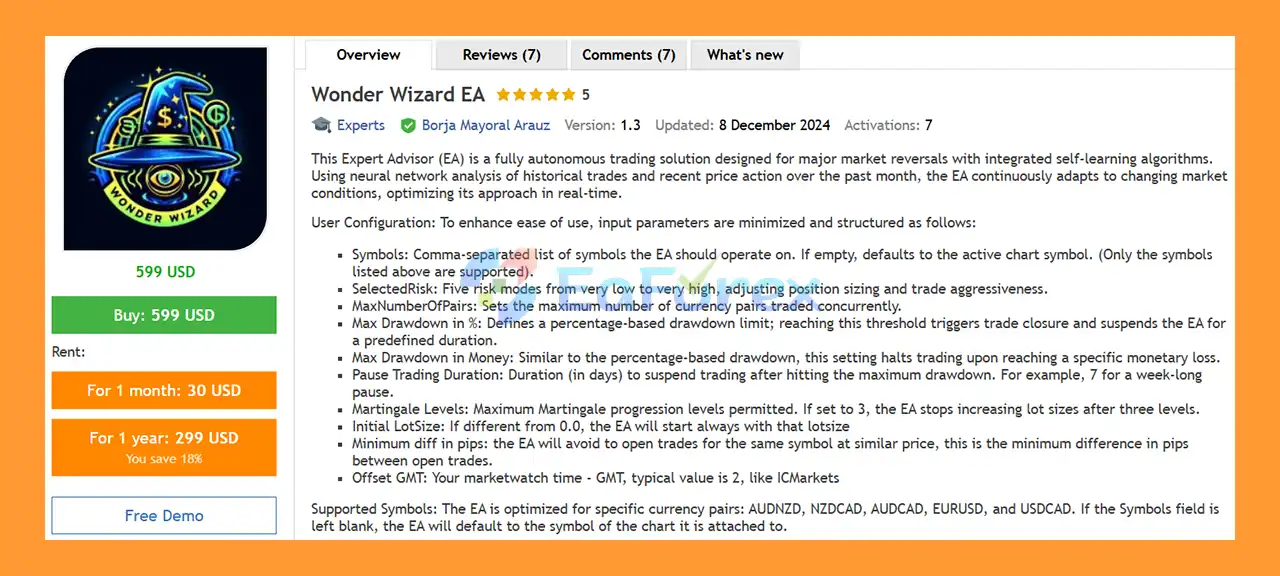
Wonder Wizard EA MT5 is a fully automated Forex Expert Advisor for MetaTrader 5 designed to identify and trade potential major market reversals. The EA combines automated trading logic with machine learning and neural network-based pattern recognition to analyze historical trades and recent market behavior.
Unlike a traditional fixed-rule Expert Advisor, Wonder Wizard EA MT5 is designed to continuously adapt its trading approach according to changing market conditions. Its analysis incorporates historical trading information together with recent price action from approximately the past month, allowing the system to adjust its decision-making process over time.
Wonder Wizard EA MT5 is optimized for a specific selection of Forex currency pairs, including AUDNZD, NZDCAD, AUDCAD, EURUSD, and USDCAD. Traders can specify the symbols manually or allow the EA to operate on the active chart symbol.
The EA also provides several important risk-control parameters, including five risk modes, maximum drawdown limits in percentage and monetary terms, trading suspension periods, maximum currency pairs, minimum trade distance, and configurable Martingale levels.
With a relatively streamlined input structure, Wonder Wizard EA MT5 is designed to provide automated reversal trading while allowing traders to control the most important aspects of risk and exposure.
>> Delivery time 24h-48h after payment.
>>> Refund if not delivered.
>>> You will receive the latest version without any limitations (ID+Time).>>Reviewed by Jason Stap <<
Wonder Wizard EA MT5 incorporates machine learning and neural network-based pattern recognition into its trading approach.
The system analyzes historical trading information and recent price action to identify patterns associated with potential market reversals.
Rather than relying exclusively on static trading rules, the EA is designed to adapt its decision-making process as market conditions change.
The core concept behind Wonder Wizard EA MT5 is reversal trading.
The EA seeks potential turning points in the market and attempts to identify situations where the current price movement may be approaching a significant reversal.
Because reversal strategies can behave differently during trending and ranging markets, appropriate risk settings and forward testing are particularly important.
The SelectedRisk parameter provides five different risk levels, ranging from Very Low to Very High.
These modes adjust the EA’s position sizing and overall trading aggressiveness.
This allows users to select a risk profile that better matches their account size and personal risk tolerance.
Wonder Wizard EA MT5 is optimized for the following currency pairs:
Users can enter multiple symbols using a comma-separated list.
If the Symbols parameter is left empty, the EA will use the symbol of the chart to which it is attached.
The MaxNumberOfPairs parameter allows traders to control the maximum number of currency pairs that can be traded concurrently.
This can help limit overall market exposure when multiple supported Forex pairs are being monitored.
Wonder Wizard includes two separate drawdown protection mechanisms:
When the configured drawdown threshold is reached, the EA can close trades and suspend further trading.
This provides an additional layer of account-level risk control.
The Pause Trading Duration parameter determines how long the EA remains inactive after reaching a maximum drawdown limit.
For example, entering 7 days can suspend trading for approximately one week after the defined drawdown threshold is triggered.
Wonder Wizard EA MT5 includes a Martingale Levels parameter that controls the maximum number of Martingale progression levels permitted.
For example, if the value is set to 3, the EA will stop increasing the lot size after the configured three levels.
Because Martingale-based position sizing can substantially increase exposure during losing sequences, this parameter should be treated as a significant risk-control setting.
The Initial LotSize parameter allows traders to define a starting lot size manually.
If the value is different from 0.0, the EA will begin trading using the specified lot size.
The Minimum diff in pips setting helps prevent the EA from opening additional trades for the same symbol at prices that are too close together.
This parameter establishes the minimum pip distance between open trades and can help control position clustering.
The Offset GMT parameter allows the EA to account for the difference between the broker’s Market Watch time and GMT.
For example, a value of 2 may be appropriate for some broker server configurations, although traders should verify their broker’s actual server time before configuring this parameter.
Wonder Wizard combines automated reversal analysis, adaptive algorithms, and predefined risk controls in several stages.
The EA monitors the supported currency pairs and evaluates recent price behavior.
Its analysis incorporates historical trading information and recent price action, with the system designed to focus particularly on data from approximately the previous month.
The machine-learning and neural-network components are used to identify patterns that may be associated with potential market reversals.
The purpose is to detect market conditions that the EA considers relevant to its reversal strategy.
When the required conditions are identified, Wonder Wizard can automatically generate a trading decision according to the selected risk configuration and strategy logic.
The EA can operate across multiple supported currency pairs, subject to the MaxNumberOfPairs setting.
The EA determines its trading exposure according to the selected SelectedRisk mode or the configured Initial LotSize, depending on the applicable settings.
Five risk modes allow users to choose between lower and higher levels of trading aggressiveness.
If Martingale functionality is enabled, the EA can progress through the configured Martingale levels following its trading logic.
The Martingale Levels parameter limits how far this progression can continue.
The Minimum diff in pips setting also helps prevent trades on the same symbol from being opened too close to each other.
The EA continuously monitors account-level drawdown.
If either the configured percentage-based or monetary drawdown limit is reached, the EA can close trades and suspend trading.
After a drawdown protection event, the Pause Trading Duration setting determines how long the EA remains paused before trading can resume.
This creates a predefined recovery period rather than allowing the system to immediately continue trading after a significant loss event.
Wonder Wizard EA MT5 may be suitable for traders looking for an automated Forex reversal system with adaptive analysis and configurable risk controls.
One of its defining characteristics is the combination of machine learning and neural network-based pattern recognition with automated reversal trading. This provides a different approach from conventional Expert Advisors that operate entirely from fixed technical indicators or static rules.
Another feature is its relatively simple user configuration. Instead of requiring users to manage a large number of technical indicators and entry parameters, the main settings focus on symbols, risk level, drawdown protection, trading exposure, Martingale limits, trade spacing, and GMT configuration.
The EA also provides account-level protection through both percentage and monetary drawdown limits. When the configured threshold is reached, trading can be suspended for a predefined period.
For traders who prefer to monitor a limited group of currency pairs, the EA’s optimized support for AUDNZD, NZDCAD, AUDCAD, EURUSD, and USDCAD provides a clearly defined trading universe.
However, users should evaluate the system through realistic backtesting and forward testing before deploying it with significant capital.
Wonder Wizard EA MT5 Signal Results
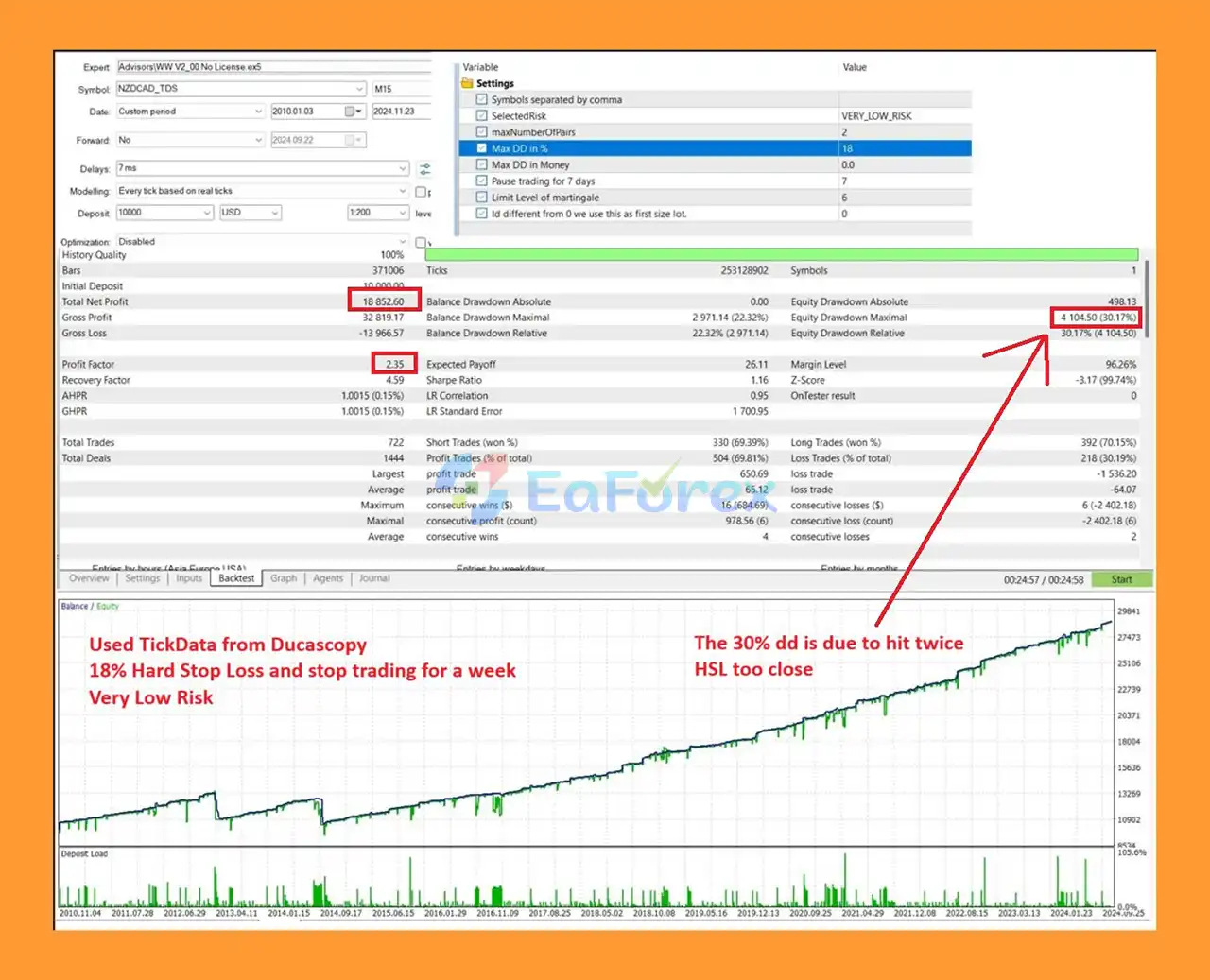
🔺NZDCAD pair – Very LowRisk (14 Years)
Wonder Wizard EA backstets
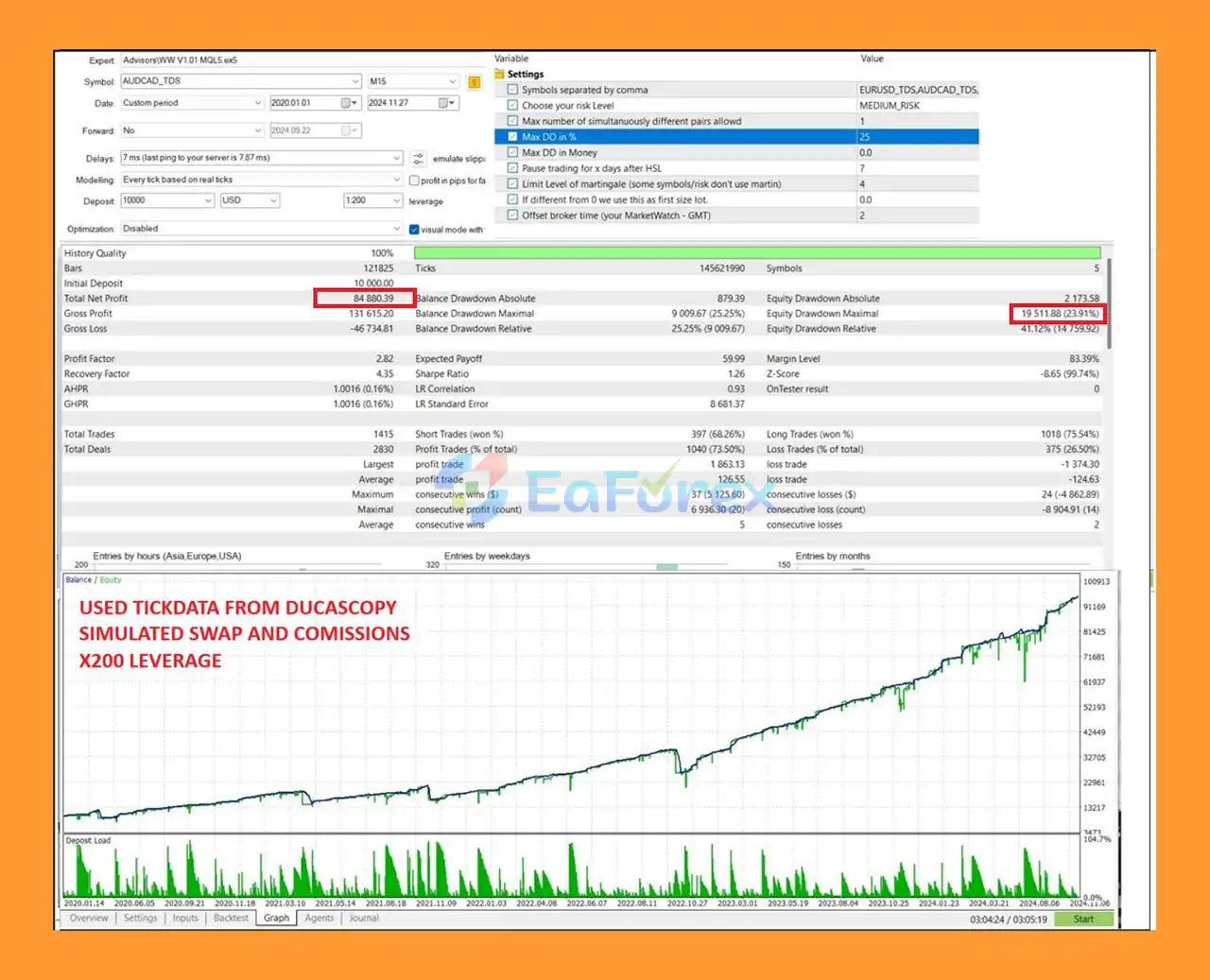
🔺AUDCAD pair – (14 Years)
Wonder Wizard EA backstet
Risk management is an important part of Wonder Wizard EA MT5 because automated reversal trading and Martingale progression can create substantial exposure during unfavorable market conditions.
The SelectedRisk parameter provides five risk levels:
Lower settings are intended to reduce trading aggressiveness, while higher settings increase potential position exposure.
The Max Drawdown in % setting establishes a percentage-based account protection threshold.
When the specified level is reached, the EA can close trades and suspend further trading.
The Max Drawdown in Money setting provides another form of account protection based on a predefined monetary loss.
Using both percentage and monetary limits can give traders additional control over account-level exposure.
After a drawdown event, Pause Trading Duration determines how long the EA remains inactive.
For example, a setting of 7 days creates a one-week pause after the relevant drawdown condition is triggered.
The EA allows traders to define the maximum number of Martingale progression levels.
This is particularly important because increasing position size after losses can accelerate account exposure.
The Minimum diff in pips parameter establishes a minimum distance between open trades on the same symbol.
This can help prevent multiple positions from accumulating at nearly identical price levels.
The provided recommendation specifies:
These are configuration recommendations rather than guarantees of sufficient capital or acceptable risk. Actual margin requirements depend on the broker, account type, symbol specifications, leverage, position size, and trading conditions.
A reversal strategy may encounter difficulty when a market continues moving strongly in one direction instead of reversing.
Extended directional movements can potentially result in multiple losing trades or increased exposure.
The EA includes configurable Martingale levels.
Although the maximum progression can be limited, increasing position sizes after losses can substantially increase exposure and drawdown.
Traders should understand this mechanism before enabling or increasing Martingale levels.
The use of machine learning or neural networks does not guarantee profitable trades or accurate market predictions.
Financial markets are influenced by numerous variables, and historical patterns may not repeat in the future.
An adaptive system may adjust to changing market behavior, but no algorithm can guarantee successful adaptation to every market regime.
Unexpected volatility, news events, liquidity changes, and structural market shifts can affect automated trading results.
Wonder Wizard is optimized for a specific group of currency pairs:
AUDNZD, NZDCAD, AUDCAD, EURUSD, and USDCAD.
Using unsupported symbols may produce results that differ from the intended configuration.
Spread, slippage, execution speed, commissions, swap costs, leverage, and broker server conditions can all influence the actual performance of an automated Forex strategy.
Maximum drawdown settings can provide an additional layer of account protection, but they cannot guarantee that losses will remain below the configured threshold in all circumstances.
Fast market movements and execution conditions can cause actual losses to differ from planned limits.
Backtesting and historical trading results should not be interpreted as guarantees of future performance.
Live trading involves real spreads, slippage, execution delays, commissions, and changing market conditions.
Installing Wonder Wizard EA MT5 follows the standard MetaTrader 5 Expert Advisor installation process.
Open MetaTrader 5 and select:
File → Open Data Folder → MQL5 → Experts
Copy the Wonder Wizard EA file into the Experts folder.
Restart MT5 or refresh the Expert Advisors section inside the Navigator window.
The EA should then appear in the available Expert Advisors list.
Open a chart for one of the supported instruments:
If the Symbols field is left empty, the EA will use the active chart symbol.
Drag Wonder Wizard EA MT5 onto the selected chart.
Open the EA’s input settings and configure the required parameters.
Select an appropriate SelectedRisk level.
You can also configure:
Start with conservative settings and avoid increasing risk before sufficient testing.
If you want the EA to monitor multiple supported pairs, enter the symbols as a comma-separated list according to the broker’s exact symbol names.
If no symbols are entered, the EA will operate on the chart symbol.
Check your broker’s Market Watch/server time and calculate the correct difference from GMT.
Do not simply copy a GMT offset from another broker because server-time settings can vary.
Make sure Algo Trading is enabled in MetaTrader 5 and that the EA has permission to trade automatically.
Before using real funds, test the EA on a demo account or other controlled environment.
Pay particular attention to:
In summary, Wonder Wizard EA MT5 is an automated Forex Expert Advisor built around market reversal trading, machine learning, and neural network-based pattern recognition.
Its primary focus is on a defined group of currency pairs, including AUDNZD, NZDCAD, AUDCAD, EURUSD, and USDCAD, while its simplified configuration allows traders to control risk, drawdown, position exposure, trade spacing, and trading pauses without managing a large number of technical parameters.
The EA’s five risk modes and dual drawdown protection system provide useful controls for managing automated exposure. At the same time, the inclusion of configurable Martingale levels means traders need to understand how position progression can affect account risk.
The machine-learning component should also be viewed as a tool for adaptive analysis rather than a guarantee of future profitability. Financial markets can change rapidly, and historical patterns may not remain effective under future conditions.
For this reason, a prudent approach is to start with a lower risk mode, use a controlled account size, test the EA across different market conditions, verify broker compatibility, and conduct forward testing before considering live deployment.
Overall, Wonder Wizard EA MT5 offers a combination of AI-assisted reversal analysis, automated Forex trading, configurable risk management, drawdown protection, and multi-pair support, making it a distinctive option for traders exploring adaptive Expert Advisor technology on MetaTrader 5.
1. What is Wonder Wizard EA MT5 and how does it work?
Wonder Wizard EA MT5 is a fully autonomous, self-learning trading Expert Advisor for MetaTrader 5. It uses neural network analysis to study historical trade data and recent price action, allowing it to detect major market reversals and adapt its strategy dynamically to changing market conditions.
2. What trading strategy does Wonder Wizard EA MT5 use?
Wonder Wizard EA MT5 focuses on reversal-based trading. Instead of chasing trends late, it aims to identify significant market turning points using neural networks and adaptive logic, making it suitable for traders who prefer early entries near potential reversals.
3. Is Wonder Wizard EA MT5 fully automated?
Yes. Wonder Wizard EA MT5 is fully automated once configured. It executes trades, manages risk, applies drawdown protection, and pauses trading automatically without requiring manual intervention.
4. Which currency pairs does Wonder Wizard EA MT5 trade?
Wonder Wizard EA MT5 supports multi-symbol trading and is optimized for the following currency pairs:
EURUSD
USDCAD
AUDCAD
AUDNZD
NZDCAD
Traders can control how many pairs are traded simultaneously to manage overall exposure.
5. Does Wonder Wizard EA MT5 use martingale?
Wonder Wizard EA MT5 includes controlled martingale logic, but with strict limits. Traders can cap the maximum number of martingale levels to prevent uncontrolled exposure, making it safer than unrestricted martingale systems.
6. How does risk management work in Wonder Wizard EA MT5?
The EA offers five selectable risk modes, ranging from very low to very high. It also includes percentage-based and monetary drawdown limits, price distance protection, and automatic trading pauses after drawdown events to protect account capital.
7. Can Wonder Wizard EA MT5 stop trading after a loss?
Yes. If predefined drawdown limits are reached, Wonder Wizard EA MT5 will automatically close open trades and pause trading for a user-defined number of days. This helps prevent emotional or revenge trading during unfavorable conditions.
8. Is Wonder Wizard EA MT5 suitable for beginners?
Wonder Wizard EA MT5 can be suitable for beginners due to its structured inputs, preset risk modes, and automated risk controls. However, understanding basic Forex trading concepts and reversal strategies is recommended before live deployment.
9. Does Wonder Wizard EA MT5 require frequent optimization?
No. Thanks to its self-learning and adaptive logic, Wonder Wizard EA MT5 adjusts its behavior based on recent performance and market conditions, reducing the need for constant manual optimization.
In stock
In stock
In stock
In stock
In stock
Out of stock
No account yet?
Create an Account












 Automatic EA
 EA Best Seller
 Expert Advisor MT4
 Expert Advisor MT5
 HFT EA


Reviews
Clear filtersThere are no reviews yet.