









-
 Unlimited Activations
-
 Instant delivery
-
 Easy to install






 Unlimited Activations
Instant delivery
Easy to install
Unlimited Activations
Instant delivery
Easy to install
 Free Update
 Free Install Support

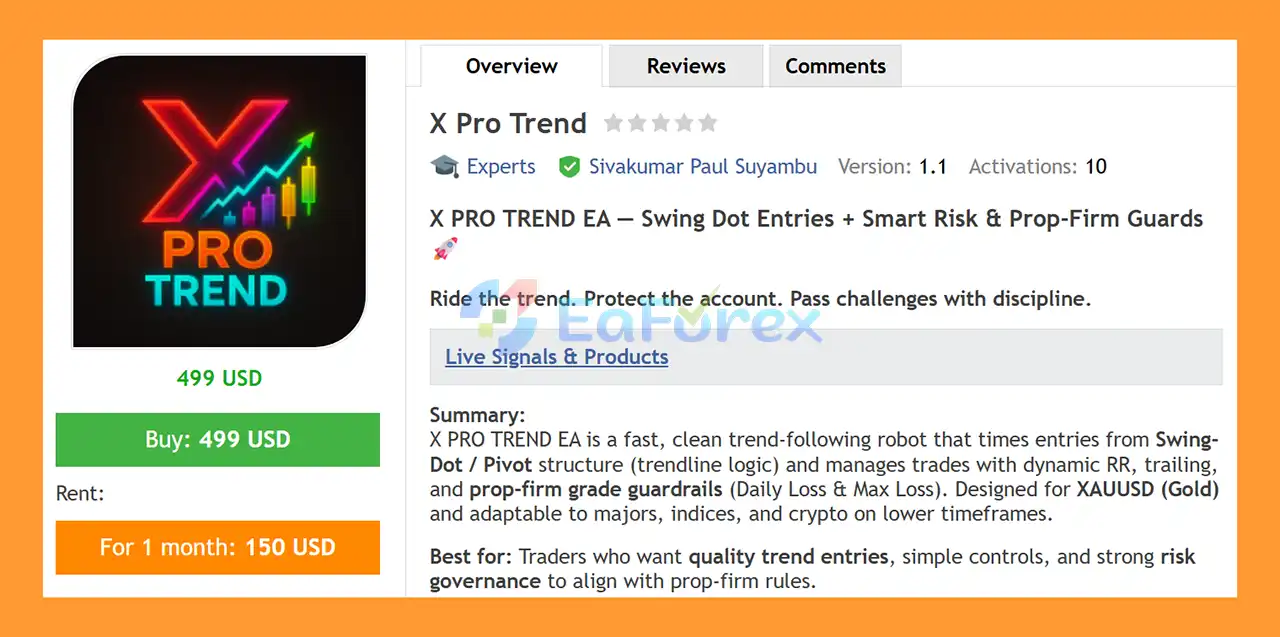
X Pro Trend EA MT5 is an automated trend-following Expert Advisor for MetaTrader 5, designed to identify potential market trends using Swing-Dot / Pivot structure and manage trades with systematic risk controls.
The EA focuses on confirmed and provisional swing pivots to identify potential entry opportunities, while a minimum slope filter helps avoid trading during flat or choppy market conditions. Once a trade is opened, X Pro Trend EA MT5 uses configurable Stop Loss, Risk-Reward Ratio, Take Profit, and trailing stop settings to manage the position.
A major feature of the system is its integrated prop-firm risk management suite, including Daily Loss and Maximum Loss guards. These controls can automatically restrict new trading or lock the EA when predefined risk limits are reached.
X Pro Trend EA MT5 is primarily designed for XAUUSD (Gold) and can also be adapted to other instruments such as major Forex pairs, indices, and cryptocurrencies, depending on broker conditions and configuration.
>> Delivery time 24h-48h after payment.
>>> Refund if not delivered.
>>> You will receive the latest version without any limitations (ID+Time).>>Reviewed by Jason Stap <<
X Pro Trend EA MT5 analyzes swing highs and swing lows using configurable SwingLeft and SwingRight parameters. Traders can choose between confirmed pivots and optional provisional dots for earlier signal detection.
The UseProvisionalDots option allows the EA to consider potential swing structures before full confirmation. This can provide earlier entries, particularly on lower timeframes, although earlier signals may also be less confirmed.
The MinSlopePoints parameter helps filter out low-momentum market conditions. By requiring a minimum slope between recent same-side pivots, the EA can avoid some flat or sideways environments.
Lot size can be calculated according to the selected RiskPercentage and Stop Loss distance. The EA uses the instrument’s tick value and broker volume steps when determining position size.
The RiskRewardRatio determines the potential Take Profit distance relative to the Stop Loss. For example, a 3.5 RR setting targets a TP distance approximately 3.5 times the configured SL distance.
The TrailingStopPercentage allows the EA to follow favorable price movement and improve the Stop Loss position while respecting broker stop and freeze-level requirements.
X Pro Trend EA MT5 includes dedicated risk controls for challenge and funded-account environments, including:
These tools are designed to help automate risk discipline, but they do not guarantee compliance with every proprietary trading firm’s rules.
The EA can restrict new entries to a defined trading session. The US session can be configured using server-time settings, including overnight sessions such as 18:00–02:00.
X Pro Trend EA is designed with a relatively simple trading framework rather than relying on a large collection of indicators. This helps keep the EA focused on swing structure, trend conditions, trade management, and risk controls.
X Pro Trend EA MT5 follows a structured sequence from market analysis to trade management.
The EA first analyzes price structure to identify potential swing highs and swing lows.
The SwingLeft parameter determines how many bars are evaluated on the left side of a potential pivot, while SwingRight determines how many bars are required for confirmation.
A higher SwingRight value generally means that the EA waits longer for confirmation, potentially producing fewer but more confirmed swing signals.
When UseProvisionalDots is enabled, the EA can use the ProvisionalRight setting to identify potential swing points before standard pivot confirmation is complete.
This feature is particularly relevant for lower-timeframe trading where waiting for full confirmation may result in later entries.
The EA can compare recent same-side pivots and measure their slope in points per bar.
If MinSlopePoints is enabled, the market must meet the specified minimum slope requirement before a trade can be considered.
This is intended to reduce entries during periods where the market lacks sufficient directional movement.
When the required swing structure, slope conditions, session settings, and other trading requirements are satisfied, the EA can place a trade automatically.
The MaxOrders parameter limits the number of simultaneous positions associated with the relevant symbol and magic number.
Stop Loss is determined using the configured StopLossPercentage, which defines the SL distance relative to price.
The RiskRewardRatio is then used to calculate the corresponding Take Profit distance.
After price moves favorably, the EA can activate its percentage-based trailing mechanism.
The trailing stop is designed to move only in a direction that improves the existing Stop Loss rather than loosening the position’s protection.
Before and during trading, the EA monitors configured risk limits.
The Daily Loss guard can stop new trading when the daily threshold is reached. Depending on the configuration of BlockNewOrdersOnly, the EA may either prevent new entries or also close existing trades.
The Maximum Loss guard acts as a hard account-level floor. A MaxLossSafetyBufferUSD can be added to provide additional room for spread, slippage, and execution differences.
X Pro Trend EA MT5 may be suitable for traders looking for a combination of trend-based entries and structured risk management rather than an overly complicated trading system.
The core entry concept is based on swing pivots and slope rather than requiring a large collection of technical indicators.
Traders can choose between confirmed swing dots and provisional dots, allowing the EA to be adapted to different trading styles and timeframes.
The system places significant emphasis on account protection through risk-based position sizing, daily loss limits, maximum loss controls, and trading locks.
The EA is designed for M1–M15, making it suitable for traders who want automated short-term trend participation.
For M1 trading, provisional dots may be considered, while M5–M15 users may prefer more standard swing confirmation.
The configurable Daily Loss and Maximum Loss guards can help traders automate predefined risk boundaries when operating under challenge-style account rules.
However, traders should always compare the EA settings with the exact rules of their individual prop-firm provider.
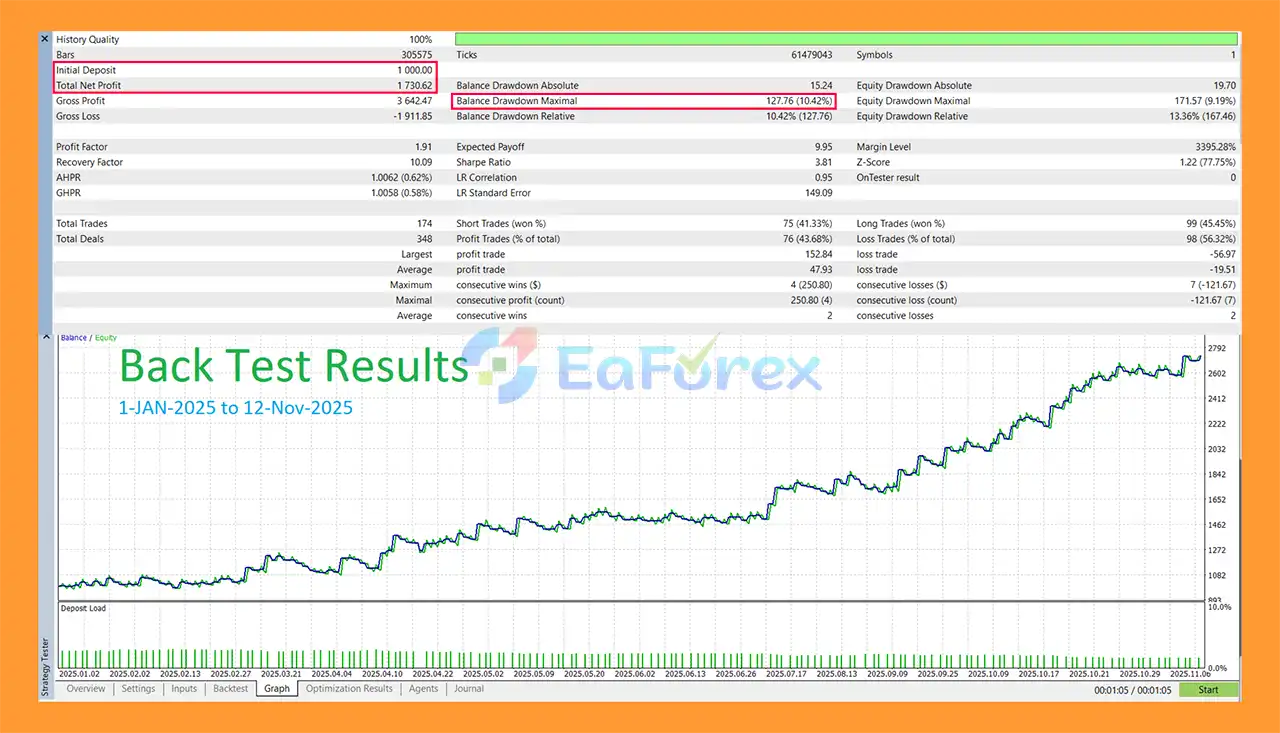
X Pro Trend EA MT5 Backtest
X Pro Trend EA MT5 does not rely solely on entry signals. Its money-management framework is an important part of the overall system.
The RiskPercentage setting determines the percentage of account balance intended to be exposed per trade.
For initial testing, the supplied guidelines suggest starting around 0.25%–1.00% risk per trade, with 0.25%–0.50% being a more conservative starting range during forward testing.
The StopLossPercentage determines the SL distance as a percentage of the entry price.
Because different instruments have different volatility characteristics, the appropriate setting can vary significantly between XAUUSD, Forex pairs, indices, and cryptocurrencies.
The RiskRewardRatio defines the relationship between the Stop Loss and Take Profit distances.
For example:
1% SL × 3.5 RR = approximately 3.5% TP distance
The actual trading outcome can differ because of spread, slippage, execution, and broker-specific conditions.
The Daily Loss system can be configured using either percentage-based or fixed-dollar limits.
Traders can also select whether the daily limit remains static or can increase after profitable trading.
For prop-firm challenges, using a static daily limit may be preferable when it matches the firm’s rules.
The Maximum Loss guard establishes a hard account-level threshold.
The MaxLossSafetyBufferUSD parameter can provide an additional cushion for execution conditions that may cause realized losses to differ from theoretical calculations.
The LockRestOfDay option can prevent further trading until the next daily reset after a daily loss breach.
The LockAfterMaxBreach option can create a persistent lock after the maximum-loss threshold has been breached.
These features are intended to prevent the EA from continuing to trade after predefined risk boundaries have been reached.
For traders using X Pro Trend EA MT5 with a proprietary trading challenge, configuration should be based on the specific firm’s current rules.
Recommended preparation includes:
An EA’s internal protection does not replace the trader’s responsibility to understand the firm’s exact drawdown methodology, reset time, floating-loss rules, news restrictions, lot limits, or other conditions.
Like any automated trading system, X Pro Trend EA MT5 carries market and execution risks.
Confirmed pivots require sufficient bars to establish the swing structure. Increasing SwingRight may improve confirmation but can also make entries later.
Provisional dots allow earlier participation, but they may be more sensitive to short-term price changes and should be tested carefully.
The EA is designed around trend and swing structure. Extended sideways markets can produce weaker signals or false breakouts.
M1–M5 trading can be particularly affected by spread, slippage, latency, broker execution, and market liquidity.
Daily Loss and Maximum Loss protections can help enforce predefined limits, but they cannot guarantee that an account will remain within a firm’s rules during abnormal market conditions.
Price gaps, slippage, spread expansion, latency, or broker execution can cause actual losses to exceed expected levels.
Any backtest or historical performance should be treated as a reference rather than a promise of future profitability. Live results may differ because of market conditions, execution quality, spreads, commissions, and other factors.
Always test the EA on a demo account or controlled environment before committing significant capital.
Open MetaTrader 5 and navigate to:
File → Open Data Folder → MQL5 → Experts
Copy the X Pro Trend EA file into the Experts folder.
Restart MetaTrader 5 or refresh the Expert Advisors section in the Navigator.
For initial testing, attach the EA to XAUUSD.
The recommended starting range is M5–M15. M1 users can experiment with provisional swing dots after completing adequate testing.
Set the RiskPercentage to a conservative value during the testing phase.
A starting range of 0.25%–0.50% per trade can be used as a testing reference before considering higher risk.
Set the US session start and end according to your broker’s server time.
Check the broker’s server time carefully, especially when using an overnight session.
For challenge accounts:
Run the EA on a demo account or controlled environment before using it with real capital.
Monitor:
Only move to live trading after confirming that the EA behaves as expected on your specific broker and account environment.
In summary, X Pro Trend EA MT5 combines Swing-Dot / Pivot trend entries, percentage-based risk management, dynamic Risk-Reward settings, trailing protection, session filtering, and dedicated Daily Loss and Maximum Loss guards into one automated trading framework.
Its strongest design emphasis is not simply generating entries, but controlling how trades are sized and how the EA responds when predefined account-risk boundaries are reached.
For XAUUSD traders, particularly those operating on lower timeframes or evaluating prop-firm-style risk requirements, the combination of swing-based entries and configurable risk governance provides a structured framework for automated trading.
However, the EA should be treated as a trading tool rather than a guarantee of profitability or challenge success. Broker execution, market conditions, spread, slippage, account rules, and parameter selection can all materially affect results.
Start with conservative risk, forward-test thoroughly, and configure the prop-firm guards according to the exact rules of your trading account.
1. What is X Pro Trend EA MT5 and how does it trade?
X Pro Trend EA MT5 is a fast, lightweight trend-following Expert Advisor designed exclusively for Gold (XAUUSD) on MetaTrader 5. It trades using Swing-Dot / Pivot market structure, identifying clean trend entries while avoiding sideways and choppy market conditions.
2. Which timeframe is X Pro Trend EA MT5 optimized for?
X Pro Trend EA MT5 is optimized for lower timeframes from M1 to M15, making it ideal for gold scalping and short-term trend trading with precise execution.
3. What trading strategy does X Pro Trend EA MT5 use?
The EA uses Swing-Dot and Pivot-based trend analysis, detecting confirmed and provisional swing highs and lows. It combines this with market slope filters to ensure trades are only taken when real momentum exists.
4. Does X Pro Trend EA MT5 use grid or martingale?
No. X Pro Trend EA MT5 uses no grid, no martingale, and no recovery systems. Each trade has predefined risk and reward, ensuring transparent behavior and capped exposure.
5. How does X Pro Trend EA MT5 manage risk?
Risk management features include:
Risk-percentage-based position sizing
Stop loss defined as a percentage of price
Fixed Risk-Reward ratio per trade
Adaptive trailing stop
Daily loss and maximum loss protection
These tools help maintain consistent and disciplined risk control.
6. Is X Pro Trend EA MT5 prop-firm friendly?
Yes. X Pro Trend EA MT5 is designed specifically for prop-firm environments, with built-in Daily Loss and Max Loss guardrails, flexible drawdown configurations, and clean non-martingale logic.
7. Can I control when X Pro Trend EA MT5 trades?
Yes. The EA includes a session filter, allowing you to trade only during selected hours, such as the U.S. session, to avoid low liquidity and unstable market periods.
8. What is the difference between confirmed and provisional swing dots?
Confirmed swing dots provide safer, cleaner entries using standard pivot logic.
Provisional swing dots allow earlier entries on M1, offering more aggressive but faster trend participation.
Traders can choose the mode that fits their risk tolerance.
9. Does X Pro Trend EA MT5 require a VPS?
A VPS is not mandatory, but strongly recommended for best performance on M1–M15 timeframes, especially with ECN brokers, to ensure fast execution and minimal slippage.
In stock
In stock
In stock
In stock
In stock
Out of stock
No account yet?
Create an Account












 Automatic EA
 EA Best Seller
 Expert Advisor MT4
 Expert Advisor MT5
 HFT EA


Reviews
Clear filtersThere are no reviews yet.