

Product Overview
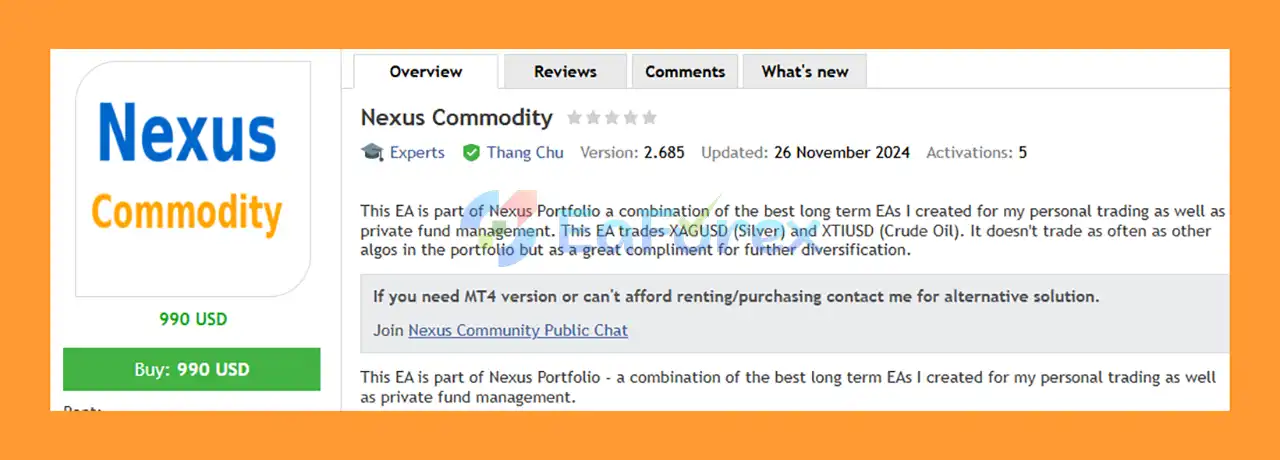
Nexus Commodity EA MT5 is a professional commodity trading Expert Advisor developed as part of the Nexus Portfolio, a collection of long-term EAs designed for personal trading and private fund management.
The EA is designed to trade two major commodity markets: XAGUSD (Silver) and XTIUSD (Crude Oil). By focusing on different commodities, Nexus Commodity can potentially complement other Expert Advisors and provide additional portfolio diversification.
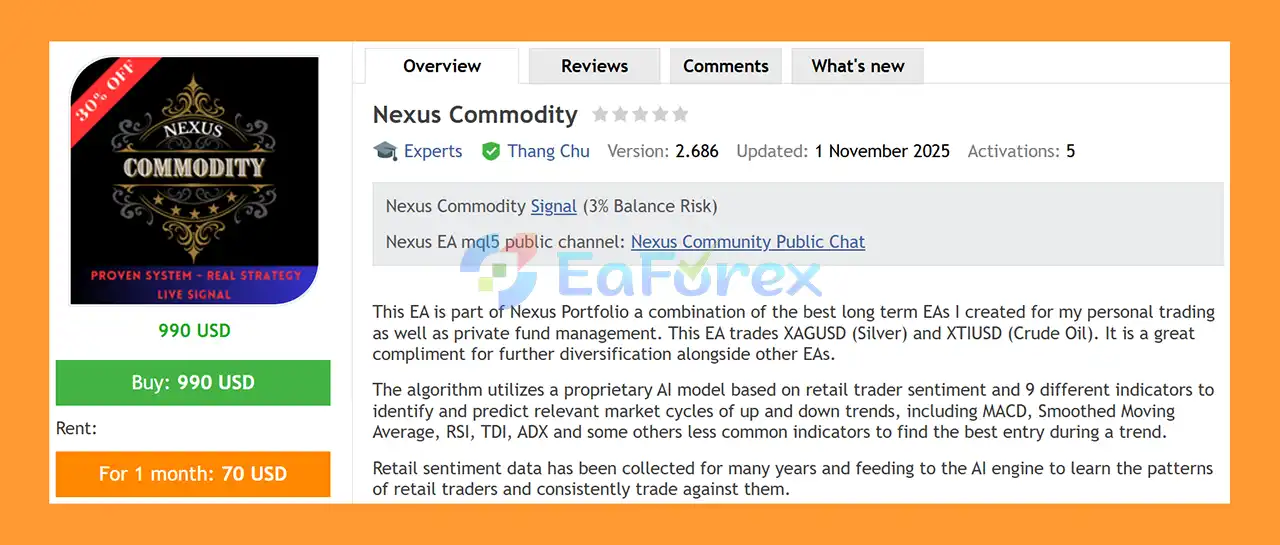
The system combines a proprietary AI model based on retail trader sentiment with a multi-indicator market analysis framework. According to the developer, the AI engine has been trained using retail sentiment data collected over many years, allowing the system to analyze patterns in retail trader behavior and seek opportunities by trading against those sentiment patterns.
The algorithm uses nine different indicators, including MACD, Smoothed Moving Average, RSI, TDI, and ADX, together with additional less-common indicators to identify market cycles, analyze trends, and search for potential entries.
Nexus Commodity EA MT5 does not use Martingale, Grid, or DCA strategies and is designed not to hold losing trades indefinitely.
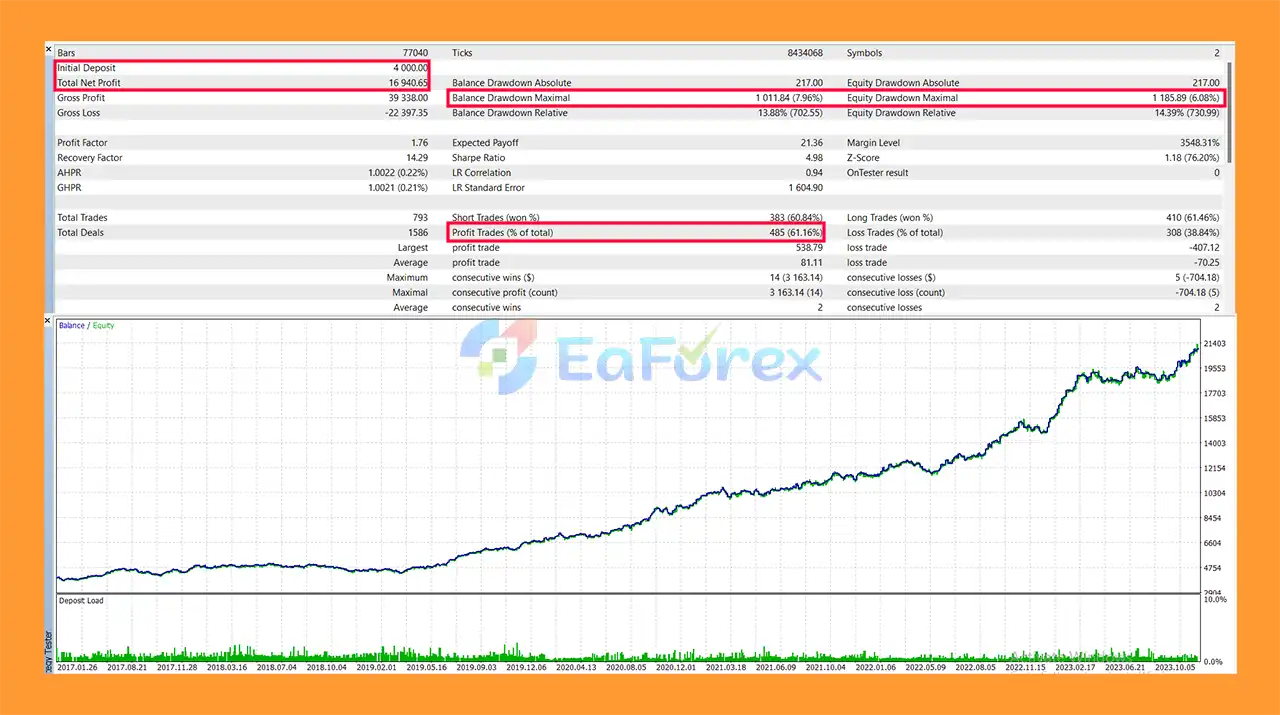
The EA has been backtested and optimized over the 2017–2024 period, with the developer reporting a Profit Factor of 1.76 and a Recovery Factor of 14.29 in backtesting.
About the Developer
• Author: Thang Chu.
• Experience: Over +8 years of experience on MQL5.
• Notable Products: Nexus Stock Trader, Gold Trend X, Nexus Commodity EA, Market Cycles Order Flow EA, PulseTrend Algo MT5 and other advisors.
• Flagship Product: Nexus Commodity is rated as the best performing product of the year.
>>> Delivery time 24h-48h after payment.
>>> Refund if not delivered.
>>> You will receive the latest version without any limitations (ID+Time).>>Reviewed by Jason Stap <<
Key Features of Nexus Commodity EA MT5
- AI-Powered Commodity Trading: Uses a proprietary AI model to analyze market cycles and retail sentiment.
- Retail Sentiment Analysis: AI is trained using years of retail trader sentiment data.
- Counter-Sentiment Approach: The system seeks to identify opportunities by analyzing and trading against certain retail sentiment patterns.
- Two Commodity Markets: Designed for XAGUSD (Silver) and XTIUSD (Crude Oil).
- Multi-Indicator Analysis: Uses nine different indicators within the trading algorithm.
- MACD: Included as part of the market-analysis framework.
- Smoothed Moving Average: Used to analyze market direction and trend behavior.
- RSI: Provides additional momentum and market-condition information.
- TDI: Included among the strategy's technical indicators.
- ADX: Used as part of the trend-strength analysis.
- No Martingale: Does not use Martingale position multiplication.
- No Grid: Does not rely on grid trading.
- No DCA: Does not use Dollar Cost Averaging.
- No Long-Term Losing Trades: The developer states that the EA does not hold losing trades indefinitely.
- One-Chart Setup: The EA can be configured by attaching it to a single XAGUSD M5 chart.
- Automatic Symbol Mapping: Supports symbol mapping for different brokers.
- Custom Money Management: Provides different money-management modes.
- Adjustable Risk: Risk levels can be customized for individual supported instruments.
- Internally Optimized Parameters: Core parameters are already calibrated and optimized by the developer.
- Historical Backtesting: Backtested and optimized from 2017 through 2024.
- High Reported Recovery Factor: 14.29 in the stated backtest.
- Reported Profit Factor: 1.76 in the stated backtest.
- ECN Recommended: Designed to work best with brokers offering favorable spreads.
- Simple Configuration: Intended to require minimal manual setup.
How Does Nexus Commodity EA MT5 Work?
The core of Nexus Commodity EA MT5 combines artificial intelligence, retail sentiment analysis, and technical indicators to identify potential market cycles in Silver and Crude Oil.
AI-Based Retail Sentiment Analysis
One of the defining characteristics of Nexus Commodity is its use of a proprietary AI model trained using retail trader sentiment data collected over many years.
The objective is to identify recurring behavioral patterns among retail traders and search for opportunities by trading against those patterns.
This approach is based on the idea that retail positioning and sentiment can sometimes provide useful information about potential market direction and turning points.
Multi-Indicator Market Analysis
The EA combines nine different indicators to analyze market conditions.
The listed indicators include:
- MACD
- Smoothed Moving Average
- RSI
- TDI
- ADX
- Additional proprietary or less-common indicators
The combination is designed to help identify relevant market cycles, including potential uptrends and downtrends, and determine suitable entry conditions.
Trend-Based Entry
Rather than relying on a single indicator, Nexus Commodity analyzes multiple market characteristics before looking for an entry.
The goal is to identify favorable entry opportunities within relevant market trends while using the AI sentiment model as an additional layer of market analysis.
Multi-Commodity Trading
The EA is designed to trade:
- XAGUSD – Silver
- XTIUSD – Crude Oil
Trading multiple commodities can provide diversification when the EA is combined with other strategies or Expert Advisors.
Why Choose Nexus Commodity EA MT5?
AI and Retail Sentiment
Nexus Commodity differentiates itself through its proprietary AI model trained on historical retail sentiment data.
Instead of relying solely on conventional technical indicators, the EA attempts to incorporate information about retail trader behavior into its market analysis.
Nine-Indicator Framework
The system uses multiple technical indicators to analyze trends, momentum, and market conditions. The combination of MACD, Smoothed Moving Average, RSI, TDI, ADX, and other indicators creates a broader analytical framework than a strategy based on a single technical signal.
Silver and Crude Oil Exposure
The EA provides access to two major commodity markets:
XAGUSD gives exposure to Silver, while XTIUSD provides exposure to Crude Oil.
These markets can behave differently from major Forex currency pairs, potentially making the EA useful as part of a broader automated trading portfolio.
No Martingale, Grid, or DCA
Nexus Commodity does not use traditional Martingale, Grid, or DCA techniques.
This is particularly relevant for traders who prefer strategies that do not depend on continuously adding positions to an adverse market movement.
One-Chart Configuration
One of the main setup advantages is the single-chart configuration.
The EA is attached to one XAGUSD M5 chart, while the system can manage the supported instruments according to its internal configuration.
Automatic Symbol Mapping
The built-in symbol mapping function is designed to make the EA easier to use across different brokers whose commodity symbols may have different naming conventions.
Customizable Risk
Different money-management modes are available, with customizable risk levels for each supported instrument.
This allows traders to adapt the EA's exposure to their own account size and risk tolerance.
Portfolio Diversification
Because Nexus Commodity focuses on Silver and Crude Oil, it can potentially complement other EAs that trade Forex, Gold, indices, or other asset classes.
The developer specifically presents it as a diversification component within the broader Nexus Portfolio.
Nexus Commodity EA MT5 Backtest Results
- Initial deposit: $4,000.
- Total net profit: $16,940.65.
- Win rate: 61.16%.
- Maximum drawdown: 7.96%.
- Performance analysis: 2017–2024.
Performance and Risk Management
Nexus Commodity EA MT5 has been backtested and optimized from 2017 to 2024, according to the developer.
The reported backtest metrics include:
- Profit Factor: 1.76
- Recovery Factor: 14.29
These figures are historical backtest results and should not be interpreted as guarantees of future live performance.
No Martingale or Grid
The EA does not use Martingale or Grid techniques, reducing dependence on progressively increasing exposure during adverse market conditions.
It also does not use DCA.
Custom Risk Levels
The EA provides different money-management modes and allows traders to customize risk for each supported instrument.
This is particularly important because Silver and Crude Oil can have very different volatility profiles.
Minimum Recommended Capital
The developer recommends a minimum capital of $1,000.
This should be viewed as a recommendation rather than a guarantee of safe operation. Traders should consider leverage, broker margin requirements, risk settings, and acceptable drawdown before deciding on account size.
Broker Conditions
The developer recommends using brokers with good spreads and preferably ECN accounts.
For the stated backtest configuration, IC Markets is recommended by the developer, particularly for testing from 2017, in order to reproduce similar historical results.
Actual live performance can vary depending on:
- Spread
- Slippage
- Commission
- Execution
- Liquidity
- Symbol specifications
- Broker server time
- Margin requirements
- Risk configuration
Weaknesses and Risk Warnings
Despite its AI-based analysis and reported backtest performance, Nexus Commodity EA MT5 still carries substantial market risk.
Commodity Volatility
Silver and Crude Oil can experience sharp price movements. Unexpected economic events, geopolitical developments, supply disruptions, and changes in market sentiment can produce rapid volatility.
AI Does Not Guarantee Predictions
The AI model is based on historical sentiment data and market patterns. Historical relationships may change, and AI analysis cannot guarantee that future market behavior will follow previously observed patterns.
Backtest Results Are Not Guarantees
The reported Profit Factor of 1.76 and Recovery Factor of 14.29 come from historical backtesting. Live trading results can differ significantly because of execution conditions, market changes, and data differences.
Indicator-Based Strategies Can Produce False Signals
Although the EA combines multiple indicators, no technical-analysis system can eliminate false signals entirely.
Broker Differences
Commodity symbols such as XAGUSD and XTIUSD can have different contract specifications, spreads, trading hours, and naming conventions across brokers.
The EA includes symbol mapping, but traders should still verify that the supported instruments are configured correctly.
Required Indicator
The developer states that the BankOrderFlow_update indicator is required for correct backtesting and operation.
This indicator must be placed in the:
MQL5 → Indicators
folder.
Without the required indicator, the EA may not function or backtest correctly.
Historical Data Requirements
The developer recommends loading historical data for all required timeframes from M1 through Daily before testing.
Insufficient historical data can lead to incomplete or unreliable backtest results.
No Guaranteed Profit
Nexus Commodity EA MT5 is an automated trading system and cannot eliminate financial risk. Past backtest performance does not guarantee future profitability.
Pros and Cons
Pros
- AI-powered commodity trading system
- Uses retail trader sentiment analysis
- Proprietary AI model trained on historical sentiment data
- Nine-indicator analysis framework
- Includes MACD, Smoothed Moving Average, RSI, TDI, and ADX
- Trades XAGUSD and XTIUSD
- No Martingale
- No Grid
- No DCA
- Does not rely on holding losing trades indefinitely
- One-chart setup
- Automatic symbol mapping
- Multiple money-management modes
- Customizable risk for supported instruments
- Internally calibrated parameters
- Backtested and optimized from 2017–2024
- Reported Profit Factor of 1.76
- Reported Recovery Factor of 14.29
- Designed as a diversification component within the Nexus Portfolio
- ECN brokers recommended
- Minimum recommended capital of $1,000
Cons
- Requires the BankOrderFlow_update indicator
- Requires sufficient historical data for accurate backtesting
- Commodity markets can experience high volatility
- XAGUSD and XTIUSD have different market characteristics
- AI analysis cannot guarantee future market direction
- Backtest results may differ from live results
- Broker spreads and execution can affect performance
- Requires careful risk configuration
- Recommended minimum capital is higher than some Forex EAs
- Actual results depend on broker, market conditions, and execution
How to Install Nexus Commodity EA MT5
Follow these steps carefully before running Nexus Commodity EA MT5.
Step 1: Install the EA
- Download Nexus Commodity EA MT5.
- Open MetaTrader 5.
- Select File → Open Data Folder.
- Navigate to MQL5 → Experts.
- Copy the EA file into the Experts folder.
Step 2: Install the Required Indicator
The developer states that BankOrderFlow_update is required for correct operation and backtesting.
Place the indicator file inside:
MQL5 → Indicators
After installing it, restart MetaTrader 5 or refresh the Navigator panel.
Step 3: Enable the Supported Symbols
Make sure the required trading instruments are visible in Market Watch.
The EA supports:
- XAGUSD – Silver
- XTIUSD – Crude Oil
Because brokers may use different symbol names, use the EA's symbol mapping function when necessary.
Step 4: Load Historical Data
For proper backtesting, load historical data for the supported instruments across all required timeframes.
In MetaTrader 5:
Ctrl + U → Symbols → Bars → Request Data
Load data from M1 through Daily.
Step 5: Attach the EA
Attach the EA to ONE XAGUSD M5 chart.
The developer specifically recommends using a single XAGUSD M5 chart for the setup.
Step 6: Configure Risk
Select the desired money-management mode and configure the appropriate risk level for the supported instruments.
The recommended minimum capital is $1,000.
Step 7: Disable Validation Mode
Before live trading or backtesting, set:
ValidationOnly = False
This is an important configuration requirement provided by the developer.
Step 8: Backtesting
For results that are intended to closely reproduce the developer's stated historical test, the developer recommends using the IC Markets platform and testing from 2017 onward.
Remember that even with the same broker, historical data and platform conditions can change over time.
Step 9: Live Trading
After completing sufficient demo and historical testing:
- Verify the correct symbols.
- Confirm the BankOrderFlow_update indicator is installed.
- Confirm historical data is available.
- Attach the EA to one XAGUSD M5 chart.
- Set ValidationOnly = False.
- Select an appropriate risk level.
- Monitor the EA during initial live operation.
What’s Included in the Download Package?
- Setting (If Any).docx
- Installation Guide.docx
Final Thoughts
Nexus Commodity EA MT5 is an AI-powered commodity Expert Advisor designed to trade XAGUSD (Silver) and XTIUSD (Crude Oil) as part of the broader Nexus Portfolio.
Its distinctive feature is the combination of a proprietary AI model trained on historical retail trader sentiment with a nine-indicator technical-analysis framework. The strategy uses indicators such as MACD, Smoothed Moving Average, RSI, TDI, and ADX to analyze market cycles and identify potential trend entries.
The EA does not use Martingale, Grid, or DCA, and the developer emphasizes that it does not rely on holding losing trades indefinitely. It also provides customizable money management, symbol mapping, and a convenient one-chart setup.
According to the supplied information, Nexus Commodity EA MT5 was backtested and optimized from 2017 to 2024, with a reported Profit Factor of 1.76 and Recovery Factor of 14.29.
However, traders should pay close attention to the installation requirements. The BankOrderFlow_update indicator is required, historical data from M1 through Daily should be loaded, and ValidationOnly must be set to False before trading or backtesting.
With a recommended minimum capital of $1,000, good-spread ECN conditions, and careful risk management, Nexus Commodity can be considered as a potential diversification tool for traders looking to add Silver and Crude Oil exposure to an automated trading portfolio.
Nexus Commodity EA MT5 is a trading tool, not a guarantee of profit. Backtest results, including the reported Profit Factor and Recovery Factor, do not guarantee future live performance.



