


Product Overview
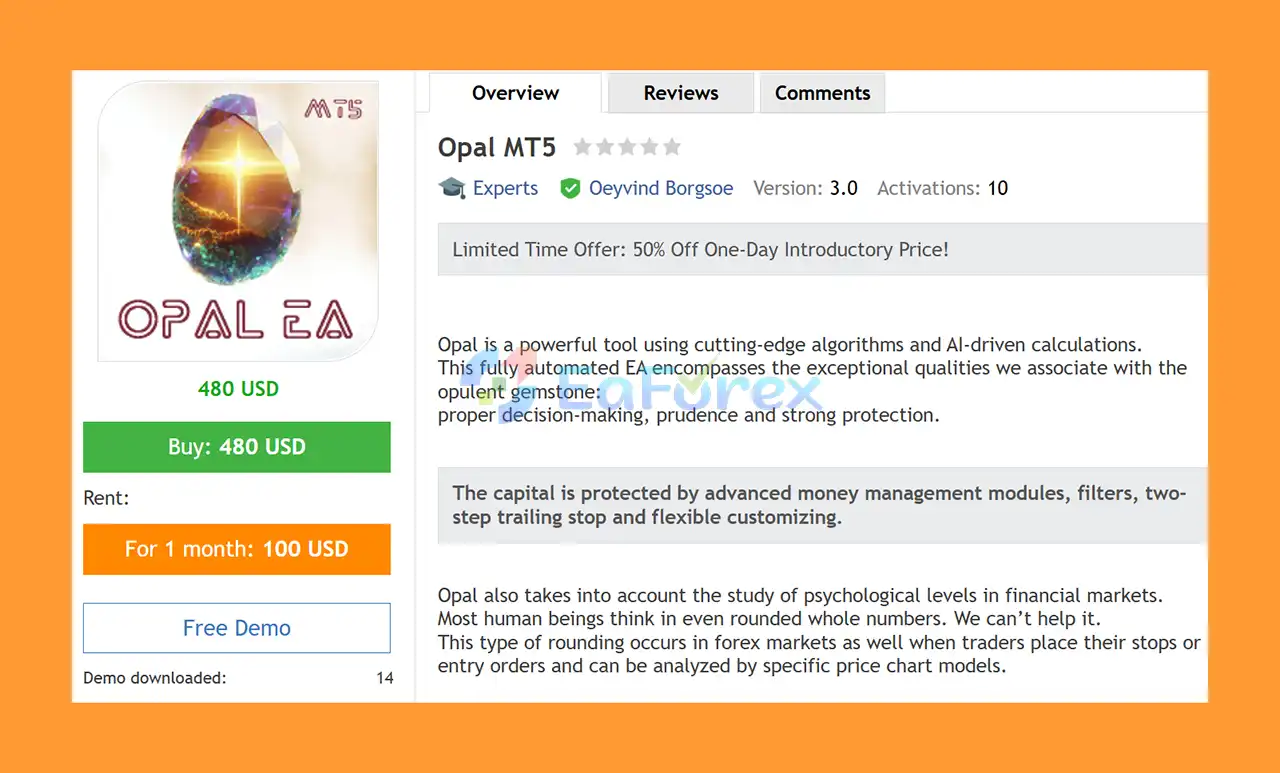
Opal MT5 is a fully automated MetaTrader 5 Expert Advisor that combines advanced algorithms with AI-driven calculations to create a systematic approach to Forex trading.
Inspired by the characteristics associated with the opal gemstone, Opal EA focuses on intelligent decision-making, prudence, adaptability, and strong protection. The system is designed for traders who want an automated Forex solution with built-in risk management and multiple market filters.
Opal EA also incorporates the concept of psychological price levels, recognizing that traders often place orders, stop losses, and take profits around psychologically significant rounded price levels. These price areas can create important market reactions and are incorporated into the EA's trading analysis.
The EA is recommended for EURUSD on the H1 timeframe, with a minimum suggested deposit of $100. Default settings are configured for a low-to-medium risk profile.
About the Developer
• Author: Oeyvind Borgsoe.
• Experience: Over +3 years of experience on MQL5.
• Notable Products: Opal MT5, Tree Of Life MT5, Adama MT5 and other advisors.
• Flagship Product: Opal MT5 is rated as the best performing product of the year.
>>> Delivery time 24h-48h after payment.
>>> Refund if not delivered.
>>> You will receive the latest version without any limitations (ID+Time).>>Reviewed by Jason Stap <<
Key Features of Opal MT5
AI-Driven Trading Calculations
Opal MT5 uses advanced algorithms and AI-driven calculations to analyze market conditions and identify potential trading opportunities.
The objective is to automate the decision-making process while maintaining a structured approach to risk and trade management.
RSI Filter
An integrated RSI filter provides an additional layer of market analysis. It can help the EA evaluate momentum conditions before allowing trades.
Money Management Module
Opal EA includes a dedicated Money Management module, allowing traders to manage position sizing and overall trading risk more systematically.
Psychological Round Levels
One of the distinctive features of Opal MT5 is its ability to identify psychological price levels.
Many traders naturally focus on rounded prices such as whole numbers and major price levels. These areas can become important zones where market participants place entries, stop losses, and pending orders.
Opal incorporates the analysis of these psychological levels into its trading methodology.
Time Filter
The built-in Time Filter allows the EA to control when trading activity is permitted. This can help the system focus on preferred market sessions and avoid unwanted trading periods.
News Protection Filter
Major economic announcements can create sudden volatility and unpredictable price movements. Opal includes a News Protection Filter designed to reduce exposure around important news events.
Recovery System
The integrated Recovery System is designed to help manage challenging trading situations according to the EA's predefined logic.
User-Friendly Interface
Opal MT5 features an easy-to-use interface designed for both experienced traders and beginners. The interface makes the system easier to configure and monitor.
Modern Design
The EA features a clean and visually appealing interface, combining practical functionality with a modern design.
How Does Opal MT5 Work?
Opal MT5 works through a combination of AI-driven calculations, technical filtering, psychological price-level analysis, money management, and automated trade protection.
The EA continuously evaluates market conditions and searches for trading opportunities according to its internal algorithm.
Before entering a position, Opal can apply several filters and conditions, including:
- Market analysis
- RSI conditions
- Psychological round price levels
- Trading time conditions
- News conditions
- Money management rules
- Risk and protection parameters
When the required conditions are satisfied, the EA can automatically execute the trade without requiring manual intervention.
After entering the market, the system continues to manage the position according to its automated trade-management and recovery logic.
This approach is designed to create a consistent trading process while reducing the influence of emotional decisions such as fear, greed, hesitation, or overtrading.
Why Choose Opal MT5?
Opal MT5 is designed for traders who want a fully automated Forex trading system with multiple layers of market analysis and protection.
AI-Based Approach
The combination of advanced algorithms and AI-driven calculations provides a modern approach to automated Forex trading.
Psychological Price Analysis
The focus on rounded psychological price levels gives Opal a distinctive component that goes beyond conventional indicator-based strategies.
Multiple Trading Filters
The RSI filter, time filter, and news protection filter can help the EA avoid potentially unfavorable trading conditions.
Integrated Money Management
The built-in money management module provides additional control over position sizing and trading exposure.
Recovery System
Opal includes a recovery mechanism designed to manage certain challenging market conditions according to its predefined strategy.
Adaptability
The developer emphasizes adaptability to changing market conditions, particularly as Forex markets have evolved significantly since 2020.
Suitable for Different Experience Levels
The user-friendly interface makes Opal MT5 accessible to both new and experienced automated traders.
Low-to-Medium Default Risk
The default configuration is described as low-to-medium risk, making it a more conservative starting point than systems that rely on highly aggressive settings.
Opal MT5 Performance Overview
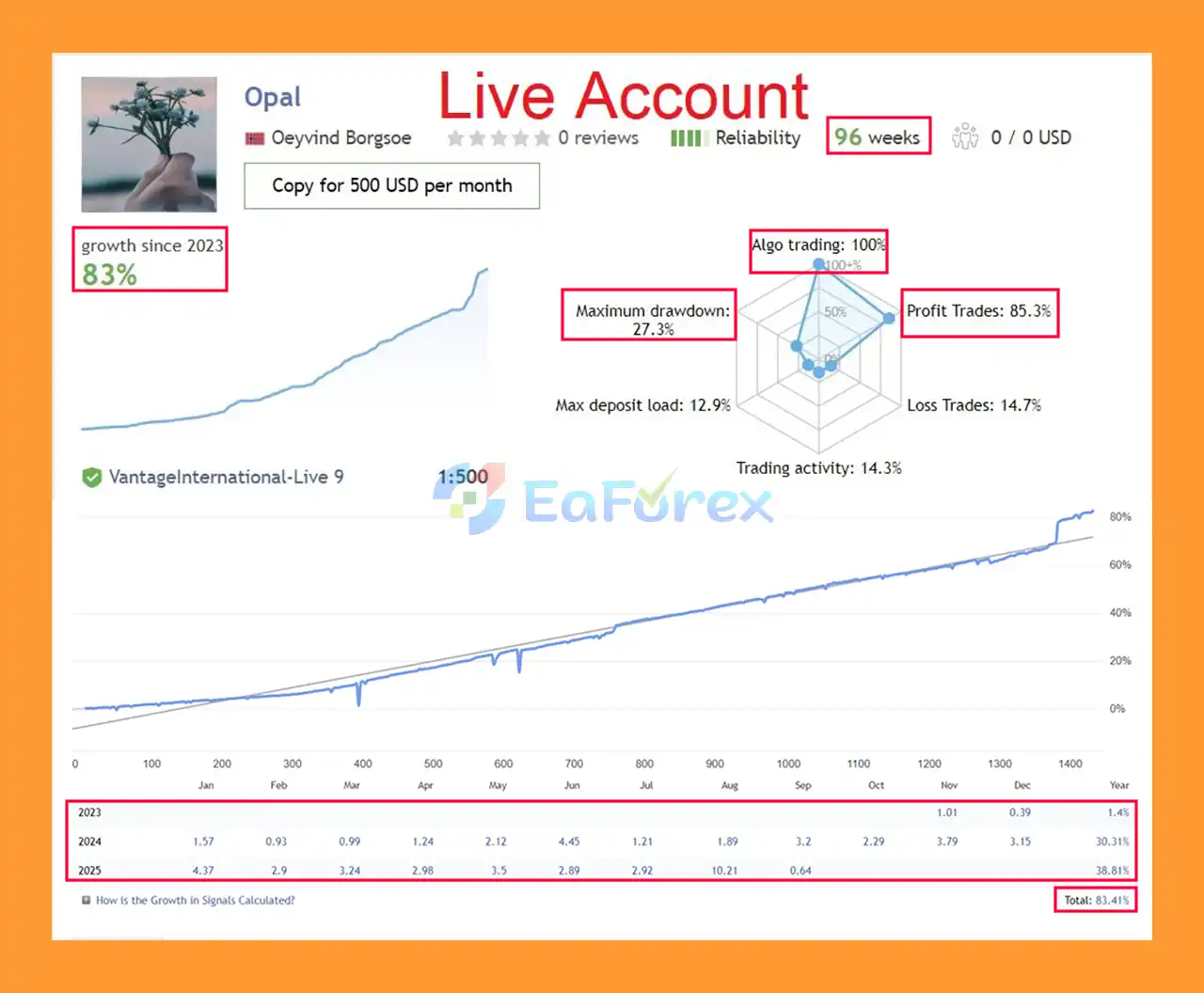
🔴Live Trading Results (96 Weeks):
- Growth: +83.41%
- Initial Deposit: $500
- Win Rate: 85.3%
- Max Drawdown: 27.3%
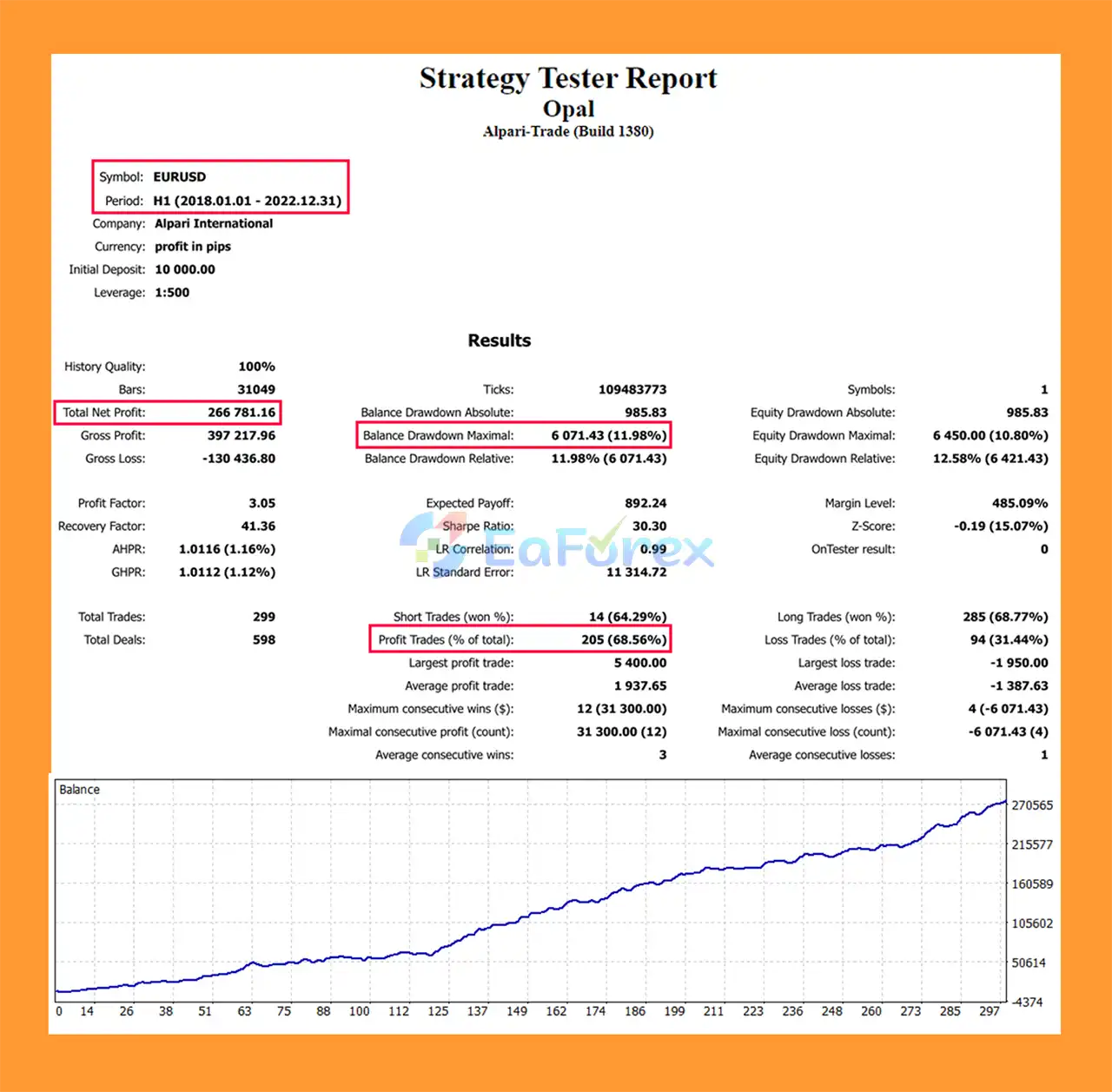
🔴Backtest Results (EURUSD, H1, 5 Years)
- Initial Deposit: $10,000
- Net Profit: $266,000
- Win Rate: 68.56%
- Max Drawdown: 11.98%
- Confirms long-term profitability & strong protection features.
Performance and Risk Management
Opal MT5 is designed with a strong focus on risk management and adaptability rather than relying solely on historical backtest optimization.
The EA includes several mechanisms intended to manage trading exposure, including its Money Management module, RSI filter, time filter, news protection, and recovery system.
The recommended setup is:
- EURUSD
- H1 timeframe
- Minimum deposit: $100
- ECN or RAW account
- Reliable VPS
- Low-to-medium default risk
The developer also emphasizes the importance of avoiding curve-fitted backtests that may generate unrealistic historical results. Instead, the system is designed with a focus on stable live trading and adaptability to changing market conditions.
However, no trading algorithm can guarantee consistent profits. Actual results can vary depending on broker conditions, spreads, slippage, execution quality, leverage, market volatility, and risk settings.
Weaknesses and Risk Warnings
Although Opal MT5 includes multiple filters and protection features, automated Forex trading remains inherently risky.
Forex Trading Risk
EURUSD and other currency pairs can experience sudden price movements caused by economic releases, central-bank decisions, geopolitical events, and unexpected market developments.
No Guaranteed Profit
AI-driven calculations and automated trading algorithms cannot eliminate market risk. Opal EA can experience losing trades and periods of drawdown.
Broker Conditions Matter
The developer recommends using an ECN or RAW account. Spread, commission, execution speed, slippage, and liquidity can all affect live performance.
Recovery System Risk
Any recovery mechanism should be used with caution because attempts to recover losses can increase exposure under unfavorable market conditions.
Market Conditions Change
A strategy that performs well under one market environment may perform differently when volatility, liquidity, trends, or market structure change.
Backtests Are Not Guarantees
Historical backtests cannot guarantee future results. Traders should evaluate live or demo performance before committing significant capital.
VPS Recommended
A reliable VPS is recommended for continuous automated trading. Platform or internet interruptions can interfere with EA operation.
Minimum Deposit Is Not a Safety Guarantee
Although $100 is listed as the recommended minimum deposit, traders should determine an appropriate account size based on their own risk tolerance and position-sizing requirements.
Pros and Cons
Pros
- Fully automated MetaTrader 5 Expert Advisor
- AI-driven trading calculations
- Advanced algorithmic approach
- Designed for EURUSD H1
- RSI filter
- Money Management module
- Psychological round-level price analysis
- Time filter
- News protection filter
- Recovery system
- User-friendly interface
- Modern design
- Low-to-medium default risk
- Designed with adaptability in mind
- ECN/RAW account recommended
- Suitable for VPS-based automated trading
- Designed for both beginner and experienced traders
Cons
- Recommended primarily for EURUSD H1
- Forex trading involves substantial financial risk
- Recovery systems require careful risk management
- Live performance may differ from historical testing
- Broker spreads and execution can affect results
- News events can still cause unexpected market movements
- Requires proper configuration
- VPS is recommended for stable operation
- No Expert Advisor can guarantee profits
How to Install Opal MT5
Installing Opal MT5 on MetaTrader 5 is simple and suitable for traders with different levels of experience.
Step 1: Install MetaTrader 5
Open your MetaTrader 5 platform and log in to your trading account.
Step 2: Install Opal MT5
Install the Opal EA through the MetaTrader 5 platform or place the provided Expert Advisor files in the appropriate MQL5/Experts directory.
Restart MetaTrader 5 or refresh the Navigator window after installation.
Step 3: Open the EURUSD Chart
Open the EURUSD currency pair and select the H1 (1-hour) timeframe.
Step 4: Attach Opal EA
Find Opal MT5 under Expert Advisors in the Navigator window and drag the EA onto the EURUSD H1 chart.
Step 5: Enable Algo Trading
Make sure the Algo Trading function is enabled in MetaTrader 5.
Also check the automated trading permissions within the EA settings.
Step 6: Configure the Settings
You can start with the default low-to-medium risk settings or adjust the available parameters according to your account size and risk tolerance.
Pay particular attention to the money-management and risk-related settings before starting live trading.
Step 7: Use a Suitable Trading Environment
For optimal operation, an ECN or RAW account and a reliable VPS are recommended.
Step 8: Test Before Going Live
Run Opal MT5 on a demo account first. Monitor its behavior across different market conditions before considering live deployment.
What’s Included in the Download Package?
- Setting (If Any).docx
- Installation Guide.docx
Final Thoughts
Opal MT5 is a fully automated AI-powered Forex Expert Advisor designed to trade EURUSD on the H1 timeframe. Its strategy combines algorithmic calculations with several distinctive features, including RSI filtering, psychological round-level analysis, money management, time filtering, news protection, and a recovery system.
One of the most interesting aspects of Opal EA is its focus on psychological price levels. Rounded price areas can attract significant attention from market participants, and incorporating these levels into an automated strategy provides an additional dimension to its market analysis.
The developer also emphasizes adaptability and realistic live trading rather than creating heavily curve-fitted backtests designed only to look attractive historically.
For traders looking for a user-friendly MetaTrader 5 EA with AI-driven calculations and multiple risk-management features, Opal MT5 is worth considering for further demo testing.
Always remember that automated Forex trading carries significant risk. Start with conservative settings, test the EA thoroughly, use appropriate position sizing, and never risk money you cannot afford to lose.



