
Product Overview
PythonX M1 Scalper GBPUSD EA MT5 is a specialized MetaTrader 5 Expert Advisor designed exclusively for GBPUSD on the M1 (1-minute) timeframe. The system focuses on fast and accurate automated trading while maintaining a straightforward trading structure without Grid or Martingale techniques.
Designed with speed, accuracy, and simplicity in mind, PythonX M1 Scalper GBPUSD EA MT5 is built for retail traders who want to automate short-term GBPUSD trading without spending hours optimizing complicated settings.
The EA is presented as a ready-to-use solution, meaning traders do not need to perform extensive optimization before running it. It is suitable for both beginners and experienced traders who want to add an automated GBPUSD scalping strategy to their trading portfolio.
PythonX M1 Scalper GBPUSD EA MT5 does not rely on Grid or Martingale position accumulation. It is specifically optimized for GBPUSD M1, making it important to use the recommended symbol and timeframe when evaluating its performance.
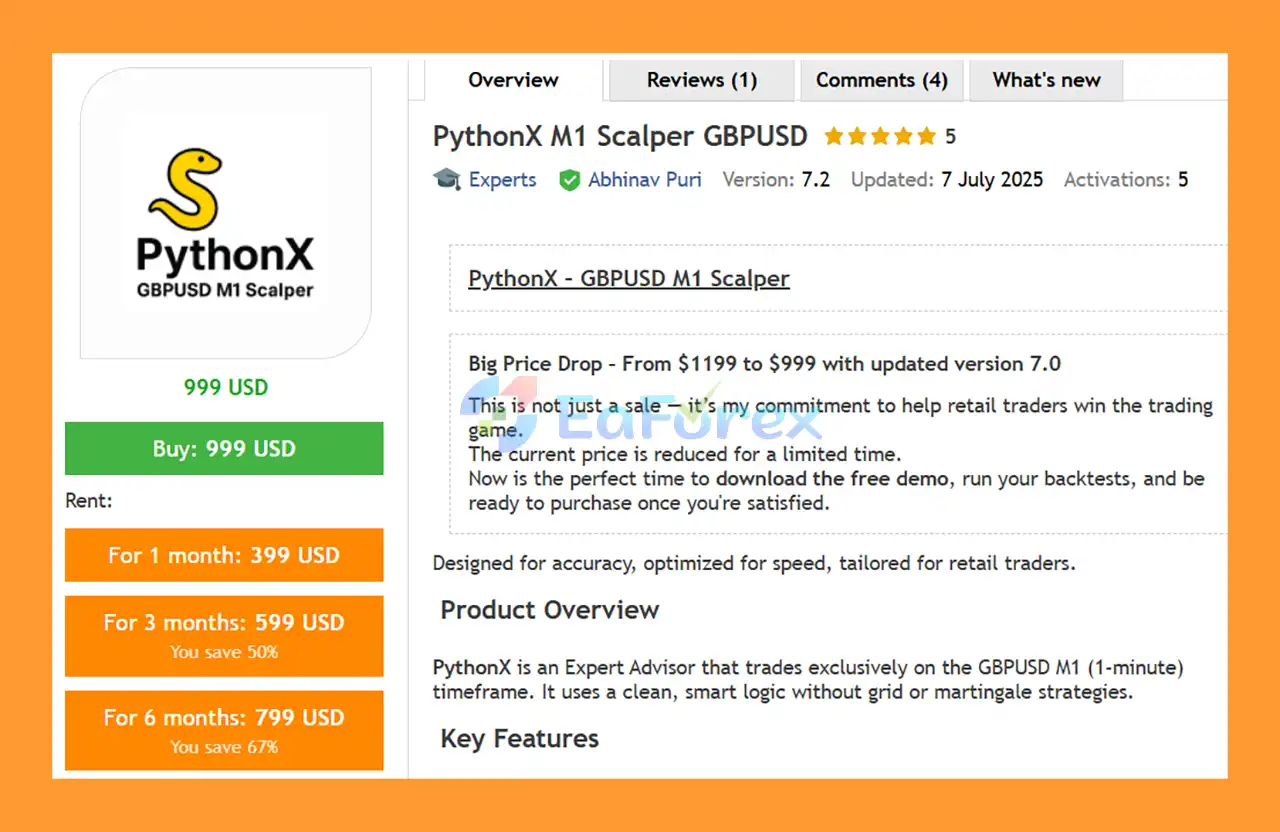
A free demo is available for traders who want to perform their own testing before purchasing.
About the Developer
• Author: Abhinav Puri.
• Experience: Over +1 years of experience on MQL5.
• Notable Products: PythonX M1 Scalper GBPUSD, PythonX M1 Hybrid Breakout EURUSD, PythonX M1 Scalper XAUUSD and other advisors.
• Flagship Product: PythonX M1 Scalper GBPUSD is rated as the best performing product of the year.
>>> Delivery time 24h-48h after payment.
>>> Refund if not delivered.
>>> You will receive the latest version without any limitations (ID+Time).>>Reviewed by Jason Stap <<
Key Features of PythonX M1 Scalper GBPUSD EA MT5
GBPUSD M1 Specialized Strategy
PythonX M1 Scalper GBPUSD EA MT5 is designed exclusively for GBPUSD on the 1-minute timeframe. Its strategy is tailored to the short-term characteristics of this currency pair.
Ready to Use
The EA is designed to work without requiring extensive manual optimization. Traders can install the system and begin testing it using the recommended settings.
No Grid Strategy
PythonX M1 Scalper GBPUSD EA MT5does not use a traditional Grid trading system, helping maintain a more straightforward trade-management structure.
No Martingale
The EA does not use Martingale-style lot multiplication to recover previous losses.
Non-Repainting Signals
The system is designed with non-repainting signals, meaning historical signals are not intended to be changed retrospectively after market conditions develop.
Fast M1 Trading
Operating on the M1 timeframe allows PythonX to analyze short-term price movements and potentially identify frequent trading opportunities.
Suitable for Different Trader Profiles
PythonX M1 Scalper GBPUSD EA MT5 can be considered by:
- Beginner traders
- Experienced traders
- Prop firm traders
- Copy trading providers
- Algorithmic trading investors
- Traders looking to diversify their EA portfolio
Demo Testing Available
Users can test the EA through a demo account or perform their own backtests before making a purchase decision.
How Does PythonX M1 Scalper GBPUSD EA MT5 Work?
PythonX operates on the GBPUSD M1 timeframe, where it analyzes short-term market movements and searches for potential trading opportunities according to its predefined algorithm.
The EA is designed to focus on accuracy and execution speed, which are particularly important characteristics for an M1 scalping strategy.
Instead of using Grid or Martingale techniques, PythonX follows its programmed trading logic to determine when to enter and manage trades.
The basic trading workflow can be summarized as:
GBPUSD Market Analysis → Trading Signal Detection → Automated Entry → Position Management → Trade Exit → Search for the Next Opportunity
Because the EA is designed specifically for GBPUSD M1, users should avoid changing the symbol or timeframe unless the developer specifically recommends doing so.
The strategy is intended to provide a ready-to-use automated trading experience without requiring users to spend significant time optimizing numerous parameters.
Why Choose PythonX M1 Scalper GBPUSD EA MT5?
Dedicated GBPUSD M1 Strategy
PythonX is not a generic multi-currency EA. It focuses specifically on GBPUSD M1, allowing the system to be designed around the characteristics of one market and one timeframe.
No Martingale or Grid
Traders who prefer to avoid aggressive recovery systems may appreciate that PythonX does not rely on Martingale or Grid strategies.
Ready-to-Use Configuration
The EA is designed to minimize the need for manual optimization, making the initial setup easier for less experienced users.
Fast Automated Trading
M1 trading requires rapid market analysis and execution. PythonX is designed with speed as one of its key objectives.
Free Demo Testing
One of the most useful features for prospective buyers is the ability to test the EA before committing to a purchase.
Potential Prop Firm Application
The supplied backtest data shows relatively controlled historical drawdowns on several broker datasets. However, traders should independently verify the EA against the specific rules of their prop firm before using it in a challenge or funded account.
Portfolio Diversification
Traders already using other automated strategies may consider PythonX as a GBPUSD-specific system to diversify their algorithmic trading portfolio.
PythonX M1 Scalper GBPUSD EA MT5 Performance Overview
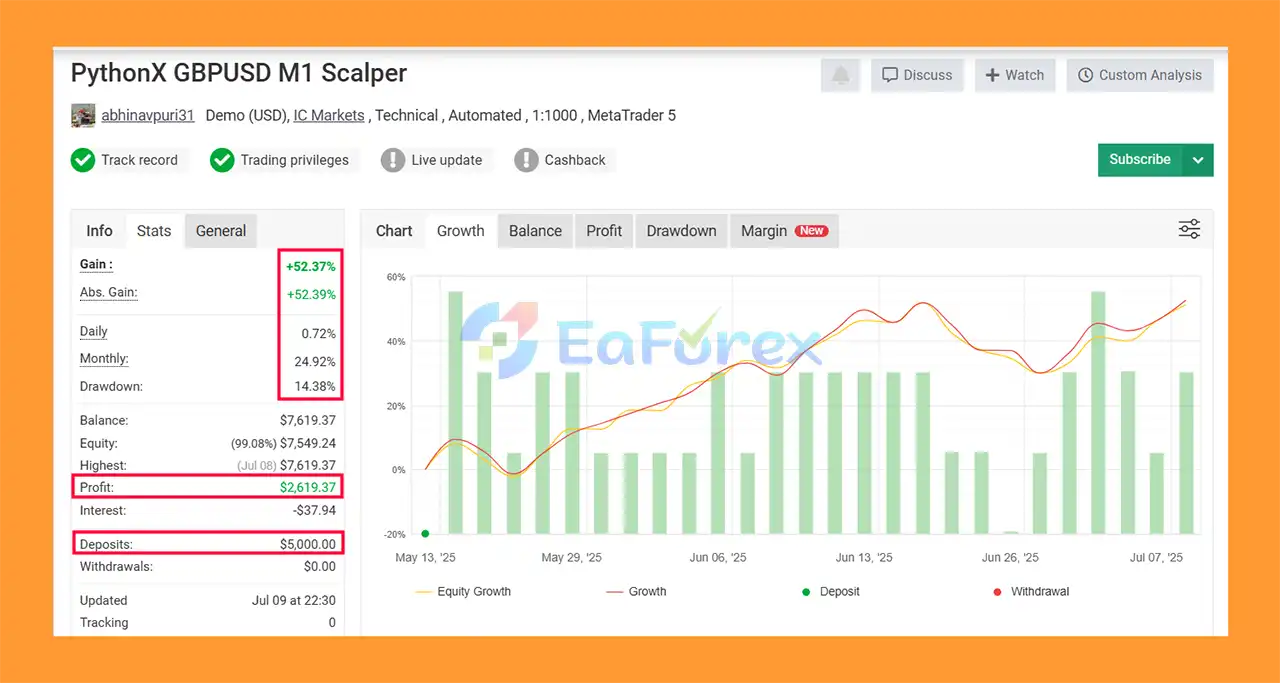
1. Verified Myfxbook Results (3 Months)
- Deposit: $5,000
- Total Gain: +52.37%
- Monthly Growth: +24.92%
- Daily Growth: 0.72%
- Max Drawdown: 14.38%
2. Backtest Results
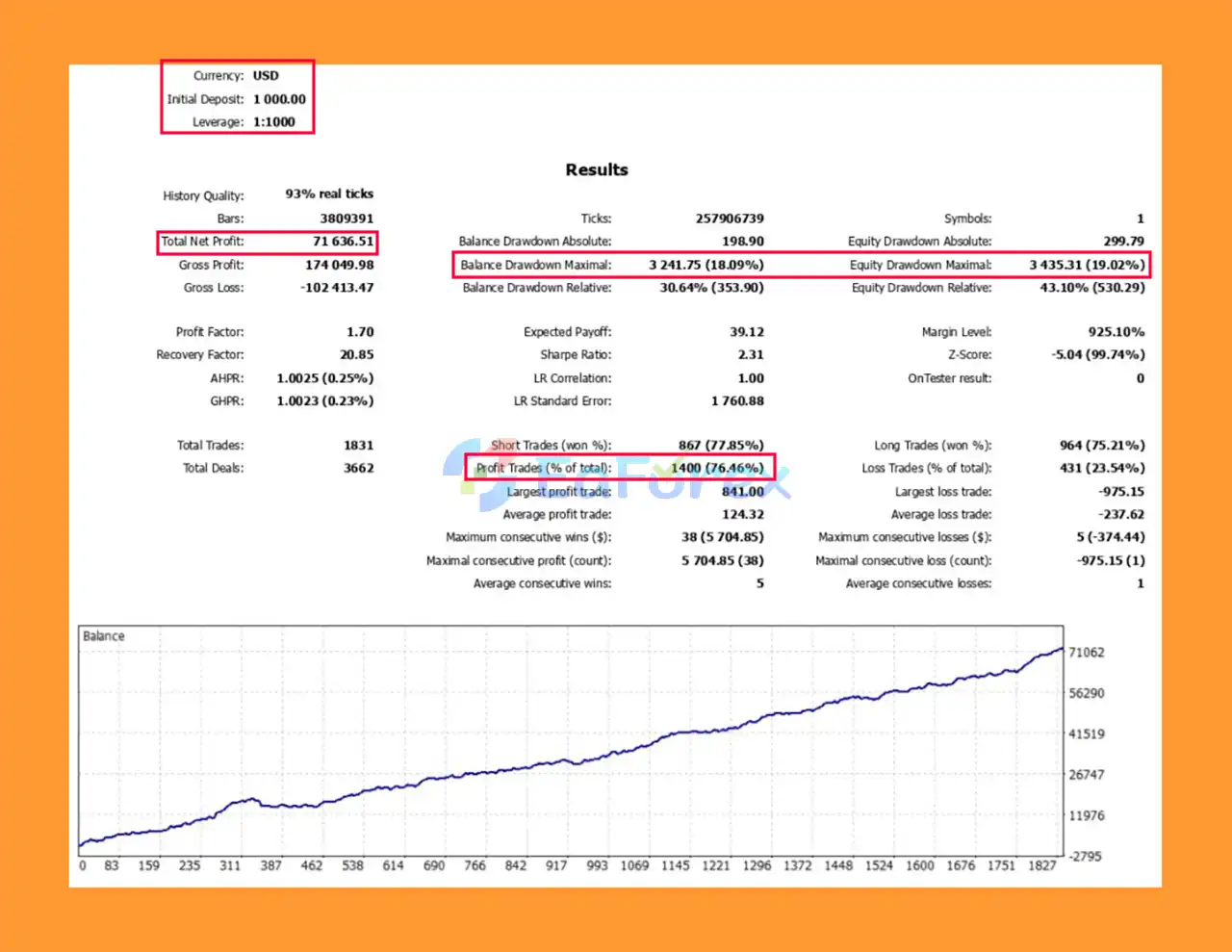
🔺Year Backtest (2015–2025)
- Initial Deposit: $1,000
- Net Profit: $71,636.51
- Win Rate: 76.46%
- Max Drawdown: 18.09%
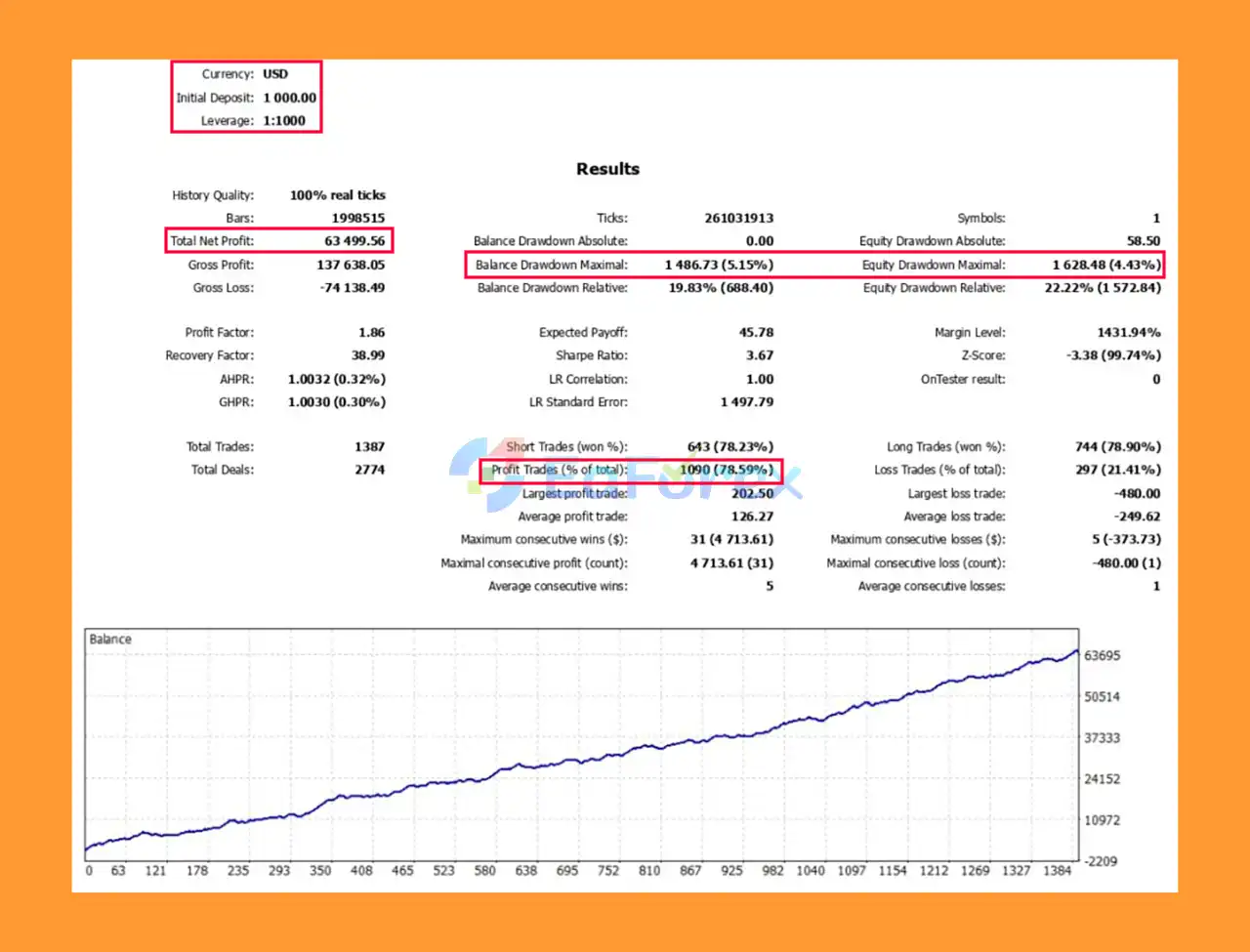
🔺5-Year Backtest (2020–2025)
- Initial Deposit: $1,000
- Net Profit: $63,499.56
- Win Rate: 78.59%
- Max Drawdown: 5.15%
Performance and Risk Management
PythonX M1 Scalper GBPUSD EA MT5 has been tested across several broker environments using an initial deposit of $1,000 and 1:1000 leverage.
The supplied backtest results for the period 2015–2025 are:
| Broker | Period | Net Profit | Max Drawdown | Trades | Win Rate |
|---|---|---|---|---|---|
| OctaFX | 2015–2025 | $123,574 | 5.63% | 3,077 | 76.96% |
| IC Markets | 2015–2025 | $111,034 | 2.90% | 2,732 | 77.23% |
| FundedNext | 2015–2025 | $85,293 | 7.55% | 2,502 | 75.54% |
| HF Markets | 2015–2025 | $71,637 | 18.09% | 1,831 | 76.13% |
| Exness | 2015–2025 | $93,826 | 11.09% | 2,000+ | ~75% |
These results indicate that historical performance varied between brokers, which demonstrates the importance of broker conditions, spreads, commissions, execution, and historical price data.
The highest reported net profit in the supplied backtests was $123,574 on OctaFX, while the lowest reported maximum drawdown was 2.90% on IC Markets.
However, historical backtest performance should not be interpreted as a guarantee of future live trading results.
Recommended Risk Management
The recommended minimum deposit is $500, although traders should determine their actual account size and risk settings based on their own financial situation.
For an M1 scalping EA, traders should pay particular attention to:
- Spread
- Commission
- Slippage
- Execution speed
- Broker liquidity
- VPS stability
- Trading-session conditions
- Position sizing
- Maximum acceptable drawdown
Testing the EA under the same broker conditions intended for live trading can provide a more meaningful evaluation than relying solely on third-party backtests.
Weaknesses and Risk Warnings
Despite its attractive historical backtest results, PythonX M1 Scalper has several limitations that traders should understand before using it with real money.
Limited to GBPUSD M1
PythonX M1 Scalper GBPUSD EA MT5 is specifically designed for GBPUSD M1. It should not automatically be assumed to work effectively on other currency pairs or timeframes.
M1 Trading Is Sensitive to Execution
Short-term strategies can be highly sensitive to spread, slippage, latency, commissions, and execution quality. Results can therefore differ significantly between brokers.
Backtest Results Are Not Guaranteed
The reported 2015–2025 backtests are historical simulations. They do not guarantee that the EA will generate similar returns in future market conditions.
High Leverage Can Increase Risk
The supplied backtests use 1:1000 leverage, which can significantly increase trading exposure. High leverage should not be interpreted as a recommendation to take excessive risk.
Broker Conditions Matter
Differences in spreads, commissions, liquidity, execution and price feeds can affect the performance of an M1 scalping system.
Prop Firm Rules Vary
Although PythonX may be considered by prop firm traders, every proprietary trading firm has different rules regarding drawdown, daily loss, lot size, news trading, holding periods and automated trading. Always verify compatibility before deployment.
No EA Can Guarantee Profit
PythonX M1 Scalper GBPUSD EA MT5 is an automated trading system, not a guaranteed-income product. Traders should use appropriate risk management and test the EA before committing real capital.
Pros and Cons
Pros
- Designed specifically for GBPUSD M1
- MetaTrader 5 compatible
- Fast short-term trading approach
- No Grid strategy
- No Martingale
- Ready-to-use configuration
- No extensive optimization required
- Non-repainting signals
- Free demo testing available
- Suitable for beginners and experienced traders
- Can be considered for prop firm testing
- Useful for algorithmic portfolio diversification
- Long historical backtest period provided
- Tested across multiple broker environments
- Reported historical win rates around 75%–77% across the supplied tests
Cons
- Supports only GBPUSD M1
- M1 strategies can be sensitive to spread and slippage
- Live results may differ from backtests
- Broker execution quality can significantly affect performance
- High leverage can increase risk
- Not suitable for traders looking for a multi-currency EA
- Backtest performance does not guarantee future profitability
- Prop firm compatibility must be checked individually
How to Install PythonX M1 Scalper GBPUSD EA MT5
Installing PythonX M1 Scalper GBPUSD EA MT5 on MetaTrader 5 is straightforward.
Step 1 – Download the EA
Download the PythonX M1 Scalper GBPUSD EA MT5 file and save it on your computer.
Step 2 – Open MetaTrader 5
Launch your MetaTrader 5 trading platform.
Go to:
File → Open Data Folder → MQL5 → Experts
Copy the EA file into the Experts folder.
Step 3 – Restart MetaTrader 5
Restart MT5 or refresh the Expert Advisors section in the Navigator window so that PythonX becomes available.
Step 4 – Open GBPUSD M1
Open a GBPUSD chart and select the M1 timeframe.
This is the recommended trading configuration for PythonX.
Step 5 – Attach the EA
Drag PythonX from the Navigator window onto the GBPUSD M1 chart.
Step 6 – Enable Automated Trading
Make sure Algo Trading / Automated Trading is enabled in MetaTrader 5.
Step 7 – Test on Demo
Before using real capital, run PythonX on a demo account and compare the results with your broker's own historical data.
Step 8 – Evaluate Your Broker Conditions
Check the broker's:
- Spread
- Commission
- Execution speed
- Slippage
- GBPUSD trading conditions
For an M1 scalping strategy, these factors can have a meaningful impact on results.
Step 9 – Consider a VPS
For continuous automated trading, a stable VPS can help maintain a consistent MT5 connection and reduce interruptions caused by local computer or internet problems.
What’s Included in the Download Package?
- Setting (If Any).docx
- Installation Guide.docx
Final Thoughts
PythonX M1 Scalper GBPUSD EA MT5 is a specialized automated trading system designed exclusively for GBPUSD on the M1 timeframe. Its main characteristics include a fast trading approach, non-repainting signals, and the absence of Grid and Martingale strategies.
The supplied 2015–2025 backtests show strong historical results across several broker environments, with reported win rates generally around 75%–77%. However, the differences in drawdown and net profit between brokers also highlight how strongly an M1 strategy can depend on trading conditions.
For traders interested in automated GBPUSD scalping, PythonX provides a relatively simple starting point because it is designed to be ready to use without extensive optimization.
The best approach is to download the demo, test the EA with your own broker's data, evaluate spreads and execution, and only then consider using real capital.
As with any Expert Advisor, historical performance should be treated as research data rather than a promise of future returns. Proper risk management and realistic expectations remain essential when trading GBPUSD on the M1 timeframe.



