









-
 Unlimited Activations
-
 Instant delivery
-
 Easy to install







 Unlimited Activations
Instant delivery
Easy to install
Unlimited Activations
Instant delivery
Easy to install
 Free Update
 Free Install Support

OSOK Gold Killer EA MT5 is a fully automated Expert Advisor developed specifically for Gold (XAUUSD) trading on the MetaTrader 5 platform. Designed to operate on the M1 timeframe, this trading robot aims to automate gold trade management while providing configurable balance protection, daily profit target controls, and a real-time trading dashboard.
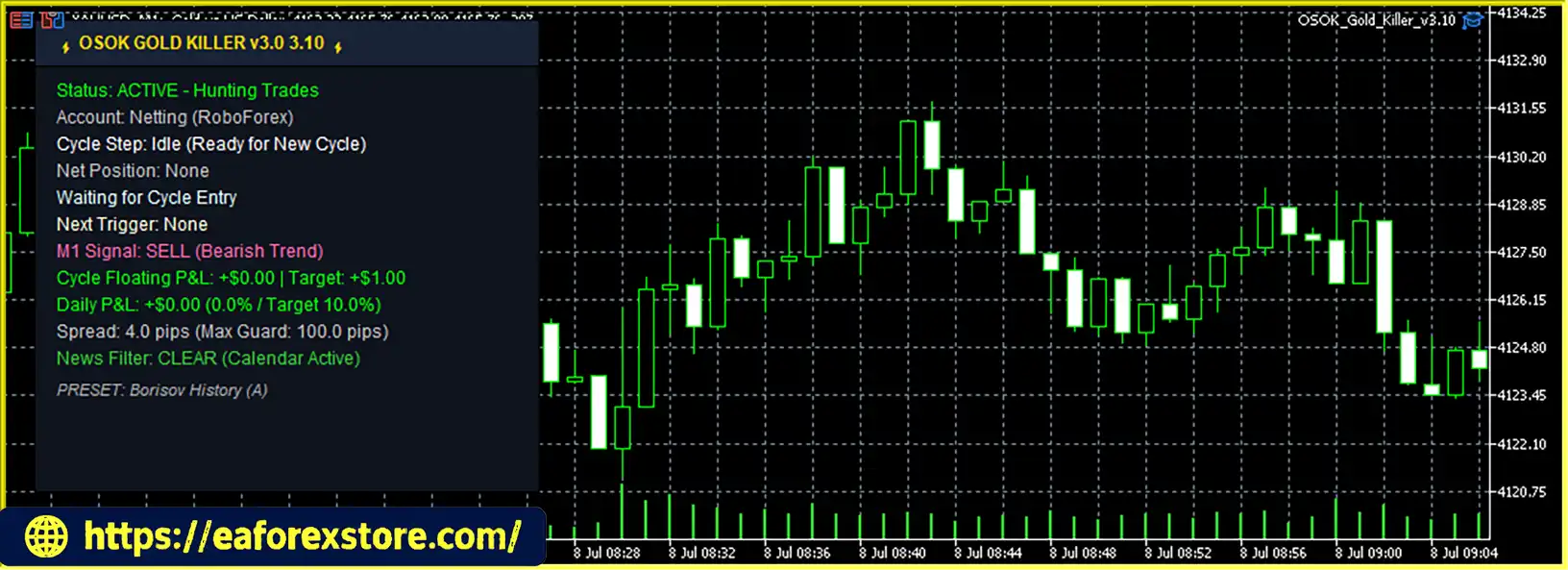
The EA is built around a protection-first trading concept, emphasizing account monitoring and predefined trading limits alongside automated execution. Its dashboard displays key information, including the current operating status, trading symbol and timeframe, spread, profit and loss, daily target progress, license status, and strategy activity.
OSOK Gold Killer EA MT5 also features a balance guard, daily target lock, hedge recovery logic, and a built-in news filter, according to the supplied product description. These functions are designed to support a more structured trading workflow, although their exact operating rules and effectiveness should be verified through testing and the official product documentation.
One of the key advantages of the OSOK ecosystem is the ability to combine two tools: OSOK Gold Killer EA MT5 for automated Gold trading and OSOK Sniper Signals for traders who prefer signal-assisted manual entries across multiple currency pairs. Users can choose automated trading, manual signal-based trading, or a combined workflow, depending on their trading preferences.
With its XAUUSD-focused strategy, live monitoring interface, and configurable daily target settings, OSOK Gold Killer EA MT5 is designed for traders seeking a dedicated Gold trading robot for MetaTrader 5.
OSOK Gold Killer EA MT5 reviews
OSOK Gold Killer EA MT5 automates Gold trading on XAUUSD using its internal strategy logic. It combines automated execution with account monitoring and daily target controls, allowing users to manage their trading activity through a centralized interface.
The EA operates on the XAUUSD M1 chart and evaluates market conditions according to its programmed trading logic. The exact entry indicators, confirmation rules, and signal-generation methodology have not been specified in the supplied product information.
When its internal trading conditions are satisfied, the EA can open and manage positions without requiring the trader to place each order manually. Its purpose is to maintain automated operation while the MetaTrader 5 terminal is connected and functioning.
The balance guard is designed to support account protection according to predefined conditions. Traders should confirm the specific thresholds, whether protection is calculated from balance or equity, and what happens to existing open positions when a protection limit is reached.
The daily target control allows traders to define a daily objective and monitor progress through the dashboard. Depending on the EA’s implementation, reaching the configured target may trigger a trading lock or stop further trading for the relevant period.
A daily profit target is a trading limit, not a guarantee that the EA will achieve the specified amount.
The product description identifies hedge recovery and news filtering as part of the EA’s feature set. Hedge recovery may involve managing opposing positions, while a news filter may restrict trading around selected economic events. The exact rules, limitations, and risk exposure of these features should be confirmed before live deployment.
The dashboard provides a convenient overview of the EA’s current status and selected performance metrics. Users can monitor the displayed spread, profit and loss, daily target progress, and other system information without manually reviewing every trade.
OSOK Gold Killer EA MT5 focuses on XAUUSD rather than presenting itself as a universal multi-market trading robot. This specialized approach may appeal to traders who want a dedicated automated system for the Gold market.
The combination of balance protection and daily target controls reflects an emphasis on predefined trading boundaries. These features can help traders structure their trading activity, although they cannot eliminate the risks associated with automated trading.
The dashboard brings important trading information together in one place, including operating status, spread, profit and loss, and daily progress. This can make routine monitoring more straightforward.
The EA is designed for the one-minute timeframe, allowing its programmed strategy to evaluate short-term Gold market conditions. However, M1 trading can be sensitive to spread, execution speed, slippage, and short-term volatility.
OSOK Gold Killer EA MT5 can be paired with OSOK Sniper Signals for traders who want to combine automated execution with signal-assisted manual trading. This provides flexibility for users who prefer different levels of automation.
According to the developer, users receive the EA files and a setup guide after contacting the provider. The stated compatibility with standard and cent accounts may also provide additional account-type flexibility, subject to broker requirements.
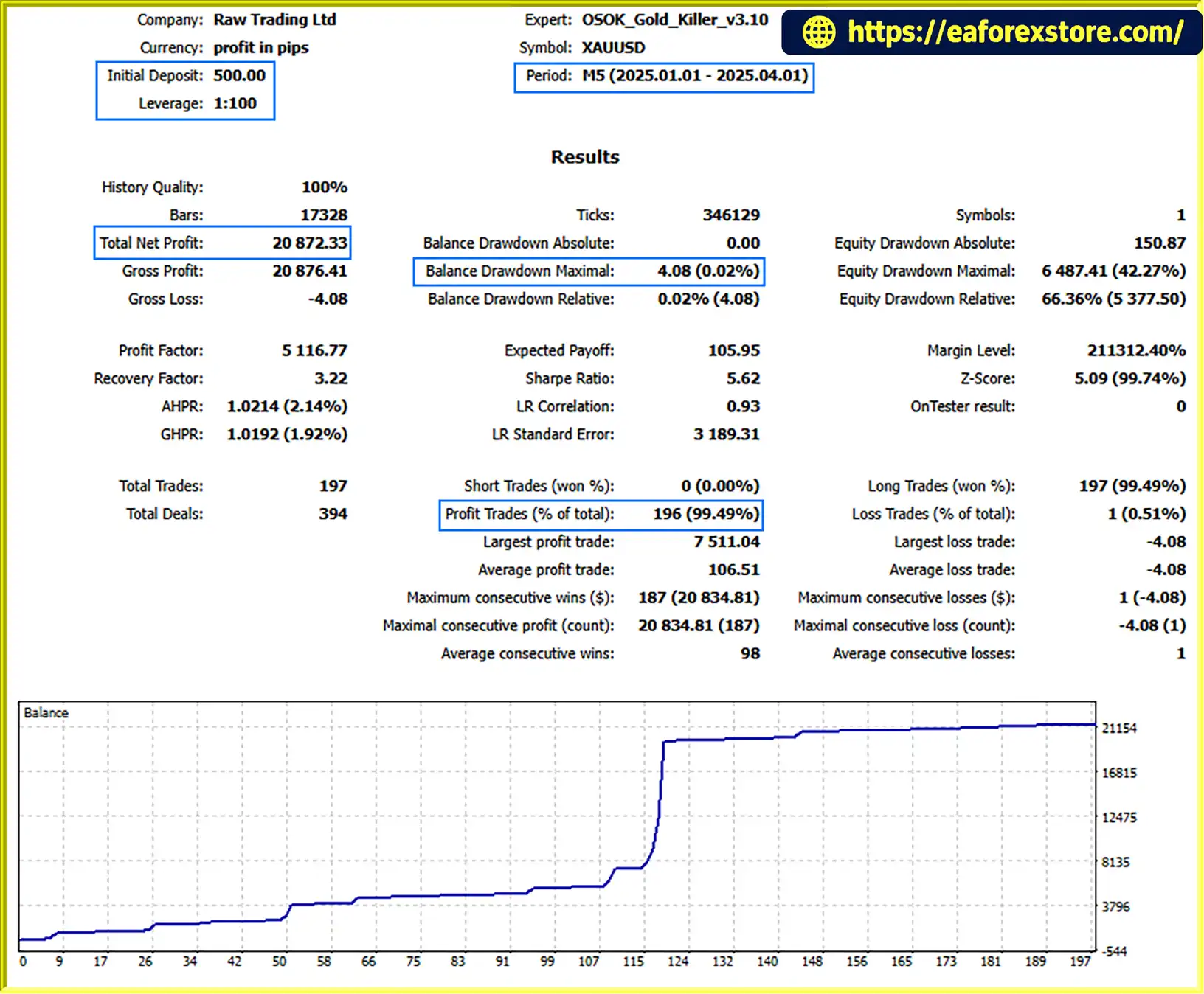
OSOK Gold Killer EA MT5 backtets
Risk management is particularly important when trading Gold on the M1 timeframe. Rapid price changes, spread widening, and execution delays can affect trade outcomes, especially during major economic announcements or periods of market volatility.
OSOK Gold Killer EA MT5 advertises several protection-oriented features, but traders should verify their exact behavior before relying on them with real funds.
The balance guard is intended to protect the account according to the EA’s internal protection rules. Before live deployment, verify:
The daily target feature allows users to define a trading objective and monitor progress through the dashboard. Confirm whether reaching the target suspends new entries, closes open positions, or applies another action.
Although hedge recovery is presented as a feature, hedging does not automatically reduce total account risk. Opposing positions may increase margin usage, trading costs, and the complexity of recovering from adverse market movements.
Users should understand the recovery rules and test the strategy under unfavorable market conditions before enabling it on a live account.
The news filter is intended to help manage exposure around economic announcements. Its effectiveness depends on the news data source, event selection, timing rules, and handling of unexpected announcements.
A news filter cannot prevent all volatility or guarantee favorable execution during important market events.
The dashboard displays the current spread, helping users monitor trading conditions. However, the supplied description does not establish a specific maximum-spread limit or guarantee that the EA will reject every trade under unfavorable execution conditions.
OSOK Gold Killer EA MT5 does not guarantee profits or protection against all losses. Before using real funds, test the balance guard, daily target lock, hedge recovery behavior, and news filter in a demo environment. Review historical performance, maximum drawdown, trade frequency, and execution costs under realistic broker conditions.
Follow these steps to install OSOK Gold Killer EA MT5 on MetaTrader 5.
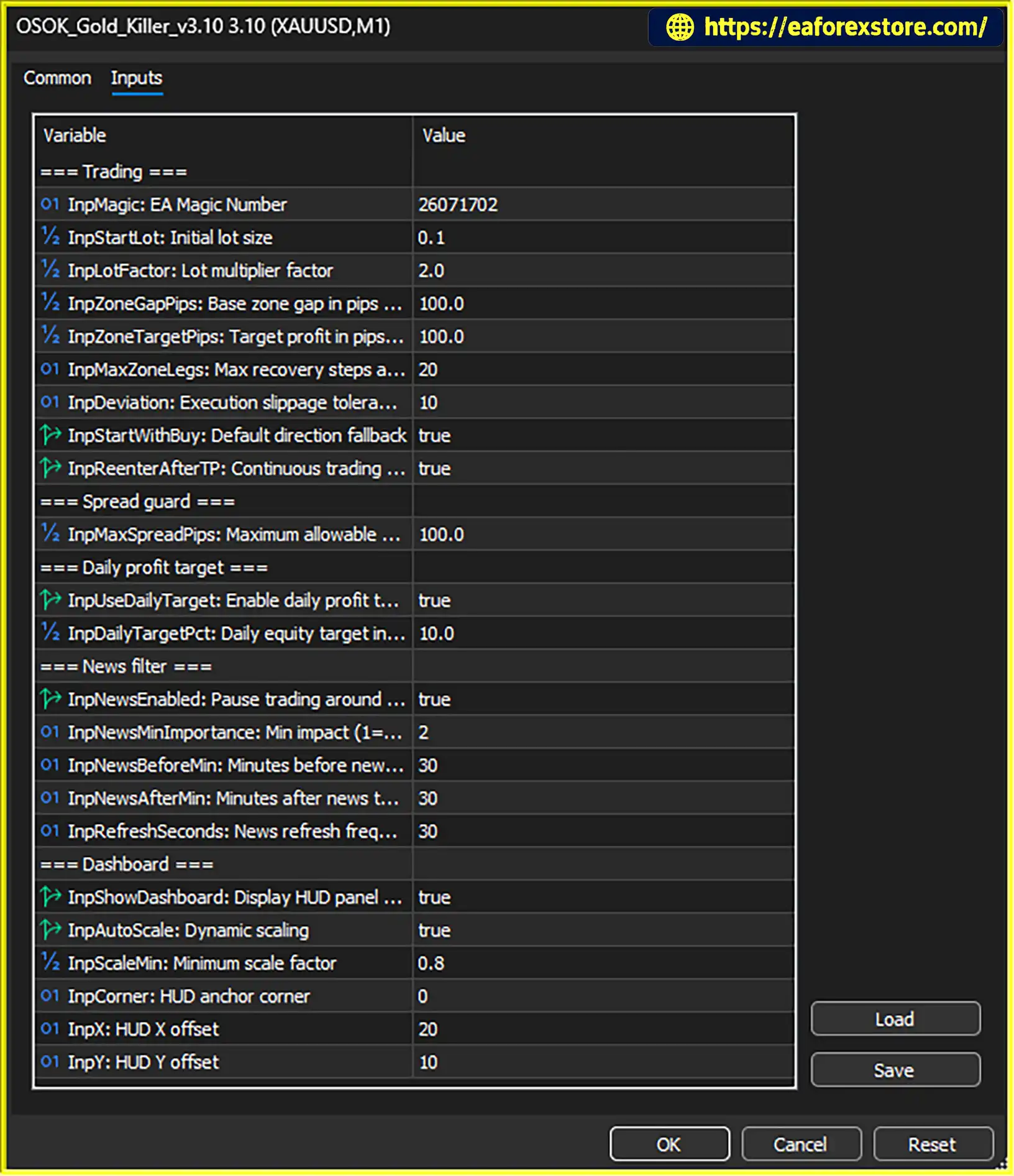
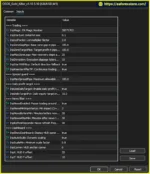
setting
According to the supplied instructions, users can contact the provider through Telegram at @Osok_admin to inquire about the product, licensing, and purchase options.
Confirm the current product version, account compatibility, installation requirements, and official setup documentation before purchasing.
After obtaining the product, download the supplied files and setup guide. Confirm that the EA file is compatible with MetaTrader 5, typically using the .ex5 or .mq5 extension.
MQL5 directory.Experts folder.Copy the OSOK Gold Killer EA MT5 file into the MQL5/Experts directory. Follow the provider’s instructions if the package contains additional files or installation requirements.
Return to MetaTrader 5, open the Navigator panel, and right-click Expert Advisors. Select Refresh, or restart the terminal if necessary.
Open your broker’s Gold trading symbol and select the M1 timeframe. Attach OSOK Gold Killer EA MT5 to the chart and review the available input parameters.
Confirm the exact symbol name used by your broker, as some brokers use suffixes or alternative naming conventions.
Review the available balance protection, daily target, and other settings provided in your installed version. Choose values appropriate for your account size and risk tolerance.
Do not assume that dashboard labels represent configurable inputs; use the supplied product documentation to identify the actual settings.
Enable Algo Trading in MetaTrader 5 and confirm that automated trading is permitted in the EA settings. Check the Experts and Journal tabs for initialization errors or rejected orders.
Run the EA on a demo account to assess its trade execution, drawdown, balance protection, daily target behavior, and response to changing spreads.
If you intend to use OSOK Sniper Signals alongside the EA, test the combined workflow separately to ensure that manual trades and automated positions do not create unintended exposure.
For continuous operation, keep MetaTrader 5 connected to the broker and consider a suitable VPS. Monitor the EA periodically, particularly during major economic announcements and periods of increased Gold volatility.
>>> Join VIP Membership Now <<<
OSOK Gold Killer EA MT5 is an automated Gold trading robot designed for XAUUSD on the M1 timeframe. Its main selling points include balance protection, daily target controls, a live trading dashboard, hedge recovery, and a built-in news filter.
The EA may appeal to traders who want to automate short-term Gold trading while monitoring system activity through a centralized dashboard. Its compatibility with OSOK Sniper Signals also offers an additional workflow for traders who want to combine automated execution with manual signal-based entries.
However, the presence of protection features does not make a trading strategy risk-free. Traders should verify the EA’s internal logic, understand its hedge recovery mechanism, and test its account protection controls before using real funds.
For traders researching an automated Gold trading EA for MT5, OSOK Gold Killer EA MT5 is worth evaluating through careful demo testing and transparent performance analysis. Its suitability depends on verified trading behavior, realistic execution conditions, and whether its risk profile matches the user’s objectives.
Trade smart, understand the risks, and evaluate performance before committing real capital.
1. What Is OSOK Gold Killer EA MT5?
OSOK Gold Killer EA MT5 is a fully automated Expert Advisor designed specifically for Gold (XAUUSD) trading on MetaTrader 5. It operates on the M1 timeframe and features automated trade execution, balance protection, daily profit target controls, a live trading dashboard, and additional risk management functions.
2. Does OSOK Gold Killer EA MT5 Support All Trading Symbols?
No. OSOK Gold Killer EA MT5 is specifically designed for XAUUSD (Gold) trading on the M1 timeframe. Traders should use a Gold symbol supported by their broker and verify any symbol suffixes before attaching the EA to a chart. For traders interested in signal-based trading across multiple currency pairs, the developer also offers OSOK Sniper Signals as a complementary tool.
3. What Are the Main Risk Management Features of OSOK Gold Killer EA MT5?
OSOK Gold Killer EA MT5 advertises a balance guard, daily target lock, hedge recovery logic, and a built-in news filter. These features are intended to support account monitoring and trading management. However, their exact operating rules should be verified through the official documentation and demo testing, as no risk management feature can eliminate trading losses.
4. Does OSOK Gold Killer EA MT5 Include a Hedge Recovery Strategy?
Yes. According to the supplied product description, OSOK Gold Killer EA MT5 includes a hedge recovery mechanism designed to manage certain trading situations. However, hedging can increase margin requirements, trading costs, and overall account exposure. Traders should understand how the recovery logic operates and evaluate its behavior during adverse market conditions before using real funds.
5. What Is the Recommended Timeframe for OSOK Gold Killer EA MT5?
OSOK Gold Killer EA MT5 is designed to operate on the XAUUSD M1 chart, which represents a one-minute timeframe. Because short-term Gold trading can be sensitive to spreads, slippage, execution speed, and sudden volatility, traders should use suitable broker conditions and test the EA on a demo account before live deployment.
6. Are the Backtest Results of OSOK Gold Killer EA MT5 Verified?
The supplied product description includes a three-month XAUUSD backtest with a $500 initial deposit, reported net profit of $20,872.33, a 99.49% win rate, and maximum drawdown of 0.02%. These figures should be treated as reported results until the original Strategy Tester report and testing conditions are independently verified. Historical backtests do not guarantee future profitability, and traders should examine the testing period, trade history, modeling quality, and execution costs.
7. Is OSOK Gold Killer EA MT5 Compatible with Standard and Cent Accounts?
According to the developer, OSOK Gold Killer EA MT5 supports standard and cent accounts on MetaTrader 5, subject to broker compatibility. Before installation, confirm the broker's XAUUSD symbol specifications, minimum lot size, leverage, margin requirements, and account settings. Test the EA on a demo account to ensure it operates correctly under the intended trading conditions.
8. How Do I Install OSOK Gold Killer EA MT5 on MetaTrader 5?
To install OSOK Gold Killer EA MT5, obtain the EA files and setup instructions from the provider, then open MetaTrader 5 and select File → Open Data Folder → MQL5 → Experts. Copy the EA file into the Experts folder, refresh the Navigator panel, and attach the EA to an XAUUSD M1 chart. Enable Algo Trading, configure the available settings, and test the EA on a demo account before using real money.
In stock
In stock
In stock
In stock
In stock
Out of stock
No account yet?
Create an Account












 Automatic EA
 EA Best Seller
 Expert Advisor MT4
 Expert Advisor MT5
 HFT EA


Reviews
Clear filtersThere are no reviews yet.