









-
 Unlimited Activations
-
 Instant delivery
-
 Easy to install






 Unlimited Activations
Instant delivery
Easy to install
Unlimited Activations
Instant delivery
Easy to install
 Free Update
 Free Install Support

Phanton Gold Pro EA MT5 is an automated Expert Advisor designed for trading Gold (XAUUSD) on the MetaTrader 5 (MT5) platform. It combines pivot-line breakout detection, volatility-based trade management, flexible position sizing, and configurable trading-session rules to help traders automate their gold trading strategies.
The EA identifies potential breakout levels by scanning recent price bars for confirmed highs and lows. It then uses these pivot points to draw breakout lines and can place pending orders when price moves beyond the identified levels. Traders can customize entry conditions, stop-loss and take-profit distances, trailing stops, lot sizing, and account-protection settings.
Phanton Gold Pro EA MT5 supports both ATR-based and fixed-distance configurations, giving traders flexibility in how they adapt the EA to different market conditions. Additional controls include trading-session restrictions, GMT time windows, rollover avoidance, weekend position closing, margin monitoring, and daily drawdown limits.
Although these features offer considerable customization, the EA’s results depend on market conditions, broker execution, spread, slippage, and the quality of its configuration. Traders should test all settings carefully before using the EA on a live account.
Phanton Gold Pro EA MT5 scans historical price bars to identify potential pivot highs and lows. It uses confirmation settings and a configurable scanning range to determine which price levels qualify for breakout-line construction.
A minimum distance between pivot points can help define the separation between relevant levels. These lines provide reference points for the EA’s breakout-entry logic.
The EA is designed to trade breakouts of detected pivot lines on the M5 timeframe. It can use pending orders to prepare for potential price movements beyond established levels.
Pending orders may also be configured to expire after a specified period, helping prevent outdated entry signals from remaining active indefinitely.
The Average True Range (ATR) measures market volatility. When ATR mode is enabled, the EA can use volatility-based distances for breakout settings, stop loss, take profit, and trailing-stop management.
This approach allows selected trading distances to respond to changing market conditions instead of relying entirely on fixed values.
Traders who prefer manual control can disable ATR mode and use fixed-distance inputs. This allows them to define breakout and exit distances directly.
The fixed mode can be useful for controlled experiments and backtesting, but its settings may become less suitable when gold volatility changes significantly.
The EA includes a configurable trailing-stop function that can be enabled or disabled. Traders can set the conditions under which trailing begins and the distance or step used to adjust the stop.
When configured appropriately, trailing stops may help protect part of an open profit. However, they cannot guarantee a profitable exit, especially during sharp price movements or periods of poor liquidity.
Phanton Gold Pro EA MT5 supports fixed-lot trading and percentage-based risk sizing. Depending on the selected configuration, position sizing may use account equity and include a lot-size limit based on available free margin.
These controls allow traders to adjust exposure to their account size and risk preferences. The actual risk per trade should still be verified against the instrument’s contract specifications, stop-loss distance, and broker settings.
The EA provides optional margin-level monitoring and a daily drawdown limit. These features may help traders manage account exposure and work within predefined trading rules.
However, the effectiveness of these protections depends on how they are configured and when the EA can execute its actions. They should not be treated as a guarantee against losses or account breaches.
Traders can configure trading-session restrictions, specify a GMT trading window, avoid rollover periods, and enable position closing before the weekend.
These options offer additional control over when the EA may open or close trades. Correct GMT offsets and broker server-time settings are essential to ensure the schedule works as intended.
Phanton Gold Pro EA MT5 follows a configurable pivot-breakout process.
Step 1: Scan the Market
The EA examines recent price bars to identify potential pivot highs and lows. Confirmation settings and the scanning range determine which price points qualify.
Step 2: Establish Breakout Lines
After identifying relevant pivots, the EA draws lines that serve as reference levels for potential breakout entries.
Step 3: Prepare Pending Orders
When the configured conditions are met, the EA can place pending orders around the identified breakout levels. Orders may expire after a predefined period if the expected move does not occur.
Step 4: Manage Open Positions
Once a trade is active, the EA applies the selected stop-loss and take-profit settings. These can use ATR-based distances or fixed values, depending on the chosen mode.
If trailing is enabled, the EA can adjust the stop according to the configured start and step parameters.
Step 5: Apply Account and Schedule Rules
The EA can use margin monitoring, daily drawdown limits, trading-session restrictions, rollover avoidance, and weekend-closing rules to manage trading activity according to the user’s configuration.
These controls should be tested individually to confirm their behavior under the intended broker and account conditions.
The EA combines pivot detection, pending-order breakouts, trade management, position sizing, and schedule settings in one system. This gives users more control over how the strategy operates.
Traders can choose between volatility-based distances and fixed values. This flexibility supports different testing approaches, although neither mode guarantees better performance.
The EA is designed to identify and trade breakouts on the M5 timeframe, reducing the need to monitor every potential entry manually.
Optional margin monitoring and daily drawdown controls can help traders implement predefined account-management rules.
Configurable time windows, rollover restrictions, and weekend-closing options help users define when the EA is allowed to operate and how it handles exposure outside regular trading periods.
The range of adjustable parameters makes the EA suitable for traders who want to test different pivot, volatility, exit, and risk-management configurations before selecting a setup.
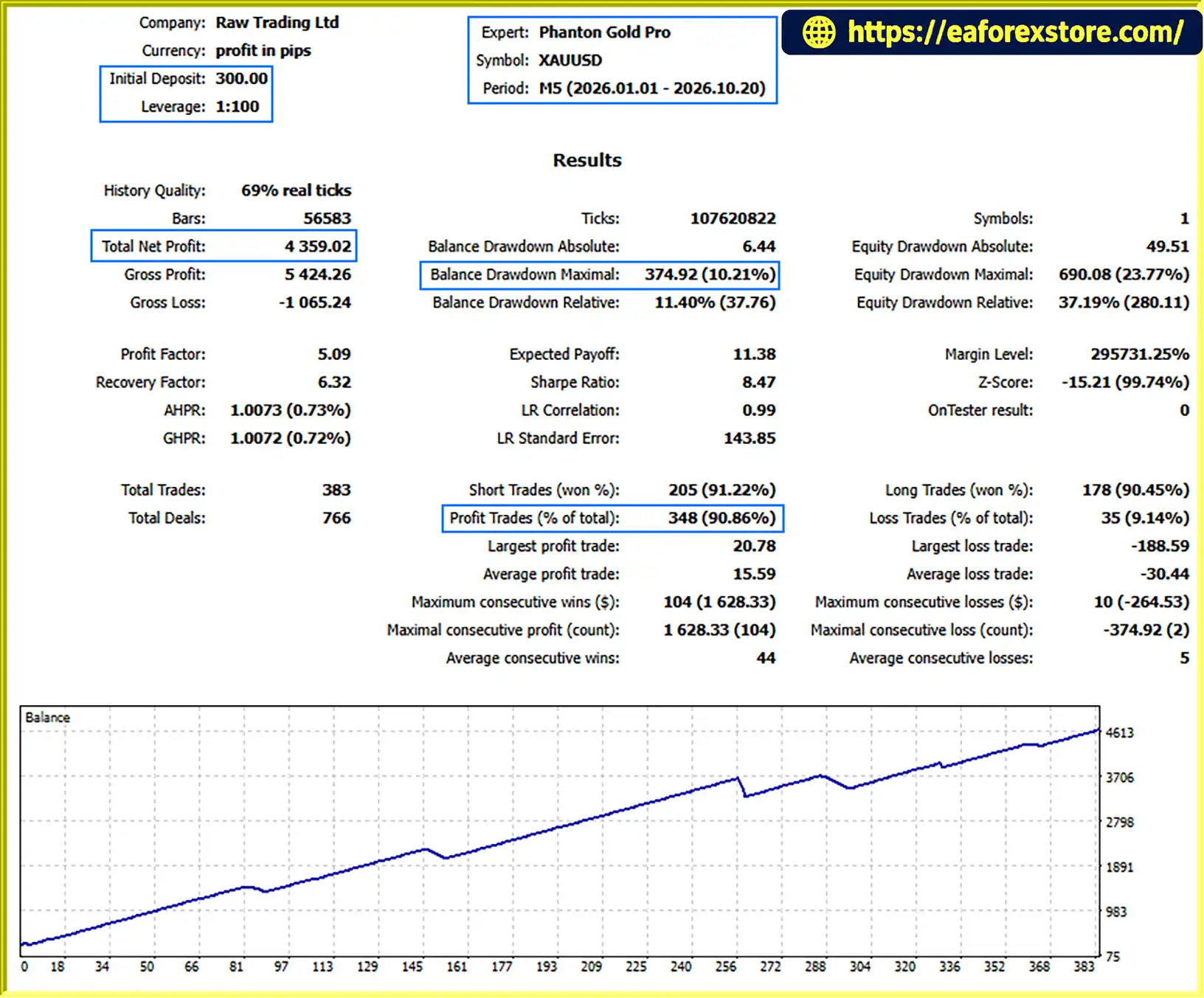
Phanton Gold Pro EA MT5 backtets
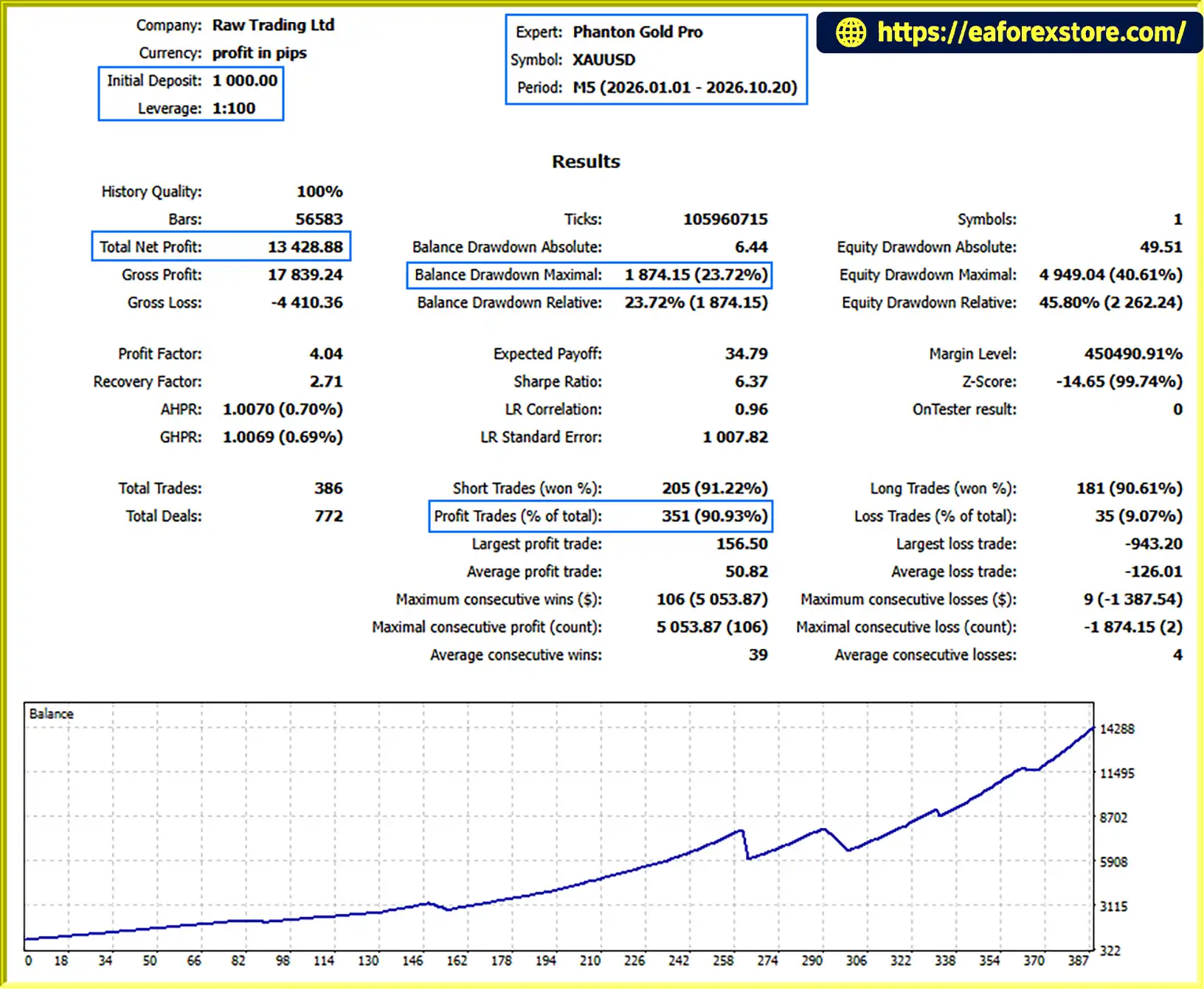
Phanton Gold Pro EA backtets
Automated trading does not eliminate market risk. Phanton Gold Pro EA MT5 includes several configurable controls, but their effectiveness depends on correct setup and execution.
Before trading live, confirm the intended risk per trade, the maximum lot size, and whether the EA calculates position size using balance or equity. Avoid assuming that the configured percentage automatically represents the maximum possible loss.
The margin-exit threshold should be checked carefully. An incorrectly configured value may trigger exits at inappropriate times or fail to provide the intended protection. Confirm the parameter’s units and meaning in the EA documentation.
A wide spread allowance may permit entries during expensive trading conditions. Test a realistic spread limit for the chosen broker, particularly during gold-market volatility and rollover periods.
A stop loss defines a planned exit level, not a guaranteed execution price. During rapid gold-price movements, gaps, or periods of low liquidity, slippage can cause the realized loss to exceed the planned amount.
Distant take-profit targets may be reached less frequently than closer targets. Test the relationship between entry frequency, stop-loss distance, target distance, and actual market volatility rather than assuming a larger target will produce better results.
Margin and drawdown controls may be optional. If they are disabled, they will not provide the intended protection. Test their behavior in the Strategy Tester and on a demo account before relying on them.
Check the broker’s server time, GMT offset, rollover period, and weekend-closing behavior. Incorrect time settings can cause the EA to trade outside the intended window or close positions at an unexpected time.
Use historical tests with realistic spreads, commissions, and slippage assumptions. Follow up with demo forward testing to evaluate pending-order behavior, position sizing, trailing stops, and protection rules under live market conditions.
No automated trading system can guarantee profits or prevent all losses. Only trade capital you can afford to lose.
Step 1: Download the EA
Obtain Phanton Gold Pro EA MT5 from the official vendor or authorized source. Confirm that the file is compatible with MetaTrader 5.
Step 2: Open MetaTrader 5
Launch MT5 and sign in to your trading account.
Step 3: Install the EA
In MT5, select File → Open Data Folder. Open the MQL5 folder, then the Experts folder, and copy the EA file into it.
Step 4: Refresh the Navigator
Return to MT5 and refresh the Expert Advisors section in the Navigator, or restart the platform if necessary.
Step 5: Open the Gold Chart
Open the XAUUSD chart and select the M5 timeframe, as specified by the EA’s intended entry logic.
Step 6: Configure the Inputs
Review the pivot-detection parameters, ATR or fixed-distance mode, stop loss, take profit, trailing settings, lot sizing, spread filter, margin protection, daily drawdown limit, and trading schedule.
Do not copy unfamiliar settings directly into a live account. Confirm the units and intended behavior of each parameter in the official documentation.
Step 7: Enable Automated Trading
Allow algorithmic trading in MT5 and check that the EA is attached to the correct chart with the required permissions.
Step 8: Test Before Live Use
Run a Strategy Tester backtest, then forward-test the configuration on a demo account. Check trade entries, pending-order expiration, position sizing, stop-loss behavior, and all protection settings before considering live deployment.
>>> Join VIP Membership Now <<<
Phanton Gold Pro EA MT5 is a configurable gold-trading Expert Advisor built around pivot-line breakouts and automated trade management. Its combination of ATR-based and fixed-distance modes, flexible position sizing, optional trailing stops, and session controls gives traders several ways to customize its behavior.
The EA may appeal to users who prefer systematic breakout trading and are willing to test their settings carefully. However, its numerous inputs also make proper configuration essential. Risk percentage, margin thresholds, spread limits, stop-loss distances, and time settings should all be verified before use.
Ultimately, the EA’s suitability should be judged through realistic backtesting and demo forward testing rather than feature lists alone. Past test results, if available, do not guarantee future performance.
Risk Disclaimer: Trading gold and other financial instruments involves substantial risk and may result in the loss of some or all invested capital. This description is for informational and educational purposes only and does not constitute financial advice. Always verify the EA’s settings, test it thoroughly, and make independent decisions based on your own risk tolerance.
1. What is Phantom Gold Pro EA MT5?
Phantom Gold Pro EA MT5 is an automated Expert Advisor designed for trading Gold (XAUUSD) on MetaTrader 5. It uses pivot-line breakout detection, pending orders, configurable trade management, and optional risk protection features to automate trading decisions. The EA is designed to operate on the M5 timeframe.
2. How does Phantom Gold Pro EA MT5 work?
The EA scans recent price bars to identify potential pivot highs and lows, then establishes breakout lines based on the detected levels. When its entry conditions are met, it can place pending orders to trade potential breakouts. After a position opens, the EA manages it using configured Stop Loss, Take Profit, and optional trailing-stop settings. Margin monitoring, drawdown limits, and trading-session rules can also be configured.
3. Does Phantom Gold Pro EA MT5 support ATR-based trading?
Yes. The EA supports both ATR-based and fixed-distance configurations. ATR mode allows selected breakout and trade-management distances to adapt to market volatility, while fixed-distance mode lets traders define those distances manually. Both approaches require testing because their effectiveness depends on market conditions and parameter settings.
4. What are the reported backtest results for Phantom Gold Pro EA MT5?
The supplied product description reports two XAUUSD backtests covering nine months each:
Backtest 1: $300 initial deposit, $4,359.02 net profit, 90.86% win rate, and 10.21% maximum drawdown.
Backtest 2: $1,000 initial deposit, $13,428.88 net profit, 90.93% win rate, and 23.72% maximum drawdown.
These figures are reported results and have not been independently verified here. The test period, broker conditions, transaction costs, and precise EA settings should be reviewed before relying on them. Historical results do not guarantee future performance.
5. What risk management features does Phantom Gold Pro EA MT5 offer?
The EA includes configurable position sizing, Stop Loss and Take Profit settings, optional trailing stops, margin-level monitoring, and daily drawdown limits. It also supports spread filtering, trading-session restrictions, rollover avoidance, and optional weekend position closing. These features can help implement predefined trading rules, but they cannot eliminate market risk or guarantee a maximum loss.
6. Can I customize the lot size and trading schedule?
Yes. Phantom Gold Pro EA MT5 supports fixed-lot and percentage-based risk sizing. Traders can also configure trading-session restrictions and GMT time windows, avoid rollover periods, and enable weekend position closing. Correct configuration is important because broker server time, account equity, available margin, and contract specifications can affect the EA's behavior.
7. What are the advantages and disadvantages of Phantom Gold Pro EA MT5?
Advantages: Automated pivot-breakout trading, ATR and fixed-distance modes, optional trailing stops, flexible position sizing, configurable drawdown and margin controls, and customizable trading schedules.
8. How do I install Phantom Gold Pro EA MT5?
Download the EA package and open MetaTrader 5. Select File → Open Data Folder, navigate to MQL5 → Experts, and copy the supplied .ex5 file into that folder. Refresh the Expert Advisors list in the Navigator panel, open an XAUUSD chart on the M5 timeframe, and attach the EA. Configure its trading and risk parameters, enable algorithmic trading, and test the setup in the Strategy Tester and on a demo account before considering live trading.
In stock
In stock
In stock
In stock
In stock
Out of stock
No account yet?
Create an Account












 Automatic EA
 EA Best Seller
 Expert Advisor MT4
 Expert Advisor MT5
 HFT EA


Reviews
Clear filtersThere are no reviews yet.