









-
 Unlimited Activations
-
 Instant delivery
-
 Easy to install






 Unlimited Activations
Instant delivery
Easy to install
Unlimited Activations
Instant delivery
Easy to install
 Free Update
 Free Install Support

Tradivo Profit Shield EA MT5 is an automated Expert Advisor (EA) designed for Gold (XAUUSD) trading on the MetaTrader 5 (MT5) platform. It combines Buy Stop and Sell Stop pending-order execution with dynamic stop-loss management, adaptive trailing protection, spread filtering, and daily loss controls.
The EA is designed to automate trade placement and position management while providing configurable lot sizes and order limits. Its built-in dashboard displays balance and profit/loss information, allowing traders to monitor account activity directly from the chart.
Tradivo Profit Shield EA MT5 also advertises drawdown protection, compatibility with standard and USC/Cent accounts, and support for MT5 and VPS operation. The product information lists compatibility with brokers such as Exness and Vantage, although actual performance and compatibility depend on the broker’s account specifications, execution conditions, and symbol configuration.
With its combination of automated pending orders and risk-management settings, Tradivo Profit Shield EA MT5 may appeal to gold traders seeking a structured approach to automated trading. However, the supplied description does not include independently verified backtest results or a complete explanation of the entry strategy. Traders should evaluate the EA carefully before using real capital.
Tradivo Profit Shield EA MT5 uses Buy Stop and Sell Stop pending orders to automate trade execution around selected price levels.
A Buy Stop order is generally placed above the current market price to enter a potential upward breakout. A Sell Stop order is generally placed below the current market price to enter a potential downward breakout.
This approach can help traders participate in price movements without manually entering every trade. However, pending orders can also be triggered during false breakouts, sudden volatility, or temporary price spikes.
The exact rules for calculating order placement levels and managing simultaneous pending orders should be confirmed in the official documentation.
The EA includes dynamic stop-loss functionality intended to adjust protection as market conditions or an open position change.
A properly configured stop-loss mechanism can help define planned exit levels and manage trade exposure. However, the exact stop-loss calculation and activation rules are not specified in the supplied product description.
Traders should verify how the EA places the initial stop loss, when it modifies the stop, and whether it supports different stop-management modes.
Tradivo Profit Shield EA MT5 advertises adaptive trailing functionality designed to follow favorable price movements.
Trailing protection can help lock in part of an unrealized profit as a trade moves in the intended direction. Depending on its configuration, it may also reduce the risk of allowing a profitable position to return all its gains.
Nevertheless, trailing stops do not guarantee profitable exits. In fast-moving gold markets, slippage and price gaps can cause actual execution to differ from the requested stop level.
The EA includes a spread filter intended to restrict trading when the difference between the bid and ask prices becomes too large.
Spread control is particularly relevant to XAUUSD because trading costs can increase during news releases, rollover periods, and sudden volatility.
A spread filter may help avoid some expensive entries, but it cannot eliminate commissions, slippage, or all unfavorable execution conditions. Traders should configure the permitted spread according to their broker’s actual gold pricing.
Tradivo Profit Shield EA MT5 advertises a daily loss-control mechanism designed to help limit trading activity when losses reach a configured threshold.
This feature may be useful for traders who follow daily loss limits or operate accounts with strict risk requirements.
Before relying on it, users should confirm how the EA calculates daily losses, whether floating losses are included, when the daily counter resets, and whether reaching the threshold stops new entries or closes existing positions.
A daily loss control should be treated as an additional risk-management tool rather than a guarantee against account losses.
The EA includes advertised drawdown-protection features intended to help users monitor and manage account risk.
Drawdown measures the decline in account value from a previous peak or reference point. Monitoring drawdown can help traders evaluate how much risk their strategy is taking.
However, the effectiveness of the EA’s protection depends on its implementation and configuration. Users should verify the relevant thresholds and responses through testing rather than assuming that the feature will prevent every excessive loss.
Tradivo Profit Shield EA MT5 allows users to configure trading volume and order limits.
Lot-size controls help traders adjust exposure according to account size and risk tolerance, while order limits can restrict how many orders or positions the EA is permitted to manage, depending on the available settings.
These controls should be reviewed carefully before live trading. A lot size that is appropriate for one account may be too large for another, particularly when trading gold during volatile conditions.
The EA provides a chart dashboard that displays balance and profit/loss information.
This visual interface can make account monitoring more convenient by keeping selected trading information visible within MT5.
The dashboard is a monitoring aid, not proof of trading performance. Traders should also review their account history, open positions, equity, and trading costs in the platform.
The product description states that Tradivo Profit Shield EA MT5 supports standard and USC/Cent account types.
Cent accounts display account values in cent-based units or according to the broker’s specific account conventions. Users should verify how the EA calculates lot size, balance, equity, profit, and loss on their particular account type.
Compatibility should be tested with the broker’s actual XAUUSD symbol specifications before the EA is used on a live account.
The EA is designed for MetaTrader 5 and advertises suitability for Virtual Private Server (VPS) operation.
A VPS can keep MT5 running when a trader’s personal computer is switched off, provided the VPS remains connected and the platform is configured correctly.
VPS hosting does not improve the underlying strategy’s profitability. Reliable connectivity, correct platform settings, and ongoing monitoring remain important.
The supplied product information advertises a license activation system, a one-time payment option with future updates, an installation guide, and setup support.
Buyers should confirm the current licensing terms, supported account or device restrictions, update policy, and scope of technical support with the seller before purchasing.
Tradivo Profit Shield EA MT5 combines pending-order execution with configurable trade management and account-protection features.
Step 1: Configure the Trading Parameters
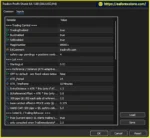
The trader sets the lot size, order limits, spread threshold, and available risk-management parameters according to the account and broker.
Step 2: Prepare Pending Orders
The EA uses Buy Stop and Sell Stop orders to automate potential entries around selected price levels. The exact method for determining these levels should be confirmed in the product documentation.
Step 3: Monitor Market Conditions
The spread filter can restrict trading when the spread exceeds the configured maximum. Pending orders may still be exposed to changing market conditions, so spread filtering should not be considered complete protection against volatility.
Step 4: Manage Open Positions
After an order is triggered, the EA applies its configured stop-loss and trailing mechanisms. These features are intended to manage risk and respond to favorable price movements.
Step 5: Monitor Daily Losses and Drawdown
The EA’s daily loss and drawdown controls are intended to help manage account exposure. Their actual behavior depends on the configured thresholds and the EA’s internal calculation rules.
Step 6: Review Trading Information
The chart dashboard displays balance and profit/loss information, allowing the trader to monitor account activity. Reviewing the platform’s trade history and equity is also important when evaluating performance.
Important: This workflow summarizes the features described by the product information. The precise entry calculations, trailing-stop rules, daily loss calculations, and order-management logic should be verified in the official documentation and through testing.
The Buy Stop and Sell Stop approach automates order placement around potential price breakouts, reducing the need for continuous manual entry.
The advertised combination of stop-loss management, trailing protection, spread filtering, daily loss controls, and drawdown protection gives traders several parameters to evaluate when establishing a risk framework.
Adjustable lot sizes and order limits allow users to tailor the EA’s exposure to their account and trading preferences.
The balance and profit/loss panel provides an accessible overview of selected account information within MT5.
The advertised support for standard and USC/Cent accounts may provide flexibility for users trading through different account structures. Broker-specific testing is still necessary.
The EA can be used in an MT5 VPS environment, helping maintain platform operation without requiring a personal computer to remain switched on.
The seller advertises an installation guide, setup support, license activation, and future updates with a one-time payment. Buyers should verify the current terms before making a purchase.
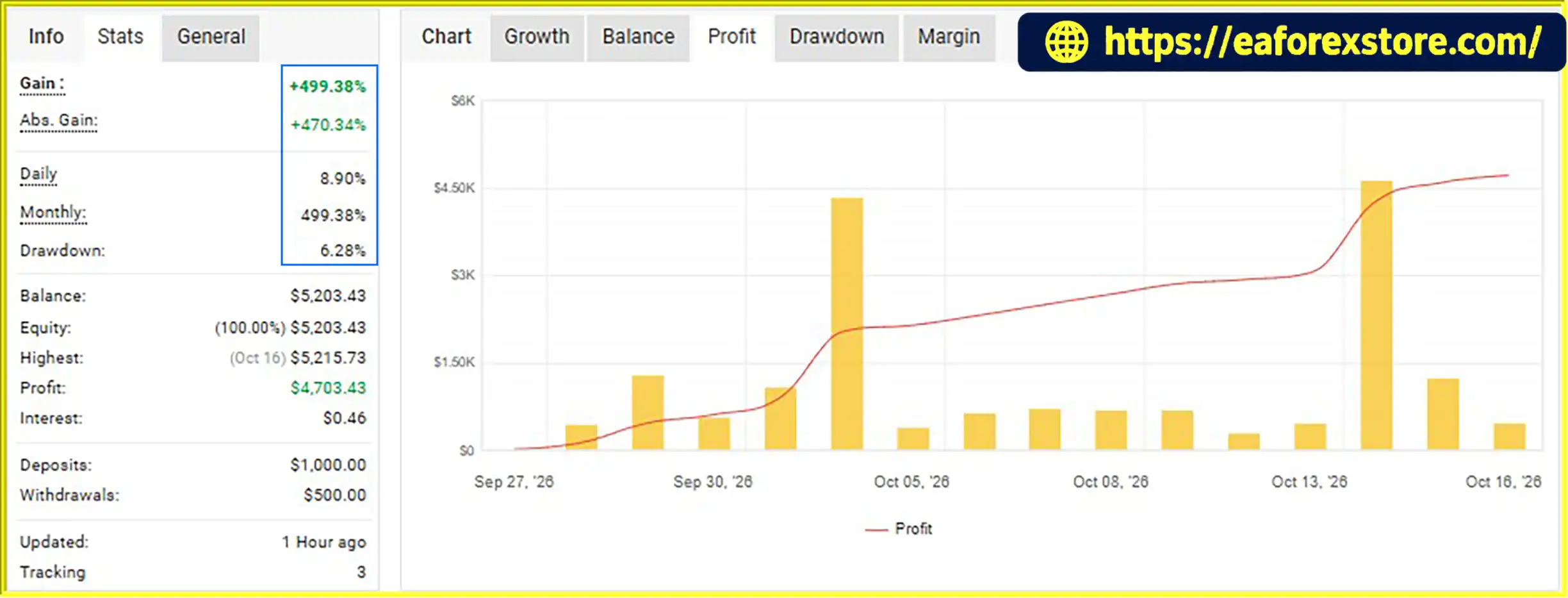
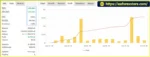
🔺XAUUSD (Gold) pair – Sep 1–22, 2026
Tradivo Profit Shield EA MT5 myfxbook
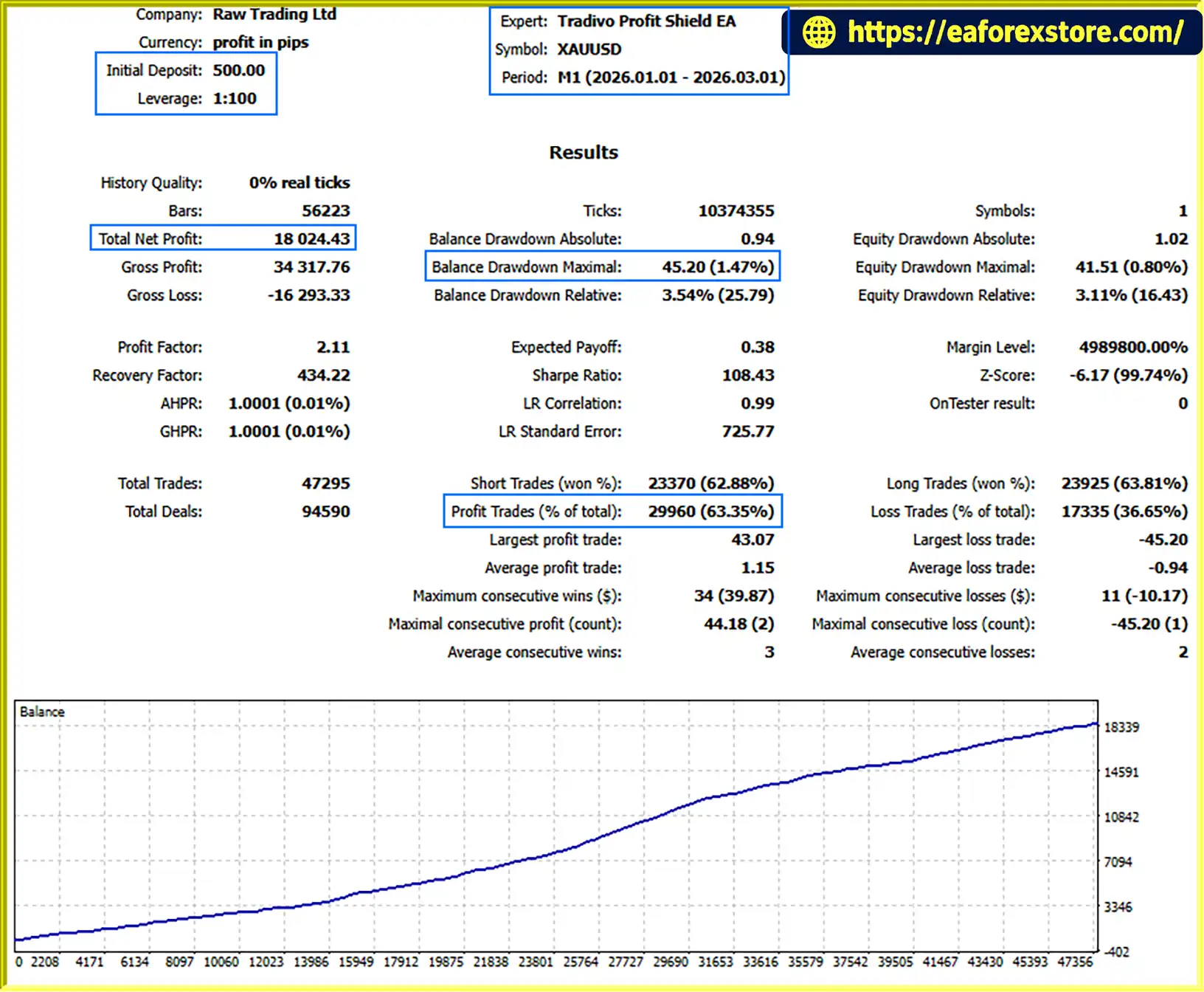
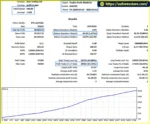
🔺XAUUSD (Gold) pair – 2 months
Tradivo Profit Shield EA MT5 backtets
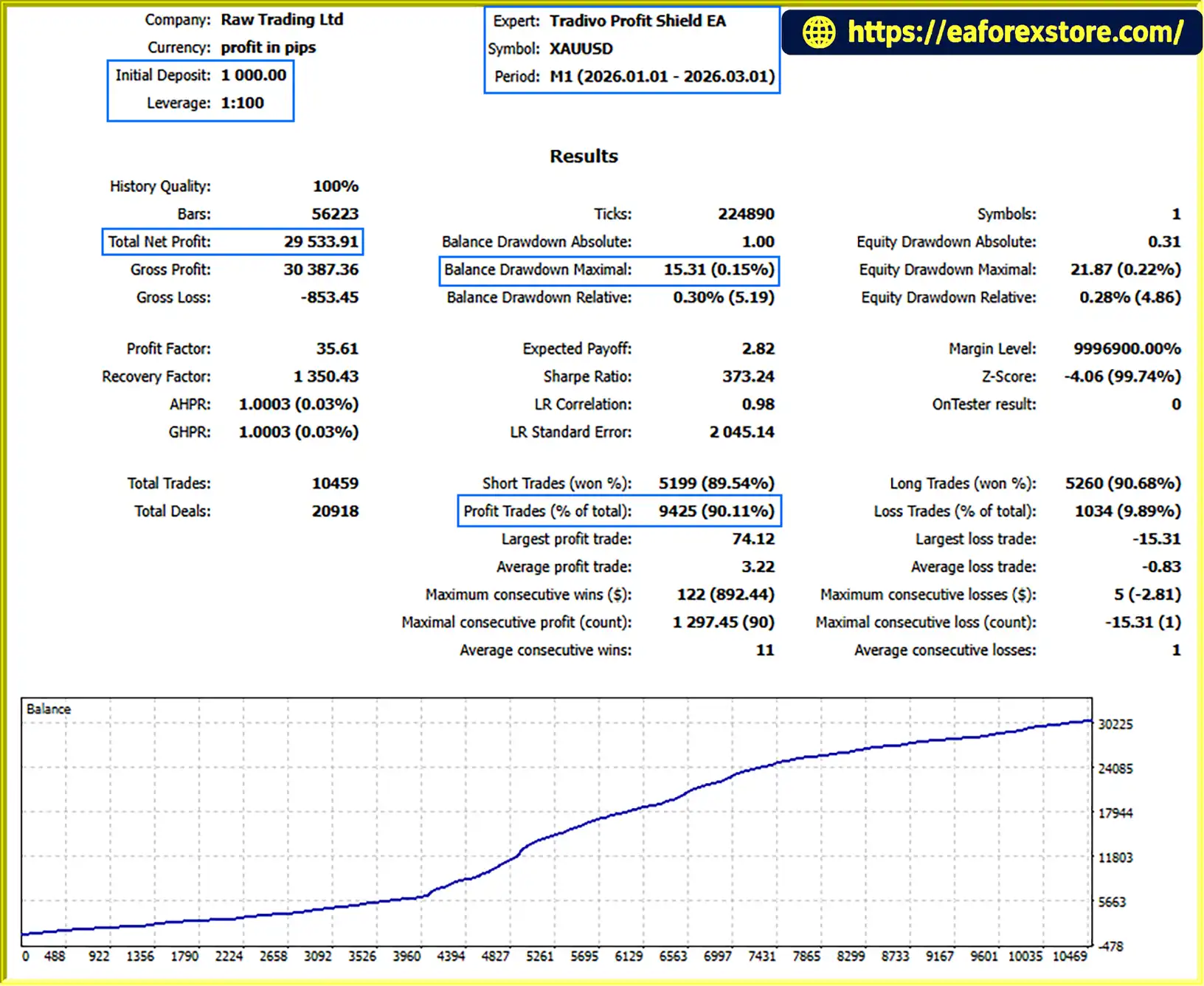
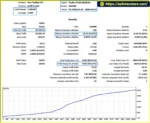
🔺XAUUSD (Gold) pair – 2 months
Tradivo Profit Shield EA backtets
Although Tradivo Profit Shield EA MT5 advertises multiple protective features, automated gold trading involves substantial risk. The effectiveness of its controls depends on their configuration, implementation, and execution conditions.
Choose a position size that is appropriate for your account equity and risk tolerance. Avoid using an unnecessarily large lot size simply because the EA supports configurable volume.
Test how the selected lot size affects potential losses at the stop-loss level and during consecutive losing trades.
Confirm the daily loss threshold and how the EA calculates losses. Check whether floating losses, commissions, and other trading costs are included, and determine when the daily limit resets.
If you use a funded account, compare the EA’s behavior with the provider’s official loss rules.
Do not assume that the advertised drawdown protection automatically prevents account breaches. Confirm which reference value the EA uses, how it handles open positions, and what action it takes when a threshold is reached.
Set the spread filter according to actual XAUUSD trading conditions at your broker. A threshold that is too wide may allow expensive entries, while one that is too narrow may block many potential trades.
Buy Stop and Sell Stop orders can be triggered during false breakouts or short-lived price spikes. If both directions are permitted, verify how the EA handles opposite orders after one order triggers.
Also confirm whether pending orders expire, are cancelled under specified conditions, or remain active until triggered or manually removed.
Gold prices can move rapidly around economic announcements and other market events. Stop losses may execute at worse prices than expected, and pending orders may be filled under unfavorable conditions.
The actual loss can therefore exceed the amount anticipated from the initial stop-loss setting.
Verify how the EA interprets balance, equity, profit, loss, and lot size on your chosen account type. Incorrect assumptions about cent-based account values can lead to unintended exposure.
Evaluate the EA in the MT5 Strategy Tester where supported, using realistic spread, commission, and slippage assumptions. Then conduct demo forward testing to assess order placement, trailing behavior, spread filtering, and daily loss controls.
No EA can guarantee profits or eliminate trading risk.
Step 1: Obtain the EA
Purchase or download Tradivo Profit Shield EA MT5 from the official seller or an authorized source. Review the licensing requirements and confirm that the file is compatible with MetaTrader 5.
Step 2: Open MetaTrader 5
Launch MT5 and sign in to your trading account.
Step 3: Install the Expert Advisor
Select File → Open Data Folder in MT5. Navigate to MQL5 → Experts and copy the EA file into the folder.
Step 4: Refresh the Navigator
Return to MT5 and refresh the Expert Advisors section in the Navigator, or restart the platform if necessary.
Step 5: Open the XAUUSD Chart
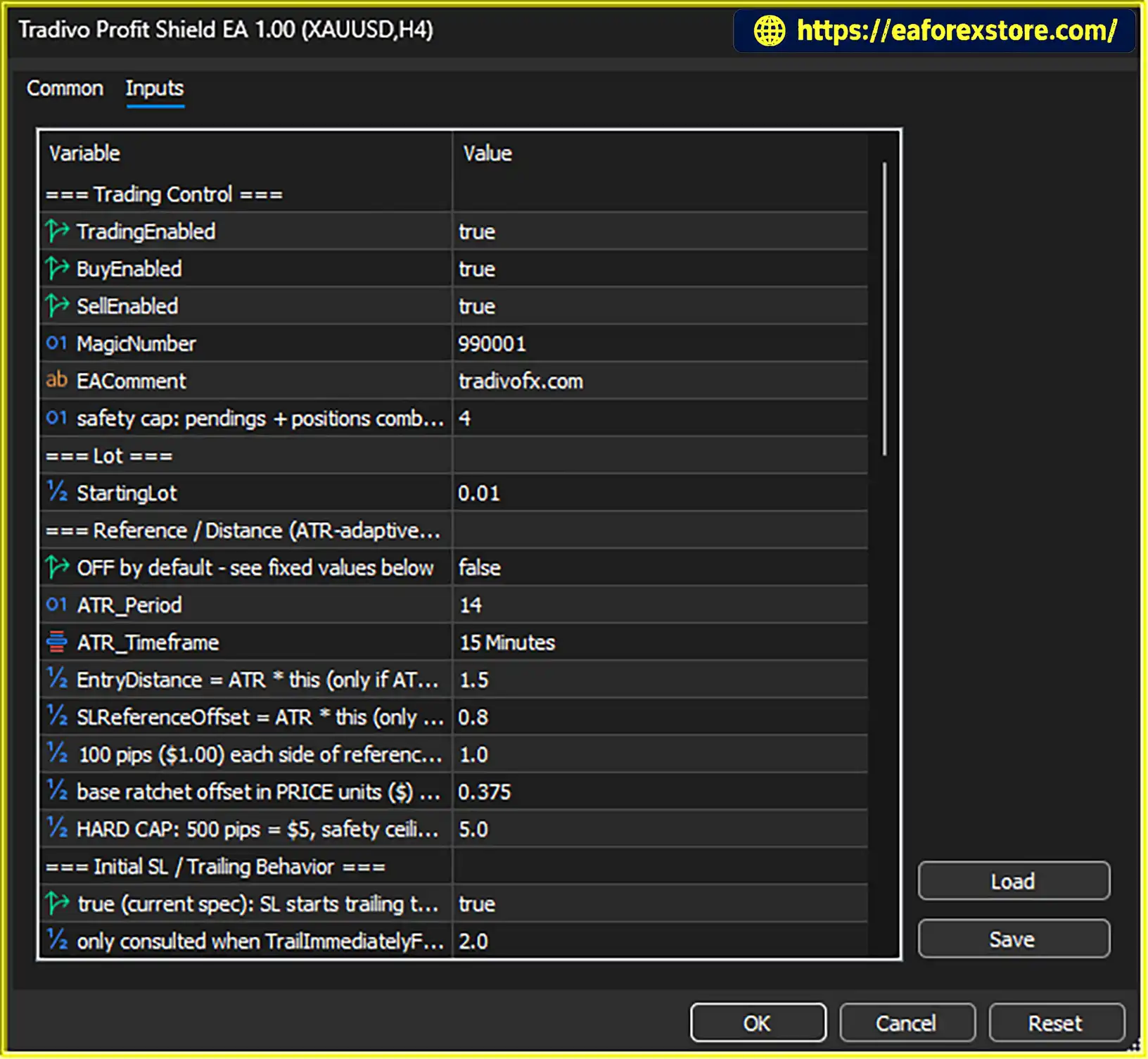
Open the gold chart and confirm the timeframe recommended by the seller. The supplied product description does not specify a particular timeframe.
Step 6: Configure the Settings
Review the lot size, order limits, pending-order parameters, stop-loss settings, trailing protection, spread threshold, daily loss limit, and drawdown controls.
Confirm the required settings for standard or USC/Cent accounts and verify that the broker’s XAUUSD symbol specifications are compatible.
Step 7: Activate the License and Enable Trading
Follow the seller’s license activation instructions. Enable algorithmic trading in MT5 and attach the EA to the intended chart.
Step 8: Test Before Live Deployment
Run a backtest where supported and perform demo forward testing. Verify pending-order placement, stop-loss modifications, trailing behavior, spread filtering, and the daily loss response.
If using a VPS, ensure that MT5 remains connected and the EA is running correctly. Do not rely on the EA for live risk control until its behavior has been tested.
>>> Join VIP Membership Now <<<
Tradivo Profit Shield EA MT5 is an automated gold-trading Expert Advisor that combines Buy Stop and Sell Stop execution with dynamic stop-loss management, adaptive trailing protection, spread filtering, and advertised daily loss and drawdown controls.
Its configurable trading volume, order limits, dashboard, and stated support for standard and USC/Cent accounts may appeal to traders seeking an automated approach to XAUUSD trading. VPS-friendly operation and advertised installation support may also simplify deployment for users who are comfortable managing MT5 systems.
However, the feature list alone does not establish profitability or guarantee account protection. Traders should verify the entry logic, order-handling rules, daily loss calculations, and broker compatibility before committing real capital.
The best approach is to test Tradivo Profit Shield EA MT5 with realistic trading costs, evaluate its drawdown behavior, and use conservative risk settings. A well-configured automated system can support a trading process, but it cannot remove market risk.
Risk Disclaimer: Trading gold and other financial instruments involves substantial risk and may result in the loss of some or all invested capital. This article is for informational and educational purposes only and does not constitute financial advice. Past performance does not guarantee future results. Always conduct independent research, verify the EA’s settings, and trade according to your financial situation and risk tolerance.
1. What is Tradivo Profit Shield EA MT5?
Tradivo Profit Shield EA MT5 is an automated Expert Advisor designed for Gold (XAUUSD) trading on MetaTrader 5. It uses Buy Stop and Sell Stop pending orders and includes dynamic stop-loss management, adaptive trailing protection, spread filtering, daily loss controls, and a dashboard displaying balance and profit/loss information.
2. How does Tradivo Profit Shield EA MT5 work?
The EA places Buy Stop and Sell Stop pending orders around selected price levels to participate in potential upward or downward breakouts. When an order is triggered, it applies its configured stop-loss and trailing mechanisms. The EA also provides spread filtering and daily loss and drawdown controls. Its precise entry calculations and order-management rules should be verified in the official documentation.
3. What are the main features of Tradivo Profit Shield EA MT5?
Key features include automated pending-order execution, dynamic stop-loss management, adaptive trailing protection, a spread filter, daily loss and drawdown controls, configurable lot sizes, order limits, and an on-chart balance and profit/loss dashboard. The product also advertises support for standard and USC/Cent accounts and VPS operation.
4. What are the reported performance results for Tradivo Profit Shield EA MT5?
The supplied product description reports the following results:
Myfxbook performance review: XAUUSD, September 1–22, 2026; initial deposit $1,000; total gain +217.36%; average daily profit 8.90%; average monthly profit 499.38%; maximum drawdown 6.28%.
Two-month backtest: $500 initial deposit; net profit $18,024.43; win rate 63.35%; maximum drawdown 1.47%.
Two-month backtest: $1,000 initial deposit; net profit $29,533.91; win rate 90.11%; maximum drawdown 0.15%.
These figures are reported in the supplied product description and have not been independently verified here. The live-account reporting period and historical backtests should be evaluated separately. Past performance does not guarantee future results.
5. Does Tradivo Profit Shield EA MT5 include daily loss and drawdown protection?
Yes. The EA advertises daily loss controls and drawdown protection intended to help manage account risk. Before relying on these features, verify how losses are calculated, whether floating losses and trading costs are included, when the daily counter resets, and whether reaching a limit stops new entries or closes existing positions.
6. Is Tradivo Profit Shield EA MT5 compatible with Cent accounts and VPS hosting?
According to the supplied product description, the EA supports standard and USC/Cent accounts and is designed for MT5 and VPS operation. However, compatibility depends on the broker's account conventions, XAUUSD symbol specifications, and execution conditions. Test the EA on the intended account type and ensure MT5 remains connected when using a VPS.
7. What are the risks of using Tradivo Profit Shield EA MT5?
Pending orders can trigger during false breakouts or sudden price spikes. Spread widening, slippage, and market gaps can increase trading costs or cause losses to exceed expectations. Daily loss and drawdown controls also require correct configuration and testing. Traders should use conservative lot sizes, verify the order-management rules, and conduct backtesting and demo forward testing before live deployment.
8. How do I install Tradivo Profit Shield EA MT5?
Download the EA from the official seller or an authorized source. In MT5, select File → Open Data Folder, navigate to MQL5 → Experts, and copy the EA file into that folder. Refresh the Navigator, open the recommended XAUUSD chart, activate the license according to the seller's instructions, and configure the lot size, order limits, spread filter, stop-loss, trailing protection, and daily loss settings. Test the EA on a demo account before using real money.
Listed download files:
Tradivo Profit Shield EA.ex5
Gold_Profit Shield.set
Gold_Profit Shield News.set
In stock
In stock
In stock
In stock
In stock
Out of stock
No account yet?
Create an Account












 Automatic EA
 EA Best Seller
 Expert Advisor MT4
 Expert Advisor MT5
 HFT EA


Reviews
Clear filtersThere are no reviews yet.