









-
 Unlimited Activations
-
 Instant delivery
-
 Easy to install







 Unlimited Activations
Instant delivery
Easy to install
Unlimited Activations
Instant delivery
Easy to install
 Free Update
 Free Install Support

Pips Maven EA MT5 is an automated Expert Advisor for MetaTrader 5, designed to help traders analyze forex market trends and automate trading decisions. Built around a proprietary geometric virtual pattern methodology, this trading robot evaluates incoming market data to identify potential trends, recognize market changes, and adapt its trading logic to evolving conditions.
Unlike trading systems that rely entirely on fixed indicator combinations, Pips Maven is designed to classify market events dynamically and adjust its approach as market behavior changes. Its autonomous trading functionality allows users to automate essential trading processes without installing additional external indicators or supplementary software.
Pips Maven EA MT5 is suitable for traders seeking a systematic approach to forex trend analysis, automated currency trading, and portfolio management. It supports trading across selected currency pairs, allowing users to build a portfolio according to their trading preferences and risk tolerance.
The developer recommends a minimum investment of approximately $1,000, with larger deposits potentially providing more flexibility for account management. However, the appropriate capital allocation depends on the selected currency pairs, position sizing, broker conditions, and individual risk tolerance.
• Author: Andriy Sydoruk
• Experience: Over 11 years of experience on MQL5.
• Notable Products: Pips Maven EA, Market Maestro MM5, IdeaIlan EA, CoreFPS EA and other advisors.
• Flagship Product: Pips Maven EA MT5 is rated as the best performing product of the year.
>> Delivery time 24h-48h after payment.
>>> Refund if not delivered.
>>> You will receive the latest version without any limitations (ID+Time).>>Reviewed by Jason Stap <<
Pips Maven EA MT5 Overview
Pips Maven EA MT5 uses a geometric virtual pattern methodology to evaluate market data and identify potential trading opportunities. This approach is designed to recognize market structures and changes that may be difficult to identify through manual chart analysis alone.
The Expert Advisor automates key trading operations, reducing the need for constant manual monitoring. Once configured, it can analyze market conditions and execute trading decisions according to its programmed strategy.
Forex market conditions change continuously. Pips Maven is designed to adapt its trading rules to incoming market information, helping it respond to evolving price behavior rather than relying exclusively on static criteria.
Adaptive logic does not guarantee accurate predictions or profitable trades, but it provides a systematic framework for responding to market changes.
Pips Maven EA MT5 is designed as a self-contained trading solution. Users do not need to install separate external indicators or supplementary analytical software to operate its core functionality.
The EA allows traders to select currency pairs that match their trading preferences and portfolio strategy. Each pair should be evaluated individually because spreads, volatility, liquidity, and market behavior can differ considerably.
Pips Maven supports configurable trading parameters, including:
These settings help traders establish trade exit rules and manage exposure according to their trading objectives.
The developer recommends starting with approximately $1,000, with a suggested allocation of $1,000–$10,000 per currency pair depending on the intended trading setup. A larger balance does not automatically reduce trading risk or guarantee better performance.
The EA is designed to accommodate traders with different levels of experience. Its automated functionality helps simplify routine trading operations, while customizable parameters provide experienced users with greater control over their configurations.
Support is available to assist users with questions about the EA and its configuration, according to the developer’s stated support arrangements.
Pips Maven EA MT5 uses geometric virtual patterns and incoming market data to classify market events and identify potential trading opportunities.
Its general operating process can be summarized as follows:
Market Data Analysis → Pattern Recognition → Trend Evaluation → Trading Decision → Order Execution → Position Management
Step 1: Market Analysis
The EA evaluates incoming market information to assess current price behavior and identify relevant market structures.
Step 2: Geometric Virtual Pattern Recognition
The system applies its proprietary geometric virtual pattern methodology to classify market events and detect potential changes in market direction.
Step 3: Adaptive Signal Evaluation
Pips Maven evaluates market conditions and adjusts its trading logic according to its programmed rules.
Step 4: Automated Trade Execution
When the required conditions are satisfied, the EA can execute trades automatically based on its configuration.
Step 5: Position and Risk Management
The system uses configured trading parameters, including Stop Loss, Take Profit, and trailing-stop settings, to manage positions.
Step 6: Continuous Market Monitoring
The EA continues monitoring incoming data while operating, allowing it to respond to subsequent market developments.
Actual trade frequency, entry conditions, holding periods, and performance depend on the EA’s implementation, selected currency pair, configuration, and market environment.
Pips Maven reduces the need to analyze every chart manually and execute every trade independently. Its automated functionality can help traders maintain a consistent, rules-based trading routine.
The EA distinguishes itself through its geometric virtual pattern approach to market analysis. This methodology is designed to identify market structures and classify changing conditions systematically.
Rather than depending entirely on fixed trading criteria, the EA is designed to adjust its decision-making logic as new market data becomes available.
The system does not require additional external indicators or analytical software for its core operation, making the setup process more straightforward.
Stop Loss, Take Profit, Trailing Start, and Trailing Stop settings allow users to define important aspects of trade management.
Traders can choose currency pairs that suit their strategy and experience. Careful pair selection can help avoid excessive exposure to similar market movements.
Beginners may appreciate the automation, while experienced traders can evaluate the EA’s behavior, configure risk parameters, and test different currency pairs.
Automating market analysis and order management can reduce the time required for routine trading activities, although regular monitoring remains important.
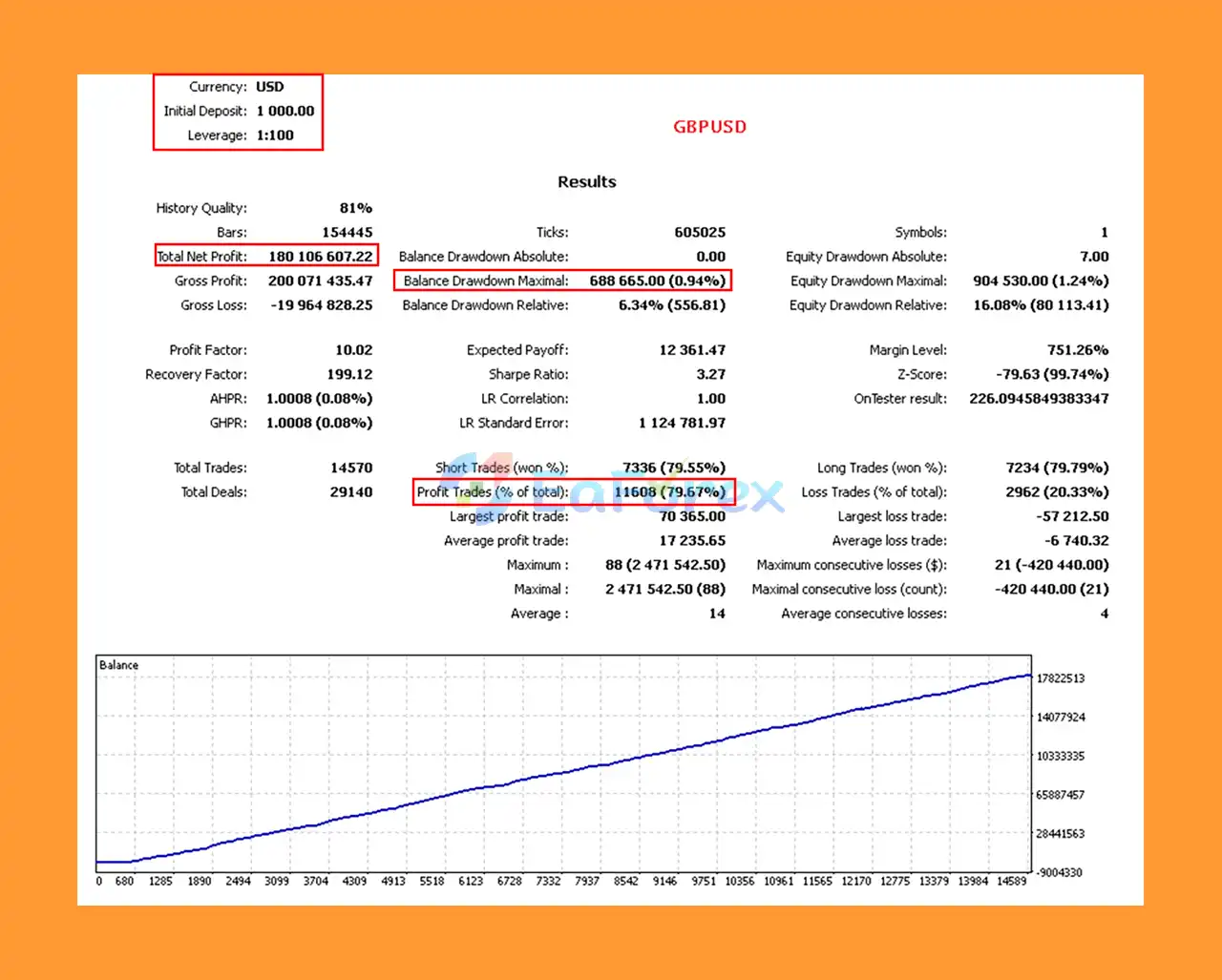
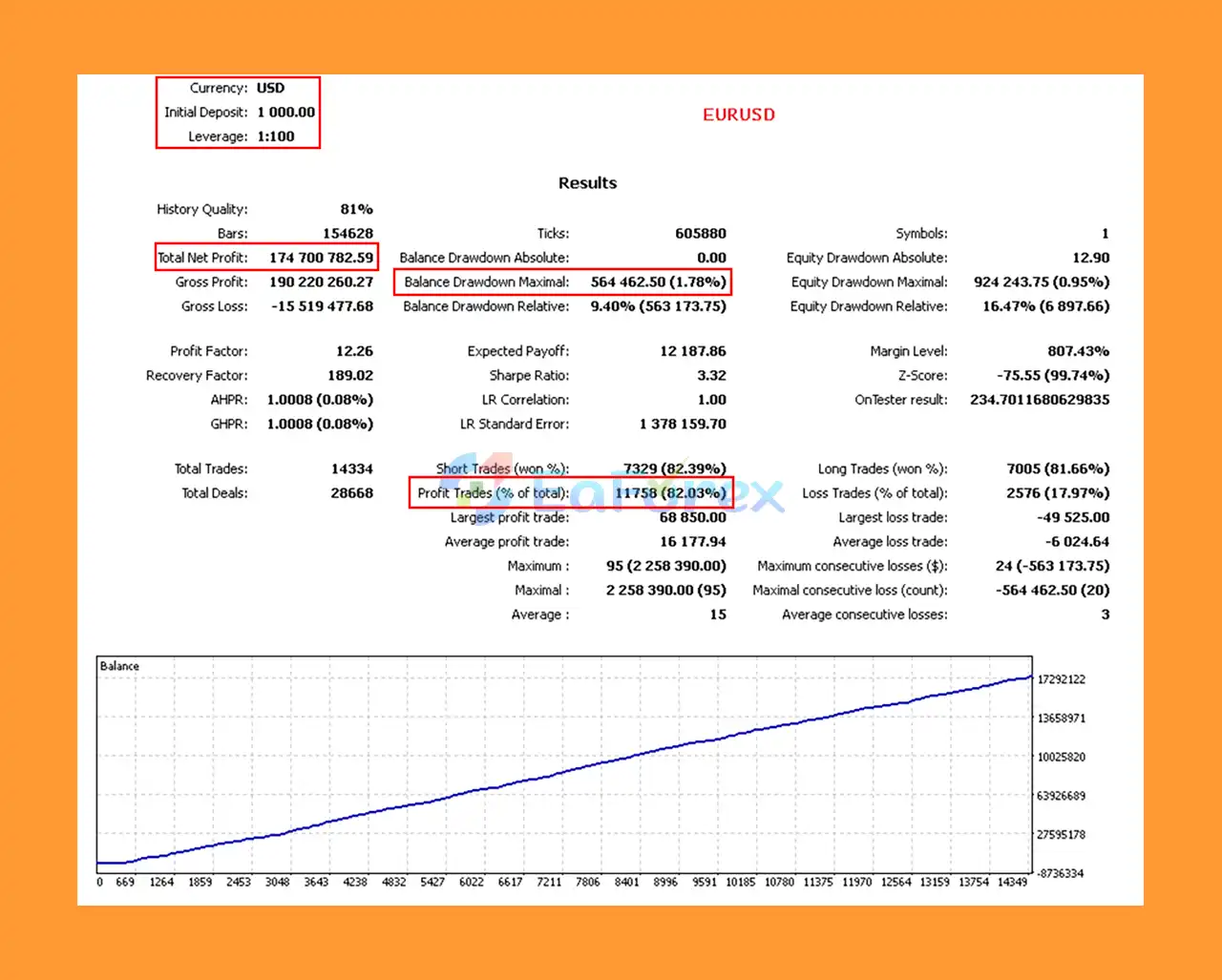
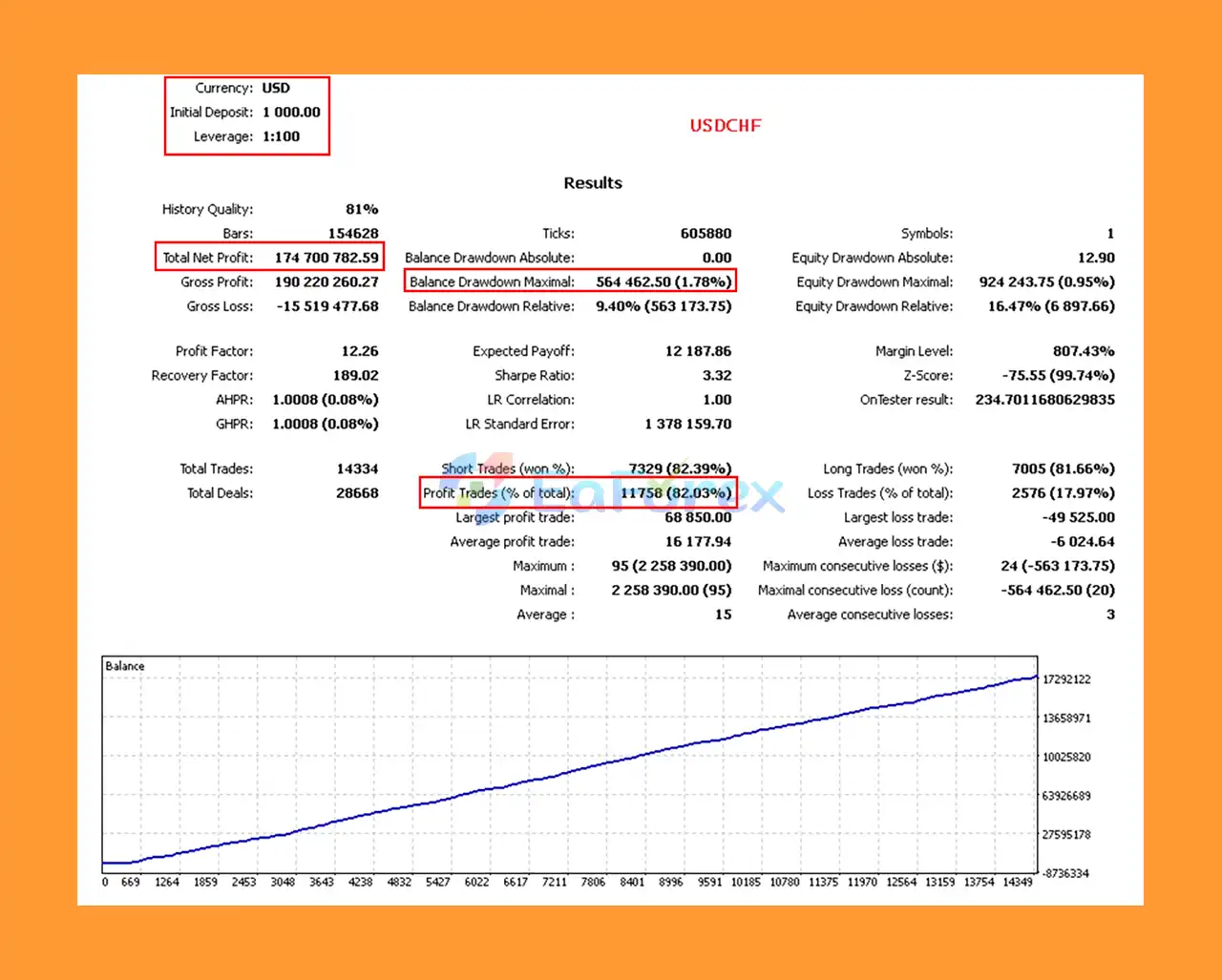
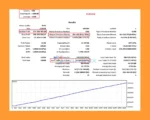
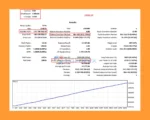
Pips Maven MT5 Backtest Results
Pips Maven MT5 Backtest Resultss
The performance of Pips Maven EA MT5 depends on several factors, including market conditions, currency pair selection, trading parameters, broker execution, spreads, commissions, and position sizing.
No verified performance statistics, such as historical returns, maximum drawdown, win rate, or profit factor, are provided in the supplied product information. Traders should independently test the EA before drawing conclusions about its profitability.
Stop Loss defines a price level intended to close a losing position and limit its potential loss. Appropriate settings should reflect the volatility of the selected currency pair and the account’s risk tolerance.
Take Profit establishes a target price for closing a profitable position. The selected target should be evaluated in relation to the strategy’s entry logic, market conditions, and expected trading costs.
Trailing Start determines when trailing-stop management begins, while Trailing Stop defines the distance used to follow favorable price movements, subject to the EA’s implementation.
These settings may help manage open positions, but they cannot guarantee that profits will be secured or losses prevented.
Different forex pairs have different volatility profiles, spreads, liquidity levels, and correlations. Traders should evaluate each pair independently and avoid concentrating too much exposure in currencies that tend to move together.
The developer suggests a minimum investment of approximately $1,000 and indicates that $1,000–$10,000 per currency pair may be appropriate for certain setups.
These figures are recommendations from the supplied product description, not universal minimums or guarantees of suitability. Account size should be assessed alongside the EA’s actual lot-sizing rules, margin requirements, and historical drawdown.
Before using Pips Maven on a live account, traders should:
Although Pips Maven EA MT5 offers automated market analysis and configurable risk-management tools, several limitations should be considered before deployment.
Automated trading systems can lose money. Adaptive logic and geometric pattern recognition do not guarantee accurate market predictions or consistent returns.
Without independently verified backtest results, forward-testing records, or live trading statistics, it is not possible to establish the EA’s actual profitability or drawdown characteristics from the supplied description alone.
Currency prices can move rapidly following economic announcements, central bank decisions, geopolitical developments, and unexpected market events.
Even a strategy that performs well under certain conditions can experience extended losing periods. Traders should maintain sufficient capital and use appropriate position sizing.
Live performance may differ from backtests because of spreads, commissions, slippage, liquidity, execution speed, and server conditions.
Trading several currency pairs simultaneously may increase overall exposure if those pairs respond similarly to market developments.
Poorly configured Stop Loss, Take Profit, or trailing-stop settings can affect trading outcomes. Users should understand each parameter before running the EA on a live account.
A larger deposit does not eliminate the possibility of substantial losses. Traders should never allocate funds solely because a recommended balance appears in a product description.
Risk warning: Forex and CFD trading involve substantial financial risk. Always test the EA independently, use prudent risk management, and never trade money you cannot afford to lose.
Follow these steps to install Pips Maven EA MT5 on MetaTrader 5.
Download and install MetaTrader 5 through your broker or an official MetaTrader distribution channel. Open the platform and log in to your trading account.
In MetaTrader 5, select:
File → Open Data Folder
Navigate to:
MQL5 → Experts
Copy the Pips Maven EA MT5 file into this folder if the product is supplied as a standard Expert Advisor file.
Return to MetaTrader 5 and refresh the Navigator panel, or restart the platform.
Locate Pips Maven EA MT5 under Navigator → Expert Advisors.
Open the chart for the currency pair you intend to trade. Check that the pair is supported by the EA and that your broker offers suitable trading conditions.
Drag Pips Maven EA MT5 onto the selected chart and open its configuration window.
Enable automated trading where required by the platform and EA settings.
Review the available parameters and configure the relevant settings, including:
Use the official product documentation for parameter definitions and recommended configurations.
Open the Strategy Tester in MetaTrader 5 and test the EA using appropriate historical data and realistic trading costs.
Review profitability, drawdown, trade frequency, losing streaks, and robustness across different periods.
Run the EA on a demo account to evaluate its behavior under current market conditions. Confirm that trades are executed and managed as expected before considering live deployment.
If you decide to use the EA on a live account, start with a risk level you can reasonably tolerate. Monitor its execution, account exposure, and performance regularly.
A reliable VPS may help maintain continuous platform operation when uninterrupted automated trading is required.
Note: Installation details may vary depending on whether the product is distributed as an .ex5 file, through the MQL5 Market, or using another authorized delivery method.
Pips Maven EA MT5 is an automated forex trading Expert Advisor designed to combine trend analysis, geometric virtual patterns, adaptive trading logic, and configurable position management in a MetaTrader 5 environment.
Its focus on automated decision-making, external-indicator-free operation, and customizable Stop Loss, Take Profit, and trailing-stop settings may appeal to traders seeking a more systematic approach to currency trading.
However, the quality of an automated trading system cannot be established by its features alone. Verified performance data, realistic backtesting, drawdown analysis, and forward-testing results are essential when evaluating whether an EA is suitable for a particular account.
For traders searching for a Pips Maven EA MT5, forex trend analysis EA, automated forex trading robot, or MetaTrader 5 Expert Advisor, this system offers a set of features worth investigating through independent testing.
Ultimately, successful automated trading requires more than sophisticated algorithms. Careful testing, disciplined risk management, appropriate currency pair selection, and realistic expectations remain essential for making informed trading decisions.
1. What is Pips Maven EA MT5 and how does it work?
Pips Maven EA MT5 is a fully automated forex Expert Advisor that uses advanced geometric pattern recognition and real-time adaptive algorithms to analyze market trends and volatility, enabling precise and profitable trading decisions.
2. Which currency pairs and assets can Pips Maven EA trade?
Pips Maven EA supports multiple assets including major forex pairs like GBPUSD, EURUSD, USDCHF, as well as BTCUSD and indices, making it versatile for diverse trading portfolios.
3. Is Pips Maven EA MT5 suitable for beginners?
Yes, Pips Maven EA MT5 features a user-friendly interface and operates fully autonomously without requiring manual input, making it ideal for both beginner and experienced traders.
4. What risk management features does Pips Maven EA MT5 offer?
The EA allows customizable stop loss, take profit, and trailing stop settings for each currency pair to ensure effective capital protection and risk control.
5. What kind of trading performance can I expect from Pips Maven EA MT5?
Backtests show exceptional results, such as over $170 million net profit from $1,000 initial deposit, with win rates above 79% and very low maximum drawdowns below 2%.
6. What is included in the Pips Maven EA MT5 package?
The download package contains the installation guide, setting files (if any), and access to VIP membership for ongoing support and updates.
In stock
In stock
In stock
In stock
In stock
Out of stock
No account yet?
Create an Account












 Automatic EA
 EA Best Seller
 Expert Advisor MT4
 Expert Advisor MT5
 HFT EA


Reviews
Clear filtersThere are no reviews yet.