









-
 Unlimited Activations
-
 Instant delivery
-
 Easy to install






 Unlimited Activations
Instant delivery
Easy to install
Unlimited Activations
Instant delivery
Easy to install
 Free Update
 Free Install Support

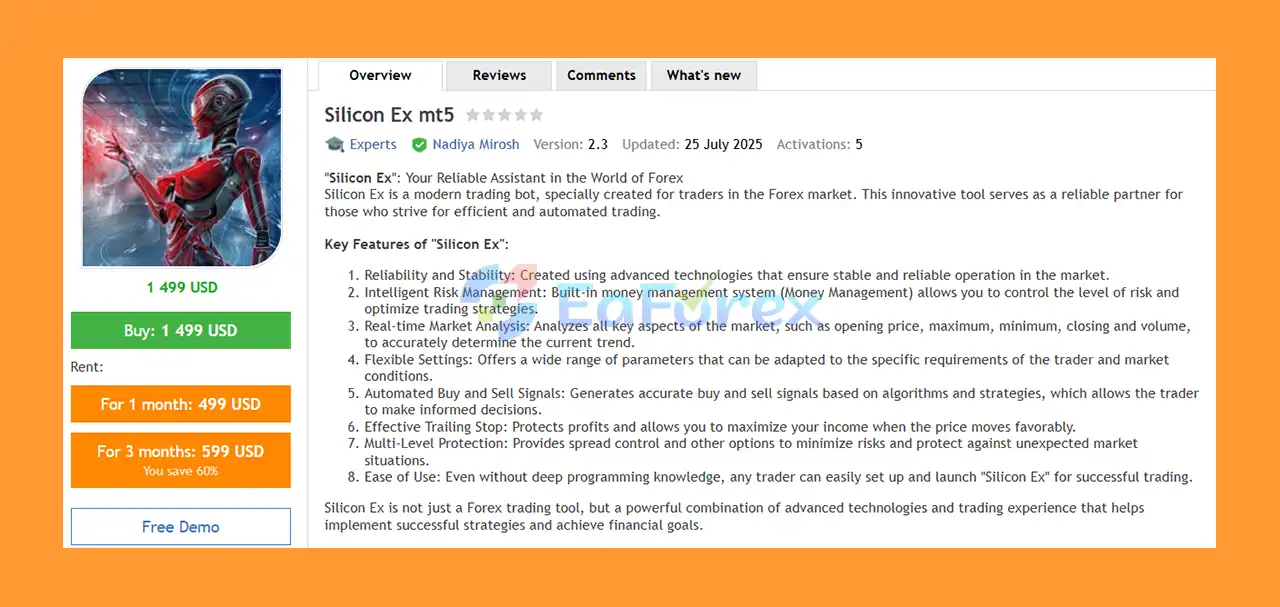
Silicon Ex MT5 is an automated Forex trading Expert Advisor (EA) designed to help traders analyze market trends, identify potential trading opportunities, and manage positions through customizable trading algorithms. Built for the MetaTrader 5 platform, Silicon Ex combines trend analysis, price channel detection, volatility filters, and advanced trade management tools to support a systematic approach to automated Forex trading.
The EA evaluates key market data, including opening prices, highs, lows, closing prices, and trading volume, to assess market direction and identify potential buy and sell signals. Its configurable parameters allow traders to adjust trend sensitivity, channel width, volatility filtering, position sizing, and trade execution according to their individual strategies.
One of the main advantages of Silicon Ex MT5 is its integrated money management system. Traders can choose between fixed lot sizing and percentage-based risk settings, while additional features such as Take Profit, Stop Loss, trailing stops, and spread control provide greater flexibility in managing trades.
Whether you are an experienced Forex trader or exploring automated trading for the first time, Silicon Ex MT5 offers a customizable trading framework designed to support disciplined execution and adaptable market analysis.
• Author: Nadiya Mirosh
• Experience: Over 3 years of experience on MQL5.
• Notable Products: Silicon Ex MT5, Sliding Block EA, Modern bot, Doctor Winston MT5, Milioron MT5, Gyroscopes MT5 and other advisors.
• Flagship Product: Silicon Ex MT5 is rated as the best performing product of the year.
>> Delivery time 24h-48h after payment.
>>> Refund if not delivered.
>>> You will receive the latest version without any limitations (ID+Time).>>Reviewed by Jason Stap <<
Silicon Ex MT5 Overview
Silicon Ex MT5 includes configurable money management parameters that allow traders to control position sizing according to their account balance and risk preferences.
The EA supports fixed lot sizing through the SetVolume parameter and percentage-based money management through EnabledMM and SetMM. These options provide flexibility when configuring trading exposure.
The EA uses configurable trend analysis settings to evaluate market direction and identify potential trading opportunities.
The InpTrendBars parameter controls the number of historical bars used for trend analysis, while InpApproximation adjusts the level of price approximation. These settings allow traders to customize how the system evaluates price movements.
Silicon Ex incorporates channel analysis to help assess price behavior within a defined range.
Key parameters include InpChannelBars, which determines the number of bars considered, and InpChannelDeviation, which controls channel width. These settings can be adjusted to accommodate different market conditions and trading preferences.
Volatility plays an important role in Forex trading. Silicon Ex includes several volatility-related parameters designed to adjust signal filtering and market analysis.
These include:
InpVolatilitysignalVolatilityWeightedFiltersignalFlatFromVolatilitysignalBandsFromVolatilityAdjustValuesOnVolatilityThese controls provide flexibility when configuring the EA to account for changing volatility and potentially distinguish trending conditions from quieter or less directional markets.
Silicon Ex MT5 is designed to generate trading signals through its underlying algorithms and configurable analysis parameters.
The ActivateBuy setting allows traders to enable or disable buy-side trading. The available settings support customization of the EA’s trading behavior according to individual preferences.
The EA supports predefined Take Profit and Stop Loss levels through the TP and SL parameters.
These settings allow traders to establish trade exit levels and define a framework for managing potential losses and locking in gains. The appropriate values depend on the instrument, broker specifications, market volatility, and individual risk tolerance.
Silicon Ex includes a trailing stop feature that can help protect accumulated profits when the market moves favorably.
The main parameters are:
TrailingOn – Enables or disables the trailing stop.TrailingStart – Defines when trailing stop management begins.TrailingStop – Sets the trailing distance.When configured appropriately, this feature can help manage open positions as prices change. However, a trailing stop cannot guarantee that a trade will close at the specified level during periods of rapid movement or execution slippage.
The EA provides spread restriction settings to help traders avoid entering trades when spreads exceed their preferred limits.
The ControlSpreadsOn parameter enables spread control, while SpreadRestrictions defines the applicable spread threshold.
Additional trade management settings, including MaximumOrders and MinimumDistance, allow users to configure order limits and minimum market distances.
Silicon Ex MT5 includes several execution-related settings designed to accommodate different broker requirements.
These include SetFilling, EcnMode, SlidingPrices, and AsynchronousMode. Traders should configure these parameters according to their broker’s supported order execution methods and the EA’s documentation.
The EA provides a range of adjustable settings for position sizing, trend analysis, channel detection, volatility filtering, trade management, and order execution.
This flexibility allows traders to adapt the configuration to their preferred trading approach rather than relying entirely on fixed parameters.
Silicon Ex MT5 combines market analysis, trading signal generation, and automated position management into a configurable Expert Advisor.
Its general workflow can be described as follows:
Step 1: Market Data Analysis
The EA evaluates available price data, including opening, high, low, and closing prices, along with volume information where supported by the trading environment.
Step 2: Trend Identification
The configured trend analysis parameters help assess market direction and identify potential trading conditions.
Step 3: Channel and Volatility Analysis
The system uses channel settings and volatility-related filters to refine its market assessment. These parameters can influence how price movements and changing market conditions are evaluated.
Step 4: Trading Signal Generation
Based on its underlying strategy and active settings, the EA identifies potential buy or sell opportunities. Traders can control whether buy trading is enabled through the relevant configuration.
Step 5: Order Placement
When trading conditions are satisfied, the EA can place orders according to its execution settings, order limits, minimum-distance requirements, and broker constraints.
Step 6: Position Management
Open positions can be managed through configured Take Profit, Stop Loss, and trailing stop settings. Money management parameters determine the selected position-sizing approach.
Step 7: Spread Monitoring
When spread control is enabled, the EA can apply its configured spread restrictions to help avoid trading under unfavorable spread conditions.
This automated process is designed to support consistent rule-based execution while reducing the need for continuous manual monitoring. Actual trading behavior depends on the EA’s internal algorithm, parameter configuration, and broker environment.
Choosing a Forex Expert Advisor requires consideration of strategy flexibility, risk controls, execution requirements, and ease of configuration.
Silicon Ex MT5 offers several features that may appeal to traders looking for a customizable automated trading solution.
For traders who prefer a configurable automated system with several built-in trade management options, Silicon Ex MT5 provides a flexible framework for exploring algorithmic Forex trading.
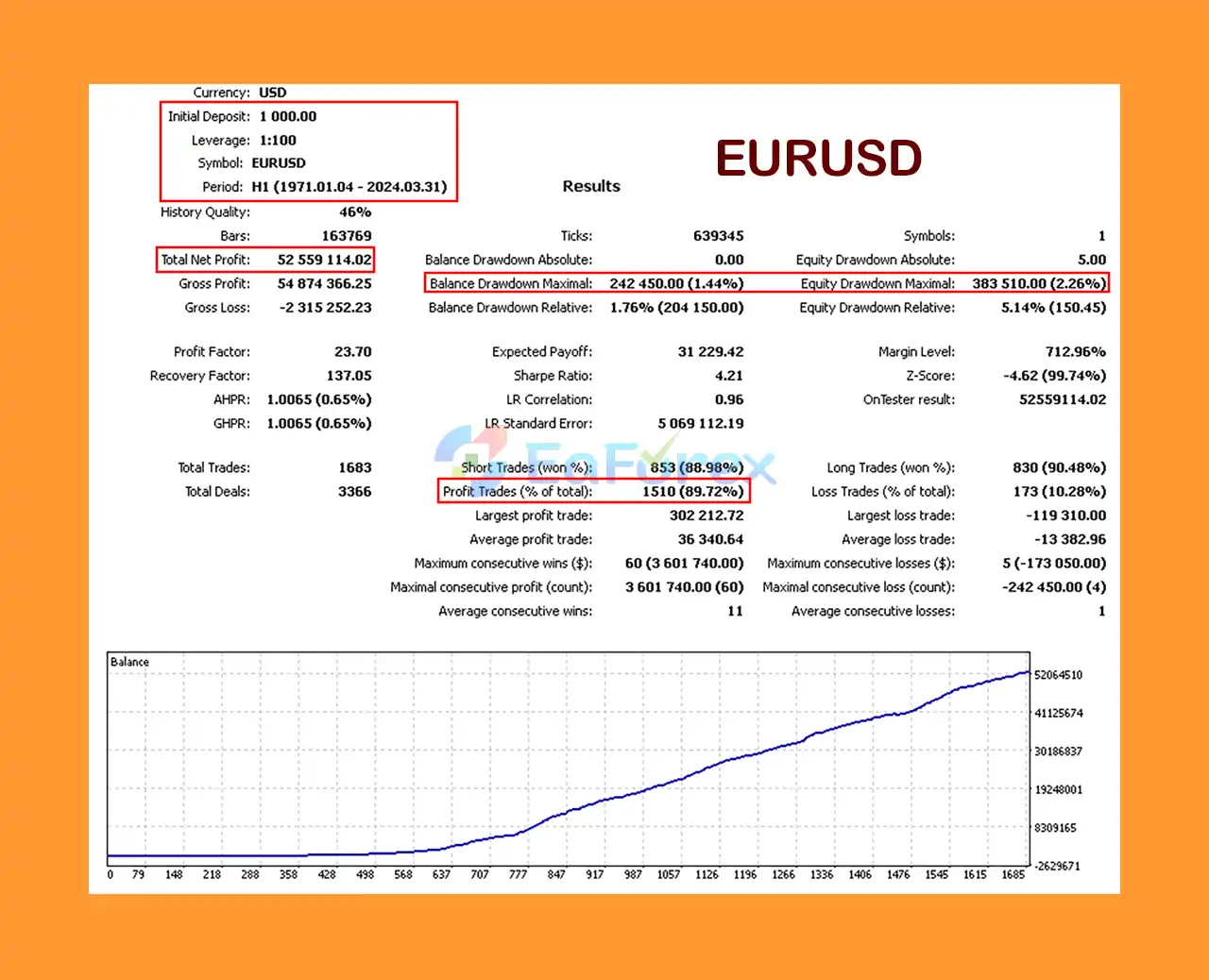
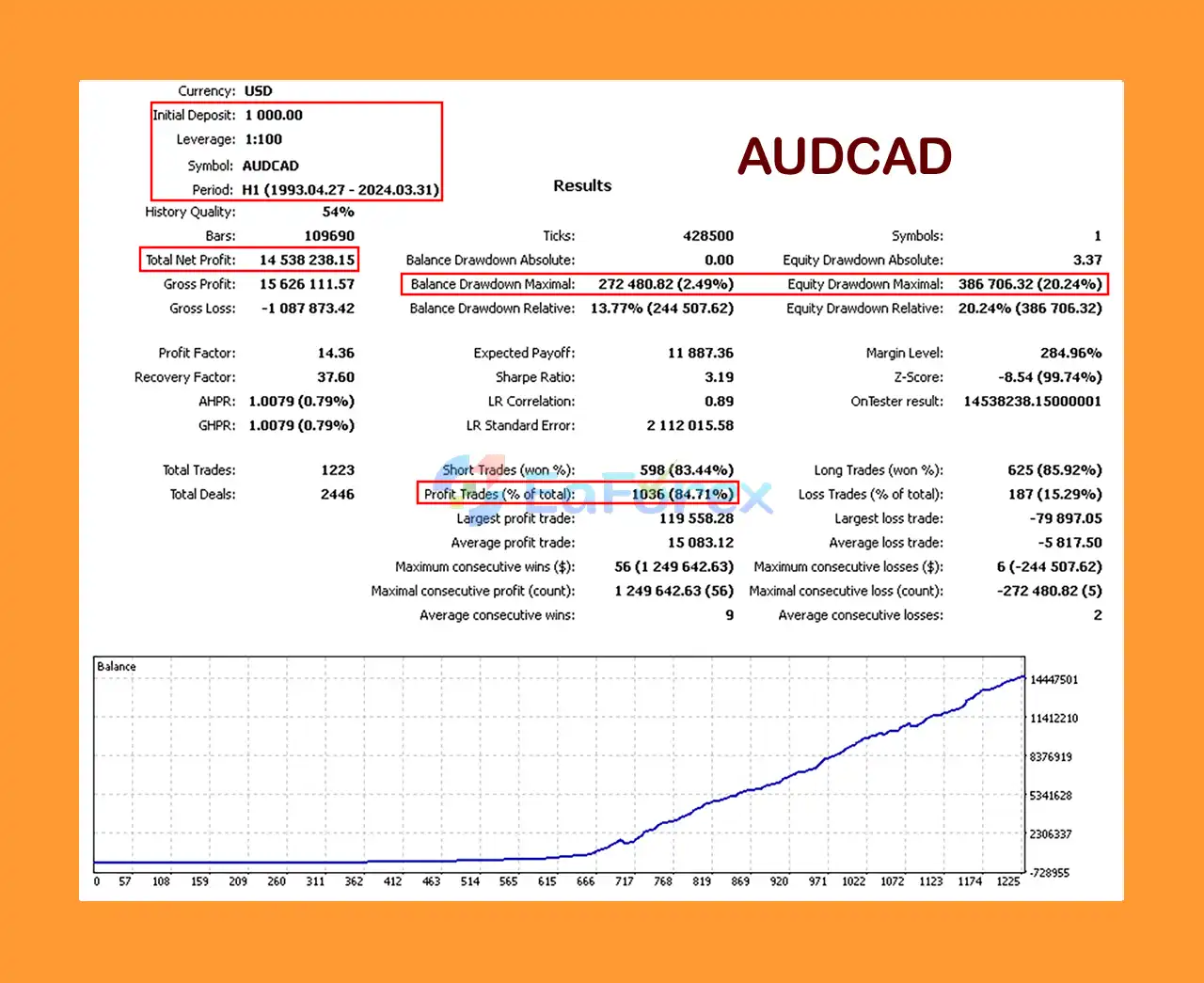
Silicon Ex MT5 Backtest Results with EURUSD
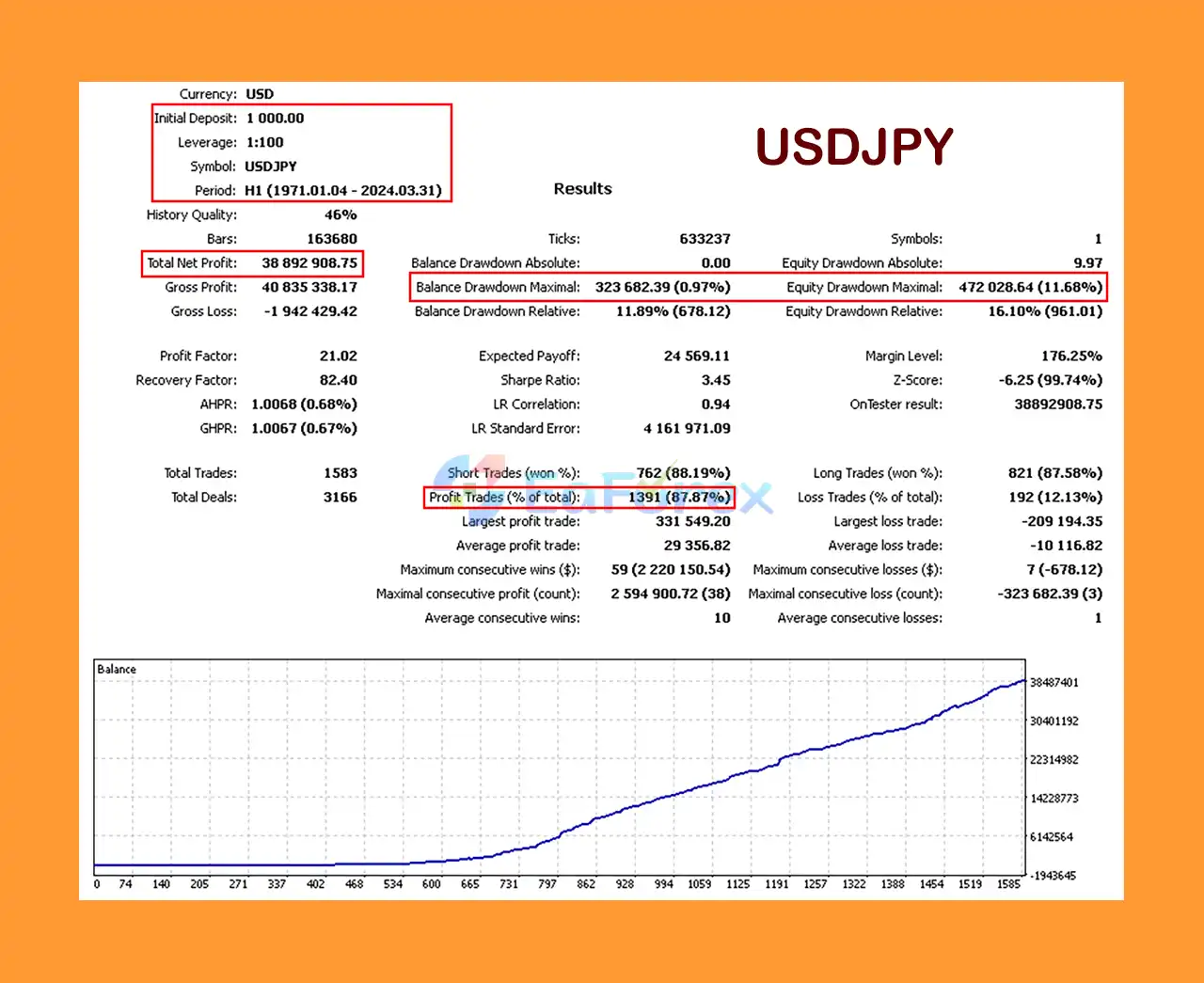
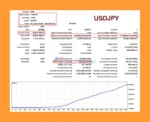
Silicon Ex MT5 Backtest Results with USDJPY
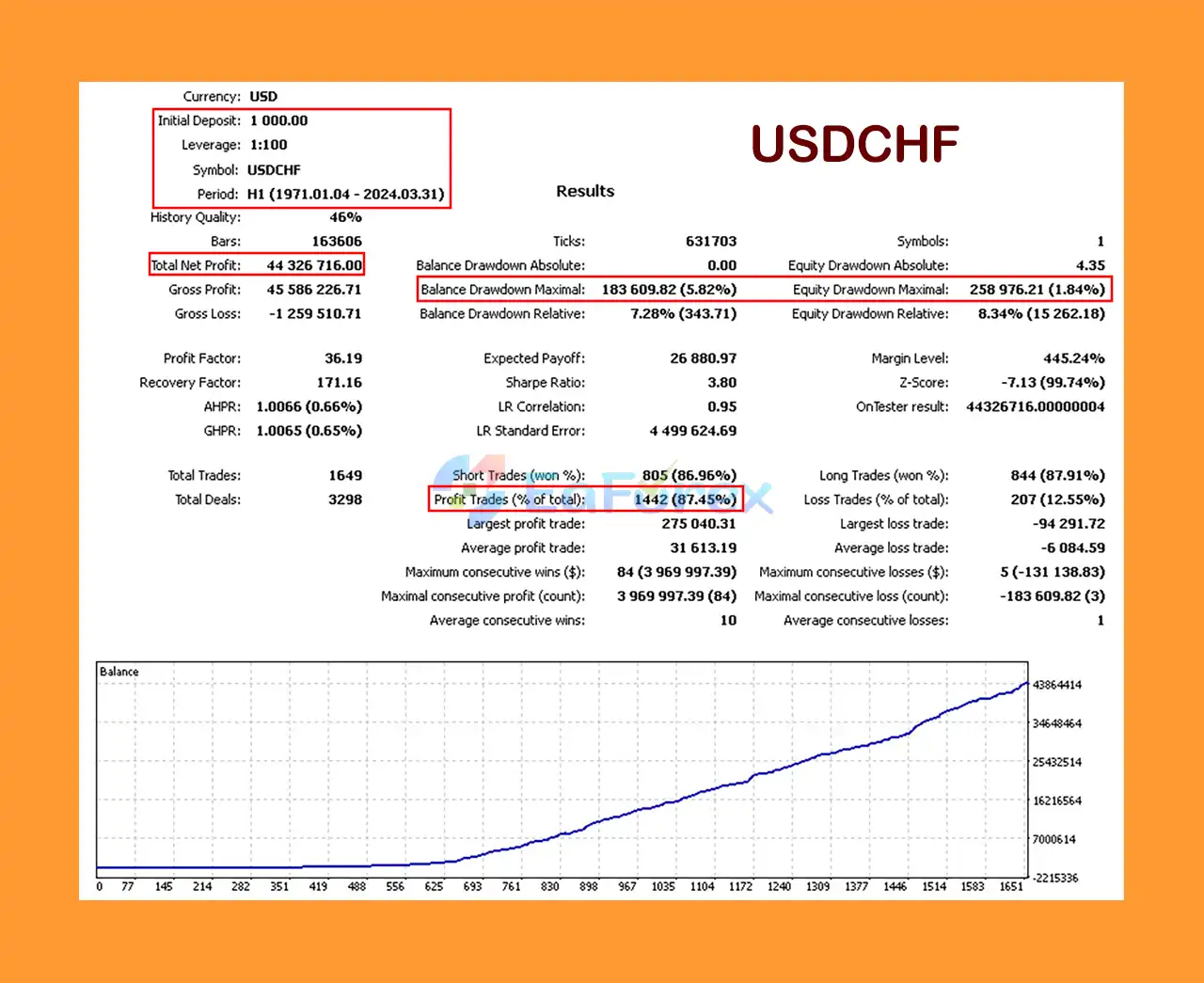
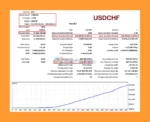
Silicon Ex MT5 Backtest Results with USDCHF
Silicon Ex MT5 includes several risk management and trade control features. However, the presence of these tools does not automatically make a trading strategy profitable or guarantee that losses will remain within a specific limit.
The EA provides two principal position-sizing approaches.
Fixed Lot Sizing
The SetVolume parameter defines the fixed trading volume in lots. This method offers straightforward position sizing, although the financial impact of a given lot size varies according to account equity, instrument specifications, and market movements.
Percentage-Based Money Management
The EnabledMM parameter activates or deactivates money management, while SetMM defines the configured percentage value from 1 to 100.
A setting of 1–100 should not automatically be interpreted as a safe percentage of account equity to risk on each trade. Traders should verify exactly how the EA calculates position size and risk before enabling this feature. If the setting represents a percentage-based risk allocation, high values could result in excessive exposure.
| Parameter | Function |
|---|---|
TP |
Sets the Take Profit level in points. |
SL |
Sets the Stop Loss level in points. |
TrailingOn |
Enables or disables trailing stop management. |
TrailingStart |
Defines when trailing stop management begins. |
TrailingStop |
Sets the trailing stop distance. |
ControlSpreadsOn |
Enables or disables spread control. |
SpreadRestrictions |
Defines the permitted spread threshold. |
MaximumOrders |
Sets the maximum number of buy or sell orders, as supported by the EA. |
MinimumDistance |
Sets the minimum distance to the market. |
AdjustValuesOnVolatility |
Enables volatility-based adjustments to price values. |
For a more disciplined approach to automated trading:
No automated trading system can eliminate market risk. Effective risk management requires appropriate configuration, ongoing monitoring, and an understanding of the strategy’s potential losses.
Although Silicon Ex MT5 offers multiple customization and risk management features, traders should understand its limitations before using it on a live account.
Automated trading algorithms can experience losing periods, and performance may change as market conditions evolve. Without verified backtesting and live trading statistics, the EA’s profitability cannot be established from its feature list alone.
The number of adjustable parameters provides flexibility but can make configuration more challenging for beginners. Incorrect settings may lead to unwanted trading behavior, unsuitable position sizing, or excessive exposure.
Percentage-based money management can be dangerous if the configured value is misunderstood or too aggressive. Traders should verify whether SetMM refers to risk per trade, a position-sizing factor, or another internal calculation before using it.
Unexpected economic announcements, sudden price movements, changing liquidity, and market gaps can affect execution and produce losses beyond what a trader might anticipate.
Spread controls may help avoid some unfavorable trading conditions, but they cannot eliminate slippage, execution delays, rejected orders, or sudden liquidity changes.
Settings such as SetFilling, EcnMode, SlidingPrices, and AsynchronousMode may depend on broker capabilities and the EA’s implementation. Incorrect configuration can cause execution problems or prevent certain orders from being processed as expected.
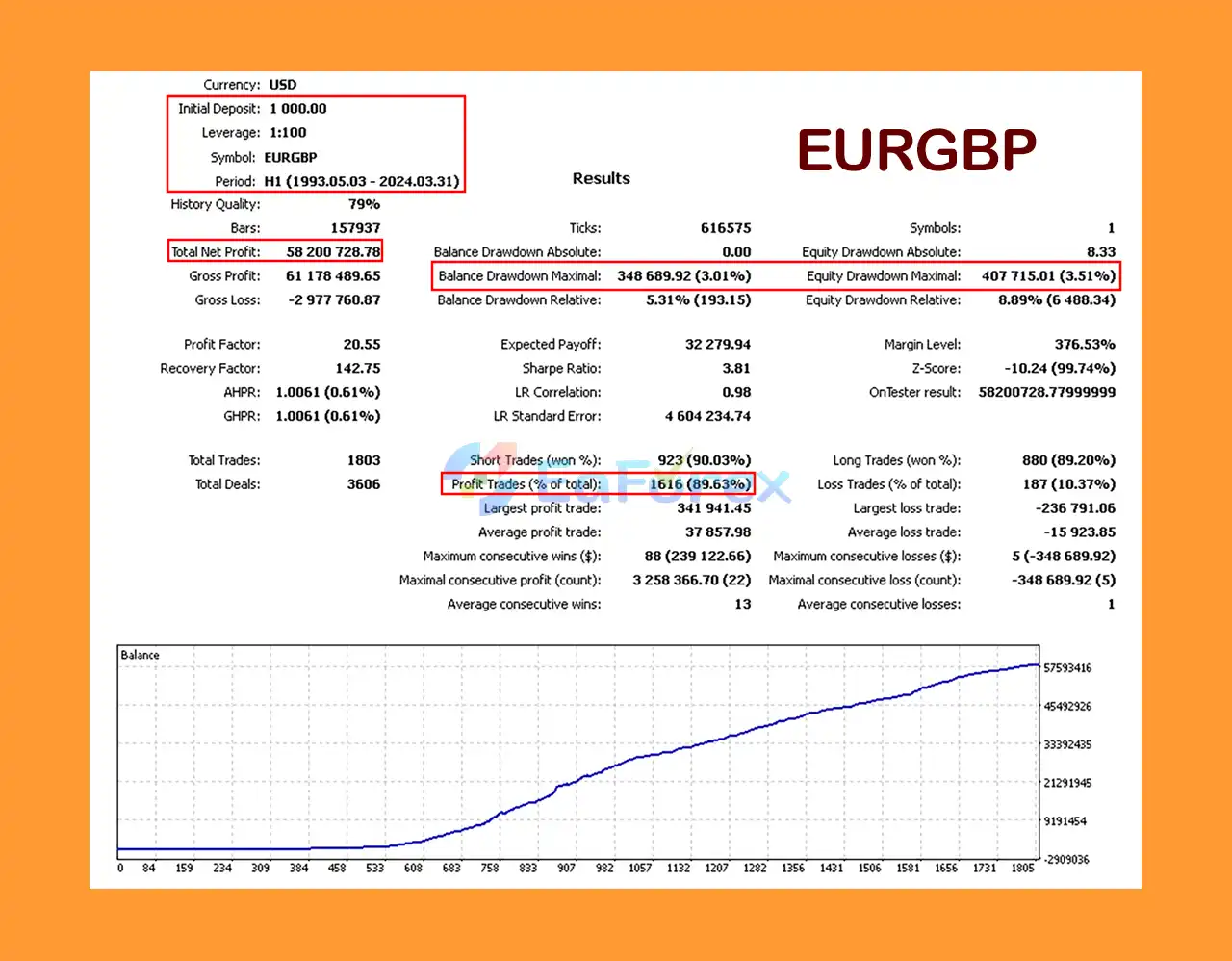
The supplied product information does not include verified backtesting statistics, live account results, maximum drawdown, win rate, or a detailed list of supported currency pairs. These details should be evaluated before making a purchasing or investment decision.
Risk warning: Forex trading involves a substantial risk of financial loss. Past performance, if available, does not guarantee future results. Only trade with money you can afford to lose.
Follow the steps below to install and configure Silicon Ex MT5 using the standard MetaTrader 5 Expert Advisor installation process.
Download MetaTrader 5 from your broker or the official MetaTrader provider and log in to your trading account.
In MetaTrader 5, navigate to:
File → Open Data Folder
Open the MQL5 directory, followed by the Experts folder.
Copy the Silicon Ex MT5 Expert Advisor files into the MQL5/Experts directory.
If the package includes additional files or installation instructions, follow the developer’s documentation.
Return to MetaTrader 5 and refresh the Navigator window or restart the platform.
Look for Silicon Ex under Navigator → Expert Advisors.
Open a chart for a currency pair supported by the EA. Since the supplied description does not specify the exact supported symbols or timeframe, verify these requirements with the developer before selecting your trading configuration.
Drag Silicon Ex onto the selected chart and review its input parameters.
Configure the relevant settings, including:
SetVolumeEnabledMMSetMMTP and SLAvoid changing multiple parameters simultaneously without testing their individual effects.
Enable Algo Trading in MetaTrader 5 and confirm that the Expert Advisor has the permissions required to operate.
Check the Experts and Journal tabs for initialization errors, rejected orders, or other execution issues.
Run a backtest using suitable historical data and realistic trading costs. Follow this with demo-account forward testing to evaluate order placement, position sizing, trailing stops, and spread filtering under changing market conditions.
A VPS may be useful if continuous operation is required, provided that the trading environment is configured correctly.
Silicon Ex MT5 is a customizable Forex trading Expert Advisor that combines trend analysis, price channel evaluation, volatility-related filters, money management, and automated position control within the MetaTrader 5 platform.
Its main strengths are its flexible configuration options and the availability of tools such as fixed lot sizing, percentage-based money management, Take Profit, Stop Loss, trailing stops, and spread restrictions. These features give traders several ways to configure the EA according to their trading preferences and risk tolerance.
However, flexibility should not be confused with guaranteed performance. The EA’s effectiveness depends on its underlying algorithm, the selected settings, market conditions, broker execution, and the trader’s risk management practices.
Before using Silicon Ex MT5 with real capital, verify its supported instruments and timeframe, understand the money management calculations, and evaluate its performance through realistic backtesting and demo trading.
Silicon Ex MT5 offers a flexible approach to automated Forex trading for traders who value configurable market analysis, systematic execution, and customizable trade management. As with any Expert Advisor, careful testing and responsible capital management remain essential.
1. What is Silicon Ex MT5 and how does it work?
Silicon Ex MT5 is a fully automated Forex trading bot built for the MetaTrader 5 platform. It combines real-time market analysis, automated buy/sell signals, and intelligent risk management to identify high-probability trade entries and manage positions efficiently. The EA is suitable for all experience levels and adapts to different market conditions and trading strategies.
2. What makes Silicon Ex MT5 different from other Expert Advisors?
Silicon Ex MT5 stands out for its:
Real-time price action and volume analysis
Dynamic trailing stop system
Customizable logic for tailored strategies
It also features multi-level protection with spread filters, drawdown controls, and universal broker compatibility, making it both safe and adaptable.
3. How profitable is Silicon Ex MT5 based on backtest results?
According to historical backtesting from 1971–2024:
EURUSD: $1,000 turned into $52.56 million, 89.72% win rate
USDJPY: $38.89 million net profit, 87.87% win rate
USDCHF: $44.32 million profit, 87.45% win rate
These results reflect long-term potential with very low drawdowns (as low as 0.97%).
4. Is Silicon Ex MT5 suitable for beginners?
Yes, it is beginner-friendly. Silicon Ex MT5 comes with:
Installation guide and setup documentation
No coding required
Pre-configured settings for easy deployment
Its automation and built-in safeguards make it ideal for users with limited trading experience.
5. What risk management features does Silicon Ex MT5 include?
Silicon Ex MT5 uses:
Fixed lot or percentage-based risk
Dynamic trailing stops
Custom SL/TP settings
Spread filters and drawdown controls
These features help protect capital and reduce exposure during high volatility or adverse market movements.
6. What’s included in the Silicon Ex MT5 download package?
The package includes:
The Silicon Ex EA for MT5
Installation Guide (.docx)
Setting file (.docx) for strategy configuration
Buyers can also join the VIP Membership for exclusive updates, community support, and performance insights.
In stock
In stock
In stock
In stock
In stock
Out of stock
No account yet?
Create an Account












 Automatic EA
 EA Best Seller
 Expert Advisor MT4
 Expert Advisor MT5
 HFT EA


Reviews
Clear filtersThere are no reviews yet.