Gold Neural Scalper Pro EA
Gold Neural Scalper Pro EA MT5 (Official version) | Unbounded Original price was: $999.00.Current price is: $599.00.
Back to products
ProTrade Breakout EA
ProTrade Breakout EA MT5 (Official version) | Unbounded Original price was: $999.00.Current price is: $599.00.

ProTrade AutoTrader EA MA MT5 (Official version) | Unbounded

ProTrade AutoTrader EA MA MT5 is an automated trading EA for all currency pairs, featuring active risk control to enable fast, accurate, and disciplined trading

Original price was: $999.00.Current price is: $599.00.

83 People watching this product now!
  • Unlimited Activations

You can use product with unlimited account


  • Instant delivery

Download link will be sent instantly after purchase


  • Easy to install

Pre-activated, ready to use immediately


  • Free Update
  • Free Install Support

Payment Methods:

Description

Product Overview

ProTrade AutoTrader EA MA MT5 is a professional automated Moving Average Expert Advisor for MetaTrader 5, designed to execute trades systematically using proprietary moving average analysis.

The EA combines automated trade execution with dynamic position sizing, loss-based risk reduction, real-time monitoring, visual signal confirmation, and customizable chart controls. It is designed for traders who want to automate their trading process while retaining control over risk parameters and the ability to manually pause or close EA-managed positions.

Unlike systems that disclose every detail of their entry algorithm, ProTrade AutoTrader EA MA MT5  keeps its proprietary signal-generation logic private. The product description confirms that its internal trading decisions are based on moving average analysis, while the exact methodology remains undisclosed to protect the underlying intellectual property.
One of the key features is its dynamic risk management system. Position size is calculated according to account equity and the selected risk percentage. After consecutive losses, the EA can automatically reduce the next position size, providing an additional layer of exposure control.

The EA is compatible with any symbol and timeframe supported by MetaTrader 5, allowing users to test different markets and trading configurations.
ProTrade AutoTrader EA MA MT5 is therefore best viewed as a systematic trading automation and risk-management tool, rather than a guaranteed-profit solution.

About the Developer

  • Author: Cain De Bruin
  • Experience: Over +1 years of experience on MQL5.
  • Notable Products: ProTrade AutoTrader EA MA MT5, ProTrade Breakout EA MT5 and other advisors.
  • Flagship Product: ProTrade AutoTrader EA MA MT5 is rated as the best performing product of the year.

>> Delivery time 24h-48h after payment.
>>> Refund if not delivered.
>>> You will receive the latest version without any limitations (ID+Time).

>>Reviewed by Jason Stap <<

Key Features of ProTrade AutoTrader EA MA MT5

Automated Moving Average Trading

  • The core of ProTrade AutoTrader EA MA is its automated trading engine based on proprietary Moving Average analysis.
  • The EA monitors the selected market and uses its internal MA-based logic to determine potential Buy and Sell opportunities.
  • Once a valid signal is generated, the system can automatically execute the trade according to the configured risk parameters.
  • The exact signal-generation methodology is intentionally not disclosed, meaning users can operate the system without access to its proprietary source logic.

Dynamic Position Sizing

ProTrade AutoTrader EA MA MT5 includes an equity-based position-sizing mechanism.

The lot size is calculated according to:

  • Current account equity
  • Maximum risk percentage
  • Broker lot requirements
  • Current trading conditions
  • Consecutive-loss adjustment

This approach allows position size to adapt as account equity changes instead of relying exclusively on a fixed lot size.

Loss-Based Risk Reduction

  • An important risk-management feature is the DecreaseFactor mechanism.
  • After consecutive losing trades, the EA can reduce position size according to its configured formula:
  • Lot Size = Lot Size − (Lot Size × Losses / DecreaseFactor)
  • The purpose of this mechanism is to reduce exposure after a losing streak rather than increasing lot size in an attempt to recover previous losses.
  • This makes the risk model fundamentally different from traditional martingale systems.

One-Click Start/Pause Control

  • The EA provides an on-chart Start/Pause button, allowing traders to enable or disable new trading activity without removing the Expert Advisor from the chart.
  • This can be useful when traders want to temporarily stop automated entries because of market conditions, scheduled events, or personal trading decisions.

Close All Function

  • A dedicated Close All control allows the user to close EA-managed positions directly from the chart.
  • This provides an additional manual intervention option during live trading.

Visual Signal Arrows

  • ProTrade AutoTrader EA MA MT5 includes optional Buy and Sell signal arrows.
  • When enabled, arrows can appear at the entry price to provide visual confirmation of where the EA initiated a trade.
  • The arrows are purely informational and do not affect the underlying execution logic.

Real-Time Trading Dashboard

The integrated dashboard provides important account and strategy information directly on the MT5 chart.

It can display:

  • Trading status
  • Account equity
  • Free margin
  • Today’s profit/loss
  • Today’s trade count
  • Current Moving Average period
  • Current risk settings

Color-coded indicators allow traders to quickly determine whether the EA is active or paused.

Customizable Moving Average Display

Users can customize the visual appearance of the Moving Average line, including:

  • MA color
  • MA width
  • MA style
  • Moving Average period
  • Moving Average shift

This makes it easier to visually monitor the indicator associated with the EA’s trading framework.

Professional Chart Customization

The EA also includes a broad range of chart customization options.

Users can configure:

  • Chart background
  • Chart foreground
  • Chart grid
  • Bullish candle appearance
  • Bearish candle appearance
  • Volume display
  • Stop-level indicators
  • Moving Average appearance

Additional display settings allow traders to control ticker information, OHLC data, price lines, period separators, trade levels, trade history, and volume display.

How Does ProTrade AutoTrader EA MA MT5 Work?

ProTrade AutoTrader EA MA MT5 follows a relatively straightforward automated workflow, although its exact proprietary signal logic remains undisclosed.

Step 1: Attach the EA to MetaTrader 5

  • The user attaches ProTrade AutoTrader EA MA to a selected MT5 chart.
  • The dashboard, controls, and optional visual indicators are then displayed automatically.

Step 2: Configure the Risk Parameters

  • The trader sets the desired MaximumRisk percentage.
  • This determines the level of account equity that the position-sizing system uses when calculating the initial lot size.
  • The trader can also configure the DecreaseFactor, which controls how aggressively position size is reduced following consecutive losses.

Step 3: Apply the Moving Average Configuration

The EA uses the configured Moving Average parameters, including:

  • MovingPeriod
  • MovingShift

These parameters form part of the EA’s internal MA-based trading framework.

The precise signal conditions remain proprietary.

Step 4: Generate Trading Signals

  • The EA continuously analyzes the selected market according to its internal Moving Average logic.
  • When the system determines that its trading conditions are satisfied, it can generate a Buy or Sell signal.
  • If enabled, the corresponding signal arrow is displayed on the chart.

Step 5: Calculate Position Size

  • Before execution, the EA calculates the appropriate position size according to current account equity and the selected maximum risk.
  • If the account has experienced consecutive losses, the loss-reduction mechanism can further reduce the calculated lot size.
  • The final position size also respects the broker’s minimum, maximum, and lot-step requirements.

Step 6: Execute the Trade

  • The EA automatically places the trade according to its internal signal logic and risk configuration.
  • The trade is associated with the EA’s identifier, allowing the system to distinguish its own positions from trades managed by other strategies.

Step 7: Monitor the Position and Account

The dashboard continuously provides information about the account and EA status.

Traders can monitor:

  • Equity
  • Free margin
  • Daily P/L
  • Trade count
  • Trading status
  • Risk settings

Step 8: Manual Intervention When Required

  • If the trader wants to temporarily stop new entries, the Start/Pause button can be used.
  • If immediate intervention is necessary, the Close All button provides a direct way to exit EA-managed positions.

Why Choose ProTrade AutoTrader EA MA MT5?

Automated Moving Average Strategy

For traders who prefer technical strategies based on Moving Average analysis, ProTrade AutoTrader EA MA provides an automated way to execute the underlying methodology without manually watching the market continuously.

Risk-Based Position Sizing

  • The dynamic position-sizing system can adjust exposure based on current account equity and the selected risk percentage.
  • This provides greater flexibility than simply using a fixed lot size for every trade.

Reduced Exposure After Losing Streaks

  • The loss-based reduction mechanism is particularly relevant for risk-conscious traders.
  • Rather than increasing position size after losses, the EA can decrease exposure as consecutive losses accumulate.
  • This can help prevent a losing streak from automatically producing increasingly large positions.

Transparent About Proprietary Logic

  • The EA does not claim to reveal every component of its signal generation system.
  • The product description clearly identifies Moving Average analysis as the foundation while keeping the exact proprietary methodology private.
  • This allows the developer to protect its intellectual property while still providing users with information about the general strategy framework.

Flexible Market Compatibility

  • ProTrade AutoTrader EA MA MT5 can operate on any symbol and timeframe supported by MetaTrader 5.
  • This gives traders the opportunity to test the EA on Forex, Gold, indices, and other supported instruments.
  • However, each market should be evaluated independently because volatility, spread, liquidity, and contract specifications can vary considerably.

Strong User Control

  • The Start/Pause and Close All buttons give users direct control over the EA without requiring them to remove the Expert Advisor from the chart.
  • This is useful for traders who want automation without completely surrendering manual control.

Professional Monitoring Interface

  • The real-time dashboard makes important account and strategy information visible directly on the trading chart.
  • Combined with optional signal arrows, this can make the EA easier to monitor during live operation.

ProTrade AutoTrader EA MA MT5 Backtest Results

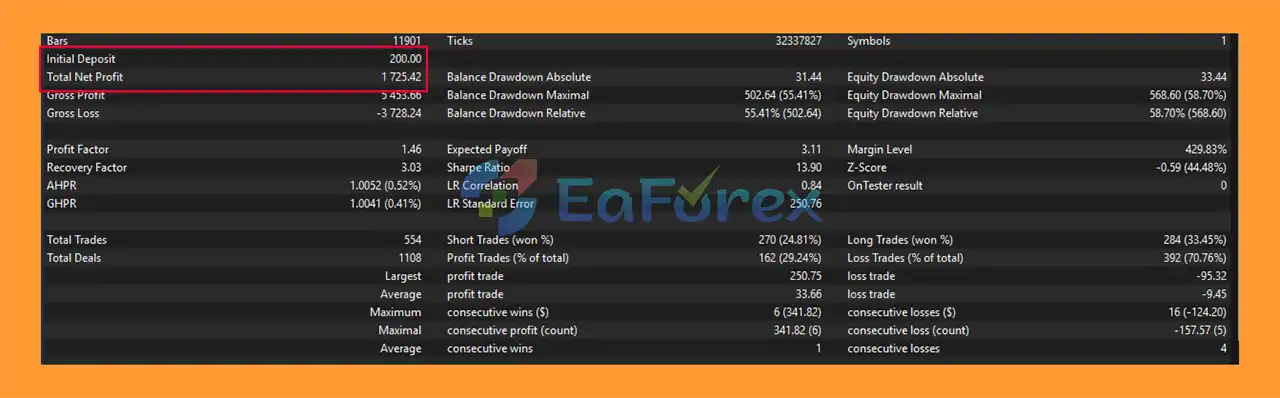
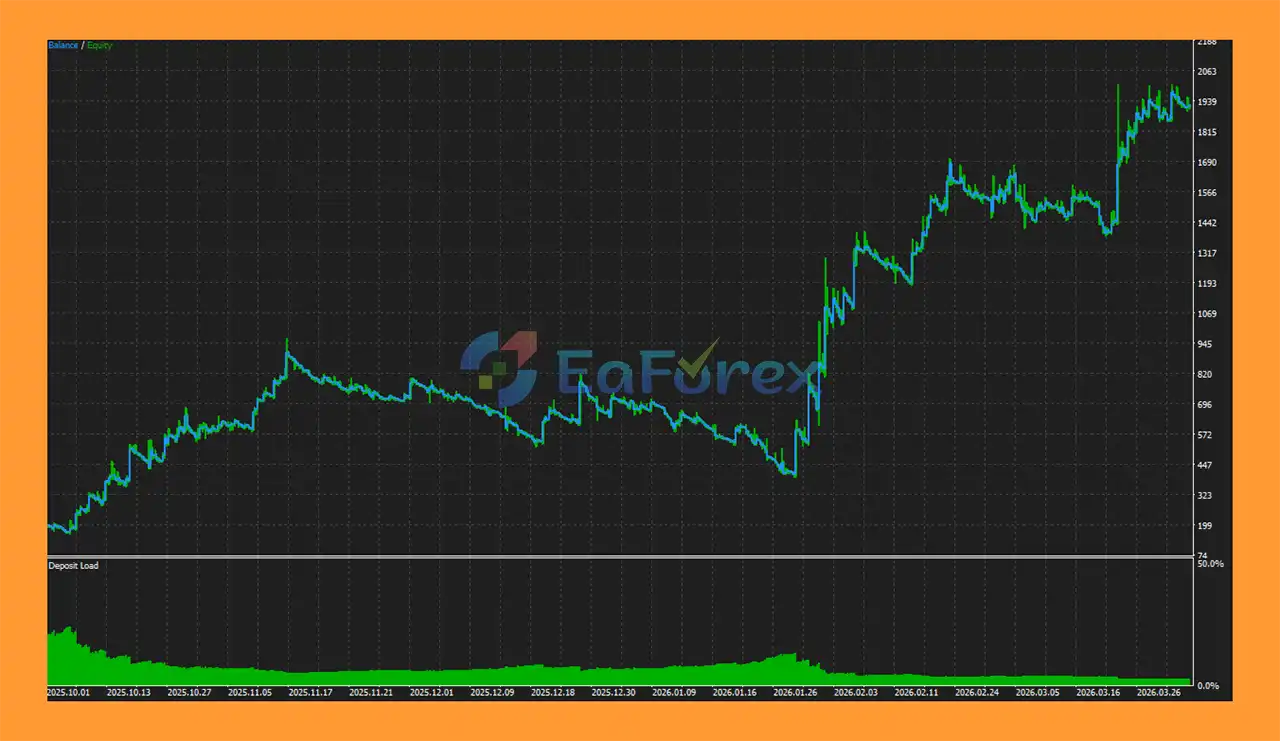
🔺XAUUSD (Gold) pair – over many years

  • Initial Deposit: $200
  • Total Net Profit: $1.725,42
ProTrade AutoTrader EA MA MT5 backtets

ProTrade AutoTrader EA MA MT5 backtets

ProTrade AutoTrader EA MA backtets

ProTrade AutoTrader EA MA backtets

Performance and Risk Management

  • ProTrade AutoTrader EA MA MT5 is primarily positioned as an automated execution and risk-management tool. The supplied product information does not provide specific backtest statistics such as net profit, win rate, profit factor, or maximum drawdown.
  • Therefore, it would not be appropriate to make specific profitability claims based solely on the available specifications.

Maximum Risk Setting

  • The MaximumRisk parameter determines the maximum percentage of account equity used for calculating the position size.
  • A lower risk percentage generally results in smaller exposure, while increasing the percentage can significantly increase potential gains and losses.
  • Traders should therefore select this parameter according to their account size and personal risk tolerance.

Consecutive-Loss Reduction

  • The DecreaseFactor provides additional risk control following losing trades.
  • Instead of increasing exposure after losses, the system reduces the calculated position size based on the number of consecutive losses.
  • This is a more conservative concept than martingale-style recovery systems.

Broker Lot Constraints

The EA automatically respects:

  • Minimum lot size
  • Maximum lot size
  • Lot-step requirements

This helps ensure that calculated position sizes remain compatible with the broker’s trading specifications.

Account Equity-Based Calculation

  • Because position sizing uses current equity, exposure can change as the account grows or declines.
  • This allows the EA to scale its position size dynamically rather than maintaining a static lot size throughout the entire trading period.

Important Performance Consideration

  • Risk management does not guarantee profitability.
  • The EA’s actual performance depends on the quality of its proprietary trading signals, market conditions, execution quality, spread, slippage, commissions, leverage, and selected parameters.
  • Since no specific verified performance data is provided in the supplied information, traders should conduct their own MT5 Strategy Tester analysis and forward testing before using real capital.

Weaknesses and Risk Warnings

Proprietary Signal Logic Is Not Fully Disclosed

  • The exact Moving Average signal-generation methodology is intentionally kept private.
  • While this protects the developer’s intellectual property, it also means traders have limited visibility into the precise conditions that trigger Buy and Sell decisions.
  • Users should therefore rely on backtesting, forward testing, and observed trading behavior rather than assuming how the internal algorithm works.

Moving Average Strategies Can Lag

  • Moving Averages are generally trend-following tools and can react more slowly to sudden market reversals.
  • During strongly trending markets, this may be beneficial, but in sideways or rapidly reversing conditions, signals can become less effective.

No Guaranteed Profit

  • ProTrade AutoTrader EA MA MT5 does not guarantee profitable trading results.
  • Past performance, if demonstrated through testing, does not guarantee future performance.

Market Conditions Can Change

  • An automated strategy that performs well under one market regime may behave differently when volatility, liquidity, or trend structure changes.
  • This is particularly important when applying the EA across multiple instruments or timeframes.

Risk Reduction Does Not Prevent Losses

  • The consecutive-loss reduction mechanism can decrease exposure, but it cannot prevent losing trades.
  • A prolonged losing period can still reduce account equity.

Trading Costs Matter

Real trading results can be affected by:

  • Spread
  • Commission
  • Slippage
  • Execution speed
  • Liquidity
  • Broker conditions

These costs can cause live results to differ from historical testing.

Multi-Asset Compatibility Requires Testing

  • Although the EA can operate on any MT5-supported symbol and timeframe, this does not mean that one configuration is optimal across all markets.
  • Gold, Forex pairs, and indices have different volatility and contract specifications, so traders should test each combination separately.

Automated Trading Requires Stable MT5 Operation

  • The EA needs MetaTrader 5 to remain active and connected to the broker for continuous automated operation.
  • Technical interruptions, internet failures, platform shutdowns, or broker-side issues can interfere with execution.

Manual Controls Require Responsible Use

  • The Start/Pause and Close All buttons provide useful control, but manual intervention during volatile conditions can result in execution at prices different from those expected.

Pros and Cons

Pros Cons
Automated Moving Average-based trading Exact signal logic is proprietary
Designed for MetaTrader 5 Not compatible with MT4
Dynamic equity-based position sizing Higher risk settings can increase losses
Consecutive-loss position reduction Does not eliminate losing streaks
No martingale-style loss recovery described Strategy performance can vary by market regime
Broker lot constraints are respected Requires testing for each symbol/timeframe
One-click Start/Pause control Manual intervention can affect results
Close All function Execution price may differ during volatile markets
Optional Buy/Sell signal arrows Visual arrows do not improve strategy performance
Real-time dashboard Requires MT5 to remain operational
Free-margin and equity monitoring Dashboard information does not guarantee trade quality
Customizable Moving Average display Moving Average signals can lag sudden reversals
Extensive chart customization Visual customization has no direct effect on profitability
Supports multiple symbols and timeframes No specific verified performance statistics supplied
Straightforward risk configuration User remains responsible for risk selection

What’s Included in the Download Package?

  • Setting (If Any).docx
  • Installation Guide.docx

>>> Join VIP Membership Now <<<

Final Thoughts

ProTrade AutoTrader EA MA MT5 is a systematic Expert Advisor designed around proprietary Moving Average analysis, with a strong emphasis on automated execution, dynamic position sizing, and user control.

Its most notable risk-management feature is the ability to reduce position size after consecutive losses, creating a more conservative approach than recovery systems that increase exposure following losing trades. The EA also provides useful operational features such as a real-time dashboard, optional signal arrows, customizable chart settings, Start/Pause controls, and a Close All function.

The main limitation is that the exact proprietary trading logic is not disclosed, so traders cannot independently inspect every condition responsible for signal generation. In addition, the supplied information does not include specific verified performance figures, making independent backtesting and forward testing especially important.

For traders interested in automated Moving Average trading on MetaTrader 5, ProTrade AutoTrader EA MA can be considered a flexible framework for systematic execution. However, users should start with conservative risk settings, test the EA on their chosen symbol and timeframe, and evaluate realistic trading costs before deploying significant live capital.

Overall, ProTrade AutoTrader EA MA MT5 focuses on automation with controlled exposure rather than promising guaranteed returns—making disciplined testing and sensible risk management essential to its successful use.

FAQs

FAQs

1. What is ProTrade AutoTrader EA MA MT5?

ProTrade AutoTrader EA MA MT5 is a professional automated trading system for MetaTrader 5 that trades any symbol using proprietary moving average logic, combining full automation with professional risk management and real-time monitoring.

2. How does ProTrade AutoTrader EA MA MT5 work?

The EA automatically executes trades based on its internal moving average analysis, adjusts position sizes according to account equity and risk, and manages trades dynamically while providing visual signal confirmations on the chart.

3. Can ProTrade AutoTrader EA MA MT5 trade multiple instruments?

Yes, it is compatible with all symbols and timeframes available in MetaTrader 5, making it versatile for trading Forex, commodities, indices, or cryptocurrencies.

4. Is ProTrade AutoTrader EA MA MT5 fully automated?

Yes, it fully automates trade execution, position sizing, and risk management while giving traders optional visual signals and real-time dashboard monitoring for transparency.

5. What risk management features does ProTrade AutoTrader EA MA MT5 include?

The EA offers dynamic position sizing, loss-based trade reduction, real-time exposure monitoring, and adherence to broker lot size limits to protect capital and control drawdowns.

6. Does ProTrade AutoTrader EA MA MT5 provide visual trade signals?

Yes, the EA can display optional buy and sell arrows directly on the chart, allowing traders to visually confirm trades without affecting automated execution.

7. Can I control ProTrade AutoTrader EA MA MT5 manually?

Yes, the EA features one-click start/pause controls and a “Close All” function, allowing traders to instantly enable/disable trading or exit all positions when needed.

8. What are the backtest results of ProTrade AutoTrader EA MA MT5?

Backtests on XAUUSD show that an initial deposit of $200 grew to $1,725.42 over multiple years, demonstrating consistent automated performance using moving average-based logic.

9. Is ProTrade AutoTrader EA MA MT5 beginner-friendly?

Yes, while it is fully automated, its real-time dashboard, visual trade confirmations, and simple control buttons make it easy for both beginners and professional traders to monitor and manage trades.

10. Why choose ProTrade AutoTrader EA MA MT5?

It offers fully automated yet transparent trading, robust risk management, multi-instrument flexibility, customizable chart interface, and professional-grade automation—ideal for disciplined traders seeking efficiency and consistency.

Specification

Technical Details

Trading platform

MetaTrader 5 (MT5)

Time frames

M15

Currency pairs

Any

Product type

Official version

Customer Reviews

0 reviews
0
0
0
0
0

There are no reviews yet.

Be the first to review “ProTrade AutoTrader EA MA MT5 (Official version) | Unbounded”

Your email address will not be published. Required fields are marked *

1 2 3 4 5
1 2 3 4 5
1 2 3 4 5