Product Overview
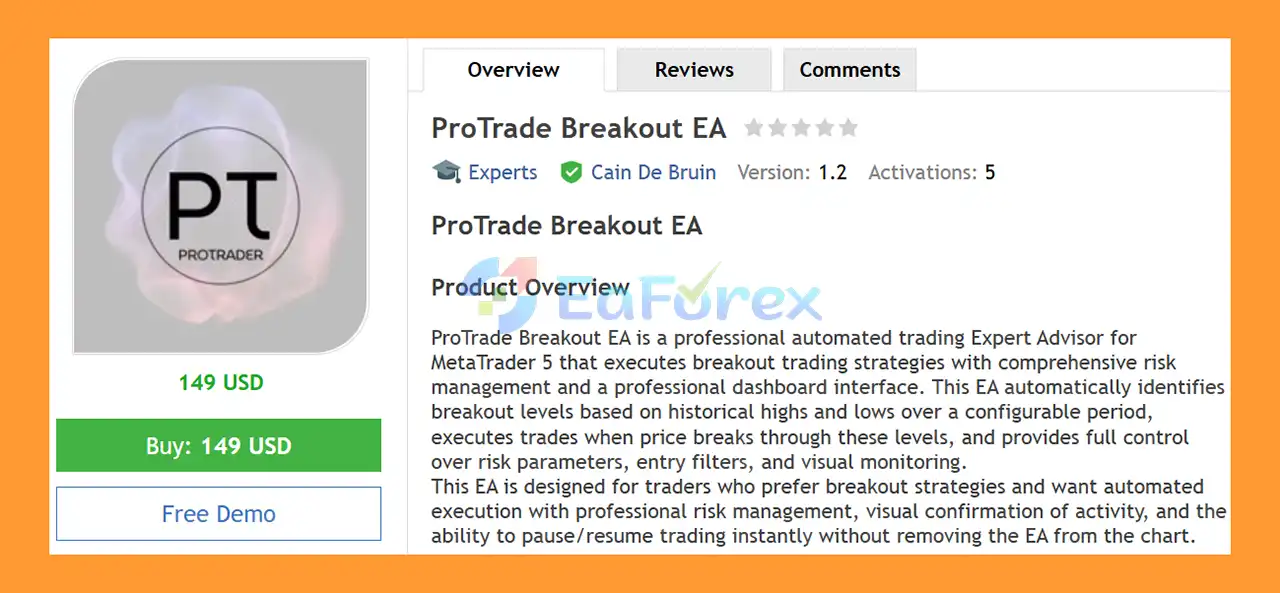
ProTrade Breakout EA MT5 is an automated breakout Expert Advisor for MetaTrader 5 designed to identify key price levels and execute trades when the market breaks through established support or resistance areas.
The EA determines breakout levels by analyzing the highest highs and lowest lows over a configurable number of historical bars. When price moves beyond the identified resistance or support level, ProTrade Breakout EA can automatically open a Buy or Sell position according to the configured strategy and risk parameters.
Unlike a simple breakout system that only focuses on entries, ProTrade Breakout EA combines automated execution with dynamic position sizing, Stop Loss, Take Profit, breakeven, trailing stop, spread filtering, session controls, daily trade limits, and account-level safety mechanisms.
A professional on-chart dashboard also provides real-time information about trading status, daily performance, trade count, consecutive losses, account equity, and selected strategy parameters.
The EA supports any symbol and timeframe available in MetaTrader 5, giving traders flexibility to test different markets and configurations.
Importantly, ProTrade Breakout EA MT5 is a trading automation tool rather than a guaranteed-profit system. Its actual performance will depend on market conditions, broker execution, trading costs, risk settings, and the parameters selected by the user.
About the Developer
- Author: Cain De Bruin
- Experience: Over +1 years of experience on MQL5.
- Notable Products: ProTrade Breakout EA MT5, ProTrade AutoTrader EA MA MT5 and other advisors.
- Flagship Product: ProTrade Breakout EA MT5 is rated as the best performing product of the year.
>> Delivery time 24h-48h after payment.
>>> Refund if not delivered.
>>> You will receive the latest version without any limitations (ID+Time).
>>Reviewed by Jason Stap <<
Key Features of ProTrade Breakout EA MT5
Breakout Trading Strategy
The core strategy of ProTrade Breakout EA MT5 is based on identifying historical price extremes.
The EA analyzes a configurable BreakoutPeriod to determine the highest high and lowest low within the selected historical range.
A potential:
- Buy trade is generated when price breaks above the identified resistance level.
- Sell trade is generated when price breaks below the identified support level.
This approach allows the EA to systematically participate in potential momentum moves without requiring the trader to manually monitor the chart.
Because the breakout period is configurable, traders can test different settings according to the market and timeframe being traded.
Intelligent Position Sizing
ProTrade Breakout EA MT5 includes a dynamic position-sizing system based on:
- Account balance
- Risk percentage
- Stop Loss distance
- Broker lot-size requirements
- Maximum permitted lot size
- Available margin
The EA automatically calculates the appropriate lot size according to the user’s selected risk percentage.
It also respects broker-specific requirements such as minimum lot size, maximum lot size, and lot-step increments.
This can help create more consistent risk exposure when trading symbols with different contract specifications.
Automatic Stop Loss and Take Profit
Each new trade can be opened with predefined Stop Loss and Take Profit distances.
The user can configure:
StopLossPipsTakeProfitPips
This provides a clear framework for managing potential losses and profit targets from the moment a position is opened.
However, actual execution prices can differ from expected levels because of spread, slippage, liquidity, and market conditions.
Auto Breakeven
The built-in Breakeven feature can automatically move the Stop Loss toward the entry price after the trade reaches a specified profit level.
Users can configure:
- Breakeven activation distance
- Breakeven offset
The offset allows the Stop Loss to be positioned slightly beyond the original entry price when appropriate.
Trailing Stop
- ProTrade Breakout EA MT5 also supports an automatic Trailing Stop.
- Once the trade reaches the configured trailing activation threshold, the EA can continuously adjust the Stop Loss as the market moves in the trade’s favor.
- This allows profitable positions to remain open while attempting to protect part of the unrealized gain.
Spread Filter
- Breakout strategies can be particularly sensitive to transaction costs during volatile periods.
- The MaxSpreadPips setting allows traders to define the maximum acceptable spread for new entries.
- When the current spread exceeds the configured threshold, the EA can prevent new trades from being opened.
Trading Session Filters
The EA allows users to select specific trading sessions:
This provides greater control over when the breakout strategy is active.
Traders can therefore focus the EA on periods that they believe provide better liquidity or breakout opportunities.
Daily Trade Limit
- The MaxTradesPerDay parameter limits the number of new trades that the EA can open during a trading day.
- This can help prevent excessive trading when the market generates multiple breakout signals.
Daily Loss Protection
- ProTrade Breakout EA MT5 includes a configurable maximum daily loss protection mechanism.
- When the daily loss exceeds the selected percentage, the EA can automatically pause further trading.
- This provides an additional account-level risk control beyond individual trade Stop Loss settings.
Consecutive Loss Protection
- The EA can also monitor losing trades consecutively.
- If the configured maximum number of consecutive losses is reached, the system can temporarily suspend new trading.
- This can be useful during periods when the breakout strategy is repeatedly failing because of ranging or choppy market conditions.
Minimum Account Balance Protection
- The MinAccountBalance setting allows traders to define a minimum account balance required for the EA to continue trading.
- If the account balance falls below this threshold, automated trading can be disabled.
Magic Number Filtering
- Every EA-managed trade can be identified using a unique Magic Number.
- This helps ProTrade Breakout EA distinguish its own positions from trades opened manually or by other Expert Advisors.
- It is particularly useful for traders running multiple automated strategies on the same MetaTrader 5 account.
Real-Time Dashboard
The integrated dashboard provides a convenient overview directly on the chart.
Depending on configuration, it can display:
- Trading status
- Today’s profit/loss
- Today’s trade count
- Consecutive loss count
- Account equity
- Strategy parameters
- Other relevant EA information
Color-coded status indicators make it easier to determine whether the EA is currently active or paused.
One-Click Trading Controls
- ProTrade Breakout EA includes interactive chart controls.
- The Start/Pause button allows traders to enable or disable the trading logic without removing the EA from the chart.
- A Close All button can also be used to close EA-managed positions when immediate manual intervention is required.
- These controls provide an additional layer of flexibility during live operation.
Chart Customization
The EA includes a comprehensive chart customization suite.
Users can configure the appearance of:
- Chart background
- Foreground
- Grid
- Bullish candles
- Bearish candles
- Volume
- Stop levels
- Breakout lines
Additional options allow traders to show or hide:
- Ticker
- OHLC information
- Grid
- Bid price line
- Ask price line
- Last price line
- Period separators
- Trade levels
- Trade history
- Tick volumes
- Real volumes
The AutoApplyChartSettings option can automatically apply the selected visual configuration when the EA initializes.
How Does ProTrade Breakout EA MT5 Work?
ProTrade Breakout EA MT5 follows a straightforward automated breakout workflow.
Step 1: Identify Historical Support and Resistance
- The EA analyzes the number of historical bars specified by the BreakoutPeriod parameter.
- From this data, it identifies relevant high and low price levels.
- These levels become the reference points for potential breakout trades.
Step 2: Monitor Price Movement
- Once the breakout levels are established, the EA continuously monitors the market.
- If price moves beyond the defined resistance level, a potential Buy setup can be generated.
- If price breaks below the support level, a potential Sell setup can be considered.
Step 3: Check Entry Conditions
Before executing the trade, ProTrade Breakout EA MT5 can check the configured entry restrictions.
These include:
- Maximum spread
- Trading session
- Daily trade limit
- Account balance requirements
- Other active safety controls
If the required conditions are not satisfied, the EA can reject or delay the entry.
Step 4: Calculate Position Size
- If the trade is permitted, the EA calculates the position size using the selected RiskPercent and Stop Loss distance.
- The calculated lot size is then adjusted according to broker limitations and the configured maximum lot size.
Step 5: Execute the Trade
- The EA automatically places the Buy or Sell order with the configured Stop Loss and Take Profit.
- The trade is assigned the specified Magic Number, allowing the EA to identify and manage its own positions.
Step 6: Manage the Open Position
After execution, the EA can manage the position using:
- Breakeven
- Trailing Stop
- Take Profit
- Stop Loss
If the market moves favorably, the EA can progressively adjust the Stop Loss according to the selected trailing parameters.
Step 7: Monitor Account-Level Risk
The system continues monitoring the account for:
- Daily loss
- Consecutive losses
- Minimum balance
- Maximum daily trades
If a safety threshold is reached, ProTrade Breakout EA MT5 can pause new trading.
This creates a layered structure in which entry logic, trade management, and account protection work together.
Why Choose ProTrade Breakout EA MT5?
Simple and Transparent Breakout Concept
- The core strategy is easy to understand: identify historical highs and lows and trade when price breaks through them.
- This makes the EA suitable for traders who specifically want automated breakout execution rather than a complicated multi-strategy system.
Automated Risk-Based Lot Sizing
- The dynamic position-sizing system can calculate lot size according to the user’s selected account risk.
- This is particularly useful when Stop Loss distances vary between different market conditions.
Multiple Layers of Risk Protection
ProTrade Breakout EA MT5 provides several independent safety mechanisms, including:
- Stop Loss
- Take Profit
- Breakeven
- Trailing Stop
- Daily loss limit
- Consecutive loss protection
- Minimum balance protection
- Maximum trades per day
- Spread filtering
This provides considerably more control than a basic breakout EA with only Buy and Sell execution.
Flexible Market and Timeframe Support
- The EA can operate on any symbol and timeframe supported by MetaTrader 5.
- This allows traders to test it across Forex pairs, Gold, indices, and other available CFD markets, subject to their broker’s specifications.
Session-Based Trading
- The London, New York, and Tokyo session controls allow traders to decide when the breakout strategy should be active.
- This can be useful because breakout behavior and liquidity can vary substantially between trading sessions.
Professional Monitoring Dashboard
- The on-chart dashboard provides important information without requiring the trader to open the EA’s settings repeatedly.
- This makes monitoring easier, particularly during live automated trading.
Manual Control Without Removing the EA
- The Start/Pause functionality is a practical feature for traders who want to temporarily stop new entries while keeping the EA attached to the chart.
- The Close All function also provides a direct way to exit EA-managed positions when necessary.
No Profit Guarantee
- One of the more important aspects of the product description is its clear positioning as an automated trading and risk-management tool, rather than a guaranteed-profit solution.
- This distinction is important because breakout systems can perform very differently across trending and ranging markets.
ProTrade Breakout EA MT5 Backtest Results
🔺XAUUSD (Gold) pair – over many years
- Initial Deposit: $200
- Total Net Profit: $342,60
- Win Rate (% of total): 44.12%
- Maximum Drawdown: 23.94%
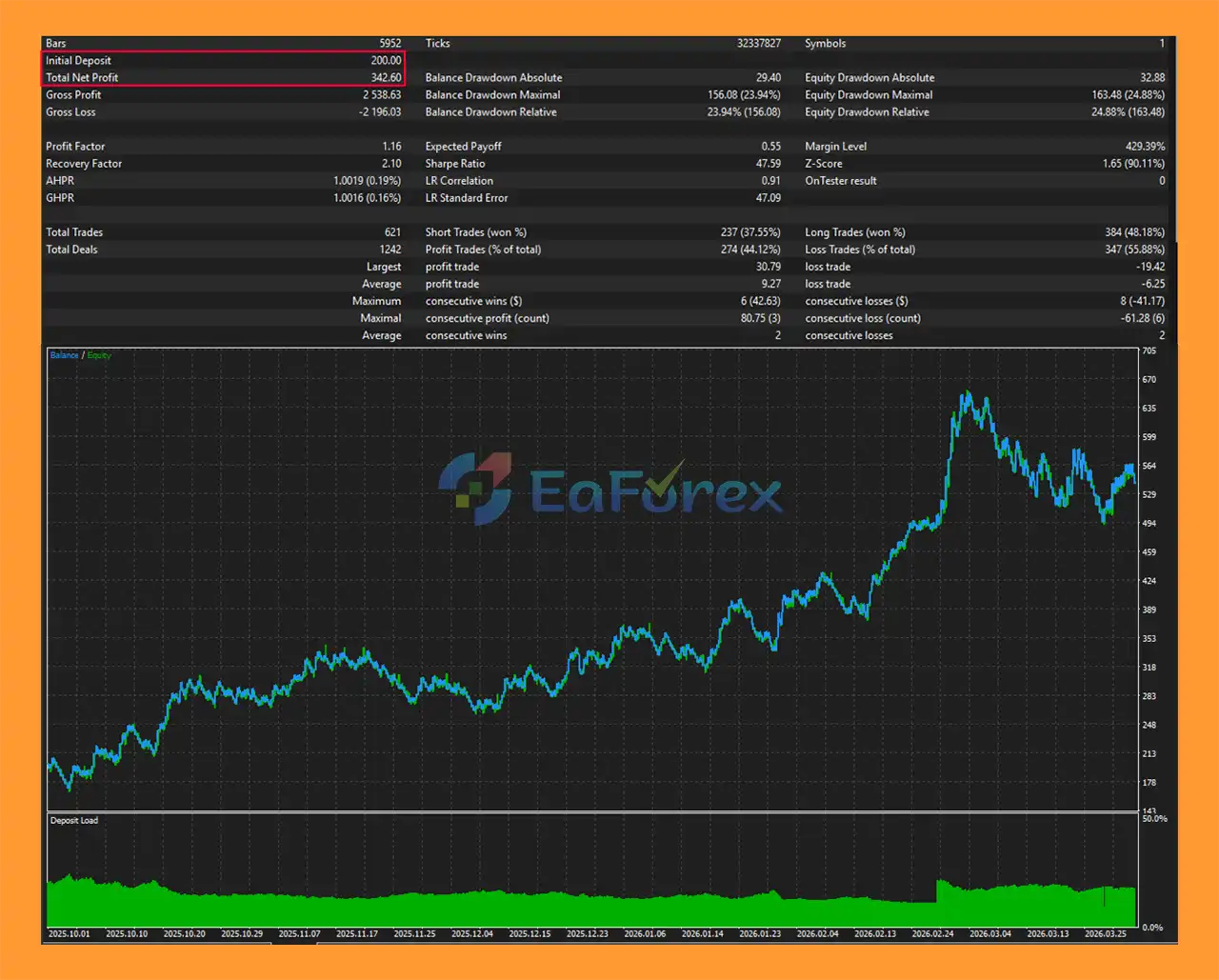
ProTrade Breakout EA MT5 backtets
Performance and Risk Management
- ProTrade Breakout EA MT5 does not provide a fixed profitability claim in the supplied specifications. Instead, its primary focus is on systematic breakout execution and configurable risk management.
- Because the EA can be used on different symbols and timeframes, performance will depend heavily on the selected market, breakout period, Stop Loss, Take Profit, trading sessions, spread, and risk percentage.
Position Risk Management
- The
RiskPercent parameter allows users to determine how much of their account balance they intend to risk on each trade.
- For example, selecting a lower risk percentage generally results in smaller position sizes, while a higher percentage increases potential exposure.
- The EA also applies a maximum lot-size restriction to prevent the calculated position from exceeding the user’s configured limit.
Daily Risk Protection
- The Maximum Daily Loss feature can stop new trading when the account reaches the specified daily loss threshold.
- This is particularly valuable because several failed breakout attempts can occur during a ranging market.
Consecutive Loss Protection
- The consecutive-loss system provides another defensive mechanism.
- If the EA reaches the configured losing-streak limit, it can pause trading rather than continuously attempting new breakouts.
Spread Protection
- Since breakout entries can occur during fast market movements, spread conditions can change quickly.
- The spread filter helps prevent the EA from opening new positions when trading costs exceed the user’s predefined limit.
Session Control
- Restricting the EA to selected market sessions can help traders avoid periods of low liquidity or focus on times when they expect stronger market activity.
Important Performance Consideration
- No combination of filters and risk controls can guarantee profitability.
- A breakout strategy can perform well during sustained trends but may experience repeated false breakouts in sideways, low-volatility, or choppy markets.
- For this reason, traders should evaluate ProTrade Breakout EA using historical backtests and forward testing before committing significant capital.
Weaknesses and Risk Warnings
Breakout Strategies Can Generate False Signals
- The biggest weakness of a breakout strategy is the possibility of false breakouts.
- Price may temporarily move above resistance or below support and then quickly reverse.
- This can result in multiple consecutive losing trades, particularly in ranging markets.
Market Conditions Can Change
- A breakout configuration that performs well during a strong trend may perform poorly during a period of consolidation.
- Therefore, traders should avoid assuming that historical results will remain consistent under all market conditions.
Slippage Can Affect Breakout Entries
- Breakout trades often occur when price is moving quickly.
- During major news releases or periods of reduced liquidity, actual execution can differ from the expected breakout price.
- This can result in higher slippage or wider spreads.
Spread Is an Important Factor
- Although the EA includes a spread filter, the spread can change rapidly.
- A trade that appears acceptable from a historical backtest may experience different transaction costs in live trading.
Risk Percentage Requires Careful Configuration
- The EA can automatically calculate position size, but the user remains responsible for choosing an appropriate risk percentage.
- A technically accurate position-sizing calculation does not make an aggressive risk setting safe.
Multi-Market Compatibility Does Not Mean Universal Optimization
- The ability to operate on many symbols and timeframes provides flexibility, but it does not mean that one configuration will perform equally well everywhere.
- For example, a breakout period and Stop Loss suitable for one Forex pair may not be appropriate for Gold or an index.
- Each market should be tested independently.
Automated Trading Requires a Stable Environment
- Because the EA executes trades automatically, MetaTrader 5 must remain connected to the broker.
- A VPS can be useful for traders who require continuous operation, although the supplied specifications do not state that a VPS is mandatory.
Minimum Balance Is Not a Guarantee
- The product information mentions approximately $500 with a fixed 0.01 lot and around $2,000 for adaptive risk management as recommended balances.
- These figures should be treated as guidelines rather than guarantees of safe operation.
- The appropriate account size depends on the selected symbol, contract specifications, leverage, risk percentage, Stop Loss distance, and broker requirements.
Pros and Cons
| Pros |
Cons |
| Automated breakout trading strategy |
False breakouts can generate losses |
| Works with MetaTrader 5 |
Not compatible with MetaTrader 4 |
| Supports multiple symbols and timeframes |
Settings may require optimization for each market |
| Dynamic risk-based position sizing |
Aggressive risk percentages can increase losses |
| Automatic Stop Loss and Take Profit |
Slippage can affect actual execution |
| Auto breakeven |
Break-even can sometimes close trades before a larger move |
| Trailing Stop |
Trailing may reduce profit during temporary pullbacks |
| Spread filter |
Spreads can change rapidly during volatile periods |
| London, New York and Tokyo session filters |
Restricting sessions can also exclude valid trades |
| Daily trade limit |
May reduce participation during strong breakout periods |
| Daily loss protection |
Does not eliminate market risk |
| Consecutive loss protection |
Losing streaks can still occur before protection activates |
| Minimum balance protection |
Requires correct configuration |
| Magic Number filtering |
Mainly useful when running multiple strategies |
| Real-time dashboard |
Requires MT5 to remain operational for automation |
| One-click Start/Pause control |
Manual intervention remains the user’s responsibility |
| Close All function |
Does not guarantee immediate execution at the desired price |
| Extensive chart customization |
Visual features do not improve trading performance by themselves |
| OOS/backtesting support |
Backtest performance may differ from live results |
What’s Included in the Download Package?
- Setting (If Any).docx
- Installation Guide.docx
>>> Join VIP Membership Now <<<
Final Thoughts
In summary, ProTrade Breakout EA MT5 is a flexible automated breakout Expert Advisor designed to identify historical support and resistance levels and execute trades when price breaks through them. Its combination of dynamic risk-based position sizing, Stop Loss, Take Profit, breakeven, trailing stop, spread filtering, session controls, and account-level protection provides a structured framework for automated breakout trading across multiple markets and timeframes.
The supplied XAUUSD backtest reports $342.60 in net profit from a $200 initial deposit over many years. However, this is historical backtest data and should not be interpreted as a guarantee of future profitability. Breakout strategies can be particularly vulnerable to false breakouts, ranging markets, spread expansion, and slippage during fast-moving conditions. Actual results may also vary depending on the broker, execution environment, trading costs, leverage, and selected risk parameters.
Overall, ProTrade Breakout EA MT5 may appeal to traders who prefer a straightforward breakout methodology combined with comprehensive risk-management and monitoring tools. Nevertheless, its flexible multi-market capability does not mean that one set of parameters will be suitable for every symbol. Traders should conduct realistic backtests, out-of-sample testing, and demo forward testing while using conservative risk settings before considering live deployment.










 Unlimited Activations
 Instant delivery
 Easy to install







 Free Update
 Free Install Support














 Automatic EA
 EA Best Seller
 Expert Advisor MT4
 Expert Advisor MT5
 HFT EA


Reviews
Clear filtersThere are no reviews yet.