









-
 Unlimited Activations
-
 Instant delivery
-
 Easy to install







 Unlimited Activations
Instant delivery
Easy to install
Unlimited Activations
Instant delivery
Easy to install
 Free Update
 Free Install Support

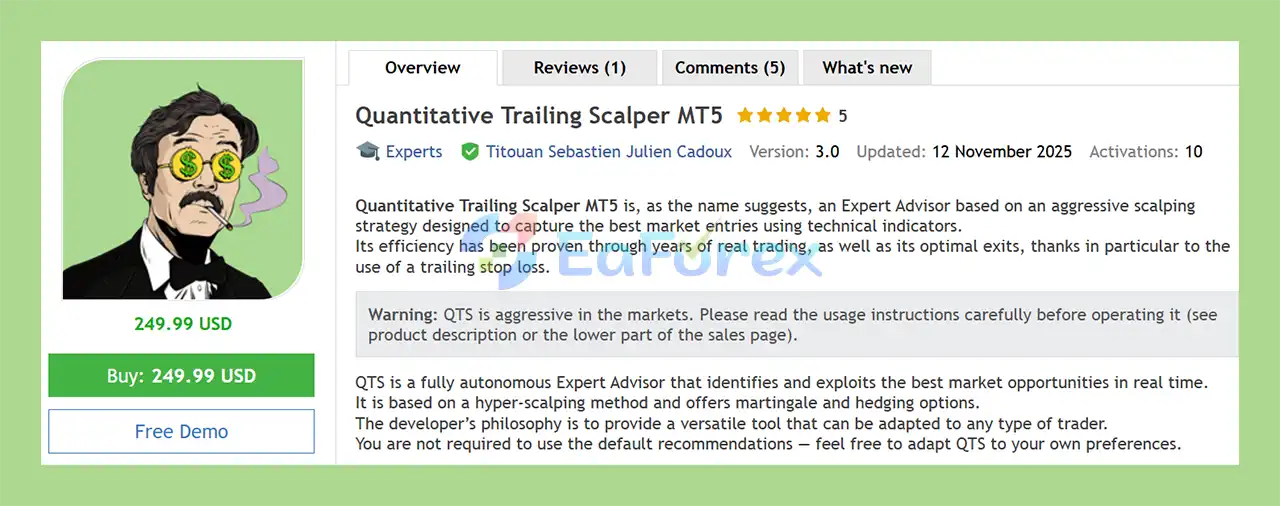
Quantitative Trailing Scalper MT5 (QTS) is a fully automated Expert Advisor for MetaTrader 5 designed around an aggressive hyper-scalping approach. The system uses technical indicators to identify potential market entry opportunities and automatically manages positions according to its programmed trading logic.
As its name suggests, one of the key components of QTS is its trailing stop-loss mechanism, which is designed to dynamically manage open positions and optimize exits as the market moves.
The EA operates autonomously, continuously monitoring market conditions in real time and searching for potential trading opportunities. According to the developer’s description, Quantitative Trailing Scalper MT5 has been developed and used over years of real trading, with particular emphasis on entry selection and automated exit management.
QTS is also designed as a flexible trading tool. It provides Martingale and Hedging options, allowing users to configure the system according to their preferred trading approach and risk parameters.
Because the EA follows an aggressive scalping methodology, appropriate risk management is especially important. The developer recommends that first-time users begin with a small lot size or risk less than 0.1% of capital.
>> Delivery time 24h-48h after payment.
>>> Refund if not delivered.
>>> You will receive the latest version without any limitations (ID+Time).>>Reviewed by Jason Stap <<
Quantitative Trailing Scalper MT5 is built around a hyper-scalping methodology focused on identifying short-term trading opportunities.
The EA continuously analyzes market conditions and attempts to identify potentially favorable entry points using technical indicators.
QTS is a fully autonomous Expert Advisor. Once configured and activated, it can monitor the market, identify trading opportunities, open positions, and manage trades without requiring manual intervention for each transaction.
The system uses technical indicators as part of its decision-making process to evaluate potential market entries.
Its objective is to identify trading conditions that satisfy its internal entry criteria rather than relying on discretionary manual analysis.
A central feature of QTS is its trailing stop-loss functionality.
Instead of keeping a static stop level throughout the entire trade, trailing-stop logic can adjust the protective level as the position develops. This is intended to help manage open positions and potentially protect part of an unrealized gain when the market moves favorably.
Quantitative Trailing Scalper MT5 includes a Martingale option.
This gives users additional configuration flexibility, but it also introduces significantly greater exposure risk when position sizes increase following losing trades. Users should understand the potential consequences before activating this feature.
The EA also supports Hedging, allowing positions to be managed through a hedging-based configuration where supported by the trading account and broker.
Hedging can change the exposure profile of an automated strategy and should therefore be evaluated carefully before being used on a live account.
The developer emphasizes that users are not required to follow the default settings.
QTS can be adapted according to individual preferences, trading objectives, account size, and risk tolerance. However, changing the default parameters can also materially change the EA’s behavior and results.
Quantitative Trailing Scalper MT5 follows an automated process designed to identify and manage short-term trading opportunities.
The EA continuously monitors the selected trading environment and analyzes incoming market data.
QTS uses technical indicators to evaluate potential market conditions and identify possible entry opportunities.
The system’s hyper-scalping approach focuses on short-term market movements rather than attempting to hold positions for extended periods.
When the required technical conditions are detected, the EA can automatically generate a trading entry.
This eliminates the need for the trader to manually monitor every potential setup.
After a position has been opened, the EA manages the trade according to its configured parameters.
The trailing stop-loss mechanism plays an important role in this stage by dynamically adjusting the protective level as the trade develops.
The system can automatically close positions when its exit conditions or protective mechanisms are triggered.
The use of trailing stops is intended to provide a dynamic approach to exit management rather than relying exclusively on a fixed stop-loss level.
Depending on the user’s configuration, additional Martingale or Hedging functionality can be incorporated into the trading process.
These options should be treated as advanced risk configurations rather than mandatory components of the EA.
Quantitative Trailing Scalper MT5 is designed for traders who are interested in automated short-term trading and prefer a system that can continuously monitor the market without manual intervention.
The EA can monitor the market and execute trades automatically, making it suitable for users who want to automate a short-term trading methodology.
The integrated trailing stop-loss system provides a dynamic approach to managing open positions and is one of the defining features of QTS.
Users can adapt the EA’s settings rather than being restricted to the developer’s default configuration.
This flexibility allows traders to experiment with different risk and trading profiles.
QTS provides optional Martingale and Hedging functionality for users who specifically require these approaches.
However, these features should be enabled only after understanding their effect on account exposure and drawdown.
The EA is designed to analyze market opportunities continuously and respond automatically when its trading conditions are satisfied.
🔺XAUUSD (Gold) pair.
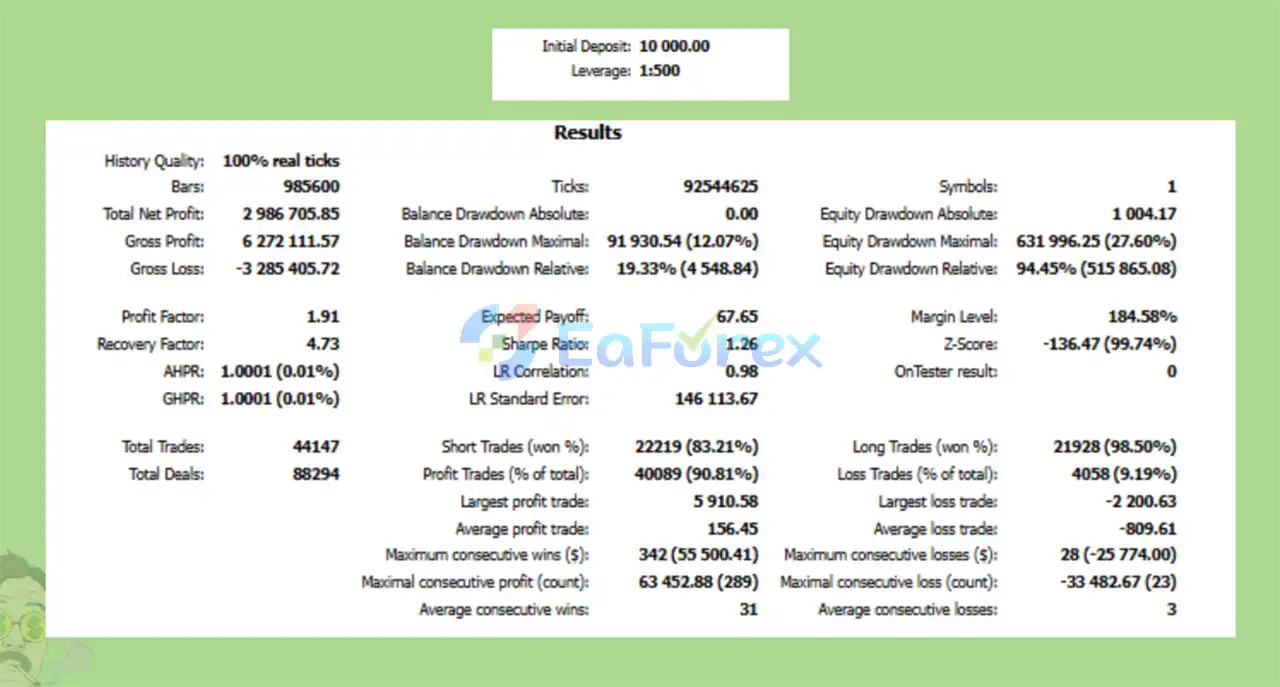
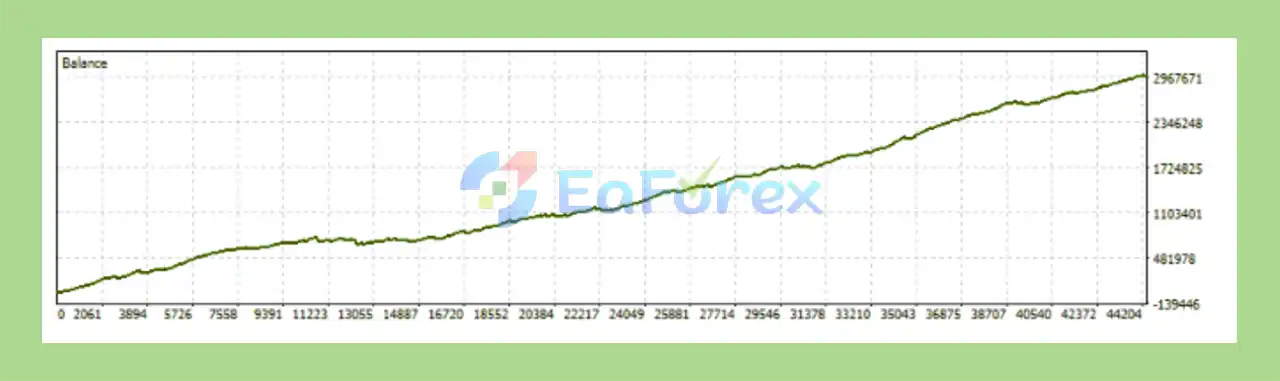
Quantitative Trailing Scalper MT5 Backtest
Quantitative Trailing Scalper EA MT5 Backtests
The developer states that Quantitative Trailing Scalper MT5 has been used in real trading over a number of years. The supplied backtesting information also provides specific conditions under which the historical tests were conducted.
According to the provided information:
These conditions are important when interpreting any historical backtest results.
A backtest using 1:500 leverage and $10,000 starting capital may produce substantially different results from a live account using different leverage, spreads, commissions, execution speeds, or account balances.
For users testing QTS for the first time, the developer recommends starting with a small lot size or less than 0.1% of capital.
This recommendation is particularly relevant because the EA is designed for aggressive scalping and also provides optional Martingale and Hedging functionality.
Before moving from testing to live trading, users should evaluate:
Scalping systems can be especially sensitive to execution conditions. Even relatively small differences in spread and slippage can influence the outcome of frequent trades.
Because QTS follows a hyper-scalping approach, trading costs and execution quality can have a significant effect on results.
Spread, commission, slippage, latency, and broker execution may cause live performance to differ from historical testing.
The optional Martingale function requires particular caution.
Increasing position size after losing trades can accelerate account exposure and may result in substantially larger drawdowns during extended losing sequences.
Users should understand the maximum potential exposure before enabling this feature.
Although hedging can alter the way positions are managed, it does not remove market risk. Depending on the broker and account structure, hedged positions can still generate losses, financing costs, commissions, and margin requirements.
The supplied backtests use 1:500 leverage. High leverage can amplify both gains and losses and may not be appropriate for every trader or account.
Historical backtest results cannot guarantee future performance. Market structure, volatility, liquidity, spreads, and execution conditions can change over time.
The EA is designed to be customizable, but changing its parameters can produce behavior that differs significantly from the developer’s default configuration or published testing.
Installing Quantitative Trailing Scalper MT5 follows the standard MetaTrader 5 Expert Advisor installation process.
Download the QTS files and any recommended .set configuration files from the authorized source.
Launch MT5 and select:
File → Open Data Folder
Navigate to:
MQL5 → Experts
Copy the Quantitative Trailing Scalper MT5 EA files into this folder.
Restart MT5 or refresh the Expert Advisors section in the Navigator panel.
Open the symbol and timeframe recommended by the EA’s configuration or the supplied .set file.
Drag Quantitative Trailing Scalper MT5 onto the chart and review the available parameters.
Set the lot size and risk parameters according to your account size and risk tolerance.
For first-time users, the developer recommends starting with a small lot size or less than 0.1% of capital.
.set FileIf recommended .set files are provided, they can be loaded through the EA’s input settings.
Always verify the parameters after loading a preset because account conditions and broker specifications may differ.
Make sure Algo Trading is enabled in MetaTrader 5.
Run the EA on a demo account or through controlled forward testing before committing significant real capital.
>>> Join VIP Membership Now <<<
Quantitative Trailing Scalper MT5 is an automated Expert Advisor designed for traders interested in an aggressive hyper-scalping strategy with technical-indicator-based market analysis and dynamic trailing-stop management.
Its main characteristics include fully automated operation, real-time opportunity detection, trailing stop-loss functionality, flexible configuration, and optional Martingale and Hedging features.
The EA’s flexibility allows users to adapt its parameters to different trading preferences. However, that flexibility also means that changing the default configuration can significantly affect trading behavior and risk.
The supplied backtests were conducted using real ticks, 1:500 leverage, $10,000 starting capital, and a test period beginning January 1, 2023. These conditions should be considered when comparing historical results with a live trading environment.
For new users, the developer recommends starting with a small lot size or less than 0.1% of capital. This is particularly important for an aggressive scalping system where frequent trades, execution costs, and optional position-management methods can materially affect account exposure.
Overall, Quantitative Trailing Scalper MT5 is positioned as a configurable automated scalping tool rather than a fixed one-size-fits-all system. Proper forward testing, conservative risk settings, and careful evaluation of broker execution conditions remain essential before using it with real funds.
Disclaimer: Quantitative Trailing Scalper MT5 is an automated trading tool, not financial or investment advice. Backtesting and historical trading results do not guarantee future performance. Trading Forex and other financial markets involves substantial risk, and users are responsible for their own settings, risk management, and trading decisions.
1. What is Quantitative Trailing Scalper MT5 and how does it work?
Quantitative Trailing Scalper MT5 is a fully automated scalping Expert Advisor for MetaTrader 5 that uses quantitative technical analysis and advanced trailing stop logic to capture fast, high-probability market movements with precision and efficiency.
2. Is Quantitative Trailing Scalper MT5 suitable for aggressive scalping?
Yes. Quantitative Trailing Scalper MT5 is specifically designed for aggressive hyper-scalping, targeting short-term market inefficiencies and frequent trading opportunities in fast-moving conditions.
3. Which markets and symbols does Quantitative Trailing Scalper MT5 trade?
Quantitative Trailing Scalper MT5 is commonly used on XAUUSD (Gold) and other volatile instruments where scalping and trailing stop strategies perform best.
4. Does Quantitative Trailing Scalper MT5 use martingale or hedging?
The EA includes optional martingale and hedging features. These are disabled by default and can be enabled or adjusted based on the trader’s risk tolerance and strategy preferences.
5. How does the trailing stop system work in Quantitative Trailing Scalper MT5?
The advanced trailing stop system dynamically adjusts exit levels as price moves in favor of the trade, helping lock in profits and optimize trade exits during rapid market fluctuations.
6. Is Quantitative Trailing Scalper MT5 fully automated?
Yes. The EA is 100% automated and handles market analysis, trade entry, position management, and exits without requiring any manual intervention after setup.
7. Can traders customize risk and trading behavior?
Absolutely. Quantitative Trailing Scalper MT5 offers highly customizable settings, including lot size, risk level, trailing stop behavior, and optional strategy features, making it adaptable to both conservative and aggressive traders.
8. Has Quantitative Trailing Scalper MT5 been backtested?
Yes. The EA has been backtested using real-tick data, providing realistic performance modeling with high win rates and controlled drawdown under professional testing conditions.
9. Who should use Quantitative Trailing Scalper MT5?
Quantitative Trailing Scalper MT5 is ideal for traders who want hands-free automated scalping, strong exit optimization, and flexible risk control—especially those trading volatile markets like gold.
In stock
In stock
In stock
In stock
In stock
Out of stock
No account yet?
Create an Account












 Automatic EA
 EA Best Seller
 Expert Advisor MT4
 Expert Advisor MT5
 HFT EA


Reviews
Clear filtersThere are no reviews yet.