
Product Overview
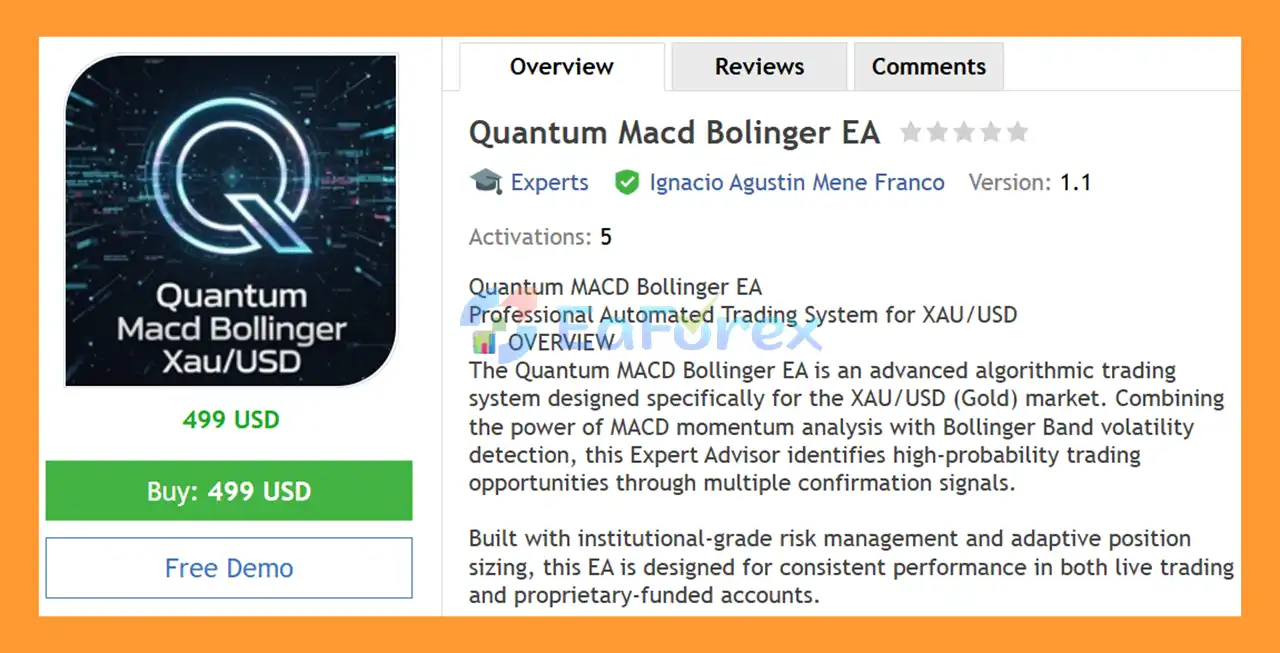
Quantum Macd Bolinger EA MT5 is an advanced automated trading system developed specifically for XAU/USD (Gold) on the M5 timeframe. The Expert Advisor combines MACD momentum analysis with Bollinger Bands volatility detection to identify potential intraday trading opportunities through multiple confirmation signals.
The EA uses a multi-signal trading framework that analyzes momentum, trend direction, volatility, breakouts, reversals, and market conditions before entering a trade. By combining MACD and Bollinger Bands signals, Quantum Macd Bolinger EA MT5 is designed to filter weaker setups and focus on configurations where several technical conditions align.
The system also includes automated position sizing, Stop Loss, breakeven, trailing stop, spread filtering, trading-hour controls, margin protection, and exposure limits. These features make it suitable for traders who want a structured and fully automated approach to XAU/USD intraday trading.
Quantum MACD Bollinger EA MT5 supports Standard, RAW Spread, ECN, and prop firm-funded accounts, with parameters that can be customized according to the trader's strategy and risk tolerance.
Technical Specifications
- Platform: MetaTrader 5
- Trading Instrument: XAU/USD (Gold)
- Recommended Timeframe: M5
- Minimum Capital: $1,000
- Recommended Balance: $2,000+
- Recommended Broker: IC Markets or other low-spread ECN brokers
- Trading Style: Scalping / Intraday Momentum Trading
- Initial Lot Size: 0.20–0.30 lots for a $1,000 balance
- Risk-Based Position Sizing: Supported
- Trading Mode: Fully Automated
- Account Types: Standard, RAW Spread, ECN, and Prop Firm Accounts
About the Developer
- Author: Ignacio Agustin Mene Franco
- Experience: Over +2 years of experience on MQL5.
- Notable Products: Quantum Macd Bolinger EA, Hunter Scalperr EA, Ichimoku Scalper Gold EA MT4, Level Hard Xauusd, Danesha Xauusd, Power Fusion Xauusd, Level Slow Xauusd EA MT4 and other advisors.
- Flagship Product: Quantum Macd Bolinger EA MT5 is rated as the best performing product of the year.
>> Delivery time 24h-48h after payment.
>>> Refund if not delivered.
>>> You will receive the latest version without any limitations (ID+Time).>>Reviewed by Jason Stap <<
Main Features of Quantum Macd Bolinger EA MT5
MACD Momentum Analysis
Quantum Macd Bolinger EA MT5 uses the MACD indicator with the following default configuration:
- Fast EMA: 12
- Slow EMA: 26
- Signal Line: 9
The EA can analyze several MACD conditions, including:
- MACD signal-line crossovers
- MACD zero-line crossovers
- Bullish and bearish momentum changes
- Momentum divergence
- Potential trend reversal conditions
These signals help the EA evaluate changes in market momentum before considering an entry.
Bollinger Bands Volatility Analysis
The system combines MACD with Bollinger Bands, using:
- Period: 20
- Standard Deviation: 2.0
The EA can identify several Bollinger Band configurations, including:
- Bollinger Band bounces
- Middle-band breakouts
- Volatility squeeze patterns
- Potential overbought and oversold reversals
- Trend continuation conditions
Multi-Signal Confirmation
One of the main features of Quantum Macd Bolinger EA MT5 is its multi-confirmation approach.
The system supports more than six different signal recognition methods and can combine MACD and Bollinger Bands conditions to create a double-confirmation trading setup.
Supported signal modules include:
- MACD Cross
- MACD Zero Cross
- MACD Divergence
- Bollinger Band Bounce
- Bollinger Band Breakout
- Bollinger Band Squeeze
Traders can enable or disable individual signal types according to their preferred trading conditions.
Automated Risk Management
The EA provides several automated risk-control mechanisms, including:
- Configurable Stop Loss
- Automatic breakeven
- Dynamic trailing stop
- Maximum spread filter
- Maximum position limits
- Pending-order limits
- Margin protection
- Trading-hour restrictions
- Signal cooling-off period
Progressive Position Sizing
Quantum Macd Bolinger EA MT5supports automatic position sizing based on account equity.
The provided configuration allows lot sizes to scale as the account balance increases, while a configurable maximum position size can be used to limit exposure.
Prop Firm Compatibility
The EA is designed with risk-control features that can be useful for traders operating under proprietary trading rules.
Its configuration supports:
- Controlled position sizing
- Stop Loss protection
- Breakeven management
- Trailing Stop
- Maximum exposure limits
- Spread filtering
- Trading-session controls
- Margin protection
- No martingale strategy
However, compatibility with any specific prop firm's rules depends on the firm's current trading conditions and restrictions.
How Does Quantum Macd Bolinger EA MT5 Work?
Quantum Macd Bolinger EA MT5 operates by analyzing momentum and volatility simultaneously.
First, the EA monitors the XAU/USD market on the M5 chart and evaluates MACD conditions. It looks for momentum changes through signal-line crossovers, zero-line movements, and divergence patterns.
At the same time, the EA analyzes Bollinger Bands to identify volatility expansion, price bounces, breakouts, and potential reversal conditions.
The EA then compares the available signals and looks for confirmation between the two indicator groups.
For example, a potential trade may receive additional confirmation when:
- MACD indicates a change in momentum.
- Bollinger Bands confirm the corresponding price behavior.
- Market conditions satisfy the configured filters.
- Spread conditions remain within the allowed limit.
- Trading hours are valid.
- Exposure and margin requirements are acceptable.
When the configured conditions are satisfied, the EA can automatically execute and manage the trade.
After entry, the system can manage the position using its Stop Loss, breakeven, and trailing-stop mechanisms.
The EA also includes a signal cooling-off period, requiring a minimum number of bars between signals to help reduce excessive trade frequency.
Why Choose Quantum Macd Bolinger EA MT55?
Quantum Macd Bolinger EA MT5 is designed for traders looking for a fully automated XAU/USD M5 trading system based on technical momentum and volatility analysis.
Multi-Indicator Confirmation
Instead of relying on a single technical condition, the EA combines MACD and Bollinger Bands signals to evaluate potential trading setups.
Automated Trade Management
The system can automatically handle entries and position management, reducing the need for constant manual intervention.
Flexible Risk Settings
Traders can customize important parameters such as:
- Fixed lot size
- Risk percentage
- Maximum position size
- Stop Loss
- Breakeven
- Trailing Stop
- Maximum spread
- Trading hours
- Grid distance
- Maximum pending orders
- Maximum total positions
Designed for Intraday Trading
The system focuses on short-term XAU/USD trading and is designed to operate primarily during configurable trading sessions rather than relying on long-term overnight positions.
Suitable for Different Account Types
The EA can be configured for standard trading accounts, RAW/ECN accounts, and certain proprietary-funded account environments.
Scalable Money Management
Position sizing can be adjusted as account equity changes, allowing traders to configure the system for different account sizes.
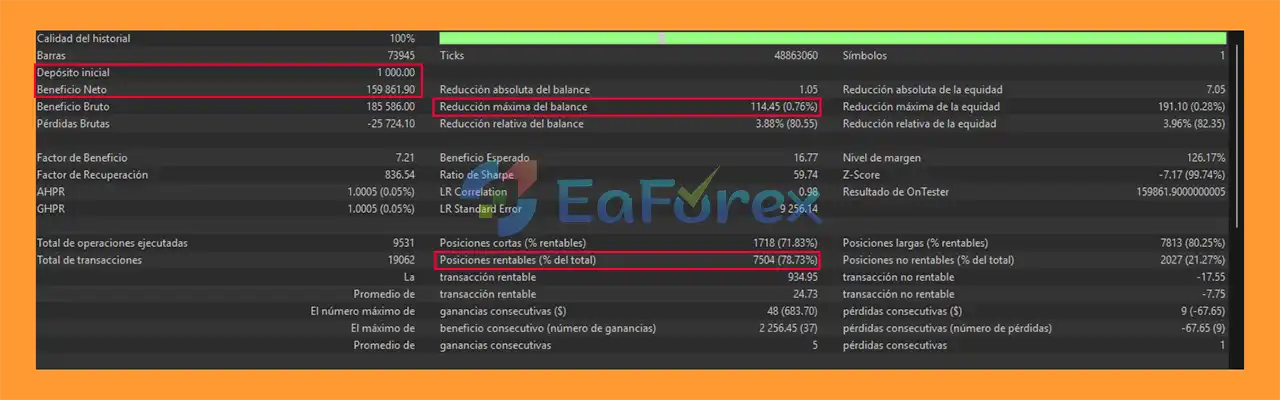
Quantum Macd Bolinger EA MT5 Backtest Results
- Initial Deposit: $1,000
- Total Net Profit: $159.861,90
- Win Rate (% of total): 78,73%
- Maximum Drawdown: 0,76%
Performance and Risk Management
Quantum Macd Bolinger EA MT5 is designed around automated risk and position management rather than simply maximizing trade frequency.
Stop Loss
The default Stop Loss is configurable, with the supplied configuration using approximately 20 pips.
Breakeven Protection
After a position reaches approximately 15 pips of profit, the EA can automatically move the Stop Loss toward the entry price, with a configurable positive offset such as +2 pips.
Trailing Stop
The trailing mechanism can begin protecting profits after approximately 10 pips, with a default trailing distance of around 5 pips.
Spread Protection
The EA includes a maximum-spread filter. With the supplied default configuration, trades can be rejected when the spread exceeds approximately 30 pips.
Actual spread conditions can vary considerably between brokers, symbols, sessions, and market events.
Position Limits
The system provides exposure controls such as:
- Maximum pending orders: 5
- Maximum total positions: 8
- Grid spacing: 3 pips
- Maximum grid distance: 15 pips
These parameters are configurable and should be tested carefully because changing them can materially affect trading behavior and risk.
Signal Cooling-Off
The EA can require a minimum of 2 bars between signals, helping prevent repeated entries during rapidly changing market conditions.
Trading Session Filter
Trading hours are configurable, with the supplied default setting covering approximately 01:00–23:00.
Margin Protection
Before opening positions, the EA can check available margin conditions to help reduce excessive account exposure.
Position Sizing
The system supports both fixed-lot and risk-based position sizing. The supplied examples indicate progressive sizing as account equity increases.
Example configuration:
- $1,000 account: approximately 0.20–0.30 lots
- $2,000 account: approximately 0.40–0.60 lots
- $5,000 account: approximately 1.00–1.50 lots
These are configuration examples rather than guaranteed risk levels or expected returns. Traders should determine appropriate position sizes based on their broker's contract specifications, leverage, Stop Loss distance, and personal risk limits.
Weaknesses and Risk Warnings
Quantum Macd Bolinger EA MT5 includes multiple protection mechanisms, automated trading on Gold involves significant risks.
Gold Can Be Highly Volatile
XAU/USD can experience rapid price movements, particularly during major economic announcements, central-bank events, geopolitical developments, and periods of increased market volatility.
M5 Trading Can Generate Noise
The M5 timeframe contains substantial short-term market noise. MACD and Bollinger Band signals can produce false entries, especially during sideways or highly irregular market conditions.
High Lot Sizes Increase Risk
The supplied lot-sizing examples are relatively aggressive for some account sizes. Traders should not assume that a larger position size is appropriate simply because the account balance increases.
Broker Conditions Matter
Trading results can vary depending on:
- Spread
- Commission
- Slippage
- Execution speed
- Liquidity
- Swap costs
- Broker server conditions
Backtests Are Not Guarantees
Historical backtests and optimization results do not guarantee future live-trading performance. Differences between historical data and real-market execution can affect results.
Prop Firm Rules Can Change
Although the EA includes features useful for risk-controlled trading, traders must independently verify the current rules of their chosen proprietary trading firm. Restrictions regarding news trading, maximum drawdown, daily loss, lot sizes, holding periods, or other trading behavior may differ between firms.
No Automated System Is Risk-Free
The EA does not eliminate trading risk. Users should test their configuration on a demo account or controlled environment before deploying it with significant capital.
Pros and Cons
Pros
- Combines MACD and Bollinger Bands analysis
- Designed specifically for XAU/USD
- Optimized for the M5 timeframe
- Multiple technical signal configurations
- Double-confirmation approach
- Automatic Stop Loss management
- Breakeven functionality
- Dynamic trailing stop
- Maximum spread protection
- Position and exposure controls
- Configurable trading hours
- Margin protection
- Fixed-lot and risk-based money management
- Progressive position sizing
- No martingale strategy
- Fully automated execution
- Customizable signal modules
- Suitable for intraday trading
Cons
- Primarily focused on XAU/USD
- M5 trading can be sensitive to market noise
- Gold volatility can cause rapid drawdowns
- Results depend heavily on broker execution conditions
- Aggressive lot settings can significantly increase risk
- Multiple positions may increase exposure during volatile markets
- Requires careful parameter optimization
- Backtest results cannot guarantee future performance
- Not suitable for traders seeking a completely risk-free system
How to Install Quantum Macd Bolinger EA MT5
Quantum Macd Bolinger EA MT5 on MetaTrader 5 is straightforward.
Step 1: Download the EA
Download the Quantum Macd Bolinger EA MT5 files provided with your purchase.
The EA file will normally use the .ex5 format.
Step 2: Open MetaTrader 5
Launch your MetaTrader 5 trading platform.
Go to:
File → Open Data Folder
Step 3: Open the Experts Folder
Navigate to:
MQL5 → Experts
Copy the Quantum Macd Bolinger EA MT5 file into the Experts folder.
Step 4: Restart MetaTrader 5
Close and reopen MetaTrader 5, or refresh the Expert Advisors section in the Navigator window.
The EA should then appear under:
Navigator → Expert Advisors
Step 5: Open an XAU/USD M5 Chart
Open your broker's XAU/USD (Gold) chart and select the M5 timeframe.
Make sure the symbol name matches your broker's specification. Some brokers may use variations such as XAUUSD, XAUUSDm, XAUUSD.a, or another suffix.
Step 6: Attach the EA
Drag Quantum MACD Bollinger EA MT5 from the Navigator window onto the XAU/USD M5 chart.
Enable:
- Allow Algo Trading
- Allow automated trading
when required by your MetaTrader 5 configuration.
Step 7: Configure the Parameters
Review the EA settings before starting live trading.
Important parameters include:
- Lot size
- Risk percentage
- MACD settings
- Bollinger Band settings
- Stop Loss
- Breakeven
- Trailing Stop
- Maximum spread
- Maximum positions
- Pending orders
- Grid distance
- Trading hours
- Signal modules
Step 8: Test Before Going Live
For safer deployment, test the EA first using the Strategy Tester and/or a demo account.
Check its behavior under your broker's:
- Spread conditions
- Commission structure
- Leverage
- XAU/USD contract specifications
- Execution environment
Only consider live deployment after you understand the EA's behavior and have selected position sizes consistent with your own risk limits.
What’s Included in the Download Package?
- Setting (If Any).docx
- Installation Guide.docx
>>> Join VIP Membership Now <<<
Final Thoughts
In summary, Quantum Macd Bolinger EA MT5 is a feature-rich automated trading system designed for traders who want to combine MACD momentum analysis and Bollinger Band volatility signals for XAU/USD intraday trading.
Its multi-signal architecture, configurable technical indicators, automated Stop Loss management, breakeven, trailing stop, spread filter, position limits, and risk-based money management provide a structured framework for automated Gold trading.
The ability to enable or disable individual signal modules also gives traders flexibility when adapting the EA to different market conditions and trading preferences.
However, XAU/USD trading on the M5 timeframe carries substantial market and execution risk. Position sizing, broker conditions, spread, slippage, leverage, and market volatility can all influence actual results. The supplied settings should therefore be treated as configuration examples rather than guarantees of performance.
For traders evaluating Quantum Macd Bolinger EA MT5, a sensible approach is to backtest the EA, forward-test it on a demo account, verify broker compatibility, and carefully configure risk parameters before using real capital.
Quantum Macd Bolinger EA MT5 can serve as a structured automated tool for traders seeking MACD-and-Bollinger-based Gold trading with extensive customization and built-in risk-management controls.



