









-
 Unlimited Activations
-
 Instant delivery
-
 Easy to install





 Unlimited Activations
Instant delivery
Easy to install
Unlimited Activations
Instant delivery
Easy to install
 Free Update
 Free Install Support

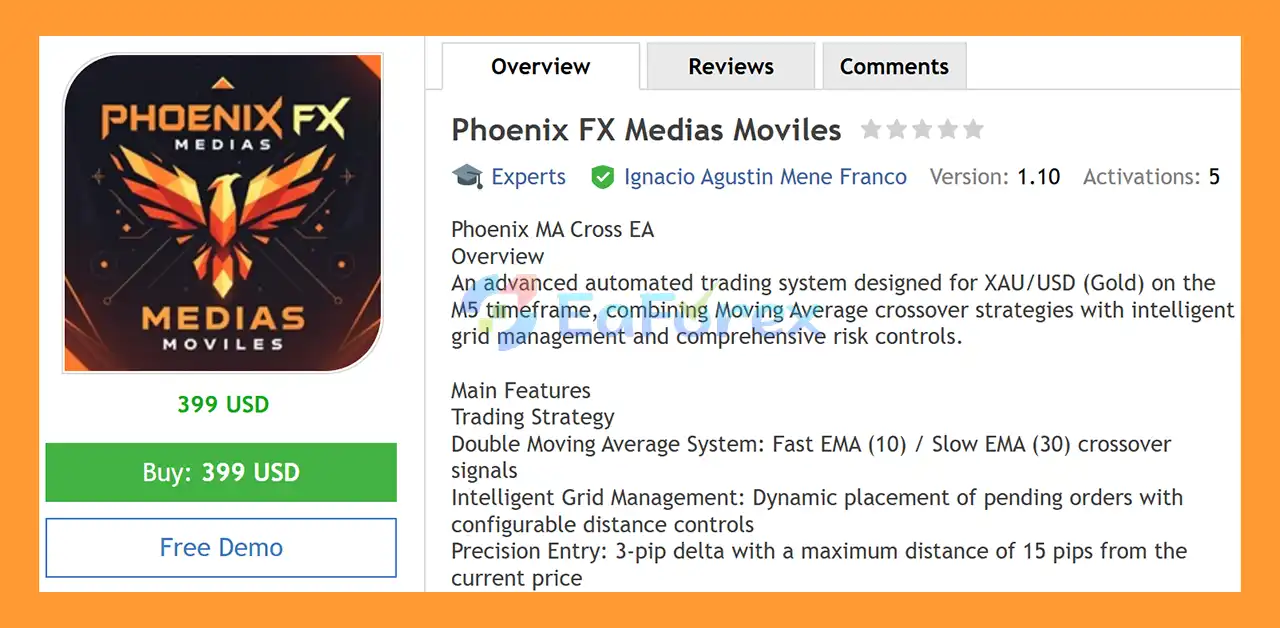
Phoenix FX Medias Moviles EA MT5 is an advanced automated trading system designed specifically for XAU/USD (Gold) on the M5 timeframe. The EA combines a Double Moving Average crossover strategy with intelligent grid management, precision entries, and multiple layers of risk protection.
At the core of the system is a Fast EMA 10 / Slow EMA 30 crossover, which is used to identify potential directional trading opportunities. The EA then manages entries through configurable pending-order and grid logic while applying fixed Stop Loss, Breakeven, Trailing Stop, spread filtering, and margin protection.
Phoenix FX Medias Moviles EA MT5 is designed for traders who want an automated Gold EA MT5 with structured entry rules and configurable money management. It can be used on standard trading accounts as well as accounts intended for prop firm challenges, provided the broker and account conditions are suitable.
The system requires relatively fast execution and is intended for XAU/USD on the 5-minute chart, making broker execution quality, spread, and latency important considerations.
>> Delivery time 24h-48h after payment.
>>> Refund if not delivered.
>>> You will receive the latest version without any limitations (ID+Time).>>Reviewed by Jason Stap <<
Phoenix FX Medias Moviles EA MT5 uses a simple but widely recognized trend-following approach based on two exponential moving averages:
The relationship between the fast and slow moving averages provides the primary trading signal. This allows the EA to automatically monitor short-term Gold price movements without requiring the trader to manually analyze every chart.
The EA incorporates an intelligent grid management system for placing pending orders around potential trading opportunities.
Grid parameters can be configured according to the trading environment, while the system includes distance controls intended to prevent orders from being placed excessively far from the current market price.
This grid functionality should be considered carefully because grid-based trading can increase market exposure when price moves against an open position.
Phoenix FX Medias Moviles includes a defined entry-distance mechanism:
These controls help structure where pending orders can be positioned relative to the market instead of allowing unlimited entry distances.
The EA also provides a visual signal system through automatic candlestick coloring:
This can make it easier to identify the EA’s current directional signal directly from the MT5 chart.
Risk management is an important part of Phoenix FX Medias Moviles EA MT5, particularly because the strategy combines short-term trading with grid-style order management.
Once a trade reaches approximately 15 pips of profit, the EA can automatically move the Stop Loss to:
BE + 2 pips
This is designed to protect part of the accumulated profit while reducing the possibility of allowing a profitable trade to return completely to a loss.
The EA includes an automated trailing mechanism:
Once activated, the Stop Loss can progressively follow favorable price movement according to the configured trailing distance.
Each trade uses a fixed:
20-pip Stop Loss
A predefined Stop Loss provides a clear maximum loss distance for individual positions, although actual monetary losses can vary depending on lot size, spread, slippage, and market conditions.
Phoenix FX Medias Moviles includes a maximum spread filter of:
30 pips
If market spread exceeds the configured threshold, the EA can prevent new trading activity. This is particularly relevant when trading Gold, where spreads can expand during volatile periods or around important market events.
The supplied settings specify a minimum capital level of:
$1,000 USD
The EA uses a starting lot size of:
0.20 lots
Depending on the configuration, position sizing can be fixed or risk-based.
Phoenix FX Medias Moviles is designed to scale position size as account equity or balance increases.
The supplied examples are:
| Account Balance | Example Lot Size |
|---|---|
| $1,000 | 0.20 lots |
| $2,000 | 0.40 lots |
| $5,000 | 1.00 lot |
These figures illustrate the intended proportional scaling model. Traders should verify that the resulting exposure remains appropriate for their broker, account type, margin requirements, and risk limits.
Before placing trades, the EA performs an automatic margin check.
This additional protection is intended to prevent the system from opening positions when available margin is insufficient for the intended order.
The trading process can be summarized into several stages.
The EA continuously monitors XAU/USD on the M5 timeframe.
It calculates the Fast EMA 10 and Slow EMA 30 to determine the current directional signal.
The Double Moving Average system looks for crossover conditions between the two EMAs.
These signals form the primary basis for identifying potential Buy or Sell opportunities.
After identifying a potential setup, the EA applies its configured entry-distance rules, including the 3-pip delta and 15-pip maximum distance.
The system can dynamically manage pending orders according to its grid logic.
This allows the EA to organize multiple potential entry points instead of relying exclusively on a single immediate market order.
Once a position is active, the EA can manage it using:
Before opening additional positions, the EA checks important execution conditions such as:
The EA requires a minimum of 3 bars between consecutive signals and includes duplicate-signal prevention.
This is designed to reduce unnecessary repeated entries during rapidly changing market conditions.
Phoenix FX Medias Moviles EA MT5 provides a configurable trading-hour filter.
The default trading schedule is:
01:00 – 23:00
Traders can adjust the trading window according to their broker’s server time and preferred trading schedule.
The system requires at least:
3 bars between consecutive signals
This rule helps reduce excessive signal generation when the market changes direction rapidly.
The EA includes logic designed to identify duplicate signals and avoid unnecessary repeated trades.
This is particularly relevant for automated M5 strategies, where multiple signals can occur within a short period.
Automatic margin verification is performed before trades are opened, helping the EA evaluate whether sufficient margin is available for the planned position.
| Setting | Recommended Configuration |
|---|---|
| Platform | MetaTrader 5 |
| Symbol | XAU/USD |
| Timeframe | M5 |
| Minimum Balance | $1,000 |
| Starting Lot | 0.20 |
| Strategy | EMA 10 / EMA 30 |
| Stop Loss | 20 pips |
| Breakeven | 15 pips |
| Breakeven Protection | BE +2 pips |
| Trailing Start | 10 pips |
| Trailing Step | 5 pips |
| Maximum Spread | 30 pips |
| Signal Spacing | 3 bars |
| Default Trading Hours | 01:00–23:00 |
Phoenix FX Medias Moviles EA MT5 is designed specifically for automated XAU/USD trading on MT5, allowing the system to monitor the market and execute its predefined strategy without requiring constant manual intervention.
The EA uses a clearly defined EMA 10 and EMA 30 crossover strategy, giving traders an understandable technical framework behind its signal generation.
Instead of relying on a single protective mechanism, the system combines:
The EA supports fixed or risk-based lot configuration and provides a proportional scaling concept as account balance increases.
According to the supplied product information, Phoenix FX Medias Moviles EA MT5 can be used with:
However, traders should always verify the specific rules of their broker or prop firm before using a grid-based automated strategy.
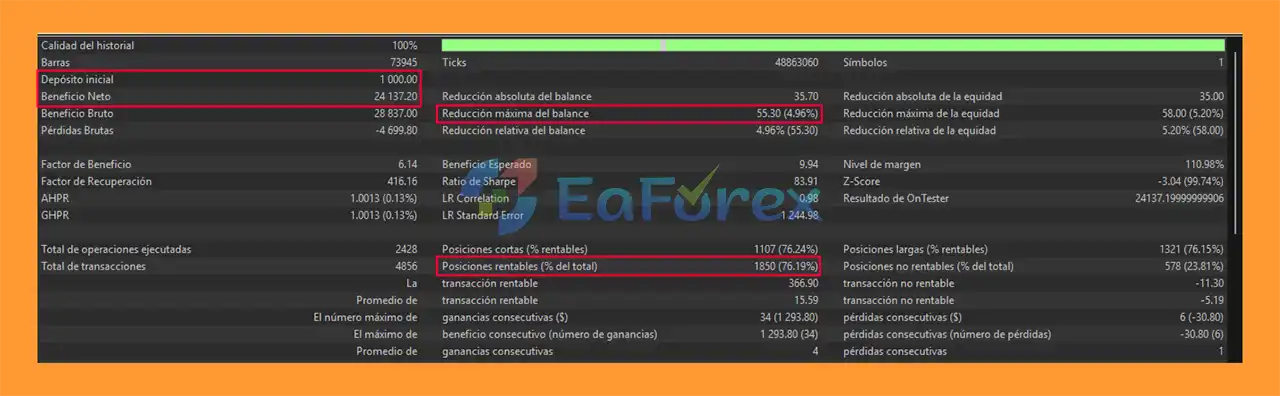
Phoenix FX Medias Moviles EA MT5 backtets
Phoenix FX Medias Moviles EA MT5 does not guarantee a specific return. Its actual results can vary significantly depending on broker conditions, Gold volatility, spread, execution speed, slippage, account leverage, and position-sizing settings.
The proportional lot examples supplied with the EA are:
| Balance | Example Position Size |
|---|---|
| $1,000 | 0.20 |
| $2,000 | 0.40 |
| $5,000 | 1.00 |
Because the position size increases with account balance, the resulting monetary exposure also increases.
For this reason, traders should evaluate the EA using realistic trading conditions and pay particular attention to:
A backtest or historical result should not be interpreted as a guarantee of future live performance.
Despite its protective features, Phoenix FX Medias Moviles EA MT5 has several important risks that traders should understand.
The EA uses intelligent grid management. Grid strategies can accumulate multiple positions when the market moves against the original trading direction.
This can increase:
XAU/USD can experience rapid price movements, especially around major economic announcements, central-bank events, geopolitical developments, and periods of abnormal market volatility.
A fixed 20-pip Stop Loss may behave differently under different market conditions because execution and spread can change.
The M5 timeframe contains considerable short-term market noise. Moving-average crossover systems can generate false or less-effective signals when Gold enters a sideways or choppy market.
The EA requires low-latency execution. Broker spreads and slippage can have a meaningful effect on short-term Gold strategies.
The configured 30-pip maximum spread should therefore be treated as an important execution parameter rather than a guarantee of acceptable trading conditions.
Although the EA is described as compatible with prop firm challenges, each proprietary trading firm may have different requirements concerning:
Always verify the current rules of the specific prop firm before deployment.
Increasing the lot size as the account grows can increase both potential profits and potential losses. Traders should not assume that proportional lot scaling automatically maintains the same level of risk under all market conditions.
| Pros | Cons |
|---|---|
| Designed specifically for XAU/USD | Focused primarily on Gold |
| Optimized for M5 trading | M5 can produce market noise |
| EMA 10/30 crossover strategy | Crossover systems can struggle in ranging markets |
| Intelligent grid management | Grid exposure can increase drawdown |
| 20-pip Stop Loss | Fixed distance may not suit every volatility environment |
| Breakeven protection | Does not eliminate trading risk |
| Trailing Stop | May close positions during short-term reversals |
| Spread filter | Broker spread conditions can vary |
| Margin verification | Requires sufficient available margin |
| Signal spacing | May reduce some potential entries |
| Duplicate-signal prevention | No guarantee against consecutive losses |
| Configurable trading hours | Results depend on broker/server time |
| Can scale lot size with balance | Larger lots create larger monetary exposure |
Launch your MetaTrader 5 trading platform.
Go to:
File → Open Data Folder
Then navigate to:
MQL5 → Experts
Place the Phoenix FX Medias Moviles EA MT5 file into the Experts folder.
If you receive an .ex5 file, copy the compiled EA directly into this directory.
Restart MT5 or right-click the Navigator window and select Refresh.
The EA should appear under:
Navigator → Expert Advisors
Open an XAU/USD chart and select the:
M5 timeframe
Drag Phoenix FX Medias Moviles EA MT5 onto the chart.
Review the available parameters, including:
Make sure Algo Trading / AutoTrading is enabled in MetaTrader 5.
Before using the EA with real money, test it on a demo account and, where possible, perform a strategy test using broker-specific historical data.
For prop firm accounts, verify the firm’s current EA and trading-rule requirements before deployment.
>>> Join VIP Membership Now <<<
In summary, Phoenix FX Medias Moviles EA MT5 is an automated XAU/USD Gold trading system for MetaTrader 5 built around an EMA 10/EMA 30 crossover strategy, intelligent grid management, and multiple layers of trade protection.
Its feature set includes 20-pip Stop Loss protection, Breakeven at 15 pips, BE+2 protection, trailing management, spread filtering, margin verification, trading-hour controls, signal spacing, and duplicate-signal prevention.
The EA is intended for traders who want to automate short-term Gold trading on the M5 timeframe while retaining configurable control over position sizing and risk management.
However, the combination of Gold volatility, M5 trading, and grid management means risk should be evaluated carefully. The supplied lot-sizing examples of 0.20 lots per $1,000 of balance can create significant market exposure, particularly during periods of strong directional movement.
For best practice, traders should begin with appropriate risk settings, test the EA under realistic broker conditions, monitor drawdown and margin usage, and use a demo or controlled environment before considering live deployment.
Important: Automated trading involves substantial risk. Historical tests, simulated results, or example position sizes do not guarantee future performance. Always trade according to your own risk tolerance and verify broker and prop-firm conditions before using an Expert Advisor.
1. What is Phoenix FX Medias Moviles EA MT5 and how does it work?
Phoenix FX Medias Moviles EA MT5 is a professional automated trading system designed exclusively for XAU/USD (Gold) on the MetaTrader 5 platform. It uses a dual EMA crossover strategy combined with intelligent grid management to identify clear trend-following scalping opportunities on the M5 timeframe with strict risk control.
2. Is Phoenix FX Medias Moviles EA MT5 only for XAU/USD trading?
Yes. Phoenix FX Medias Moviles EA MT5 is fully optimized for XAU/USD only. All EMA settings, grid rules, stop-loss levels, and execution filters are specifically tuned to gold’s volatility and intraday price behavior.
3. What timeframe does Phoenix FX Medias Moviles EA MT5 trade on?
The EA operates exclusively on the M5 (5-minute) timeframe, making it ideal for short-term scalping and intraday trading strategies focused on frequent but structured gold price movements.
4. What trading strategy does Phoenix FX Medias Moviles EA MT5 use?
The EA uses a dual moving average crossover strategy, based on:
Fast EMA (10)
Slow EMA (30)
Trades are triggered only when a confirmed crossover occurs, helping filter out market noise and false signals.
5. Does Phoenix FX Medias Moviles EA MT5 use martingale or aggressive grid strategies?
No. Phoenix FX Medias Moviles EA MT5 does not use martingale or aggressive lot multiplication. It applies a controlled grid system with strict spacing, order limits, and maximum distance rules to manage exposure responsibly.
6. How does risk management work in Phoenix FX Medias Moviles EA MT5?
Each trade is protected by a fixed 20-pip stop loss, breakeven protection, conservative trailing stop, spread filter, margin check, and time-based trading filter to keep drawdowns under control.
7. Is Phoenix FX Medias Moviles EA MT5 suitable for prop firm or funded accounts?
Yes. The EA is prop-firm compatible, designed to comply with drawdown and risk rules thanks to its non-martingale logic, mandatory stop loss, and overtrading prevention system.
8. What is the recommended minimum deposit for Phoenix FX Medias Moviles EA MT5?
The recommended minimum balance is $1,000. The EA supports scalable money management, allowing lot sizes to increase proportionally as account equity grows.
9. Does Phoenix FX Medias Moviles EA MT5 work with ECN or standard MT5 brokers?
Yes. Phoenix FX Medias Moviles EA MT5 works with both ECN and standard MT5 brokers. It includes spread protection and margin safety checks to avoid trading under poor execution conditions.
In stock
In stock
In stock
In stock
In stock
Out of stock
No account yet?
Create an Account












 Automatic EA
 EA Best Seller
 Expert Advisor MT4
 Expert Advisor MT5
 HFT EA


Reviews
Clear filtersThere are no reviews yet.