









-
 Unlimited Activations
-
 Instant delivery
-
 Easy to install






 Unlimited Activations
Instant delivery
Easy to install
Unlimited Activations
Instant delivery
Easy to install
 Free Update
 Free Install Support

Ashinton Smart Ultra Pro EA MT5 is a fully automated MetaTrader 5 Expert Advisor designed for structured trend-following trading with an emphasis on risk control, disciplined execution, and account protection.
The EA identifies potential trend continuation opportunities using multi-stage entry confirmation, directional market bias, and price-structure-based swing levels. Rather than relying on Martingale, Grid, or averaging-down techniques, Ashinton Smart Ultra Pro EA MT5 is designed around a controlled trend-trading framework.
The system includes multiple layers of risk management, including daily drawdown protection, account-level equity protection, adaptive risk scaling, spread filtering, cooldown controls, session restrictions, and automated Friday position management.
Ashinton Smart Ultra Pro EA MT5 is designed for traders who want an automated trading system with a strong focus on capital protection and structured risk management, whether trading a personal account or operating within a rules-based evaluation environment.
>> Delivery time 24h-48h after payment.
>>> Refund if not delivered.
>>> You will receive the latest version without any limitations (ID+Time).>>Reviewed by Jason Stap <<
Ashinton Smart Ultra Pro EA MT5 Overview
Ashinton Smart Ultra Pro EA MT5 operates automatically on MetaTrader 5, analyzing market conditions and executing trades according to its predefined trading framework.
Once properly configured, the EA can manage entries, pending orders, risk exposure, and protective trading rules without requiring constant manual intervention.
The EA focuses on identifying trend continuation opportunities rather than attempting to predict every market reversal.
Its entry process uses multiple confirmation stages aligned with directional bias and price-structure-based swing levels.
Before entering a position, the system evaluates multiple conditions designed to confirm whether a potential setup aligns with the current market direction.
This structured approach is intended to filter lower-quality opportunities and maintain consistency in trade selection.
Risk management is one of the core components of Ashinton Smart Ultra Pro.
The EA includes:
The system can adjust trading exposure according to account conditions.
During periods of drawdown, risk exposure can be controlled, while the EA can continue participating during recovery phases according to its programmed risk framework.
Ashinton Smart Ultra Pro EA MT5 monitors daily account performance and can lock trading when the configured daily drawdown threshold is reached.
This feature is particularly relevant for traders who operate under strict daily loss limits.
The EA supports different approaches to account-level drawdown control.
These settings allow users to establish predefined limits for protecting account equity and controlling overall exposure.
The system continuously monitors account equity and can apply protective actions when predefined equity conditions are reached.
This provides an additional layer of protection beyond individual trade-level Stop Loss management.
The EA checks spread conditions before executing trades.
When spreads become excessively wide or market execution conditions become unfavorable, the system can restrict trading activity.
Ashinton Smart Ultra Pro EA MT5 uses a pending-order-based execution architecture as part of its trading framework.
This allows the system to structure entries around predefined market conditions and price levels.
The EA provides controls for limiting trading activity according to specific sessions and time periods.
This allows traders to adapt the system to different market schedules and account requirements.
The EA includes automated Friday position and order management.
This can help control exposure around the end of the trading week and reduce the need for manual intervention.
Ashinton Smart Ultra Pro EA MT5 includes an on-chart dashboard designed to display relevant account and EA information.
The dashboard can help traders monitor the system’s current status and account conditions.
The EA supports MT5 mobile push notifications, allowing traders to receive alerts related to important system events.
Notifications can be configured for events such as:
Ashinton Smart Ultra Pro EA MT5 follows a structured trend-following and risk-management process.
The system first evaluates the market’s directional bias and identifies potential trend continuation conditions.
It then analyzes price structure and swing levels to determine whether the market provides a suitable setup.
When the required confirmation conditions are satisfied, the EA can place a trade or pending order according to its execution framework.
After entering the market, the EA continuously monitors account and market conditions while applying its configured risk-management rules.
A simplified workflow is:
Market Direction → Trend Confirmation → Price Structure Analysis → Entry Setup → Trade Execution → Risk Monitoring → Automated Position Management
At the account level, the EA can also monitor:
Daily Drawdown → Equity Conditions → Spread → Trading Session → Cooldown Status
This creates a multi-layered automated trading framework where both trade selection and account protection are considered.
Ashinton Smart Ultra Pro EA MT5 is designed for traders who want more than simple automated trade execution. Its architecture combines trend-following logic with multiple layers of account protection.
The system focuses on trend continuation setups and uses multiple confirmation stages before executing trades.
Capital protection is an important part of the EA’s design. The system includes several mechanisms for limiting exposure during unfavorable conditions.
Ashinton Smart Ultra Pro EA MT5 is explicitly designed without Martingale logic.
It does not rely on increasing position sizes after losses as its primary recovery mechanism.
The EA is also designed without Grid trading behavior.
This means the system does not depend on repeatedly adding positions at predefined price intervals to recover losing trades.
The EA does not use averaging-down as its core strategy.
Its trading framework is based on controlled trend-following entries rather than accumulating losing positions.
With daily drawdown controls, equity protection, cooldown rules, and session management, the EA provides features relevant to traders operating under predefined account risk limits.
The EA does more than monitor individual positions. It can also evaluate account-level equity and drawdown conditions to determine when trading should be restricted.
The integrated MT5 notification functionality allows traders to stay informed about important EA events even when they are away from their trading computer.
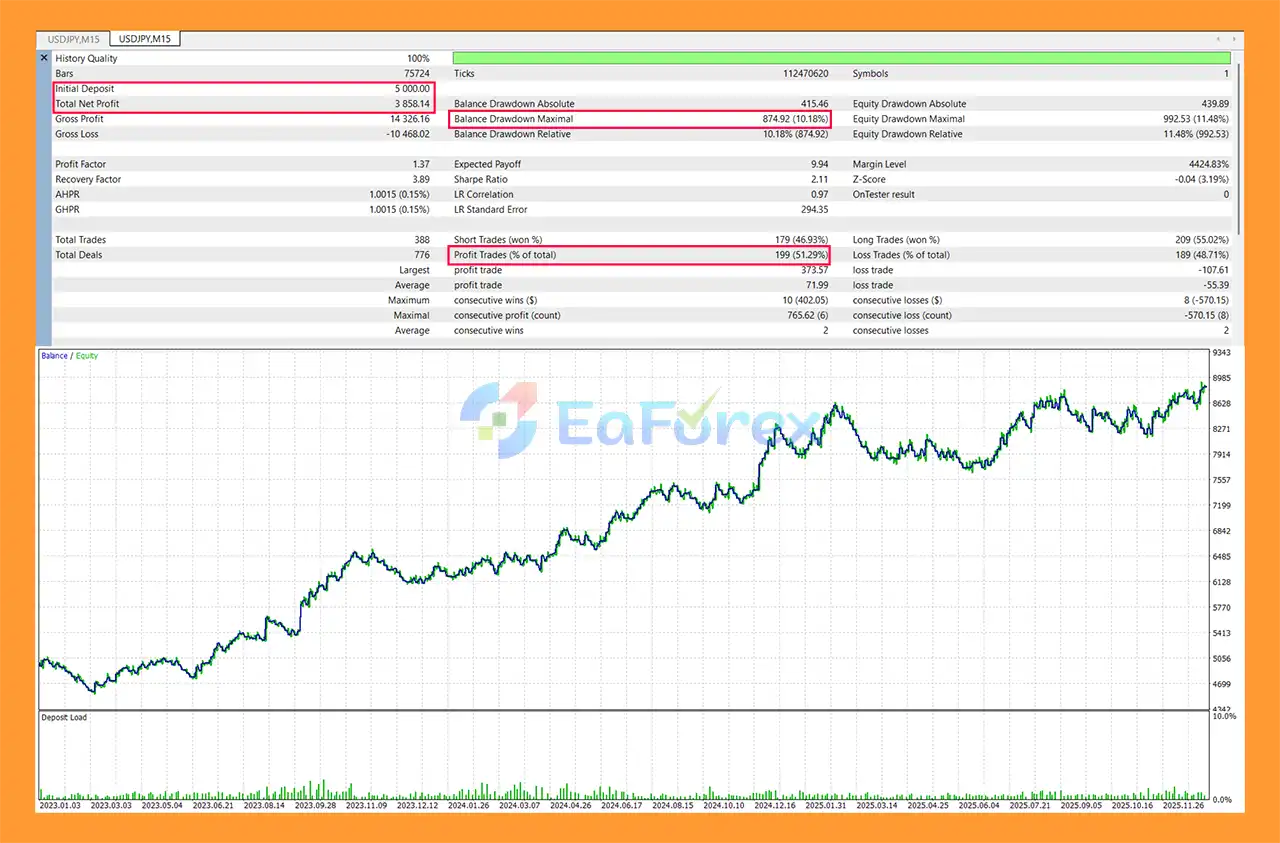
The supplied backtest data for Ashinton Smart Ultra Pro EA MT5 covers the period from January 1, 2023, to January 18, 2026, using the 100% Real Ticks modeling method.
The test used:
Ashinton Smart Ultra Pro EA MT5 backtets
| Symbol | Net Profit | Net Profit % | Max Equity DD | Profit Factor | Total Trades |
|---|---|---|---|---|---|
| USDJPY | $3,858 | +77% | 11.48% | 1.37 | 388 |
| NASDAQ100 (XUSTEC) | $2,602 | +52% | 16.18% | 1.22 | 463 |
| S&P500 (XUS500) | $2,168 | +43% | 14.89% | 1.14 | 499 |
These figures represent the supplied historical backtest results and should not be interpreted as guaranteed future performance.
The supplied backtest reports $3,858 net profit, equivalent to +77%, with a maximum equity drawdown of 11.48% and a Profit Factor of 1.37 across 388 trades.
For NASDAQ100 (XUSTEC), the reported result is $2,602 net profit, equivalent to +52%, with a maximum equity drawdown of 16.18% and a Profit Factor of 1.22 across 463 trades.
The supplied S&P500 (XUS500) test reports $2,168 net profit, equivalent to +43%, with a maximum equity drawdown of 14.89% and a Profit Factor of 1.14 across 499 trades.
Backtest results can differ significantly from live trading because of:
Therefore, traders should evaluate the EA using their own broker’s data and conditions whenever possible.
Although Ashinton Smart Ultra Pro EA MT5 includes multiple risk-management features, automated trading always involves financial risk.
Trend-following systems may experience periods of reduced performance when markets move sideways or repeatedly reverse direction.
A trend-following strategy does not guarantee that every identified trend will continue.
The supplied backtests show historical maximum equity drawdowns ranging from 11.48% to 16.18% across the tested symbols.
Future drawdown can be higher than historical results.
An EA optimized around historical market behavior may perform differently when volatility, liquidity, spreads, or market structure changes.
Live results can be affected by:
Even with automated protection, users remain responsible for selecting appropriate risk settings.
Higher risk levels can increase both potential returns and potential losses.
Although the EA includes features designed for structured evaluation environments, users should independently verify the rules of their specific trading program.
Daily drawdown, maximum drawdown, news trading, overnight positions, and other requirements can differ between providers.
The supplied historical results are based on a specific testing period, deposit, risk setting, symbols, and execution model. They do not guarantee equivalent results in live trading.
Installing Ashinton Smart Ultra Pro EA MT5 on MetaTrader 5 is straightforward.
Launch MetaTrader 5 and select:
File → Open Data Folder
Navigate to:
MQL5 → Experts
Copy the Ashinton Smart Ultra Pro EA MT5 .ex5 file into the Experts folder.
Restart MT5 or refresh the Expert Advisors section in the Navigator window.
Open the chart for the instrument you want to test or trade, according to the EA’s supported configuration.
Go to:
Navigator → Expert Advisors
Find Ashinton Smart Ultra Pro EA MT5 and drag it onto the selected chart.
Make sure the AutoTrading button in MetaTrader 5 is enabled.
Review and configure the available risk parameters, including:
Always use settings that match your account size and personal risk tolerance.
To receive mobile notifications:
On MT5 Mobile:
On MT5 Desktop:
You should receive a test notification on your mobile device.
Before using real funds, it is recommended to:
For uninterrupted operation, a reliable VPS is recommended.
>>> Join VIP Membership Now <<<
In summary, Ashinton Smart Ultra Pro EA MT5 is a structured automated trading system designed around trend-following, multi-stage confirmation, and comprehensive risk management.
Its framework combines directional market analysis with price-structure-based entries and several account-protection mechanisms, including daily drawdown protection, absolute and trailing drawdown controls, equity protection, spread filtering, cooldown rules, session management, and automated Friday controls.
The EA also clearly separates itself from recovery-style systems by operating without Martingale, Grid, or averaging-down behavior. Instead, its approach focuses on controlled trend trading and predefined risk parameters.
The supplied backtest results, using 100% Real Ticks from January 1, 2023 to January 18, 2026, show different historical performance characteristics across USDJPY, NASDAQ100, and S&P500. These results can be useful when evaluating the system, but they remain historical simulations and cannot guarantee future live performance.
For traders considering automated deployment, the most important factors remain appropriate risk settings, broker execution quality, drawdown tolerance, market conditions, and continuous monitoring.
Before moving to a live account, traders should conduct their own backtests, forward-test the EA on a demo account, verify broker compatibility, and ensure that the configured risk parameters match their account objectives.
Ashinton Smart Ultra Pro EA MT5 is designed as a disciplined trading automation tool with a strong emphasis on risk control, but responsible risk management remains essential for every automated trading strategy.
1. What is Ashinton Smart Ultra Pro EA MT5?
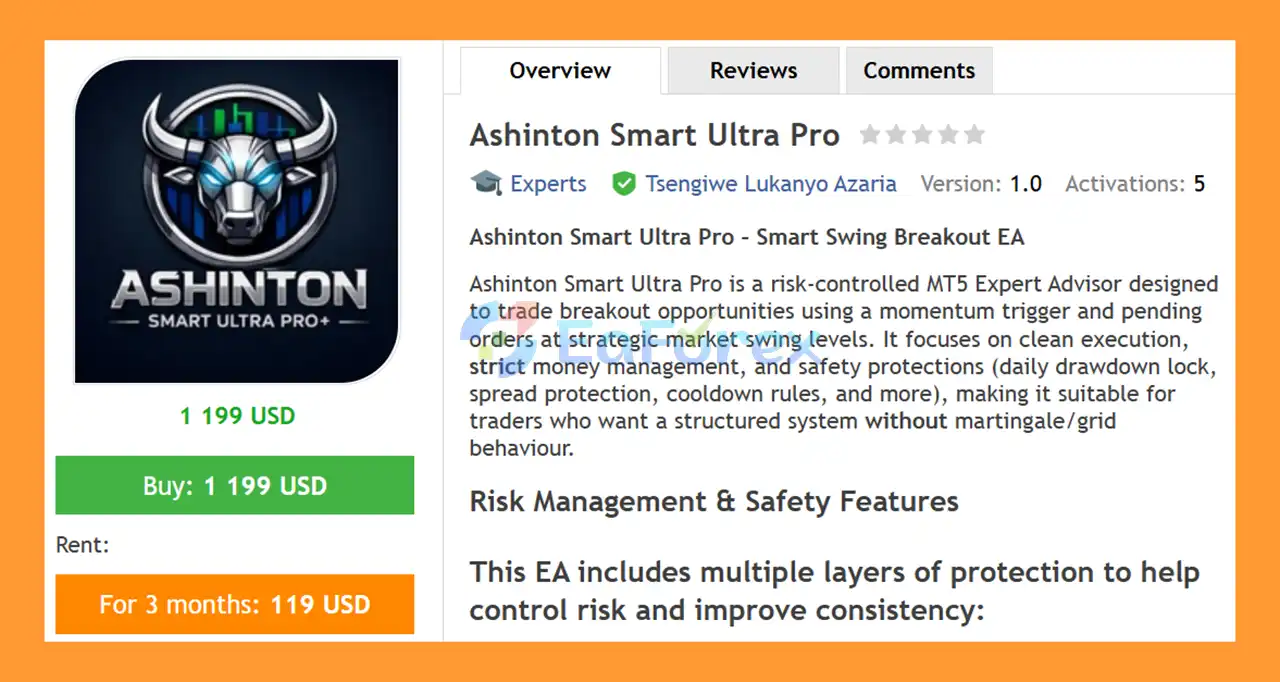
Ashinton Smart Ultra Pro EA MT5 is a professional automated trading system for MetaTrader 5 that uses trend-following and breakout strategies. It trades momentum-driven market movements using pending orders at key swing levels while applying strict risk management and advanced safety protections.
2. Does Ashinton Smart Ultra Pro EA use martingale or grid strategies?
No. Ashinton Smart Ultra Pro EA MT5 does not use martingale, grid, or averaging strategies. This makes it a safer option compared to high-risk EAs that rely on position escalation or recovery techniques.
3. Which markets and timeframes does Ashinton Smart Ultra Pro EA MT5 trade?
The EA is optimized for USDJPY, NASDAQ100, and S&P500 on the M15 timeframe. It is designed to perform best in liquid, momentum-driven markets.
4. Is Ashinton Smart Ultra Pro EA MT5 suitable for prop firm accounts?
Yes. The EA is prop-firm friendly and includes daily drawdown locks, maximum daily risk caps, session filters, and Friday close protection—features commonly required by funded account rules.
5. How does the risk management system work?
Ashinton Smart Ultra Pro EA MT5 includes multiple risk protection layers such as:
Daily drawdown lock
Maximum daily risk limit
Spread and slippage protection
Cooldown protection after failed setups
These features help control losses and protect trading capital.
6. What is the minimum recommended deposit?
The EA is suitable for accounts starting from $1,000, but higher balances allow for better risk distribution and scalability, especially when using conservative or moderate risk profiles.
7. Can I choose different risk levels?
Yes. Ashinton Smart Ultra Pro EA MT5 supports flexible risk profiles, including:
Conservative (0.5% risk)
Moderate (1% risk)
Growth mode (up to 3% risk)
This allows traders to align the EA with their personal risk tolerance.
8. Does the EA trade all the time?
No. The EA uses session time filters and trades only during selected market hours with optimal liquidity. It also closes trades before the weekend to avoid gap risk.
9. Do I need a VPS to run Ashinton Smart Ultra Pro EA MT5?
While not mandatory, using a VPS is highly recommended to ensure stable execution, low latency, and uninterrupted 24/5 operation—especially for prop firm or live trading environments.
In stock
In stock
In stock
In stock
In stock
Out of stock
No account yet?
Create an Account












 Automatic EA
 EA Best Seller
 Expert Advisor MT4
 Expert Advisor MT5
 HFT EA


Reviews
Clear filtersThere are no reviews yet.