

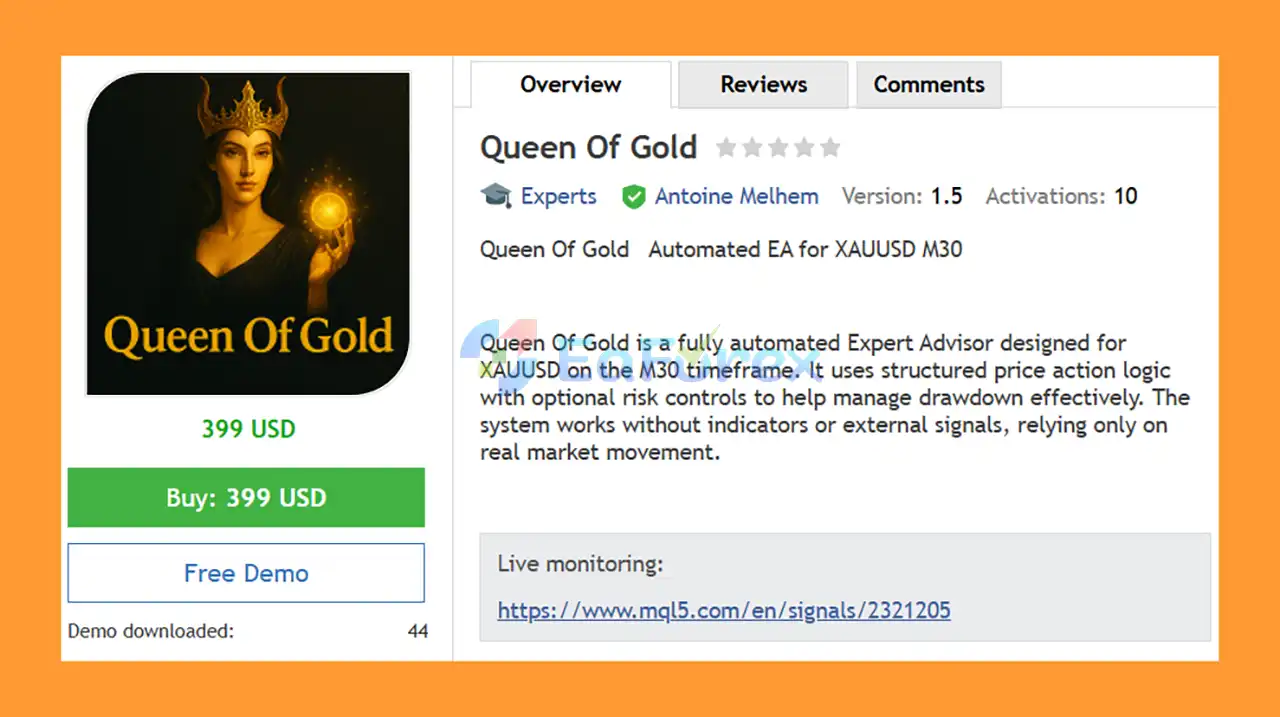
Product Overview
Queen Of Gold EA MT5 is a fully automated Expert Advisor for XAUUSD (Gold), specifically designed to operate on the M30 timeframe. The system uses structured price-based trading logic to identify trading opportunities directly from market movement without relying on traditional technical indicators or external trading signals.
The EA is designed with optional risk-management features, including a Recovery Mode and adjustable Grid system, giving traders greater flexibility when configuring their trading approach.
Queen Of Gold EA MT5 supports both fixed and dynamic lot sizing, allowing traders to choose a position-sizing method that fits their account and risk tolerance.
The recommended configuration is 0.01 lot per $500, with a minimum suggested balance starting from $500. The EA can be used on ECN, Standard, and Cent account types.
For continuous automated execution, a VPS or 24/5 active MetaTrader 5 terminal is recommended.
About the Developer
• Author: Antoine Melhem.
• Experience: Over +3 years of experience on MQL5.
• Notable Products :Queen Of Gold, London Edge EA, Venom Us30 Scalp and other advisors.
• Flagship Product: Queen Of Gold EA MT5 is rated as the best performing product of the year.
>> Delivery time 24h-48h after payment.
>>> Refund if not delivered.
>>> You will receive the latest version without any limitations (ID+Time).>>Reviewed by Jason Stap <<
Key Features of Queen Of Gold EA MT5
Price Action Trading Logic
Queen Of Gold EA MT5 relies on real market price movement rather than traditional technical indicators.
The system analyzes price behavior directly to determine potential trading opportunities, making it a purely price-based automated trading approach.
No Technical Indicators
Unlike many Expert Advisors that depend on moving averages, oscillators, or other indicators, Queen Of Gold EA MT5 operates without conventional indicators or external signals.
This allows the EA to focus on market price behavior itself.
Recovery Mode
The EA includes an optional Recovery Mode designed to help manage unfavorable trading periods and drawdown.
Recovery features can increase exposure during certain market conditions, so traders should understand the associated risks before enabling this functionality.
Adjustable Grid System
Queen Of Gold EA MT5 includes an optional Grid trading system.
Grid mode allows the EA to manage multiple positions according to predefined price intervals. Traders can adjust the available risk controls to determine how aggressively the system operates.
Because Grid strategies can accumulate multiple positions during sustained market movements, proper risk management is essential.
Fixed or Dynamic Lot Sizing
The EA supports two position-sizing approaches:
-
-
- Fixed Lot: Uses a predefined lot size for trades.
- Dynamic Lot: Adjusts position sizing according to the configured risk or account parameters.
-
This flexibility allows traders to select a position-sizing method appropriate for their account.
XAUUSD M30 Optimization
Queen Of Gold EA MT5 is specifically designed for Gold (XAUUSD) on the 30-minute timeframe (M30).
The dedicated configuration helps traders maintain a consistent trading environment instead of applying the EA indiscriminately across multiple markets and timeframes.
Multiple Account Types
The EA can be used with:
-
-
- ECN accounts
- Standard accounts
- Cent accounts
-
Broker specifications can affect spreads, execution, commissions, and ultimately live trading results.
How Does Queen Of Gold EA MT5 Work?
Queen Of Gold EA MT5 uses price-based logic to automatically analyze and trade XAUUSD on the M30 timeframe.
Step 1: Monitor XAUUSD Price Movement
The EA continuously monitors the Gold market on the M30 chart.
Instead of depending on traditional indicators, it evaluates market price behavior according to its programmed price-action rules.
Step 2: Identify Trading Opportunities
When the EA detects conditions that match its trading logic, it can automatically open a position.
The system is designed to operate without requiring external signals or manual trade entries.
Step 3: Apply the Selected Lot Method
Traders can choose between fixed or dynamic lot sizing.
A fixed-lot configuration provides consistent position sizes, while dynamic sizing can adjust exposure according to the selected account-management parameters.
Step 4: Manage Grid Positions
If Grid Mode is enabled, the EA can manage multiple positions according to its programmed grid logic.
Grid trading can provide additional opportunities when price fluctuates, but it also increases the number of open positions and therefore the potential account exposure.
Step 5: Use Recovery Mode When Configured
Recovery Mode can be enabled to help manage unfavorable trading sequences.
This feature should be used carefully because recovery-based trading can increase exposure during drawdown.
Step 6: Continue Automated Management
Once configured, the EA automatically manages the trading process without requiring manual entry for every position.
For uninterrupted operation, traders should keep MetaTrader 5 running continuously or use a reliable VPS.
Why Choose Queen Of Gold EA MT5?
Designed Specifically for Gold
Queen Of Gold EA MT5 is built specifically for XAUUSD, one of the most actively traded and volatile financial instruments.
A dedicated Gold strategy can be useful for traders who prefer to focus on a single market rather than managing multiple currency pairs.
Pure Price-Based Approach
The EA does not rely on conventional technical indicators or external signals. Instead, its trading logic is based on market price movement.
Fully Automated Trading
Once installed and configured, Queen Of Gold EA MT5 can automatically identify and manage trades, reducing the need for constant manual execution.
Optional Grid Trading
Traders who prefer Grid-based strategies can enable the Grid functionality, while those who want a simpler configuration can choose to keep it disabled.
Recovery Function
The optional Recovery Mode provides an additional method for managing certain unfavorable trading sequences.
Flexible Lot Management
The ability to choose fixed or dynamic lot sizing gives traders more control over their position-sizing approach.
Suitable for Different Account Types
Support for ECN, Standard, and Cent accounts provides flexibility when choosing a broker and account structure.
VPS-Friendly
Because the EA is designed for automated trading, running it continuously through a VPS can help maintain uninterrupted operation during market hours.
Queen Of Gold EA MT5 Performance Review
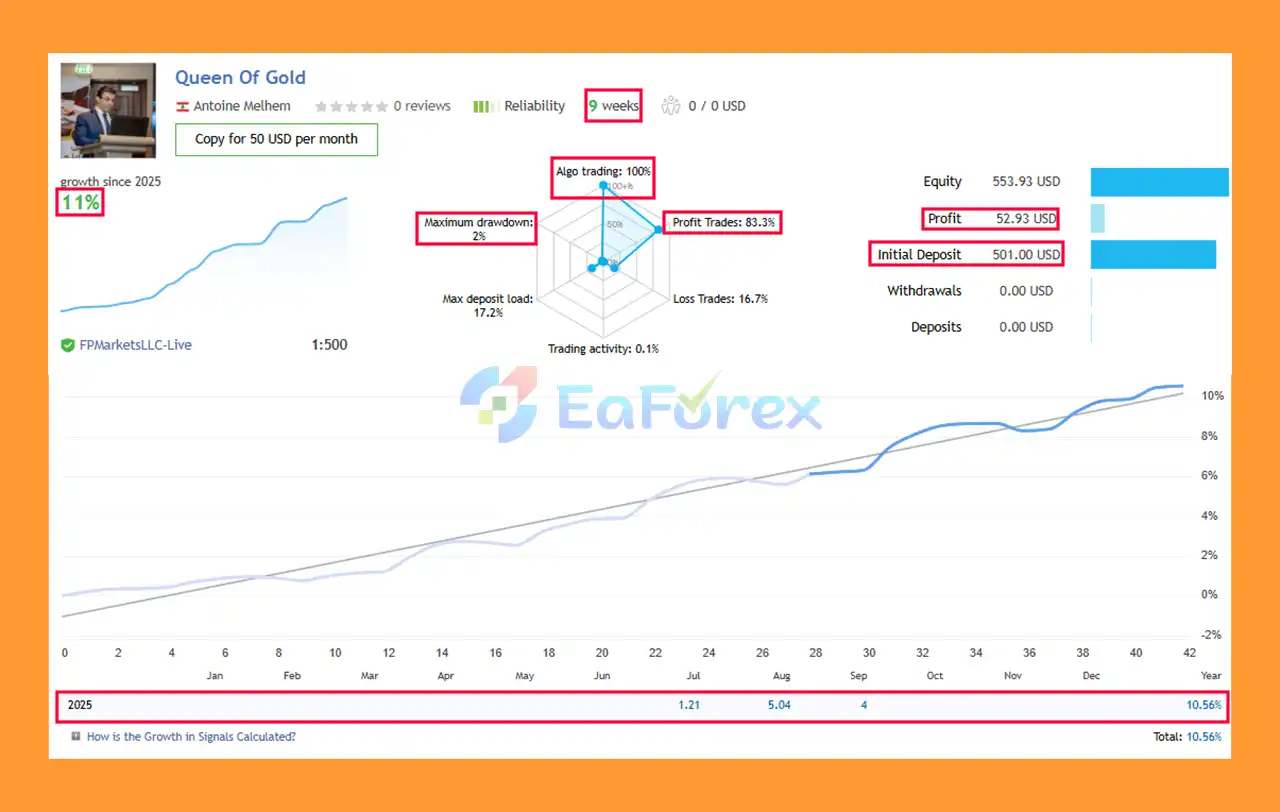
🔴 Live Results (2025)
- Initial Deposit: $501
- Growth: +11% in 8 weeks
- Win Rate: 83.3%
- Maximum Drawdown: 2.0%
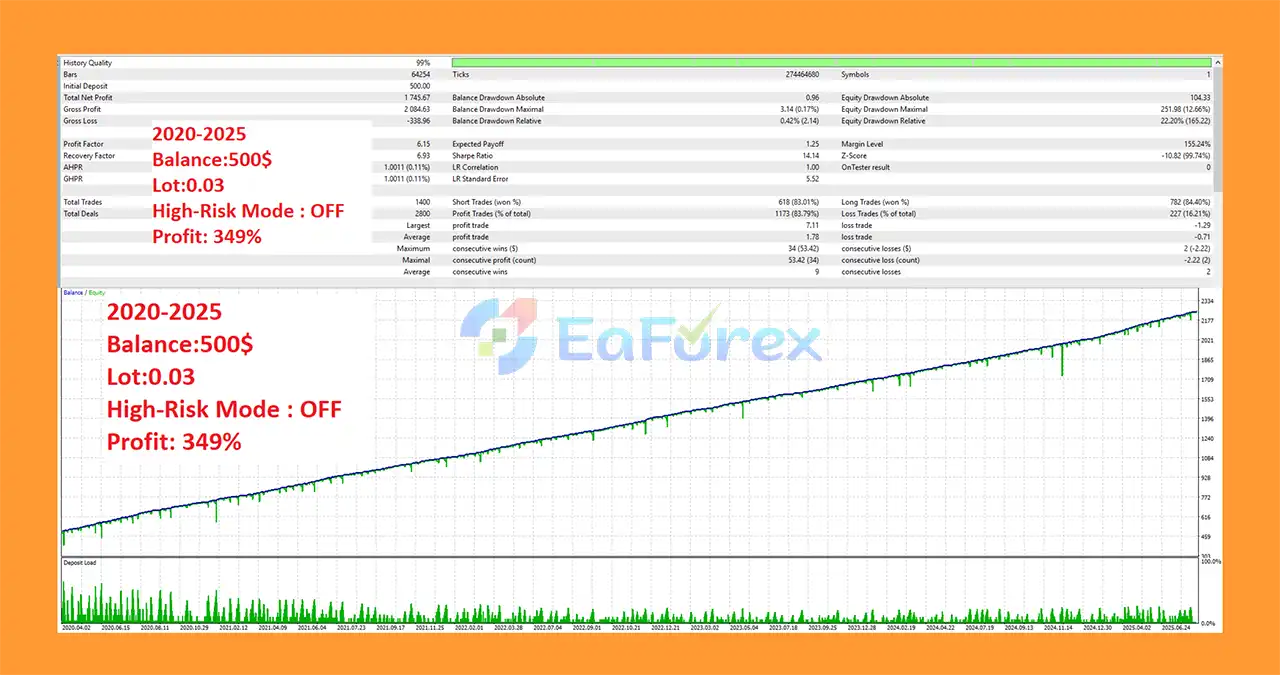
🔴 Backtest Results (2020–2025)
- Initial Deposit: $500
- Final Net Profit: $1,745.67
- Total Return: +349% growth
- Win Rate: 83.79%
- Maximum Drawdown: 12.66%
Performance and Risk Management
Queen Of Gold EA MT5 includes several features designed to provide traders with control over their position sizing and overall trading exposure.
The recommended configuration is:
| Trading Parameter | Recommended Setting |
|---|---|
| Expert Advisor | Queen Of Gold EA MT5 |
| Symbol | XAUUSD |
| Timeframe | M30 |
| Recommended Lot | 0.01 per $500 |
| Minimum Balance | From $500 |
| Account Types | ECN, Standard, Cent |
| Trading Logic | Price Action |
| Indicators | None |
| Grid Mode | Optional |
| Recovery Mode | Optional |
| Lot Sizing | Fixed or Dynamic |
| VPS | Recommended |
Recommended Position Sizing
The stated recommendation is 0.01 lot per $500.
For example, a $500 account would start with approximately 0.01 lot under this guideline, while a $1,000 account could use approximately 0.02 lot.
However, traders should not treat this calculation as a guarantee of safe risk. Actual exposure depends on the broker's contract specifications, leverage, stop-loss configuration, number of open positions, and whether Grid or Recovery Mode is enabled.
Grid Risk Management
Grid trading can increase the number of positions when price moves through predefined levels. If the market continues moving in one direction, multiple positions may accumulate and cause significant floating drawdown.
For this reason, traders should carefully evaluate:
- Maximum number of positions
- Lot progression
- Account equity
- Available margin
- Maximum acceptable drawdown
- Market volatility
Recovery Mode Risk
Recovery Mode can help manage certain losing sequences, but it may also increase market exposure during unfavorable conditions.
Traders should understand how the recovery mechanism works before using it with real capital.
Weaknesses and Risk Warnings
Despite its automated design and risk-control options, Queen Of Gold EA MT5 involves significant trading risks.
Grid Trading Risk
Grid strategies can accumulate multiple trades as the market moves against the initial position. A strong one-directional move in XAUUSD can therefore create substantial floating losses.
Recovery Risk
Recovery mechanisms can increase exposure while an account is already experiencing drawdown. If the market does not reverse as expected, losses can become larger.
Gold Volatility
XAUUSD can experience rapid price movements during major economic announcements, central-bank decisions, geopolitical events, and changes in market sentiment.
Such conditions can create significant slippage and drawdown.
No Guaranteed Profit
No Expert Advisor can guarantee consistent profits. Past performance, backtesting, or successful periods in live trading do not guarantee future results.
Broker Conditions
Live performance can vary depending on:
- Spread
- Commission
- Slippage
- Execution speed
- Liquidity
- Leverage
- Contract specifications
VPS Requirement
Automated trading requires the EA and MetaTrader 5 terminal to remain active. If the computer or VPS disconnects, the EA may not be able to manage positions as intended.
Small Account Risk
Although the minimum suggested balance is $500, traders should not assume that this amount is sufficient under all market conditions. Grid and Recovery features can increase margin requirements and drawdown.
Pros and Cons
Pros
- Fully automated XAUUSD Expert Advisor
- Designed specifically for the M30 timeframe
- Price Action-based trading logic
- Does not rely on traditional technical indicators
- No external trading signals required
- Optional Grid system
- Optional Recovery Mode
- Fixed lot sizing available
- Dynamic lot sizing available
- Supports ECN accounts
- Supports Standard accounts
- Supports Cent accounts
- VPS-friendly automated operation
- Simple XAUUSD-focused configuration
- Installation and setup support available through the MQL5 messaging system after purchase
Cons
- Designed specifically around XAUUSD M30
- Grid trading can increase floating drawdown
- Recovery Mode can increase market exposure
- Gold can experience significant volatility
- Requires careful position sizing
- VPS or continuously running MT5 terminal is recommended
- Broker execution conditions can affect results
- No guaranteed profitability
- Minimum $500 balance does not eliminate account risk
How to Install Queen Of Gold EA MT5
Installing Queen Of Gold EA MT5 on MetaTrader 5 is generally straightforward.
Step 1: Install MetaTrader 5
Install MetaTrader 5 through your preferred broker and log in to your trading account.
Step 2: Install the EA
Place the Queen Of Gold EA MT5 files into the appropriate MetaTrader 5 Expert Advisors directory.
You can access it through:
File → Open Data Folder → MQL5 → Experts
Step 3: Restart MetaTrader 5
Restart MT5 or refresh the Expert Advisors section in the Navigator window.
Step 4: Open an XAUUSD M30 Chart
Open the XAUUSD trading chart and select the M30 timeframe.
Make sure the symbol name matches your broker. Some brokers may use variations such as XAUUSDm or GOLD.
Step 5: Attach the EA
Find Queen Of Gold EA MT5 in the Navigator and attach it to the XAUUSD M30 chart.
Step 6: Configure Lot Size
Select either:
- Fixed Lot
- Dynamic Lot
The stated starting guideline is 0.01 lot per $500.
Step 7: Configure Grid and Recovery
Choose whether to enable or disable:
- Grid Mode
- Recovery Mode
For new users, conservative settings and demo testing are recommended before enabling higher-risk features.
Step 8: Enable Algo Trading
Make sure Algo Trading is enabled in MetaTrader 5.
Step 9: Keep MT5 Running
For continuous automated trading, keep your trading terminal active 24/5 or use a reliable VPS.
Step 10: Test Before Going Live
Before using real money, test the EA on a demo account and evaluate its trading frequency, drawdown, margin usage, Grid behavior, and Recovery behavior.
What’s Included in the Download Package?
- Setting (If Any).docx
- Installation Guide.docx
Conclusion
In summary, Queen Of Gold EA MT5 stands out as a reliable and results-driven automated trading solution for XAUUSD on the M30 timeframe. By using pure price action logic instead of lagging indicators, it ensures trades are aligned with real market movement, delivering both precision and adaptability. With built-in recovery mode, a safe grid system, and flexible lot sizing, this EA provides strong risk management while maintaining consistent performance across different account types.
>>> Reviewed by Jason Stap



