


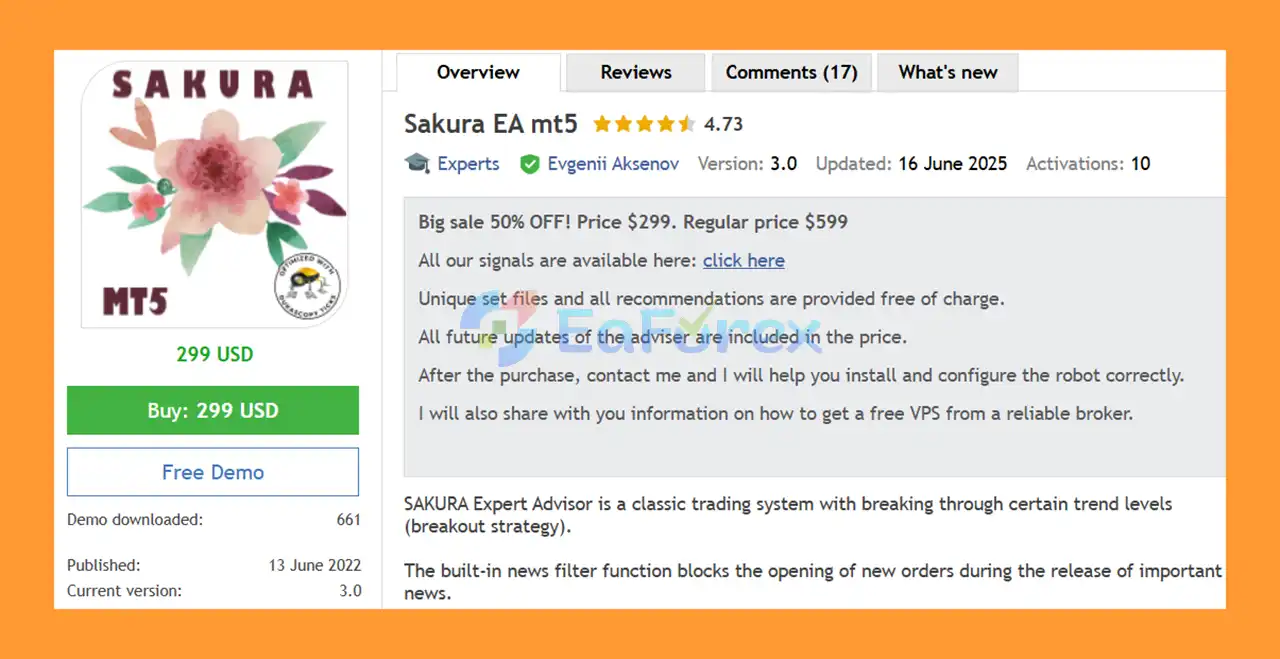
Product Overview
Sakura EA MT5 is an automated Expert Advisor for MetaTrader 5 based on a classic breakout trading strategy. The robot is designed specifically for USDJPY and operates on the H1 (1-hour) timeframe, looking for opportunities when price breaks through important trend levels.
The trading concept behind Sakura EA is relatively straightforward. Instead of relying on Grid, Martingale, or other aggressive recovery techniques, the system attempts to identify meaningful market breakouts and manage each position using predefined risk-management levels.
Every trade is protected with an individually calculated Stop Loss, Take Profit, and Trailing Stop. These levels are automatically adjusted according to the strength of the current market trend.
Sakura EA also includes a built-in news filter that can prevent the opening of new trades during important economic news releases.
The EA is designed to be easy to install and configure. Unique set files and trading recommendations are provided free of charge, while future updates are included with the purchase.
About the Developer
• Author: Evgenii Aksenov
• Experience: Over +7 years of experience on MQL5.
• Notable Products: Sakura EA MT5, DAX Scalper MT5, Gold Dragon AI MT5, Trend Line PRO EA mt5, GOLD EAgle mt5, TrendLine GRID MT5, Wall Street Scalper MT5 and other advisors.
• Flagship Product: Sakura EA MT5 is rated as the best performing product of the year.
>>> Delivery time 24h-48h after payment.
>>> Refund if not delivered.
>>> You will receive the latest version without any limitations (ID+Time).>>Reviewed by Jason Stap <<
Key Features of Sakura EA MT5
USDJPY Breakout Strategy
Sakura EA MT5 is designed specifically for USDJPY, using a breakout approach to identify potential opportunities when price moves beyond important trend levels.
H1 Trading Timeframe
The recommended timeframe is H1 (1 hour), providing the EA with a broader market view compared with lower-timeframe scalping systems.
No Martingale
Sakura EA does not use Martingale position sizing or increase lot sizes aggressively to recover previous losses.
No Grid System
The robot does not rely on a Grid strategy or continuously add positions against the market.
Automatic Stop Loss
Each trade receives an automatically calculated Stop Loss based on the current market conditions and trend strength.
Automatic Take Profit
Take Profit levels are also calculated automatically to help manage potential trade exits.
Dynamic Trailing Stop
The built-in Trailing Stop adapts to the strength of the current trend, helping the EA manage positions as the market moves in a favorable direction.
Built-In News Filter
Sakura EA can block the opening of new positions during important economic news releases. This feature is designed to reduce exposure to potentially unpredictable market movements.
Flexible Lot Management
The EA supports different money-management approaches:
- Fixed Lot – Uses a constant trading volume.
- Automatic Lot Size – Adjusts the position size proportionally according to the selected account balance and risk settings.
Free Set Files and Recommendations
Unique set files and configuration recommendations are provided free of charge to help users configure the EA correctly.
Free Future Updates
All future updates to the Expert Advisor are included in the purchase price.
Installation Support
After purchasing Sakura EA, users can contact the developer for assistance with installation and configuration.
VPS Assistance
The developer also provides information on how users may obtain a free VPS from a supported/reliable broker, helping maintain continuous EA operation.
How Does Sakura EA MT5 Work?
Sakura EA MT5 uses a breakout-based trading approach.
The EA monitors the USDJPY market on the H1 timeframe and searches for situations where price breaks through predefined trend levels. These breakout conditions are used to identify potential opportunities in the direction of a developing market movement.
Once a valid trading condition is detected, the EA can automatically open a position.
The position is then managed using several built-in mechanisms:
Market Analysis → Breakout Detection → Trade Entry → Stop Loss / Take Profit → Trailing Stop → Trade Exit
The Stop Loss, Take Profit, and Trailing Stop levels are calculated automatically according to the strength of the current trend.
Sakura EA also checks the economic calendar through its news-filter functionality. When important news is scheduled, the system can block new trades to reduce exposure during potentially unstable market conditions.
Importantly, the EA does not use Martingale or Grid strategies. Each position is managed individually rather than relying on additional trades to recover losses.
Why Choose Sakura EA MT5?
Specialized USDJPY Strategy
Sakura EA focuses specifically on USDJPY, allowing traders to use a dedicated strategy rather than a generic multi-market system.
Classic Breakout Concept
The EA uses a classic and easy-to-understand market concept: identifying breakouts through important trend levels.
No Dangerous Recovery Strategies
For traders who want to avoid aggressive position-recovery systems, Sakura EA does not use:
- Martingale
- Grid
- Lot doubling
- Other aggressive recovery techniques
Automatic Trade Management
Stop Loss, Take Profit, and Trailing Stop levels are automatically calculated, reducing the need for users to manually manage every position.
News Protection
The built-in news filter can prevent new trades around important economic announcements, helping reduce exposure to sudden market volatility.
Simple Money Management
Users can choose between fixed-lot trading and automatic lot sizing according to their preferred risk and capital-management approach.
Free Updates
All future EA updates are included in the purchase price, allowing users to continue receiving newer versions without additional update fees.
Installation and Configuration Support
The developer provides assistance after purchase, including help with installation and configuration.
Free Configuration Files
Unique set files and recommendations are provided free of charge, making it easier for users to start with the recommended configuration.
Sakura EA MT5 Performance Results
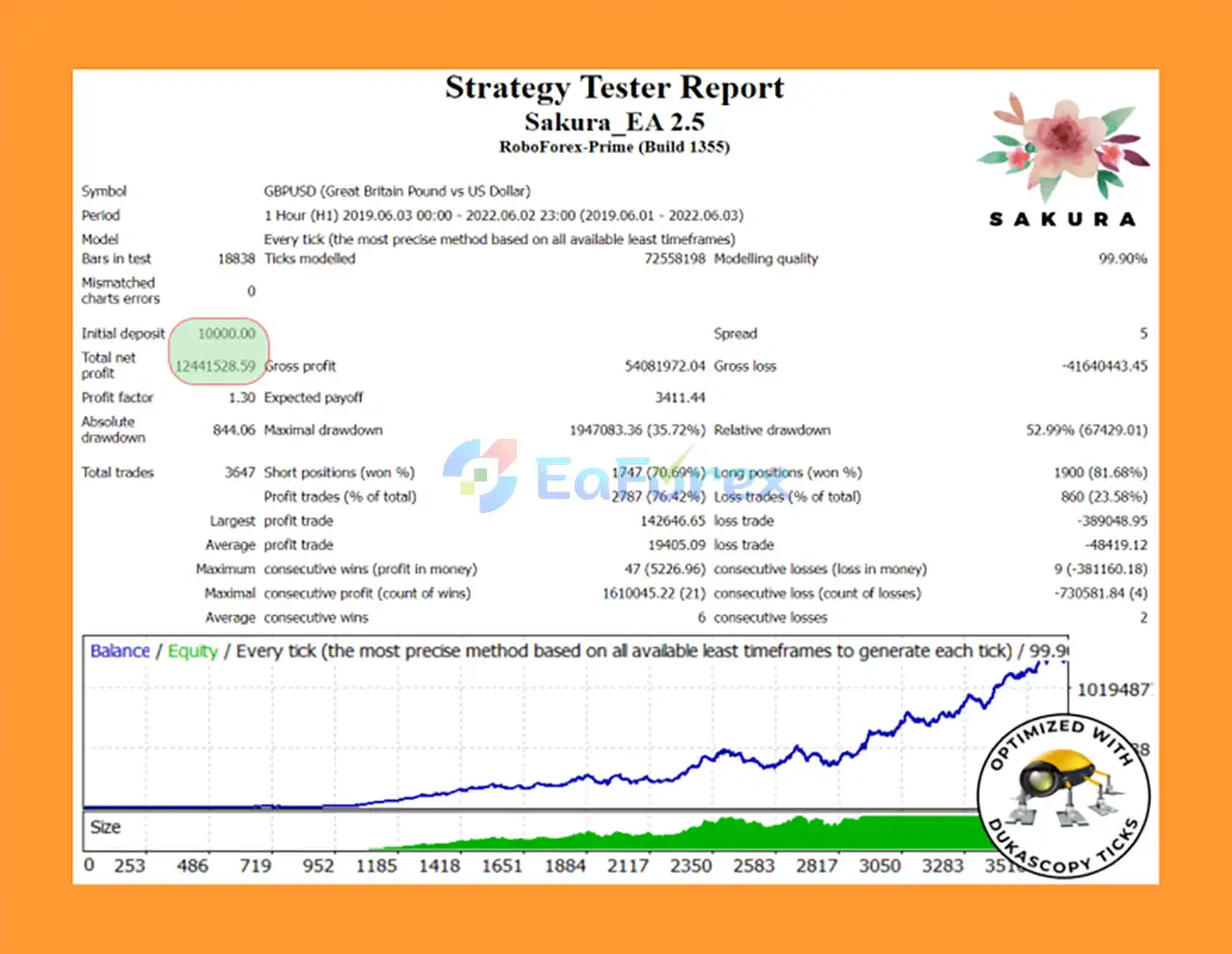
🟢 Backtest Results – GBPUSD
- Initial deposit: $10,000.
- Total net profit: $1,241,529.
- Win rate: 76.43%.
- Profit factor: 1.30.
- Max drawdown: 35.72%.
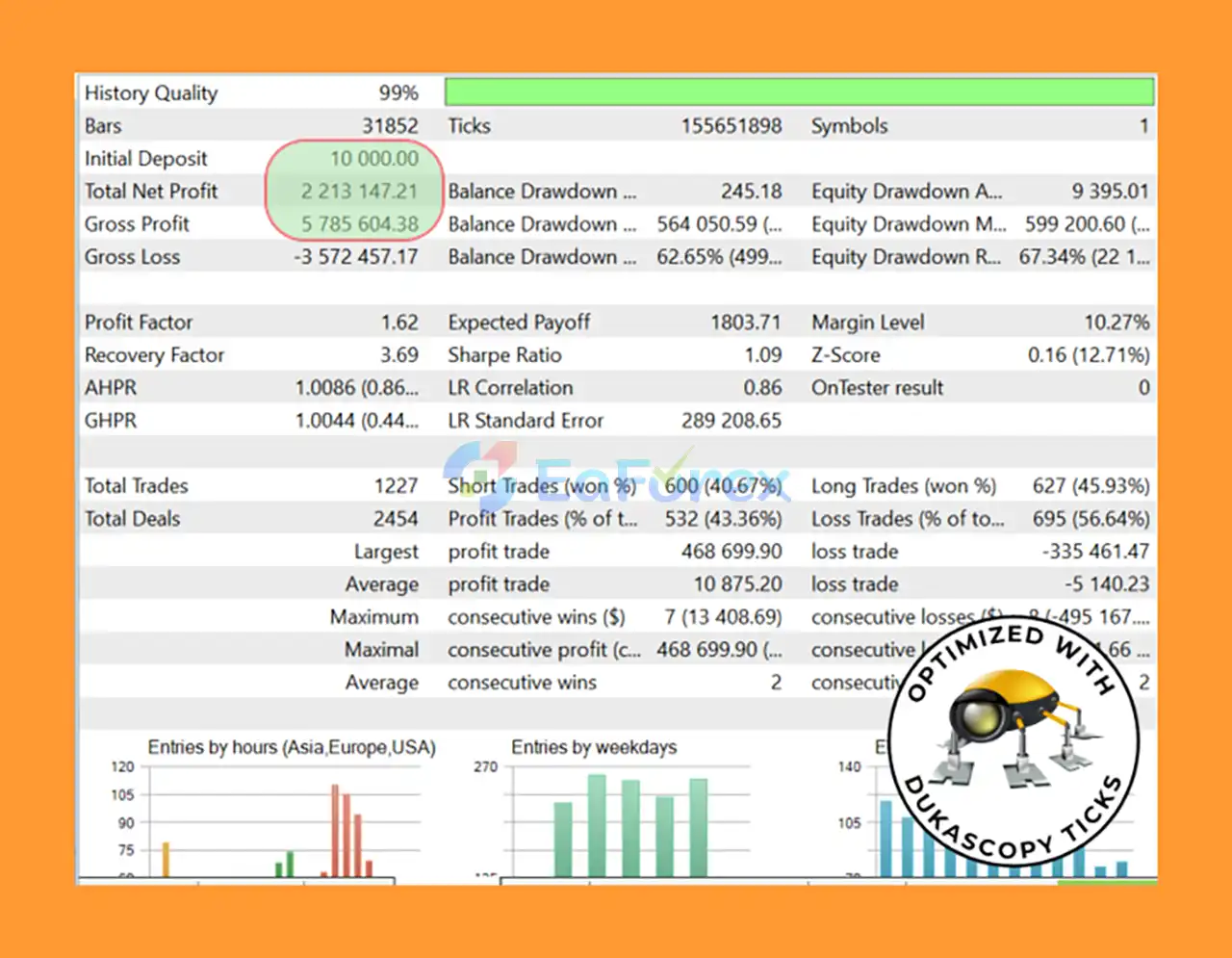
🟢 Backtest Results – High-Growth Mode
- Initial deposit: $10,000.
- Total net profit: $2,213,147.21.
- Profit factor: 1.62.
- Max drawdown: 12.65%.
- Over 22,000% return using long-term compounding strategies.
Performance and Risk Management
Sakura EA MT5 is designed with several built-in mechanisms intended to control trading risk.
Stop Loss
Each position receives an individual Stop Loss level calculated automatically according to the current market trend and conditions. This provides a predefined loss limit for individual trades.
Take Profit
The EA automatically determines Take Profit levels to manage potential profits when the market reaches the required target.
Trailing Stop
The Trailing Stop can adjust according to the strength of the current trend, allowing the EA to manage profitable positions dynamically.
Risk-Based Lot Management
Traders can choose between a fixed lot and automatic lot sizing.
Fixed Lot:
A constant position size is used for each trade.
Automatic Lot:
The position size is adjusted proportionally according to the selected account balance and risk-management settings.
News Filter
The built-in news filter can block new orders during important news releases. This can help reduce the risk of entering the market during periods of unusually high volatility.
Important Risk Consideration
The developer specifically recommends increasing risk carefully. Traders should avoid using excessive lot sizes simply because the EA has performed well historically.
The EA may experience drawdown periods, and the existence of a Stop Loss on every trade does not mean losses can be eliminated.
Recommended Trading Conditions
According to the supplied specifications:
| Setting | Recommendation |
|---|---|
| Expert Advisor | Sakura EA MT5 |
| Trading Pair | USDJPY |
| Timeframe | H1 |
| Strategy | Breakout |
| Platform | MetaTrader 5 |
| Account Type | Classic, ECN, PRO |
| Spread | Floating or Constant |
| Money Management | Fixed Lot or Automatic Lot |
Users should verify the broker's USDJPY contract specifications, spread, commission, execution quality, and trading conditions before using the EA on a live account.
Weaknesses and Risk Warnings
Although Sakura EA avoids Grid and Martingale strategies, it is still an automated trading system and carries normal market risks.
Limited to USDJPY
The recommended trading pair is USDJPY. Performance on other currency pairs should not be assumed unless specifically tested and recommended by the developer.
H1 Breakout Strategies Can Experience False Breakouts
Breakout systems can encounter situations where price temporarily breaks a trend level before reversing. These false breakouts can result in losing trades.
Drawdown Periods Are Possible
The EA developer explicitly notes that drawdown periods can occur. A Stop Loss limits individual trade losses but does not eliminate overall account drawdown.
News Events Can Cause Extreme Volatility
The news filter can block new positions during important news releases, but unexpected events can still cause rapid market movements and execution risks.
Broker Conditions Affect Results
Spread, commission, slippage, liquidity, and execution speed can influence the actual performance of an Expert Advisor.
Do Not Manually Close EA Positions
The supplied recommendations advise users not to manually close positions opened by the EA, because manual intervention can interfere with the system's intended trade-management logic.
Risk Should Be Increased Carefully
Higher risk may increase potential returns, but it also increases potential losses and drawdown. Traders should select risk according to their account size and personal risk tolerance.
No Guaranteed Profit
Sakura EA MT5 does not guarantee profits. Past performance, backtesting, or previous trading results cannot guarantee future results.
Pros and Cons
Pros
- Designed specifically for USDJPY
- MetaTrader 5 compatible
- Uses an H1 breakout strategy
- No Martingale
- No Grid system
- Individual Stop Loss for every trade
- Automatic Take Profit
- Dynamic Trailing Stop
- Built-in news filter
- Fixed-lot money management
- Automatic lot-size option
- Free set files and recommendations
- Free future updates
- Installation and configuration support
- VPS guidance available
- Suitable for Classic, ECN, and PRO accounts
- Designed for both floating and constant spread conditions
Cons
- Primarily designed for USDJPY
- Recommended timeframe is limited to H1
- Breakout strategies can experience false breakouts
- Drawdown periods are possible
- Broker conditions can affect live performance
- News events can still create unexpected volatility
- Requires appropriate risk management
- Manual intervention can interfere with EA trade management
- No automated trading system can guarantee profits
How to Install Sakura EA MT5
Installing Sakura EA MT5 on MetaTrader 5 is relatively straightforward.
Step 1 – Download the EA
Download the Sakura EA MT5 Expert Advisor files and save them on your computer.
Step 2 – Open the MT5 Data Folder
Open MetaTrader 5 and navigate to:
File → Open Data Folder → MQL5 → Experts
Copy the Sakura EA file into the Experts folder.
Step 3 – Restart or Refresh MetaTrader 5
Restart MT5 or refresh the Expert Advisors section in the Navigator window.
Step 4 – Open USDJPY H1
Open a USDJPY chart and select the H1 timeframe.
This is the recommended configuration for Sakura EA.
Step 5 – Attach Sakura EA
Find Sakura EA in the Navigator window and drag it onto the USDJPY H1 chart.
Step 6 – Enable Automated Trading
Make sure Algo Trading / Automated Trading is enabled in MetaTrader 5.
Step 7 – Load the Recommended Set File
Use the supplied set file and configuration recommendations provided with the EA.
Avoid changing parameters unnecessarily unless you understand how the changes affect risk and trade management.
Step 8 – Select Your Risk Mode
Choose the appropriate money-management method:
- Fixed Lot, or
- Automatic Lot Size
Use a conservative risk level, especially when testing the EA for the first time.
Step 9 – Contact Support if Needed
After purchase, users can contact the developer for assistance with installation and configuration.
Information regarding VPS options may also be provided to help keep the EA running continuously.
Step 10 – Test Before Going Live
Before trading with real money, it is recommended to test Sakura EA on a demo account and evaluate its behavior under your broker's actual USDJPY trading conditions.
Real User Reviews and Feedback
🔺 Sakura EA MT5 is highly appreciated by the MQL5 community for bringing stable and reliable profits. Below are 5 star reviews from users:
- YcLIM (2023.09.02): “Bought and had put it to live account trading 3 weeks ago. At start, this Sakura do not trade daily. It trades when good opportunities come in. Lately, it entered and had make big profits win. I am very happy with the results.”
- Aleksandar Aleksandrov (2022.11.23): “Thanks to Evgenii for the wonderful robot and for releasing two updates for me because it was not working correctly.”
- Moe alda (2022.11.14): “Once i set it up properly with the provided set files it started to work great, doesn’t fight the trend and consistently catches run ups.”
What’s Included in the Download Package?
- Setting (If Any).docx
- Installation Guide.docx
Final Thoughts
Sakura EA MT5 is a USDJPY-focused Expert Advisor built around a classic H1 breakout trading strategy. The system is designed to identify breaks through important trend levels and automatically manage positions using Stop Loss, Take Profit, and Trailing Stop mechanisms.
One of the key advantages of Sakura EA is its straightforward risk-management structure. The robot does not use Martingale or Grid strategies, while each trade is protected by an individual Stop Loss.
The built-in news filter provides another layer of protection by blocking new trades during important economic announcements. Users can also choose between fixed-lot and automatic lot-size management depending on their preferred approach to capital management.
The EA is also designed to be easy to use, with free set files, configuration recommendations, future updates, installation assistance, and VPS guidance included.
However, traders should remember that breakout systems can experience false breakouts and periods of drawdown. No Expert Advisor can eliminate trading risk or guarantee consistent profits.
For traders looking for an automated USDJPY breakout EA for MetaTrader 5, Sakura EA MT5 offers a relatively simple approach with built-in trade protection and automated risk-management features. Proper testing, conservative position sizing, and realistic expectations are still essential before deploying the system on a live account.



