









-
 Unlimited Activations
-
 Instant delivery
-
 Easy to install







 Unlimited Activations
Instant delivery
Easy to install
Unlimited Activations
Instant delivery
Easy to install
 Free Update
 Free Install Support

ScalpAuT EA MT5 is an automated scalping Expert Advisor designed for MetaTrader 5, powered by the VIST timing system. It analyzes forecasted time levels to identify potential trading opportunities and automate trade execution across different financial instruments, including XAUUSD (Gold), DAX, and other supported markets.
Unlike conventional trading robots that depend primarily on traditional technical indicators, ScalpAuT EA MT5 focuses on the relationship between time, price levels, and expected market movements. Its timing-based methodology is designed to forecast potential trading windows and directional price movements, allowing traders to evaluate opportunities before they occur.
The EA operates exclusively on the M1 (one-minute) timeframe, making it suitable for short-term trading strategies that require precise timing and rapid execution. It can automatically open trades according to predefined settings, manage trading sessions, and apply configurable risk parameters.
Powered by the VIST mathematical framework, ScalpAuT EA MT5 is designed for traders who prefer systematic, timing-based scalping rather than relying entirely on manual chart analysis.
The system supports several trading strategies, including Timing, Position to Level, Position from Level, and Timing Short. These options allow users to adapt the EA’s entry logic to different market conditions and trading preferences.
ScalpAuT EA MT5 is not intended to be a guaranteed-profit solution. Its effectiveness depends on market conditions, parameter selection, execution quality, and disciplined risk management.
• Author: Vadym Zhukovskyi.
• Experience: Over 3 years of experience on MQL5.
• Notable Products: Creator of ScalpAuT EA, IVISTscalp5 and other products
• Flagship Product: ScalpAuT EA MT5 highlighted as his best-performing product in 3 years.
>> Delivery time 24h-48h after payment.
>>> Refund if not delivered.
>>> You will receive the latest version without any limitations (ID+Time).>>Reviewed by Jason Stap <<
ScalpAuT EA MT5 Overview
ScalpAuT EA MT5 is built around the VIST system, a proprietary mathematical framework developed to calculate forecasted time levels and potential price movements.
The system aims to identify when market movements may occur, helping traders prepare for potential opportunities rather than relying exclusively on conventional indicator signals.
The EA automates the process of monitoring timing levels, evaluating trading conditions, and executing orders according to its configured strategy.
This reduces the need for constant manual intervention in a trading style that typically requires close attention to price movements.
ScalpAuT EA MT5 is designed to run on the one-minute chart. This setting is essential to its intended operating method and should be followed when configuring the EA.
Users can load historical data from different chart periods to support the calculation process, but the EA itself should be attached to an M1 chart.
The EA supports several strategy modes:
These strategies provide flexibility in how the EA interprets timing forecasts and identifies potential entries.
Although originally developed with gold trading in mind, ScalpAuT EA MT5 can be configured for different financial instruments.
Supported instruments may include:
Each instrument requires individual configuration because volatility, contract specifications, price increments, and trading hours vary between markets.
The EA allows users to configure session start and end times. Its documented operating schedule is approximately 04:00–20:00 UTC+3 by default, with the ability to adjust trading hours.
The actual session settings should be checked against the EA’s time-handling logic and the broker’s server time.
ScalpAuT EA MT5 includes configurable risk-related settings, such as:
riskreservhistory_weeksdtTimeThese parameters control aspects of risk allocation and the calculation of timing forecasts. Their precise effects should be confirmed using the official documentation.
The EA provides weekday settings that allow traders to enable or disable trading on selected days. A non-trading day can also be specified.
This functionality helps users align the EA’s activity with their preferred schedule and periods of market activity.
The EA includes tral_1 and tral_2 parameters associated with its trailing and order-management logic. Users should follow the developer’s instructions when modifying these values.
ScalpAuT EA MT5 can display timing information on the chart, allowing users to review potential trading windows in advance.
The developer also describes a related VIST indicator that can display timing forecasts for the week ahead. Visualized forecasts can help traders plan, but they should not be interpreted as guarantees of future price movements.
The EA relies on historical price information to calculate its timing values. Loading sufficient historical M1 quotes and tick data is therefore an important preparation step before operation.
ScalpAuT EA MT5 uses a timing-based methodology to evaluate potential trading opportunities. Rather than focusing exclusively on conventional indicators, it combines forecasted time levels with price movement and relevant price levels.
Its general workflow can be summarized as:
Historical Data Preparation → Timing Calculation → Forecast Visualization → Entry Condition Evaluation → Trade Execution → Position Management
Before using the EA, traders should load several months of historical data for the selected instrument, including M1 quotes and tick data where available.
The developer recommends increasing the maximum number of chart bars to unlimited so that the terminal can access sufficient historical information.
The VIST-based system calculates timing levels using its configured historical lookback and time interval parameters.
The developer indicates that the EA may require approximately 20–30 seconds to calculate its values after initialization, although actual calculation time can vary.
The EA can draw timing information on the chart, helping users identify potential trading windows and review the system’s forecast before deciding whether to allow automated entries.
The EA applies the selected trading mode to determine whether the current price movement satisfies the required conditions.
For example, Position from Level requires a suitable test of a nearby price level within the forecast window. Position to Level evaluates the distance to the nearest relevant level. Timing Short considers prior price movement before the forecasted entry.
When the configured timing and entry conditions are satisfied, the EA can place a buy or sell order according to the selected operation settings.
The EA follows its configured risk parameters, trading schedule, weekday restrictions, and order-management settings.
This process is designed to make timing-based scalping more systematic, although actual trade frequency and results depend on the instrument and parameter configuration.
ScalpAuT EA MT5 focuses on forecasted time levels rather than relying exclusively on traditional indicator combinations. This offers a different approach to identifying potential short-term trading opportunities.
The VIST system is the mathematical foundation behind the EA’s timing calculations. According to the developer, its methodology was developed through years of research into price behavior and timing relationships.
The EA can monitor the market and execute trades according to predefined rules, reducing the need to manually react to every timing signal.
The availability of four trading modes allows users to explore different entry conditions within the timing-based framework.
Traders can configure the EA for different financial instruments rather than being restricted to gold alone. However, each instrument requires careful testing and appropriate parameters.
Customizable session times and weekday controls help users determine when the EA is permitted to trade.
The ability to display timing information on the chart can help traders understand upcoming forecast windows and monitor the EA’s behavior.
ScalpAuT EA MT5 uses the MetaTrader 5 environment, which provides historical-data tools, charting features, and a Strategy Tester for evaluating automated trading systems.
The EA may appeal to traders who prefer rule-based execution and are comfortable with the demands of short-term trading.
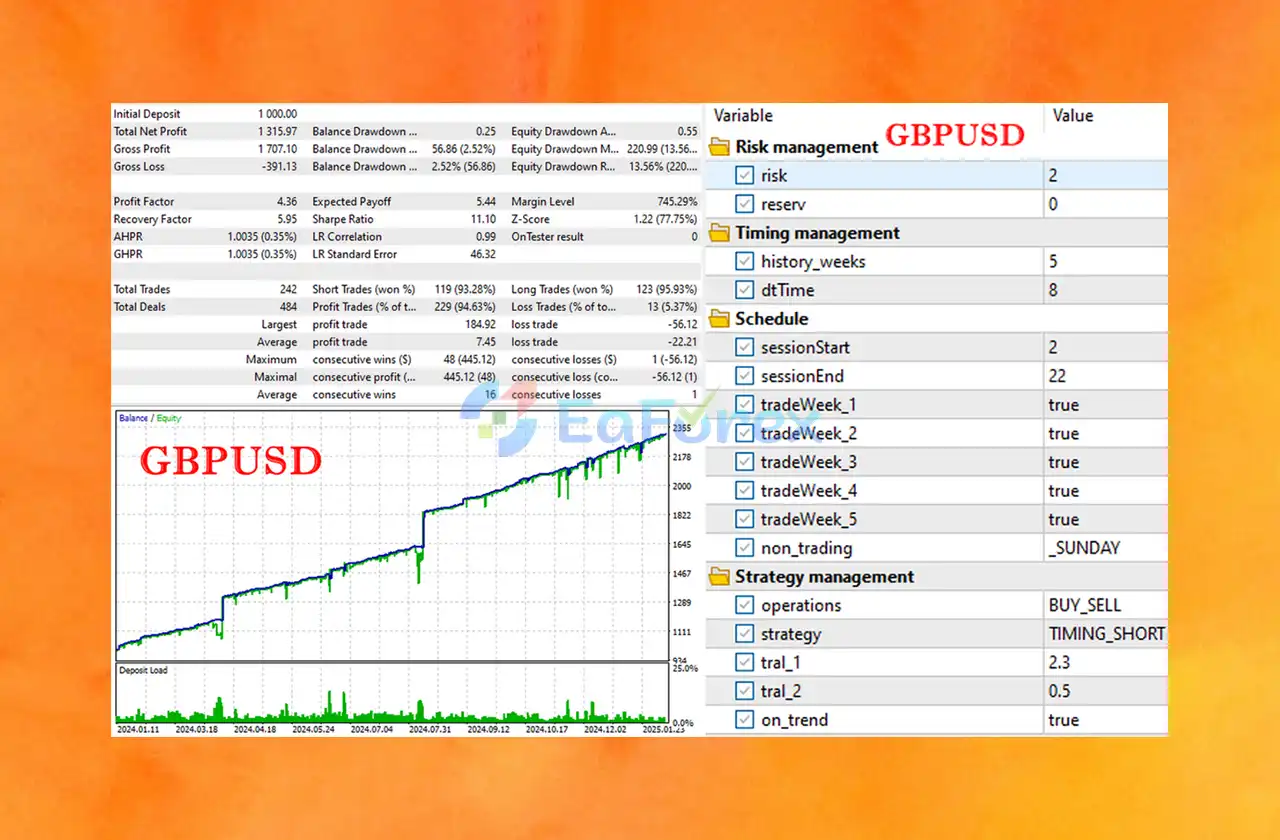
➫ GBPUSD Results:
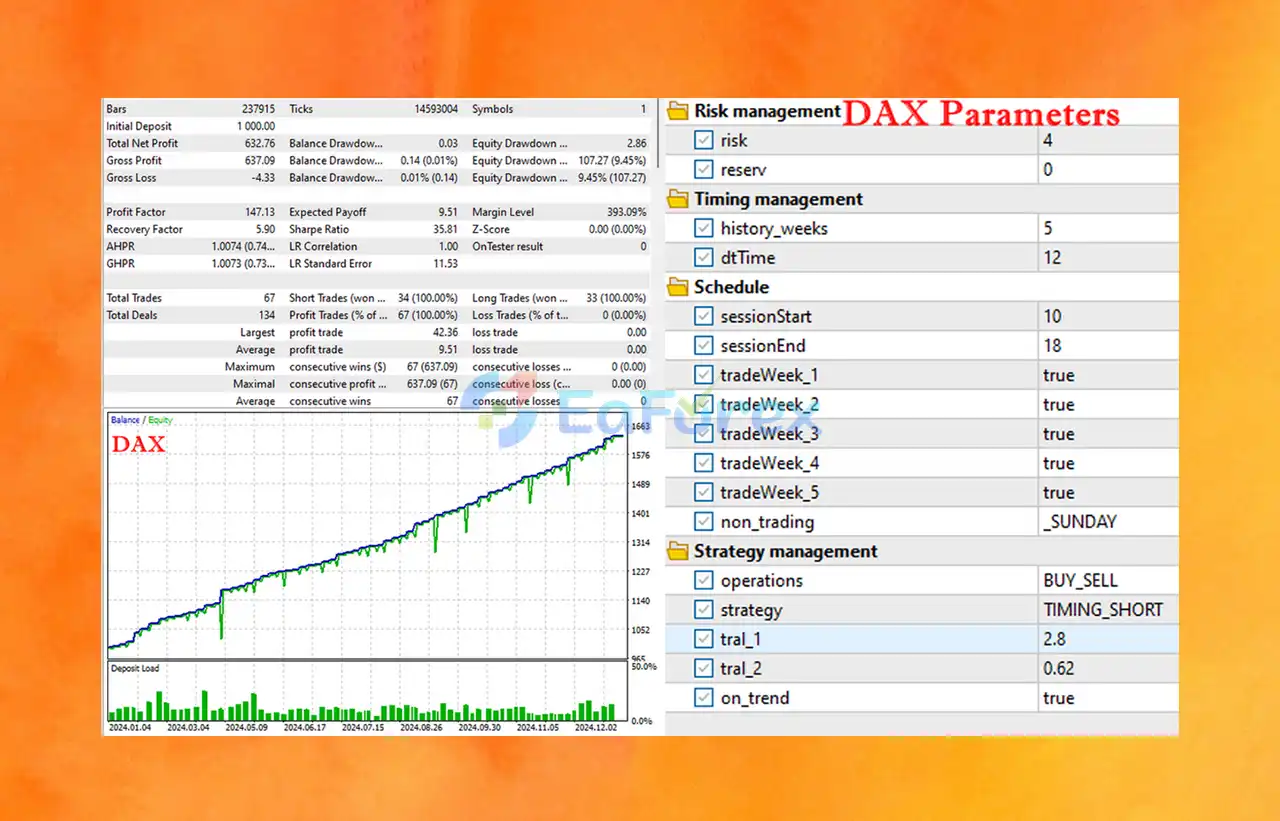
ScalpAuT EA Backtest Trading Results
ScalpAuT EA MT5 Backtest Trading Results
ScalpAuT EA MT5 is designed for short-term trading, where execution costs and risk control can have a substantial impact on results.
The developer provides example configurations for XAUUSD and DAX. These should be treated as instrument-specific starting points rather than universally optimal settings.
| Parameter | Example Setting |
|---|---|
| Instrument | XAUUSD |
| Recommended Chart Timeframe | M1 |
risk |
0.2 |
reserv |
0 |
history_weeks |
5 |
dtTime |
13 |
on_trend |
true |
sessionStart |
02:00 UTC+2 |
sessionEnd |
22:00 |
| Trading Operations | Buy/Sell |
| Strategy | Timing Short |
tral_1 |
1.81 |
tral_2 |
0.01 |
| Non-Trading Day | Sunday |
The exact risk represented by risk = 0.2 should be verified in the EA documentation before live use. It should not automatically be interpreted as a particular percentage of account equity.
| Parameter | Example Setting |
|---|---|
| Instrument | DAX |
| Recommended Chart Timeframe | M1 |
risk |
4 |
reserv |
0 |
history_weeks |
5 |
dtTime |
12 |
on_trend |
true |
sessionStart |
10:00 UTC+2 |
sessionEnd |
18:00 |
| Trading Operations | Buy/Sell |
| Strategy | Timing Short |
tral_1 |
2.8 |
tral_2 |
0.62 |
| Non-Trading Day | Sunday |
These values are examples supplied by the developer. They should not be copied between instruments without testing. In particular, the risk = 4 DAX setting should be clarified before use because its actual exposure depends on how the EA implements the parameter.
The EA provides risk-related settings that allow users to configure exposure according to the instrument and trading strategy.
Before using these settings, traders should establish how the EA calculates position size, stop levels, and potential losses. Small numerical parameter values do not necessarily imply low financial risk.
The EA allows users to restrict its activity to selected trading hours. Session controls may help avoid unwanted periods, but they cannot eliminate sudden price movements or unexpected market events.
Because timing forecasts rely on historical market information, incomplete or poor-quality data can affect calculations and testing results.
Traders should verify that historical M1 quotes and tick data are available and sufficiently complete for the intended testing period.
Before deploying ScalpAuT EA MT5 on a live account, evaluate it using the MetaTrader 5 Strategy Tester and a demo account.
Important metrics include:
No independently verified profitability or drawdown statistics were provided in the supplied product description. Actual performance should therefore be established through independent testing.
Although ScalpAuT EA MT5 offers a distinctive timing-based approach, several limitations should be considered.
Scalping typically involves frequent trading and relatively short holding periods. Transaction costs and execution quality can have a disproportionate impact on profitability.
Forecasted time levels do not guarantee that the market will move in the expected direction or travel the predicted distance. Unexpected events can invalidate a forecast.
A configuration suitable for XAUUSD may be unsuitable for DAX or another financial instrument. Differences in volatility, tick size, trading hours, and contract specifications can materially affect results.
Insufficient M1 history or incomplete tick data may affect the timing calculations. Proper preparation and data validation are essential.
Parameters such as risk, reserv, dtTime, tral_1, and tral_2 require a clear understanding of the EA’s implementation. Incorrect configuration may lead to unintended exposure or unexpected trading behavior.
Economic announcements, interest-rate decisions, futures and options expirations, and changes in liquidity can affect short-term price movements.
The developer specifically recommends additional caution during February, May, August, and November, and around selected Fridays and major US interest-rate announcements. These are developer-provided precautions, not universal rules that guarantee safer trading.
Trading sessions may be interpreted according to broker server time or another time reference. Incorrect session configuration can cause the EA to trade at unintended times.
The existence of a proprietary mathematical framework does not independently establish profitability. Backtesting, forward testing, and live execution analysis are necessary to evaluate the strategy.
Risk warning: Forex, gold, indices, and other leveraged financial instruments can generate substantial losses. Use conservative position sizing and never trade with money you cannot afford to lose.
Follow these steps to prepare and install ScalpAuT EA MT5.
Download and install MetaTrader 5 through your broker or an official MetaTrader distribution channel. Open the terminal and log in to your trading account.
If the EA is supplied as a standard .ex5 file:
MQL5 → Experts.If the EA is distributed through the MQL5 Market, follow the platform’s built-in installation process.
In MetaTrader 5, open:
Tools → Options → Charts
Set Max bars in chart to Unlimited, as recommended by the developer.
Restart the terminal if necessary and verify that the required historical data is available.
Load several months of historical data for the selected instrument.
The developer recommends preparing both:
Although XAUUSD is the primary example, the data should match the instrument you intend to trade.
Open the selected financial instrument and switch the chart to the M1 timeframe.
ScalpAuT is intended to operate on this timeframe. Switching to another chart period for its active operation may not match the developer’s instructions.
Locate ScalpAuT EA MT5 under Navigator → Expert Advisors and attach it to the M1 chart.
Enable automated trading and configure any permissions required by the platform.
Review the settings, including:
riskreservhistory_weeksdtTimesessionStartsessionEndoperationsstrategytral_1tral_2Use the official documentation to confirm each parameter’s exact meaning. Start with an instrument-specific configuration and avoid assuming that the supplied examples are suitable for every broker.
After initialization, allow the EA time to process historical data and calculate its timing values.
The developer indicates that this process may take approximately 20–30 seconds, but calculation time can vary depending on the terminal and available data.
Verify that the timing information appears as expected before enabling live trading.
Use the MetaTrader 5 Strategy Tester to assess the EA’s historical performance. Then conduct forward testing on a demo account to verify its behavior under current market conditions.
Check trade entries, execution costs, risk exposure, and the accuracy of session settings.
A reliable VPS can help keep MetaTrader 5 running continuously. Monitor the EA regularly and confirm that its trading schedule matches the intended time zone.
➫ Here are 4 star user reviews:
➫Recommended Installation Files:
ScalpAuT EA MT5 is a timing-based scalping Expert Advisor built around the VIST system, designed to identify potential trading opportunities using forecasted time levels and price movements.
Its main distinguishing features include multiple trading strategies, customizable session controls, instrument-specific parameters, and chart-based timing forecasts. Support for instruments such as XAUUSD and DAX also provides flexibility for traders who want to explore timing-based automation across different markets.
However, scalping requires careful execution and disciplined risk management. Historical data quality, parameter selection, trading costs, and unexpected market events can all affect performance. Forecasted timing levels should be treated as analytical inputs rather than guaranteed market predictions.
For traders searching for a ScalpAuT EA MT5, timing-based scalping robot, VIST Expert Advisor, Gold scalping EA, or automated MT5 trading system, this EA offers a distinctive methodology worth evaluating.
The most responsible approach is to prepare reliable historical data, understand the EA’s risk parameters, test each instrument separately, and forward-test the system before committing real capital.
Ultimately, successful use of ScalpAuT EA MT5 depends not only on timing calculations, but also on realistic expectations, reliable execution, and disciplined control of trading risk.
1. What is ScalpAuT EA MT5?
ScalpAuT EA MT5 is a fully automated scalping Expert Advisor designed for the MetaTrader 5 (MT5) platform. It leverages the proprietary VIST intelligent system, which uses predicted time-level logic instead of traditional indicators, making it ideal for high-speed, short-term trading—especially on assets like Gold (XAUUSD), GBPUSD, and the DAX index.
2. How does ScalpAuT EA MT5 differ from other scalping EAs?
Unlike typical EAs that rely on lagging indicators, ScalpAuT EA predicts market entry times in advance using VIST’s time-based strategy. This provides a unique edge by identifying pre-calculated “market moments” for trading—enabling high precision and minimal latency, especially on the M1 (1-minute) chart.
3. What trading instruments are supported by ScalpAuT EA?
ScalpAuT EA is compatible with all financial instruments, but it delivers outstanding results on:
XAUUSD (Gold)
GBPUSD
DAX Index (Germany 40)
Backtest data shows win rates of up to 100% with near-zero drawdown on DAX and 94.63% on GBPUSD.
4. Is ScalpAuT EA MT5 suitable for beginners?
Yes, ScalpAuT EA is fully automated and includes a visual time-level forecast display, so even new traders can follow entry signals with confidence. However, its advanced time-trading logic may require some learning to optimize settings for specific assets.
5. What are the risk management features of ScalpAuT EA MT5?
The EA includes:
One trade per signal
Maximum active trade limits
Customizable SL/TP and lot sizing
Trading session filters and day-of-week controls
These ensure strict capital protection and reduce overexposure, even during high-volatility events.
6. What is included in the ScalpAuT EA MT5 download package?
The download includes:
✅ Setting (If Any).docx – for optimized configuration
✅ Installation Guide.docx – step-by-step setup instructions
This ensures a smooth onboarding process, whether you're a beginner or an experienced trader.
In stock
In stock
In stock
In stock
In stock
Out of stock
No account yet?
Create an Account












 Automatic EA
 EA Best Seller
 Expert Advisor MT4
 Expert Advisor MT5
 HFT EA


Reviews
Clear filtersThere are no reviews yet.