









-
 Unlimited Activations
-
 Instant delivery
-
 Easy to install







 Unlimited Activations
Instant delivery
Easy to install
Unlimited Activations
Instant delivery
Easy to install
 Free Update
 Free Install Support

Easy Correlations EA MT5 is a MetaTrader 5 Expert Advisor designed to simplify correlation-based trading by identifying opportunities between two financial symbols that historically tend to move together. Instead of analyzing each instrument independently, the EA focuses on the relationship between correlated markets and looks for potential trading opportunities when their price movements diverge.
The core concept is straightforward: identify two symbols with a meaningful correlation, monitor changes in their relative price behavior, and look for opportunities to buy one symbol while selling the other when the relationship deviates from its usual pattern.
Easy Correlations EA MT5 combines Pearson correlation analysis, RSI-based momentum insights, and flexible distance calculations to help traders evaluate market relationships more systematically. Its intuitive dashboard presents relevant information in an accessible format, making correlation analysis easier to understand for both experienced traders and those learning advanced trading strategies.
Designed for MetaTrader 5, Easy Correlations EA aims to make statistical relationship trading more structured, transparent, and convenient.
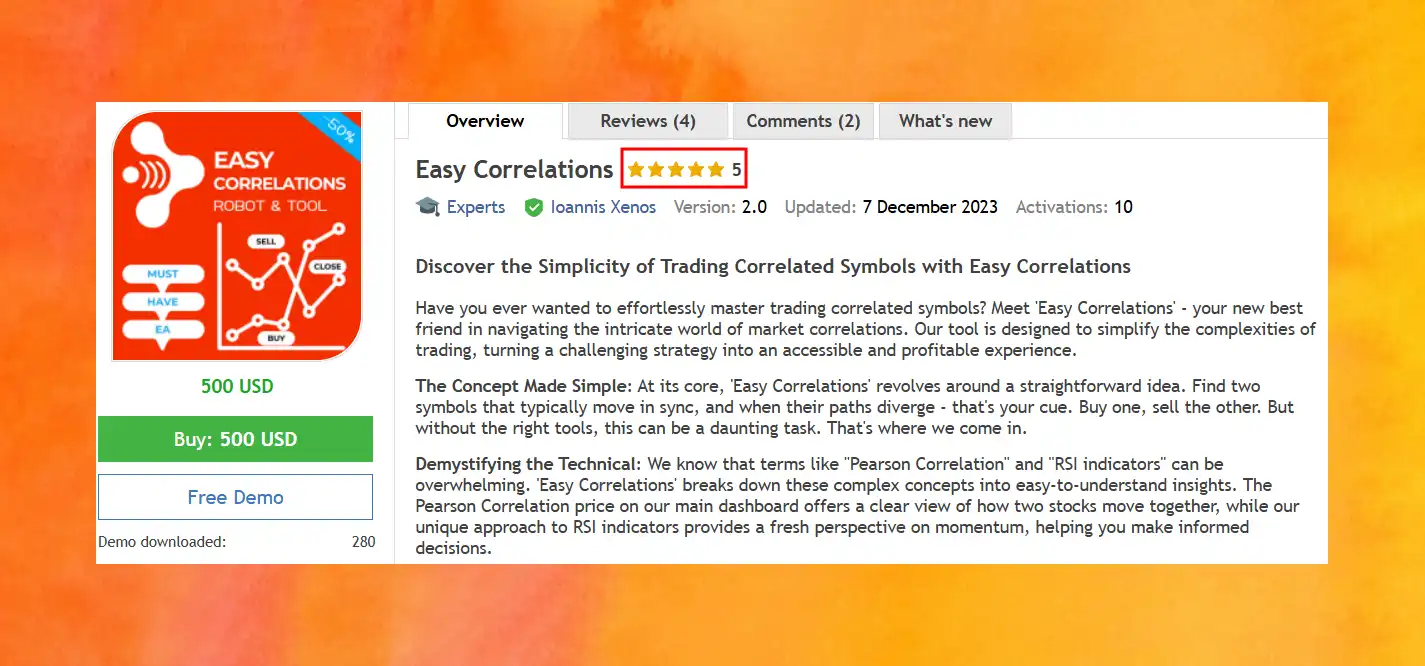
• Author: Ioannis Xenos
• Experience: Over 1 years of experience on MQL5.
• Notable Products: Easy Correlations, Prop Grid EA, Advanced CCI by Ioannis Xenos
• Flagship Product: Easy Correlations highlighted as his best-performing product in 1 years.
>> Delivery time 24h-48h after payment.
>>> Refund if not delivered.
>>> You will receive the latest version without any limitations (ID+Time).>>Reviewed by Jason Stap <<
Easy Correlations EA MT5 focuses on identifying trading opportunities between two symbols that exhibit correlated price movements. When their relationship deviates from its typical behavior, the EA helps traders evaluate potential opportunities for opposing positions.
This approach is commonly associated with pairs trading and statistical arbitrage. However, a temporary divergence does not guarantee that prices will converge again.
The EA features a Pearson correlation value on its main dashboard to help users understand how closely two selected symbols have moved together over the analyzed period.
Pearson correlation measures the strength and direction of a linear relationship between two sets of observations. Its value generally ranges from -1 to +1:
This information can help traders assess whether a symbol pair may be suitable for a correlation-based trading strategy. Correlation values can change over time and do not establish that a pair will maintain the same relationship in the future.
Easy Correlations EA MT5 incorporates an approach to RSI indicators that provides additional insight into market momentum.
The Relative Strength Index (RSI) is a technical indicator used to evaluate the strength of recent price movements. When considered alongside correlation and price-distance information, RSI can help traders assess the condition of a potential trading opportunity.
Using multiple analytical inputs may provide a broader market perspective than relying on a single indicator. Nevertheless, RSI signals can be misleading during strong trends or changing market conditions.
The EA supports both fixed and dynamic distance calculations, offering flexibility in how traders evaluate divergence between correlated symbols.
The availability of both approaches allows users to tailor their correlation strategy to different instruments and trading preferences. Actual behavior depends on the EA’s settings and implementation.
The main dashboard presents important correlation information in a more accessible format, helping users monitor the relationship between selected symbols without manually performing every calculation.
By bringing correlation readings and analytical insights into one interface, Easy Correlations EA MT5 aims to simplify the process of evaluating potential trading opportunities.
Easy Correlations EA is designed for the MetaTrader 5 trading platform. This allows users to incorporate its correlation-analysis workflow into an MT5 environment and monitor the selected instruments through their trading terminal.
Before live deployment, traders should confirm that the EA supports their broker’s symbol names, trading conditions, and account configuration.
Easy Correlations EA MT5 is based on the principle that some financial instruments exhibit related price behavior. When the relationship between two symbols temporarily diverges from its historical pattern, a trader may investigate whether the deviation could present a trading opportunity.
The general workflow involves the following stages:
Step 1: Identify a Suitable Symbol Pair
Select two instruments with a historically meaningful relationship. Correlation analysis can help evaluate whether their price movements have tended to move together or in opposite directions.
Step 2: Analyze the Correlation
The EA’s Pearson correlation reading helps assess the strength and direction of the relationship between the selected symbols. Traders should consider the observation period and recognize that historical correlation may weaken or reverse.
Step 3: Evaluate Price Divergence
The EA uses fixed or dynamic distance calculations to help assess when the relationship between the two symbols has moved away from its reference behavior.
Step 4: Consider Momentum Information
RSI-based insights provide an additional perspective on market momentum, helping traders evaluate a potential setup alongside correlation and distance readings.
Step 5: Evaluate Opposing Positions
When the configured conditions indicate a potential opportunity, the strategy may involve buying one symbol and selling the other. The objective of this approach is generally to benefit if the relative price relationship moves back toward its expected behavior.
Step 6: Monitor the Relationship and Trading Risk
Correlation-based positions require ongoing monitoring. A divergence may continue to widen, and the relationship between the symbols may change permanently. Traders should understand the EA’s exit rules, position-sizing settings, and loss-control mechanisms before using it with real funds.
The exact entry conditions, exit logic, stop-loss rules, and trade-management behavior should be verified in the EA’s documentation and settings.
Correlation trading can involve statistical calculations, indicator interpretation, and continuous monitoring of multiple instruments. Easy Correlations EA MT5 brings key analytical information into a single workflow, helping users evaluate relationships more efficiently.
By incorporating Pearson correlation, RSI-based momentum insights, and distance calculations, the EA provides several perspectives for evaluating a potential trade instead of focusing exclusively on one indicator.
The availability of fixed and dynamic distance calculations allows traders to choose an approach that better matches their strategy and preferred trading conditions.
A dashboard-based interface can make it easier to monitor the relationship between two symbols and review the information relevant to a potential entry.
The EA’s emphasis on displaying correlation information may also help traders better understand how related instruments behave. However, users should learn the underlying strategy and its limitations rather than relying solely on automated signals.
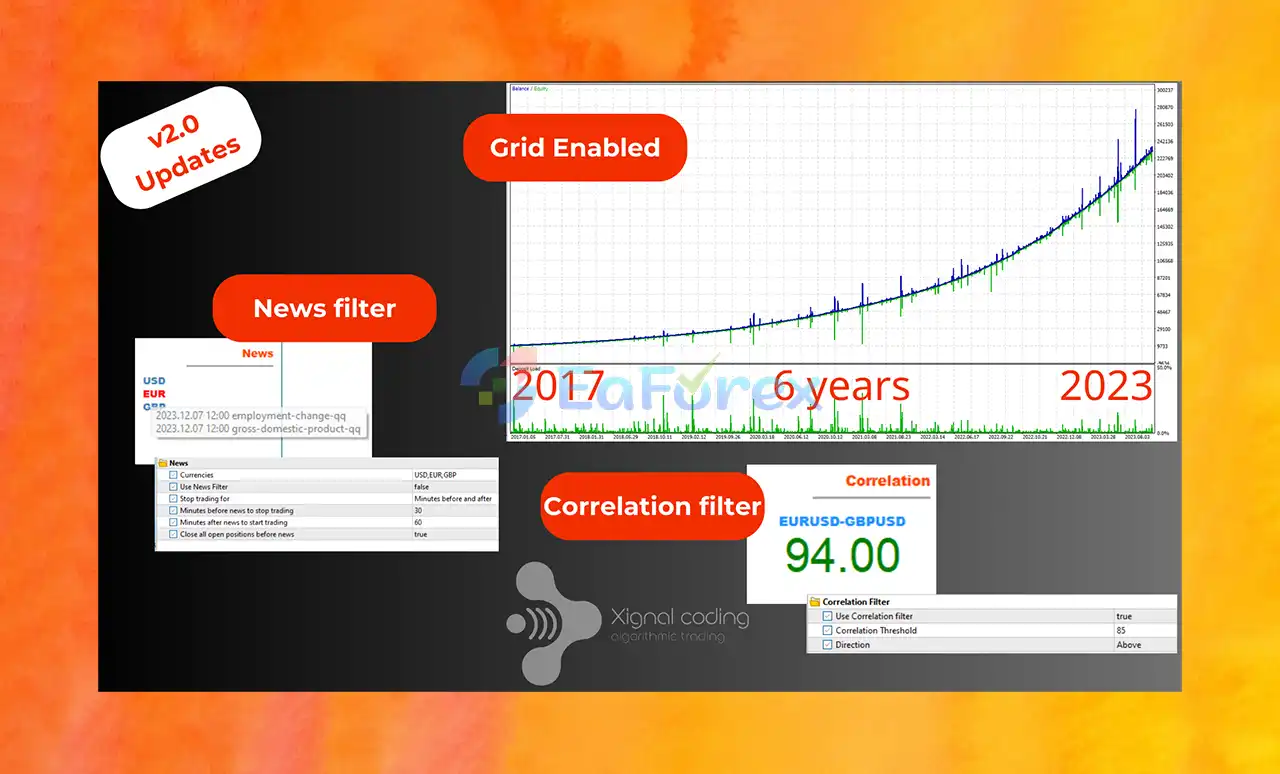
6-Year Backtest:
Easy Correlations EA MT5 Backtest Results
Easy Correlations EA Backtest Results
The potential effectiveness of Easy Correlations EA MT5 depends on the selected instruments, the stability of their relationship, trading costs, execution quality, and the EA’s configuration.
Correlation-based trading is not inherently profitable. Its results depend on whether the observed relationship behaves as expected after a position is opened.
A high historical correlation does not guarantee that two instruments will continue moving together. Economic announcements, interest-rate changes, market stress, liquidity conditions, and other factors can cause previously correlated symbols to diverge.
When buying one symbol and selling another, traders must consider the combined exposure of both positions. Equal lot sizes do not necessarily create a market-neutral position because different instruments may have different volatility levels, contract specifications, and monetary values per price movement.
Spread, commissions, swaps, and slippage can reduce the potential benefit of a correlation trade. These costs are particularly important when the expected relative price movement is small.
Before using the EA on a live account, evaluate its behavior across different market environments, including trending markets, sideways conditions, and periods of elevated volatility.
Useful evaluation metrics include:
No verified performance statistics were provided in the product description. Therefore, profitability, win rate, and expected drawdown should not be assumed without independently reviewed testing results.
Although Easy Correlations EA MT5 aims to simplify correlation trading, users should understand the limitations of this strategy before deploying it.
Two symbols that have historically moved together may stop doing so because of changing economic conditions or market-specific events. A divergence can persist much longer than expected, potentially causing substantial losses.
The strategy’s general premise relies on the possibility that a price relationship will move back toward its usual behavior. However, some divergences reflect a genuine change in market conditions rather than a temporary imbalance.
Opening a buy position on one symbol and a sell position on another does not automatically eliminate risk. Both positions can lose money, especially when the relationship changes or the instruments respond differently to market events.
Spreads, commissions, swaps, and slippage may consume a significant portion of the potential gains from relatively small price adjustments.
Backtests can be affected by data quality, parameter selection, execution assumptions, and market conditions. A strategy that performs well on historical data may produce different results in live trading.
The supplied description does not specify all details of the EA’s stop-loss rules, maximum drawdown protection, position sizing, or emergency exit behavior. Traders should verify these functions before trading live.
Risk warning: Forex and CFD trading involves a substantial risk of loss. Easy Correlations EA MT5 cannot guarantee profits or eliminate market risk. Test the EA on a demo account and use conservative risk limits before considering live deployment.
Follow these general steps to install and prepare Easy Correlations EA MT5 in MetaTrader 5.
Step 1: Obtain the EA File
Download Easy Correlations EA MT5 from the provider or the authorized marketplace where it is available. Confirm that the file is compatible with MetaTrader 5.
Step 2: Open MetaTrader 5
Launch your MT5 terminal and select File → Open Data Folder.
Step 3: Install the Expert Advisor
Navigate to MQL5 → Experts and place the EA file in the appropriate folder. If the provider supplies additional indicators or supporting files, install them according to the accompanying instructions.
Step 4: Refresh the Navigator
Return to MetaTrader 5, open the Navigator panel, and refresh the Expert Advisors list. Restart the terminal if necessary.
Step 5: Configure the Symbol Pair
Open the charts or symbol data required by the EA and configure the two instruments you intend to analyze. Confirm that the broker provides the correct symbols and that their trading sessions and specifications are suitable for the strategy.
Step 6: Review the EA Settings
Check the correlation parameters, RSI settings, distance-calculation method, and any available trade-management or risk-control options. Do not assume that the default settings are suitable for every broker or instrument.
Step 7: Enable Automated Trading if Required
Enable algorithmic trading in MT5 and grant the EA the permissions it requires. Follow the provider’s documentation for any additional configuration.
Step 8: Test Before Live Trading
Run the EA on a demo account and monitor its signals, entries, exits, and exposure. Where supported, use the MT5 Strategy Tester to evaluate historical behavior, while recognizing that multi-symbol strategies may require careful testing of data synchronization and execution assumptions.
Only consider live deployment after you understand the strategy’s behavior and have established appropriate risk limits.
Trusted by the MQL5 community for consistent results and ease of use.
Felicia Algorithm (2025.01.14):
“One of my favorite bots out there—it’s an absolute monster.”
Sachanvajra (2024.07.13):
“Fast backtest speed, great logic, highly recommended.”
Component Description:
Easy Correlations EA MT5 offers a structured approach to correlation-based trading by combining Pearson correlation analysis, RSI-based momentum insights, and flexible distance calculations within an accessible dashboard.
Its central concept—evaluating potential opportunities when two related symbols diverge—may appeal to traders interested in pairs trading and statistical relationships between financial instruments. The combination of fixed and dynamic distance calculations also provides flexibility when assessing different market conditions.
However, the quality of a correlation strategy depends on more than identifying two instruments that have historically moved together. Traders must account for changing relationships, position exposure, transaction costs, and the possibility that a divergence will not reverse.
For anyone considering Easy Correlations EA MT5, the sensible starting point is to verify its exact trading rules, test it on a demo account, and assess its results using realistic costs and conservative risk limits. A disciplined evaluation is essential before deciding whether the EA fits a particular trading strategy.
1. What is Easy Correlations EA MT5?
Easy Correlations EA MT5 is an automated trading system designed to capitalize on price divergences between highly correlated forex pairs. Built for MetaTrader 5, it identifies when correlated assets like EURUSD and GBPUSD deviate from their normal behavior, and executes trades to profit from the eventual price convergence.
2. How does Easy Correlations EA work?
The EA automatically tracks correlation coefficients between currency pairs and uses divergence-based logic to detect trading opportunities. When two correlated pairs move apart, it opens a buy on the undervalued pair and a sell on the overvalued one, targeting profit when the spread narrows again.
3. What are the benefits of correlation-based trading?
Correlation trading can offer more stable returns and lower directional risk, especially in range-bound markets. Easy Correlations EA enhances this by using advanced filters like Pearson Correlation and RSI, while simplifying execution with a real-time dashboard and auto-trade logic.
4. What trading pairs and timeframe does it support?
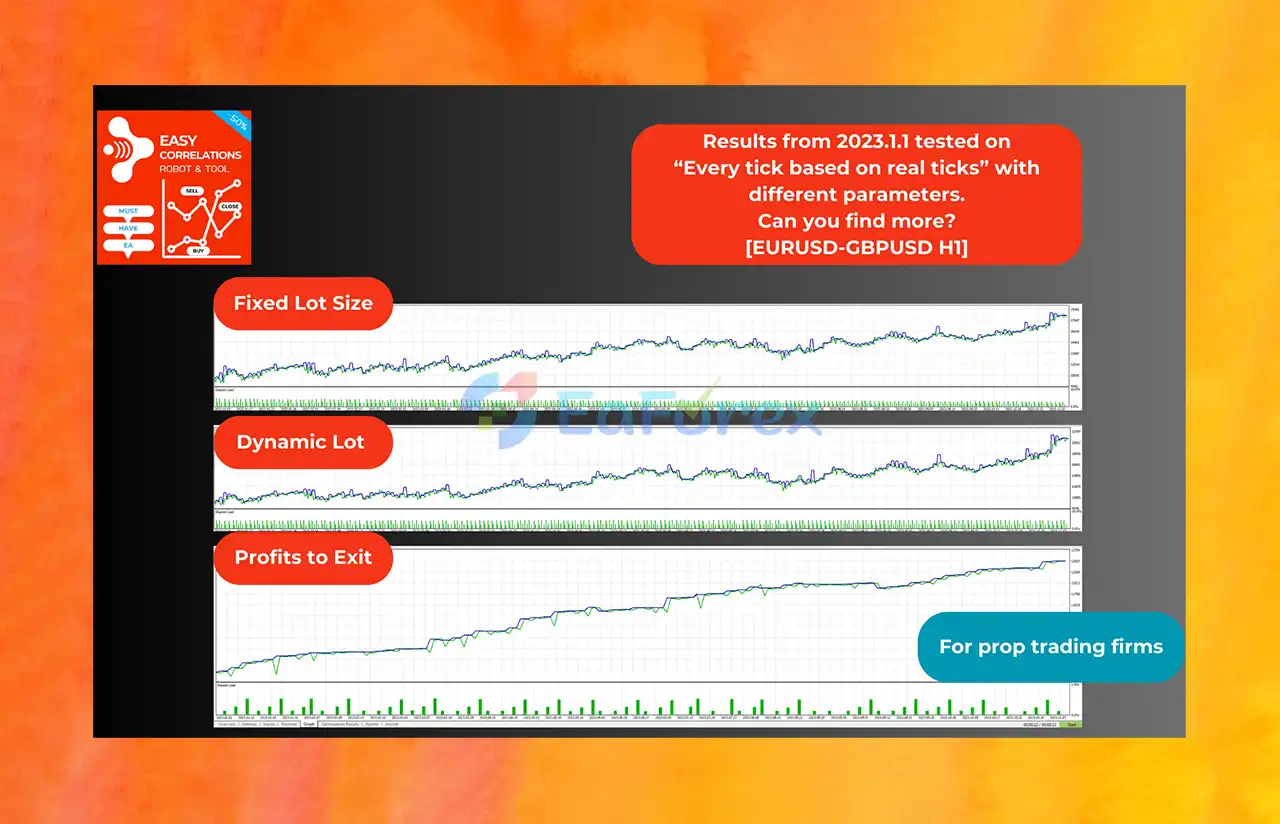
This EA is optimized for pairs like EURUSD–GBPUSD, and works best on H1 (1-hour) timeframe. However, its logic is adaptable, making it suitable for other highly correlated instruments as well. It includes preset strategy modes such as fixed lot, dynamic lot, and profit-exit.
5. Is Easy Correlations EA suitable for prop firm accounts?
Yes. Thanks to its risk-conscious grid structure, smart entry logic, and ability to control lot sizing, it performs well in prop firm challenges. Its high-precision tick-based backtests and customizable parameters make it an excellent choice for evaluation accounts.
6. Who developed Easy Correlations EA and how is support?
The EA was created by Ioannis Xenos, an MQL5 developer with a growing portfolio of trading tools. With top-rated reviews and fast customer response, traders appreciate the ease of use, performance, and developer support provided with this EA.
In stock
In stock
In stock
In stock
In stock
Out of stock
No account yet?
Create an Account












 Automatic EA
 EA Best Seller
 Expert Advisor MT4
 Expert Advisor MT5
 HFT EA


Reviews
Clear filtersThere are no reviews yet.