Product Overview
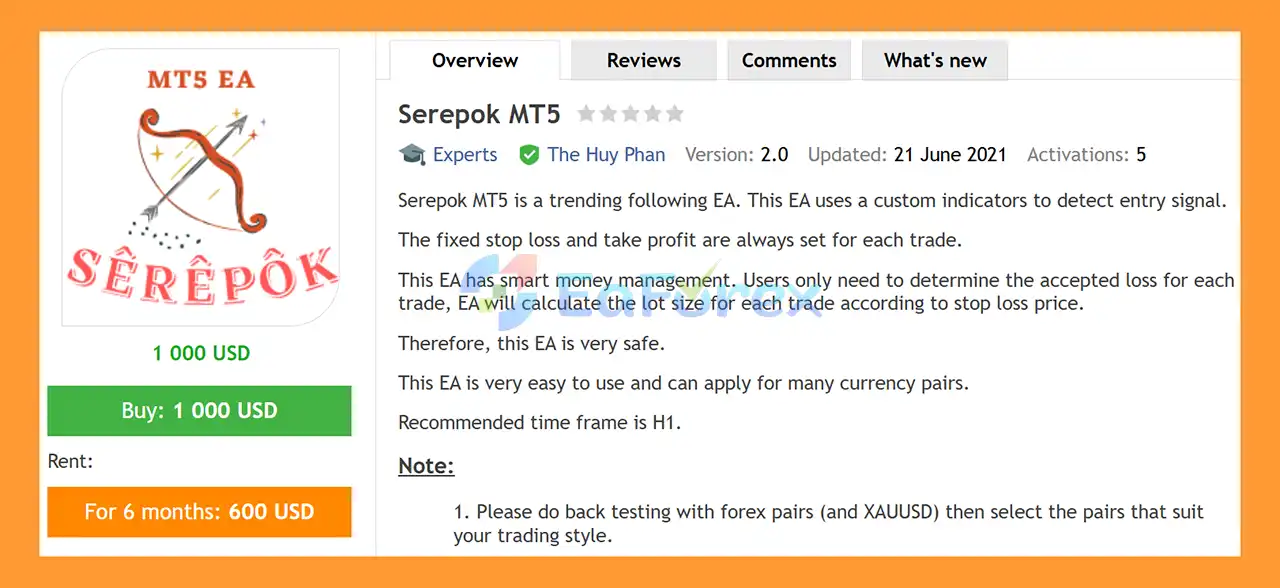
Serepok MT5 is an automated trend-following Expert Advisor (EA) for MetaTrader 5, designed to identify trading opportunities using a custom indicator-based entry system.
The EA combines fixed Stop Loss and Take Profit levels with smart money management. Instead of manually calculating position sizes, traders can define their acceptable risk, allowing Serepok MT5 to automatically calculate the appropriate lot size based on the selected Stop Loss distance.
Designed primarily for Forex and XAUUSD, Serepok MT5 is recommended for the H1 timeframe and can be applied to multiple currency pairs. Its flexible money management options allow traders to control risk according to balance, equity, free margin, fixed monetary risk, or fixed lot size.
About the Developer
- Author: The Huy Phan
- Experience: Over +7 years of experience on MQL5.
- Notable Products: Serepok MT5, Daklak MT5, Serepok MT4, Daklak MT5, Set and Forget MT5 EA and other advisors.
- Flagship Product: Serepok MT5 is rated as the best performing product of the year.
>> Delivery time 24h-48h after payment.
>>> Refund if not delivered.
>>> You will receive the latest version without any limitations (ID+Time).
>>Reviewed by Jason Stap <<
Serepok MT5 Overview
Key Features of Serepok MT5
- Automated Trend-Following Strategy – Uses a custom indicator to identify potential trend-based entry signals.
- Custom Indicator Confirmation – The
ConfirmPeriod parameter controls the indicator confirmation period.
- Fixed Stop Loss & Take Profit – Every trade is opened with predefined SL and TP levels.
- Smart Money Management – Automatically calculates lot size according to the selected risk model and Stop Loss distance.
- Percentage-Based Risk Control – Set the acceptable loss per trade using a percentage of balance, equity, or free margin.
- Multiple Money Management Modes – Supports percentage-based risk, fixed money, and fixed lot sizing.
- Multiple Risk/Reward Targets – Supports first, second, and third Risk/Reward ratios of 1.0, 1.5, and 2.0 by default.
- Spread Protection – Prevents new trades when the spread exceeds the configured maximum.
- Slippage Control – Allows traders to define the maximum acceptable slippage.
- Multi-Pair Support – Can be used across multiple Forex pairs and XAUUSD.
- Recommended H1 Timeframe – Designed for trend-following conditions on the 1-hour chart.
- Information Panel – Displays EA information directly on the chart and can be disabled to improve backtesting speed.
- Magic Number Support – Allows the EA to identify and manage its own trades.
How Does Serepok MT5 Work?
Serepok MT5 follows a straightforward automated trading process:
🔺Trend Signal Detection
The EA uses its custom indicator to identify potential trading signals according to the current market trend.
The ConfirmPeriod parameter determines the period used by the indicator. When Auto Setting is enabled, the EA can automatically select the appropriate confirmation period.
🔺Entry Confirmation
After detecting a potential signal, Serepok MT5 evaluates the available trading conditions before opening a position.
The EA also checks the configured maximum spread and slippage conditions to help avoid unfavorable execution environments.
🔺Automatic Stop Loss Calculation
Each trade receives a predefined Stop Loss according to the selected Stop loss rate.
The default Stop Loss rate is 2.5, although this value can be adjusted according to the trader’s configuration and testing results.
🔺Risk-Based Lot Calculation
One of the key features of Serepok MT5 is its automated position sizing.
Instead of manually selecting a lot size, traders can specify how much they are willing to risk. The EA then calculates the appropriate position size according to the selected money management method and Stop Loss distance.
For example, with:
MM_Type = PERCENT_BALANCERiskPercent = 3.0
the EA is configured to target approximately 3% of the selected balance-based risk amount per losing trade, subject to execution conditions and the actual Stop Loss.
🔺Trade Management
Serepok MT5 uses predefined Risk/Reward settings to determine its profit-taking structure.
The default Risk/Reward levels are:
- First: 1.0
- Second: 1.5
- Third: 2.0
These parameters can be adjusted through the EA settings.
Why Choose Serepok MT5?
Serepok MT5 is designed for traders who prefer a systematic trend-following approach combined with automated risk-based position sizing.
Automated Position Sizing
The EA can calculate lot sizes automatically based on the trader’s selected risk model, reducing the need for manual position-size calculations.
Flexible Risk Management
Users can choose between percentage-based balance/equity/free-margin risk, fixed monetary risk, or fixed lot sizing.
Forex & Gold Support
The EA was designed for Forex and XAUUSD, providing flexibility to test different instruments and identify markets that fit a trader’s preferred strategy.
Simple Configuration
Serepok MT5 does not require complicated manual calculations. Traders primarily need to configure their preferred risk and trading parameters before testing and deployment.
Built-In Execution Filters
Maximum spread and slippage parameters help control the trading conditions under which new positions can be opened.
Serepok MT5 Backtest Results
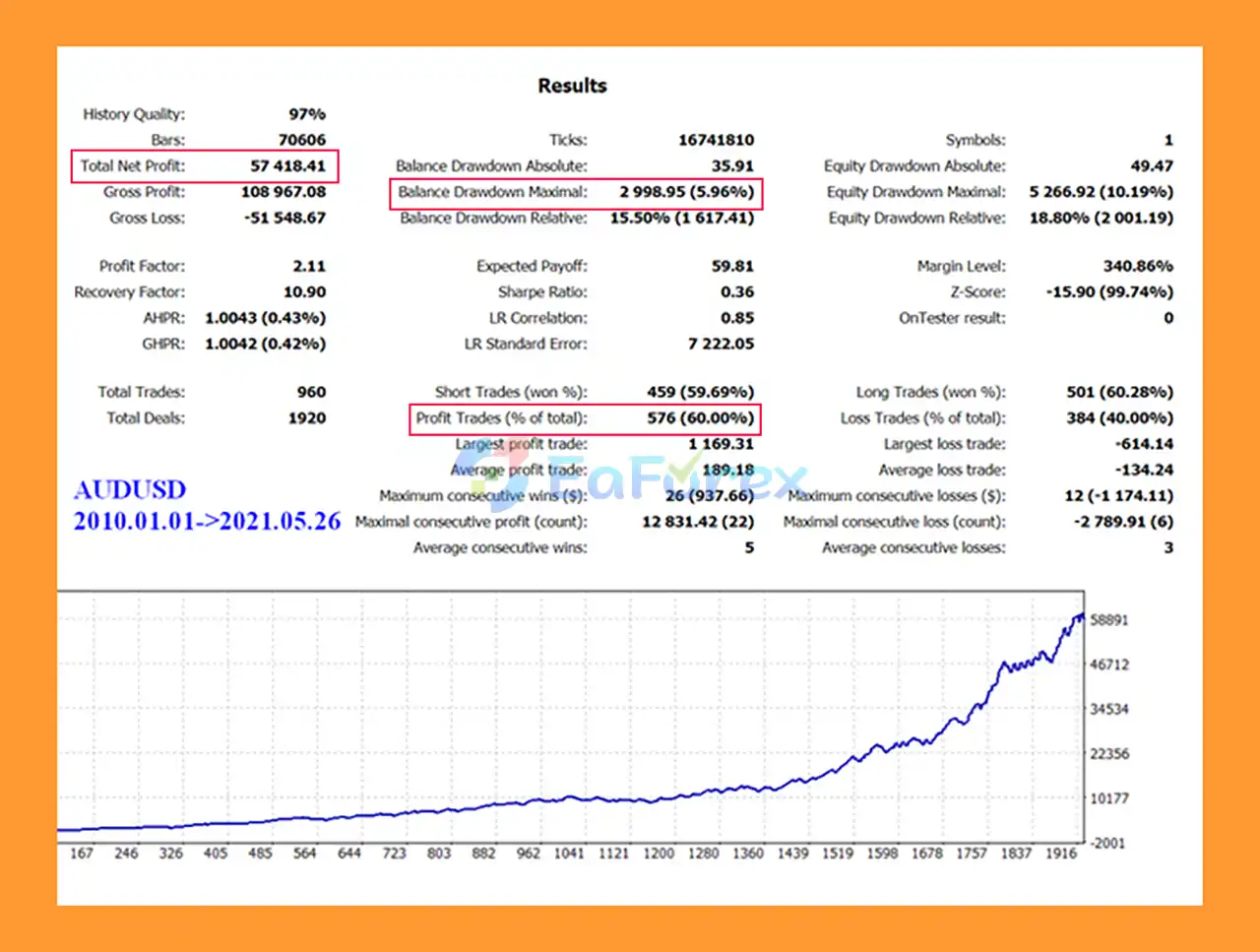
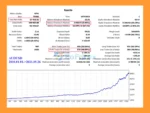
🔺AUDUSD pair – 11 years
- Initial Deposit: $1,000
- Total Net Profit: $57,418.41
- Win Rate (% of total): 60%
- Maximum Drawdown: 5.96%
Serepok MT5 Backtest
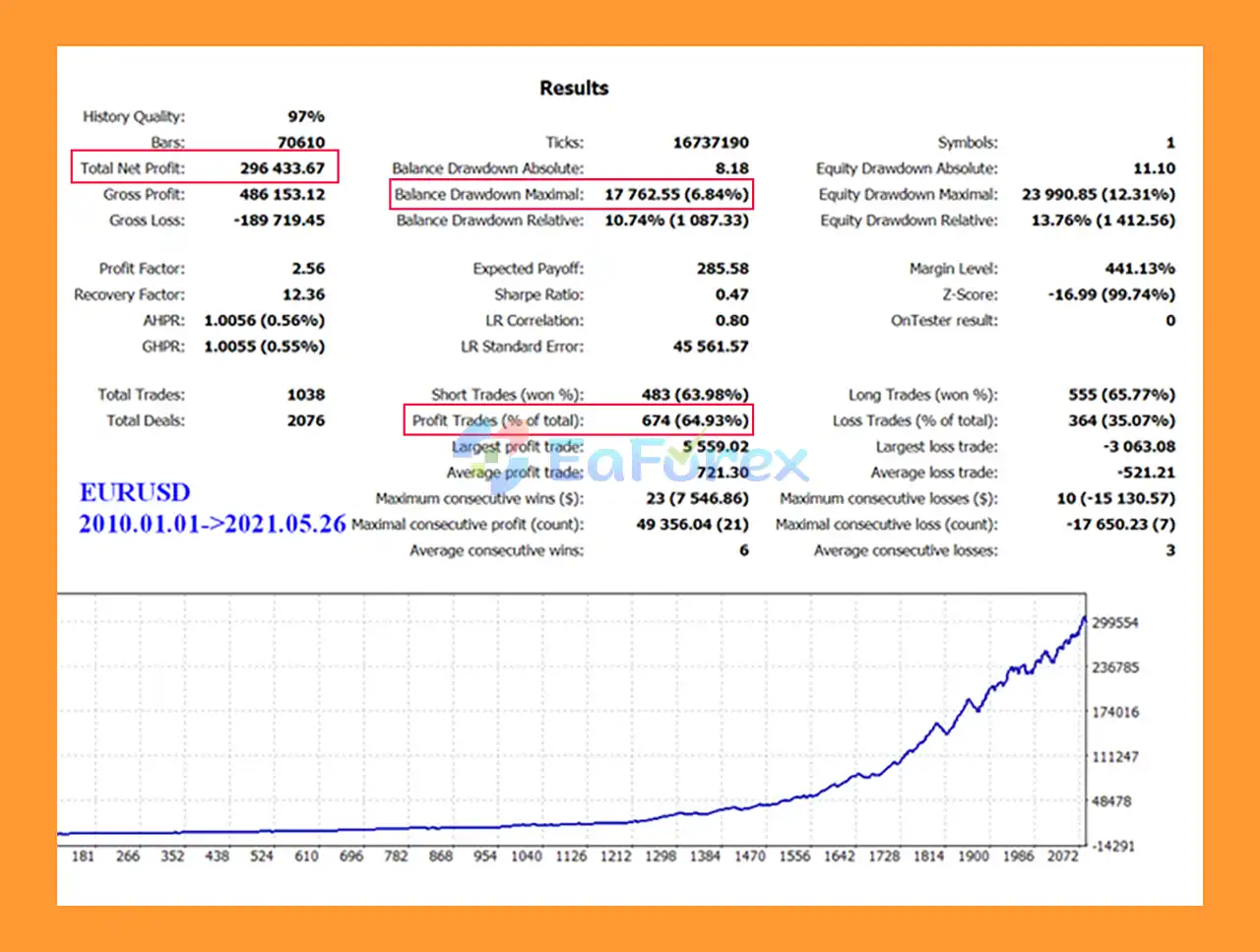
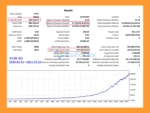
🔺EURUSD pair – 11 years
- Initial Deposit: $1,000
- Total Net Profit: $296,433.67
- Win Rate (% of total): 64.93%
- Maximum Drawdown: 6.84%
Serepok MT5 Backtest Results
Performance and Risk Management
Serepok MT5 places significant emphasis on position sizing and predefined trade protection.
The most important risk-management parameters include:
RiskPercent
Controls the percentage-based risk per trade when using the relevant money management mode.
MM_Type
Determines how the EA calculates position size. Available approaches include percentage-based balance, equity, free margin, fixed money, and fixed lot.
Stop Loss Rate
Determines the Stop Loss distance used by the EA.
Max Spread in Points
Defines the maximum spread permitted before a new trade can be opened.
Slippage
Controls the acceptable execution slippage.
Important Multi-Pair Risk Consideration
The default lot size or risk configuration is intended for use with one currency pair. If Serepok MT5 is simultaneously running on several Forex pairs or XAUUSD, total account exposure can increase.
For this reason, traders should consider reducing the RiskPercent or LotSize when running multiple symbols simultaneously.
Weaknesses and Risk Warnings
Although Serepok MT5 includes automated money management and fixed Stop Loss protection, no Expert Advisor can eliminate trading risk.
Backtesting Is Essential
The developer recommends testing the EA on different Forex pairs and XAUUSD before selecting instruments for live trading. Results can vary significantly between symbols because market behavior, spread, volatility, and execution conditions differ.
Multiple Pairs Increase Overall Exposure
Running the EA on many pairs at the same time can increase combined account risk. The default risk or lot-size configuration should not automatically be duplicated across numerous symbols.
Market Conditions Can Change
A trend-following strategy may perform differently during strong trends, ranging markets, sudden volatility, or changing liquidity conditions.
Broker Conditions Matter
Spread, slippage, execution speed, contract specifications, and trading conditions can affect real-world performance compared with historical backtests.
Historical Results Are Not Guarantees
Backtest or previous trading performance should not be interpreted as a guarantee of future results. Always evaluate the EA using realistic trading conditions before committing significant capital.
Pros and Cons
Pros
- Automated trend-following strategy
- Custom indicator for entry signals
- Fixed Stop Loss and Take Profit
- Automated risk-based lot calculation
- Multiple money management methods
- Supports Forex and XAUUSD
- Recommended H1 timeframe
- Spread and slippage controls
- Adjustable Risk/Reward settings
- Can be used across multiple currency pairs
Cons
- Requires backtesting to identify suitable pairs
- Performance may vary between instruments
- Running multiple pairs increases total account exposure
- Trend-following systems may struggle during certain ranging or unstable market conditions
- Live execution can differ from backtest results
- Risk settings require careful configuration
Serepok MT5 Parameters
| Parameter |
Description |
| ShowPanel |
Displays the EA information panel. Set to false to improve backtesting speed. |
| Auto Setting |
Automatically selects the ConfirmPeriod value when enabled. |
| ConfirmPeriod |
Period used by the custom indicator. Default: 50. |
| First Risk/Reward Rate |
First Risk/Reward ratio. Default: 1.0. |
| Second Risk/Reward Rate |
Second Risk/Reward ratio. Default: 1.5. |
| Third Risk/Reward Rate |
Third Risk/Reward ratio. Default: 2.0. |
| Stop Loss Rate |
Determines the Stop Loss distance. Default: 2.5. |
| MM_Type |
Selects the money management method. |
| RiskPercent |
Percentage-based risk per trade. Default: 3.0. |
| FixMoney |
Fixed monetary loss setting when using fixed-money MM. Default: 100. |
| LotSize |
Basic lot size when using fixed-lot MM. Default: 0.1. |
| Max Spread in Points |
Maximum spread permitted for opening a trade. Default: 100. |
| Slippage |
Maximum configured slippage. Default: 30. |
| Comment |
EA trade comment. Default: SerepokMT5. |
| MagicNumber |
Unique identifier used by the EA to manage its trades. Default: 20210526. |
How to Install Serepok MT5
- Open MetaTrader 5.
- Go to File → Open Data Folder.
- Open the MQL5 → Experts directory.
- Copy the Serepok MT5 EA file into the Experts folder.
- Restart MetaTrader 5 or refresh the Navigator window.
- Open the desired Forex or XAUUSD chart.
- The recommended timeframe is H1.
- Drag Serepok MT5 onto the chart.
- Configure the money management, Stop Loss, Risk/Reward, spread, and slippage parameters.
- Enable Algo Trading.
- Perform thorough backtesting and forward testing before using the EA on a live account.
Recommended Setup
- Minimum Deposit: $500
- Account Type: Any
- Recommended Timeframe: H1
- Markets: Forex and XAUUSD
- Recommended Approach: Test individual pairs first
- Multiple Symbols: Reduce overall risk when running several pairs simultaneously
For live trading, using a reliable VPS can also help maintain continuous MT5 operation and stable execution.
What’s Included in the Download Package?
- Setting (If Any).docx
- Installation Guide.docx
>>> Join VIP Membership Now <<<
Final Thoughts
In summary, Serepok MT5 is an automated trend-following Expert Advisor for MetaTrader 5, designed primarily for Forex and XAUUSD trading on the H1 timeframe. Its core approach combines a custom indicator-based entry system with fixed Stop Loss and Take Profit levels, allowing the EA to identify potential trend opportunities while automatically managing trade size and risk.
One of the main characteristics of Serepok MT5 is its flexible money-management system. Traders can select percentage-based risk using balance, equity, or free margin, as well as fixed monetary risk or fixed lot sizing. The automatic lot calculation based on Stop Loss distance can help maintain more consistent risk across different trades. Spread and slippage controls, adjustable Risk/Reward targets, and Magic Number management provide additional configuration options.
The supplied 11-year backtests report $57,418.41 net profit, a 60% win rate, and 5.96% maximum drawdown on AUDUSD, while the EURUSD test reports $296,433.67 net profit, a 64.93% win rate, and 6.84% maximum drawdown from a $1,000 initial deposit. These are historical results and do not guarantee future performance. Actual results may differ because of market conditions, spreads, slippage, commissions, execution quality, and broker specifications.
Overall, Serepok MT5 provides a structured framework for automated trend-following and risk-based position sizing. Traders should test each currency pair or XAUUSD separately, reduce total risk when running multiple symbols, and conduct thorough demo and forward testing before deploying the EA with live capital.
































 Automatic EA
 EA Best Seller
 Expert Advisor MT4
 Expert Advisor MT5
 HFT EA


Reviews
Clear filtersThere are no reviews yet.