Product Overview
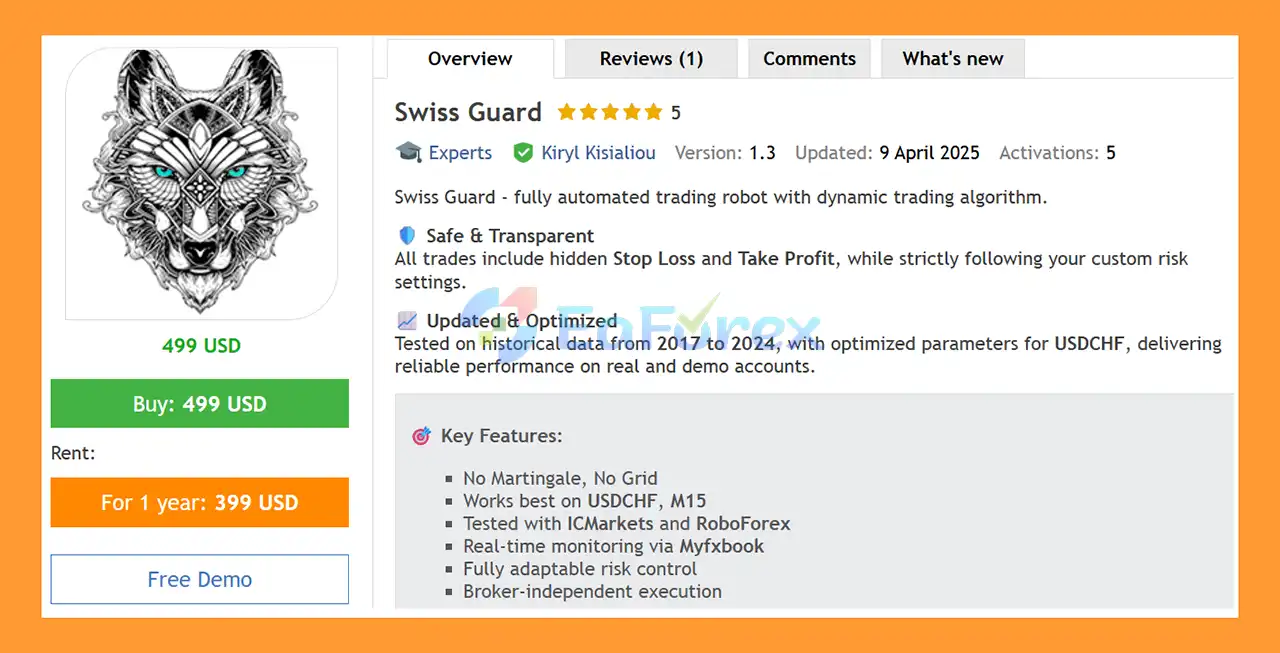
Swiss Guard EA MT5 is a fully automated Expert Advisor for MetaTrader 5, designed primarily for trading USDCHF on the M15 timeframe.
The system uses a dynamic trading algorithm to identify persistent market signals and manage multiple positions through structured trade series. Its trading architecture focuses on capturing favorable price movements while controlling market exposure through configurable risk limits, spread filtering, and slippage protection.
Swiss Guard EA MT5 does not use Martingale or Grid strategies. Instead, the robot manages trades through predefined series and position-control parameters.
The EA has been tested using historical data covering 2017 to 2024, with optimized parameters specifically developed for USDCHF. The developer also states that the system has been tested with IC Markets and RoboForex, while live monitoring is available through Myfxbook.
Each position is managed using internally controlled Stop Loss and Take Profit levels. These levels are broker-invisible but are followed by the EA according to its programmed risk-management logic.
About the Developer
- Author: Kiryl Kisialiou
- Experience: Over +4 years of experience on MQL5.
- Notable Products: Swiss Guard EA MT5, Swiss Guard EA MT4 and other advisors.
- Flagship Product: Swiss Guard EA MT5 is rated as the best performing product of the year.
>> Delivery time 24h-48h after payment.
>>> Refund if not delivered.
>>> You will receive the latest version without any limitations (ID+Time).
>>Reviewed by Jason Stap <<
Key Features of Swiss Guard EA MT5
🔺Dynamic Trading Algorithm
Swiss Guard EA MT5 uses a dynamic algorithm designed to respond to persistent market signals and manage trades according to the current trading conditions.
The system can open multiple positions when a valid signal remains active, while applying predefined limits to control the overall exposure.
🔺USDCHF M15 Optimization
The EA is primarily optimized for:
- Symbol: USDCHF
- Timeframe: M15
Using the recommended symbol and timeframe is important because the supplied parameters and historical optimization are based on these conditions.
🔺No Martingale
Swiss Guard EA MT5 does not use traditional Martingale logic that automatically increases lot sizes after losing trades.
🔺No Grid
The EA is also designed without a conventional Grid strategy. Instead, multiple positions are organized through configurable trade series based on active signals.
🔺Hidden Stop Loss and Take Profit
The EA uses internally managed Stop Loss and Take Profit levels.
These levels are not directly visible as broker-side SL/TP orders, but the EA monitors price and applies the configured protection internally.
This approach can provide greater control over how protective levels are handled, although it also means that reliable EA and platform operation are particularly important.
🔺Multiple Position Series
Swiss Guard can open multiple positions based on a persistent trading signal.
The number of series and the number of orders within each series can be configured through the EA parameters.
🔺Deposit Load Protection
The Max Deposit Load Percent parameter allows traders to define the maximum percentage of account deposit exposure permitted across opened positions.
This provides an additional layer of account-level exposure control.
🔺Spread Filtering
The EA includes a Maximum Acceptable Spread parameter.
When the current spread exceeds the configured limit, the robot can prevent new positions from being opened.
🔺Slippage Protection
The Slippage parameter allows traders to define the maximum acceptable price deviation when opening a trade.
This can help control execution during periods of fast market movement.
🔺Signal Lifetime Controls
Swiss Guard includes two parameters for controlling how long an active trading signal remains valid:
- Signal Life Distance – Points
- Signal Lifetime – Seconds
These settings help determine how long and how far from the original signal the EA can continue attempting to open positions.
🔺Broker Compatibility
The EA has been configured and tested with IC Markets and RoboForex, according to the developer.
Actual execution can still vary between brokers because spreads, commissions, liquidity, slippage, and server conditions are broker-specific.
How Does Swiss Guard EA MT5 Work?
Swiss Guard EA MT5 operates by monitoring the market for persistent trading signals and managing positions through configurable trade series.
The general process can be summarized as:
Signal Detection → Signal Validation → Spread/Slippage Check → Series Management → Position Execution → Internal SL/TP Management
Step 1: Detect a Trading Signal
The EA continuously monitors the selected market for its predefined trading conditions.
The primary recommended environment is USDCHF on M15.
Step 2: Evaluate Signal Lifetime
Once a signal appears, the EA uses its signal lifetime parameters to determine whether the signal remains valid.
Two important controls are:
- Signal lifetime in points
- Signal lifetime in seconds
These settings determine the distance and duration during which the EA can continue attempting to enter positions based on the active signal.
Step 3: Check Spread and Slippage
Before opening a position, the EA evaluates execution conditions.
If the spread exceeds the configured maximum or the expected execution conditions fall outside the allowed slippage parameters, the EA can avoid opening the trade.
Step 4: Open Trade Series
When the trading conditions are satisfied, Swiss Guard can open one or more positions according to the configured:
- Number of series
- Number of orders per series
- Maximum deposit load
This allows traders to control how much exposure can be generated from a single trading signal.
Step 5: Manage Positions
Once positions are opened, the EA manages them using its internal trading logic.
The system follows internally defined Stop Loss and Take Profit levels while monitoring market conditions.
Step 6: Control Overall Exposure
The maximum deposit load setting helps limit how much account capacity can be committed to open positions.
This is particularly important when multiple positions are opened from the same signal.
Why Choose Swiss Guard EA MT5?
USDCHF-Focused System
Swiss Guard is primarily designed and optimized for USDCHF, allowing its parameters to focus on the behavior of this specific currency pair.
M15 Trading
The recommended timeframe is M15, providing a balance between short-term market analysis and a broader price structure than ultra-short-term strategies.
No Martingale or Grid
The EA avoids traditional Martingale and Grid mechanisms, instead using controlled trade series based on persistent market signals.
Internal Trade Protection
Hidden Stop Loss and Take Profit levels allow the EA to manage protective parameters internally rather than displaying them directly as broker-side order levels.
Configurable Exposure
Traders can adjust the number of series, orders per series, and maximum deposit load to control overall trading exposure.
Execution Filters
Spread and slippage controls help the EA avoid entering trades when execution conditions become less favorable.
Historical Testing
The system has been tested using historical data from 2017 through 2024, with parameters optimized for USDCHF according to the developer.
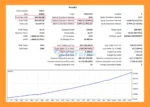
Swiss Guard EA MT5 Backtest Results
🔺 USDCHF
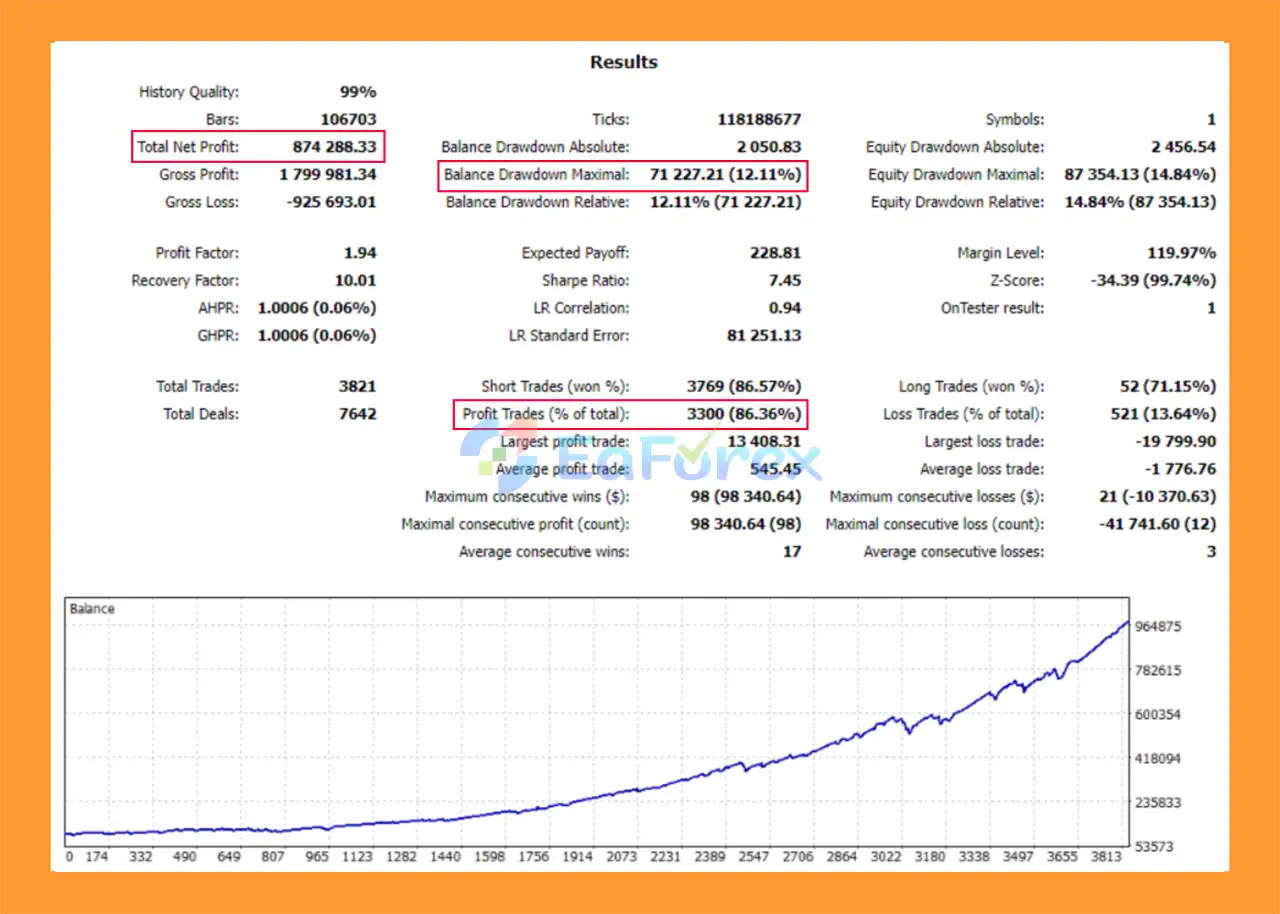
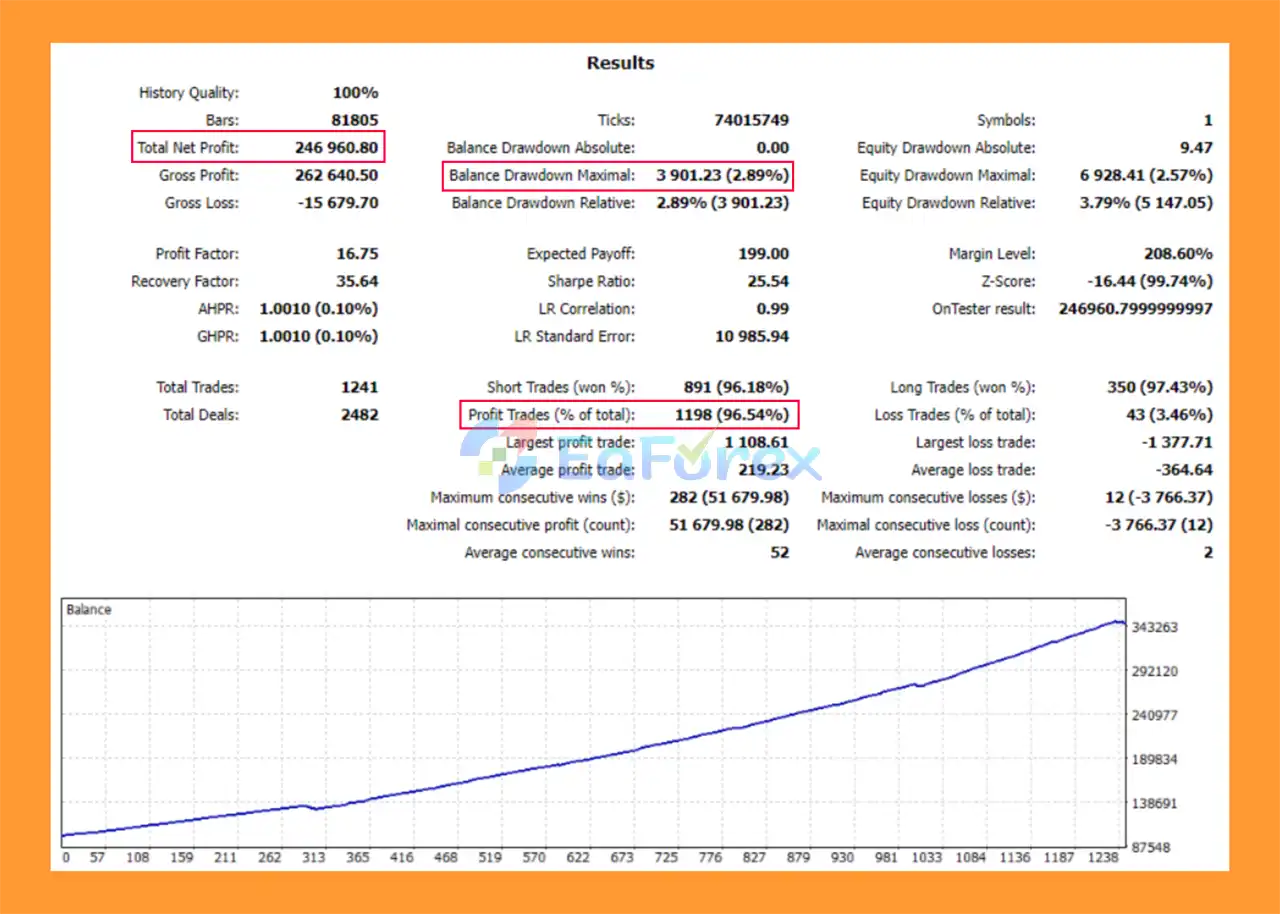
- Initial Deposit: $1,000
- Total Net Profit: $874,28833
- Win Rate (% of total): 86.36%
- Maximum Drawdown: 12.11%
Swiss Guard EA MT5 Backtests
Performance and Risk Management
Swiss Guard EA MT5 includes several parameters designed to control trade exposure and execution quality.
Maximum Deposit Load
The Max Deposit Load Percent setting defines the maximum percentage of account deposit exposure allowed across open positions.
This is an important parameter when the EA is configured to open multiple positions from a single signal.
Series Control
The following settings determine the potential number of positions generated by a signal:
Number of Series
Defines how many trading series can be opened from one signal.
Number of Orders in Series
Defines how many individual trades can be opened within each series.
Increasing these parameters can increase the number of open positions and therefore increase account exposure.
Spread Control
The Max Acceptable Spread parameter limits trading when market spreads become too wide.
This is particularly relevant during:
- News events
- Market openings
- Low-liquidity periods
- Volatile market conditions
- Broker liquidity changes
Slippage Control
The Slippage parameter controls the maximum allowed execution deviation when opening trades.
Actual slippage can still vary during fast-moving markets.
Internal SL/TP
The EA follows internally managed Stop Loss and Take Profit levels. Because these levels are broker-invisible, stable MT5 operation and reliable execution are important for the protection logic to function as intended.
Weaknesses and Risk Warnings
Hidden SL/TP Requires Stable EA Operation
Because Stop Loss and Take Profit levels are managed internally rather than necessarily being visible as broker-side protective orders, a terminal, VPS, or connection failure could affect the EA’s ability to manage positions.
A reliable VPS is therefore recommended.
Multiple Positions Increase Exposure
Although the EA does not use Martingale or Grid, it can open multiple positions based on a persistent signal.
The number of series and orders per series should therefore be configured carefully.
USDCHF Optimization Does Not Guarantee Future Results
Historical optimization from 2017–2024 provides historical information only. Market behavior can change, and live results can differ from backtests.
Broker Conditions Matter
Actual performance can be affected by:
- Spread
- Commission
- Slippage
- Liquidity
- Execution speed
- Broker server conditions
- Trading-session conditions
False or Persistent Signals
A trading signal can remain active while the market subsequently moves in an unfavorable direction. Multiple entries based on the same signal can increase total exposure.
Myfxbook Results Are Historical Evidence
Myfxbook monitoring can provide useful transparency into an account’s trading activity, but it should not be interpreted as a guarantee of future profitability.
Pros and Cons
Pros
- Fully automated MetaTrader 5 Expert Advisor
- Designed primarily for USDCHF
- Recommended M15 timeframe
- Dynamic trading algorithm
- No Martingale
- No Grid
- Internal Stop Loss and Take Profit
- Configurable trade series
- Adjustable orders per series
- Maximum deposit load control
- Maximum spread filter
- Slippage protection
- Signal lifetime controls
- Tested with IC Markets and RoboForex
- Myfxbook monitoring available
- Historical testing from 2017 to 2024
- Broker-independent architecture according to the developer
Cons
- Primarily optimized for USDCHF
- Multiple positions can increase total exposure
- Hidden SL/TP requires stable EA operation
- VPS is recommended
- Spread and slippage can affect live execution
- Higher series or order settings increase exposure
- Historical optimization does not guarantee future performance
- Broker conditions can produce different results
- Myfxbook results represent historical trading activity rather than guaranteed future returns
How to Install Swiss Guard EA MT5
Step 1: Open MetaTrader 5
Launch MetaTrader 5 and log in to your trading account.
Step 2: Open the MT5 Data Folder
In MT5, select:
File → Open Data Folder
Then navigate to:
MQL5 → Experts
Copy the Swiss Guard EA MT5 file into the Experts folder.
Step 3: Restart MetaTrader 5
Restart the platform or refresh the Navigator window.
The EA should appear under:
Navigator → Expert Advisors
Step 4: Open a USDCHF M15 Chart
For the recommended setup, open:
Symbol: USDCHF
Timeframe: M15
Step 5: Attach the EA
Drag Swiss Guard EA MT5 onto the USDCHF M15 chart.
Enable Algo Trading in MetaTrader 5.
Step 6: Configure Trade Series
Review the following parameters:
- Number of Series
- Number of Orders in Series
- Max Deposit Load Percent
Start with conservative exposure settings and test the EA before increasing position capacity.
Step 7: Configure Execution Filters
Review:
- Max Acceptable Spread
- Slippage
- Signal Life Distance
- Signal Lifetime
These settings determine when the EA can open positions and how long an active signal remains valid.
Step 8: Check Risk Settings
Review the internal Stop Loss and Take Profit configuration and make sure the overall exposure is appropriate for your account.
Remember that hidden SL/TP is managed by the EA, so reliable MT5 operation is essential.
Step 9: Use a VPS
Install the EA on a reliable VPS with a stable connection to your broker.
A VPS is particularly recommended because the EA uses internally managed protective levels.
Step 10: Test Before Live Trading
Run the EA on a demo account first and evaluate:
- Spread
- Slippage
- Execution
- Drawdown
- Number of positions
- Deposit load
- Series behavior
- Broker compatibility
Only move to live trading after confirming that the EA operates correctly under your broker’s conditions.
Real User Reviews and Feedback
🔺Swiss Guard EA MT5 is highly appreciated by the MQL5 community for bringing stable and reliable profits. Below are 5 star reviews from users:
- Fcaillou (2021.08.11): “The expert has only been live for 15 days. For the moment everything is going well, the results are there and he managed a drawdown last week. Very satisfied. Thank you. ( L’expert est en direct seulement depuis 15 jours. Pour le moment tout ce passe bien, les résultats sont la et il a bien géré un drawdown last week. Très satisfait.”
What’s Included in the Download Package?
- Setting (If Any).docx
- Installation Guide.docx
>>> Join VIP Membership Now <<<
Final Thoughts
In summary, Swiss Guard EA MT5 is a specialized USDCHF Expert Advisor for MetaTrader 5, designed primarily for automated trading on the M15 timeframe. Its trading architecture combines a dynamic signal-based algorithm with configurable trade series, internal Stop Loss and Take Profit management, spread filtering, slippage protection, and maximum deposit load controls.
A notable characteristic of Swiss Guard EA MT5 is that it does not use traditional Martingale or Grid strategies. However, the EA can open multiple positions when a trading signal remains active, meaning overall exposure can still increase depending on the number of series, orders per series, and deposit-load settings. Traders should therefore configure these parameters carefully according to their account size and risk tolerance.
The supplied USDCHF backtest reports $874,288.33 total net profit, an 86.36% win rate, and 12.11% maximum drawdown from a $1,000 initial deposit. The historical testing period covers 2017–2024. These results are historical and do not guarantee future performance. Actual results can differ because of spread, commission, slippage, liquidity, execution quality, broker conditions, and changing USDCHF market behavior.
Because the EA uses internally managed SL/TP levels, stable MT5 operation and a reliable VPS are particularly important. Overall, Swiss Guard EA MT5 provides a structured framework for automated USDCHF trading, but thorough demo testing, realistic broker conditions, conservative exposure settings, and continuous monitoring are recommended before live deployment.

































 Automatic EA
 EA Best Seller
 Expert Advisor MT4
 Expert Advisor MT5
 HFT EA


Reviews
Clear filtersThere are no reviews yet.