


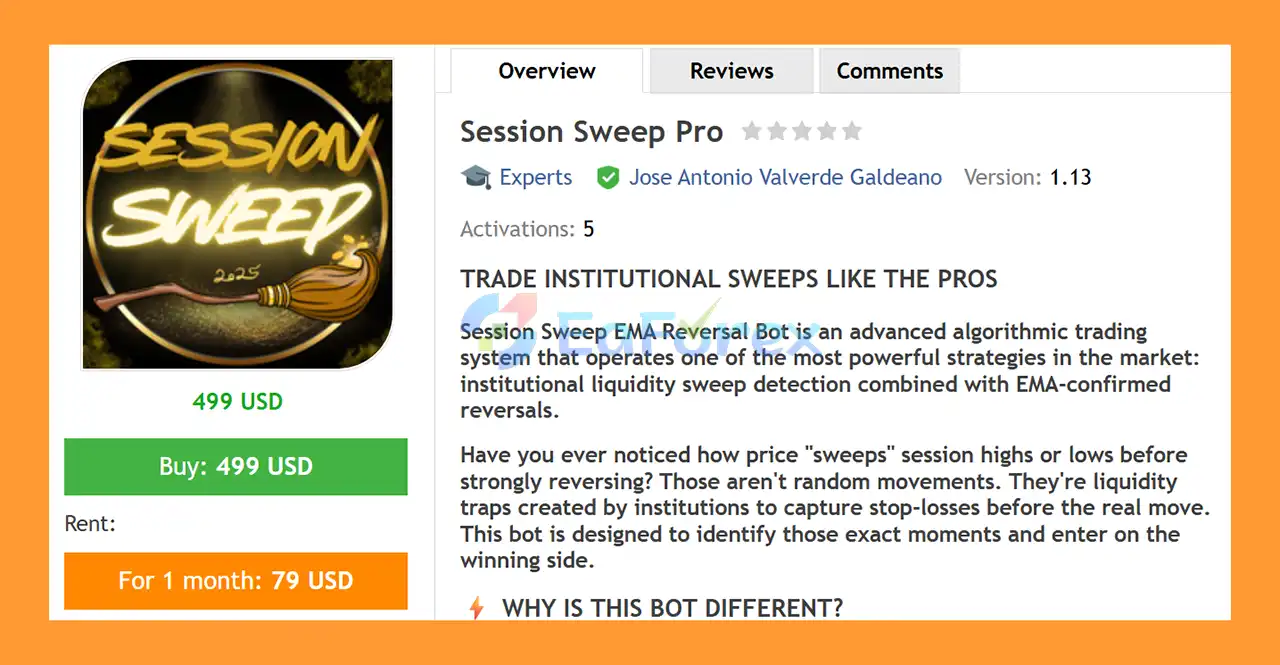
Product Overview
Session Sweep Pro MT5 is an automated MetaTrader 5 Expert Advisor (EA) designed to identify potential market reversals after liquidity sweeps around major trading sessions.
The strategy is based on a market-structure concept in which price temporarily moves beyond important session highs or lows, potentially triggering liquidity before reversing in the opposite direction.
Session Sweep Pro MT5 focuses on three major trading sessions: Asia, London, and New York. By analyzing session extremes and waiting for confirmation of a reversal, the EA attempts to identify structured entry opportunities rather than entering randomly during the trading session.
The primary recommended market is EURUSD on the M5 timeframe, although the system can also be used on XAUUSD and other Forex pairs.
The EA combines liquidity-sweep analysis, EMA 12 confirmation, risk-based position sizing, multiple take-profit levels, and advanced trade filters into an automated trading framework.
About the Developer
• Author: Jose Antonio Valverde Galdeano
• Experience: Over +1 years of experience on MQL5.
• Notable Products: Session Sweep Pro MT5, Breakout Box Pro 3in1 and other advisors
• Flagship Product: Session Sweep Pro is rated as the best performing product of the year.
>> Delivery time 24h-48h after payment.
>>> Refund if not delivered.
>>> You will receive the latest version without any limitations (ID+Time).>>Reviewed by Jason Stap <<
Main Features of Session Sweep Pro MT5
Key Features
Liquidity Sweep Strategy
The core of Session Sweep Pro MT5 is the liquidity sweep concept.
The EA monitors important highs and lows created during specific trading sessions. When price moves beyond one of these extremes, the system evaluates whether the movement may represent a liquidity sweep followed by a potential reversal.
This approach focuses on the relationship between session liquidity and subsequent price action.
Three Major Trading Sessions
Session Sweep Pro MT5 analyzes three key market sessions:
| Session | Trading Hours | Primary Role |
|---|---|---|
| Asia | 01:00–08:00 | Establishes early daily liquidity |
| London | 08:00–14:30 | Major Forex activity and liquidity |
| New York | 15:00–21:00 | Higher volatility and US market activity |
The exact session behavior can vary depending on broker server time, daylight-saving adjustments, and market conditions, so traders should verify how the configured times correspond to their broker.
EMA 12 Confirmation
A 12-period Exponential Moving Average (EMA 12) is used as an additional entry confirmation.
Rather than entering immediately after a liquidity sweep, the EA waits for price to provide confirmation through its relationship with the EMA.
This adds an additional condition to the reversal setup and helps define the intended trade direction.
Stop Loss at the Sweep Extreme
The Stop Loss is positioned at the relevant liquidity sweep extreme.
For a bearish reversal following an upside sweep, the sweep high can serve as the protective reference. For a bullish reversal following a downside sweep, the sweep low can provide the corresponding reference.
This structure ties the risk level directly to the market event that generated the trading setup.
Automatic Risk-Based Position Sizing
Session Sweep Pro MT5 can automatically calculate position size according to the trader's selected risk percentage per trade.
The recommended configuration is 1% risk per trade, although the final risk level should be determined according to the user's account size, strategy tolerance, and overall portfolio exposure.
Risk-based sizing can help maintain a more consistent percentage exposure across trades with different Stop Loss distances.
Multiple Take Profits
The EA supports a two-stage profit-taking structure:
- TP1: Closes approximately 50% of the position to secure partial profit.
- TP2: Keeps the remaining position open for a potentially larger directional movement.
This approach allows a trade to partially realize profit while maintaining exposure to a continuation of the reversal.
90-Minute Timeout
Session Sweep Pro MT5 includes a 90-minute timeout designed to prevent a setup from remaining active indefinitely.
If the expected confirmation or market movement does not occur within the defined period, the EA can discontinue the setup according to its programmed rules.
Intelligent Pending Order Cancellation
The system also incorporates automated pending-order management.
When market conditions change and an existing setup is no longer considered valid, pending orders can be cancelled according to the EA's programmed logic.
This helps prevent outdated trading setups from remaining active after the original market conditions have changed.
How Does Session Sweep Pro MT5 Work?
Session Sweep Pro MT5 follows a structured sequence when searching for potential reversal opportunities.
Session Range Identification
The EA first tracks the relevant price activity during the configured Asia, London, and New York sessions.
Important session highs and lows are recorded as potential liquidity reference points.
Liquidity Sweep Detection
The system monitors whether price moves beyond one of these established extremes.
A movement above a session high or below a session low can represent a potential liquidity sweep.
However, breaking a session extreme alone does not automatically mean that a valid trade exists.
Reversal Confirmation
After identifying a potential sweep, the EA waits for additional confirmation.
The EMA 12 is used as part of this confirmation process to help determine whether price is beginning to move back in the opposite direction.
This creates a basic sequence:
Session Extreme → Liquidity Sweep → EMA Confirmation → Entry
Stop Loss Calculation
Once the setup is confirmed, the Stop Loss is positioned around the relevant sweep extreme.
The resulting Stop Loss distance is then used as part of the position-sizing calculation when risk-based sizing is enabled.
Trade Execution
The EA automatically executes the trade according to the configured conditions.
Once the position is open, the multiple take-profit structure can manage the position through TP1 and TP2.
Position Management
At TP1, approximately 50% of the position can be closed according to the strategy configuration.
The remaining position is managed toward TP2, allowing the trade to remain open if the reversal develops into a larger directional movement.
Why Choose Session Sweep Pro MT5?
Session Sweep Pro MT5 may be suitable for traders interested in liquidity-based Forex trading and session reversal strategies.
Its primary characteristics include:
- Liquidity sweep methodology
- Asia, London, and New York session analysis
- EMA 12 confirmation
- Stop Loss based on sweep extremes
- Automatic risk-based lot sizing
- Recommended 1% risk per trade
- Two-stage take-profit structure
- 50% partial profit at TP1
- Extended TP2 target
- 90-minute setup timeout
- Automatic pending-order cancellation
- M5 trading timeframe
- EURUSD-focused configuration
- Support for XAUUSD and other Forex pairs
- Hedging and netting account compatibility
The strategy provides a structured framework for traders who want to automate a specific market behavior: the potential reversal following a session liquidity sweep.
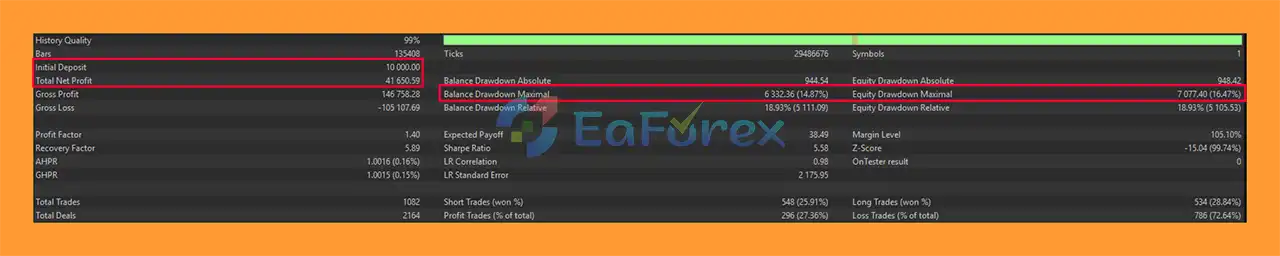
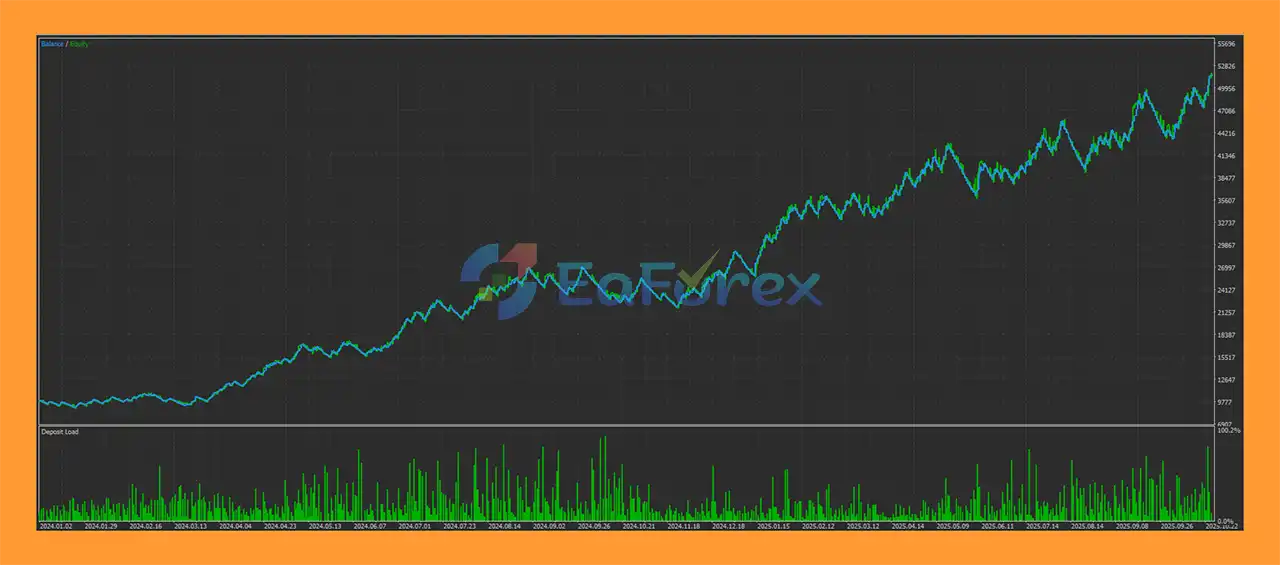
Session Sweep Pro MT5 Backtest Results
- Initial Deposit: $10,000
- Total Net Profit: $41,650
- Win Rate (% of total): 27.36%
- Maximum Drawdown: 14.87%
Performance and Risk Management
Session Sweep Pro MT5 incorporates several risk-management concepts directly into its trading process.
The most important is risk-based position sizing. Instead of using the same lot size for every trade, the EA can calculate the position size according to the selected risk percentage and the distance between the entry and Stop Loss.
The recommended risk level is 1% per trade.
A trade's risk can still be affected by factors such as:
- Spread
- Slippage
- Market gaps
- Execution speed
- Broker conditions
- Liquidity
- Volatility
- Account leverage
- Position sizing settings
The TP1/TP2 structure also provides a predefined approach to partial profit-taking, but neither partial exits nor Stop Loss placement can eliminate the possibility of losses.
Traders should test the EA using realistic spread, commission, and slippage assumptions before considering live deployment.
Recommended Trading Conditions
The supplied recommended configuration is:
| Parameter | Recommendation |
|---|---|
| Primary Pair | EURUSD |
| Additional Markets | XAUUSD and other Forex pairs |
| Timeframe | M5 |
| Minimum Deposit | $500 |
| Recommended Risk | 1% per trade |
| Account Type | Hedging or Netting |
| Broker | ECN / Low Spread |
| EURUSD Spread | Preferably below 1.5 pips |
The $500 minimum deposit should be viewed as a product recommendation rather than a guarantee that this account size is suitable for every trader.
Similarly, a low-spread ECN environment may help reduce transaction costs, but actual execution can vary between brokers and market conditions.
Trading Sessions
Session Sweep Pro MT5 is structured around three major market periods.
Asia Session
01:00–08:00
The Asia session can establish an early daily trading range and create reference highs and lows for subsequent market activity.
London Session
08:00–14:30
The London session is particularly important for Forex liquidity and can produce significant movements around previously established Asian session levels.
New York Session
15:00–21:00
The New York session can introduce additional volatility as US market activity increases and major economic releases occur.
Because broker server times and daylight-saving changes can affect session timestamps, traders should verify the EA's session configuration before live use.
Weaknesses and Risk Warnings
Liquidity-sweep strategies are not guaranteed to identify every reversal correctly.
A market can break beyond a session high or low and continue moving in the same direction rather than reversing. This creates the possibility of a failed liquidity sweep.
The M5 timeframe can also be sensitive to market noise, spread fluctuations, and short-term volatility.
Important risks include:
- False liquidity sweeps
- Failed reversals
- Short-term market noise
- Spread expansion
- Slippage
- High-impact economic news
- Rapid XAUUSD volatility
- Broker execution differences
- Incorrect session-time configuration
- Excessive leverage
- Overly aggressive risk settings
The recommended 1% risk per trade does not eliminate account drawdown. A sequence of losing trades can still produce meaningful losses.
Users should also avoid assuming that a strategy optimized for EURUSD will automatically perform similarly on Gold or other currency pairs. Each instrument has different liquidity and volatility characteristics.
Pros and Cons
Pros
- Automated liquidity-sweep strategy
- Focuses on major market sessions
- Asia, London, and New York session analysis
- EMA 12 entry confirmation
- Stop Loss based on sweep extremes
- Automatic risk-based position sizing
- Two-stage take-profit structure
- Partial profit-taking at TP1
- 90-minute setup timeout
- Intelligent pending-order cancellation
- Suitable for EURUSD M5
- Can also be applied to XAUUSD and other Forex pairs
- Supports hedging and netting accounts
Cons
- Liquidity sweeps can produce false reversals
- M5 trading is sensitive to market noise
- Spread and slippage can affect short-term entries
- Session times may need adjustment for broker server time
- High-impact news can disrupt technical setups
- Results can vary significantly between instruments
- 1% risk can still generate drawdowns during losing periods
- No trading strategy can guarantee profits
How to Install Session Sweep Pro MT5
Installing Session Sweep Pro MT5 follows the standard MetaTrader 5 Expert Advisor installation process.
Download the Session Sweep Pro MT5 files and make sure the package is compatible with MetaTrader 5.
Open MetaTrader 5 and select File → Open Data Folder.
Navigate to MQL5 → Experts and copy the EA files into the appropriate folder.
Restart MetaTrader 5 or refresh the Expert Advisors section in the Navigator.
Open an EURUSD M5 chart, which is the primary recommended configuration.
Attach Session Sweep Pro MT5 to the chart.
Configure the trading sessions, risk percentage, Stop Loss, take-profit parameters, and other available settings.
Verify that your account type is compatible with the selected configuration.
Enable Algo Trading and monitor the EA to confirm that it is operating correctly.
Before trading with real funds, conduct a backtest and demo forward test using the same broker and account conditions intended for live trading.
What’s Included in the Download Package?
🔺 Experts:
- Setting (If Any).docx
- Installation Guide.docx
Final Thoughts
In summary, Session Sweep Pro MT5 is an automated liquidity sweep and session reversal Expert Advisor built around a clearly defined market-structure concept.
The system monitors the Asia, London, and New York sessions, identifies potential liquidity sweeps around session extremes, and uses EMA 12 confirmation to validate potential reversal entries.
Its risk-management framework includes sweep-based Stop Loss placement, automatic risk-based position sizing, TP1/TP2 profit management, a 90-minute timeout, and intelligent pending-order cancellation.
The primary configuration is EURUSD on M5, while XAUUSD and other Forex pairs can also be considered with appropriate testing and parameter validation.
The strategy is based on a specific market behavior rather than an assumption that every breakout will reverse. Nevertheless, liquidity sweeps can fail, and short-term trading remains exposed to spread, slippage, volatility, and news-related risks.
For traders researching a Session Sweep EA, EURUSD Expert Advisor, Liquidity Sweep EA, or automated Forex reversal strategy, Session Sweep Pro MT5 provides a structured approach that can be evaluated through historical testing, demo trading, and careful live-risk management.



