


Product Overview
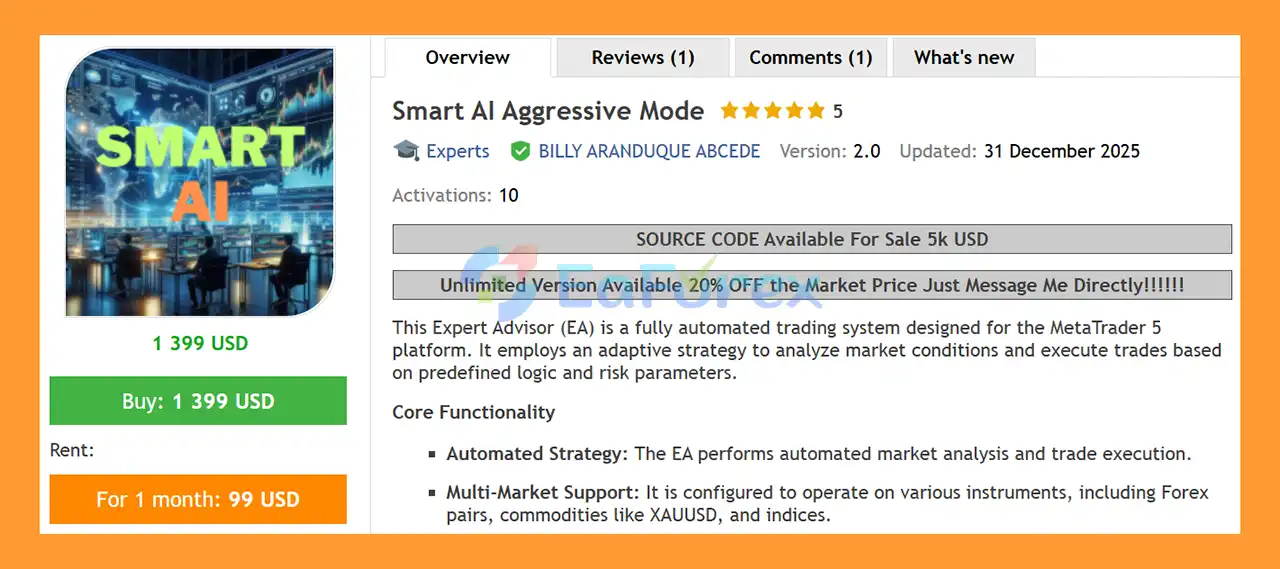
Smart AI Aggressive Mode EA MT5 is a fully automated MetaTrader 5 Expert Advisor designed to analyze market conditions and execute trades according to adaptive trading logic and predefined risk-management parameters.
The EA is designed to operate across multiple markets, including Forex currency pairs, Gold (XAUUSD), Bitcoin (BTCUSD), and selected indices. Its adaptive algorithm is intended to respond to different market volatility conditions while maintaining structured trade-entry and position-management rules.
Smart AI Aggressive Mode EA MT5 provides configurable controls for risk per trade, fixed lot sizing, maximum positions, Take Profit, trading sessions, daily trade limits, and Friday position closure. This gives traders flexibility to configure the system according to their preferred level of activity and risk tolerance.
The EA also features an integrated on-chart dashboard that displays important account and trading statistics in real time, allowing users to monitor the system directly from the MetaTrader 5 chart.
According to the supplied specifications, the EA is primarily tested on XAUUSD and BTCUSD and is recommended for the M15 timeframe.
Technical Specifications
-
- Platform: MetaTrader 5
- EA Type: Fully Automated Trading System
- Recommended Timeframe: M15
- Primary Instruments: XAUUSD and BTCUSD
- Additional Markets: Forex pairs and indices
- Minimum Recommended Deposit: $10,000
- Alternative: Cent account for smaller capital
- Trading Style: Aggressive Short-Term Trading
- Money Management: Risk-Based or Fixed Lot
- Maximum Positions: Configurable
- Trading Session: Configurable
- Daily Trade Limit: Configurable
- Weekend Protection: Friday Close feature
- Dashboard: On-chart real-time statistics
- Execution: MT5-compatible broker required
- VPS: Recommended for continuous operation
About the Developer
- Author: BILLY ARANDUQUE ABCEDE.
- Experience: Over +6 years of experience on MQL5.
- Notable Products: Smart AI Aggressive Mode EA, Volatilities Scalper EA, XAU Marti MT4, High Scalper GOLD MT4, BTMM Expert MT4, BTMM Scalper MT5 and other advisors. and other advisors.
- Flagship Product: Smart AI Aggressive Mode EA MT5 is rated as the best performing product of the year.
>> Delivery time 24h-48h after payment.
>>> Refund if not delivered.
>>> You will receive the latest version without any limitations (ID+Time).>>Reviewed by Jason Stap <<
Main Features of Smart AI Aggressive Mode EA MT5
Fully Automated Trading
Smart AI Aggressive Mode EA MT5 performs market analysis, trade execution, and position management automatically.
Once installed and configured, the EA can operate according to its predefined trading logic without requiring traders to manually monitor every market movement.
Adaptive Trading Logic
The EA uses adaptive logic designed to respond to different market volatility conditions.
Instead of applying identical trading behavior regardless of market environment, the system is designed to adjust its operation according to the current market state.
This approach is intended to help the EA operate across different market conditions while maintaining predefined risk and position-management rules.
Multi-Market Support
Smart AI Aggressive Mode EA MT5 is designed to support multiple financial instruments.
The supplied specifications identify:
- XAUUSD (Gold)
- BTCUSD (Bitcoin)
- Forex currency pairs
- Selected indices
XAUUSD and BTCUSD are listed as the primary tested instruments. Traders should verify compatibility with their specific broker and symbol before using other markets.
Automated Risk Management
The EA includes configurable risk-management parameters that allow users to control their exposure.
Available settings include:
- Risk per trade
- Fixed lot size
- Maximum positions
- Take Profit
- Maximum daily trades
- Trading hours
- Friday close
- Position-management parameters
These settings allow the EA to be configured for different trading approaches, from relatively controlled settings to more active configurations.
Risk-Based Lot Sizing
The RiskPerTrade parameter allows traders to define the percentage of account balance allocated to each trade cycle.
Alternatively, users can enable FixedLot to trade with a predefined lot size.
This flexibility allows traders to select either automated position sizing or manual lot control.
Maximum Position Control
The MaxPositions parameter limits the total number of simultaneous open positions.
This feature is particularly relevant because the EA is described as an aggressive short-term system that may open multiple positions within a relatively short period.
Take Profit Management
The TakeProfit parameter defines the target profit percentage of equity used to close the trades within a trading cycle.
This provides the EA with a predefined profit objective for managing a group of positions.
Trading Session Control
The EA includes configurable trading-hour parameters:
- TradeStartHour
- TradeEndHour
These settings allow users to restrict trading to specific periods of the day.
Friday Close Protection
The FridayCloseHour parameter allows the EA to automatically close positions before the weekend.
This can help traders avoid maintaining positions through periods when markets are closed or liquidity conditions change.
Daily Trade Limitation
The MaxDailyTrades parameter limits the number of trading cycles the EA can execute during a single day.
This provides an additional layer of control over trading frequency.
Real-Time Dashboard
Smart AI Aggressive Mode EA MT5 includes a visual dashboard displayed directly on the trading chart.
The dashboard provides essential account and trading information, allowing users to monitor the EA's activity and performance without leaving the MetaTrader 5 platform.
How Does Smart AI Aggressive Mode EA MT5 Work?
Smart AI Aggressive Mode EA MT5 follows a structured automated trading process.
Step 1: Market Analysis
The EA continuously evaluates market conditions on the selected instrument.
It analyzes the current market environment and determines whether the conditions match its predefined trading logic.
Step 2: Adaptive Market Evaluation
The system considers different volatility states and adjusts its trading behavior according to its internal adaptive logic.
This allows the EA to respond differently depending on the current market environment.
Step 3: Trade Entry
When the required conditions are satisfied, the EA can automatically open a trade.
Position sizing is determined according to the selected money-management method:
- Risk-based position sizing
- Fixed lot sizing
Step 4: Position Management
After entering the market, the EA manages open positions according to its internal trading rules and user-defined parameters.
The MaxPositions setting limits the number of simultaneous positions.
Step 5: Profit Target Management
The EA monitors the trading cycle and can close positions when the configured TakeProfit equity target is reached.
Step 6: Trading Session Control
The EA only operates during the configured trading window.
This allows traders to avoid unwanted trading outside their preferred market hours.
Step 7: Daily and Weekend Management
The system can limit the number of daily trading cycles and automatically close positions before the weekend using the FridayCloseHour parameter.
This creates a structured framework for controlling automated trading activity throughout the week.
Why Choose Smart AI Aggressive Mode EA MT5?
Smart AI Aggressive Mode EA MT5 is designed for traders looking for a fully automated and adaptive MT5 trading system with extensive control over position sizing, trading frequency, and trading sessions.
Automated Market Analysis
The EA handles market analysis and trade execution automatically, reducing the need for continuous manual intervention.
Adaptive Trading System
Its adaptive logic is designed to respond to different volatility conditions rather than relying on one static trading environment.
Multi-Market Capability
The system can be used with multiple types of instruments, including Gold, Bitcoin, Forex pairs, and indices, subject to broker and symbol compatibility.
Flexible Money Management
Traders can select between:
- Risk-based position sizing
- Fixed lot trading
This makes it possible to customize the EA according to different account-management preferences.
Extensive Configuration
Users have access to parameters controlling:
- Risk
- Lot size
- Maximum positions
- Profit targets
- Trading hours
- Daily trade frequency
- Weekend position management
- Symbol-specific strategy settings
Real-Time Monitoring
The integrated dashboard provides account and trading statistics directly on the chart.
Continuous Automated Operation
When deployed on a suitable MT5 environment, the EA can operate automatically throughout the trading week.
Smart AI Aggressive Mode EA MT5 Myfxbook Results
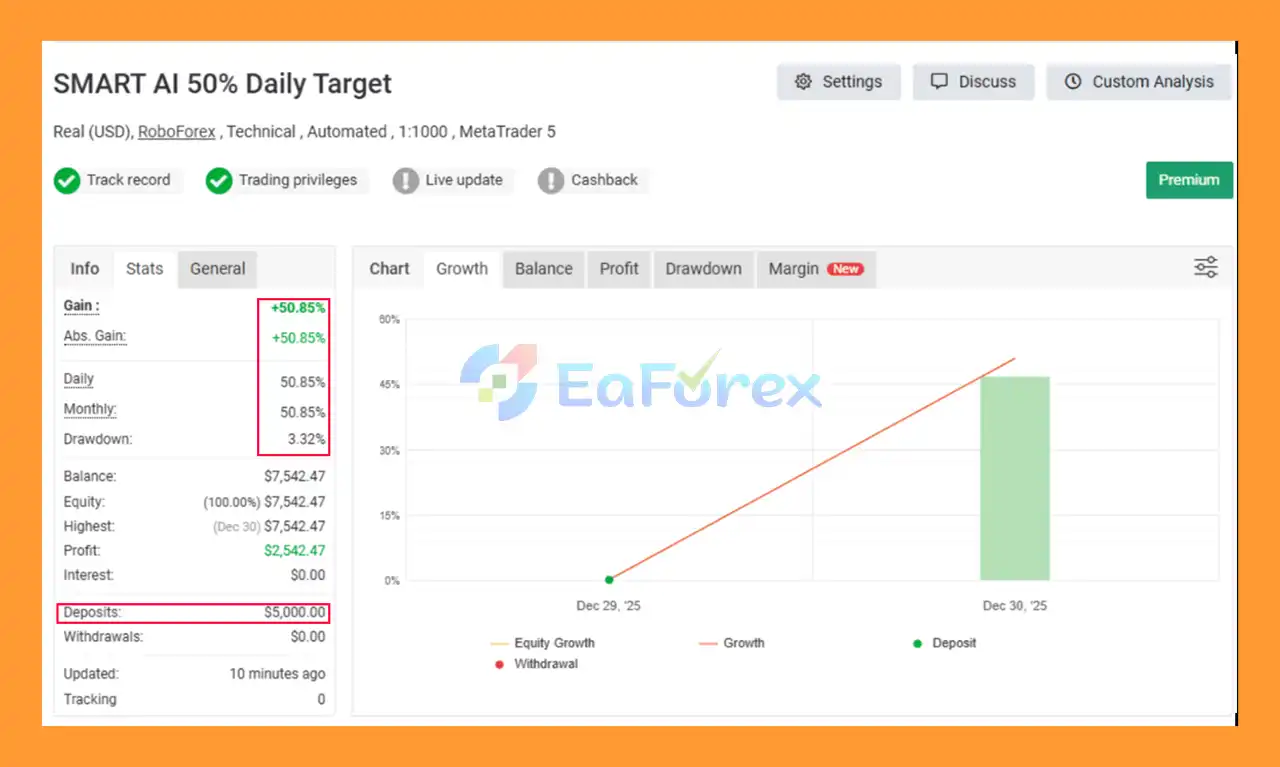
♦️Verified Myfxbook
- Initial Deposit: $5.000
- Total Gain: +50.85%
- Daily Growth: 50.85%
- Monthly Growth: 50.85%
- Maximum Drawdown: 3,32%
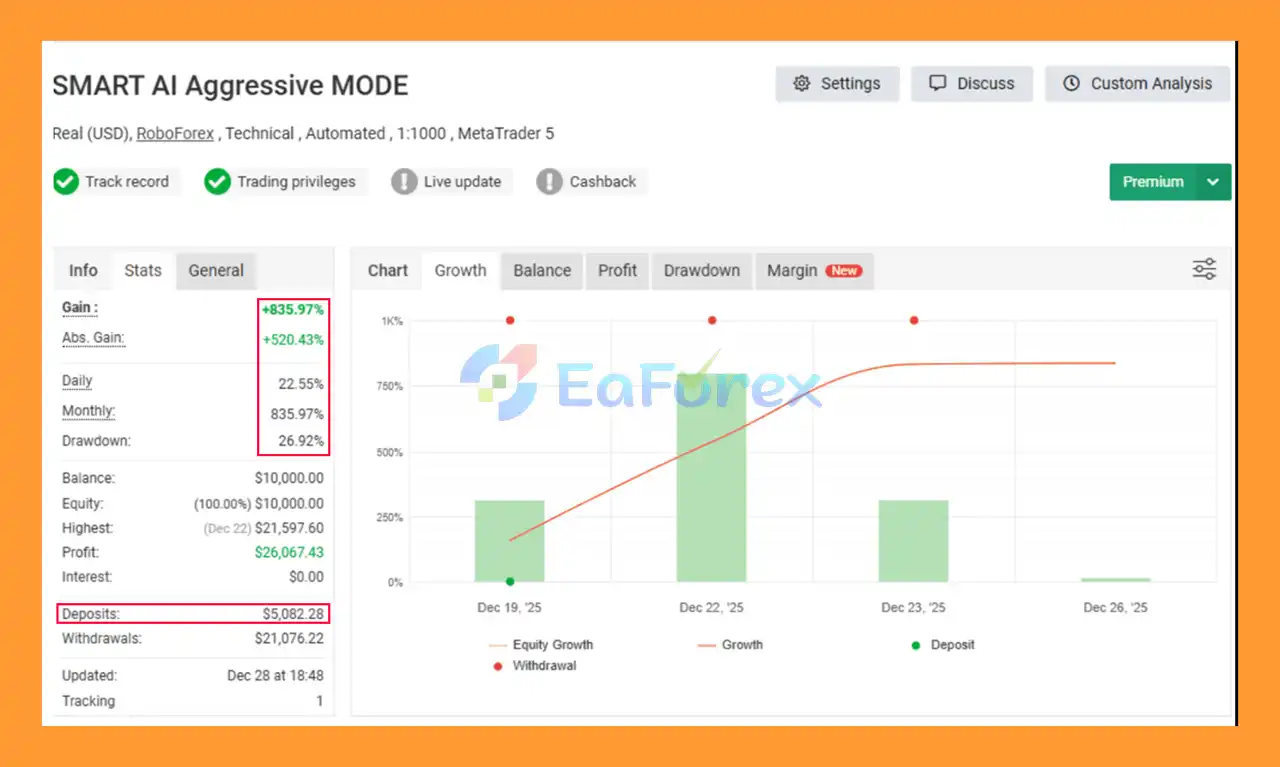
- Initial Deposit: $5.082
- Total Gain: +835.97%
- Daily Growth: 22.55%
- Monthly Growth: 835.97%
- Maximum Drawdown: 26,92%
Performance and Risk Management
Smart AI Aggressive Mode EA MT5 is described as an aggressive, short-term trading system. This is an important characteristic that should be considered when configuring the EA.
Risk Per Trade
The RiskPerTrade parameter allows users to define the percentage of account balance allocated to each trade cycle.
Lower risk settings generally reduce exposure per trading cycle, while higher settings increase potential exposure.
Fixed Lot Option
Users who prefer direct control over position size can use the FixedLot parameter instead of percentage-based risk management.
Maximum Position Limit
The MaxPositions parameter controls the maximum number of simultaneous open positions.
This is especially important when using an aggressive configuration.
Equity-Based Take Profit
The TakeProfit parameter defines the equity-based profit target for closing the trading cycle.
This provides the EA with a predefined objective for managing groups of trades.
Daily Trade Limit
The MaxDailyTrades parameter can be used to restrict the number of trading cycles executed each day.
This helps prevent unlimited trade frequency.
Trading Hours
The TradeStartHour and TradeEndHour settings allow traders to define when the EA is permitted to operate.
Friday Position Closure
The FridayCloseHour setting can automatically close positions before the weekend.
This provides an additional layer of exposure management.
Broker Execution
Broker conditions can significantly affect automated trading results.
Traders should consider:
- Spread
- Slippage
- Execution speed
- Liquidity
- Commission
- Contract specifications
- Margin requirements
Stable MT5 execution and reliable order filling are recommended for this EA.
Weaknesses and Risk Warnings
Aggressive Trading Strategy
The EA is explicitly described as an aggressive short-term trading system.
It may open multiple positions in relatively quick succession, meaning account exposure can increase rapidly depending on the selected settings.
Multiple Positions Increase Exposure
Although MaxPositions provides an exposure limit, allowing multiple positions can still create substantial aggregate market exposure.
High Capital Requirement
The supplied recommendation is a minimum deposit of approximately $10,000. Traders with smaller accounts are advised in the product information to consider a cent account rather than simply using aggressive lot sizes on a standard account.
Gold and Bitcoin Volatility
XAUUSD and BTCUSD can experience substantial price movements.
Rapid market movements can result in increased spreads, slippage, drawdown, or unexpected execution conditions.
Market Compatibility
Although the EA supports multiple markets, the supplied information identifies XAUUSD and BTCUSD as the primary tested instruments.
Users should not assume that identical performance will occur on every Forex pair or index.
Broker Conditions Matter
Different brokers can provide different spreads, liquidity, execution speeds, and contract specifications.
These differences may affect the EA's real-world behavior.
Leverage Risk
Leveraged trading can amplify both potential profits and potential losses.
Using a high-risk configuration with high leverage can result in substantial account drawdown.
No Guaranteed Profit
SMART AI AMMT EA MT5 is a trading tool and does not guarantee profitable results.
Backtests, demonstrations, or previous trading performance cannot guarantee future results.
Demo Testing Is Recommended
Users should test the EA on a demo account for at least two weeks, as recommended in the supplied product information, to understand its trading frequency, position management, drawdown behavior, and compatibility with their broker.
Pros and Cons
Pros
- Fully automated MetaTrader 5 Expert Advisor
- Adaptive market-analysis logic
- Multi-market support
- Designed for XAUUSD and BTCUSD
- Compatible with Forex and selected indices
- Risk-based position sizing
- Fixed-lot option
- Maximum position control
- Equity-based Take Profit
- Configurable trading sessions
- Daily trade limitation
- Automatic Friday position closure
- Real-time on-chart dashboard
- Extensive input parameters
- Automated trade execution and management
- VPS-friendly for continuous operation
Cons
- Designed as an aggressive short-term trading system
- Can open multiple positions
- Higher exposure is possible with aggressive settings
- Recommended capital requirement is relatively high
- XAUUSD and BTCUSD can experience high volatility
- Results can vary between brokers
- Execution quality can affect performance
- Other symbols require individual compatibility testing
- No trading system can guarantee profits
- Requires careful risk configuration and testing
How to Install Smart AI Aggressive Mode EA MT5
Step 1: Download the EA
Purchase and download the SMART_AI_AMMT.ex5 file from the MQL5 Market.
Step 2: Open the MT5 Data Folder
Launch MetaTrader 5 and go to:
File → Open Data Folder
Step 3: Open the Experts Folder
Navigate to:
MQL5 → Experts
Copy the SMART_AI_AMMT.ex5 file into this folder.
Step 4: Restart or Refresh MT5
Restart MetaTrader 5 or refresh the Navigator panel.
The EA should appear under:
Navigator → Expert Advisors
Step 5: Select the Trading Chart
Open the instrument you want to trade.
For the supplied recommended configuration, XAUUSD on the M15 timeframe is the primary setup.
Step 6: Attach the EA
Drag Smart AI Aggressive Mode EA MT5 onto the selected chart.
Make sure AutoTrading is enabled in MetaTrader 5.
Step 7: Configure the Parameters
Review and configure the available settings, including:
- RiskPerTrade
- FixedLot
- MaxPositions
- TakeProfit
- TradeStartHour
- TradeEndHour
- FridayCloseHour
- MaxDailyTrades
- Symbol-specific parameters
Choose settings according to your own risk tolerance and account conditions.
Step 8: Test the EA
Before using real capital, run the EA on a demo account.
Monitor:
- Trade frequency
- Position size
- Maximum positions
- Drawdown
- Spread
- Execution
- Profit-target behavior
- Weekend closure
A VPS is recommended if continuous 24/5 automated operation is required.
What’s Included in the Download Package?
- Setting (If Any).docx
- Installation Guide.docx
>>> Join VIP Membership Now <<<
Final Thoughts
In summary, Smart AI Aggressive Mode EA MT5 is a fully automated and adaptive Expert Advisor designed for traders who want automated market analysis, trade execution, and position management on MetaTrader 5.
The system supports multiple markets, with XAUUSD and BTCUSD identified as the primary tested instruments. Its combination of adaptive logic, configurable money management, maximum-position controls, equity-based Take Profit, trading-session filters, daily trade limits, and automatic Friday closure provides traders with substantial control over how the EA operates.
One of the most important characteristics of this product is its aggressive short-term trading approach. The ability to open multiple positions can increase trading opportunities, but it can also increase overall account exposure and drawdown during unfavorable market conditions.
For this reason, proper risk configuration is essential. Traders should carefully evaluate the RiskPerTrade, FixedLot, MaxPositions, TakeProfit, and daily trading limits before deploying the system with real funds.
The recommended approach is to first test Smart AI Aggressive Mode EA MT5 on a demo account under the same broker conditions intended for live trading. This allows users to evaluate execution quality, spreads, trade frequency, position behavior, and drawdown before committing significant capital.
Smart AI Aggressive Mode EA MT5 is therefore best viewed as an automated trading tool with flexible configuration and adaptive market logic—not as a guaranteed source of profit. Proper testing, conservative risk management, and broker compatibility remain essential for responsible automated trading.



