


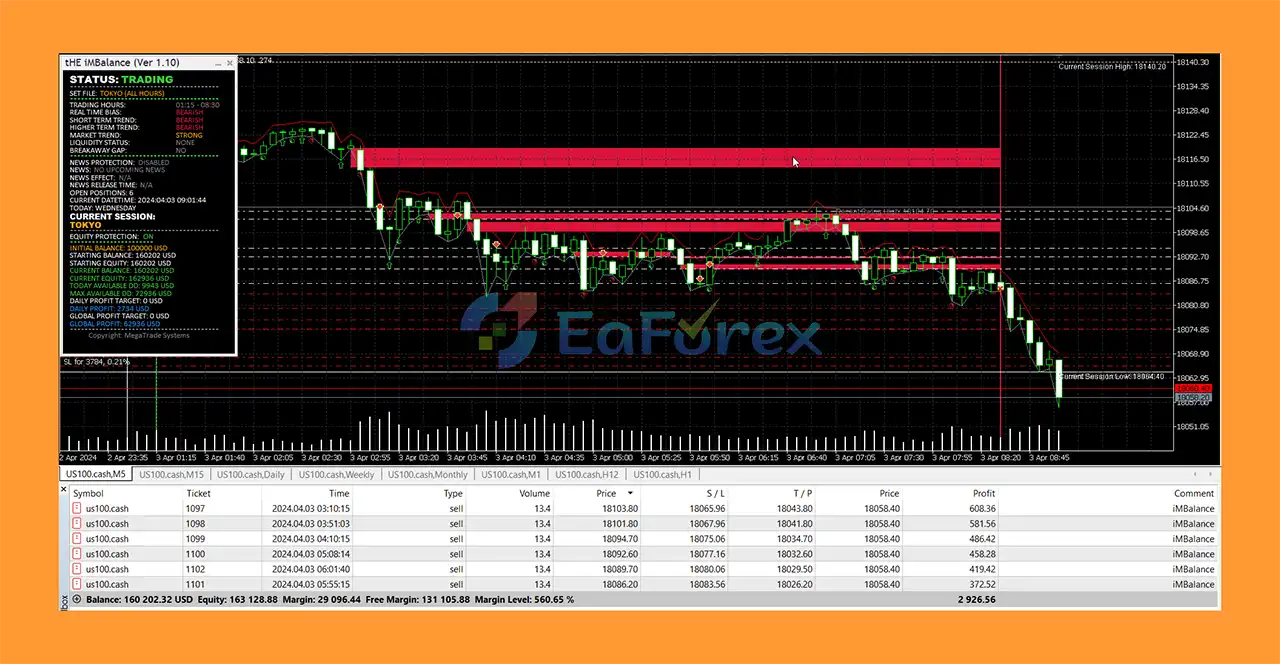
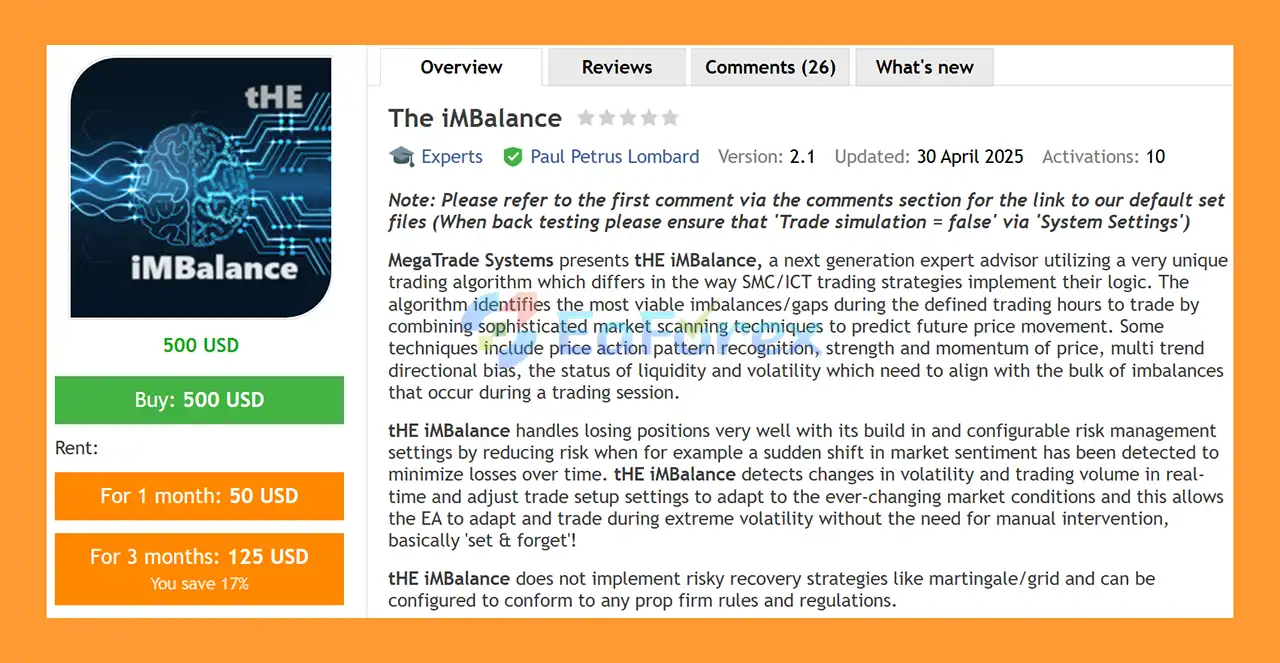
Product Overview
The iMBalance EA MT5 is a next-generation automated trading system developed by MegaTrade Systems, designed around a specialized imbalance and market-structure trading algorithm.
Unlike conventional SMC and ICT-based Expert Advisors that may rely on a limited set of predefined concepts, The iMBalance EA MT5 combines multiple market-analysis techniques to identify potentially significant price imbalances and liquidity gaps during defined trading sessions.
The system analyzes several factors before establishing a trade setup, including price action patterns, price strength and momentum, multi-timeframe directional bias, liquidity conditions, trading volume, and market volatility.
The iMBalance EA MT5 is also designed with adaptive risk management. It can detect changes in market sentiment, volatility, and trading volume in real time and adjust trading risk and management parameters accordingly.
With extensive configuration options, the EA can be adapted to different trading styles, instruments, risk levels, and prop firm trading requirements.
About the Developer
- Author: Paul Petrus Lombard
- Experience: Over +1 years of experience on MQL5.
- Notable Products: The iMBalance EA, Trade Fury EA and other advisors
- Flagship Product: The iMBalance EA MT5 is rated as the best performing product of the year.
>> Delivery time 24h-48h after payment.
>>> Refund if not delivered.
>>> You will receive the latest version without any limitations (ID+Time).>>Reviewed by Jason Stap <<
Key Features of The iMBalance EA MT5
Advanced Imbalance Detection
The core of The iMBalance EA MT5 is its ability to identify potentially significant market imbalances and price gaps.
The EA scans the market during defined trading sessions and evaluates which imbalances may have greater trading relevance based on additional market conditions.
Multi-Factor Market Analysis
Rather than relying on imbalance alone, the system combines several analytical components, including:
- Price action pattern recognition
- Price strength
- Market momentum
- Multi-timeframe trend direction
- Liquidity conditions
- Trading volume
- Market volatility
- Imbalance structure
This multi-factor approach is designed to filter trading opportunities and avoid setups that do not meet the required conditions.
Adaptive Risk Management
The iMBalance EA MT5 includes configurable risk management designed to adjust exposure when market conditions change.
For example, the system can reduce trading risk when it detects:
- A sudden change in market sentiment
- Important news events
- Low trading volume
- High or extreme volatility
- Specific market-session conditions
- Predefined day-of-week risk conditions
Highly Configurable Trade Setup
The EA provides extensive configuration options for determining how trades are opened and managed.
Traders can configure risk according to:
- Percentage of account balance
- Percentage of account equity
- Fixed lot size
- Dynamic risk algorithms
- Custom Stop Loss and Take Profit logic
This flexibility allows traders to adapt the EA to conservative, moderate, or more aggressive trading approaches.
Advanced Trade Management
The iMBalance EA MT5 supports both fixed and dynamic trade management.
The system can use ATR-based calculations for functions such as:
- Partial profit taking
- Trailing Stop
- Breakeven
- Dynamic trade management
The EA can also automatically close positions when the original trade conditions are no longer valid.
Trend and Liquidity Monitoring
The system continuously evaluates the prevailing market environment. If the trend or liquidity conditions change significantly, the EA can adjust its trade management or liquidate positions according to the configured rules.
Trading Scheduler
The built-in Trading Scheduler allows traders to control when the EA can open, manage, or close trades.
This can be used to focus trading activity on specific market sessions or prevent new trades during unwanted periods.
News Protection
The iMBalance EA MT5 includes an integrated News Protection feature designed to control trading around important economic events.
The developer also provides the ability to backtest historical news events, helping traders evaluate how fundamental events may have affected the market and the EA's behavior.
Equity and Money Management
The system includes an extensive Equity and Money Management framework designed to help control overall account exposure.
Possible functions include:
- Daily profit target
- Global profit target
- Portfolio risk management
- Equity protection
- Automatic trading shutdown
- Funded-account profit protection
For example, traders can configure the EA to stop trading after achieving a predefined daily profit target or a global account target.
No Martingale or Grid
The iMBalance EA MT5 does not use Martingale or Grid recovery strategies.
This makes it suitable for traders who prefer a structured risk management approach without progressively increasing position size as a recovery mechanism.
Prop Firm Configuration
The EA is designed to be configurable for different prop firm rules and risk requirements.
Its risk controls, trading scheduler, equity protection, and profit-target functions can be particularly useful when operating within funded-account restrictions.
However, traders should always verify compatibility with the specific prop firm's current rules.
How Does The iMBalance EA MT5 Work?
The iMBalance EA MT5 begins by scanning the market for potentially significant imbalances or price gaps during the configured trading session.
However, the presence of an imbalance alone does not necessarily trigger a trade.
The EA combines imbalance analysis with several additional market conditions, including:
Imbalance → Price Action → Momentum → Trend Bias → Liquidity → Volatility → Trade Setup
The system evaluates whether these factors are sufficiently aligned before determining whether a trading opportunity meets its configured criteria.
Once a valid setup is identified, the EA calculates the appropriate trade parameters based on the selected risk model.
After entry, the trade can be managed using fixed or dynamic Stop Loss and Take Profit methods, ATR-based trailing, partial profit taking, breakeven, and other management functions.
The EA can also continue monitoring market conditions after entry. If the prevailing trend, liquidity, or market structure changes substantially, the system can adjust the trade or close the position according to the selected settings.
This adaptive approach is intended to reduce the need for constant manual intervention.
Why Choose The iMBalance EA MT5?
Specialized Imbalance Trading
The EA is designed specifically around market imbalance and liquidity concepts, making it an interesting choice for traders who follow SMC- or ICT-inspired methodologies.
Multi-Factor Confirmation
Instead of depending solely on an imbalance signal, the system considers price action, momentum, trend direction, liquidity, volume, and volatility.
Dynamic Risk Management
Risk can be adjusted according to changing market conditions, including volatility, liquidity, sentiment, news events, and trading sessions.
Extensive Customization
The iMBalance EA MT5 offers a wide range of settings, allowing traders to customize trade frequency, risk, Stop Loss, Take Profit, trade management, filters, and trading schedules.
Strong Equity Protection Features
The ability to define daily and global profit targets, portfolio protection, and automatic trading shutdowns can be useful for traders who prioritize account-level risk management.
Prop Firm Friendly Configuration
The EA can be configured around specific risk parameters and trading restrictions, making it potentially suitable for funded trading environments.
No Martingale or Grid
The absence of Martingale and Grid recovery strategies may appeal to traders who prefer to avoid aggressive loss-recovery techniques.
The iMBalance EA MT5 Performance and Backtest Results
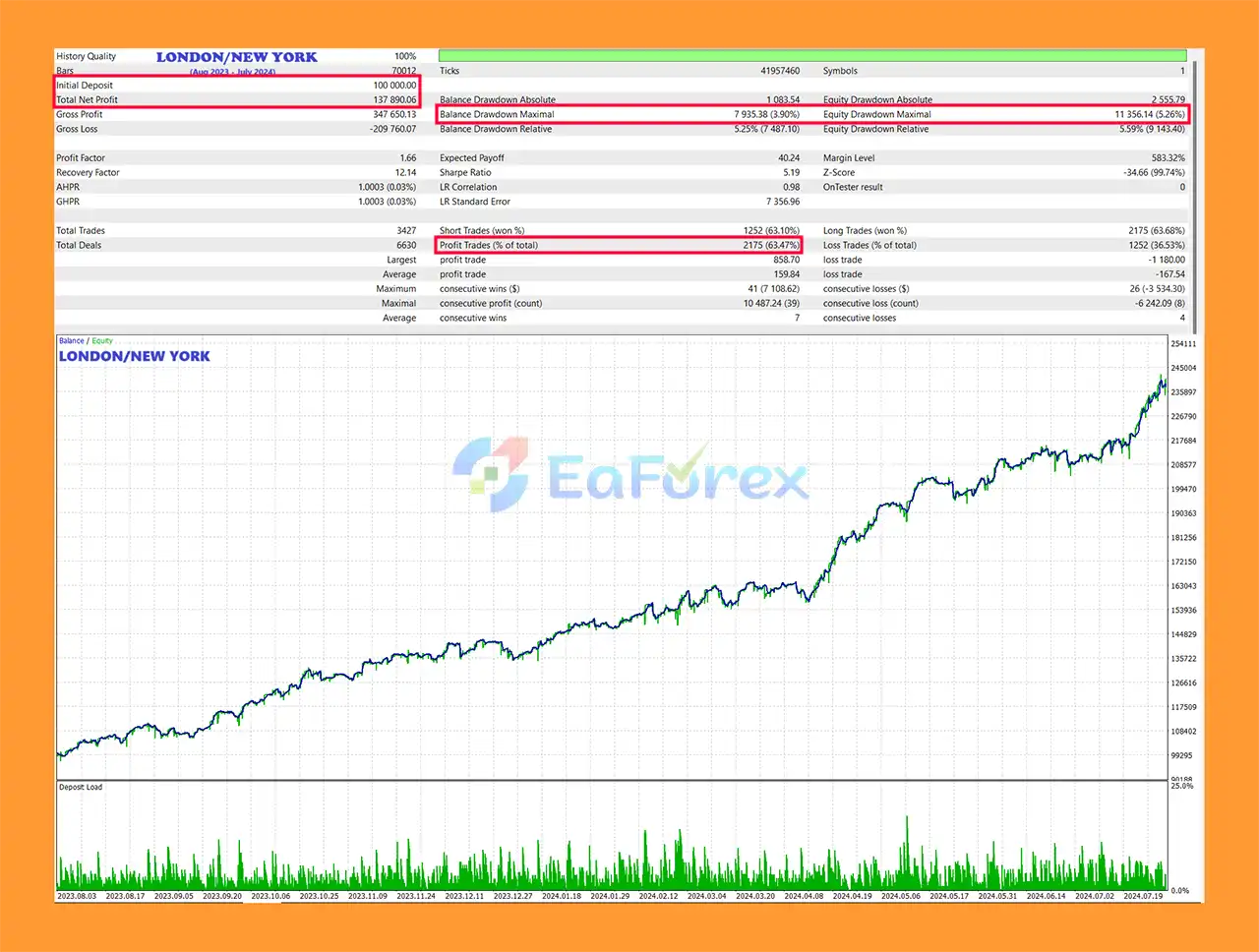
🔺Long-Term Backtest:
- Initial Deposit: $100,000
- Total Net Profit: $137,890
- Win Rate: 63.47%
- Maximum Drawdown: 3.90%
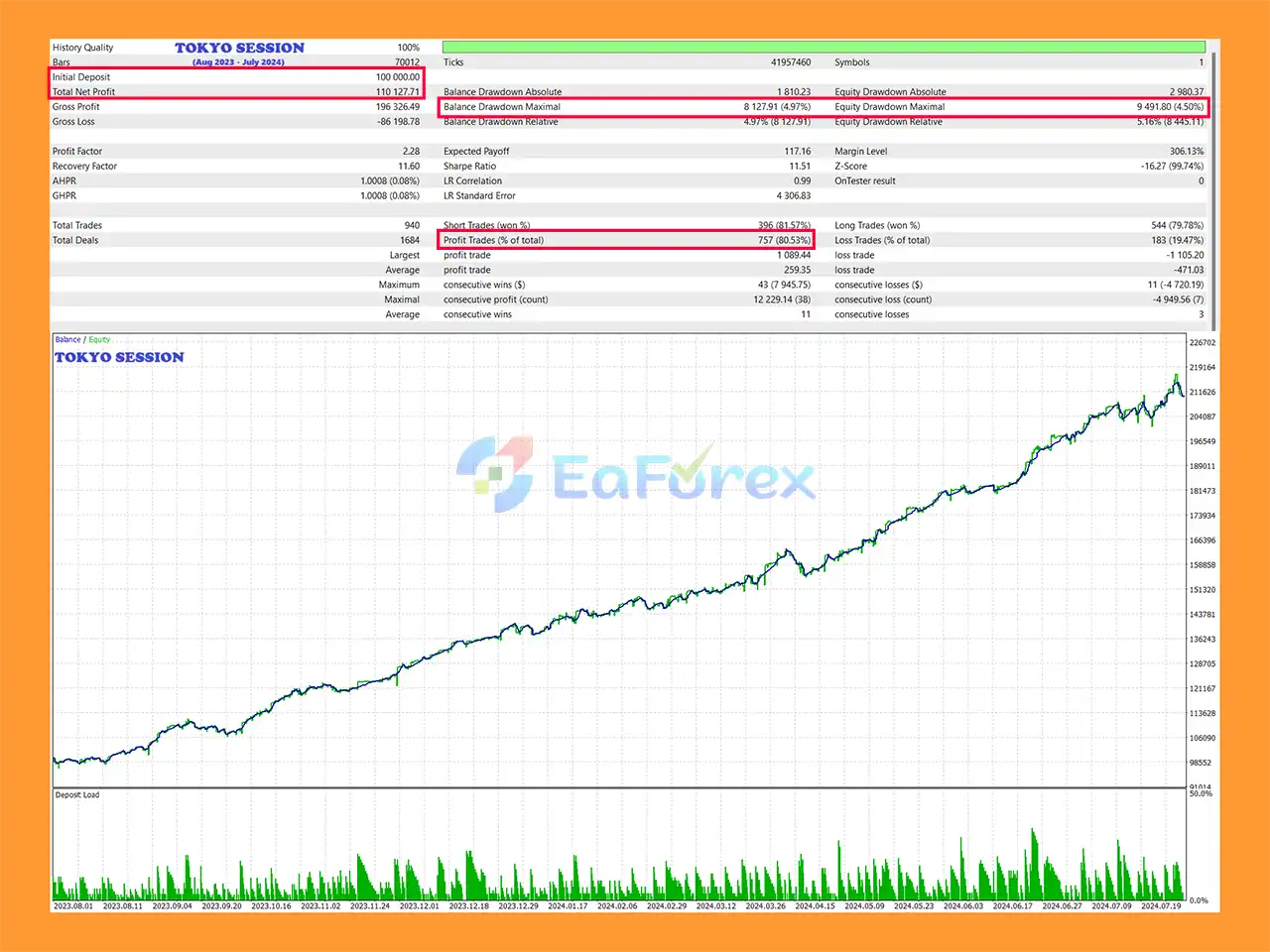
🔺Tokyo Session Backtest:
- Initial Deposit: $100,000
- Total Net Profit: $110,128
- Win Rate: 80.53%
- Maximum Drawdown: 4.97%
Performance and Risk Management
Risk management is one of the core components of The iMBalance EA MT5.
Rather than using a single static risk level, the EA provides multiple options for adjusting risk according to market and account conditions.
Traders can select risk based on:
- Account balance
- Account equity
- Fixed lot size
- Dynamic risk algorithms
- Day-of-week settings
- Trading volume
- Market volatility
- News events
- Market sentiment
For example, the system can reduce risk when extreme volatility or low trading volume is detected.
It can also reduce exposure around important news events or specific market conditions.
Equity Protection
The EA's equity and money management system can be configured to protect the account when predefined targets or risk conditions are reached.
Possible controls include:
- Daily profit target
- Global profit target
- Portfolio-level risk management
- Equity protection
- Automatic trading shutdown
- Funded-account target protection
This can be especially useful for traders participating in prop firm challenges, where protecting accumulated profits can be just as important as generating new returns.
However, these features should be viewed as risk-management tools rather than guarantees against drawdown or loss.
Weaknesses and Risk Warnings
Imbalance Strategies Can Fail
Not every imbalance or liquidity gap results in a profitable price movement. Market structure can change unexpectedly, and false signals are possible.
Market Conditions Change
An adaptive algorithm may respond to changing market conditions, but no automated system can perfectly predict future price movements.
News Events Remain Risky
News protection can reduce exposure around scheduled events, but unexpected announcements and rapid market reactions can still cause significant volatility.
Configuration Requires Understanding
The iMBalance EA MT5 offers extensive settings. Incorrect configuration of risk, lot size, Stop Loss, trading sessions, or equity protection can negatively affect performance.
Prop Firm Rules Differ
Although the EA can be configured for prop firm trading, each firm may have different rules concerning drawdown, news trading, holding periods, lot sizes, trading hours, and automated trading.
No Guaranteed Performance
Past backtests or historical performance cannot guarantee future results. Changes in market structure, liquidity, volatility, spreads, and execution can significantly affect live trading.
Minimum Deposit Is Not a Safety Guarantee
The recommended minimum deposit of $100 should not be interpreted as a guarantee that this amount is sufficient for every instrument or risk configuration.
Pros and Cons
Pros
- Specialized imbalance trading algorithm.
- Designed for MetaTrader 5.
- Inspired by SMC/ICT market concepts.
- Combines imbalance, liquidity, momentum, and price action analysis.
- Multi-timeframe directional bias.
- Real-time volatility and volume analysis.
- Adaptive risk management.
- Highly configurable trade setup.
- Supports percentage-based and fixed-lot risk models.
- ATR-based dynamic trade management.
- Partial profit-taking functionality.
- Trailing Stop and Breakeven options.
- Trading session scheduler.
- Integrated news protection.
- Historical news-event backtesting support.
- Equity and money management system.
- Daily and global profit targets.
- Portfolio-level risk protection.
- Can automatically stop trading after predefined targets.
- No Martingale.
- No Grid recovery.
- Configurable for prop firm requirements.
Cons
- Imbalance-based setups can still produce losing trades.
- Extensive configuration may require experience.
- Performance can change with market conditions.
- News and unexpected events can create significant volatility.
- Broker execution, spread, and liquidity can affect results.
- Prop firm compatibility must be checked individually.
- No EA can guarantee profits.
- Requires proper testing and risk management.
How to Install The iMBalance EA MT5
Installing The iMBalance EA MT5 on MetaTrader 5 is generally straightforward.
Step 1: Install MetaTrader 5
Install the MetaTrader 5 trading platform provided by your broker or trading provider.
Step 2: Open the MT5 Data Folder
In MetaTrader 5, select:
File → Open Data Folder
Then navigate to:
MQL5 → Experts
Step 3: Copy the EA Files
Copy the The iMBalance EA MT5 files into the Experts folder.
Step 4: Restart MetaTrader 5
Restart MT5 or refresh the Expert Advisors section in the Navigator window.
Step 5: Open the Trading Chart
Open the instrument you want to trade.
The recommended default timeframe is:
M5
However, the EA can be configured to trade other timeframes according to the selected settings.
Step 6: Attach the EA
Drag The iMBalance EA MT5 from the Navigator window onto the selected chart.
Step 7: Configure Risk Management
Review the available settings and define:
- Risk per trade
- Fixed lot size or dynamic risk
- Stop Loss
- Take Profit
- Trading sessions
- News protection
- Volatility filters
- Equity protection
- Daily profit target
- Global profit target
Step 8: Enable Algo Trading
Make sure Algo Trading is enabled in MetaTrader 5.
Step 9: Test on a Demo Account
Before using real capital, run the EA on a demo account and evaluate its behavior under different market conditions.
Pay particular attention to drawdown, trade frequency, risk exposure, news behavior, and equity protection.
What’s Included in the Download Package?
- Setting (If Any).docx
- Installation Guide.docx
Final Thoughts
The iMBalance EA MT5 is an advanced automated trading system developed by MegaTrade Systems, combining market imbalance detection, liquidity analysis, price action, momentum, volatility, volume, and multi-timeframe trend bias.
Its primary strength is the extensive combination of trade filtering, adaptive risk management, dynamic trade management, news protection, trading scheduling, and equity protection.
The EA can be configured to operate conservatively or more aggressively, depending on the trader's preferred risk profile. It also avoids Martingale and Grid strategies, while providing account-level controls that can be useful for traders working with prop firm challenges or funded accounts.
The recommended default configuration is M5, although the system can be adapted to other timeframes and instruments with sufficient liquidity and volatility.
Despite its sophisticated architecture, The iMBalance EA MT5 remains subject to normal market risks. An imbalance can fail, market conditions can change, and unexpected volatility can result in losses.
For this reason, traders should test the EA thoroughly on a demo account before using it with real capital, start with conservative risk settings, and verify that the configuration complies with their broker or prop firm's current rules.
Risk Disclaimer: Automated trading involves substantial financial risk. Past performance and backtesting results do not guarantee future results. Always use appropriate risk management and trade only with capital you can afford to lose.



