









-
 Unlimited Activations
-
 Instant delivery
-
 Easy to install






 Unlimited Activations
Instant delivery
Easy to install
Unlimited Activations
Instant delivery
Easy to install
 Free Update
 Free Install Support

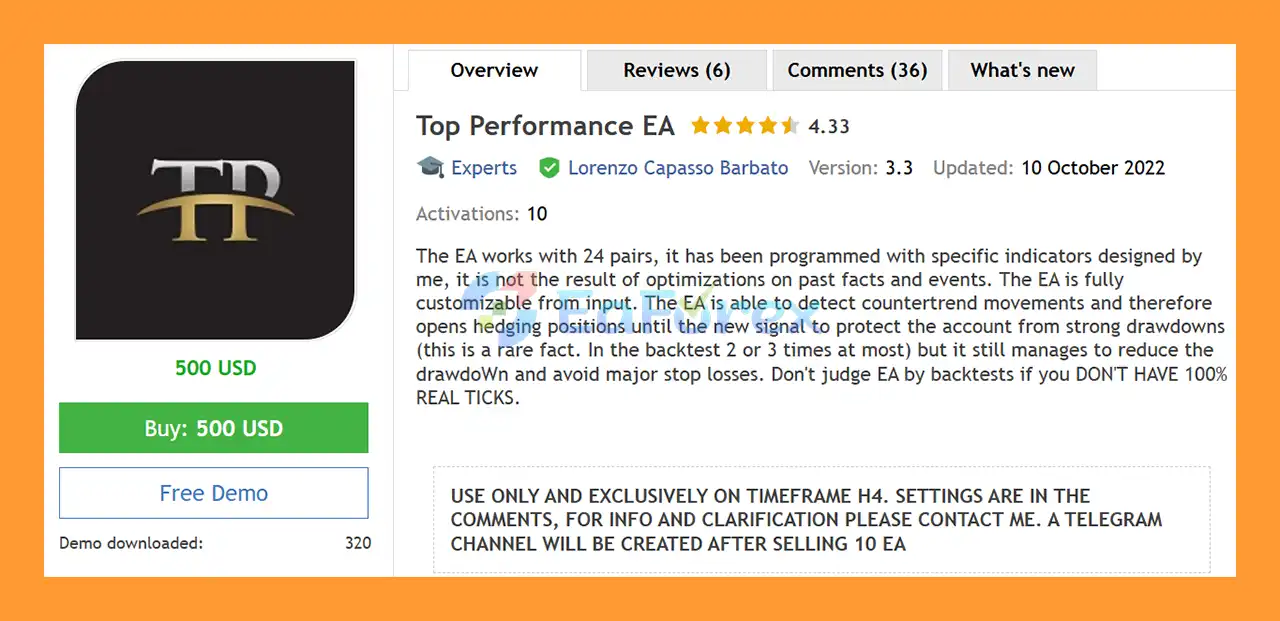
Top Performance EA MT5 is a fully automated Forex Expert Advisor designed to trade a diversified portfolio of 24 currency pairs using a proprietary set of technical indicators and dynamic trade-management algorithms.
According to the developer, the trading logic is based on specifically designed indicators rather than being created simply by optimizing historical market events. The EA is also highly customizable, allowing traders to adjust position sizing, Take Profit, risk, grid distance, trade frequency, and volume-management settings according to their preferred trading style.
One of the key features of Top Performance EA MT5 is its ability to detect potential countertrend movements. When an opposite market signal is detected, the EA can open hedging positions to help protect the account against strong drawdowns until a new trading signal appears.
This hedging mechanism is described as relatively rare in backtests, occurring only a few times, but it is designed to potentially reduce severe drawdowns and avoid larger stop-loss events.
The EA is recommended for H4 trading, although other timeframes can also be tested. It supports multiple trading modes, including single-position trading, multi-position trading, dynamic lot sizing, average Take Profit, individual Take Profit, and optional Grid trading.
• Author: Lorenzo Capasso Barbato
• Experience: Over +4 years of experience on MQL5.
• Notable Products: Top Performance EA and others.
• Flagship Product: Top Performance EA MT5 is rated as the best performing product of the year.
>> Delivery time 24h-48h after payment.
>>> Refund if not delivered.
>>> You will receive the latest version without any limitations (ID+Time).>> Reviewed by Jason Stap <<<
24 Currency Pairs
Top Performance EA MT5 is designed to trade a diversified portfolio of 24 predefined currency pairs. This allows the system to distribute trading opportunities across multiple markets instead of relying on a single symbol.
Proprietary Trading Indicators
The EA uses a set of indicators specifically developed for its trading logic. According to the developer, the system is not simply the result of excessive optimization around historical events.
Countertrend Detection
The EA can identify potential countertrend movements and react when market conditions move against the original signal.
Hedging Protection
When a countertrend condition is detected, the EA can open a hedge position to help reduce exposure and potentially protect the account from significant drawdown.
Dynamic Volume Algorithm
The volume-management algorithm considers factors such as market conditions, account deposit, current drawdown, and selected risk parameters when determining position size.
Automatic Lot Management
Auto Lot can automatically adjust trading volume based on account capital and risk settings.
Fixed Lot Option
Traders who prefer manual position sizing can disable Auto Lot and use a predefined fixed lot size.
Flexible Take Profit Management
The EA supports both average Take Profit and individual trade Take Profit. This allows traders to choose between managing a group of positions collectively or closing each profitable position independently.
Optional Grid Trading
The Grid function can be enabled or disabled. When active, additional positions can be opened according to the configured grid distance.
Single or Multiple Positions
Traders can choose whether the EA should open only one position at a time or continue opening new trades when additional signals are generated.
Deposit-Based Dynamic Volume
The EA can calculate position volume proportionally to account capital when multiple trades, average Take Profit, and Auto Lot are enabled.
Customizable Risk Settings
The Risk parameter can be adjusted to influence position sizing and overall trading aggressiveness.
Spread Monitoring
The EA calculates average spread over a configurable period and uses this information as part of its trading environment assessment.
Top Performance EA MT5 combines technical market signals, dynamic position sizing, hedging, and optional grid management into an automated trading system.
The EA continuously monitors the selected currency pairs and waits for its proprietary indicators to generate a valid trading signal.
When a signal appears, the system determines the appropriate position size based on the selected configuration. Traders can use a fixed lot or activate the Auto Lot and Dynamic Volume algorithms.
If the market subsequently moves against the original position and the EA detects a significant countertrend condition, it can open a hedging position. The purpose of this mechanism is to reduce exposure during unfavorable market movements and potentially limit severe drawdown until another valid signal is detected.
When Grid Mode is enabled, additional positions can be opened at the configured grid distance. Traders can therefore control whether the EA operates as a single-entry system or a multi-position strategy.
For multi-position trading, users can choose between:
Take Profit Average — closes multiple positions when the combined average profit reaches the configured Take Profit level.
Take Profit Single Operation — allows individual trades to close when their respective Take Profit conditions are reached.
This flexibility allows Top Performance EA MT5 to be configured for different trading and risk-management approaches.
Top Performance EA MT5 may appeal to traders looking for a multi-currency automated Forex strategy with dynamic risk and position management.
One of its main advantages is the ability to monitor 24 currency pairs, creating more opportunities across different market environments.
The EA also takes a different approach to drawdown management through its countertrend detection and optional hedging mechanism. Instead of relying exclusively on a Stop Loss after a market reversal, the system can potentially open an opposing position to help manage exposure.
Another important advantage is its extensive customization. Traders can control:
This makes the EA adaptable to both more conservative and more aggressive configurations.
The recommended H4 timeframe also focuses the strategy on broader market movements rather than extremely short-term price fluctuations.
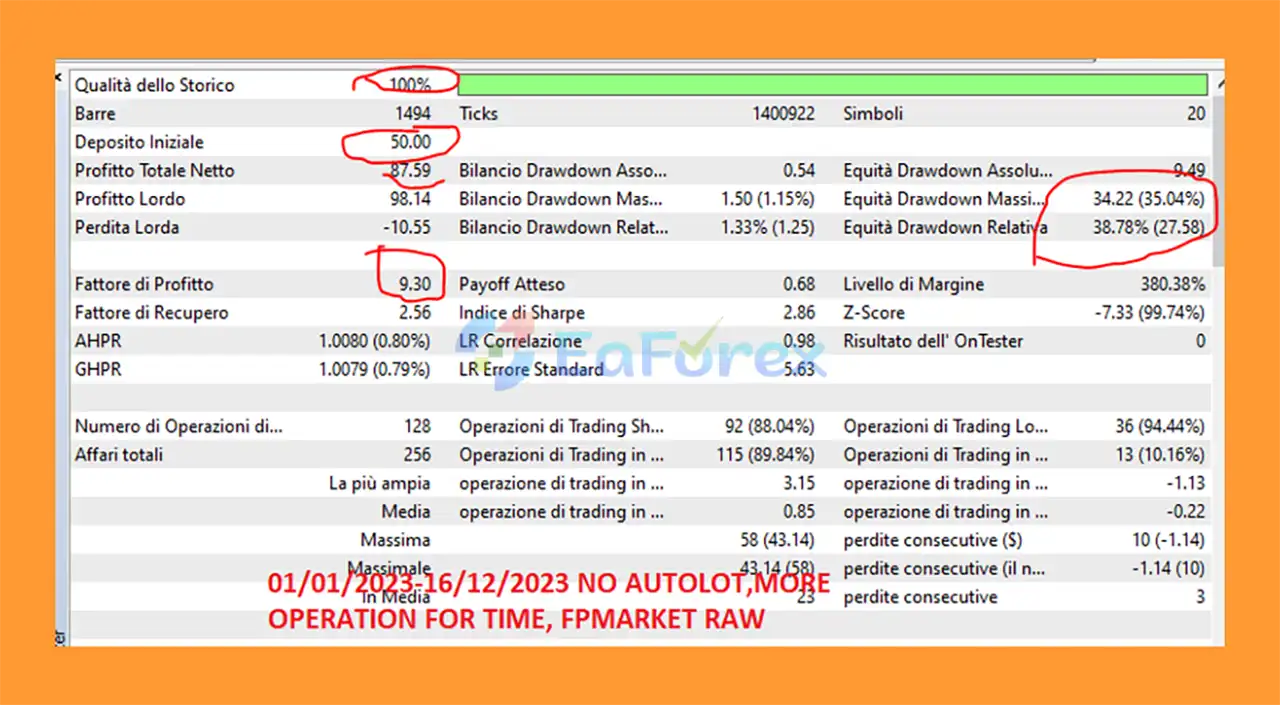
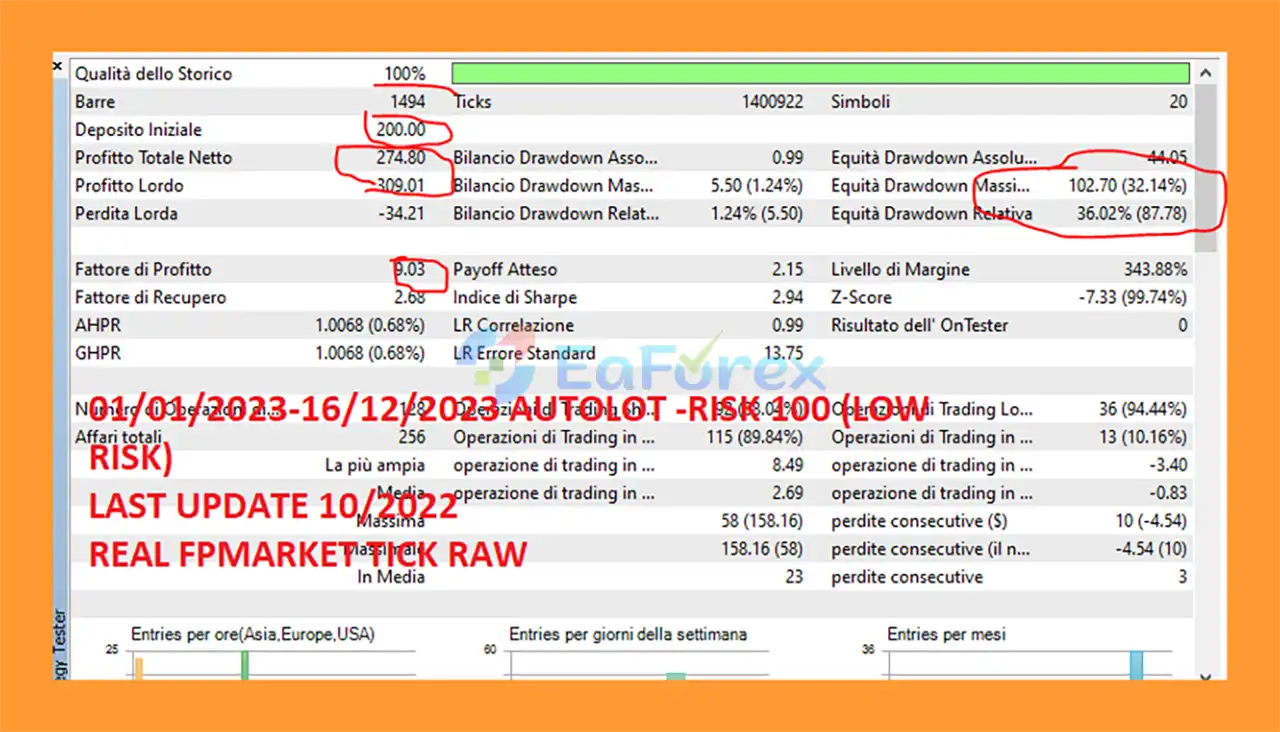
Top Performance EA Backtest Result
Top Performance EA Backtest Results
Top Performance EA MT5 includes several mechanisms designed to manage account exposure and adapt position sizes to market and account conditions.
The Risk parameter influences the relationship between account balance, default volume, and Take Profit. Lower risk values may produce larger trading volumes and potentially higher returns, but they can also result in significantly higher drawdown.
The Dynamic Volume Algorithm can determine position size based on factors including:
The EA also provides a Hedging Mechanism that can activate when countertrend movements are detected. This is intended to help protect the account during unusually strong adverse movements.
The optional Grid Mode allows additional trades to be opened at predefined distances. While this can increase trading opportunities and potentially accelerate recovery, it can also increase overall exposure and drawdown.
For this reason, appropriate capital allocation and conservative risk settings are essential.
The developer recommends:
The EA may also go several days without opening a trade. This is considered normal behavior when its trading conditions are not satisfied.
Despite its advanced trade-management features, Top Performance EA MT5 carries significant risks that traders should understand before using it on a live account.
Grid Trading Risk
When Grid Mode is enabled, multiple positions can accumulate as price moves against the original trade. This can substantially increase floating drawdown and margin requirements.
Hedging Does Not Eliminate Risk
A hedge can reduce directional exposure, but it does not guarantee that losses will be recovered. Spreads, commissions, swaps, execution delays, and market volatility can still affect results.
Dynamic Lot Risk
Aggressive risk settings can cause the EA to increase trading volume. A higher position size can lead to significantly larger losses during unfavorable market conditions.
Multiple Currency Pair Exposure
Trading 24 pairs simultaneously can diversify opportunities, but it can also create correlated exposure during major market events.
RAW Spread and Execution Requirements
The recommended RAW Spread account and fast execution conditions indicate that broker execution quality may have an important influence on live performance.
Backtest Quality Is Critical
Backtest results can vary considerably depending on the modelling method. The developer specifically warns against judging the EA using backtests that do not use 100% Real Tick data.
For a more realistic evaluation, traders should use high-quality historical tick data and account for realistic spread, commission, slippage, and execution conditions.
Periods Without Trades Are Normal
The EA may remain inactive for several days when its conditions are not met. A lack of trades should not automatically be interpreted as a malfunction.
Installing Top Performance EA MT5 is straightforward.
Download the EA files and open your MetaTrader 5 platform.
Go to:
File → Open Data Folder → MQL5 → Experts
Copy the EA files into the appropriate folder.
Restart MetaTrader 5 or refresh the Expert Advisors section in the Navigator window.
Open one of the recommended currency-pair charts and set the timeframe to H4.
Attach Top Performance EA MT5 to the chart.
Because the EA supports multi-currency trading, make sure all required currency pairs are enabled in the Market Watch window.
You can open Market Watch using Ctrl + U and make sure all 24 supported symbols are visible and selected.
If your broker uses symbol suffixes or prefixes, enter the appropriate extension for each currency pair in the EA settings.
Configure the main parameters, including:
Select the appropriate account and risk configuration before starting live trading.
It is strongly recommended to backtest the EA using 100% Real Tick data whenever possible. After backtesting, perform forward testing on a demo account before using real capital.
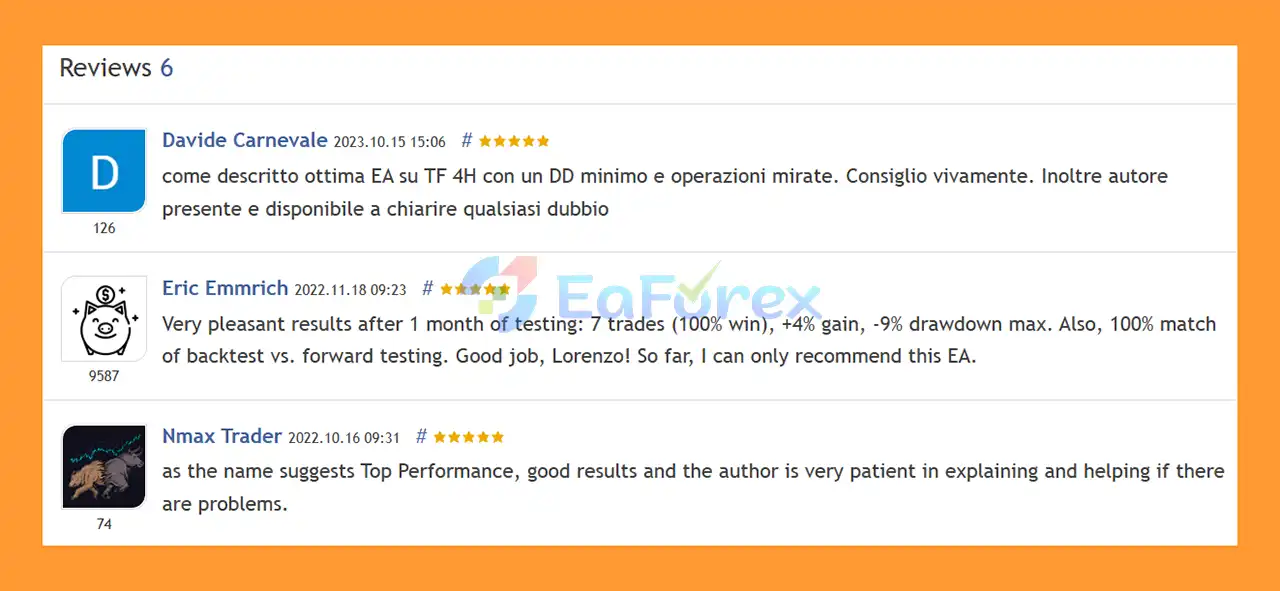
🔻Top Performance EA MT5 is highly appreciated by the MQL5 community for bringing stable and reliable profits. Below are 5 star reviews from users:
User Reviews
🔺 Experts:
🔺 Presets:
Top Performance EA MT5 is a flexible multi-currency Expert Advisor designed to trade 24 Forex pairs using proprietary technical indicators, dynamic position sizing, countertrend detection, and optional hedging and Grid functionality.
Its most interesting feature is the ability to detect potentially unfavorable countertrend movements and open hedging positions in an attempt to reduce exposure during strong adverse market conditions. Combined with dynamic volume management and configurable Take Profit methods, this gives traders considerable control over how the EA manages positions.
The EA is recommended for H4 trading, with a Hedge account, RAW Spread, and fast execution preferred. Its ability to remain inactive for several days is also part of its normal trading behavior and should not necessarily be viewed as a problem.
However, the combination of 24 currency pairs, dynamic volume, Grid trading, and hedging means that risk management is extremely important. Traders should avoid judging the system solely by headline backtest profits and should pay particular attention to maximum drawdown, margin usage, correlation between pairs, and the quality of historical data.
For the most meaningful evaluation, use 100% Real Tick backtesting with realistic trading costs and follow up with extensive forward testing.
Top Performance EA MT5 can be an interesting option for traders looking for a customizable multi-currency Forex EA, but proper risk management and realistic performance testing remain essential before deploying it on a live account.
1. What is Top Performance EA MT5?
Top Performance EA MT5 is a fully automated trading system for MetaTrader 5, designed to trade 24 currency pairs simultaneously. It uses proprietary custom indicators and advanced algorithms to adapt to real market conditions, offering consistent performance without relying on over-optimized backtest data.
2. Which currency pairs does Top Performance EA MT5 support?
This Expert Advisor works with 24 major and minor currency pairs, allowing traders to diversify their portfolios and maximize exposure to global market opportunities.
3. How customizable is Top Performance EA MT5?
Top Performance EA MT5 is fully customizable, letting you adjust risk settings, grid distance, lot sizing, and trade management parameters. You can choose between conservative or aggressive strategies, fixed or dynamic lots, and single or multi-trade operation modes.
4. Does Top Performance EA MT5 use martingale or risky strategies?
No. Unlike traditional EAs, Top Performance EA MT5 does not rely on martingale. It uses a dynamic volume algorithm, hedging protection, and countertrend detection to minimize drawdowns while maximizing profitability safely.
5. What kind of performance can I expect from Top Performance EA MT5?
Backtests and real-user reviews show high win rates of around 89–90% with manageable drawdowns (around 35–36%). It works reliably on the H4 timeframe, providing a balance between trading frequency and accuracy, suitable for both low and high capital accounts.
6. What is included when I download Top Performance EA MT5?
The package includes the Expert Advisor files, installation guides, and preset configuration files for different risk levels (low, medium, high) across multiple timeframes. This makes it easy to start trading immediately with optimized settings.
In stock
In stock
In stock
In stock
In stock
Out of stock
No account yet?
Create an Account












 Automatic EA
 EA Best Seller
 Expert Advisor MT4
 Expert Advisor MT5
 HFT EA


Reviews
Clear filtersThere are no reviews yet.