


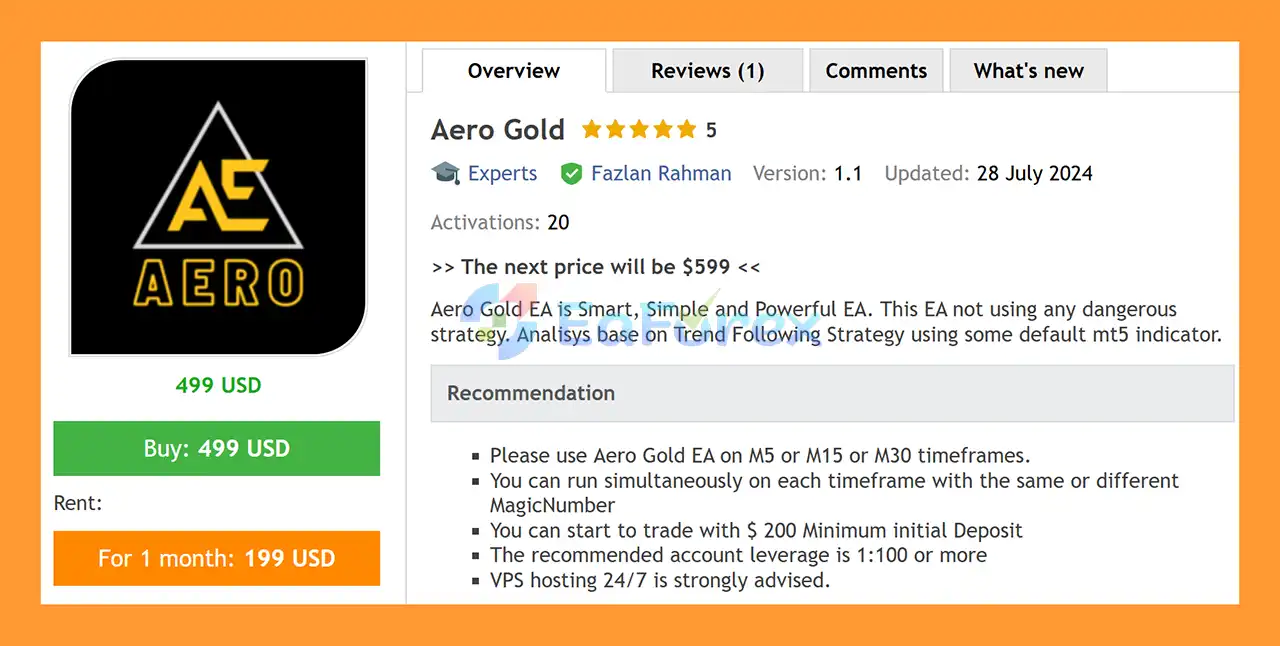
Product Overview
Aero Gold EA MT5 is a smart, simple, and powerful Gold Expert Advisor for MetaTrader 5, designed to trade XAUUSD (Gold) using a trend-following strategy.
Instead of relying on dangerous money management techniques such as Martingale, Grid Trading, or aggressive averaging, Aero Gold focuses on identifying market trends using a combination of standard MetaTrader 5 technical indicators.
The EA is designed to provide a straightforward automated trading solution for traders who want to participate in Gold market trends without using complicated trading systems.
Aero Gold can be used on M5, M15, and M30 timeframes, allowing traders to choose between faster short-term signals and more filtered medium-term market movements.
The EA can also be installed on multiple charts simultaneously, with the option to use the same or different Magic Numbers for each instance.
About the Developer
• Author: Fazlan Rahman
• Experience: Over +1 years of experience on MQL5.
• Notable Products: Aero Gold EA MT5 and others
• Flagship Product: Aero Gold EA MT5 is rated as the best performing product of the year.
>> Delivery time 24h-48h after payment.
>>> Refund if not delivered.
>>> You will receive the latest version without any limitations (ID+Time).>> Reviewed by Jason Stap <<<
Main Features of Aero Gold EA MT5
Trend Following Strategy
Aero Gold EA MT5 uses a trend-following trading approach based on technical analysis.
The system evaluates market conditions using selected default MetaTrader 5 indicators to identify potential directional movements in the Gold market.
Rather than attempting to predict every short-term price fluctuation, the EA is designed to participate when market conditions indicate a potential trend.
Designed for XAUUSD
Aero Gold is specifically designed for Gold trading (XAUUSD).
Gold is known for its strong price movements and frequent trends, making trend-following strategies particularly interesting for automated trading.
The EA can be used on:
- M5
- M15
- M30
These timeframes provide different trading characteristics, allowing users to select the configuration that best matches their preferred trading style.
No Dangerous Trading Strategy
One of the main characteristics of Aero Gold is its straightforward trading architecture.
The EA does not rely on aggressive strategies such as:
- Martingale
- Grid Trading
- Excessive averaging
- Progressive lot multiplication
This approach is designed to keep the trading logic relatively simple and easier to understand.
However, the absence of these techniques does not mean the EA is risk-free. Gold can experience significant volatility, and appropriate position sizing remains essential.
Multiple Timeframe Operation
Aero Gold can be run simultaneously on multiple timeframes.
For example, traders can run separate instances on:
- XAUUSD M5
- XAUUSD M15
- XAUUSD M30
Each instance can use the same or a different Magic Number, allowing MetaTrader 5 to distinguish trades generated by different EA instances.
Automatic Lot Management
Aero Gold supports automatic position sizing through the AutoLots function.
When AutoLots is enabled, the RiskPercent parameter can be used to determine the position size according to the selected account risk.
Alternatively, traders can disable AutoLots and manually specify the desired position size using FixLots.
This provides flexibility for both percentage-based and fixed-lot trading.
Trailing Stop Protection
The EA includes a trailing stop mechanism with two main parameters:
TrailingStart determines when the trailing mechanism becomes active.
TrailingStop defines the trailing distance used to manage the open position.
This allows the EA to attempt to protect accumulated profits while still giving profitable trades room to continue following the market trend.
How Does Aero Gold EA MT5 Work?
Aero Gold follows a relatively straightforward trend-following methodology.
The EA analyzes XAUUSD price behavior using selected MetaTrader 5 technical indicators.
When market conditions meet the strategy's criteria, the EA can open a position in the direction of the identified trend.
Once a trade is active, the position is managed using the configured Stop Loss and, when enabled, the trailing stop system.
The basic trading process can be summarized as:
Market Analysis → Trend Identification → Trade Entry → Stop Loss Protection → Trailing Management → Trade Exit
The system is designed to focus on established or emerging directional movements rather than relying on aggressive recovery mechanisms.
The selected timeframe can influence the frequency and characteristics of signals. Lower timeframes such as M5 may generate more frequent market activity, while M15 and M30 can provide a broader view of market trends.
Why Choose Aero Gold EA MT5?
Aero Gold may be suitable for traders looking for a simple automated Gold trading system without complicated recovery strategies.
Its main advantages include a straightforward trend-following concept, flexible timeframe selection, automatic lot sizing, and built-in trailing stop management.
The EA may appeal to traders who want:
- Automated XAUUSD trading
- Trend-following Gold strategy
- MetaTrader 5 compatibility
- Simple trading logic
- M5, M15, and M30 support
- Automatic lot calculation
- Fixed-lot trading option
- Stop Loss protection
- Trailing Stop functionality
- Multiple EA instances
- Individual Magic Number management
- 24/7 automated operation
Aero Gold is also relatively simple to configure, making it accessible to traders who prefer an EA without a large number of complex parameters.
Aero Gold EA MT5 Performance Review
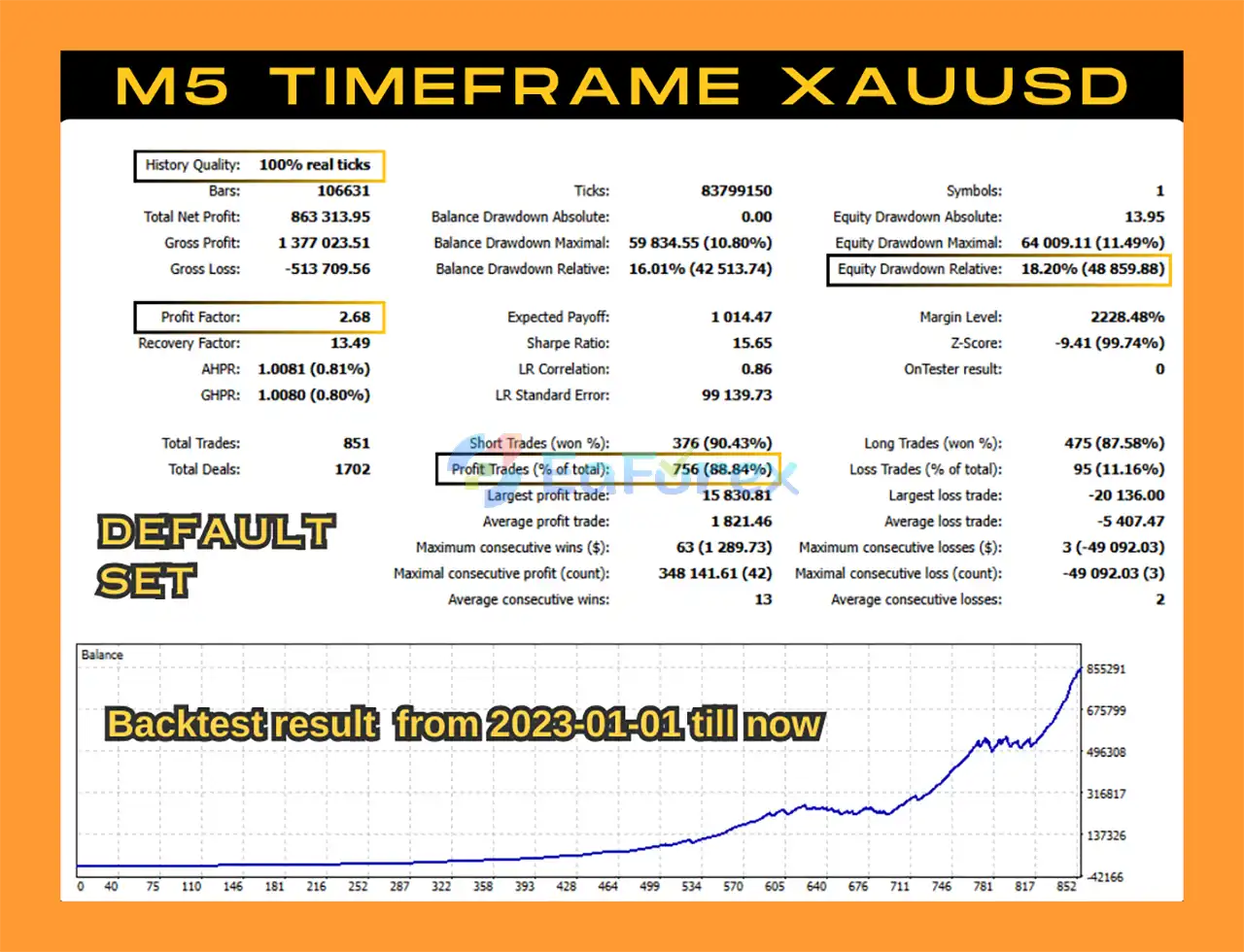
🔺 M5 Backtest
- Win Rate: 88.84%
- Total Net Profit: $863,313.95
- Max Drawdown: 18.20%
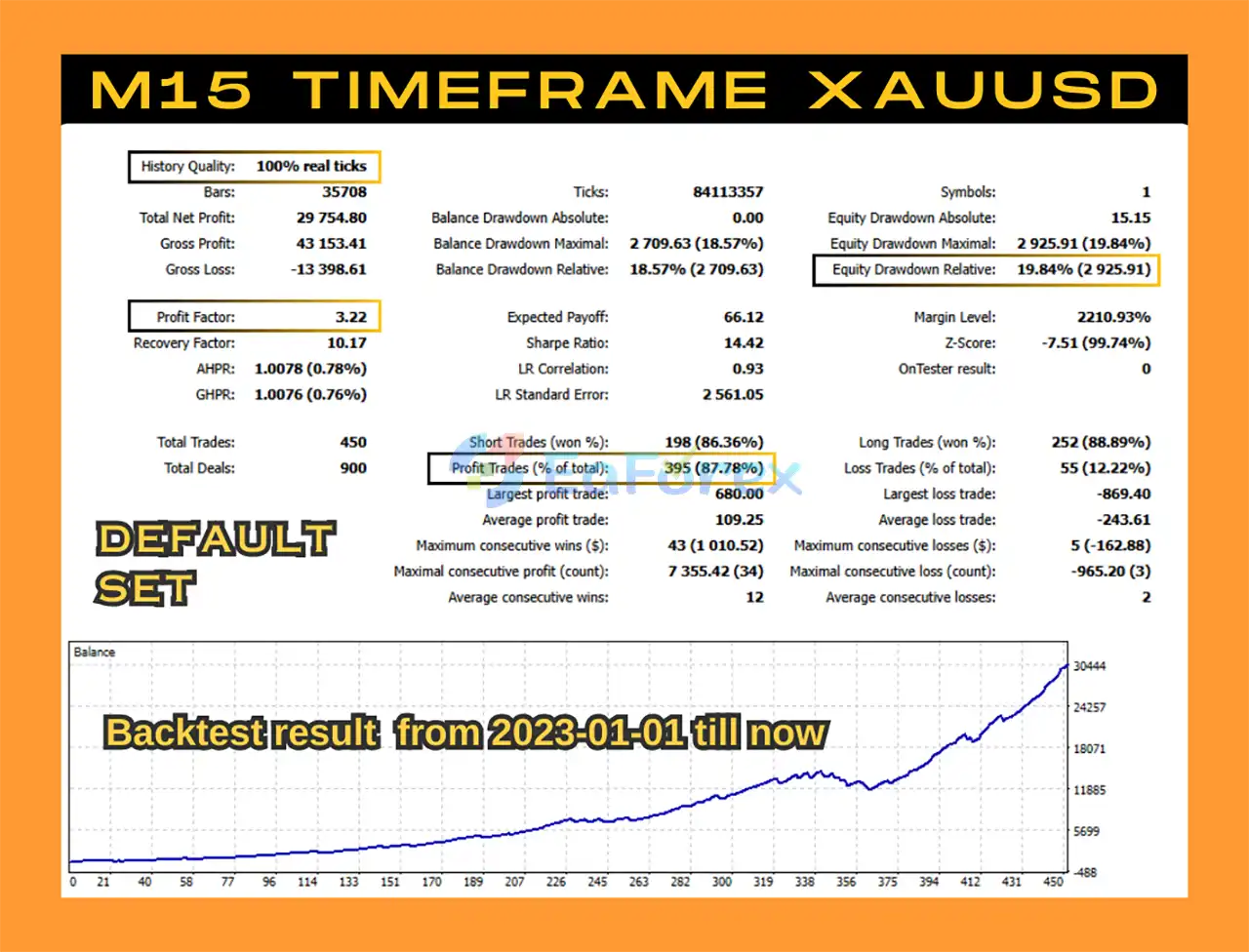
🔺 M15 Backtest
- Win Rate: 87.78%
- Total Net Profit: $29,754.80
- Max Drawdown: 19.84%
- Profit Factor: 3.22
Performance and Risk Management
Aero Gold EA MT5 provides several settings designed to control trading exposure.
The StopLoss parameter defines the Stop Loss distance in pips.
TrailingStart determines the profit level at which trailing protection becomes active.
TrailingStop controls the trailing distance used after the trailing function has been activated.
For position sizing, traders can choose between automatic and fixed lot management.
When:
AutoLots = True
the EA uses RiskPercent to calculate the position size based on the selected account risk.
When:
AutoLots = False
the EA uses the FixLots value specified by the trader.
The recommended minimum starting deposit is approximately $200, with recommended leverage of 1:100 or higher.
These figures should not be interpreted as guaranteed requirements for profitable trading. Actual capital requirements depend on lot size, broker specifications, spread, volatility, Stop Loss settings, and individual risk tolerance.
Because Aero Gold trades XAUUSD, traders should be prepared for potentially large price movements and should avoid excessive leverage or position sizes.
Recommended Trading Setup
The developer recommends using Aero Gold EA on:
M5, M15, or M30
Traders can also run multiple instances simultaneously.
For example, one configuration could operate on M5 while another runs on M15 and another on M30.
Using different Magic Numbers for each instance is recommended when running multiple configurations so that trades can be identified and managed independently.
A 24/7 VPS is strongly recommended because MetaTrader 5 must remain connected to the trading account for the EA to operate continuously.
EA Settings
MagicNumber
The MagicNumber is used to identify trades generated by a particular EA instance.
When running multiple Aero Gold instances, different Magic Numbers can be assigned to each configuration.
StopLoss
Defines the Stop Loss distance in pips.
This parameter provides predefined downside protection for each position.
TrailingStart
Determines the profit level at which the trailing stop mechanism becomes active.
TrailingStop
Defines the trailing distance used to manage profitable positions after the trailing function has started.
AutoLots
Enables or disables automatic lot calculation.
Set:
AutoLots = True
to use automatic position sizing.
RiskPercent
Defines the account risk percentage used by the automatic lot-sizing system when AutoLots is enabled.
FixLots
Defines the fixed lot size when automatic lot calculation is disabled.
Set:
AutoLots = False
when you want to use a manually specified fixed lot size.
Weaknesses and Risk Warnings
Although Aero Gold does not use aggressive strategies such as Martingale or Grid Trading, it is still a fully automated trading system and therefore carries financial risk.
Trend-following strategies can perform well during strong directional markets but may experience periods of weaker performance when the market moves sideways or produces frequent false breakouts.
Gold can also experience sudden volatility caused by:
- U.S. economic releases
- Federal Reserve decisions
- Inflation data
- Geopolitical events
- Changes in interest-rate expectations
- Unexpected market news
During these periods, spreads can widen and slippage can increase.
Running multiple EA instances across several timeframes can also increase the overall number of trades and account exposure.
Important risks include:
- XAUUSD volatility
- Trend reversals
- Sideways market conditions
- False trading signals
- Spread expansion
- Slippage
- Broker execution differences
- Excessive leverage
- Oversized positions
- Multiple-instance exposure
- VPS or connection failures
Aero Gold should therefore be tested carefully on a demo account before being used with real capital.
Pros and Cons
Pros
- Designed for XAUUSD Gold trading
- Trend-following strategy
- MetaTrader 5 compatible
- Supports M5, M15, and M30
- No Martingale
- No Grid Trading
- No aggressive averaging strategy
- Simple configuration
- Stop Loss protection
- Trailing Stop functionality
- Automatic lot sizing
- Risk percentage management
- Fixed lot option
- Multiple EA instances supported
- Magic Number identification
- Suitable for 24/7 automated operation
- VPS recommended for continuous trading
Cons
- Primarily designed for XAUUSD
- Trend-following strategies can struggle in sideways markets
- Gold can be highly volatile
- Trading frequency may vary between timeframes
- Spread and slippage can affect results
- Multiple instances can increase overall exposure
- Requires a continuously running MT5 terminal for uninterrupted operation
- No trading strategy can guarantee profits
- Recommended leverage of 1:100 or higher can significantly increase risk if position sizing is not controlled
How to Install Aero Gold EA MT5
Installing Aero Gold EA MT5 follows the standard MetaTrader 5 Expert Advisor installation process.
Step 1: Download the Aero Gold EA MT5 files.
Step 2: Open MetaTrader 5 and select File → Open Data Folder.
Step 3: Navigate to the MQL5 → Experts folder.
Step 4: Copy the Aero Gold EA files into the Experts directory.
Step 5: Restart MetaTrader 5 or refresh the Expert Advisors section in the Navigator.
Step 6: Open an XAUUSD chart.
Step 7: Select your preferred timeframe: M5, M15, or M30.
Step 8: Attach Aero Gold EA to the chart.
Step 9: Enable Algo Trading/AutoTrading.
Step 10: Configure MagicNumber, StopLoss, TrailingStart, TrailingStop, and the desired lot-sizing method.
Step 11: If using automatic lot sizing, enable AutoLots and configure RiskPercent.
Step 12: If using fixed lots, disable AutoLots and enter the desired FixLots value.
Step 13: For continuous operation, run MetaTrader 5 on a reliable 24/7 VPS.
If running multiple Aero Gold instances, use different Magic Numbers to distinguish the trades generated by each configuration.
Real User Reviews and Feedback
🔻 Aero Gold EA MT5 is highly appreciated by the MQL5 community for bringing stable and reliable profits. Below are 5 star reviews from users:
- Liems (2024.08.01): “I recommend for this EA. this good.”
What’s Included in the Download Package?
- Setting (If Any).docx
- Installation Guide.docx
Final Thoughts
Aero Gold EA MT5 is a straightforward trend-following Expert Advisor for XAUUSD, designed for traders who prefer a simple automated approach without aggressive money management techniques.
The EA combines standard MetaTrader 5 technical indicators with trend-following logic to identify potential directional movements in the Gold market. It supports M5, M15, and M30 timeframes, allowing traders to select different trading environments or even run multiple configurations simultaneously.
Its built-in Stop Loss, Trailing Stop, automatic lot sizing, RiskPercent, and fixed-lot options provide useful tools for controlling trading exposure.
Another important advantage is the absence of Martingale and Grid Trading, which keeps the core strategy simpler and avoids deliberately increasing exposure through common high-risk recovery mechanisms.
However, trend-following systems can struggle during sideways or highly erratic markets, while XAUUSD itself remains a volatile instrument. Proper position sizing, realistic expectations, and disciplined risk management are therefore essential.
Overall, Aero Gold EA MT5 offers a clean and accessible solution for traders searching for a Gold EA MT5, XAUUSD Expert Advisor, trend-following EA, or automated Gold trading robot without relying on Martingale or Grid strategies.



