


Product Overview
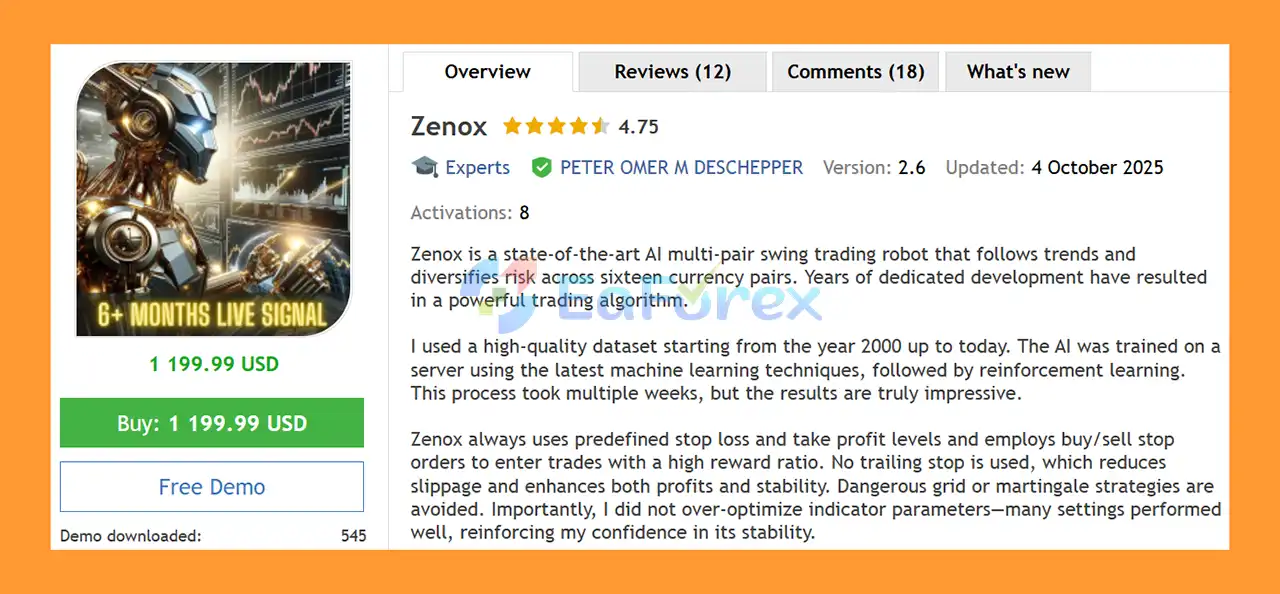
Zenox EA MT5 is a state-of-the-art AI-powered Forex Expert Advisor designed for multi-pair swing trading and trend-following strategies. Developed through years of research and development, Zenox combines machine learning, reinforcement learning, structured trade execution, and predefined risk controls to create an adaptive automated trading system for MetaTrader 5.
The AI model was trained using historical market data from 2020 to 2025, while data from 2025 onward is treated as Out-of-Sample data. This development approach is intended to evaluate whether the AI can adapt to changing market conditions rather than relying purely on heavily optimized historical parameters.
Zenox focuses on disciplined swing trading instead of aggressive recovery techniques. The EA does not use Grid or Martingale strategies, and each trade is protected by predefined Stop Loss and Take Profit levels.
The system uses Buy Stop and Sell Stop orders to seek trend-following entries with a potentially attractive reward-to-risk structure. Zenox allows only one Buy and one Sell position per pair, helping maintain controlled exposure across its supported instruments.
Another important characteristic is its multi-pair architecture. Zenox can manage several currency pairs from a single chart instance, allowing traders to operate a diversified portfolio without attaching the EA separately to every chart.
About the Developer
• Author: PETER OMER M DESCHEPPER
• Experience: Over +1 years of experience on MQL5.
• Notable Products: Zenox EA, GoldenTron X and others.
• Flagship Product: Zenox EA MT5 is rated as the best performing product of the year.
>> Delivery time 24h-48h after payment.
>>> Refund if not delivered.
>>> You will receive the latest version without any limitations (ID+Time).>> Reviewed by Jason Stap <<<
Main Features of Zenox EA MT5
AI-Powered Trading Algorithm
Zenox EA MT5 uses an AI-based trading model developed with modern machine learning and reinforcement learning techniques.
The model was trained over multiple weeks using historical market data covering 2020–2025. The objective is to allow the algorithm to identify market patterns and adapt its trading decisions to different market environments.
Multi-Pair Trading
Zenox is designed to diversify trading exposure across multiple instruments from a single EA instance.
Supported pairs include:
- EURUSD
- GBPUSD
- GBPAUD
- GBPJPY
- AUDUSD
- NZDUSD
- USDCAD
- USDJPY
- XAUUSD
The ability to enable or disable individual pairs gives traders additional control over portfolio exposure.
Swing Trading Strategy
Zenox is primarily designed as a swing trading EA, meaning positions can remain open for extended periods while the system waits for the market to reach its predefined Take Profit or Stop Loss.
This approach differs from high-frequency scalping systems that attempt to close positions rapidly.
Trend-Following Entries
The EA uses Buy Stop and Sell Stop orders to enter trades when price reaches predefined levels.
This approach is designed to participate in potential directional market movements rather than attempting to predict every short-term market fluctuation.
Predefined Stop Loss and Take Profit
Every trade uses predefined Stop Loss and Take Profit levels.
This creates a clearly defined risk and reward structure before a trade is executed.
No Grid or Martingale
Zenox deliberately avoids aggressive recovery techniques.
The EA does not rely on:
- Grid trading
- Martingale
- Averaging down
- Increasing lot sizes after losses
This is an important distinction for traders looking for a more structured trend-following and swing-trading system.
Controlled Position Exposure
Zenox limits trading exposure by allowing a maximum of one Buy and one Sell position per pair.
This helps prevent the EA from continuously adding positions to the same currency pair during an unfavorable market movement.
Optional Break-Even
Break-even protection can be enabled separately for supported pairs.
The Break-even RR Trigger determines when the EA moves the Stop Loss toward the entry price based on the selected Risk-to-Reward threshold.
The Break-even SL Offset allows users to specify how many points the Stop Loss should be positioned away from the original entry price.
Automatic Risk Management
The Auto Risk Setting calculates position size based on a specified percentage of the account balance.
The recommended default risk is 5% per trade, although traders should adjust this according to their own risk tolerance and account objectives.
Equity-Based Risk Calculation
Users can choose to calculate automatic risk using account equity instead of balance.
This can be useful when multiple Expert Advisors or manual trades are running on the same account.
Fixed Balance Risk Calculation
Zenox also supports a fixed balance amount for automatic risk calculations.
This can be useful for traders who regularly withdraw profits and want to maintain a consistent risk calculation without manually changing the balance setting.
Fixed Lot Trading
Traders who prefer fixed position sizing can specify a fixed lot size.
When the Fixed Lot Size value is greater than zero, the automatic risk calculation is disabled.
Maximum Open Positions
The EA provides a Maximum Open Positions setting based on the Magic Number.
This feature can be particularly useful for traders using Zenox on prop firm accounts where controlling total exposure is important.
Symbol Prefix and Suffix Support
Zenox supports brokers that use customized symbol names.
Users can specify:
- Symbol Prefix
- Symbol Suffix
For example, if a broker uses mEURUSD or EURUSDm, the corresponding prefix or suffix can be entered into the EA settings.
Prop Firm Randomizer
Zenox includes an optional randomizer for Entry, Stop Loss, and Take Profit.
The feature is designed for prop firm environments where identical trades between different users may be restricted.
The randomizer is disabled by default and is generally not recommended for standard users because it may result in slightly different or potentially weaker execution.
Chart Panel
A built-in chart panel can display Zenox information directly on the MetaTrader 5 chart.
Users can enable or disable the panel according to their preferences.
How Does Zenox EA MT5 Work?
Zenox EA MT5 operates as an automated AI-driven swing trading system.
The underlying AI model was trained using historical market data from 2020 to 2025 through machine learning and reinforcement learning processes. The system was then evaluated against later market data to assess how it performs outside the primary training period.
When the EA identifies a potential trading opportunity, it can place a Buy Stop or Sell Stop order according to its trading logic.
The pending order allows the market to confirm the anticipated price movement before the trade is activated.
Once a position is opened, Zenox uses predefined Stop Loss and Take Profit levels to manage the trade.
Unlike Grid or Martingale systems, Zenox does not continuously add recovery positions when a trade moves into a loss. Instead, it follows a structured swing-trading approach with controlled position exposure.
The EA can manage multiple supported pairs from a single chart. Traders can individually enable or disable pairs according to their preferred portfolio configuration.
Position sizing can be calculated automatically based on balance, equity, or a fixed balance amount. Alternatively, traders can use a fixed lot size.
Why Choose Zenox EA MT5?
AI and Machine Learning Approach
One of the main differences between Zenox and conventional Forex Expert Advisors is its use of machine learning and reinforcement learning during development.
Instead of relying entirely on manually optimized indicator parameters, the system was developed using an AI training process intended to recognize changing market conditions.
Multi-Pair Diversification
Trading multiple currency pairs can help diversify exposure across different market environments.
Zenox can manage its supported instruments from a single chart, simplifying the setup for traders who want a multi-pair automated portfolio.
No Grid or Martingale
Zenox does not use Grid or Martingale recovery techniques.
For traders who prefer avoiding strategies that continuously increase market exposure during losing sequences, this can be an important advantage.
Structured Risk Management
Every trade is designed around predefined Stop Loss and Take Profit levels.
The EA also provides automatic risk sizing, maximum position controls, optional break-even protection, and other parameters designed to help traders manage account exposure.
Out-of-Sample Evaluation
The development data covers 2020–2025, while later market data is treated as Out-of-Sample data.
Testing an algorithm against data that was not used during the original training process can provide a more meaningful indication of whether the system may adapt beyond its training environment.
However, Out-of-Sample performance should never be interpreted as a guarantee of future profitability.
Single-Chart Multi-Pair Management
Zenox does not require users to attach the EA to multiple charts.
A single chart instance can manage the supported trading pairs, which simplifies installation and monitoring.
Prop Firm Features
The Maximum Open Positions setting and optional trade randomizer can be useful for traders working with prop trading firms that impose restrictions on exposure or identical trade execution.
Zenox EA MT5 Performance Review
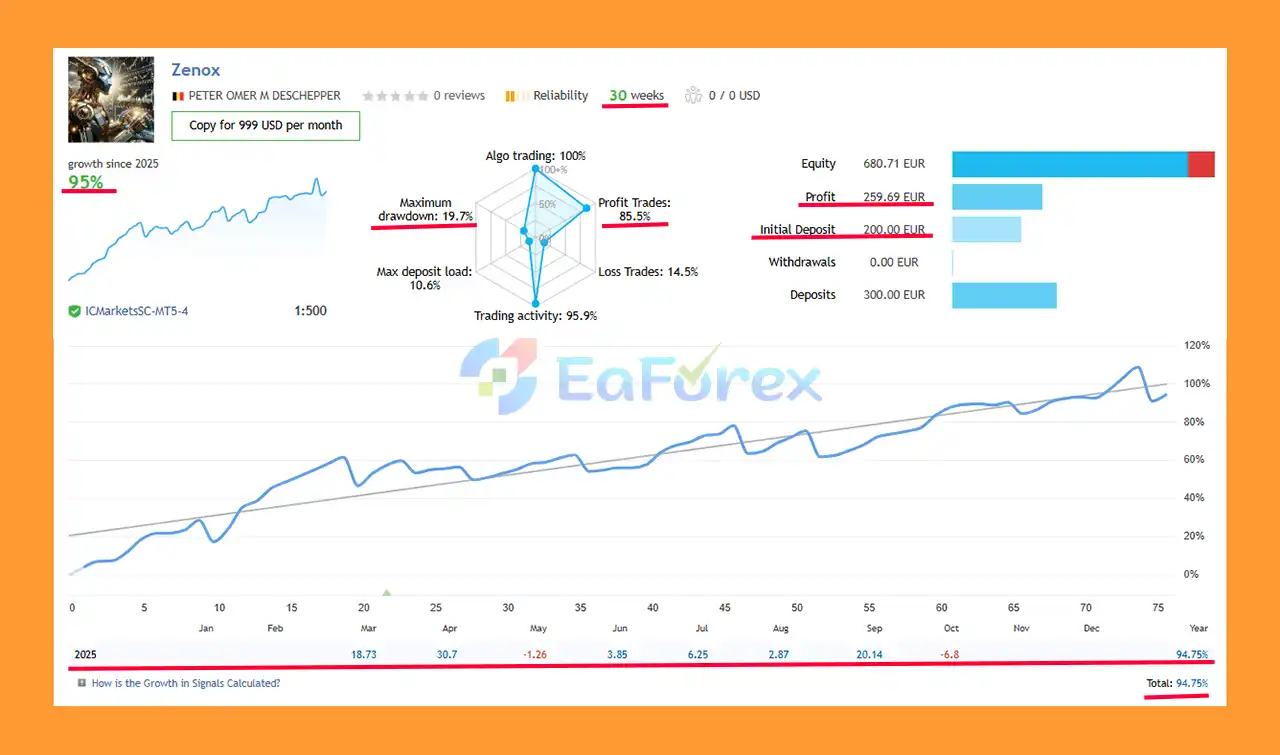
🟢 Live Trading
- Initial Deposit: €200
- Total Growth: +95%
- Win Rate: 85.5%
- Maximum Drawdown: 19.7%
- Live Signal Results: View here
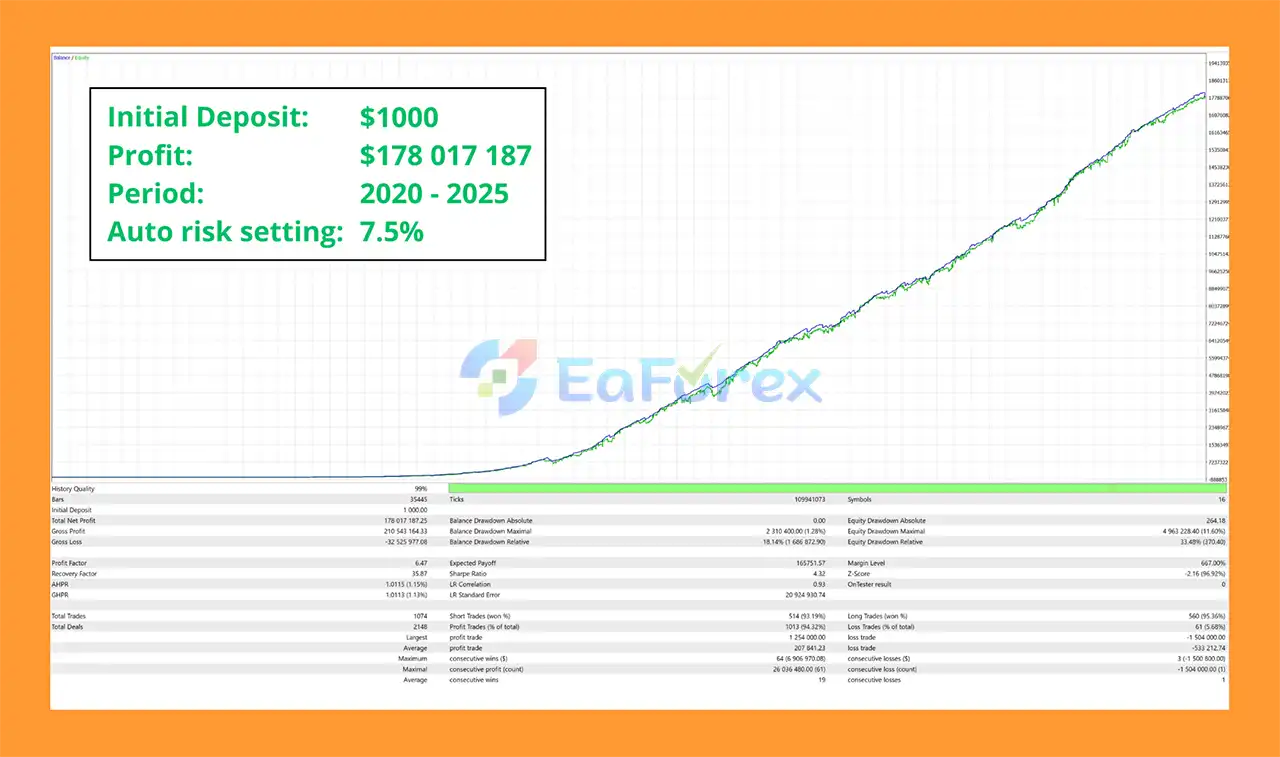
🟢 Backtest Results
-
Initial Deposit: $1,000 → Net Profit: $178 Million, Max Drawdown: 1.28%
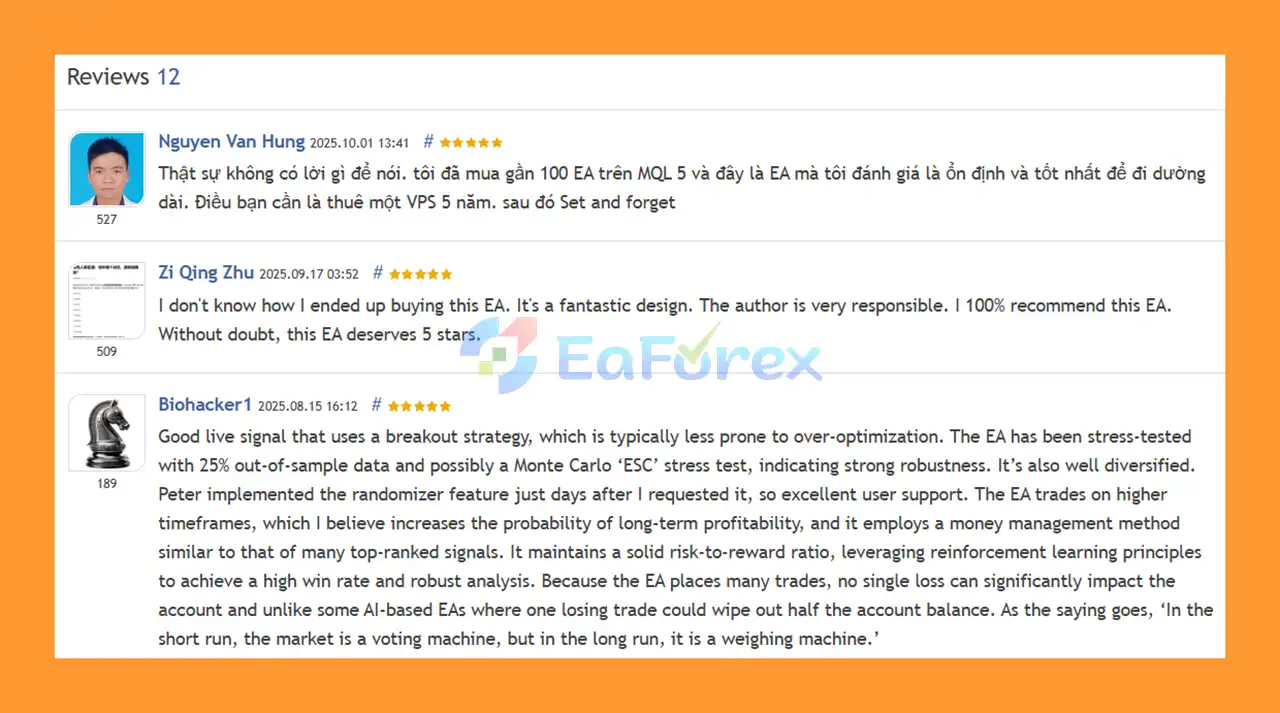
Real User Reviews and Feedback
🔻Zenox EA MT5 is highly appreciated by the MQL5 community for bringing stable and reliable profits. Below are 5 star reviews from users:
Performance and Risk Management
Zenox EA MT5 is designed around controlled swing trading rather than aggressive recovery.
The recommended default Auto Risk setting is 5%, but this should not automatically be considered suitable for every trader. A 5% risk level per trade can be aggressive, especially when multiple pairs are active simultaneously.
The EA provides several options for controlling position sizing:
- Auto Risk based on balance
- Auto Risk based on equity
- Fixed Balance calculation
- Fixed Lot Size
- Maximum Open Positions
- Pair-specific trading controls
- Optional Break-even
- Predefined Stop Loss
- Predefined Take Profit
Using equity instead of balance can be useful when multiple trading systems or manual positions are active on the same account.
The Fixed Balance feature can also help traders who regularly withdraw profits because the risk calculation can remain based on a predetermined amount rather than continuously increasing with account growth.
For portfolio-level risk management, traders should consider the combined exposure across all active pairs rather than evaluating each trade individually.
Even though Zenox avoids Grid and Martingale strategies, multiple simultaneous trades can still generate significant total drawdown during unfavorable market conditions.
Weaknesses and Risk Warnings
Zenox EA MT5 uses AI and machine learning, but artificial intelligence does not eliminate financial risk.
Market conditions can change in ways that differ from the historical data used during development and testing. An AI model that performed well during previous market environments may experience periods of weaker performance in the future.
The multi-pair approach can also increase total exposure when several correlated currencies move in the same direction.
The recommended 5% risk setting may be aggressive for many traders, particularly when multiple pairs are active. Users should carefully consider reducing the risk percentage according to their account size and risk tolerance.
Swing trading also means that positions can remain open for extended periods. During major market events, gaps or sudden volatility can result in losses that differ from the theoretical Stop Loss level.
Backtesting has another important limitation. Because Zenox uses swing trading logic and can maintain a basket of open positions, the final positions may be forcibly closed when the backtest reaches its end date. This can make the final backtest result less representative of real-world trading, where positions would normally remain open until their Stop Loss or Take Profit is reached.
Other risks include:
- AI models can experience periods of underperformance.
- Historical results do not guarantee future performance.
- Out-of-Sample performance can change in future market conditions.
- Multiple pairs can create correlated exposure.
- High risk percentages can produce significant drawdowns.
- Swing trades can remain open for extended periods.
- Slippage and gaps can affect live execution.
- Broker execution conditions can influence results.
- Prop firm rules may differ between companies.
- A VPS is recommended for continuous automated operation.
Always test the EA on a demo account and use risk settings that you can realistically tolerate.
Pros and Cons
Pros
- AI-powered Forex Expert Advisor
- Machine learning and reinforcement learning development
- Multi-pair swing trading
- Trend-following trading approach
- Supports multiple Forex pairs and XAUUSD
- Can manage multiple pairs from one chart
- No Grid strategy
- No Martingale strategy
- Predefined Stop Loss and Take Profit
- Buy Stop and Sell Stop entries
- Automatic risk-based lot sizing
- Equity-based risk calculation
- Fixed balance risk option
- Fixed lot trading
- Maximum Open Positions control
- Optional Break-even functionality
- Pair-specific trading controls
- Symbol prefix and suffix support
- Optional prop firm randomizer
- Built-in chart panel
- VPS compatible
- Designed to work with different brokers and account currencies
Cons
- AI performance can change as market conditions evolve
- Recommended 5% risk can be aggressive
- Multiple pairs can increase combined exposure
- Swing positions may remain open for extended periods
- Backtest end-date results may not accurately represent live trading
- No trading system can guarantee profits
- Out-of-Sample results do not guarantee future performance
- Prop firm rules may require additional configuration
- VPS is recommended for continuous operation
How to Install Zenox EA MT5
Step 1: Obtain Zenox from the Official MQL5 Platform
Zenox EA is stated to be available exclusively through the MQL5 platform.
Traders should be careful with unauthorized websites or sellers claiming to distribute Zenox outside the official platform.
Step 2: Install the EA in MetaTrader 5
Open MetaTrader 5 and access the purchased Expert Advisor through the MQL5 environment.
Make sure the EA appears correctly in the Navigator → Expert Advisors section.
Step 3: Open a Chart
Zenox does not depend on a specific chart timeframe.
Although EURUSD H1 may be commonly used, the EA can be attached to a chart according to the supported configuration.
Importantly, you do not need to attach Zenox to multiple charts because one instance can manage multiple supported pairs.
Step 4: Configure Risk
Set the Auto Risk Setting according to your risk tolerance.
The developer lists 5% as the default/recommended setting, but traders should carefully evaluate whether this level is appropriate for their account.
You can alternatively use:
- Equity-based risk
- Fixed balance risk
- Fixed lot size
Step 5: Select Trading Pairs
Enable or disable individual pairs according to your preferred portfolio.
Available pair controls include:
- XAUUSD
- GBPUSD
- GBPAUD
- GBPJPY
- EURUSD
- AUDUSD
- NZDUSD
- USDCAD
- USDJPY
Step 6: Configure Break-Even
If desired, enable Break-even for individual pairs and configure:
- Break-even RR Trigger
- Break-even SL Offset Points
Step 7: Configure Broker Symbols
If your broker uses symbol prefixes or suffixes, enter them in the corresponding Prefix and Suffix settings.
For example:
mEURUSD
or
EURUSDm
Step 8: Configure Maximum Positions
If you are using a prop firm account or want to limit total exposure, configure the Maximum Open Positions parameter.
Step 9: Configure the Randomizer if Required
The Entry, SL, and TP randomizer is optional.
It may be useful for certain prop firm requirements but is not recommended for most users because it can slightly alter execution and performance.
Step 10: Use a VPS
A VPS is recommended for maintaining a stable MetaTrader 5 connection and allowing Zenox to manage positions continuously.
Before using the EA with real funds, perform adequate backtesting and forward testing on a demo account.
What’s Included in the Download Package?
- Setting (If Any).docx
- Installation Guide.docx
Final Thoughts
Zenox EA MT5 is an advanced AI Forex trading robot focused on multi-pair swing trading, trend-following entries, and structured risk management.
Its use of machine learning and reinforcement learning distinguishes it from traditional Expert Advisors that rely entirely on manually optimized parameters. The combination of AI-driven analysis, Buy Stop and Sell Stop entries, predefined Stop Loss and Take Profit, multi-pair diversification, and the absence of Grid and Martingale strategies makes Zenox an interesting solution for traders seeking a more disciplined automated trading approach.
The ability to manage multiple pairs from a single chart is another practical advantage, while automatic risk sizing, equity-based calculations, fixed balance options, maximum position limits, and optional break-even protection provide additional flexibility.
However, AI does not guarantee consistent profits. Financial markets continuously evolve, and even systems with strong historical and Out-of-Sample performance can experience drawdowns or periods of underperformance.
For this reason, traders should focus on appropriate risk management rather than simply maximizing returns. Start with a risk level that matches your account and tolerance, test the EA under different market conditions, and carefully evaluate its behavior before moving to a live account.
Overall, Zenox EA MT5 is a compelling option for traders looking for an AI-powered, multi-pair Forex swing trading EA without Grid or Martingale recovery, while still providing flexible position sizing and portfolio-level risk controls.



