


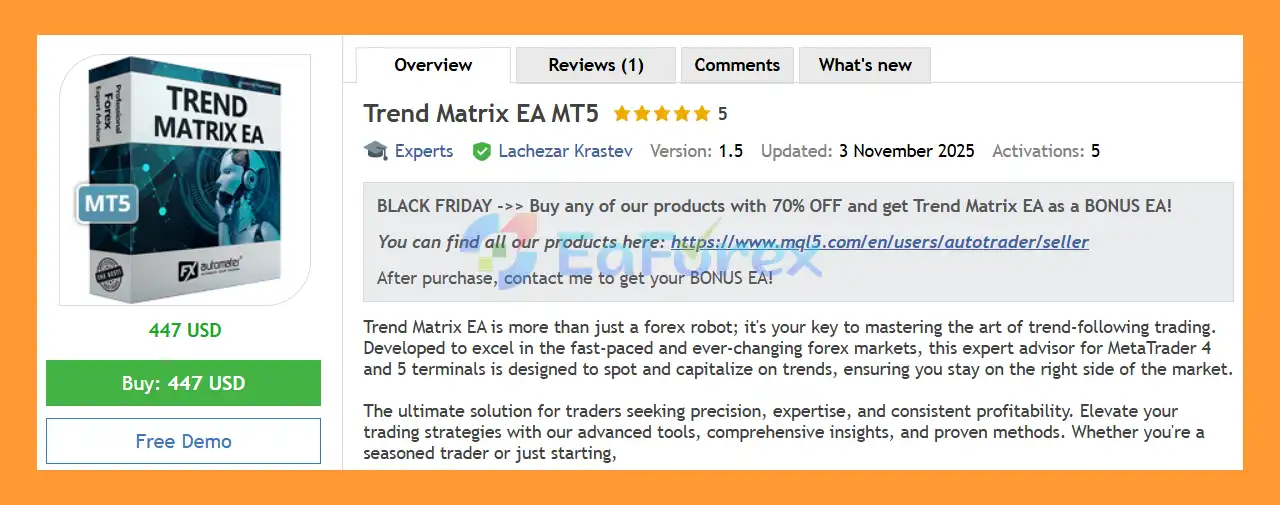
Product Overview
Trend Matrix EA MT5 is an advanced trend-following Expert Advisor (EA) designed to identify and capitalize on market trends across multiple forex and commodity instruments. Developed for automated trading, the system is designed to help traders follow established market movements while using a comprehensive range of risk-management and trade-protection tools.
Trend Matrix EA MT5 is compatible with MetaTrader 4 and MetaTrader 5 terminals, making it suitable for both experienced traders and users who prefer a more automated approach to forex trading.
The core philosophy behind Trend Matrix EA is based on simple and structured trend-following logic. Instead of relying on overly complicated trading concepts, the EA analyzes market conditions and attempts to position itself on the appropriate side of the prevailing trend.
The system also includes advanced features such as loss recovery, trailing stops, spread and slippage protection, news filtering, time management, and drawdown protection.
With support for multiple currency pairs and commodities, Trend Matrix EA can be configured for different portfolios and trading preferences.
About the Developer
- Author: Lachezar Krastev.
- Experience: Over +2 years of experience on MQL5.
- Notable Products: Trend Matrix EA MT5, Infinity Trader EA MT4, Infinity Trader EA MT5, Forex GOLD Investor MT5, Forex GOLD Investor MT4 and other advisors.
- Flagship Product: Trend Matrix EA MT5 is rated as the best performing product of the year.
>> Delivery time 24h-48h after payment.
>>> Refund if not delivered.
>>> You will receive the latest version without any limitations (ID+Time).>>Reviewed by Jason Stap <<
Main Features of Trend Matrix EA MT5
Key Features
Trend-Following Trading Strategy
Trend Matrix EA MT5 is built around a trend-following strategy designed to identify market direction and participate in potentially sustained price movements.
The system focuses on following market trends rather than attempting to predict every short-term price fluctuation.
Simple and Structured Trading Logic
The EA uses a relatively straightforward trading philosophy designed to identify potential opportunities without relying on unnecessarily complex manual analysis.
This approach can make the system easier to configure and understand compared with EAs that require numerous manual trading decisions.
Multi-Pair and Multi-Market Support
Trend Matrix EA MT5 supports a range of forex and commodity instruments, including:
- AUDUSD
- EURGBP
- EURJPY
- EURUSD
- GBPJPY
- NZDCAD
- USDCAD
- USDJPY
- XAGUSD
- Brent Crude Oil
The default settings are optimized for EURUSD H1, while additional .set files are available for other supported instruments.
User-Friendly Interface
Trend Matrix EA MT5 is designed for both beginners and experienced traders.
The interface provides configurable parameters that allow users to adjust important trading and risk settings according to their account and trading objectives.
The EA can also be used in a more hands-off set-and-forget style once the appropriate parameters have been configured.
Comprehensive Risk Management
Risk management is an important component of Trend Matrix EA.
The system includes multiple protective mechanisms, including:
- Broker protection
- Spread protection
- Slippage protection
- Static trailing stop
- Dynamic trailing stop
- Drawdown protection
- News filtering
- Trading-time controls
These tools are designed to reduce exposure to unfavorable market and execution conditions.
Next Generation Loss Recovery System
Trend Matrix EA MT5 includes a Next Generation Loss Recovery System designed to respond when market conditions move against an existing position.
According to the supplied strategy description, the system can identify unfavorable trades and potentially close the existing position before opening a position in the opposite direction.
This mechanism is designed to adapt to potential market reversals rather than simply maintaining a losing position.
However, loss-recovery systems can increase trading complexity and risk, so traders should carefully evaluate their behavior using historical testing and demo trading before using them with real capital.
Static and Dynamic Trailing Stop
The EA provides both static and dynamic trailing-stop functionality.
These tools can be used to manage open trades as price moves in the desired direction, potentially protecting part of an existing profit while allowing positions to remain open during continued trends.
Advanced News Filter
Trend Matrix EA MT5 includes an Advanced News Filter designed to reduce exposure during high-impact economic news events.
The system can automatically avoid trading during selected high-impact news periods, helping reduce exposure to sudden volatility, spreads, and unpredictable price movements.
Time Management System
The built-in Time Management System allows traders to define when the EA is permitted to trade.
Users can configure specific trading hours and restrict trading during periods they consider unsuitable for their strategy.
Drawdown Protection System
Trend Matrix EA MT5 includes a configurable Drawdown Protection System designed to help traders manage account-level risk.
This feature can be particularly relevant to traders using prop firm or funded accounts, where maximum drawdown and daily loss restrictions are often important.
The system allows traders to configure protection parameters according to their account rules.
Long-Only and Short-Only Modes
Trend Matrix EA MT5 provides flexible directional trading options.
Users can configure the EA to:
- Trade Long positions only
- Trade Short positions only
- Allow both Long and Short positions
This allows traders to adapt the EA to their market outlook or specific trading strategy.
Push and Email Notifications
The EA includes notification functionality that can keep traders informed about important trading events and EA activity.
Push notifications can help users monitor automated trading even when they are away from their MetaTrader terminal.
24/5 Automated Trading
Trend Matrix EA is designed for continuous automated operation during the trading week.
The system does not require manual GMT-shift adjustments, allowing traders to operate the EA without constantly modifying trading times because of GMT changes.
Ongoing Development
Trend Matrix EA is designed as an evolving product, with continued development and updates intended to adapt the system to changing market conditions and incorporate additional improvements.
How Does Trend Matrix EA Work?
Trend Matrix EA continuously analyzes supported markets to identify potential trends and trading opportunities.
The core process is based on trend identification and directional trade execution.
When the EA detects conditions that satisfy its strategy rules, it can open a position in the corresponding market direction.
Once a position is active, the system uses its trade-management tools to control the position. These may include:
- Stop and exit logic
- Static trailing stop
- Dynamic trailing stop
- Loss recovery
- Spread protection
- Slippage protection
- News filtering
- Time-based restrictions
If the market begins moving against an open position, the Loss Recovery System can respond according to its programmed logic. The system may close an unfavorable position and potentially look for an opportunity in the opposite direction.
At the same time, the Drawdown Protection System monitors account-level risk and can restrict trading when configured account limits are reached.
The overall trading workflow can be summarized as:
Market Analysis → Trend Detection → Entry Confirmation → Trade Execution → Position Management → Trailing/Exit Logic → Risk Monitoring
Why Choose Trend Matrix EA MT5?
Trend Matrix EA MT5 is designed for traders who want a fully automated trend-following system with extensive customization and protection features.
One of its main characteristics is its multi-market compatibility. Instead of being limited to a single currency pair, the EA can operate on multiple forex pairs as well as silver and Brent crude oil.
Another important feature is the combination of trend-following logic and advanced trade management. The EA includes trailing stops, loss recovery, news filtering, spread protection, slippage protection, and drawdown controls.
The system is also designed to accommodate different trader profiles. Users can select Long-only or Short-only trading, use fixed lots or automatic money management, and configure maximum spread and slippage limits.
For traders interested in automated trend-following strategies, Trend Matrix EA provides a broad set of tools for managing entries, exits, trading schedules, and account risk.
Trend Matrix EA MT5 Performance Review
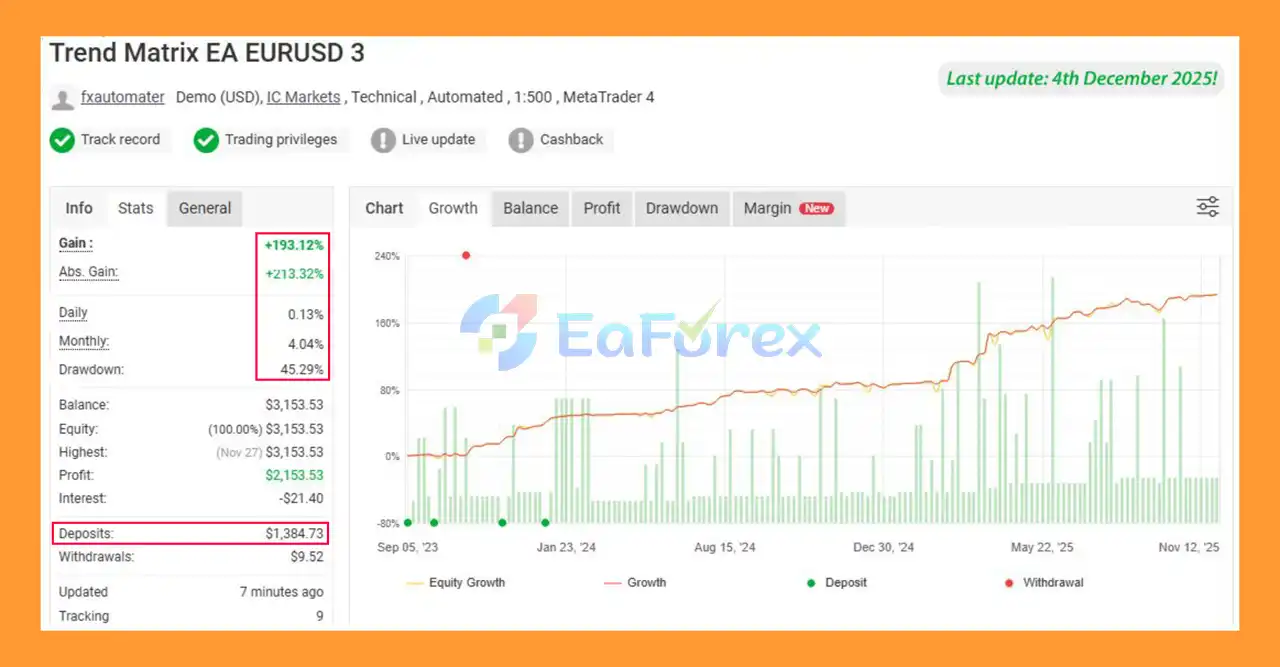
🟢Myfxbook Results
🔺Verified Myfxbook - 6 months
- Initial Deposit: $1,384.73
- Total Gain: +193.12%
- Monthly Growth: 4.40%
- Maximum Drawdown: 45.29%
🟢Backtest Results
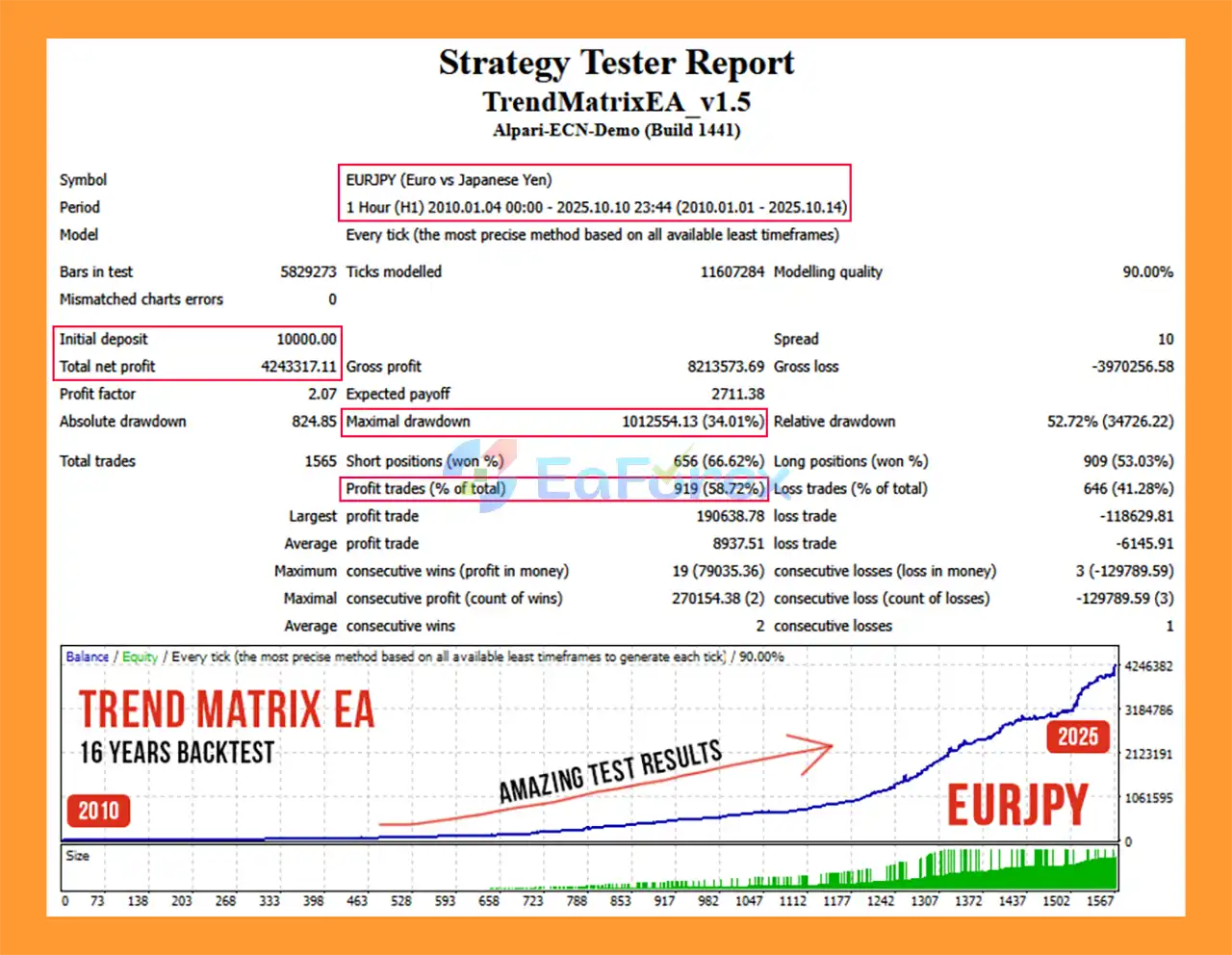
🔺EURJPY – 15 years
- Initial Deposit: $10,000
- Total Net Profit: $4.24 million
- Maximum Drawdown: 34.01%
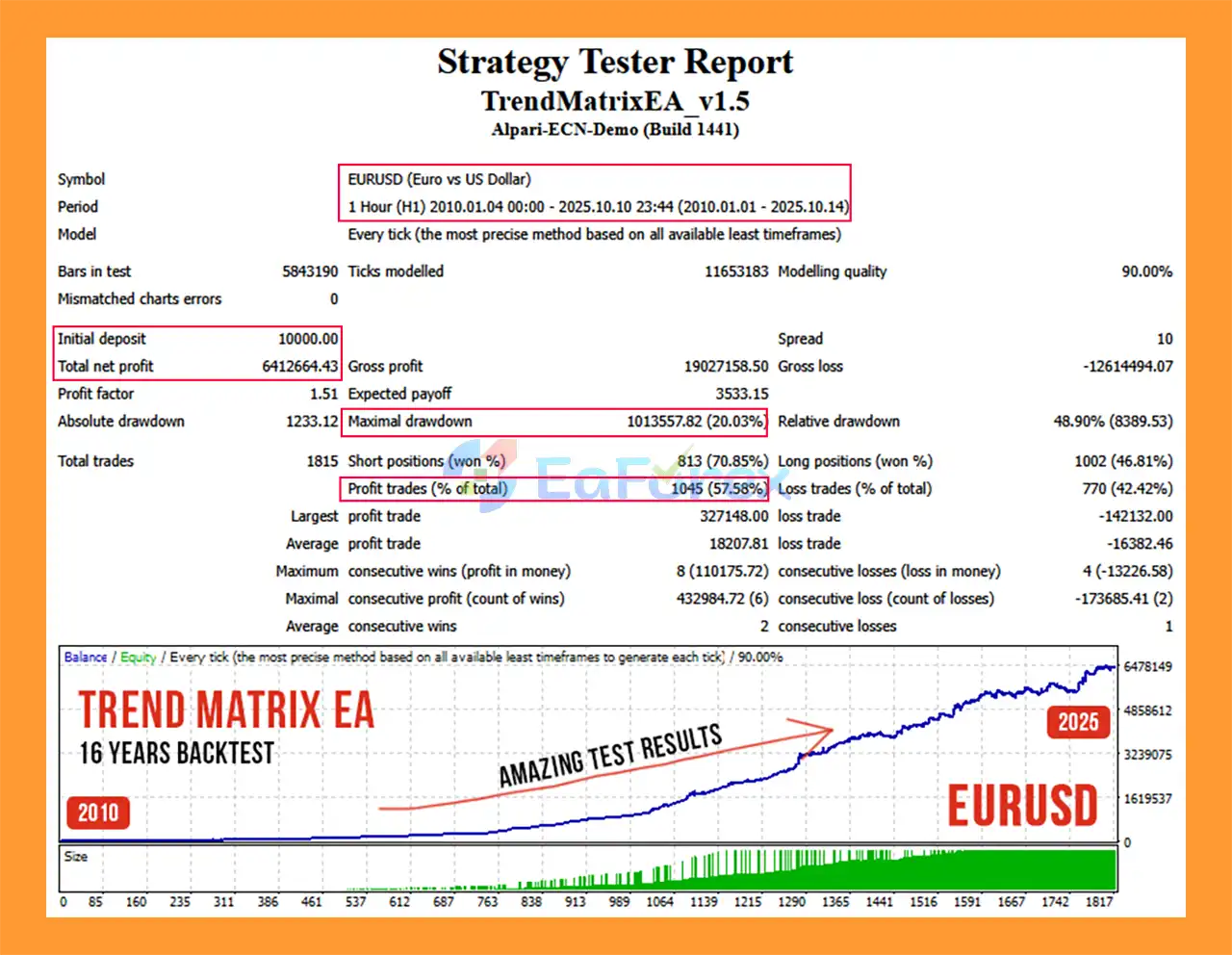
🔺EURUSD – 15 years
- Initial Deposit: $10,000
- Total Net Profit: $6.41 million
- Maximum Drawdown: 20.03%
Performance and Risk Management
Trend Matrix EA is presented with a 14-year backtest history, providing a long historical period for evaluating the strategy's behavior across different market environments.
The recommended testing timeframe is H1.
For more detailed historical testing, the supplied recommendations are:
- Primary Backtest: H1 Every Tick
- Faster Backtest: M1 or Open Price, where appropriate
- Recommended Timeframe: H1
The default settings are optimized for EURUSD H1, while .set files are available for other supported instruments.
Low-risk .set files are also available for traders who prefer a more conservative approach.
Risk Management Features
Trend Matrix EA includes several risk-management mechanisms:
- Fixed lot trading
- Automatic money management
- Spread protection
- Slippage protection
- Broker protection
- Static trailing stop
- Dynamic trailing stop
- Drawdown protection
- Advanced news filter
- Trading-time management
- Long-only configuration
- Short-only configuration
Important Settings
FixedLots controls the fixed trading volume when automatic money management is disabled.
AutoMM can activate automatic money management, with the traded volume calculated according to the configured percentage of free margin.
LongTrades allows traders to enable or disable Buy positions.
ShortTrades allows traders to enable or disable Sell positions.
Magic is the unique Magic Number used to identify trades generated by the EA. Different EAs should use different Magic Numbers to avoid trade-management conflicts.
MaxSpread defines the maximum spread allowed before a new position can be opened.
Slippage defines the maximum permitted slippage for trade execution.
EA_Comment allows users to specify the text displayed in the trade comment for positions opened by Trend Matrix EA.
Weaknesses and Risk Warnings
Despite its extensive protection features, Trend Matrix EA is still an automated trading system and cannot eliminate market risk.
Trend-Following Drawbacks
Trend-following systems can perform differently depending on market conditions. Strong directional markets may provide favorable environments, while sideways or highly choppy markets can generate false signals and losing trades.
Loss Recovery Risk
The Next Generation Loss Recovery System is an important part of the strategy, but any recovery mechanism can increase complexity and exposure during adverse market conditions.
Traders should carefully test recovery behavior and understand the potential drawdown before using aggressive settings.
Backtest Limitations
A 14-year backtest provides useful historical information, but it does not guarantee future profitability.
Historical market conditions may differ significantly from future market environments.
Broker Conditions
Live performance can vary depending on:
- Spread
- Slippage
- Commission
- Liquidity
- Execution speed
- Broker restrictions
- Market conditions
News Volatility
Although the Advanced News Filter is designed to reduce exposure around major economic events, no news filter can guarantee that all unexpected volatility or price gaps will be avoided.
Prop Firm Rules
The Drawdown Protection System can help traders configure the EA for funded-account environments, but it does not guarantee compliance with every prop firm's rules.
Each provider may have different requirements regarding drawdown, daily losses, news trading, overnight positions, and trading hours.
Automated Trading Risk
Technical issues such as VPS outages, internet interruptions, platform errors, or broker execution problems can affect automated trading.
Always test Trend Matrix EA on a demo account and in the MT5 Strategy Tester before using real trading capital.
Pros and Cons
Pros
- Trend-following strategy
- Designed for MetaTrader 4 and MetaTrader 5
- Supports multiple forex and commodity markets
- Recommended H1 timeframe
- 14-year historical backtest period
- User-friendly interface
- Fixed-lot and automatic money-management options
- Broker protection
- Spread protection
- Slippage protection
- Static trailing stop
- Dynamic trailing stop
- Next Generation Loss Recovery System
- Advanced News Filter
- Time Management System
- Drawdown Protection System
- Long-only and Short-only modes
- Push notifications
- Email notifications
- 24/5 automated trading
- No GMT-shift hassles
- Low-risk
.setfiles available - Ongoing development and updates
Cons
- Trend-following strategies can struggle during sideways markets
- Loss recovery can increase trading complexity and exposure
- Actual performance may differ from backtest results
- Broker spreads and execution can affect live results
- News events can still create unexpected volatility
- Different currency pairs may require different settings
- Prop firm compatibility depends on individual provider rules
- Automated trading requires reliable MT4/MT5 and VPS operation
How to Install Trend Matrix EA MT5
Install MetaTrader 5
Install MetaTrader 5 through your broker and log in to your trading account.
If using the MT4 version, follow the equivalent installation process inside MetaTrader 4.
Open the Data Folder
In MetaTrader, select:
File → Open Data Folder
For MetaTrader 5, navigate to:
MQL5 → Experts
For MetaTrader 4, navigate to:
MQL4 → Experts
Copy the EA File
Copy the appropriate Trend Matrix EA file into the Experts folder.
Restart MetaTrader or refresh the Expert Advisors section in the Navigator window.
Open a Supported Market
Open one of the supported instruments, such as:
- EURUSD
- AUDUSD
- EURGBP
- EURJPY
- GBPJPY
- NZDCAD
- USDCAD
- USDJPY
- XAGUSD
- Brent Crude Oil
Select the recommended H1 timeframe.
Attach Trend Matrix EA
Open:
Navigator → Expert Advisors
Find Trend Matrix EA and drag it onto the selected chart.
Configure the Settings
Adjust the settings according to your trading plan, including:
- FixedLots
- AutoMM
- LongTrades
- ShortTrades
- Magic Number
- MaxSpread
- Slippage
- EA Comment
- Trading hours
- News filter
- Drawdown protection
- Trailing stop settings
For supported instruments other than EURUSD, use the appropriate .set file when available.
Enable Automated Trading
Make sure Algo Trading is enabled and that the EA has permission to execute trades.
Use a VPS
For uninterrupted 24/5 operation, running MetaTrader on a reliable VPS is recommended.
Always test the EA on a demo account before deploying it on a live account.
Real User Reviews and Feedback
🔺Trend Matrix EA is highly appreciated by the MQL5 community for bringing stable and reliable profits. Below are 5 star reviews from users:
- Patipat Khunthong (2025.09.01): “I just bought this EA and am trying it on a live account! backtest results with developer’s setup are working quite well. I hope my live account will be profitable as the backtest results.”
What’s Included in the Download Package?
- Setting (If Any).docx
- Installation Guide.docx
>>> Join VIP Membership Now <<<
Final Thoughts
Trend Matrix EA MT5 is a comprehensive trend-following Expert Advisor designed to automate forex and commodity trading across multiple supported markets.
Its combination of trend-following logic, Next Generation Loss Recovery, static and dynamic trailing stops, spread and slippage protection, advanced news filtering, time management, and drawdown protection gives traders a broad range of tools for managing automated positions.
The EA supports multiple instruments, with EURUSD H1 as the default optimized configuration, while additional .set files and low-risk configurations are available for other supported markets.
The reported 14-year backtest history provides a substantial historical period for evaluating the strategy, although historical performance should never be interpreted as a guarantee of future results.
Trend Matrix EA may be suitable for traders looking for a flexible automated trend-following solution with configurable risk controls and multi-market support. However, traders should carefully test the EA under their own broker conditions and select appropriate risk settings before committing real capital.
For best results, use the recommended H1 timeframe, appropriate .set files, conservative risk parameters, and a reliable VPS for continuous automated operation.



