









-
 Unlimited Activations
-
 Instant delivery
-
 Easy to install







 Unlimited Activations
Instant delivery
Easy to install
Unlimited Activations
Instant delivery
Easy to install
 Free Update
 Free Install Support

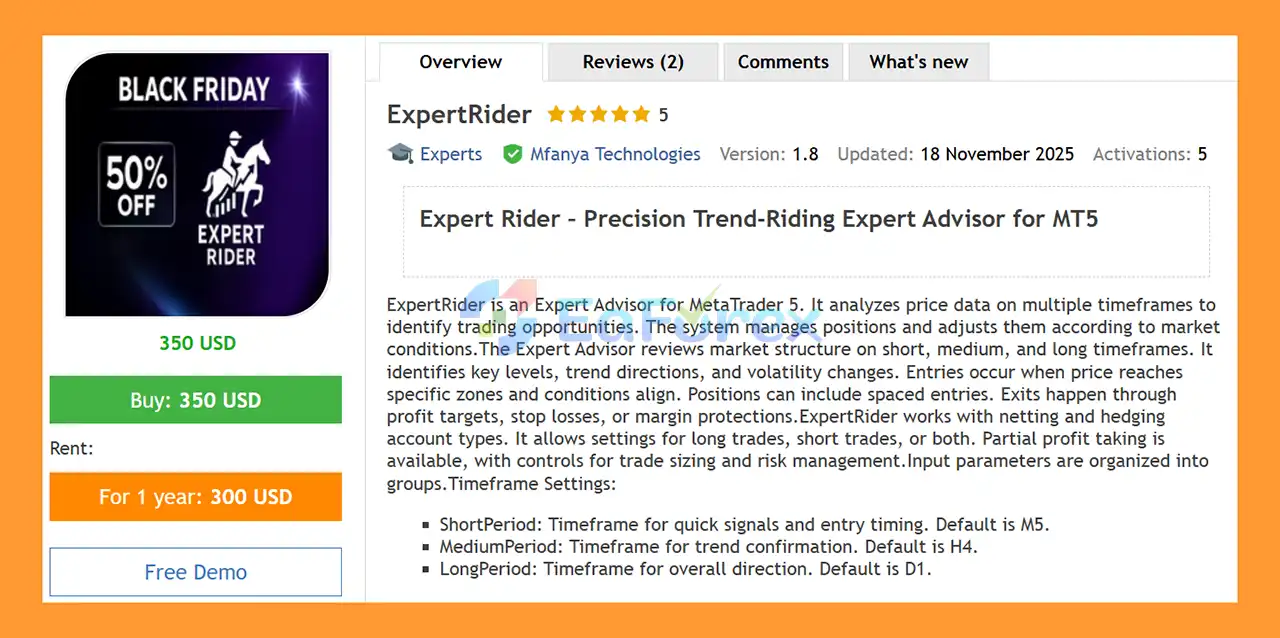
ExpertRider EA MT5 is an automated Expert Advisor for MetaTrader 5 designed to analyze market conditions across multiple timeframes and manage positions according to predefined trading rules.
The EA combines short-, medium-, and long-term market analysis to identify potential trading zones, evaluate trend direction, monitor volatility, and manage open positions. Its multi-timeframe framework uses a short timeframe for entry timing, a medium timeframe for trend confirmation, and a long timeframe for broader market direction.
ExpertRider supports both netting and hedging account types and can be configured for long trades, short trades, automated directional trading, or hedge-oriented operation.
The system also includes configurable DCA entry spacing, partial profit taking, adaptive profit targets, optional Stop Loss mechanisms, margin protection, trade cooldowns, and position-management controls.
Because ExpertRider EA MT5 includes optional DCA and position-multiplier functionality, traders should understand the relationship between position size, margin usage, market volatility, and total account exposure before using the EA on a live account.
>> Delivery time 24h-48h after payment.
>>> Refund if not delivered.
>>> You will receive the latest version without any limitations (ID+Time).>>Reviewed by Jason Stap <<
ExpertRider EA MT5 evaluates market conditions across three configurable timeframe layers:
This structure allows the EA to combine short-term entry information with medium- and long-term market context.
The EA identifies key market levels and trading zones before managing entries and exits.
Trades can be opened when price reaches predefined areas and the required conditions are satisfied.
ExpertRider EA MT5 supports both directional sides:
The BUY_ENABLED and SELL_ENABLED settings can also be used to control whether long or short positions are permitted.
One of ExpertRider’s major features is its configurable Dollar-Cost Averaging (DCA) framework.
The EA can space additional entries according to a predefined percentage distance and configurable entry-frequency parameters.
Important settings include:
This allows traders to control how additional positions are distributed when price moves through different market zones.
ExpertRider EA MT5 includes an optional position-size multiplication mechanism.
The ENABLE_DCA_MULTIPLIER parameter is disabled by default. When enabled, the EA can increase position sizing according to configured market-level conditions, with MAX_DCA_MULTIPLIER providing a maximum multiplication factor.
Because position multiplication can increase total exposure significantly, this feature should be tested carefully before live use.
The EA provides both fixed and volatility-based profit target mechanisms.
With AUTO_GAIN enabled, profit targets can be calculated according to market volatility rather than relying exclusively on a fixed percentage.
Relevant parameters include:
This allows the system to manage full and partial profit targets according to different market conditions.
ExpertRider EA MT5 supports partial position closing.
The ENABLE_SCALPING setting is enabled by default, while PARTIAL_REDUCE_RATIO controls the portion of a position that can be reduced.
For example, the supplied default ratio of 0.5 represents a 50% partial reduction when the relevant conditions are triggered.
Stop Loss protection can be configured through several different mechanisms.
The EA supports options including:
Key parameters include:
The default ENABLE_STOP_LOSS value supplied is false, so users should carefully review the protection settings rather than assuming every configuration operates with an active percentage Stop Loss.
Margin management is an important part of ExpertRider.
The EA includes settings such as:
These parameters are designed to control new trade exposure and position calculations under changing account conditions.
ExpertRider EA MT5 is compatible with both netting and hedging account types.
Its hedging framework includes configurable controls such as:
This gives traders greater flexibility when managing simultaneous long and short exposure.
The EA includes optional advanced entry mechanisms.
ENABLE_CROSS_TRADE is enabled by default and can allow trend crossover-based trading.
The system also includes optional wick-pattern trading through:
Wick trading is disabled by default according to the supplied configuration.
ExpertRider EA MT5 supports a Hybrid TP mechanism through USE_HYBRID_TP.
When enabled, the system can use adaptive Take Profit logic rather than relying solely on a static target.
The EA includes market-condition filters such as:
ATR-based volatility settings can help determine whether market movement meets the required threshold, while ADX can be used as a trend-strength filter.
The PANIC_CLOSE function provides an optional emergency exit mechanism for reversal conditions.
Users can also configure other protection-related parameters according to their preferred risk-management framework.
Each EA position can be identified through a dedicated MAGIC_NUMBER, with the supplied default being 100300.
Logging can also be enabled for debugging and monitoring through:
ExpertRider EA MT5 operates through several stages of market analysis and position management.
The EA first evaluates the selected short, medium, and long timeframes.
By default:
M5 → H4 → D1
The short timeframe provides more immediate entry information, while H4 and D1 provide broader trend and market-structure context.
When price reaches a relevant market zone and the required conditions align, the EA can initiate a position.
Depending on the selected configuration, the system can trade long, short, automatically, or through a hedge-oriented mode.
If the strategy requires additional entries, the DCA system determines the spacing between positions using the configured DCA parameters.
The minimum-step protection can be enabled to prevent entries from being placed too close together.
Once positions are active, ExpertRider evaluates market conditions and manages the position according to the configured profit, Stop Loss, margin, and exit parameters.
When the required profit conditions are reached, the EA can close a portion of the position instead of immediately closing the entire trade.
This allows part of the position to remain open while reducing some exposure.
The remaining position can eventually be closed when the full profit target or other exit conditions are reached.
Adaptive profit settings can adjust target calculations according to volatility when the relevant options are enabled.
If adverse conditions develop, the EA can use its configured Stop Loss or margin-management mechanisms.
The exact behavior depends on the selected protection mode.
On compatible hedging accounts, ExpertRider can manage both long and short exposure according to the configured hedge ratios and maximum imbalance settings.
ExpertRider EA MT5 may be suitable for traders looking for a flexible multi-timeframe MT5 trading system with extensive position-management controls.
Its main characteristics include:
The large number of configurable parameters makes ExpertRider adaptable to different trading styles, but it also means that users should understand and test the settings before making changes to the default configuration.
🔺XAUUSD pair – 1 years
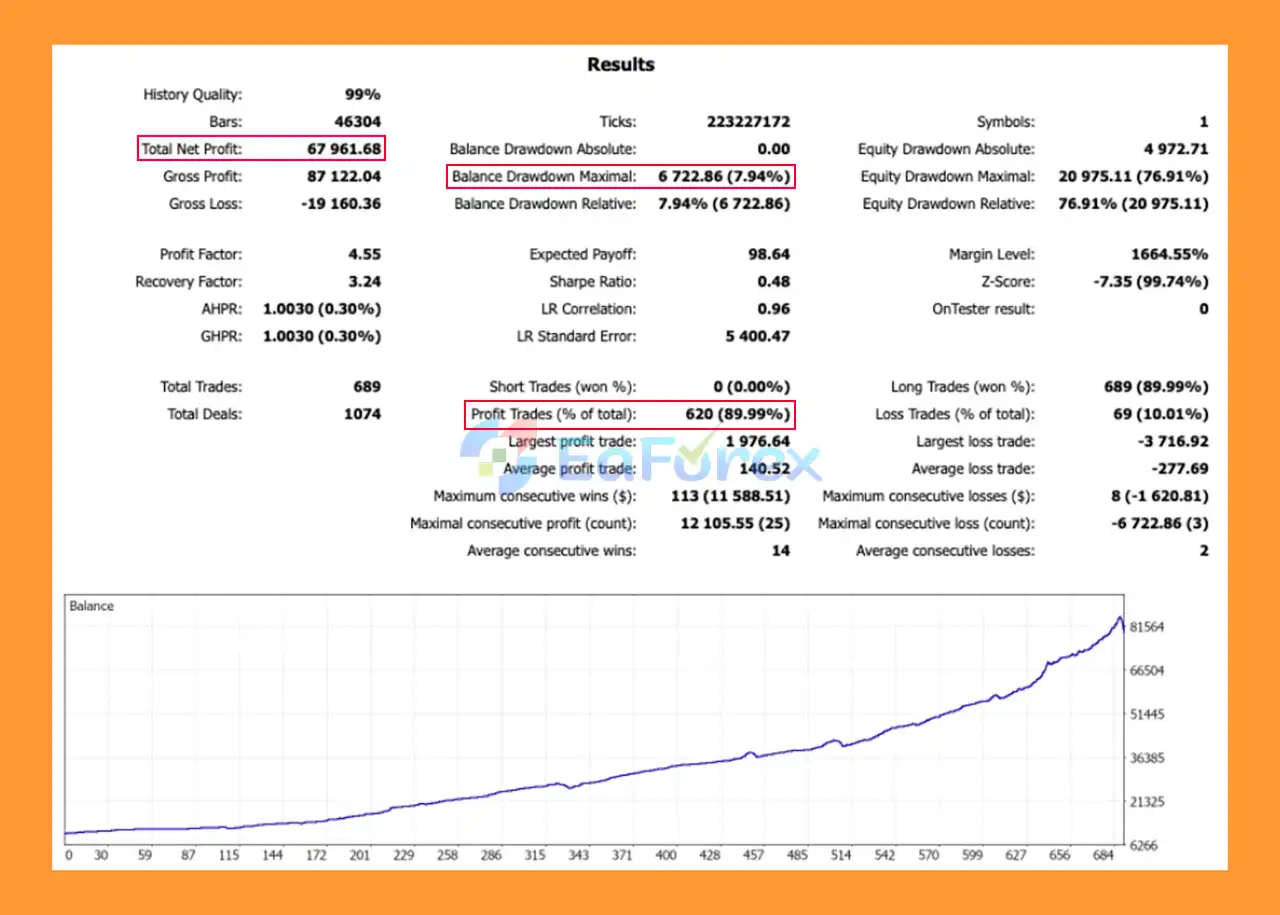
ExpertRider EA MT5 Backtests
No specific historical return, win rate, or maximum drawdown figures were provided for ExpertRider EA MT5.
Therefore, the EA should not be promoted with a specific expected return or drawdown figure without verified testing data.
The risk profile of ExpertRider depends heavily on configuration, particularly because the system supports DCA and optional position multiplication.
The supplied default capital parameters include:
The EA can use either a fixed-value approach or a balance-multiplier approach for trade-size calculations.
Users should understand how these settings interact with their actual account balance before activating automated trading.
DCA can create multiple positions as price moves through predefined levels.
Even when each individual position appears relatively small, the combined exposure of the entire position series can become significantly larger.
Therefore, traders should monitor:
The supplied default configuration has:
ENABLE_DCA_MULTIPLIER = false
This is important because enabling the multiplier can materially increase exposure.
The MAX_DCA_MULTIPLIER parameter has a supplied default of 3, meaning users should carefully evaluate the effect of increased position sizing before enabling this function.
Because ExpertRider EA MT5 can manage multiple positions, margin monitoring is particularly important.
The EA includes margin-related controls, but these should be considered additional risk-management mechanisms rather than guarantees against losses or liquidation.
The use of DCA means the EA can add positions as price moves through different levels.
If the market continues moving against the position, total exposure can increase and drawdown can become significantly larger than the loss from a single trade.
Although the DCA multiplier is disabled by default in the supplied configuration, enabling it can increase position sizes as additional entries are opened.
This can accelerate both potential recovery and potential losses.
The supplied default for ENABLE_STOP_LOSS is false.
Therefore, users should not assume that every default configuration automatically applies conventional Stop Loss protection to every position.
The Stop Loss framework should be reviewed carefully before live deployment.
Opening opposing positions can reduce directional exposure in some circumstances, but hedging also creates additional positions, costs, and management complexity.
It should not be interpreted as a guarantee against losses.
Multi-timeframe analysis can help provide broader market context, but no technical framework can guarantee correct market-direction predictions.
Unexpected volatility, news events, gaps, liquidity changes, and execution conditions can affect automated trading.
Actual results can differ depending on:
This is particularly relevant when trading volatile instruments such as cryptocurrencies.
Install MetaTrader 5 and log in to your trading account.
Place the ExpertRider EA MT5 file into the appropriate:
MQL5 → Experts
folder.
Restart MetaTrader 5 or refresh the Navigator window after installation.
Open the chart of the instrument you want to trade.
ExpertRider EA MT5 can be used with various instruments, including Forex pairs and cryptocurrencies, subject to broker and account conditions.
Drag ExpertRider EA MT5 from the Navigator window onto the selected chart.
Check the:
settings.
The supplied defaults are M5, H4, and D1 respectively.
Review the capital, position-sizing, DCA, margin, Stop Loss, Take Profit, and hedging parameters.
For initial testing, conservative settings are recommended rather than immediately increasing position size or enabling aggressive DCA multiplication.
Enable Algo Trading in MetaTrader 5 and confirm that the EA is operating correctly.
During operation, monitor:
The supplied specification suggests a minimum account balance of 1,000.
Before using real funds, however, traders should conduct demo and forward testing to determine whether the EA’s behavior matches their broker, instrument, account type, and selected configuration.
>>> Join VIP Membership Now <<<
In summary, ExpertRider EA MT5 is a flexible automated trading system built around multi-timeframe market analysis, structured entry zones, DCA position management, adaptive profit targets, partial closing, margin controls, and optional hedging.
Its default timeframe structure of M5 for entry timing, H4 for confirmation, and D1 for broader direction provides a multi-layer approach to market analysis.
The EA’s flexibility is also one of its most important considerations. Features such as DCA, optional position multiplication, hedging, partial profit taking, adaptive TP, and multiple Stop Loss modes can significantly change the system’s risk profile depending on configuration.
For that reason, ExpertRider EA MT5 should be evaluated not only by individual trade results but also by maximum cumulative exposure, margin usage, DCA depth, drawdown behavior, and account-level risk.
A sensible evaluation process is to begin with the default or conservative configuration, test the EA on a demo account, monitor its behavior across different market conditions, and only then consider gradual live deployment.
1. What is ExpertRider EA MT5?
ExpertRider EA MT5 is a professional multi-timeframe Expert Advisor for MetaTrader 5 that analyzes market structure, trend direction, and volatility to automate trading decisions. It manages entries, exits, position scaling, and risk dynamically based on real-time market conditions.
2. How does ExpertRider EA MT5 analyze the market?
ExpertRider EA MT5 uses multi-timeframe analysis, combining short-term (M5), medium-term (H4), and long-term (D1) price data to identify trends, structural zones, and volatility shifts before executing trades.
3. Does ExpertRider EA MT5 use grid or martingale strategies?
No. ExpertRider EA MT5 does not rely on aggressive grid or martingale techniques. While it supports spaced entries similar to DCA, all position scaling is strictly controlled with configurable distance, frequency, and risk limits.
4. What trading modes are available in ExpertRider EA MT5?
ExpertRider EA MT5 supports multiple trading modes, including long-only, short-only, automatic direction selection, and optional hedge trading. This flexibility allows traders to adapt the EA to different market conditions and strategies.
5. How does ExpertRider EA MT5 manage risk?
The EA includes advanced risk and capital management tools, such as fixed or balance-based lot sizing, margin usage limits, multiple stop-loss models, and protective behavior during high-risk market conditions.
6. Does ExpertRider EA MT5 support partial profit taking?
Yes. ExpertRider EA MT5 offers partial profit-taking and scalping logic, allowing positions to be closed gradually with cooldown timers. This helps smooth equity growth and reduce exposure during volatile periods.
7. Which instruments and brokers can ExpertRider EA MT5 trade?
ExpertRider EA MT5 is MT5-native and broker-flexible, working with both netting and hedging accounts. It can be adapted to various instruments, including forex pairs and gold (XAUUSD), through its extensive customization options.
8. Is ExpertRider EA MT5 suitable for beginners?
ExpertRider EA MT5 is best suited for intermediate to advanced traders. While it is fully automated, its wide range of configurable parameters is designed for users who want detailed control over entries, exits, and risk behavior.
9. Who should use ExpertRider EA MT5?
ExpertRider EA MT5 is ideal for traders seeking a structure-based, adaptive, and professional automated trading system. It suits users who value multi-timeframe logic, controlled risk exposure, and scalable automation on MetaTrader 5.
In stock
In stock
In stock
In stock
In stock
Out of stock
No account yet?
Create an Account












 Automatic EA
 EA Best Seller
 Expert Advisor MT4
 Expert Advisor MT5
 HFT EA


Reviews
Clear filtersThere are no reviews yet.