









-
 Unlimited Activations
-
 Instant delivery
-
 Easy to install







 Unlimited Activations
Instant delivery
Easy to install
Unlimited Activations
Instant delivery
Easy to install
 Free Update
 Free Install Support

Trendlock EA MT5 is a fully automated breakout Expert Advisor for MetaTrader 5, designed to trade Forex, Gold, Bitcoin, and major stock indices by identifying recent swing highs and swing lows.
The EA uses a straightforward breakout mechanism: it places a Buy Stop near the latest swing high and a Sell Stop near the latest swing low. New trade opportunities are evaluated once per completed bar, with a maximum of one active order in each direction according to the EA’s trading logic.
Once a position is opened, it is protected by a combination of Stop Loss (SL), Take Profit (TP), and trailing stop functionality. Trendlock EA also includes several risk-management and trading filters designed to help control exposure under changing market conditions.
The EA supports different calculation modes for different asset classes. Forex uses point-based TP/SL settings, while Gold, Bitcoin, and US indices can use percentage-based TP/SL calculations that are designed to adapt more naturally to differences in instrument price and volatility.
Trendlock EA MT5 is recommended for M15 to H1 timeframes and should be thoroughly tested in the Strategy Tester and on a demo account before being used with real capital.
• Author: Gerry Anggriawan
• Experience: Over +1 years of experience on MQL5.
• Notable Products: Trendlock EA MT5, Trendlock AI and other advisors.
• Flagship Product: Trendlock EA MT5 is rated as the best performing product of the year.
>> Delivery time 24h-48h after payment.
>>> Refund if not delivered.
>>> You will receive the latest version without any limitations (ID+Time).>>Reviewed by Jason Stap <<
Trendlock EA identifies recent swing levels and uses them as breakout reference points:
This approach allows the EA to focus on price expansion rather than continuously opening market orders.
Trendlock EA MT5 provides four primary instrument modes:
Forex instruments use point-based TP and SL calculations, while Gold, Bitcoin, and US indices can use percentage-based price calculations.
Because different brokers may use different symbol names, users should ensure that the EA’s instrument keywords correspond to their broker’s symbols.
The EA includes automatic position sizing based on account risk.
Lot size can be calculated according to:
This can help maintain a more systematic relationship between position size and predefined risk parameters.
However, automatic lot sizing does not eliminate trading risk. Large market gaps, slippage, execution conditions, or unusually volatile movements can cause actual losses to differ from theoretical calculations.
Trendlock EA includes a Daily Loss Limit designed to restrict further trading after a predefined daily loss threshold is reached.
Depending on the configuration, the EA can also close existing positions when the limit is triggered.
The status is preserved after a MetaTrader 5 terminal restart, helping maintain the daily risk-control state rather than automatically resetting it after a restart.
Trendlock EA provides several optional filters to refine trade conditions:
These filters can help prevent the EA from entering trades during conditions that do not meet the selected parameters.
The Economic Calendar news filter should be tested carefully because its availability and behavior differ between live trading and Strategy Tester environments.
The Auto Cut Loss function can close positions when predefined loss conditions occur.
It can respond to:
This provides another layer of protection beyond the standard Stop Loss.
Every opened position is designed to have protective trade-management mechanisms from the beginning.
These include:
The combination allows the EA to define both downside protection and potential profit-taking rules while adapting open positions as price develops.
Trendlock EA takes broker execution restrictions into account, including:
These features are intended to make order placement more compatible with real-world MT5 broker execution conditions.
They cannot, however, guarantee execution at the requested price during fast markets or severe liquidity conditions.
The integrated panel provides useful account and EA information directly on the chart, including:
This allows users to monitor important information without constantly checking separate account windows.
Trendlock EA MT5 follows a breakout-based trading process.
First, the EA analyzes recent price action to identify relevant swing high and swing low levels.
When a valid setup is detected, the EA can place:
Buy Stop → Above the latest swing high
and
Sell Stop → Below the latest swing low
The idea is to participate when price moves beyond an established market level rather than attempting to predict the exact direction before the breakout occurs.
The EA evaluates new trade conditions once per bar, helping reduce unnecessary repeated calculations and order placement attempts within the same candle.
After an order becomes a market position, the EA applies its configured:
Additional filters can determine whether a new setup is allowed, including trading hours, spread, RSI, Moving Average distance, and economic news conditions.
The exact behavior will depend on the selected settings and the instrument being traded.
Trendlock EA can automate a breakout methodology based on swing highs and lows, reducing the need to manually monitor charts for every potential breakout.
Instead of being limited to a single market, the EA offers dedicated modes for Forex, Gold, Bitcoin, and US indices.
This provides flexibility for traders who want to evaluate the same EA framework across different instruments.
Risk-based lot sizing, daily loss limits, maximum lot controls, margin checks, Stop Loss, and Auto Cut Loss provide several layers of exposure management.
Users can configure multiple filters according to their preferred trading schedule and market conditions.
The on-chart panel provides a convenient overview of account performance, spread, floating P/L, and EA status.
Consideration of broker stop levels, freeze levels, and requotes makes the EA more suitable for actual MT5 execution than a system that only considers theoretical entry conditions.
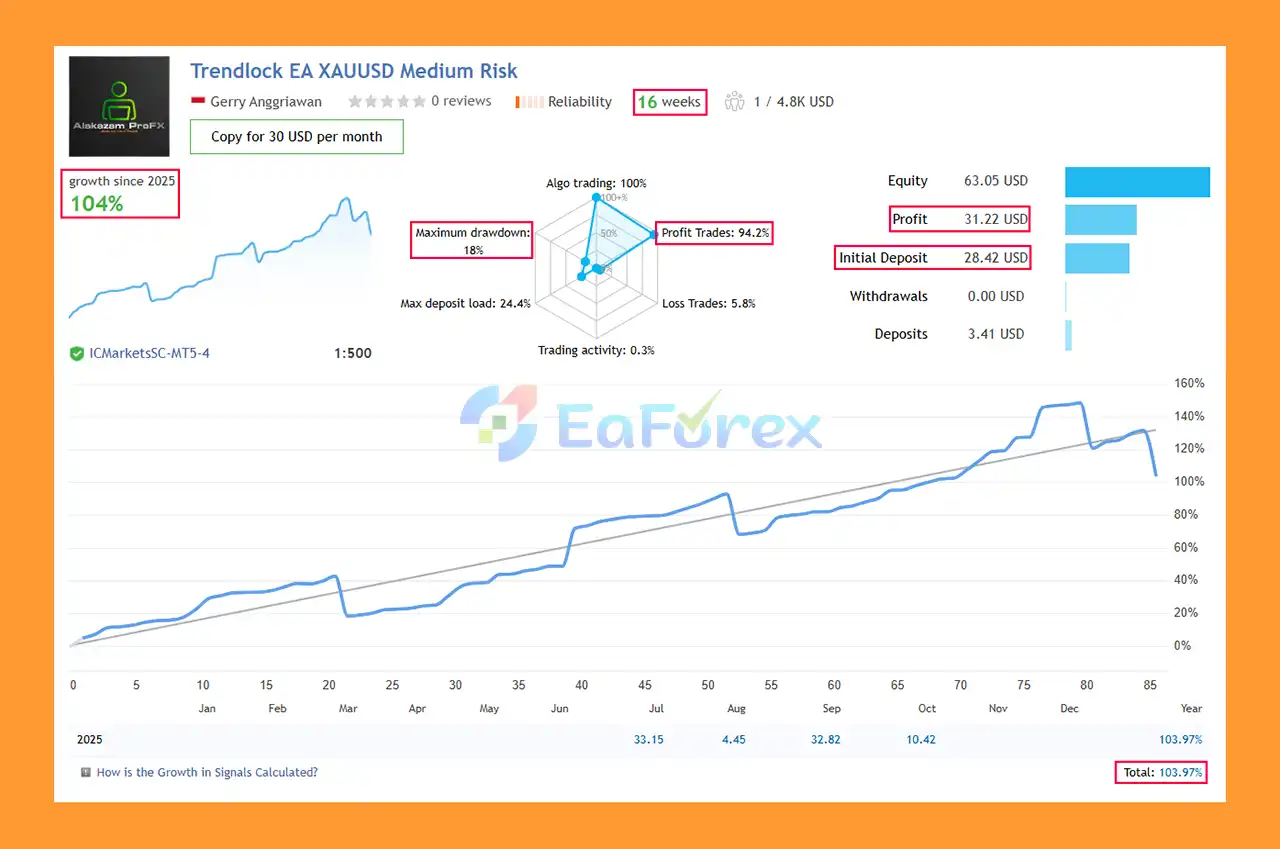
Trendlock EA MT5 Signal Results
🔺Trendlock EA MT5 is highly appreciated by the MQL5 community for bringing stable and reliable profits. Below are 5 star reviews from users:
User Reviews
Trendlock EA MT5 combines its breakout strategy with several risk-management mechanisms rather than relying solely on entry signals.
The risk-based automatic lot calculation is particularly important because the EA can determine position size using account balance, risk percentage, and Stop Loss distance. A maximum lot cap and margin checks provide additional constraints.
The Daily Loss Limit can stop new trading once the configured daily loss threshold has been reached. Users can also configure the EA to close open positions when the limit is triggered.
The EA’s trading filters can further reduce exposure during selected periods by considering:
For breakout systems, however, risk management remains essential. Breakouts can fail quickly, and price may reverse after triggering a pending order. Gold, Bitcoin, and indices can also experience rapid price movements and significant gaps.
Users should therefore select a risk percentage appropriate for their account size and trading objectives rather than simply using aggressive settings because historical testing produced attractive results.
Backtests and historical results should be treated as research data, not guarantees of future performance.
Although Trendlock EA MT5 includes multiple protective mechanisms, it is not risk-free.
A breakout above a swing high or below a swing low does not guarantee that a new trend will develop. Price can trigger a pending order and then quickly reverse.
Significant gaps can cause the actual execution price to differ from the expected Stop Loss or entry level.
Gold, Bitcoin, and US indices can experience rapid price movements. These markets may require different risk parameters from traditional Forex pairs.
Economic announcements can produce sudden volatility, spread expansion, and slippage. Although the EA includes a news filter, the Strategy Tester cannot fully reproduce live Economic Calendar behavior because the MT5 Economic Calendar is unavailable there.
Different brokers may use names such as:
Users must make sure the EA’s symbol keywords match the symbols provided by their broker.
Spread, commission, slippage, latency, and liquidity can influence the actual results of a breakout strategy. A configuration that performs well with one broker may behave differently with another.
Automatic lot sizing can help standardize intended risk, but it cannot completely control losses during extreme market conditions, gaps, or execution problems.
Backtest results and previous live performance cannot guarantee future profitability. Market structure and volatility can change over time.
For this reason, users should backtest the EA, optimize settings carefully, and run it on a demo account before considering live deployment.
| Pros | Cons |
|---|---|
| Automated swing-high/swing-low breakout strategy | False breakouts can trigger losing trades |
| Supports Forex, Gold, Bitcoin, and US indices | Different instruments require different risk settings |
| Risk-based automatic lot sizing | Automated sizing cannot eliminate gap or slippage risk |
| Daily Loss Limit | Aggressive risk percentages can still create substantial losses |
| Stop Loss, Take Profit, and trailing stop | Trailing behavior may affect how profits are captured |
| Spread, RSI, MA, time, and news filters | News filtering is unavailable in Strategy Tester |
| Auto Cut Loss functionality | Extreme volatility can exceed expected execution conditions |
| Broker stop/freeze-level handling | Results can vary between brokers |
| On-chart performance dashboard | Symbol naming must match the broker |
| Suitable for M15–H1 testing | Requires proper testing and parameter selection |
Installing Trendlock EA MT5 on MetaTrader 5 is straightforward.
Launch your MT5 trading platform and log into the appropriate trading account.
Go to:
File → Open Data Folder
Then navigate to:
MQL5 → Experts
Copy the Trendlock EA MT5 .ex5 file into the Experts folder.
Restart MetaTrader 5 or refresh the Expert Advisors section in the Navigator window.
Open the desired trading chart and timeframe, preferably within the recommended M15–H1 range.
Drag Trendlock EA MT5 onto the chart.
Make sure the Algo Trading button is enabled and allow automated trading in the EA settings.
Set the appropriate:
Avoid using settings designed for a different instrument or broker without testing them first.
The developer recommends using the provided EA settings file. Users should contact the seller after purchase to receive the appropriate set file.
Run a Strategy Tester analysis and then operate the EA on a demo account before moving to live trading.
Remember that the Economic Calendar news filter is not active in Strategy Tester, so live/demo testing is particularly useful for evaluating news-filter behavior.
For continuous automated trading, a reliable VPS can help keep MT5 and the EA running when your personal computer is offline.
🔺 Experts:
In summary, Trendlock EA MT5 is a breakout-focused Expert Advisor designed for traders who want to automate swing-level breakout trading across Forex, Gold, Bitcoin, and US indices.
Its main components include Buy Stop and Sell Stop breakout entries, risk-based lot sizing, Daily Loss Limit protection, Stop Loss, Take Profit, trailing stop, Auto Cut Loss, spread and time filters, RSI and Moving Average filters, and an MT5 Economic Calendar filter.
The multi-instrument design gives users flexibility, while the integrated dashboard provides useful information about equity, floating P/L, win rate, spread, and EA status.
However, breakout trading naturally carries the risk of false breakouts, and the additional volatility of Gold, Bitcoin, and indices can significantly affect execution and drawdown. The EA’s risk controls should therefore be treated as tools for managing exposure rather than guarantees against losses.
For best practice, users should start with conservative risk settings, verify that broker symbol names are correctly configured, test the recommended set file, perform historical backtests, and validate the EA on a demo account before considering live deployment.
Trendlock EA MT5 should be viewed as an automated trading tool—not a guarantee of profits. Trading involves risk, and past performance does not guarantee future results.
1. What is Trendlock EA MT5?
Trendlock EA MT5 is an advanced, AI-driven Expert Advisor that automates trading across Forex, Gold (XAUUSD), Bitcoin (BTCUSD), and US indices. It delivers disciplined, consistent, and emotion-free trading for both beginners and professionals.
2. How does Trendlock EA MT5 work?
The EA uses adaptive AI algorithms and trendline breakout detection to identify precise trade opportunities. It executes one position per signal, manages risks automatically, and adjusts trading during volatile market conditions.
3. Which instruments can Trendlock EA MT5 trade?
Trendlock EA supports Forex pairs (EURUSD, GBPUSD, USDJPY, etc.), Gold (XAUUSD), Crypto (BTCUSD), and US indices like US30 and NAS100, offering wide multi-market flexibility.
4. Does Trendlock EA MT5 have built-in risk management?
Yes. It includes automatic stop-loss, daily loss limits, spread filters, and risk-based lot sizing. These features work together to protect your capital and ensure stable, long-term growth.
5. What are the performance results of Trendlock EA MT5?
In live trading, Trendlock EA achieved +104% total growth in 16 weeks with a 94.2% win rate and 18% maximum drawdown, proving its consistency and reliability.
6. What’s included in the Trendlock EA MT5 package?
The download package includes the EA file, detailed installation guide, and preset settings. Buyers also gain access to VIP support and updates via the developer’s Telegram community.
In stock
In stock
In stock
In stock
In stock
Out of stock
No account yet?
Create an Account












 Automatic EA
 EA Best Seller
 Expert Advisor MT4
 Expert Advisor MT5
 HFT EA


Reviews
Clear filtersThere are no reviews yet.