









-
 Unlimited Activations
-
 Instant delivery
-
 Easy to install



 Unlimited Activations
Instant delivery
Easy to install
Unlimited Activations
Instant delivery
Easy to install
 Free Update
 Free Install Support

Triton EA MT5 is an automated Forex Expert Advisor for MetaTrader 5, designed to trade major currency pairs using three different trading strategies: Swing Trading, Gap Trading, and Support & Resistance.
Instead of relying on a single market approach, Triton EA MT5 combines multiple trading methods to identify potential market opportunities under different price conditions. The EA uses an algorithm to analyze historical price data and determine suitable parameters for its trading logic.
Market conditions are also filtered using analysis of the Daily and Monthly charts over the previous 12 periods. This additional filtering is designed to help the EA evaluate broader market conditions before executing trades.
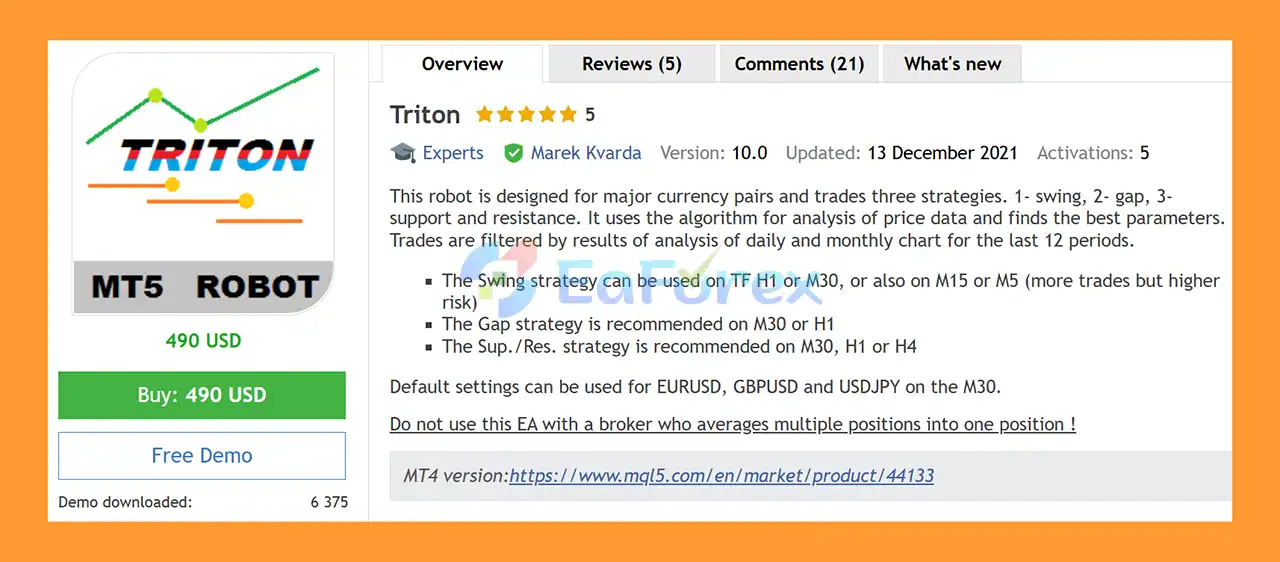
Triton EA MT5 can be configured for different trading timeframes depending on the selected strategy. The Swing strategy can operate on H1 and M30, while M15 and M5 can also be used when more trading opportunities are desired, with potentially higher risk. The Gap strategy is recommended for M30 or H1, while the Support & Resistance strategy is recommended for M30, H1, or H4.
The default settings are designed for EURUSD, GBPUSD, and USDJPY on the M30 timeframe.
• Author: Marek Kvarda.
• Experience: Over +9 years of experience on MQL5.
• Notable Products: Triton MT5, Megatron MT4, Forebot MT4, FXbot MT4, Edger MT4 and other advisors.
• Flagship Product: Triton EA MT5 is rated as the best performing product of the year.
>> Delivery time 24h-48h after payment.
>>> Refund if not delivered.
>>> You will receive the latest version without any limitations (ID+Time).>>Reviewed by Jason Stap <<
Triton EA MT5 provides three independent trading strategies:
Users can enable or disable each strategy according to their preferred trading configuration.
Each strategy has its own timeframe parameter, allowing traders to configure the EA according to their preferred setup:
Lower timeframes may generate more trading opportunities but can also increase exposure to market noise and trading risk.
Triton EA MT5 analyzes price data and uses the results to determine trading parameters. Its market filtering process also considers the Daily and Monthly charts over the last 12 periods.
This allows the EA to incorporate both shorter-term trading signals and broader market context.
The EA allows users to define:
This provides greater control over when the EA is allowed to open and manage positions.
Triton EA MT5 includes several controls designed to limit excessive exposure, including:
The EA supports both fixed-lot and automatic lot sizing.
With AutoLot, position size can be calculated according to account balance and a specified percentage. For example, if the base lot is 0.02 and AutoLot is configured around a balance reference of 500:
Actual position sizing can depend on the configured parameters and broker conditions.
Triton EA MT5 includes a wide range of trade-management features, such as:
These settings allow traders to customize how positions are opened, protected, and closed.
Triton EA MT5 works by combining its three available trading strategies with market-data analysis and configurable risk-management rules.
The EA analyzes available price data and evaluates market conditions. Its filtering process also considers the Daily and Monthly charts based on the previous 12 periods.
Depending on the enabled settings, Triton EA MT5 can search for opportunities using:
Swing Trading
The Swing strategy is designed to identify potential price movements across selected timeframes. H1 and M30 are recommended, while M15 and M5 can be used for a more active configuration.
Gap Trading
The Gap strategy focuses on identifying market gaps. M30 and H1 are the recommended timeframes for this strategy.
Support & Resistance
This strategy uses support and resistance concepts to identify potential trading areas. M30, H1, and H4 are recommended.
Before opening a position, the EA can apply configured restrictions such as:
Once a trade is opened, Triton EA MT5 can manage it using the configured TP, SL, break-even, trailing, partial-close, and drawdown-management functions.
The Multipair Closing function can monitor trades across different currency pairs when their Magic Numbers share the same first two digits.
For example:
Because both Magic Numbers begin with 55, the EA can treat these positions as part of the same group. If TP All Trades = 30 points, the combined result reaches +30 points and the positions can be closed according to the configured rule.
Triton EA MT5 may be suitable for traders who want an automated MT5 trading system with multiple strategy options rather than relying on a single entry model.
One notable advantage is its strategy flexibility. Traders can activate Swing, Gap, and Support & Resistance strategies independently and select different timeframes for each one.
The EA also provides extensive configuration options for trading schedules, position sizing, spread filtering, trade limits, drawdown control, partial closing, break-even, and trailing management.
Another useful feature is its ability to work with multiple major currency pairs, with default settings specifically provided for EURUSD, GBPUSD, and USDJPY on M30.
However, configuration should always be tested carefully because changing the timeframe, lot size, strategy combination, or risk parameters can significantly affect trading behavior.
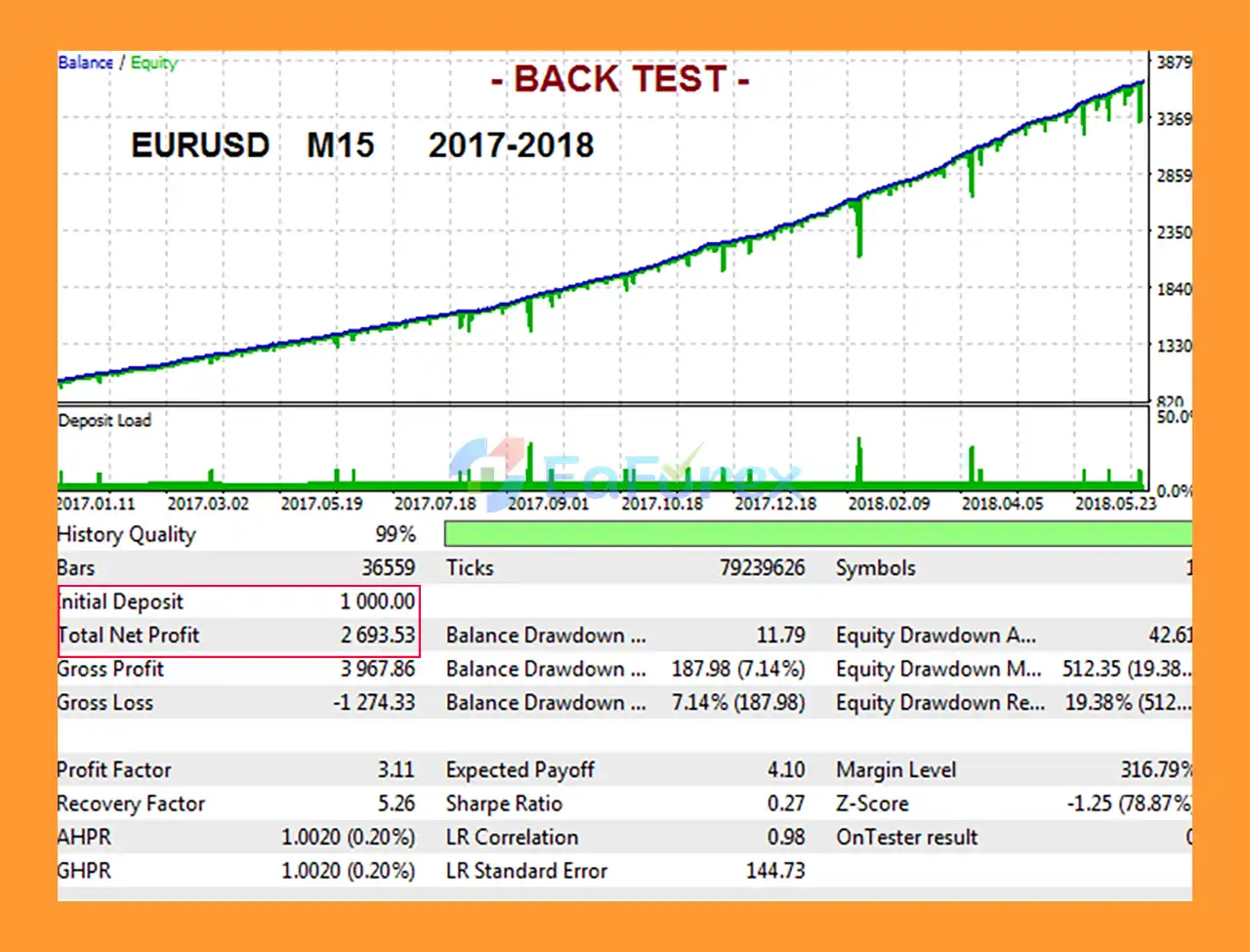
🔺 EURUSD – 12 months
Triton EA MT5 Backtests
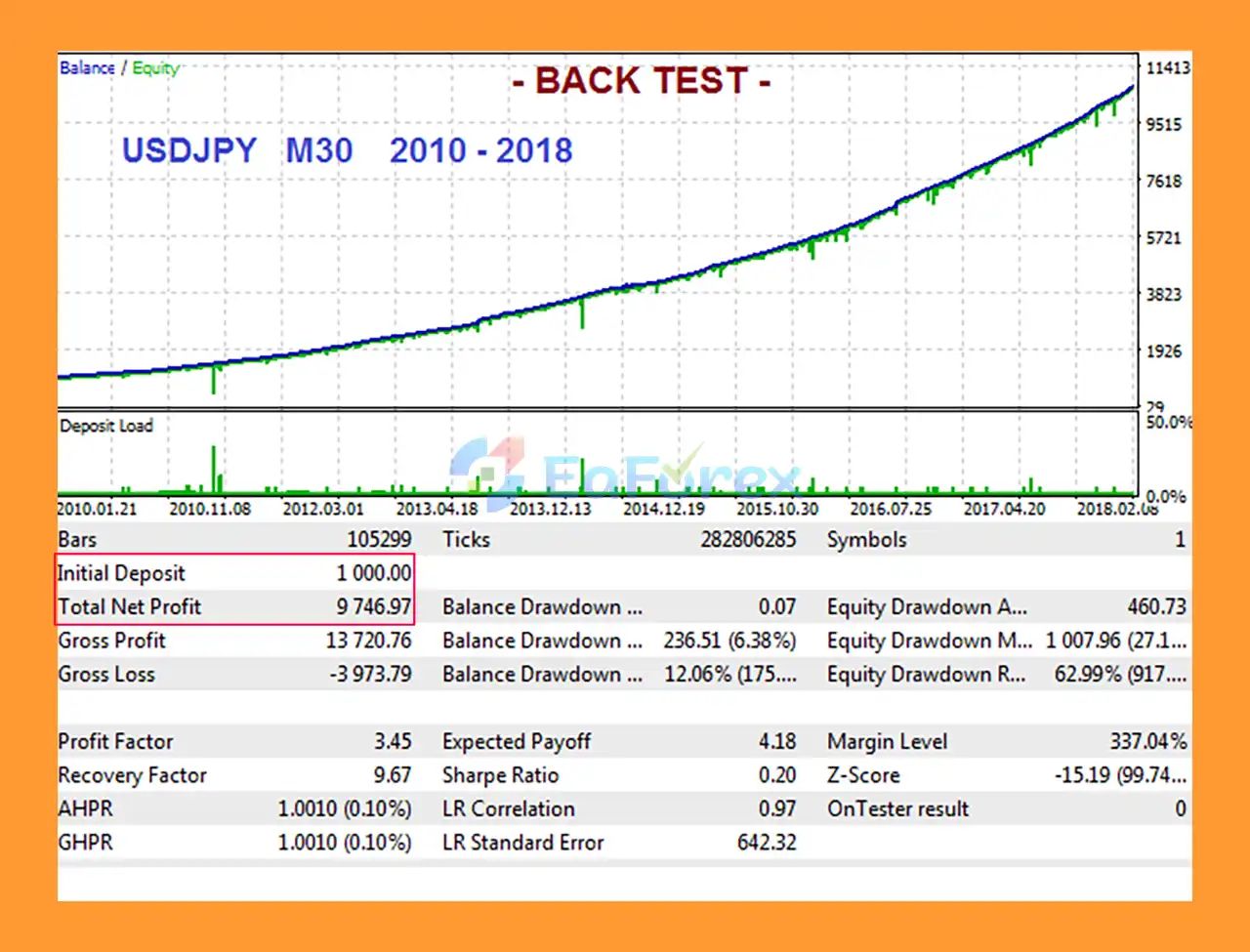
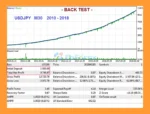
🔺 USDJPY – 8 years
Triton EA MT5 Backtest
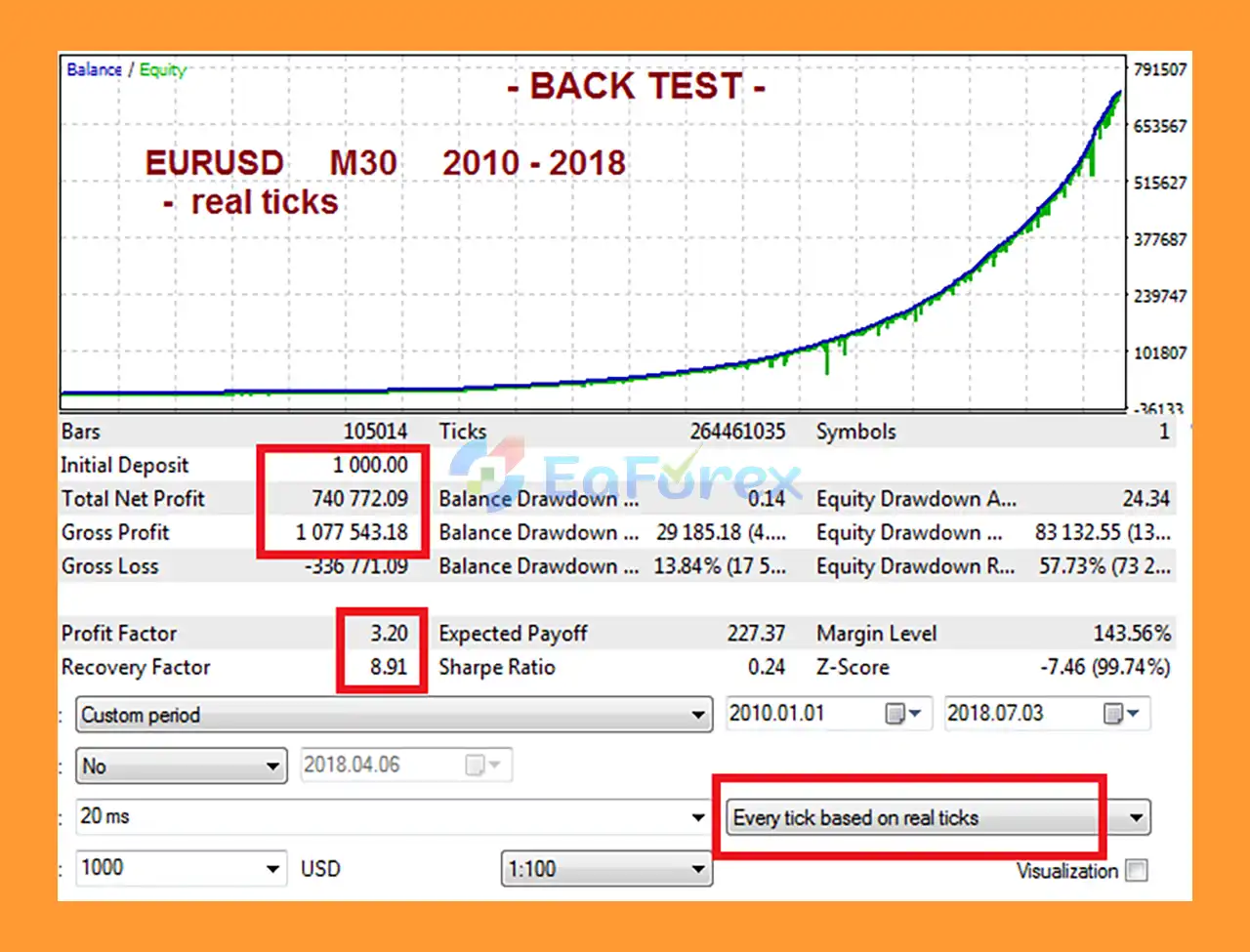
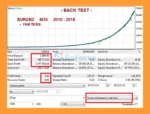
🔺 EURUSD – 8 years
Triton MT5 Backtest
The performance of Triton EA MT5 depends on many factors, including the selected currency pairs, timeframe, broker execution, spread, trading hours, account size, lot-sizing method, and risk-management parameters.
The EA provides several tools that can be used to control trading exposure.
The All Close by DD% function allows traders to define a maximum drawdown percentage. When the configured drawdown level is reached, the EA can close all trades associated with the EA.
The DD Alert % setting can also provide a warning when a specified drawdown level is reached.
Traders can configure individual:
The combined Stop Loss option can be used to manage the overall exposure of multiple trades.
The SL on BE function can move the Stop Loss to the trade’s opening price after the configured profit level is reached.
The SL on BE+ option can move the Stop Loss beyond the opening price to lock in a specified amount of profit.
The EA provides:
These parameters allow traders to determine when and how the Stop Loss follows a profitable position.
The SafeClosing function is designed to close a trade that has remained in loss for an extended period once the position returns to approximately breakeven, including commission and swap considerations. This feature is recommended in the supplied settings.
Users can choose between a fixed Lot size and AutoLot calculation.
When trading multiple currency pairs, the AutoLot percentage should be configured carefully. For example, the supplied documentation indicates that if the EA is used on three pairs, users may allocate approximately 33% per pair, depending on their overall risk plan.
Past backtest or live-trading results should not be considered a guarantee of future performance. Forex trading involves substantial risk, and automated trading does not eliminate the possibility of losses.
Although Triton EA MT5 offers extensive configuration and risk-management features, traders should understand several important limitations.
The EA’s strategies operate according to predefined algorithms and market conditions. There is no guarantee that historical results or backtests will be repeated in future market conditions.
Swing, Gap, and Support & Resistance strategies can behave differently depending on market volatility and the selected timeframe.
Using M15 or M5 for the Swing strategy may create more trading opportunities, but the supplied documentation also indicates that these lower timeframes involve higher risk.
Triton EA MT5 should not be used with a broker that averages multiple positions into one position. Such broker-side behavior can interfere with the EA’s individual trade management and position tracking.
AutoLot can increase position size as account balance changes. Incorrect configuration may result in excessive exposure, particularly when the EA is running on several currency pairs simultaneously.
Running Swing, Gap, and Support & Resistance simultaneously may result in more positions or overlapping market exposure. Traders should carefully test the interaction between strategies before using them on a live account.
Spread, slippage, execution speed, commissions, swaps, and trading conditions can affect real trading results. Backtests performed under different conditions may not accurately represent live execution.
M5 and M15 configurations can be more sensitive to short-term price fluctuations, spreads, and execution quality. Traders should consider these factors when selecting a timeframe.
Installing Triton EA MT5 on MetaTrader 5 is generally straightforward.
Launch your MetaTrader 5 trading platform and log in to your trading account.
Go to:
File → Open Data Folder
Then navigate to:
MQL5 → Experts
Copy the Triton EA MT5 file into the Experts folder.
Restart MT5 or refresh the Expert Advisors section in the Navigator window.
Open the desired chart, such as:
For the supplied default configuration, use the M30 timeframe.
Find Triton EA MT5 in the Navigator and drag it onto the selected chart.
Review the main parameters, including:
Make sure Algo Trading/AutoTrading is enabled in MetaTrader 5.
Before using real money, test the EA in the Strategy Tester and preferably on a demo account. Check that the broker’s execution model is compatible with the EA, especially regarding multiple open positions and position handling.
🔺Triton MT5 is highly appreciated by the MQL5 community for bringing stable and reliable profits. Below are 5 star reviews from users:
🔺 Experts:
In summary, Triton EA MT5 is a multi-strategy Forex Expert Advisor designed for MetaTrader 5 and major currency pairs. Its core approach combines Swing, Gap, and Support & Resistance strategies, while its market analysis uses historical price data together with Daily and Monthly chart filtering.
The EA also provides a broad selection of money-management and trade-management tools, including AutoLot, Stop Loss, Take Profit, drawdown protection, break-even, trailing stops, partial closing, trading schedules, and Multipair Closing.
Its flexibility can be useful for traders who want greater control over strategy selection and risk parameters. At the same time, the large number of settings means that proper testing and configuration are important before deploying the EA on a live account.
For traders considering Triton EA MT5, the most important factors to evaluate are strategy settings, timeframe selection, position sizing, broker compatibility, maximum drawdown limits, and real trading costs. As with any automated Forex trading system, backtest and historical performance should be treated as reference information rather than a guarantee of future results.
1. What is Triton EA MT5?
Triton EA MT5 is a versatile Forex Expert Advisor that combines three strategies—Swing, Gap, and Support/Resistance—to trade major currency pairs. It uses algorithmic analysis of daily and monthly charts to dynamically optimize trade parameters.
2. Who developed Triton EA MT5?
Triton EA MT5 was developed by Marek Kvarda, an experienced MQL5 programmer with over 9 years of expertise. He is also known for other popular trading robots such as Megatron MT4, Forebot MT4, FXbot MT4, and Edger MT4.
3. How does Triton EA MT5 work?
The EA analyzes historical price data across daily and monthly charts to select optimal trading parameters. It trades using three integrated strategies: Swing for trend trading, Gap for breakouts, and Support/Resistance for reversal trades, with customizable risk management.
4. Which Forex pairs and timeframes are recommended for Triton EA MT5?
Triton EA MT5 is optimized for major pairs like EURUSD, GBPUSD, and USDJPY. Swing strategy works on M5 to H1, Gap strategy on M30 or H1, and Support/Resistance strategy on M30, H1, or H4 charts.
5. What trade management features does Triton EA MT5 offer?
It includes AutoLot for dynamic lot sizing, multipair trade tracking, partial profit/loss closures, adjustable trailing stops and take-profit levels, and account-level risk protection to ensure safe and efficient trading.
6. What are the backtested results of Triton EA MT5?
EURUSD (12 months): $1,000 → $2,693.53, Drawdown: 7.14%
USDJPY (8 years): $1,000 → $9,746.97, Drawdown: 6.38%
EURUSD (8 years): $1,000 → $740,772.09, Drawdown: 13.84%
7. Is Triton EA MT5 suitable for beginners?
Yes. Triton EA MT5 features a plug-and-play setup with default settings for major pairs, detailed installation guides, and flexible customization options, making it accessible to both novice and experienced traders.
8. What is included in the Triton EA MT5 package?
The package contains the Expert Advisor files, set files for optimal trading, an installation guide, and access to support resources, ensuring a seamless setup and smooth trading experience.
In stock
In stock
In stock
In stock
In stock
Out of stock
No account yet?
Create an Account












 Automatic EA
 EA Best Seller
 Expert Advisor MT4
 Expert Advisor MT5
 HFT EA


Reviews
Clear filtersThere are no reviews yet.