



Product Overview
XAU M1 Intelligent Scalping MT5 is an automated Expert Advisor specifically designed for XAUUSD (Gold) on the M1 timeframe. The system focuses on short-term intraday scalping, aiming to capture brief price fluctuations, pullbacks, and rapid market opportunities in the gold market.
Built around a risk-first trading philosophy, the EA is designed to provide systematic execution without emotional interference. It can be used by traders looking for an automated solution for XAUUSD M1 scalping, including traders operating smaller accounts.
The system is focused on frequent short-term opportunities rather than long-term position holding. Because Gold can move rapidly on the M1 timeframe, correct configuration and conservative risk management are essential.
Important: For live trading, the Grid function should be disabled. Proper parameter settings are extremely important for the EA's operation and risk profile.
About the Developer
- Author: Shou Cheng Jiang
- Experience: Over +1 years of experience on MQL5.
- Notable Products: XAU M1 Intelligent Scalping MT5 and other advisors.
- Flagship Product: XAU M1 Intelligent Scalping MT5 is rated as the best performing product of the year.
>> Delivery time 24h-48h after payment.
>>> Refund if not delivered.
>>> You will receive the latest version without any limitations (ID+Time).
>>Reviewed by Jason Stap <<
Main Features of XAU M1 Intelligent Scalping MT5
Optimized for XAUUSD M1
The EA is specifically designed for Gold (XAUUSD) on the 1-minute timeframe, allowing it to react to short-term price movements and intraday volatility.
High-Frequency Scalping
XAU M1 Intelligent Scalping MT5 focuses on frequent short-term trading opportunities. The strategy is designed to capture relatively small price movements rather than relying on long-duration trades.
Precise Entry Logic
The EA is designed to identify short-term market opportunities and execute trades automatically according to its programmed trading conditions.
Pullback Trading
The system focuses on short-term price fluctuations and pullback opportunities, attempting to participate when price temporarily retraces within an intraday movement.
Automated Execution
Once the configured trading conditions are satisfied, the EA can execute and manage trades automatically without requiring manual order placement.
Risk-First Approach
Risk management is an important part of the system. Traders can configure parameters according to their account size and preferred risk level.
Small Account Support
The EA is designed to accommodate smaller trading accounts when appropriate settings are used. However, a small starting balance does not remove the possibility of substantial losses, particularly when trading Gold on M1.
Grid Control
A Grid function is available in the system configuration, but the Grid should be disabled for live trading according to the supplied recommendation.
This setting is particularly important because enabling grid-based trading can materially change the EA's exposure, number of positions, margin requirements, and drawdown characteristics.
How Does XAU M1 Intelligent Scalping MT5 Work?
The EA operates through an automated short-term trading process designed specifically for XAUUSD M1.
Step 1 – Monitor XAUUSD
The Expert Advisor continuously monitors Gold (XAUUSD) on the 1-minute chart.
Step 2 – Analyze Short-Term Price Movement
The system evaluates short-term market behavior to identify potential scalping opportunities and pullback conditions.
Step 3 – Identify an Entry Opportunity
When the programmed trading conditions are satisfied, the EA identifies a potential short-term entry.
Step 4 – Apply Risk Parameters
Before executing a trade, the configured risk and position parameters determine how the position should be handled.
Step 5 – Automatic Execution
The EA automatically sends the trading order to the MT5 broker according to the configured settings.
Step 6 – Trade Management
The position is then managed automatically according to the EA's programmed rules and user-defined parameters.
The goal is to provide a systematic execution process that removes emotional decision-making from repetitive M1 scalping operations.
Why Choose XAU M1 Intelligent Scalping MT5?
XAU M1 Intelligent Scalping MT5 is designed for traders who specifically want an automated solution for Gold M1 scalping.
The main reasons traders may consider this EA include:
- Dedicated XAUUSD strategy
- Designed specifically for M1 trading
- Automated short-term execution
- High-frequency intraday approach
- Focus on pullback opportunities
- Risk-first trading philosophy
- Suitable for smaller accounts when properly configured
- Reduces emotional interference
- Fully automated operation
- Configurable trading parameters
- Grid can be disabled for live trading
The system is intended for traders who prefer a systematic approach to short-term Gold trading rather than manually monitoring every M1 price movement.
XAU M1 Intelligent Scalping MT5 Backtest Results
🔺XAUUSD (Gold)
- Initial Deposit: $200
- Total Net Profit: $473,16
- Win Rate (% of total): 74,22%
- Maximum Drawdown: 35,65%
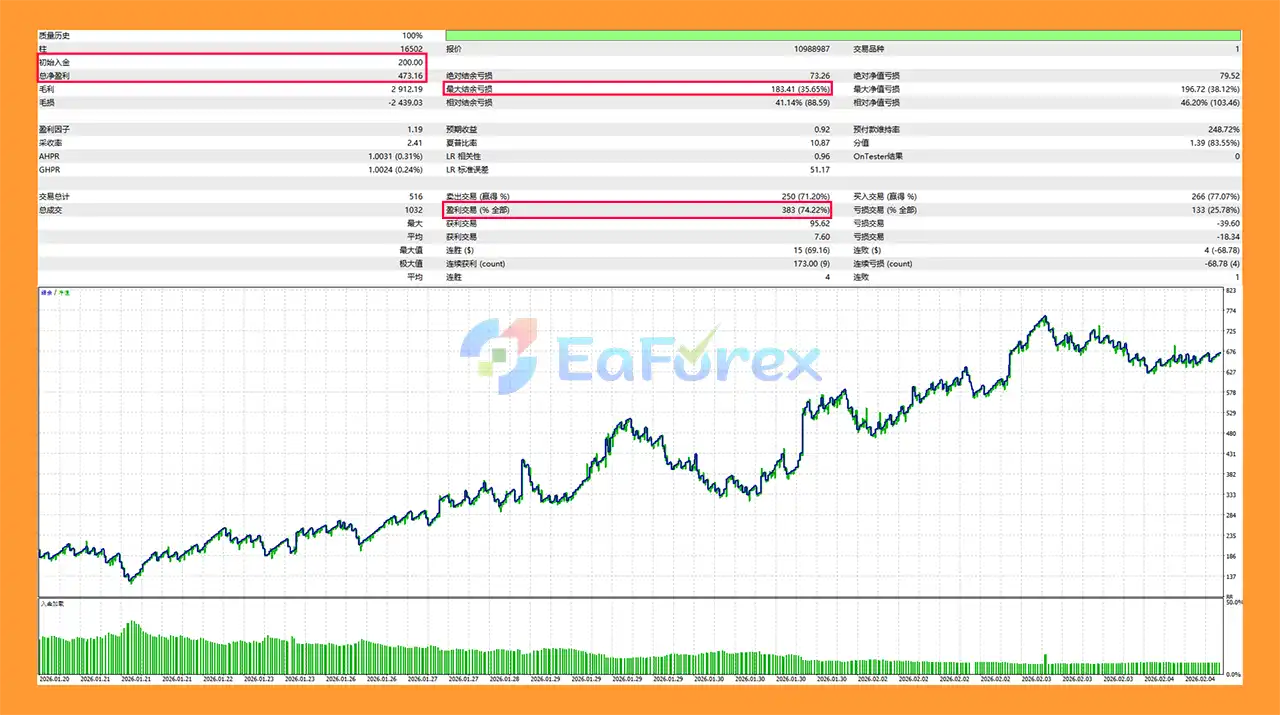 XAU M1 Intelligent Scalping MT5 backtets
Performance and Risk Management
XAU M1 Intelligent Scalping MT5 is designed around a risk-first philosophy, but M1 Gold scalping remains a high-risk trading activity because XAUUSD can experience rapid price movements within seconds or minutes.
The supplied strategy description emphasizes a high win-rate approach, but a high win rate alone does not guarantee profitability. Overall performance also depends on average profit per trade, average loss, trading costs, drawdown, spread, slippage, and execution quality.
For this reason, traders should pay particular attention to:
- Risk per trade
- Lot size
- Account balance
- Maximum exposure
- Spread conditions
- Slippage
- Broker execution
- Trading session
- Grid settings
- Other EA parameters
Important Live-Trading Setting
Disable the Grid function before live trading, unless the trader has specifically tested and understands the additional risk created by grid positions.
Grid trading can increase the number of open positions and may substantially increase exposure during adverse price movements.
Parameter Configuration Is Critical
Proper parameter settings are extremely important.
Using parameters designed for one account size, broker, spread environment, or risk level on a different account can produce very different results.
Before moving to live trading, traders should test the EA under their actual broker conditions and determine appropriate settings for their account.
Weaknesses and Risk Warnings
M1 Trading Is Highly Sensitive
The 1-minute timeframe contains considerable market noise. Short-term signals can change rapidly, and false entries are possible.
Gold Can Move Quickly
XAUUSD is capable of sudden price movements during major economic events, market openings, geopolitical developments, and periods of increased volatility.
Spread and Slippage
Because this is a scalping EA, trading costs can have a meaningful impact on performance. Spread expansion and slippage may reduce the expected profitability of short-term trades.
High Win Rate Does Not Mean No Losses
Even a strategy with a historically high winning percentage can experience losing trades and consecutive losses.
Grid Risk
The supplied recommendation is to disable Grid for live trading. Enabling Grid may significantly increase market exposure and drawdown during unfavorable price movements.
Parameter Dependency
The EA's behavior can vary substantially depending on its settings. Incorrect parameters may result in excessive trading frequency, inappropriate position sizes, or higher-than-expected risk.
Broker Dependency
Execution speed, spreads, commissions, minimum lot sizes, contract specifications, leverage, and trading conditions can all affect live results.
Small Account Risk
Although the EA may be suitable for small accounts, trading Gold with insufficient capital or excessive risk settings can lead to significant losses.
No Guaranteed Performance
Past results, backtests, or stated win-rate expectations cannot guarantee future trading performance.
Always test the EA on a demo account before using real money.
Pros and Cons
Pros
- Specifically designed for XAUUSD
- Optimized for the M1 timeframe
- Automated Gold scalping
- High-frequency intraday trading approach
- Focus on short-term price fluctuations
- Pullback trading concept
- Fully automated execution
- Risk-first philosophy
- Designed to support smaller accounts
- Reduces emotional trading
- Configurable parameters
- Grid can be disabled
- Suitable for traders seeking systematic Gold scalping
Cons
- M1 trading can generate significant market noise
- XAUUSD can experience rapid price movements
- Scalping performance is sensitive to spread and slippage
- Broker execution can materially affect results
- Incorrect settings can increase trading risk
- High-frequency trading may generate more transaction costs
- Grid must be handled carefully and is recommended to be disabled for live trading
- Small accounts can be vulnerable to excessive risk
- A high win rate does not guarantee profitability
- No EA can guarantee future results
How to Install XAU M1 Intelligent Scalping MT5
Step 1 – Download the EA
Download the XAU M1 Intelligent Scalping MT5 Expert Advisor file from your authorized source.
Step 2 – Open MetaTrader 5
Launch the MetaTrader 5 platform.
Step 3 – Open the MQL5 Experts Folder
In MT5, go to:
File → Open Data Folder → MQL5 → Experts
Copy the EA file into the Experts folder.
Step 4 – Restart MetaTrader 5
Restart MT5 or refresh the Expert Advisors section in the Navigator window.
Step 5 – Open an XAUUSD M1 Chart
Open XAUUSD and select the M1 timeframe.
The EA is specifically designed for Gold M1 trading, so using the recommended symbol and timeframe is important.
Step 6 – Attach the EA
Find XAU M1 Intelligent Scalping MT5 in the Navigator panel and drag it onto the XAUUSD M1 chart.
Step 7 – Configure the Parameters
Carefully configure the EA settings according to your account and broker conditions.
Pay particular attention to:
- Lot size
- Risk settings
- Trading parameters
- Spread-related settings
- Trading hours
- Grid settings
- Other available risk controls
For live trading, make sure the Grid function is disabled as recommended.
Step 8 – Enable Algo Trading
Make sure Algo Trading is enabled in MetaTrader 5 and that the EA has permission to trade automatically.
Step 9 – Test Before Live Trading
Use the MT5 Strategy Tester and a demo account to evaluate the EA before deploying it with real funds.
Test it using conditions that closely match your intended live account, including broker spread, commission, leverage, execution, and account size.
Step 10 – Consider a VPS
For continuous automated operation, a reliable VPS can help maintain a stable MT5 connection and reduce interruptions caused by local computer or internet problems.
What’s Included in the Download Package?
- Setting (If Any).docx
- Installation Guide.docx
>>> Join VIP Membership Now <<<
Final Thoughts
In summary, XAU M1 Intelligent Scalping MT5 is an automated Gold scalping Expert Advisor for MetaTrader 5, designed specifically for traders who want to operate on the fast-moving M1 timeframe.
Its core concept focuses on short-term price fluctuations and pullback opportunities while emphasizing automated execution and disciplined risk management.
The EA may be suitable for traders looking for a systematic approach to XAUUSD M1 scalping, including those working with smaller accounts. However, the M1 timeframe and Gold's volatility require careful parameter configuration and strict risk control.
The most important operational recommendation is to disable the Grid function for live trading and thoroughly test the selected parameters before using real capital.
As with any automated trading system, there is no guarantee of future profitability. Live performance can be affected by market conditions, spread, slippage, broker execution, trading costs, account size, and EA configuration. Proper testing and conservative risk management should always come before live deployment.



