


Product Overview
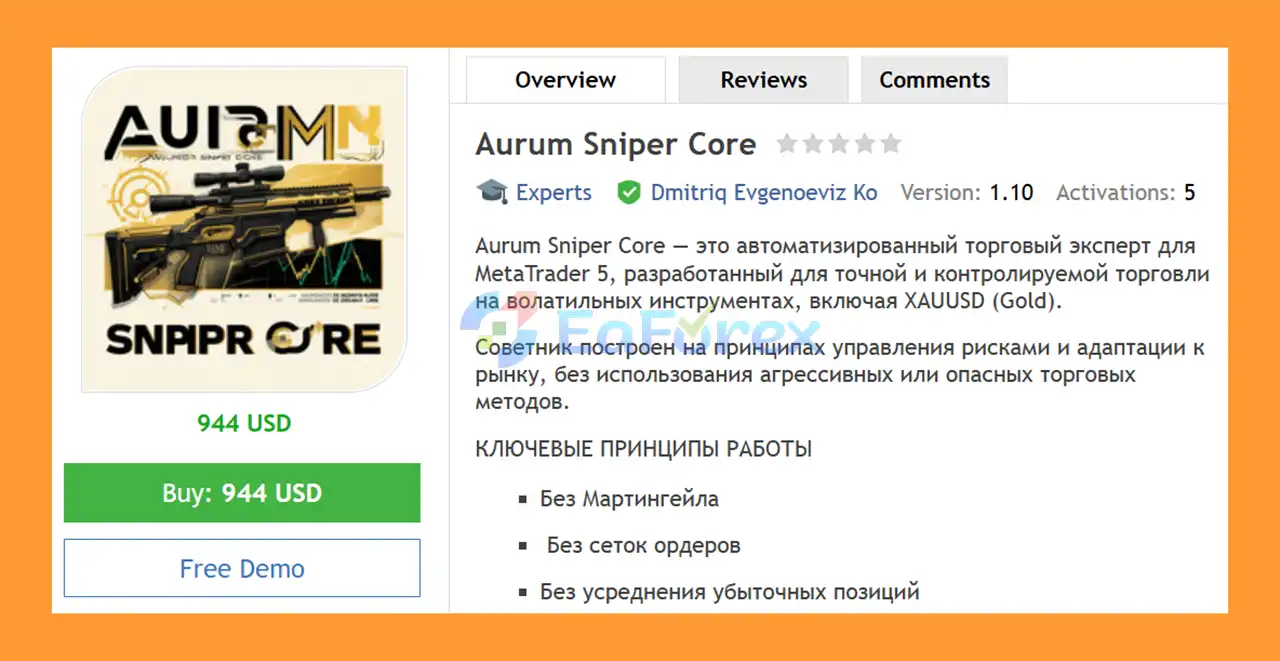
Aurum Sniper Core EA MT5 is a fully automated Expert Advisor for MetaTrader 5, designed for precise and controlled trading on volatile financial instruments, with a primary focus on XAUUSD (Gold).
The EA is built around a structured trading approach that combines momentum-based entries, market volatility analysis, adaptive Stop Loss and Take Profit calculations, trading-session filters, and disciplined risk management.
Unlike aggressive recovery systems, Aurum Sniper Core does not rely on Martingale, grid trading, averaging down, or hidden lot increases. Each trade is opened independently with a predefined risk calculation and position protection.
The recommended operating environment is M5–M15, particularly on XAUUSD and other volatile instruments. For stable 24/5 automated operation, using a reliable VPS is recommended.
About the Developer
- Author:Dmitriq Evgenoeviz Ko
- Experience: Over +4 years of experience on MQL5.
- Notable Products: Aurum Sniper Core EA, Golden Scythe EA, Aurum Fade EA MT5, Gold Lady V EA, Golden Talent EA, Golden Snow V, Gold Brick Pro EA, White Horse MT5, Gold Flow MT5, Pure Gold Algo EA, Aurum Path EA Gold Medalist EA, Golden Suite EA, Gold x25 MT4, Golden Harmony MT4, Infinity Gold Impulse MT4, Pharaoh Gold EA, Apex Gold MT4 and other advisors.
- Flagship Product: Aurum Sniper Core EA MT5 is rated as the best performing product of the year.
>> Delivery time 24h-48h after payment.
>>> Refund if not delivered.
>>> You will receive the latest version without any limitations (ID+Time).>>Reviewed by Jason Stap <<
Main Features of Aurum Sniper Core EA MT5
No Martingale Strategy
Aurum Sniper Core EA MT5 does not use traditional Martingale logic or automatically increase lot sizes after losing trades. This helps prevent uncontrolled position growth caused by consecutive losses.
No Grid Trading
The EA does not open a series of orders at predetermined price intervals. It focuses on individual trade opportunities instead of building large multi-position grids.
No Loss Averaging
The system does not average down losing positions. Every trade is treated as an independent opportunity with its own risk calculation and protection.
No Hidden Lot Multiplication
Position sizing is calculated according to the selected risk settings rather than secretly increasing the lot size after losses.
Momentum-Based Entry Logic
The trading logic looks for price momentum from a control level, combined with confirmation from the current candle before considering a trade.
One Position at a Time
Aurum Sniper Core is designed to limit exposure by allowing one position at a time. This helps keep the trading structure simple and makes overall risk easier to monitor.
AI Adaptive SL & TP
The EA uses adaptive Stop Loss and Take Profit calculations based on current market conditions. The system analyzes ATR (Average True Range) and identifies different volatility environments:
- Low volatility
- Normal volatility
- High volatility
SL and TP levels can then be dynamically adjusted according to the detected market conditions.
Risk-Based Position Sizing
The EA can calculate trade volume based on a selected percentage of account balance risk. Users can configure their preferred risk parameters while the system respects the broker's minimum and maximum lot requirements.
Built-In Trailing Stop
A built-in trailing-stop function can be used to help protect accumulated profit as the market moves in the expected direction.
Trading Session Filter
Users can define specific trading periods and restrict the EA to active market hours. This can help reduce trading activity during periods of potentially lower liquidity.
MT5 Account Compatibility
Aurum Sniper Core EA MT5 is designed to work with both:
- Hedging accounts
- Netting accounts
It also supports 4-digit and 5-digit price quotations.
How Does Aurum Sniper Core EA MT5 Work?
The trading process can be summarized in several stages.
Step 1 – Market Monitoring
The EA continuously monitors the selected trading symbol and evaluates current price behavior.
Step 2 – Momentum Detection
The system looks for an impulse price movement originating from a defined control level.
Step 3 – Candle Confirmation
The current candle is analyzed to confirm the direction of the potential trade before an entry is considered.
Step 4 – Trading Session Filter
Before opening a position, the EA checks whether the current time falls within the permitted trading session.
Step 5 – Volatility Analysis
The EA uses ATR-based analysis to evaluate the current volatility regime. This helps determine whether market conditions are relatively calm, normal, or highly volatile.
Step 6 – Adaptive SL & TP Calculation
Based on the detected market environment, the system dynamically calculates the appropriate Stop Loss and Take Profit levels.
Step 7 – Risk-Based Lot Calculation
The position size can be calculated according to the user's selected risk percentage while respecting the broker's minimum and maximum lot limitations.
Step 8 – Trade Management
Once a position is opened, the EA manages it automatically according to the configured parameters, including the available trailing-stop functionality.
The overall concept is simple: one setup, one position, one calculated risk.
Why Choose Aurum Sniper Core EA MT5?
Aurum Sniper Core is designed for traders who prefer a structured and risk-conscious automated trading system rather than aggressive recovery strategies.
Some of its main advantages include:
- No Martingale
- No grid order system
- No loss averaging
- No hidden lot increases
- Adaptive volatility-based SL and TP
- Risk-based position sizing
- Trading-session controls
- One-position-at-a-time structure
- Automated trade management
- Support for XAUUSD and other volatile instruments
- Compatible with MT5 hedging and netting accounts
The EA focuses on controlled exposure, market adaptation, and predefined risk parameters, making its trading architecture easier to understand and configure.
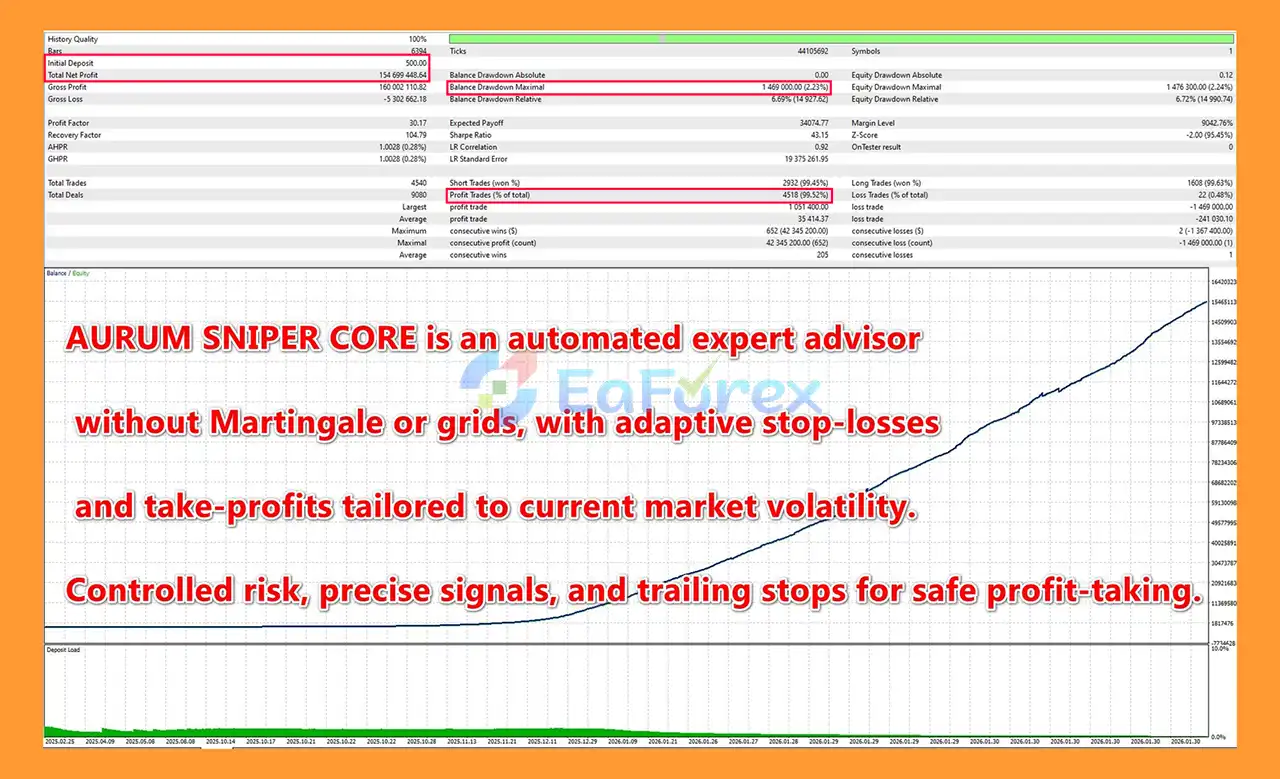
Aurum Sniper Core EA MT5 Backtest Results
🔺XAUUSD (Gold)
- Initial Deposit: $500
- Total Net Profit: $154.699 million
- Win Rate (% of total): 99,52%
- Maximum Drawdown: 2.32%
Performance and Risk Management
Aurum Sniper Core EA MT5 places significant emphasis on risk management rather than simply increasing trading frequency.
The position size can be calculated using a percentage of account balance, allowing traders to define the amount of capital they are willing to risk on each trade.
The system also provides:
- Minimum and maximum lot control
- Fixed-risk configuration options
- Adaptive Stop Loss
- Adaptive Take Profit
- ATR-based volatility analysis
- Built-in trailing stop
- Trading-session restrictions
- One-position-at-a-time exposure
The adaptive SL/TP mechanism is particularly relevant for instruments such as XAUUSD, where volatility can change significantly between market conditions.
However, adaptive risk management does not eliminate trading risk. Market gaps, slippage, spread expansion, execution delays, unexpected volatility, and broker-specific trading conditions can all affect actual results.
The recommended timeframe is M5–M15, while the minimum deposit should be determined according to the selected risk settings, trading symbol, broker conditions, and account type.
For continuous automated trading, a stable VPS is recommended to reduce the possibility of interruptions caused by local computer or internet problems.
Weaknesses and Risk Warnings
Although Aurum Sniper Core EA MT5 is designed with several risk-control mechanisms, it is not a guaranteed-profit system.
Market Volatility Risk
Gold and other volatile instruments can experience rapid price movements. Extreme market conditions may result in slippage or execution prices that differ from expected levels.
No Guaranteed Profit
Past backtests, historical performance, or previous trading results cannot guarantee future profitability.
Broker Conditions Matter
Spread, commission, execution speed, minimum lot size, maximum lot size, contract specifications, and trading conditions can affect the EA's real-world performance.
Adaptive SL/TP Is Not a Guarantee
ATR-based adaptive calculations can adjust trade protection according to volatility, but they cannot predict unexpected market movements.
Incorrect Risk Settings
Using excessively high risk per trade or an unsuitable lot size can significantly increase drawdown and the possibility of substantial losses.
VPS and Execution
Automated trading depends on stable execution. A poor VPS, internet connection, or trading server environment may interfere with normal EA operation.
Backtest vs. Live Trading
Backtest results may differ considerably from live trading because real-market conditions include spreads, commissions, slippage, execution delays, and changing liquidity.
Always test the EA on a demo account and carefully evaluate your broker conditions before using real funds.
Pros and Cons
Pros
- Fully automated MetaTrader 5 trading
- Designed primarily for XAUUSD and volatile instruments
- No Martingale
- No grid trading
- No averaging down
- No hidden lot multiplication
- Momentum-based entry concept
- Current-candle confirmation
- ATR-based volatility analysis
- Adaptive Stop Loss and Take Profit
- Risk-based position sizing
- Built-in trailing stop
- Trading-session filter
- One-position-at-a-time approach
- Supports hedging and netting MT5 accounts
- Supports 4-digit and 5-digit quotations
- Suitable for VPS-based automated operation
Cons
- No trading strategy can guarantee profits
- Performance can vary between brokers
- XAUUSD can experience significant volatility
- Slippage and spread changes may affect execution
- Incorrect risk settings can increase losses
- Backtest performance may differ from live results
- Requires proper testing and configuration before live deployment
- A VPS is recommended for stable continuous operation
How to Install Aurum Sniper Core EA MT5
Installing Aurum Sniper Core EA MT5 on MetaTrader 5 is straightforward.
Step 1 – Download the EA
Obtain the Aurum Sniper Core EA MT5 installation file from your authorized source.
Step 2 – Open MetaTrader 5
Launch your MetaTrader 5 trading platform.
Step 3 – Open the MQL5 Folder
In MT5, go to:
File → Open Data Folder → MQL5 → Experts
Copy the EA file into the Experts folder.
Step 4 – Restart MetaTrader 5
Close and restart MT5, or refresh the Expert Advisors section in the Navigator window.
Step 5 – Attach the EA to a Chart
Open the preferred trading symbol, such as XAUUSD, and select the recommended M5 or M15 timeframe.
Drag Aurum Sniper Core EA MT5 from the Navigator window onto the chart.
Step 6 – Configure the Parameters
Adjust the available settings according to your trading plan, including:
- Risk percentage
- Fixed-risk settings
- Lot parameters
- Trading sessions
- Stop Loss and Take Profit settings
- Trailing-stop parameters
- Other available EA options
Step 7 – Enable Automated Trading
Make sure Algo Trading / AutoTrading is enabled in MetaTrader 5 and confirm that the EA is permitted to trade.
Step 8 – Test Before Live Trading
Before using a live account, test the EA in the MT5 Strategy Tester and/or on a demo account. Evaluate its behavior under your broker's spread, commission, leverage, execution, and symbol conditions.
What’s Included in the Download Package?
- Setting (If Any).docx
- Installation Guide.docx
>>> Join VIP Membership Now <<<
Final Thoughts
In summary, Aurum Sniper Core EA MT5 is designed around a straightforward philosophy: controlled entries, calculated risk, adaptive trade protection, and disciplined exposure.
Instead of relying on Martingale, grid trading, or loss-averaging techniques, the EA focuses on individual trade opportunities supported by momentum analysis, candle confirmation, trading-session filtering, and ATR-based volatility adaptation.
For traders looking for an automated XAUUSD EA for MetaTrader 5 with configurable risk management and adaptive SL/TP functionality, Aurum Sniper Core provides a structured framework for automated trading.
As with any Expert Advisor, actual results depend on market conditions, broker execution, account settings, risk parameters, and other external factors. Proper backtesting, forward testing, and conservative risk management are essential before deploying the EA on a live account.



