









-
 Unlimited Activations
-
 Instant delivery
-
 Easy to install






 Unlimited Activations
Instant delivery
Easy to install
Unlimited Activations
Instant delivery
Easy to install
 Free Update
 Free Install Support

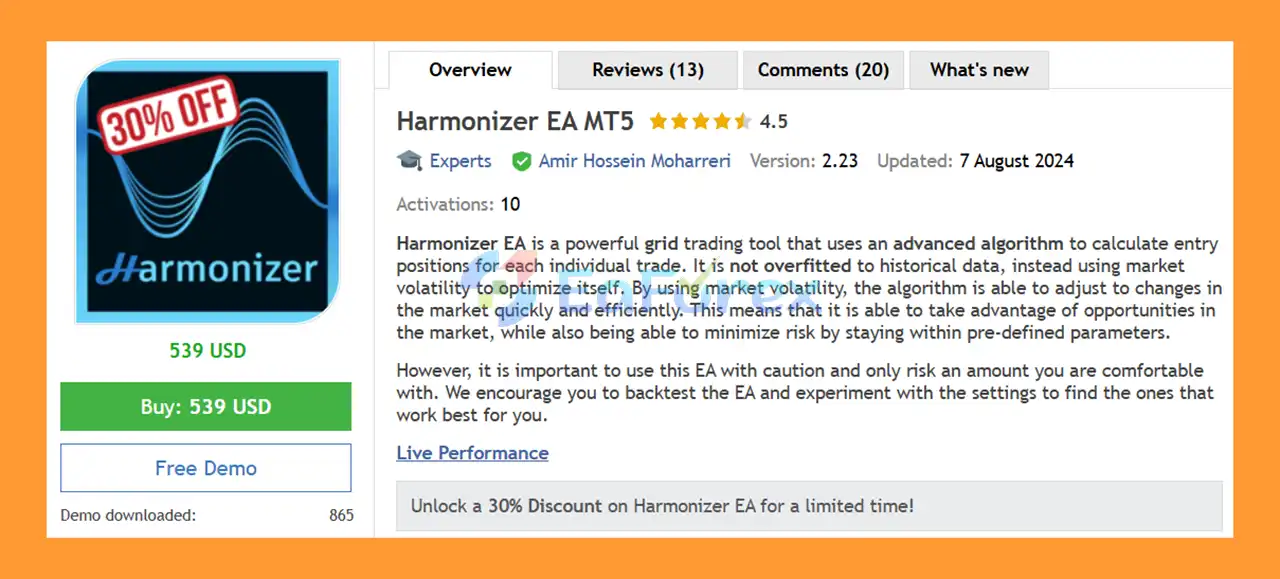
Harmonizer EA MT5 is an advanced automated grid trading Expert Advisor for MetaTrader 5, designed to calculate entry positions dynamically according to current market conditions and volatility.
Unlike grid systems that rely on rigid historical optimization, Harmonizer uses an adaptive algorithm based on market volatility to adjust its trading behavior. This approach is designed to help the EA respond more efficiently when market conditions change rather than depending entirely on parameters optimized for a specific historical period.
The EA supports multiple symbols from a single chart and includes a wide range of money-management, drawdown protection, grid-management, news-filter, and trade-control features.
The developer recommends AUDCAD and NZDCAD as the primary trading symbols, with AUDNZD available as an optional symbol. The recommended timeframe is M15 (15-minute).
Harmonizer EA MT5 is designed with capital preservation in mind, but traders should remember that grid trading can accumulate multiple positions during adverse market movements. Proper account sizing, leverage, drawdown limits, and testing are therefore essential.
• Author: Amir Hossein Moharreri
• Experience: Over +1 years of experience on MQL5.
• Notable Products: Harmonizer EA MT5, Harmonizer EA MT4 and other advisors.
• Flagship Product: Harmonizer EA MT5 is rated as the best performing product of the year.
>> Delivery time 24h-48h after payment.
>>> Refund if not delivered.
>>> You will receive the latest version without any limitations (ID+Time).>>Reviewed by Jason Stap <<
Harmonizer EA MT5 uses an algorithm designed to calculate entry positions based on current market volatility.
Instead of relying exclusively on fixed historical parameters, the EA attempts to adapt its trading behavior to changing market conditions.
The Smart Distance function can adjust the distance between grid positions according to the current market environment.
Market volatility can change significantly over time. Harmonizer is designed to use volatility information when determining how it manages entries.
This adaptive approach is intended to help the EA respond to different market conditions without requiring constant manual optimization.
The EA can operate on multiple symbols from a single chart.
The recommended symbols are:
The Trade Symbols parameter determines which instruments the EA will manage.
Harmonizer can manage multiple trading symbols from one M15 chart, reducing the need to attach separate EA instances to every currency pair.
This can make portfolio management more convenient and reduce the number of charts required.
The built-in News Filter can prevent the EA from opening new positions around scheduled economic events.
Traders can configure:
The news filter can be used both in live trading and during backtesting, according to the developer.
Harmonizer provides multiple ways to define a maximum global drawdown.
Traders can select protection based on:
When the configured drawdown threshold is reached, the EA can stop trading according to the selected protection mode.
The EA also includes a Daily Drawdown Check, which can be useful for traders who need to operate within predefined daily-loss limits.
Available options include:
This functionality may also be relevant when testing strategies against trading rules that include daily loss limits.
Harmonizer provides several lot-calculation methods.
Traders can choose between:
This allows the initial trading volume to be adjusted according to account size and risk preferences.
The EA includes a configurable Trailing Stop Loss (TSL).
The TSL can be activated after a trading session reaches the specified profit trigger, and the trailing distance can then be configured separately.
The Randomize Entry option can introduce a random delay of up to 10 seconds before opening a trade.
This feature can help vary the exact timing of entries rather than having every trade triggered at precisely the same moment.
Harmonizer EA MT5 combines adaptive market analysis, grid positioning, money management, and risk controls into an automated trading system.
The EA first evaluates the market using its configured strategy and indicator timeframe. It then calculates potential entry conditions and determines when a new position should be opened.
Once the initial trade is active, additional trades may be opened according to the configured Trade Distance, Smart Distance, and trade multipliers.
The grid structure can use different multipliers for different stages:
This allows the position-size progression to change as more trades are added to a trading set.
The EA also controls the maximum number of positions through the Maximum Trades parameter.
As the basket develops, Harmonizer manages the positions toward the configured Take Profit target. Additional protection can come from global drawdown controls, daily drawdown limits, trailing stops, spread restrictions, and the news filter.
The basic workflow can be summarized as:
Market Analysis → Entry Calculation → Grid Management → Position Sizing → Basket Management → Take Profit / Risk Protection
Because this is a grid-based strategy, the behavior of the EA can change significantly depending on market volatility and the number of positions accumulated.
Harmonizer EA MT5 is designed for traders looking for an automated adaptive grid trading system rather than a conventional single-entry Expert Advisor.
One of its notable characteristics is its focus on market-volatility-based adaptation. The EA is designed to adjust entry positioning according to changing market conditions rather than relying exclusively on fixed historical optimization.
Another important advantage is the number of built-in risk-management options. Traders can define:
The ability to trade multiple symbols from one chart can also simplify setup and monitoring.
For traders following the developer’s recommended configuration, AUDCAD and NZDCAD on M15 are the primary markets, while AUDNZD can optionally be added.
The EA does not require a .set file, allowing users to begin with default settings or perform their own backtests and parameter testing.
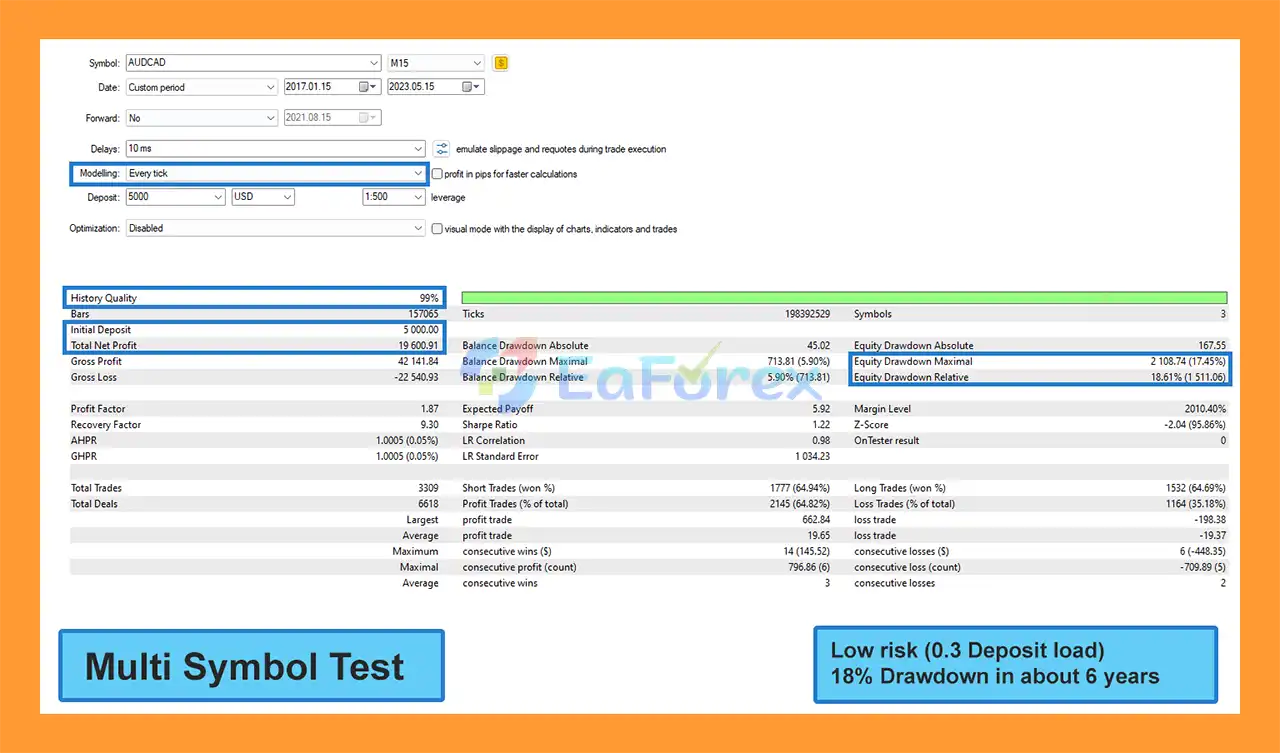
Low-risk setup: $19,600 profit from $5,000 deposit, Balance Drawdown Maximal: < 6%
Harmonizer EA MT5 Backtests Result
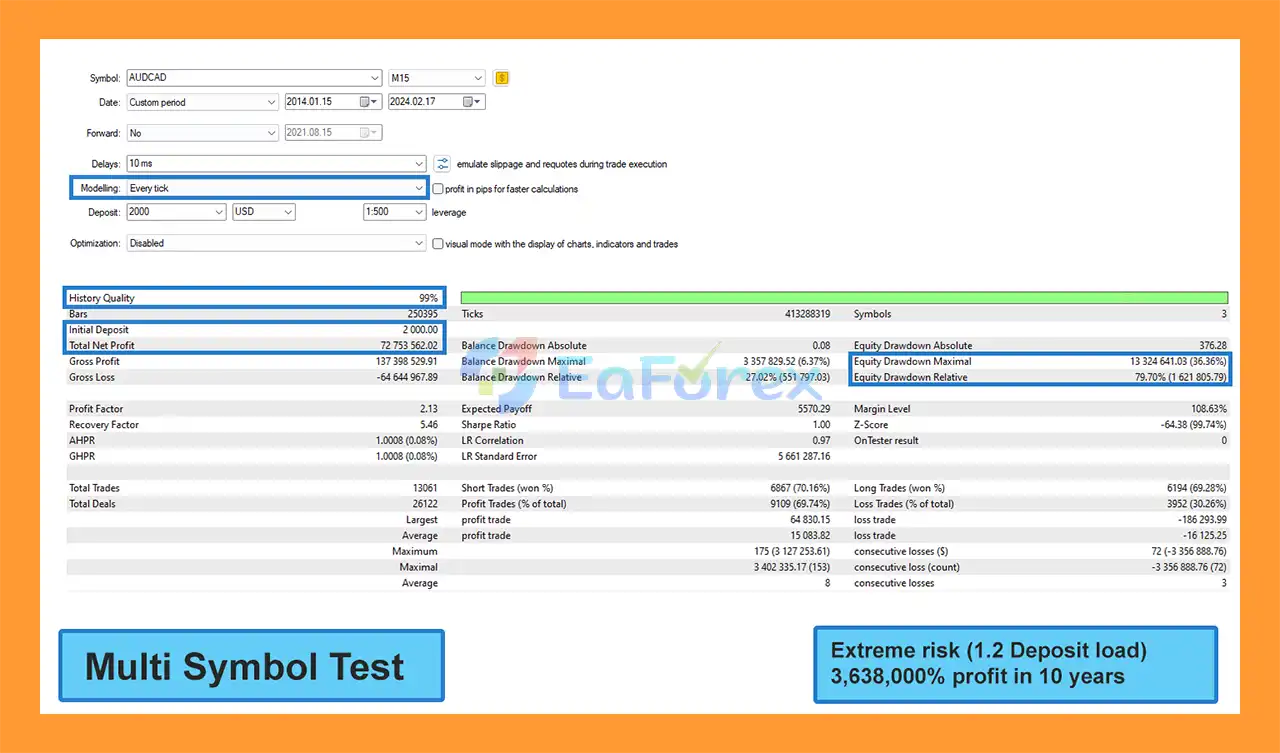
Harmonizer EA MT5 Backtests Results
🔻Harmonizer EA MT5 is highly appreciated by the MQL5 community for bringing stable and reliable profits. Below are 5 star reviews from users:
User Reviews
Harmonizer EA MT5 includes several features specifically designed to control exposure and protect the trading account.
The developer recommends:
| Parameter | Recommendation |
|---|---|
| Primary Symbols | AUDCAD, NZDCAD |
| Optional Symbol | AUDNZD |
| Timeframe | M15 |
| Starting Deposit | $500 minimum |
| More Conservative Starting Capital | $1,500 |
| Account Type | Hedging |
| Recommended Leverage | 1:200 or higher |
| VPS | Recommended for continuous operation |
.set File |
Not required |
The developer notes that the EA can technically start from around $500, while approximately $1,500 is suggested for a lower-risk approach.
These figures should be considered configuration guidance rather than a guarantee that a particular account size will prevent losses.
The EA can monitor overall drawdown and stop trading based on the selected threshold.
Possible protection methods include:
Percentage Drawdown
Stops the EA when the configured percentage loss is reached.
Points Drawdown
Uses a predefined number of points as the maximum drawdown threshold.
Currency Drawdown
Stops the strategy when the specified monetary loss level is reached.
The Daily Drawdown Check can limit losses within a trading day.
This can be useful for traders who follow strict daily risk limits or trading environments where maximum daily losses are defined.
The following parameters have a direct effect on exposure:
Traders should test these settings carefully because increasing the number of positions or the volume multipliers can significantly increase margin requirements.
Although Harmonizer EA MT5 includes several risk-management features, it remains a grid-based trading system, and this introduces specific risks.
When the market moves against the initial position, the EA may open additional positions according to its grid settings.
If the market continues moving in the same unfavorable direction, the number of open trades and total exposure can increase.
The 2nd, 3rd–5th, and 6th+ trade multipliers can influence how position size develops as additional trades are opened.
Aggressive multiplier settings may increase potential recovery speed, but they can also increase:
The developer recommends leverage of 1:200 or higher. Higher leverage can provide greater trading capacity, but it does not reduce the underlying market risk.
The News Filter is designed to reduce new entries around economic events, but it cannot eliminate all risks associated with news.
Price gaps, spread expansion, slippage, and unexpected market reactions can still occur.
If the broker uses a symbol suffix such as AUDCAD.m, traders must update the Trade Symbols parameter accordingly.
An incorrect symbol configuration can prevent the EA from operating as expected.
Because the EA is designed for continuous automated operation, running it on a stable VPS can help reduce interruptions caused by local computer shutdowns, internet disconnections, or power failures.
Even though the EA is designed not to be overfitted to historical data, no automated strategy can guarantee future performance.
Different settings, brokers, spreads, execution conditions, and market environments can produce different results.
.set file requiredInstall MetaTrader 5 through your broker or another trusted provider.
In MetaTrader 5, select:
File → Open Data Folder → MQL5 → Experts
Copy the Harmonizer EA MT5 files into the Experts folder.
Restart the platform or refresh the Expert Advisors section in the Navigator.
Harmonizer requires a hedging-type MT5 account. Confirm that your broker provides this account mode before installation.
According to the recommended setup, attach the EA to one M15 AUDCAD chart.
The EA can then manage the configured symbols from this single chart.
The recommended symbols are:
If your broker uses a suffix, such as AUDCAD.m, update the Trade Symbols parameter accordingly.
Alternatively, enable Custom Symbol Mode if you want to trade a different instrument.
Set the appropriate:
Start with conservative parameters and test them before increasing exposure.
Review:
These settings have a significant effect on the EA’s risk profile.
Enable the News Filter if desired and define:
For continuous automated trading, install MetaTrader 5 on a stable VPS and ensure that the platform remains connected to the broker.
Run multiple backtests with different market periods and settings.
Then use a demo account to evaluate:
Only after understanding the strategy’s behavior should you consider using real capital.
🔺 Experts:
🔺 Presets:
In summary, Harmonizer EA MT5 is an automated adaptive grid trading Expert Advisor designed to adjust its entry behavior according to market volatility. Rather than relying exclusively on fixed historical optimization, the EA uses an adaptive approach intended to respond to changing market conditions.
Its feature set goes beyond basic grid trading. It includes Smart Distance, multiple position-size multipliers, global drawdown protection, daily drawdown controls, a news filter, trailing stop management, spread protection, multi-symbol trading, and live performance monitoring.
The recommended configuration focuses on AUDCAD and NZDCAD on the M15 timeframe, with AUDNZD available as an optional symbol. The developer recommends using a hedging account, a VPS for continuous operation, and leverage of 1:200 or higher.
However, the core grid mechanism remains an important risk factor. When markets move strongly against a position, additional trades may accumulate and increase margin usage and floating drawdown. For this reason, the Maximum Trades, trade multipliers, lot calculation method, and drawdown limits should be carefully tested.
Harmonizer EA MT5 should therefore be viewed as a volatility-adaptive grid trading tool, not a guaranteed-profit system. Thorough backtesting, forward testing, appropriate capital allocation, and disciplined risk management are essential before deploying the EA on a live account.
1. What is Harmonizer EA MT5?
Harmonizer EA MT5 is a volatility-based grid trading Expert Advisor designed to adapt dynamically to live market conditions. Instead of relying on fixed historical data, it calculates optimal entry points and trade spacing in real time, making it a flexible and efficient EA for Forex traders.
2. How does Harmonizer EA MT5 manage risk?
The EA includes multiple built-in safety features such as global and daily drawdown limits, trailing stop options, and deposit-based lot sizing. It also features a news filter to pause trading during high-impact economic events—helping protect capital and reduce exposure to sudden volatility.
3. What makes Harmonizer EA MT5 different from other grid EAs?
Unlike traditional grid systems that follow fixed spacing or martingale strategies, Harmonizer EA MT5 adjusts dynamically based on volatility. This prevents overtrading in quiet markets and excessive drawdown in volatile conditions, resulting in a more stable performance profile.
4. Which trading pairs and timeframes does Harmonizer EA MT5 support?
Harmonizer EA MT5 can trade multiple pairs simultaneously from a single chart using its multi-symbol feature. It supports most major and cross pairs, with optimized presets for AUDCAD and other popular Forex symbols. The recommended timeframe is M15 to H1, depending on market conditions.
5. Is Harmonizer EA MT5 suitable for prop firm challenges?
Yes. Harmonizer EA MT5 is prop-firm compatible, with built-in daily and total drawdown checks designed to meet strict risk limits. Its adaptive grid system and smart capital management make it ideal for traders participating in funded account programs.
6. What are the backtest and live performance results of Harmonizer EA MT5?
Backtests over 10 years show strong profitability and low drawdown.
Low-Risk Setup: $19,600 profit from a $5,000 deposit, max drawdown < 6%
High-Risk Setup: $2,000 deposit → $72 million profit, 69.74% win rate, max drawdown 6.37%
These results highlight the EA’s ability to deliver consistent growth while maintaining strict risk control.
In stock
In stock
In stock
In stock
In stock
Out of stock
No account yet?
Create an Account












 Automatic EA
 EA Best Seller
 Expert Advisor MT4
 Expert Advisor MT5
 HFT EA


Reviews
Clear filtersThere are no reviews yet.