









-
 Unlimited Activations
-
 Instant delivery
-
 Easy to install






 Unlimited Activations
Instant delivery
Easy to install
Unlimited Activations
Instant delivery
Easy to install
 Free Update
 Free Install Support

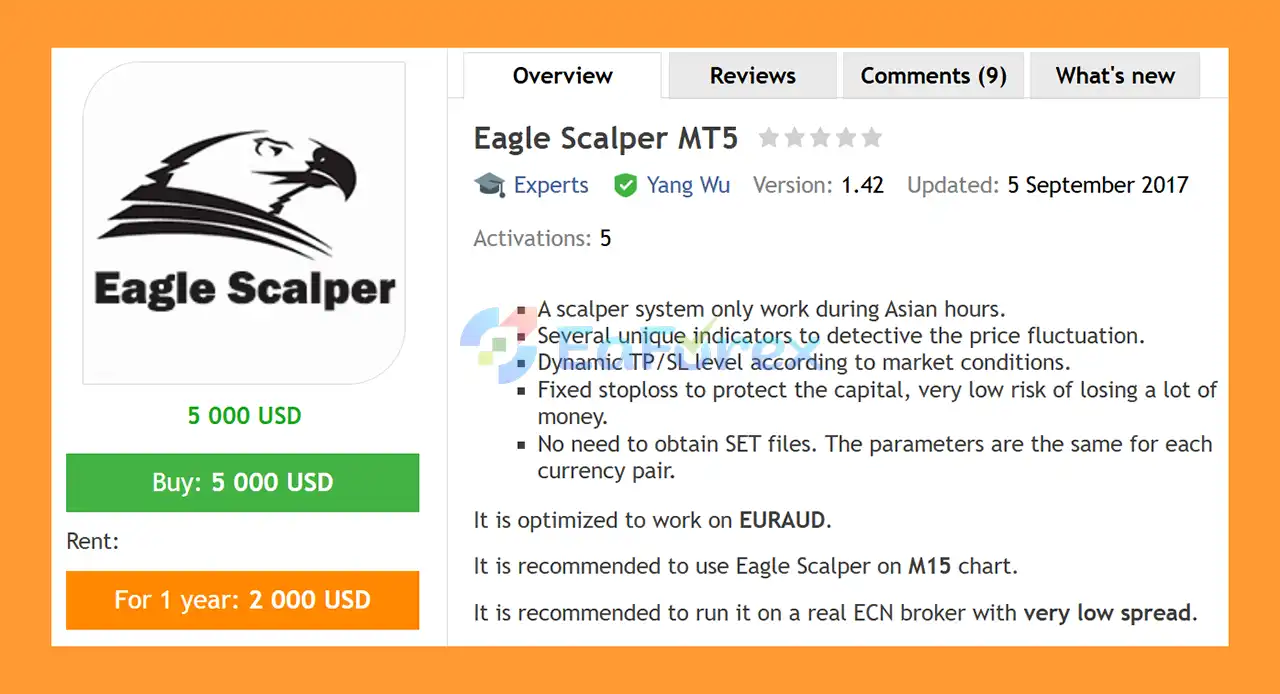
Eagle Scalper EA MT5 is a fully automated Forex scalping Expert Advisor designed to trade during the Asian trading session. The system uses several internal indicators to analyze short-term price fluctuations and identify potential trading opportunities.
The EA is specifically optimized for EURAUD and is recommended for the M15 timeframe. Its trading logic is designed to adapt Take Profit and Stop Loss levels according to market conditions while also using a fixed Stop Loss structure to define downside risk on individual positions.
Eagle Scalper EA MT5 is designed for traders who prefer a session-based automated scalping strategy without the need to manually search for SET files for different currency pairs. According to the developer’s specifications, the EA uses the same parameter structure for each supported configuration, while EURAUD is the primary optimized market.
For best execution conditions, the developer recommends using a real ECN broker with very low spreads.
>> Delivery time 24h-48h after payment.
>>> Refund if not delivered.
>>> You will receive the latest version without any limitations (ID+Time).
>> Reviewed by Jason Stap <<<
Eagle Scalper EA MT5 is designed to operate specifically during the Asian trading hours. Its session-based structure limits trading activity to a defined period instead of continuously trading throughout the day.
The EA is optimized for EURAUD, making this the primary currency pair for its intended trading configuration.
The recommended operating timeframe is M15, providing a balance between short-term price analysis and the execution requirements of an automated scalping strategy.
Eagle Scalper uses several indicators to analyze short-term price fluctuations and identify potential entry and exit conditions.
The EA provides controls for up to three internal indicators:
Each indicator can be enabled or disabled according to the configured settings.
The EA supports Take Profit and Stop Loss levels designed to adapt to market conditions, according to the supplied specifications.
This allows the trading system to manage positions according to its programmed market analysis rather than relying exclusively on a single static target structure.
A Stop Loss is used to define a predefined exit level for individual trades. This provides a mechanism for limiting losses when the market moves against an open position.
However, a Stop Loss does not guarantee that the exact requested price will be obtained during periods of high volatility or slippage.
The developer states that users do not need to obtain separate SET files because the parameters are intended to remain consistent across currency-pair configurations.
The primary optimized pair is EURAUD, so users should follow the recommended configuration rather than assuming identical performance across other markets.
The Risk parameter can calculate position size dynamically based on a defined percentage/value of account capital.
This function is active when Lots = 0.
Users who prefer direct position-size control can specify a fixed lot size using the Lots parameter.
The Max_Spread parameter allows traders to define the maximum spread at which the EA is permitted to open an order.
This is particularly important for scalping strategies because transaction costs can have a greater effect on short-term trading results.
The EA includes configurable opening and closing hours, allowing users to define when automated trading is active.
Eagle Scalper EA MT5 provides an optional second-order mechanism.
Users can control:
This feature should be used carefully because an additional position can increase total market exposure.
Eagle Scalper EA MT5 follows a session-based scalping process designed around short-term price fluctuations.
Its general operating logic can be summarized as:
Asian Session Filter → Price Analysis → Indicator Confirmation → Entry → Position Management → TP/SL Exit
During the configured trading hours, the EA monitors EURAUD on the M15 timeframe.
Its internal indicators can be used to evaluate market conditions and identify potential trading opportunities. Depending on the configured parameters, the system can use one, two, or three internal indicators.
Once the required conditions are satisfied, the EA can automatically open a Buy or Sell position according to the selected Direction setting.
The available direction modes are:
After entering a position, the EA manages the trade using its configured Take Profit and Stop Loss parameters.
If enabled, the second-order function can open an additional position after the specified Second_Order_Distance is reached, with its size determined by the Second_Lot_Factor.
Eagle Scalper EA MT5 may be suitable for traders looking for an automated Asian-session scalping EA with configurable risk, spread, trading-hour, and indicator parameters.
Key characteristics include:
The combination of session control and spread filtering is particularly relevant for scalping, where execution costs and trading conditions can materially influence results.
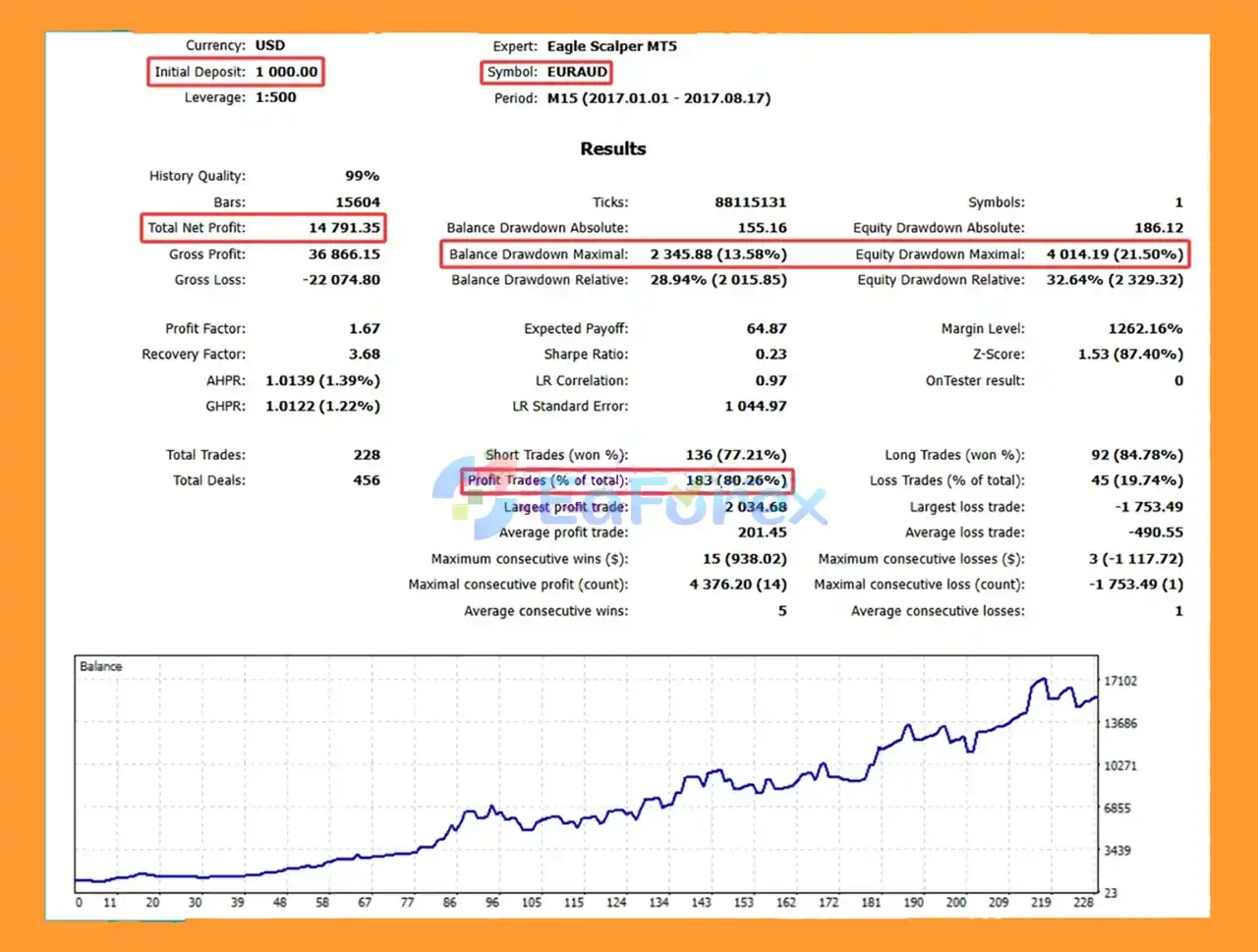
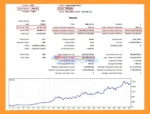
🔺EUR/AUD – over 7 months
Eagle Scalper Backtests
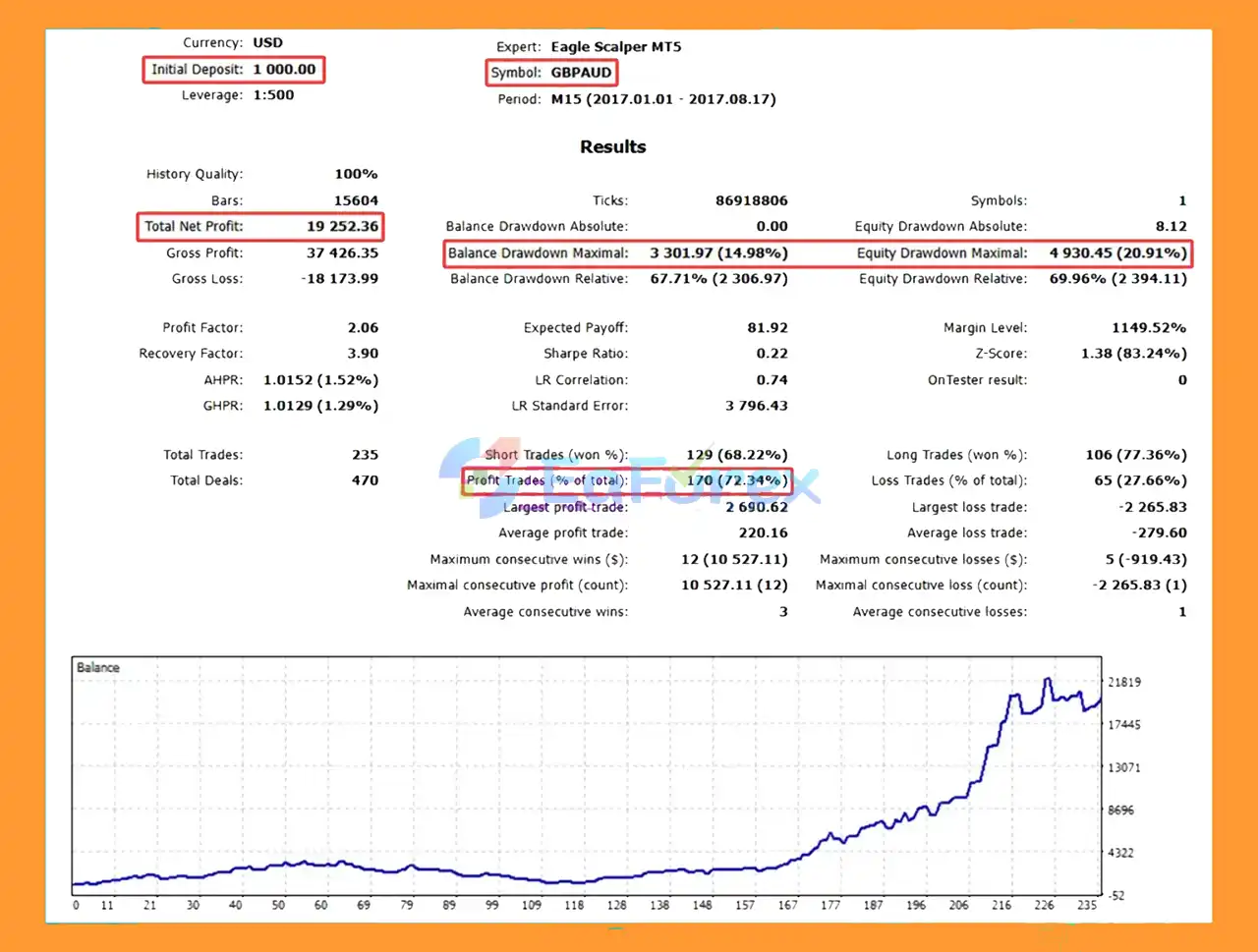
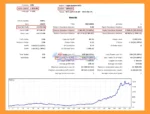
🔺GBP/ AUD – over 7 months
Eagle Scalper MT5 Backtests
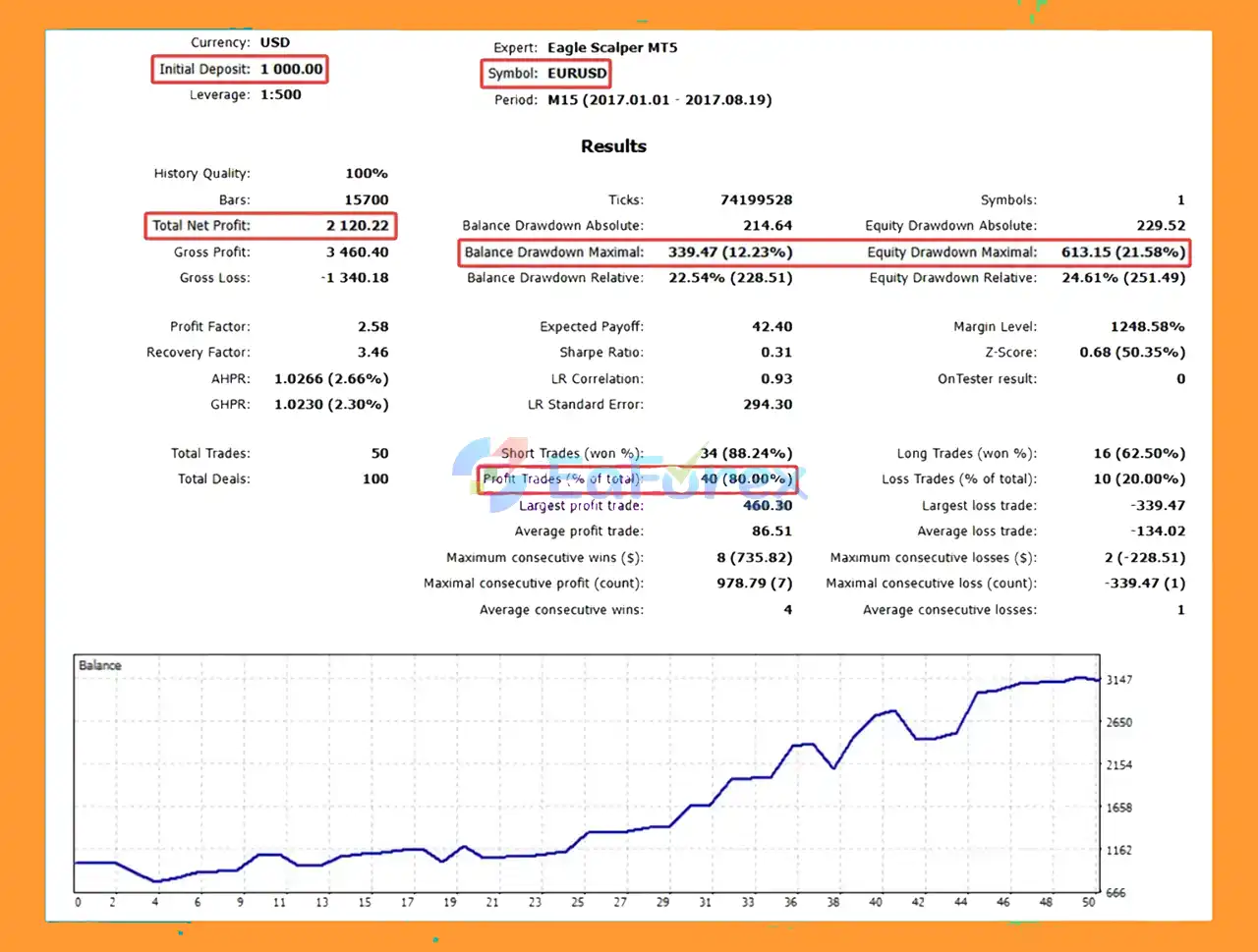
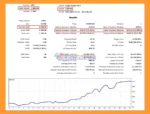
🔺EUR/USD – over 7 months
Eagle Scalper MT5 Backtest
The developer recommends running Eagle Scalper EA MT5 with a Risk value below 10 and testing with 99.9% modeling quality.
These are configuration and testing recommendations rather than guarantees of future live performance.
| Parameter | Recommended Setting |
|---|---|
| Primary Pair | EURAUD |
| Timeframe | M15 |
| Trading Session | Asian Session |
| Broker | ECN / Very Low Spread |
| Risk | Below 10 |
| Backtest Modeling | 99.9% quality recommended |
| Lot Mode | Fixed Lot or Risk-Based |
| Spread | Very Low |
| VPS | Recommended for continuous automation |
When Lots = 0, the EA can use the Risk parameter to calculate the trading volume dynamically according to account capital.
This can be useful for adapting position size to different account balances, but higher risk settings can increase potential drawdown.
The developer recommends keeping the Risk below 10.
If the Lots parameter is set to a value greater than zero, the EA uses the specified fixed lot size.
Fixed-lot trading provides direct control over position size, but traders should consider how the chosen lot size relates to account equity and margin.
The Max_Spread parameter prevents the EA from opening trades when the spread exceeds the configured maximum.
For an automated scalper, this is an important control because a wide spread can consume a significant portion of a short-term trade’s potential profit.
The Open_Hour and Close_Hour parameters define the active trading window.
The EA also includes:
These settings allow users to control whether trading continues on Friday and when Friday trading should stop.
Scalping strategies can be highly sensitive to spread, commission, slippage, execution speed, and liquidity.
A strategy that performs acceptably under low-spread ECN conditions may produce different results under a higher-spread account.
Because Eagle Scalper focuses on Asian-session trading, it does not attempt to capture opportunities throughout the European and New York sessions.
Market conditions during the Asian session can also vary considerably from day to day.
The EA is optimized for EURAUD. Applying the same settings to unrelated currency pairs does not guarantee comparable results.
Even when multiple indicators are used, technical indicators cannot predict every market movement.
Unexpected volatility, liquidity changes, or unusual price behavior can result in losing trades.
The optional second-order function can increase exposure.
If the first position is losing and a second position is opened, total account exposure becomes larger. The Second_Lot_Factor should therefore be configured conservatively.
Fast market movements can result in execution prices that differ from the requested price. This can affect both scalping entries and exits.
The option to continue trading on Friday should be considered carefully because liquidity and market conditions can change as the trading week approaches its close.
A 99.9% modeling-quality backtest can provide more detailed historical simulation when suitable tick data is available, but it still cannot reproduce every aspect of live trading.
Live spread changes, slippage, execution latency, liquidity, broker conditions, and market events can all produce different results.
Install MetaTrader 5 and log in to your trading account.
Copy the Eagle Scalper EA MT5 file into the appropriate:
MQL5 → Experts
folder.
Restart MetaTrader 5 or refresh the Navigator panel if necessary.
Open an EURAUD chart and select the recommended M15 timeframe.
Drag Eagle Scalper onto the EURAUD M15 chart and enable automated trading.
For fixed-lot trading, enter the desired value in Lots.
For dynamic risk-based sizing, set:
Lots = 0
Then configure the Risk parameter.
The developer recommends keeping Risk below 10.
Set Max_Spread according to your broker’s typical EURAUD spread.
A low-spread ECN account is recommended.
Set:
according to your desired Asian-session trading window and broker server time.
Review the settings for:
The Use_Internal_Inputs option determines whether the EA uses its internal indicator values or the values entered manually by the user.
If required, enable Allow_Second_Order and configure:
For initial testing, it is sensible to evaluate the EA without additional exposure before enabling this feature.
Run a thorough demo test before using real funds. For historical testing, the developer recommends 99.9% modeling quality and using real tick data where available.
🔺 Experts:
In summary, Eagle Scalper EA MT5 is an automated Asian-session Forex scalping system optimized for EURAUD and the M15 timeframe. It combines multiple internal indicators with configurable trading hours, spread protection, dynamic position sizing, and TP/SL management.
One of its main characteristics is its focus on a specific trading session rather than continuous 24-hour operation. The ability to choose between fixed lots and risk-based position sizing also gives traders flexibility in managing account exposure.
However, scalping requires suitable execution conditions. Low spreads, reliable execution, controlled slippage, and appropriate position sizing are important factors when evaluating the EA. The optional second-order function can also increase total exposure and should therefore be used cautiously.
The developer recommends keeping Risk below 10 and conducting 99.9% modeling-quality backtests. These recommendations can help with evaluation, but historical results should not be considered a guarantee of future live performance.
For traders considering Eagle Scalper EA MT5, demo testing under the same broker and trading conditions intended for live deployment is an important step before committing real capital.
Risk Disclaimer: Automated Forex trading involves substantial risk. A fixed Stop Loss can help define trade risk but cannot eliminate losses or guarantee execution at the exact requested price. Past performance and backtest results do not guarantee future results. Only trade with funds you can afford to lose.
1. What is Eagle Scalper EA MT5?
Eagle Scalper EA MT5 is a fully automated trading robot designed for scalping during the Asian session. It’s optimized for the EURAUD pair (M15 timeframe) and uses multiple custom indicators to detect small market movements for consistent, low-risk profits.
2. Which trading hours and pairs does Eagle Scalper EA MT5 work best on?
This EA performs best during Asian trading hours, when the market is calm and spreads are low. It’s primarily optimized for EURAUD, but can also be tested on GBP/AUD and EUR/USD for diversification.
3. Is Eagle Scalper EA MT5 beginner-friendly?
Yes. Eagle Scalper EA MT5 offers a plug-and-play setup with automatic GMT detection and one-setting simplicity, meaning no external SET files are needed. Even beginners can start trading immediately with minimal configuration.
4. How safe is Eagle Scalper EA MT5 for live trading?
The EA includes a fixed stop loss for every trade, dynamic Take Profit and Stop Loss adjustment, and flexible risk management. These features help minimize drawdowns and ensure consistent account growth under real ECN conditions.
5. What are the backtest results of Eagle Scalper EA MT5?
Backtests show impressive results over 7 months:
EURAUD: $1,000 → $14,791 profit, 80.26% win rate, 13.58% drawdown
GBPAUD: $1,000 → $19,252 profit, 72.34% win rate
EURUSD: $1,000 → $2,120 profit, 80.00% win rate
These results highlight strong profitability with controlled risk.
6. What is included in the Eagle Scalper EA MT5 package?
The package includes:
The Eagle Scalper EA MT5 file
Installation Guide.docx
Settings file (if any)
You’ll also gain access to the Telegram channel and VIP Membership for updates, support, and trading insights.
In stock
In stock
In stock
In stock
In stock
Out of stock
No account yet?
Create an Account












 Automatic EA
 EA Best Seller
 Expert Advisor MT4
 Expert Advisor MT5
 HFT EA


Reviews
Clear filtersThere are no reviews yet.