









-
 Unlimited Activations
-
 Instant delivery
-
 Easy to install






 Unlimited Activations
Instant delivery
Easy to install
Unlimited Activations
Instant delivery
Easy to install
 Free Update
 Free Install Support

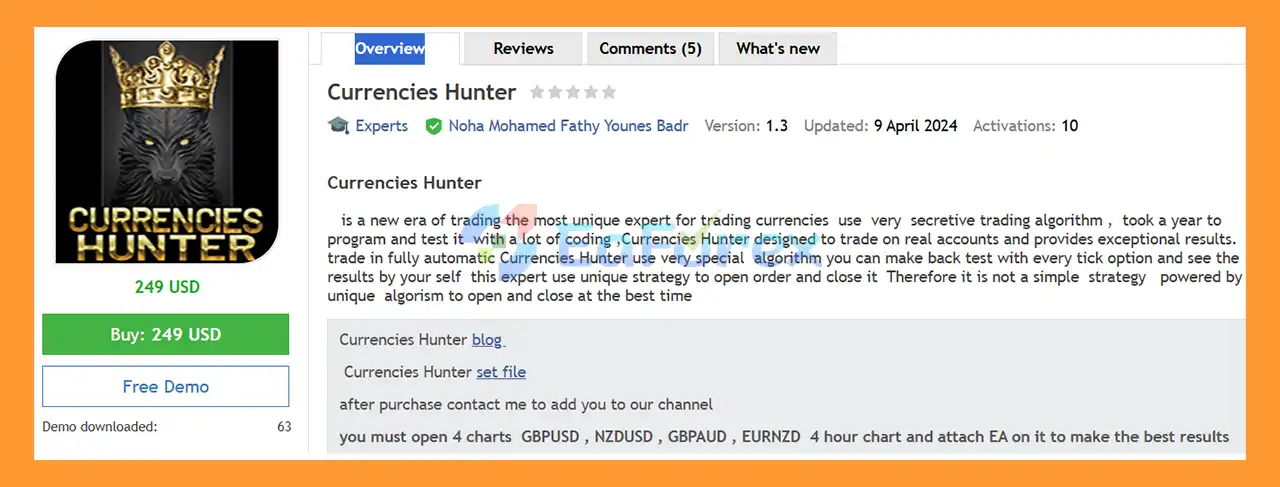
Currencies Hunter EA MT5 is an advanced automated Forex Expert Advisor designed to trade multiple currency pairs using a proprietary and highly specialized trading algorithm. Developed over a year of programming, testing, and optimization, the EA is built for traders looking for a fully automated approach to Forex trading.
Unlike a simple rule-based strategy, Currencies Hunter EA MT5 uses a unique algorithm to identify potential market opportunities and determine when to open and close trades. The system is designed to operate automatically on real trading accounts while providing traders with tools for backtesting and performance analysis.
Currencies Hunter EA MT5 is specifically configured to work across four currency pairs on the H4 timeframe: GBPUSD, NZDUSD, GBPAUD, and EURNZD.
For the intended setup, traders should run the EA on all four H4 charts simultaneously. Set files are provided to help configure the EA for each supported currency pair.
>> Delivery time 24h-48h after payment.
>>> Refund if not delivered.
>>> You will receive the latest version without any limitations (ID+Time).>>Reviewed by Jason Stap <<
Currencies Hunter EA MT5 uses a specialized trading algorithm developed through extensive programming and testing. The algorithm is designed to identify trading opportunities and manage entries and exits automatically.
The built-in time filter helps control when the EA is allowed to trade, allowing the system to focus on specific market periods.
Currencies Hunter incorporates a trend filter to help evaluate market direction before entering trades.
The EA includes a deposit-load control feature designed to help manage the amount of trading exposure relative to the account.
Each trade can use predefined Take Profit (TP) and Stop Loss (SL) levels for structured trade management.
A built-in statistics panel provides useful trading information directly on the chart, helping users monitor the EA’s activity and account conditions.
Once installed and configured correctly, Currencies Hunter can automatically analyze the market, open trades, and manage positions without requiring manual execution.
The recommended setup uses four Forex pairs simultaneously:
All four charts should be configured on the H4 timeframe.
Currencies Hunter EA MT5 is designed to analyze the selected currency pairs using its proprietary trading algorithm together with trend and time filters.
The basic trading process can be summarized as follows:
Market Analysis → Time Filter → Trend Filter → Trading Signal → Trade Entry → TP/SL Management → Trade Exit
The EA continuously monitors the configured H4 charts and evaluates market conditions according to its internal algorithm. When the required conditions are satisfied, the system can automatically open a position.
After entering the market, the EA manages the trade according to its configured risk parameters, including fixed Take Profit and Stop Loss levels.
Because Currencies Hunter is designed to operate across multiple currency pairs, traders should attach the EA to all four recommended charts rather than using only a single chart if they want to follow the developer’s recommended configuration.
Currencies Hunter EA MT5 may be suitable for traders who are looking for a fully automated Forex trading system with multi-pair functionality and structured risk controls.
Key reasons to consider the EA include:
The system is particularly focused on four currency pairs—GBPUSD, NZDUSD, GBPAUD, and EURNZD—which allows traders to follow a clearly defined trading configuration.
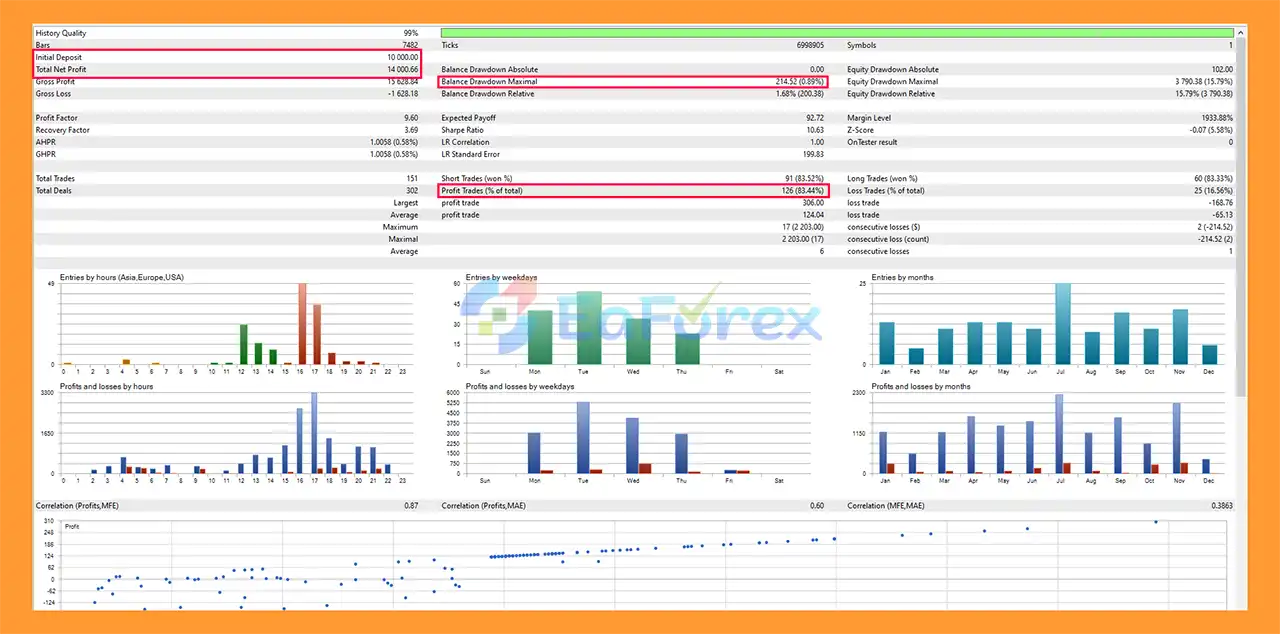
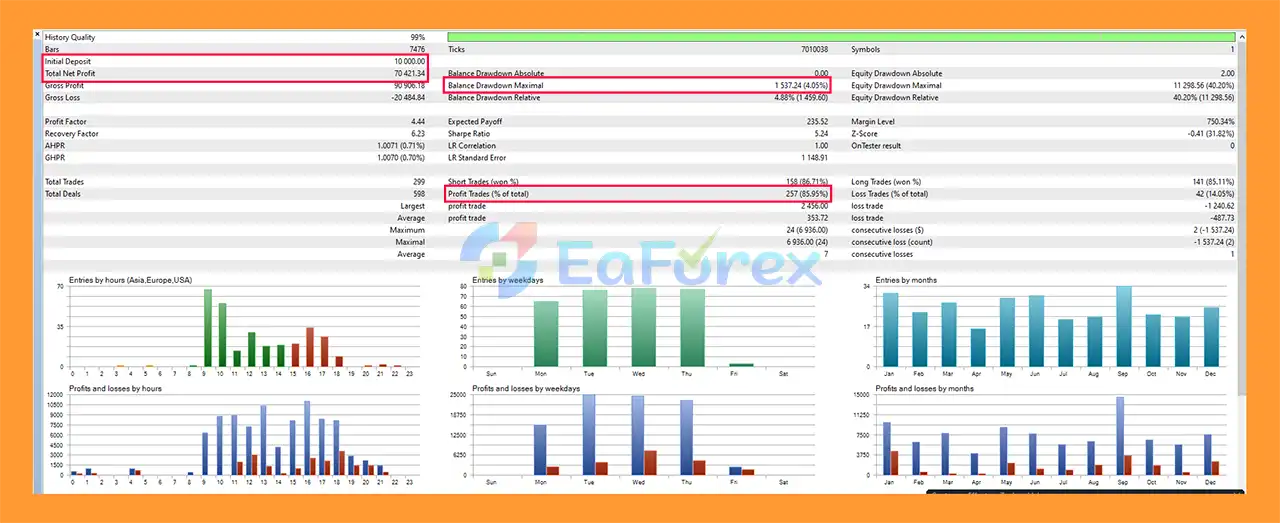
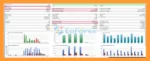
Currencies Hunter MT5 backtets
Currencies Hunter EA MT5 backtets
Currencies Hunter EA MT5 is designed with several features intended to help manage trading exposure, including fixed Take Profit, Stop Loss, maximum deposit-load control, trend filtering, and time filtering.
The recommended starting configuration provided by the developer is:
For a $1,000 account, the recommended configuration uses 0.08 lot on each of the four charts. However, traders should understand that this is a developer-provided example rather than a guarantee of suitable risk for every account.
The recommended minimum deposit is $200, while traders are advised to use a good ECN broker with low spreads.
To test Currencies Hunter EA MT5 using the recommended configuration:
Backtesting results can vary depending on broker data, spread, commission, execution conditions, historical data quality, and testing settings.
Although Currencies Hunter EA MT5 includes several risk-management and filtering features, automated Forex trading always involves financial risk.
The recommended configuration requires four separate H4 charts. This means traders need to manage multiple simultaneous EA instances rather than simply attaching the EA to one chart.
Historical backtests cannot guarantee future performance. Forex market conditions can change significantly over time, and an algorithm that performs well under certain conditions may experience different results in other market environments.
The developer specifically recommends using a low-spread ECN account. High spreads, commissions, slippage, or poor execution can affect the EA’s trading results.
The recommended 0.08 lot per chart for a $1,000 account should not automatically be considered appropriate for every trader. Risk depends on account size, leverage, broker conditions, drawdown tolerance, and the EA’s actual trading behavior.
For continuous automated trading, the EA should run on a VPS to help maintain stable operation when the trader’s personal computer is offline.
Currencies Hunter EA MT5 is a trading tool, not a guarantee of profit. Users should perform their own testing and use appropriate risk management before trading with real money.
Installing Currencies Hunter EA MT5 is straightforward when following the recommended configuration.
Copy the Currencies Hunter EA MT5 files into the appropriate MetaTrader platform folder and restart the trading terminal if necessary.
Open the following four currency pairs:
Attach Currencies Hunter EA MT5 to each of the four H4 charts.
Use the corresponding set file for each currency pair. The set files are provided through the developer’s blog/comments according to the supplied product instructions.
For the developer’s example configuration, a $1,000 account uses 0.08 lot on each chart.
Traders should evaluate their own account size and risk tolerance before using this setting on a live account.
Make sure algorithmic/automated trading is enabled in MetaTrader.
For continuous operation, run the EA on a reliable VPS so that the trading terminal can remain online.
For the recommended setup, use a reputable ECN broker with competitive spreads and reliable execution.
In summary, Currencies Hunter EA MT5 is a specialized automated Forex trading system designed around a proprietary algorithm and a clearly defined four-pair H4 configuration. By combining an advanced time filter, trend filter, deposit-load control, fixed TP/SL, and a statistical panel, the EA provides a structured framework for automated currency trading.
The recommended configuration focuses on GBPUSD, NZDUSD, GBPAUD, and EURNZD, with the EA running simultaneously on all four H4 charts. The system also supports backtesting using Every Tick mode, allowing traders to evaluate its historical behavior under their chosen testing conditions.
However, traders should not rely solely on backtest performance when making live trading decisions. Broker spreads, commissions, slippage, execution quality, market conditions, and position sizing can all influence actual results.
For users considering Currencies Hunter EA MT5, a sensible approach is to test the system on a demo account first, verify the settings, evaluate drawdown and trading behavior, and only then consider live deployment with appropriate risk management.
Important: Forex and automated trading involve substantial risk. Past performance and backtest results do not guarantee future results. Trade only with capital you can afford to lose.
1. What is Currencies Hunter EA MT5 and how does it work?
Currencies Hunter EA MT5 is a fully automated multi-currency trading robot for MetaTrader 5. It uses a proprietary algorithm with advanced trend and time filters to identify high-probability trade setups and automatically execute trades on the H4 timeframe without manual intervention.
2. Which currency pairs does Currencies Hunter EA MT5 trade?
Currencies Hunter EA MT5 trades four carefully selected currency pairs: GBPUSD, NZDUSD, GBPAUD, and EURNZD. This multi-pair approach helps diversify risk and reduce dependence on a single market.
3. Is Currencies Hunter EA MT5 suitable for real trading accounts?
Yes. Currencies Hunter EA MT5 is specifically designed for real trading environments, not just backtesting. Its logic, filters, and risk controls are optimized for live market conditions.
4. What timeframe does Currencies Hunter EA MT5 use?
The EA is optimized exclusively for the H4 (4-hour) timeframe, which helps reduce market noise, avoid overtrading, and improve trade accuracy and consistency.
5. Does Currencies Hunter EA MT5 use martingale or grid strategies?
No. Currencies Hunter EA MT5 does not use martingale, grid, or risky recovery techniques. It relies on fixed stop-loss and take-profit levels to maintain controlled and predictable risk.
6. What is the recommended minimum deposit and lot size?
The recommended setup is $1,000 balance with 0.08 lot per chart, but lot size can be adjusted depending on account size and personal risk tolerance. Proper risk management is strongly advised.
7. How does Currencies Hunter EA MT5 manage risk?
Risk is managed through fixed stop-loss and take-profit levels, maximum deposit load control, advanced trend and time filters, and noise reduction logic to avoid low-quality trades.
8. Can Currencies Hunter EA MT5 be backtested?
Yes. The EA supports tick-by-tick (“Every Tick”) backtesting, and pair-specific set files are provided so users can verify historical performance with transparency.
9. Does Currencies Hunter EA MT5 require a VPS?
While not mandatory, using a VPS is highly recommended for best performance. A VPS ensures 24/5 uninterrupted trading, faster execution, and stable connectivity.
10. Is Currencies Hunter EA MT5 beginner-friendly?
Yes. Despite its professional-grade logic, Currencies Hunter EA MT5 is easy to install and use. It includes clear installation instructions, ready-to-use set files, and automatic trade execution, making it suitable for both beginners and experienced traders.
In stock
In stock
In stock
In stock
In stock
Out of stock
No account yet?
Create an Account












 Automatic EA
 EA Best Seller
 Expert Advisor MT4
 Expert Advisor MT5
 HFT EA


Reviews
Clear filtersThere are no reviews yet.