









-
 Unlimited Activations
-
 Instant delivery
-
 Easy to install




 Unlimited Activations
Instant delivery
Easy to install
Unlimited Activations
Instant delivery
Easy to install
 Free Update
 Free Install Support

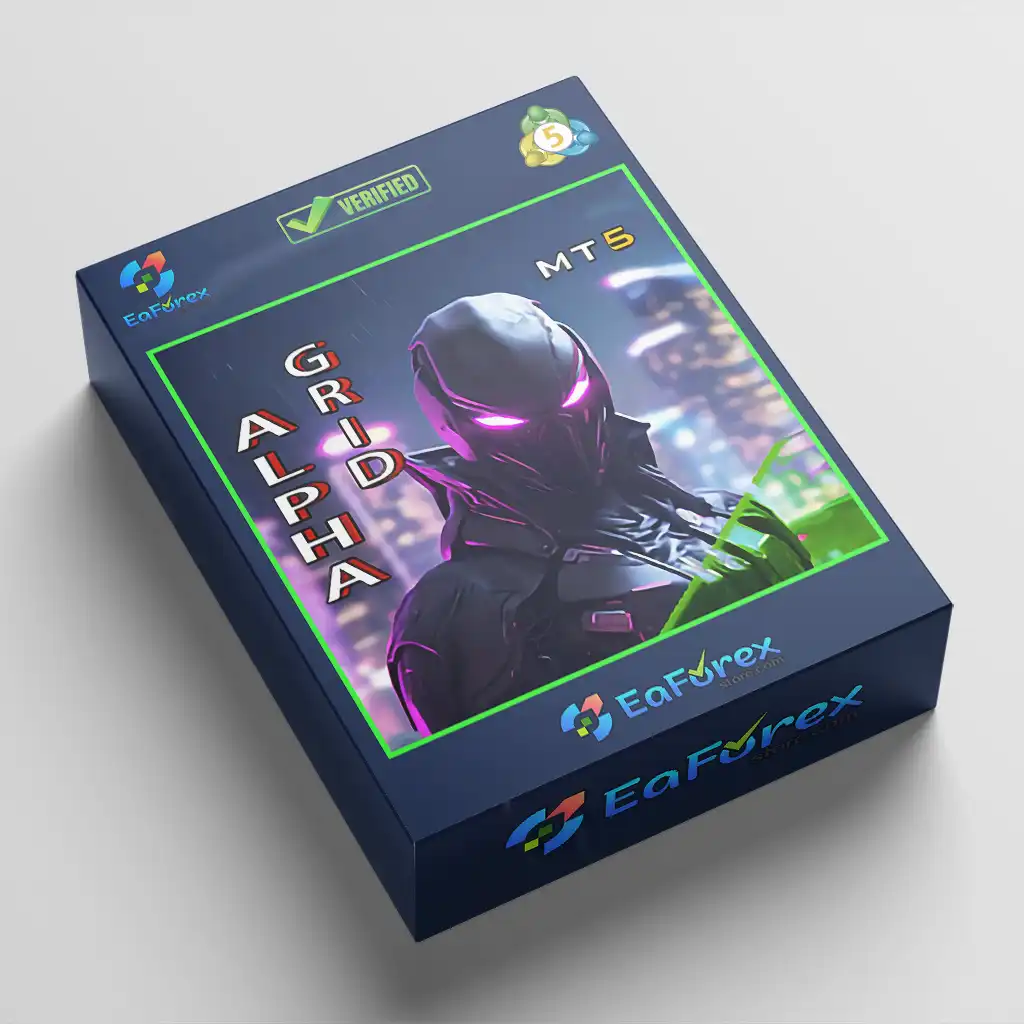
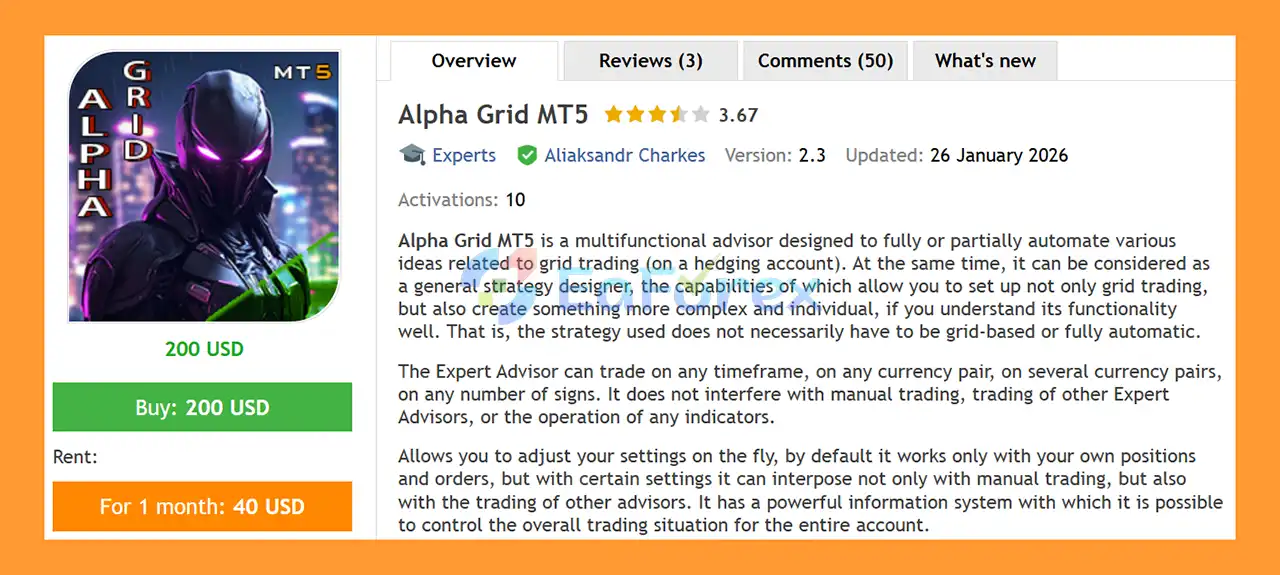
Alpha Grid MT5 is a flexible and advanced Grid Trading Expert Advisor for MetaTrader 5, designed for traders who want to automate, customize, and combine a wide range of grid trading strategies on hedging accounts.
Unlike traditional Grid EAs that rely on one fixed trading model, Alpha Grid MT5 provides a comprehensive set of tools that allows traders to build and manage multiple grid strategies simultaneously. Different grid configurations can be combined, adjusted, and adapted to changing market conditions without requiring the trader to use every available feature.
The Expert Advisor can be used immediately as a ready-to-use grid trading solution while also providing advanced configuration options for experienced traders who want to create their own trading systems.
Alpha Grid MT5 can operate on any timeframe, currency pair, or trading symbol, regardless of the number of digits used by the broker.
The EA is designed to manage its own positions and orders by default and does not interfere with manual trades, other Expert Advisors, or indicators. If required, traders can configure it to manage positions opened manually or by other Expert Advisors as well.
>> Delivery time 24h-48h after payment.
>>> Refund if not delivered.
>>> You will receive the latest version without any limitations (ID+Time).>>Reviewed by Jason Stap <<
Alpha Grid MT5 supports up to four different grid types simultaneously:
Each grid has its own initial price and independent configuration settings.
Initial grid prices can be entered manually or generated automatically using different algorithms.
Each grid can be configured independently with its own:
The EA supports multiple coefficient methods, including:
This allows traders to create different grid structures and position-sizing models according to their trading strategy.
Alpha Grid MT5 can automatically recreate a grid pending order after an existing grid position is closed.
For example, if a position is closed by:
the EA can automatically place a new pending order using the same grid configuration.
This feature can allow a grid to continue operating for an extended period and can be disabled whenever the trader does not want automatic reopening.
The use of pending orders allows the EA to prepare grid levels in advance.
This means that eligible orders can remain positioned at predefined price levels even when the trading terminal is temporarily disconnected or turned off.
When MetaTrader 5 is restarted, Alpha Grid MT5 can reassess the existing orders and positions and regain control of the trading configuration.
Alpha Grid MT5 works by creating and managing predefined grid levels around an initial market price.
The general process can be summarized as:
Initial Price → Grid Construction → Pending Orders → Market Entry → Position Management → TP/SL → Grid Reopening
Traders can define how far apart grid levels should be, how much each position should trade, and how Take Profit and Stop Loss values should be calculated.
Because the EA supports multiple coefficient types, traders can build both simple and progressively adjusted grid structures.
For example, a trader can configure a grid where the lot size remains constant or progressively increases according to a multiplication coefficient.
Each grid can operate independently, allowing several trading ideas to run simultaneously on the same symbol.
Alpha Grid MT5 includes flexible time-based trading controls.
Two primary modes are available:
The EA can be configured to trade exclusively during a specified period.
Alternatively, traders can block trading during a particular period while allowing the EA to operate at other times.
This can be useful when traders want to avoid specific market sessions, news periods, or low-liquidity periods.
When several Alpha Grid instances are used on the same symbol, different Magic Numbers can be assigned to each instance so that each configuration can operate independently.
The system also supports daily trading restarts based on specified hours.
Alpha Grid MT5 includes a dedicated Profit and Loss Tracking mode.
This feature allows traders to define account-level or strategy-level profit and loss boundaries.
The upper limit can function as a Take Profit, while the lower limit can function as a Stop Loss.
Profit calculations can include positions that have already been closed since the beginning of the trading session, rather than considering only currently open positions.
When a specified profit or loss boundary is reached, the EA can:
The trading mode can also be configured for automatic daily restart.
The Multiple Trading mode extends the standard Profit and Loss Tracking functionality.
Instead of simply stopping after reaching a predefined target, this mode can automatically restart the trading process multiple times while tracking the cumulative result across all trading cycles.
This functionality can be used to create more advanced multi-step trading strategies.
For example, traders can design different configurations for individual trading cycles and longer multi-cycle strategies, including different Take Profit and Stop Loss parameters.
The feature can also be used in the Strategy Tester for testing multi-stage trading concepts.
Alpha Grid MT5 can restrict trading to a predefined price range.
Available functionality includes:
This provides additional flexibility for traders who want to combine grid trading with specific market zones.
One of the more advanced features of Alpha Grid MT5 is Phantom Mode.
This mode is designed to help overcome broker restrictions on the maximum number of pending orders.
Instead of placing every grid level as a permanent pending order, Phantom Mode places only the pending orders closest to the current market price.
As the market moves, the EA dynamically adjusts which pending orders are active.
This allows traders to create grids with a large number of theoretical levels while using only a small number of actual pending orders.
Under normal conditions, the system can support the four grid types with as few as four active pending orders, depending on the configuration.
The full grid can also be visualized on the chart for monitoring purposes.
Phantom Mode focuses on managing the pending-order structure. Existing market positions remain under the control of the trader and other relevant Alpha Grid settings.
The mode can also work with uneven grid spacing when step coefficients are used.
Alpha Grid MT5 allows the initial price of a grid to be dynamically linked to current market conditions.
The trader can specify a distance at which the grid’s initial price should move closer to the current market price.
When the market moves sufficiently far from the original grid price, the EA can automatically:
This feature allows the grid to adapt to changing market levels instead of remaining permanently anchored to the original starting price.
It can also be used for strategies that are not traditional grid systems.
For example, by configuring only one grid order, traders can create a mechanism that continually moves a pending order closer to the market according to predefined grid steps.
Alpha Mode expands the EA’s control capabilities beyond the Alpha Grid instance itself.
It can be used to automatically control the operation of Expert Advisors based on:
Depending on the configuration, Alpha Mode can:
This makes Alpha Mode useful for traders running complex automated portfolios with multiple Expert Advisors.
Alpha Grid MT5 can operate simultaneously on:
Each order and position can be identified using an individual comment containing relevant trading information such as the opening price and instrument name.
Traders can also add their own personal identifier to the trade comment.
This can be particularly useful when several Alpha Grid instances are running simultaneously.
Alpha Grid MT5 is designed to recover its trading management after interruptions.
If the terminal is restarted or the EA is loaded again with unchanged settings, it can reassess its existing orders and positions and provide information about trading events that occurred while the system was inactive.
This functionality helps traders maintain better control over automated strategies following:
Alpha Grid MT5 includes an integrated information system designed to provide a real-time overview of the trading environment.
The information panels can display relevant information about the current trading configuration and account activity.
The EA also supports different types of alerts, including:
Many interface elements can be moved around the chart, minimized, or resized according to the trader’s preferences.
Alpha Grid MT5 is designed for traders who want more flexibility than a conventional single-strategy Grid EA can provide.
Instead of being limited to one predefined grid model, traders can create and combine different grid structures.
The coefficient system allows lot sizes and other grid parameters to be modified through multiplication, division, addition, or subtraction.
Four grid directions—BuyUp, BuyDown, SellUp, and SellDown—can operate simultaneously.
The EA provides time, price, profit, loss, and multi-step controls for traders who want to automate more complex strategies.
Phantom Mode can reduce the number of actual pending orders required to maintain a large theoretical grid.
The EA can operate alongside manual trading, indicators, and other Expert Advisors. When configured appropriately, it can also manage positions created by other systems.
The initial grid price can be dynamically adjusted according to market movement, allowing the grid structure to adapt to changing price levels.
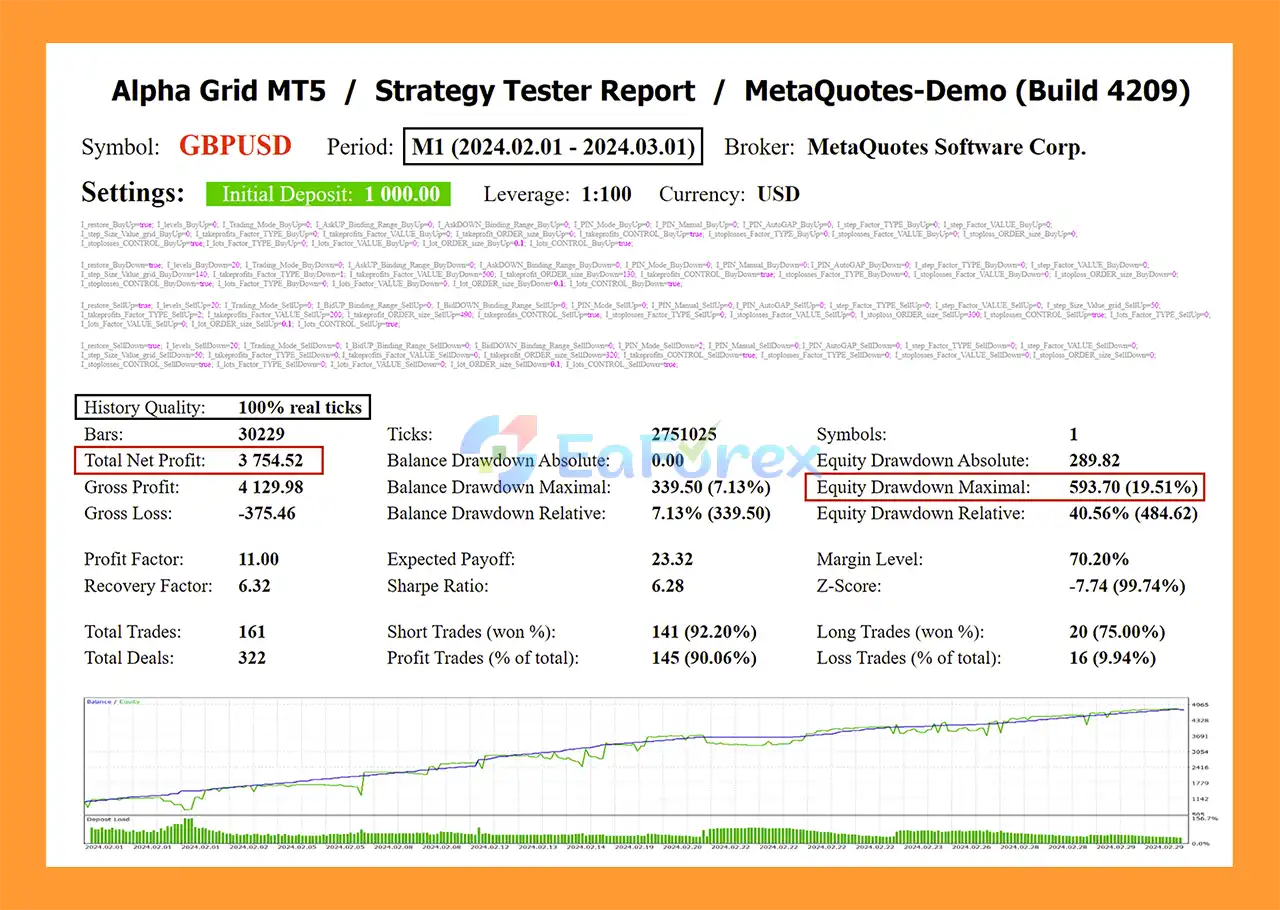
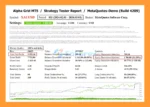
🔺GBPUSD pair – 1 months
Alpha Grid MT5 Backtests
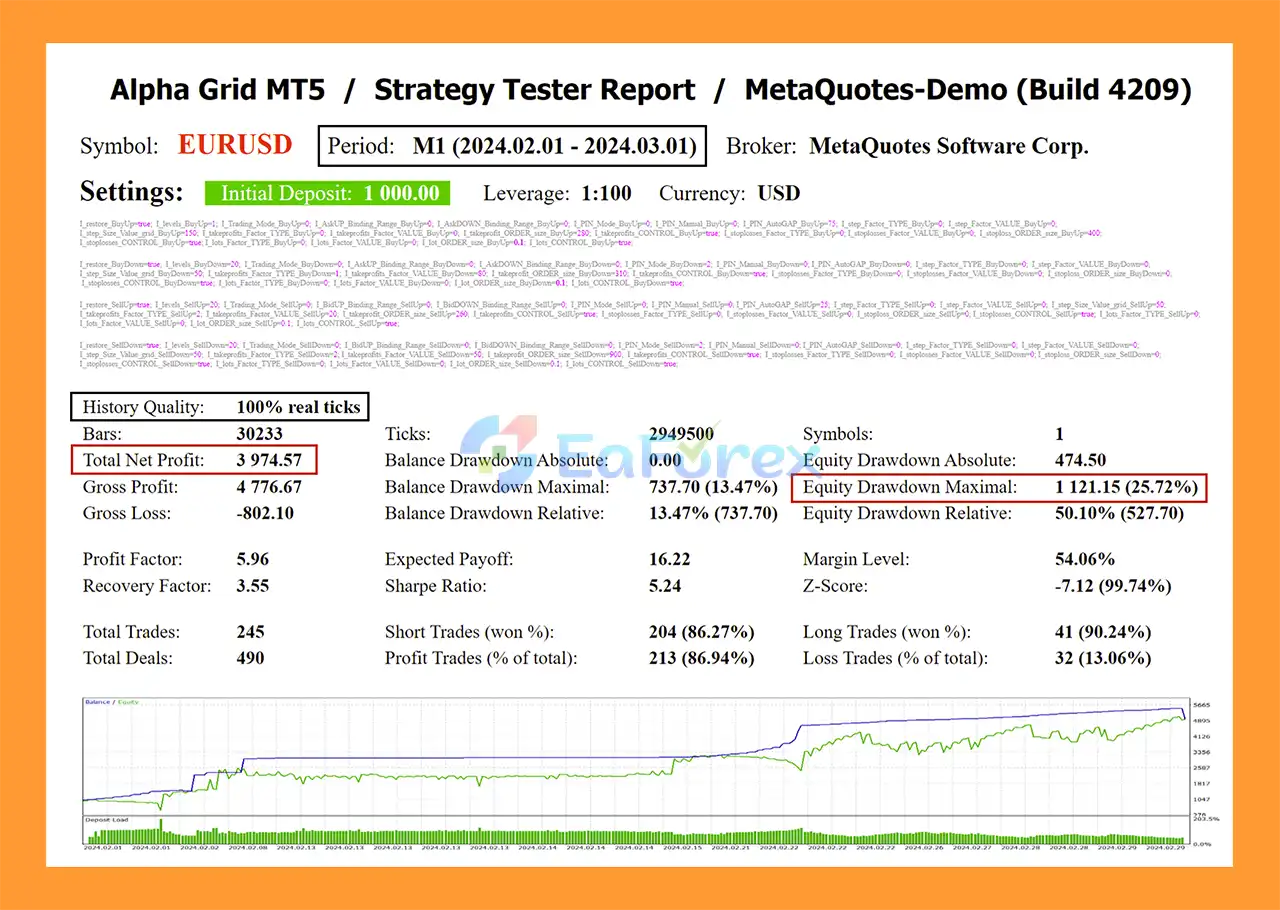
🔺EURUSD pair – 1 months
Alpha Grid MT5 Backtest
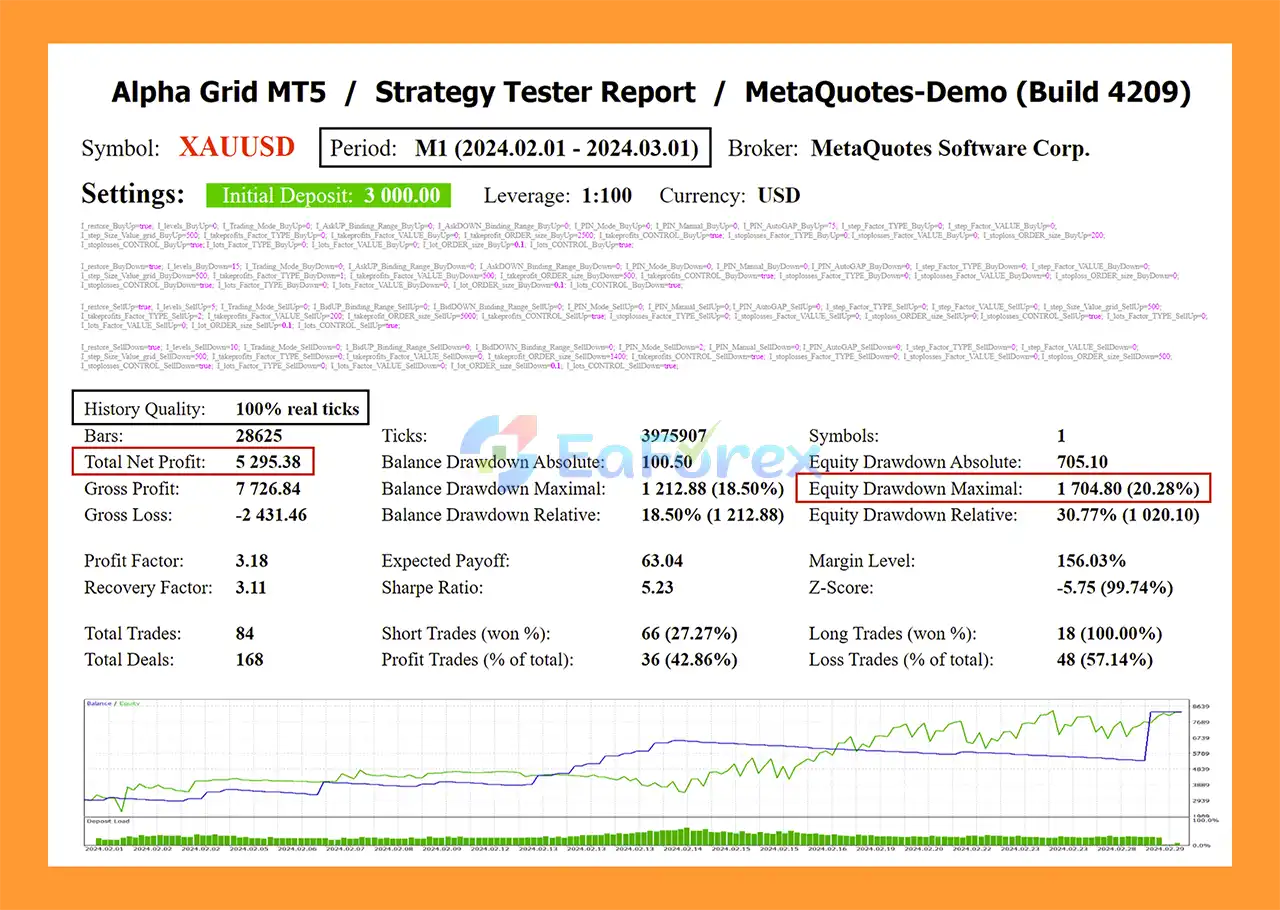
🔺XAUUSD pair – 1 months
Alpha Grid MT5 Backtest Results
Unlike a conventional Expert Advisor marketed around one specific backtest result, Alpha Grid MT5 is primarily a grid-building and automation framework. Its actual performance depends heavily on the strategy configuration selected by the trader.
Important variables include:
Because users can construct many different grid strategies, there is no single performance profile that applies to every Alpha Grid configuration.
Alpha Grid provides several mechanisms that can be incorporated into a risk-management framework:
However, these features do not eliminate the inherent risks of grid trading.
Grid systems can accumulate multiple positions as price moves through different levels. During a sustained directional market, this may result in substantial floating losses.
Although Alpha Grid is a flexible framework rather than a single fixed Martingale system, its coefficient functionality can be used to progressively increase lot sizes.
Multiplying position sizes after losses can significantly increase exposure and margin requirements.
The product is designed for hedging accounts. Traders should verify that their MetaTrader 5 broker account supports the required hedging functionality.
Because Alpha Grid allows traders to build many different strategies, the EA’s performance depends on the configuration selected.
A profitable configuration in one market condition may perform differently under another.
Pending-order limits, minimum distance requirements, execution rules, margin requirements, and other broker specifications can affect grid operation.
Phantom Mode is designed to address certain pending-order limitations, but it does not eliminate all broker-specific restrictions.
Rapid market movements can cause multiple grid levels to activate within a short period, increasing exposure quickly.
Major economic events and market gaps can cause prices to move through multiple grid levels rapidly, potentially resulting in substantial losses.
Even though the EA is designed for automation, traders should monitor account exposure, margin, floating loss, and system behavior.
Install and open MetaTrader 5 using a broker account that supports the required hedging mode.
Copy the Alpha Grid MT5 Expert Advisor file into the appropriate MT5 Experts directory.
Restart MetaTrader 5 if necessary.
Open the symbol and timeframe you want to use.
Alpha Grid MT5 can operate on different symbols and timeframes, depending on your strategy.
Drag the EA from the Navigator panel onto the selected chart.
Configure the desired grid parameters, including:
Before activating automated trading, configure appropriate:
If multiple Alpha Grid instances are running on the same symbol, use different Magic Numbers so that each strategy can independently identify and manage its orders and positions.
Enable Algo Trading in MetaTrader 5 and verify that the EA is operating correctly.
Use the Strategy Tester and a demo account to test the selected grid configuration before deploying it with real funds.
Because Alpha Grid MT5 is a flexible framework, testing the exact configuration you intend to use is particularly important.
🔺Alpha Grid MT5 is highly appreciated by the MQL5 community for bringing stable and reliable profits. Below are 5 star reviews from users:
In summary, Alpha Grid MT5 is a highly configurable Grid Trading Expert Advisor for MetaTrader 5, designed for traders who want to build and automate their own grid-based strategies rather than rely on a single predefined trading model.
Its most notable characteristic is its flexibility. The EA supports BuyUp, BuyDown, SellUp, and SellDown grids, customizable grid steps, flexible lot coefficients, Take Profit and Stop Loss controls, automatic position reopening, time tracking, profit and loss monitoring, price-range trading, Phantom Mode, dynamic initial-price binding, and Alpha Mode.
The Phantom Mode is particularly useful for traders dealing with broker restrictions on the number of pending orders, while the dynamic grid and price-range functions provide additional ways to adapt automated trading strategies to changing market conditions.
However, flexibility also means that the trader is responsible for the strategy configuration. Alpha Grid MT5 can be used to create conservative or aggressive grid systems, and certain configurations—especially those involving increasing lot sizes—can create substantial exposure.
For this reason, traders should test their exact settings using historical data and a demo account before moving to live trading. Particular attention should be paid to maximum exposure, floating drawdown, margin requirements, grid spacing, lot-size progression, and behavior during strong one-directional market moves.
Risk Disclaimer: Grid trading involves significant risk and can result in substantial floating losses when markets trend strongly in one direction. Features such as Stop Loss, Profit/Loss tracking, and position controls can help manage risk but cannot eliminate it. Past testing does not guarantee future performance. Always use appropriate risk management and trade only with capital you can afford to lose.
1. What is Alpha Grid MT5 and how does it work?
Alpha Grid MT5 is a professional grid trading Expert Advisor for MetaTrader 5, designed specifically for hedging accounts. It allows traders to run multiple independent grid strategies simultaneously while also functioning as a flexible strategy design tool for grid, non-grid, semi-automatic, and hybrid trading systems.
2. Is Alpha Grid MT5 fully automated or semi-automated?
Alpha Grid MT5 supports both full automation and partial automation. Traders can let the EA manage grids automatically or use it alongside manual trading, indicators, and other Expert Advisors without interference.
3. Does Alpha Grid MT5 use martingale strategies?
Alpha Grid MT5 does not force martingale usage. Lot sizing, grid expansion, and risk parameters are fully customizable. Traders can configure conservative grid strategies or more aggressive approaches depending on their risk tolerance.
4. Can Alpha Grid MT5 trade multiple symbols and timeframes?
Yes. Alpha Grid MT5 is universal and multi-symbol compatible. It can trade any currency pair, commodity, or index on any timeframe, and multiple instances can be run simultaneously using different magic numbers.
5. What makes Alpha Grid MT5 different from traditional grid EAs?
Unlike typical grid EAs, Alpha Grid MT5 is also a strategy builder. It supports multiple grid types (BuyUp, BuyDown, SellUp, SellDown), independent grid logic, non-grid strategies, phantom grid mode, and real-time parameter adjustments without stopping trading.
6. How does Phantom Grid Mode work in Alpha Grid MT5?
Phantom Grid Mode uses virtual pending orders instead of real broker-side orders. This helps bypass broker limitations on pending orders, reduces server load, and improves execution while still maintaining full grid functionality.
7. Can Alpha Grid MT5 work with manual trades and other EAs?
Yes. Alpha Grid MT5 is designed to be non-intrusive. By default, it does not interfere with manual trades, indicators, or other Expert Advisors running on the same account or chart.
8. What risk management tools does Alpha Grid MT5 provide?
Alpha Grid MT5 includes advanced risk controls such as:
Time-based trading filters
Price range limitations
Maximum profit and loss targets
Cycle-based profit/loss tracking
These tools allow traders to tightly control drawdown and exposure.
9. Are Alpha Grid MT5 backtest results reliable?
Alpha Grid MT5 has shown strong backtest performance across multiple symbols such as EURUSD, GBPUSD, and XAUUSD, with high win rates and controlled drawdowns. However, backtest results do not guarantee future performance, as market conditions may vary.
In stock
In stock
In stock
In stock
In stock
Out of stock
No account yet?
Create an Account












 Automatic EA
 EA Best Seller
 Expert Advisor MT4
 Expert Advisor MT5
 HFT EA


Reviews
Clear filtersThere are no reviews yet.